
openSUSE Ad-hoc Board Election
Back in February 2020 Christian Boltz resigned from the openSUSE Board explaining the reasons behind his decision on the project mailing list. His resignation came about two weeks after Sarah Julia Kriesch's resignation from the Board.
The openSUSE Board was left with two vacant seats to be filled. Sarah had been a board member for just a few weeks after the 2019-2020 board elections. After her resignation, the openSUSE Board decided to appoint Vinzenz Vietzke as board member based on the results of the 2019-2020 board elections. Following that, only one seat remained vacant on the board. However, before the Election Committee could start discussions for an election to fill that vacant seat, about two weeks after Vinzenz's appointment, openSUSE member Pierre Böckmann called for a No-Confidence vote against the current board. It was unprecedented in the community and that put things on halt for a while.
The board election rules state that:
If 20 per cent or more of the openSUSE members require a new board, an election will be held for the complete elected Board seats.
The Election Committee was tasked to find out whether 20% of the community is indeed calling for a re-election. At this point I should disclose that I am an election official in the openSUSE Election Committee and the task given to us was not easy. After much consultation, we finally came up with a way to "measure" this 20% requirement of the election rule. We set up an electronic petition using the voting platform that is used for openSUSE Board elections.
A few days ago the petition ended and the result showed that only 11.6% of the community was in favour of a re-election. That does not satisfy the requirement for a forced re-election and thus an ad-hoc election will be carried to fill the one vacant seat only.
Ariez Vachha announced the ad-hoc board election schedule on the project mailing list and details are also available on the openSUSE wiki.

Starting now and until the 2nd of August openSUSE members wishing to run for this election or nominate someone from the community can do so by sending an email to election-officials@opensuse.org. I wish to remind that only openSUSE members can run for board candidacy and vote in this election.
The Election Committee is composed of Ariez Vachha, Edwin Zakaria and myself.

 Member
 DimStar
openSUSE Tumbleweed – Review of the week 2020/29
Dear Tumbleweed users and hackers,
The week started a bit bumpy for Tumbleweed, as openQA was having some technical difficulties over the weekend. But nothing that our skilled epxerts could not solve within a few hours. Once every thing was back in shape, Tumbleweed started rolling full steam ahead and we managed to release 5 new snapshots (0710, 0713, 0714, 0715 and 0716)
The changes included in those snapshots were:
- KDE Plasma 5.19.3
- KDE Frameworks 5.72.0
- KDE Applications 20.04.3
- Poppler 0.90.0
- GNOME 3.36.4
- Subversion 1.14.0
- Mozilla Firefox 78.0.2
The staging projects are filled up with:
- Kubernetes 1.18.6 and 1.17.9
- LibreOffice 7.0rc1
- Linux kernel 5.7.9
- GCC 10.2 rc1
- openSSL 3.0
- Python3 package will be renamed to python38. The goal will be to allow multiple python versions to more easily coexist.
- RPM changes: %{_libexecdir} is being changed to /usr/libexec. This exposes quite a lot of packages that abuse %{_libexecdir} and fail to build. Additionally, the payload compression is being changed to zstd

Release Team Asks for Feedback on openSUSE Leap 15.2
The openSUSE release team is would like feedback from users, developers and stakeholders about the release of the of community-developed openSUSE Leap 15.2 through a survey.
The survey is available at https://survey.opensuse.org.
openSUSE Leap 15.2 was released on July 2. Two weeks of people installing the release and using it is a good timeframe to capture fresh ideas and thoughts about how people felt about the release. The survey centers on these two questions: what went well and what didn’t go well?
That is the question the release team is asking of those who installed and used openSUSE Leap 15.2.
The team hopes the feedback will provide enough information to help improve the release processes and other elements people found important.
The survey will close on August 4.
GNOME, KDE, libvirt Packages Update in Tumbleweed
The desktops had a big week of updates in openSUSE Tumbleweed snapshots this week.
Among the packages updated for the desktops this week were GNOME’s 3.36.4 version and the July 7 release of KDE’s Plasma 5.19.3, Applications 20.04.3 and the July 4 release of Frameworks 5.72.0.
Tumbleweed snapshots are trending stable this week and snapshot 20200714 is trending at a 99 rating, according to the Tumbleweed snapshot reviewer. Both Frameworks and Applications were in the most recent snapshot. Applications had updates for the open-source video editing software Kdenlive. Fixes were made to new clips that could possibly crash and/or make clips disappear. The Akonadi storage framework had a server fix for the fetching of attributes with empty data; the topic need to be revisited, according to the commit. Frameworks 5.72.0 added a new DAV protocol implementation with KJobs. KDE’s input/output system library KIO and the user interface builder Kirigami had multiple updates. The Kirigami update provided better collapsing handling for UI and better presentation for list header items. The virtualization package Xen had a small update for its 4.13.1 version to fix incorrect error handling in event channel port allocation; A few patches were added and a handful of Common Vulnerabilities and Exposures were addressed. The hxtools collection of tools and scripts updated to 20200712 and added a new utility for arpeggio/polyphonic mixing of bsvplay/qplay outputs. Rubygem also had several different packages updated in the snapshot.
Snapshot 20200713 brought GNOME 3.36.4 that brought several bug fixes and enhancements to the control center, desktop, gnome-maps evolution browser and music. GNOME’s note editor bijiben 3.36.2 fixed a memory leak in an OwnCloud provider. Mutter 3.36.4 plugged a memory leak and fixed a crash on area screenshots with fractional scaling. The Advanced Linux Sound Architecture provided some regression fixes and configuration modifications. The libvirt 6.5.0 version added several new features like adding the ability to create mediated devices and allowing firmware blobs configuration, which the new sysinfo/ type introduced holds these new blobs. PHP7 7.4.8 had more than a dozen bug fixes. Other packages that were updated were autoyast2 4.3.22, glib2 2.64.4 and yast2 4.3.14, which make a change to only record the first two numbers of a Kernel version. The snapshot is trending stable with a rating of 99, according to the Tumbleweed snapshot reviewer.
The snapshot that began the week, 20200710, also updated some GNOME 3.36.4 packages brought an update to Plasma 5.19.3. The Plasma desktop fixed a potential null pointer deref in the file manager chooser and Plasma Workspace made fixes to the system tray applet for loading configurations defaults from the main.xml file.It also had a fix for exiting a plasma-session that was blocked until the startup sound completes. The small utility program k4dirstat fixed crashes on startup in some certain KIO related circumstances with version 3.2.1. An update of libstorage-ng 4.3.34 extended integration tests and is bringing an experimental support for RAID journal devices. The 3.1.9 mariadb-connector-c package fixed a memory leak in GnuTLS if the connection couldn’t be established. The fast MP3 Player for Linux and UNIX systems known as mpg123 enabled terminal control by default only when both input and output are connected to a terminal; doing thist avoids messing with terminal settings when piping stderr to a pager, which takes over terminal input while mpg123 still thinks it has control, in version 1.26.2. PDF rendering library poppler 0.90.0 made some color profile tweaks, signature improvements and fixed some calculations for when Type 3 fonts are used. YaST had some updates and the yast2-storage-ng 4.3.12 package warns the user in the partitioner before performing certain actions on an LVM snapshot. The snapshot is trending stable with a rating of 98, according to the Tumbleweed snapshot reviewer.
In other Tumbleweed news, Python3 package will be renamed to python38 with the goal to allow multiple python versions to more easily coexist, according to the 2020/28 week review.
openSUSE Board Non-Confidence Petition result announced
Two weeks ago the openSUSE Election Committee set up an electronic petition to measure whether 20% of the community members are in favour of a re-election of the current elected Board Members. Let me remind that a non-confidence vote was called by openSUSE member Pierre Böckmann. He explained his reasoning in the email he addressed to community members.
The openSUSE election rules state that:
If 20 per cent or more of the openSUSE members require a new board, an election will be held for the complete elected Board seats.
As explained in my earlier post a few weeks ago, the Election Committee was tasked find out whether 20% of the community is indeed calling for a re-election.
We set up an electronic petition using Helios, the voting platform used by the community to run the board elections.
Voting "Yes, I want to sign the petition to call for a re-election of the openSUSE Board" would give us an idea of how many members are calling for re-election.
If a member did not support a re-election, there was no need to vote. This was explained in an email sent to community members on the project mailing list and via the voting credential email sent by Helios to eligible voters.
The petition ran for two weeks, starting on 30 June 2020. It ended on 14 July 2020. The result was published this morning on the project mailing list and members also received an email via Helios announcing the result.
Result
Out of the 509 eligible voters on Helios, 59 voted "Yes" for a re-election of the openSUSE Board. This result indicates that only 11.6% of the community voted in favour of a re-election.
Since the result is less than the 20% required for the complete Board's re-election, the Election Committee will proceed with an election to fill the current vacant seats only.
Podman - unable to pull image
Today, while pulling the latest Nextcloud container image from the docker.io repository I noticed that it is failing. Looking at the read: connection reset by peer error I assume it could be primarily due to network failure; maybe poor quality of the connection.
Note that Mauritius is far from "everywhere" else and connectivity issues are nothing new.
ish@coffee-bar:~> podman pull docker.io/library/nextcloud
Trying to pull docker.io/library/nextcloud...
Getting image source signatures
Copying blob e0276193a084 done
Copying blob eb2d00c10344 done
Copying blob 3a60f364b0c5 done
Copying blob e0d3d1244592 done
Copying blob f54006e0dc29 done
Copying blob 8559a31e96f4 done
Copying blob b22875b95a2a done
Copying blob f65316e96b10 done
Copying blob 3e309988c00b done
Copying blob 0c78caf16ec3 [======================================] 13.1MiB / 13.2MiB
Copying blob 4fc30aae7ee5 done
Copying blob 37b016cacdc6 done
Copying blob fd56bf3cc539 done
Copying blob e3cd35f544b5 done
Copying blob 467fea8f6f80 done
Copying blob 0dc7444f9282 done
Copying blob 547ae6684264 done
Copying blob 3139b6de5be7 done
Copying blob 00e77223b529 done
Copying blob 2b37e3b3a856 done
  read tcp 192.168.100.6:33536->104.18.124.25:443: read: connection reset by peer
Error: error pulling image "docker.io/library/nextcloud": unable to pull docker.io/library/nextcloud: unable to pull image: Error writing blob: error storing blob to file "/var/tmp/storage720474498/10": read tcp 192.168.100.6:33536->104.18.124.25:443: read: connection reset by peer
Podman does not retry to copy the image in case of failures.
A few days ago there was a suggestion to implement a similar feature in Podman that is present in Buildah, which provides the "image copy retry" functionality.

For the curious, the implementation of retryCopyImage in Buildah can be seen here.
Container images that are pulled by Buildah are stored in the local repository which can also by accessed by Podman, so that's an advantage. I tried pulling the Nextcloud container image using Buildah and it completed successfully.
ish@coffee-bar:~> buildah pull nextcloud
Getting image source signatures
Copying blob e0d3d1244592 done
Copying blob 8559a31e96f4 done
Copying blob eb2d00c10344 done
Copying blob 3a60f364b0c5 done
Copying blob f54006e0dc29 done
Copying blob e0276193a084 done
Copying blob f65316e96b10 done
Copying blob b22875b95a2a done
Copying blob 3e309988c00b done
Copying blob 0c78caf16ec3 done
Copying blob 4fc30aae7ee5 done
Copying blob 37b016cacdc6 done
Copying blob e3cd35f544b5 done
Copying blob fd56bf3cc539 done
Copying blob 467fea8f6f80 done
Copying blob 0dc7444f9282 done
Copying blob 547ae6684264 done
Copying blob 2b37e3b3a856 done
Copying blob 00e77223b529 done
Copying blob 3139b6de5be7 done
Copying config 327476ebe3 done
Writing manifest to image destination
Storing signatures
327476ebe3280c7b570d8463edd136956eab120959976b643cb7dbfaa73f98c1
Now, the downloaded container image is also accessible by Podman.
ish@coffee-bar:~> podman images
REPOSITORY                     TAG      IMAGE ID       CREATED        SIZE
docker.io/libreoffice/online   latest   0586fecfa3c1   28 hours ago   2.84 GB
docker.io/library/nextcloud    latest   327476ebe328   3 days ago     774 MB
To conclude, while we are waiting that a retryCopyImage function is available in Podman, we can use Buildah to pull container images that are troublesome due to network issues.

MechBoard64 | Replacement Commodore 64 Keyboard
Updating Documentation for openSUSE Leap 15.2


Installing espanso on OpenSUSE

As I collapsed on the sofa for the evening, I started browsing Fosstodon to see what I'd missed throughout the day. It's FOSS had just posted about a cross-platform text expansion utility written in Rust called espanso.
Installation:
espanso's installation instructions are for .deb based distro's or advise you to use the Snap package. I didn't want to so for those of you that want to get right to it, here's what you're going to need.
Packages:
- libxtst6
- xdotool
- xclip
- libnotify4
These cover the pre-reqs listed here in the espanso manual install docs of: libxtst6 / libxdo3 / xclip / libnotify-bin
sudo zypper install libxtst6 xdotool xclip libnotify4
Once you have those, you can actually follow the rest of the instructions from espanso. But here they are:
curl -L https://github.com/federico-terzi/espanso/releases/latest/download/espanso-linux.tar.gz | tar -xz -C /tmp/
This will download the the .tar.gz file from Github that is tagged with latest and then -x extract, -z gzip, -C to a specific location of /tmp/.
sudo mv /tmp/espanso /usr/local/bin/espanso
This will then move the file from your /tmp/ directory to your /usr/local/bin. Once you've done that, restart your terminal and away you go!
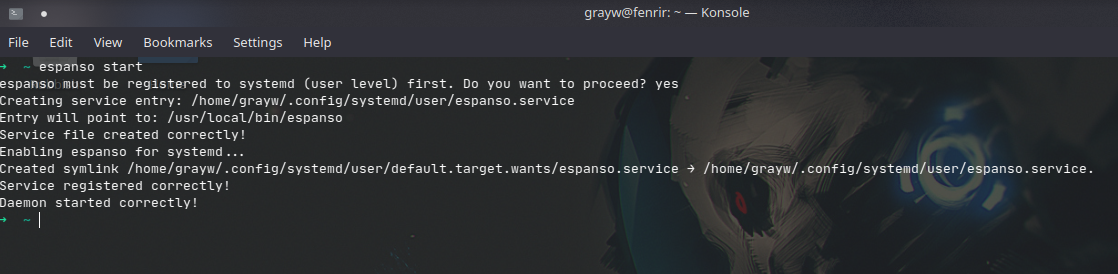
Pointless Waffle:
I've been looking for a truly cross-platform solution for text expansion for years (literally). I've had to make do with different solutions for my different workstations for far too long, all of them have had their quirks and in the end I gave up on them because they just wouldn't behave. I thought I'd take a closer look at espanso as I didn't really have anything to loose except a little time.
I'll be installing it on my macOS & Windows machines tomorrow and test syncing the configuration files across the various platforms with Syncthing.
I'm really looking forward to testing it out and seeing what it can do. Big thanks to Frederico Terzi & the contributors for creating such and awesome tool and to It's FOSS for highlighting it!

PDF Erstellen mit PDF Quirk
Im Büro gibts öfter den Fall, dass ein Dokument auf Papier eingescannt und versendet werden muss. Das geschieht entweder per Email (so hat man das früher gemacht…) oder besser per ownCloud Dateien teilen Feature. In jedem Fall muss dazu das Papier zuvor gescannt werden, was erstmal ein Bild ergibt. Das wird dann in ein PDF gewandelt, um es verschicken zu können.
Blöd, wenn dann das PDF riesengroß geworden ist, und das Bild trotzdem nur klein drauf ist und dazu noch einen Blaustich hat…
Wie schön wäre doch ein Tool, das dem gestressten Büronauten solcherart Übungen abnimmt und „einfach nur“ einige Seiten in ein PDF scannt?
 Dafür gibt es auf dem Linux Desktop PDF Quirk. Dieses nette kleine Tool übernimmt das Scannen, zeigt die Scanergebnisse dann als als sortierbare Seiten an, und wandelt sie dann in ein ordentliches mehrseitiges PDF. Und das ganz ohne Kommandozeile, sondern schnell und mit maximal einfacher, aber hübscher Oberfläche…
Unter der Haube greift PDF Quirk auf Bewährtes zurück: Anstatt Scannen neu zu erfinden wird auf das Tool scanimage des SANE Projekts zurückgegriffen, das viele Scanner unter Linux unterstützt. Das Scankommando kann an die eigenen Bedürfnisse einfach angepasst werden.
Zur Wandlung in PDF kommt ein ImageMagick Utility zum Einsatz, mit dem aus den gescannten Bildern PDFs erzeugt werden. Die Aufrufe der Tools können natürlich innerhalb von PDF Quirk angepasst werden.
Ich hoffe, Linux mit diesem Werkzeug wieder ein bisschen attraktiver für den Einsatz im Büro von kleinen Unternehmen gemacht zu haben. Kraft ist ja sicher schon bekannt 
Alle weiteren Infos Infos zu Installation und Konfiguration snd auf der PDF Quirk Website zu finden.