
GNOME 40, KDE Frameworks, Plasma Update in Tumbleweed
Two openSUSE Tumbleweed snapshots were released since last week’s blog.
The snapshots brought the much anticipated GNOME 40 as well as an update of KDE Frameworks 5.81.0, Plasma 5.21.4 and several other packages.
The 20210414 snapshots was a monster; the amount of packages updated in the snapshot was ginormous. The update to GNOME 40 brought some significant changes to the desktop environment. New visual changes with rounded corners, and gestures like a three-finger swipe to move between workspaces were among the improvements in the release. The app launcher is more customizable and more intuitive to navigate with a mouse. Another desktop environment that was updated in the snapshot was Plasma 5.21.4, which had color scheme fixes and a fix for a broken keyboard configurations with single layout on Wayland. The release also set the preferred aspect ratio to “21:9” over “64:27” with KScreen. KDE Frameworks 5.81.0 added high-brightness and low-brightness Breeze Icons and the user interface builder Kirigami fixed a potential crash in the SizeGroup. Even Xfce had in update in the snapshot; this update in the xfce4-settings 4.16.1 package fixed scaling and updated translations. Dependencies were update in the upgrade to nodejs15 15.14. There was a minor fix for the cups printing package and xterm 367 updated some patches and improved responsiveness of the terminal. Linux Kernel 5.11.12 arrived in the snapshot and had several Advanced Linux Sound Architecture fixes and a commit for a nosy driver with Common Vulnerabilities and Exposures (CVE)2021-3483. Both ruby2.7 and ruby3.0 received minor updates to fix an XML vulnerability and GStreamer 1.18.4 fixed mpeg-2 video handling and a memory leak. Several YaST packages also had updates.
A major version update of audacity 3.0.0 arrived in snapshot 20210408. The format to save Audacity projects was changed and a new analyzer called Label Sounds can label sounds and silences for more effective use of the application. Less than a handful of CVEs were updated in curl 7.76.0; the command line tool strips credentials from the auto-referer header field and adds support to read and store the referrer header. An update of systemd 246.13 had some changes to handle large packets more gracefully and rubygem-rubocop 1.12.1 had an enormous amount of fixes jumping from version 1.8.1. Another package that received a large amount of updates was vim 8.2.2725; there were fixes for a memory leak when compiling and a fix for hangs with the terminal when resized. The xf86-input-libinput package moved from version 0.30.0 to 1.0.0 and its biggest change was the change to an MIT Licence. Other packages updated in the snapshot were bind 9.16.12, fwupd 1.5.8 and openssl 1.1.1k, which fixed CVE-2021-3450 that had a problem with verifying a certificate chain when using a certain flag.
A Message from the openSUSE Board
(This message was originally published on the mailing list on April 2, 2021)
We, the members of the openSUSE Board, strongly value the openSUSE Code of Conduct and Guiding Principles:
Inclusion is a fundamental pillar of our community and the broader free software and open source communities that we are part of, are connected with, and value.
We firmly stand against sexism, racism,… and strive to keep our communities open, welcoming, and safe for everyone to join.
As a board, we also believe that these principles that apply to our openSUSE communities shall also apply to the events and groups that we partner with and sponsor.
We are reassessing our sponsorships in that light.
In accordance with this statement, we are discontinuing sponsorship of all events and organizations affiliated with the Free Software Foundation until further notice.
Axel, Gerald, Gertjan, Neal, Simon, Syds, Vinz

 Member
 benJIman
Don’t hire top talent; hire for weaknesses.
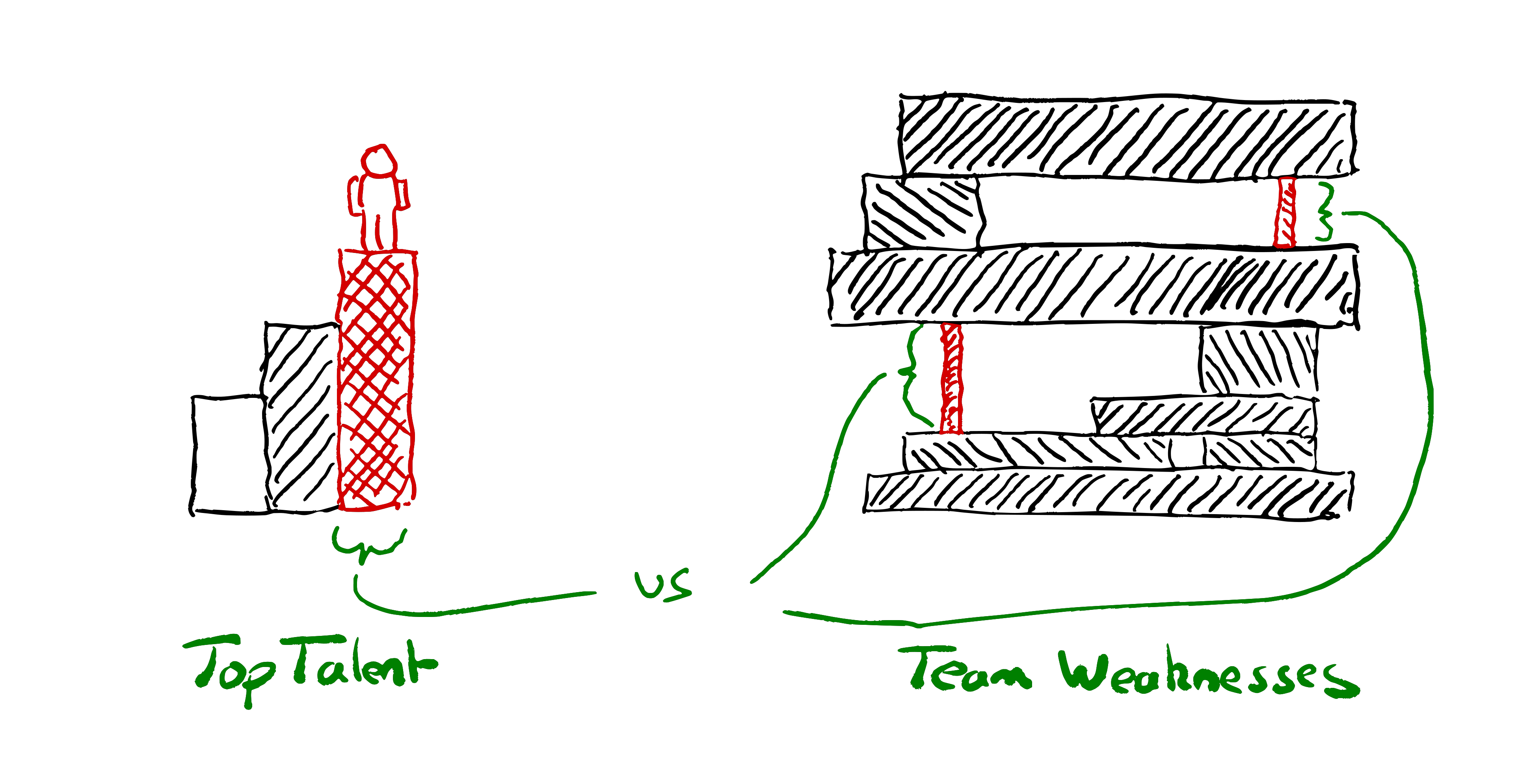
Instead of starting from “how do we hire top talent?”, start from “what are our weaknesses?”
Why are you hiring? Are you hiring to do more, or are you hiring to achieve more?
Design your hiring process to find the right people to strengthen your teams’ weaknesses, rather than trying to find the best people.
Instead of “how can we find the smartest people?” think about “how can we find people who will make our team stronger?”
Often the language used by those hiring betrays their view of people as resources. Or, to use its current popular disguise: “talent”.
“We hire top talent” “the candidate didn’t meet our bar”, “our hiring funnel selects for the best”. “we hire smart people and get out of their way”. We design “fair tests” that are an “objective assessment” of how closely people match our preconceptions of good.
The starting point for the talent mindset is that we want to hire the smartest people in the “talent pool”. If only we can hire all the smartest people, that will give us a competitive advantage!
If you focus on hiring brilliant people, and manage to find people who are slightly smarter on average than your competitors, will you win? Achievements in tech seldom stem solely from the brilliance of any one individual. Successes don’t have a single root cause any more than failures do.
We’re dealing with such complex systems; teams that can capture and combine the brilliance of several people will win.
With the right conditions a team can be smarter than any individual. With the wrong conditions a team can be disastrously wrong; suffering from over confidence and groupthink, or infighting and undermining each other. Hiring the right people to help create the right conditions in the team gives us a better chance of winning than hiring the smartest people.
| Talent Mindset | Weaknesses Mindset |
| Find top Talent | Find skills that unlock our potential |
| Grow Team | Transform Team |
| Help teams do more things | Help teams achieve greater things |
| People who can do what we’re doing | People can do things we can’t do |
| Hire the best person | Hire the person who’s best for the team |
| People who match our biased idea of good | People who have what we’re missing |
| Fair tests & Objective assessment | Equal opportunity to demonstrate what they’d add to our team |
| Consistent process | Choose your own adventure |
| Hire the most experienced/skilled candidate | Hire the person who’ll have the greatest impact on the team’s ability. |
| Number of candidates & Conversion rate | How fast can we move for the right candidate? |
| Centralised Process & Bureaucracy | Teams choose their own people |
| Grading candidates | Collaborating with candidates |
| Prejudging what a good candidate looks like | Reflecting on our team’s weaknesses |
| Fungibility | Suitability |
| Smart people | People who make the team smarter |
| Intelligence | Amplifying others |
| Culture Fit | Missing Perspectives |
| People who’ve accomplished great things | People who’ll unblock our greatness |
| Exceptional individuals. | People we can grow and who will grow us |
| What didn’t the candidate demonstrate against checklist | What would the candidate add to our team |
Talent-oriented hiring
If we start out with the intent to find the “best people” it will shape our entire process.
We write down our prejudices about what good looks like in job descriptions. We design a series of obstacles^Winterviews to filter out candidates who don’t match these preconceptions. Those who successfully run the gauntlet are rewarded with an offer, then we figure out how to best put them to use.
Hiring processes are centralised to maximise efficiency & throughput. We look at KPIs around the number of candidates at each stage in the funnel, conversion rates.
Interviewing gets shared out around teams like a tax that everyone pays into. Everyone is expected to interview for the wider organisation.
Hiring committees are formed and processes are standardised. We try to ensure that every candidate is assessed as fairly as possible, against consistent criteria.
We pat ourselves on the back about how we only hire the top 1% of applicants to our funnel. We’re hiring “top talent” and working here is a privilege. We’re the best of the best.
Weaknesses-oriented hiring
There’s another approach. Instead of starting from our idea of talent and the strengths we’re looking for, start from our weaknesses. What’s missing in our team that could help us achieve more?
Maybe we have a team of all seniors, frequently stuck in analysis. We need some fresh perspectives and bias for action.
Maybe we are suffering from groupthink and need someone with a different background and new perspectives. Someone who can help generate some healthy debate?
Maybe we have all the technical skills we need but nobody is skilled at facilitating discussions. We struggle to get the best out of the team.
Perhaps we’re all fearful of a scaling challenge to come. We could use someone experienced who can lend the team some courage to meet the challenge.
Maybe those in the existing team specialise in frontend tech, and we’ve realised we need to build and run a data service. We could learn to do it, but bringing someone in with existing knowledge will help us learn faster.
Maybe we are all software engineers, but are spending most of our time diagnosing and operating production systems. Let’s add an SRE in the team.
Maybe we don’t even know what our weaknesses are—until we experience collaboration with the right person who shows us how to unlock our potential.
Identify your weaknesses. Use them to draft role descriptions and design your interview processes.
Design your interviews to assess what the candidate brings to your team. How do they reduce your weaknesses and what strengths would they add?
Leave space in the process to discover things people could bring to your team that you weren’t aware you needed.
A talent-oriented process would assess how the candidate stacks up against our definition of good. A weaknesses-oriented process involves collaborating with the candidate, to see whether (and how) they might make your team stronger.
If possible, have candidates join in with real work with the team. When this is not feasible for either side, design exercises that allow people on your team to collaborate with them.
Pair together on a problem. Not what many companies call paired interviews where it’s really an assessor watching you code under pressure. Instead, really work together to solve something. Help the candidate. Bounce ideas off each other. Share who’s actually doing the typing, as you would if you were pairing with a colleague. Don’t judge if they solved the same problems you solved; see what you can achieve together.
A weaknesses-oriented process might mean saying no to someone eminently qualified and highly skilled; because you have their skills well covered in the team already.
A weaknesses-oriented process might mean saying yes to someone inexperienced who’s good at asking the right questions. Someone whose feedback will help the experienced engineers in the team keep things simple and operable.
Why not both?
It’s often worth thinking about when something good is not appropriate. There are rarely “best practices”, only practices that have proven useful in a given context.
At scale I can see the need for the talent-oriented hiring approach in addition to weaknesses-oriented.
Exposing all of your teams’ variety of hiring needs to candidates may create too much confusion.
You may well want a mechanism to ensure some similarity. A mechanism to select for those who share the organisational values. To find those with enough common core skills to increase the chances that they can move from team to team. Indeed, long-lived and continuously funded teams are not a given in all organisations.
If you’re getting thousands of applications a day you’ll probably want a mechanism to improve signal to noise ratio for teams wishing to hire. Especially if you don’t want to use education results as a filter.
I suspect a lot of hiring dysfunction comes from people copying the (very visible) talent-oriented top-of-funnel hiring practices that big companies use. Copy-pasting as the entire hiring mechanism for their smallish team.
Start from reflecting on your weaknesses. Whose help could you use? Some of the practices from the talent-oriented approach may be useful, but don’t make them your starting point. Start from your weaknesses if you want strong teams.
The post Don’t hire top talent; hire for weaknesses. appeared first on Benji's Blog.
openSUSE Tumbleweed – Review of Weeks 2021/13 & 14
Dear Tumbleweed users and hackers,
Dominique has been enjoying a vacation these last two weeks and left Tumbleweed in my hands. Thanks to all who’ve helped out as I got to grips with holding the reins solo for the first time.
These two weeks also saw the long Easter weekend. That said, we still managed to release 5 snapshots (0325, 0329, 0330, 0401 and 0406) during this fortnight, with 0408 currently in testing and an 0409 likely to be checked in tonight.
The changes delivered these weeks included:
- SELinux 3.2 (now also used by default in MicroOS)
- transactional-update 3.3.4
- A large amount of YaST updates
- Mozilla Firefox 87.0
- git 2.31.1
- kernel 5.11.11
- Mesa 20.3.5 with a large number of fixes
- MicroOS GNOME Desktop reaching [BETA] quality
The future, near or far, will bring those updates:
- systemd v246.13 with cgroupsv2 enabled by default (Currently being tested in 0408)
- libvirt 7.2.0 (Currently being tested in 0408)
- GNOME 40 (Currently being needled, hopefully will be included in 0409)
- KDE Plasma 5.21.4
- LibreOffice 7.1.2.2
- nodejs 15.14.0
- gstreamer 1.18.4
- Further MicroOS GNOME Desktop improvements
- Python 3.9 modules: besides python36-FOO and python38-FOO, we are testing to also shop python39-FOO modules; we already have the interpreter after all. Python 3.8 will remain the default for now.
- UsrMerge is progressing well, thanks to Ludwig for his continued work here
- GCC 10.3.0
- GCC 11 as the default compiler
Have a lot of fun!
– Richard
Two Tumbleweed Snapshots Update Fetchmail, Mesa, More
A couple of openSUSE Tumbleweed snapshots were released since the beginning of the month.
The two snapshots updated more than 30 packages and the latest snapshot, 20210406, gave rolling release users an update of Mozilla Firefox 87; the new release had several fixes including a fix to the video controls, which now have visible focus styling. The video and audio controls are now keyboard navigable. Firefox also sets a useful initial focus in the Add-ons Manager. New features in the browser release include the “Highlight All” feature on the “Find in Page”, which now displays tick marks alongside the scrollbar that correspond to the location of matches found on that page; this is a great feature for those who do keyword searches. Mozilla updates in the snapshot were finished as Thunderbird updated to version 78.9.0. The bugfix update for the email client had some security fixes and a fix for fields that were unreadable in the Dark theme in the General preferences panel. The update of fetchmail 6.4.18 fixed the configuration parser in fetchmailconf, which had an effect in version 6.4.16 when --sslcertfile was added to the configuration dump. The new version of fetchmailconf –version now prints the Python version in use. The snapshot gave users the 5.11.11 Linux Kernel, which had some changes for btrfs and x86 KVM. Other packages updated in the snapshot included spamassassin 3.4.5, git 2.31.1 and attr 2.5.1, which fixed a libtool library versioning regression.
The 20210401 didn’t deliver any foolery but it did deliver some magic; ImageMagick 7.0.11.5 disables framework OpenCL by default. Use the environment variable MAGICK_OCL_DEVICE to turn it on or select the device to use. Mesa and Mesa-drivers 20.3.5 went on a bug-hunting expedition as the release was quite large and had a huge number of fixes. Radv and ACO dominated the changes for the release and a graphical glitch was fixed that has been around since version 18.0.5. The extensible text editor emacs 27.2 changed the behavior of the user option ‘resize-mini-frames’ and the user option ‘tramp-completion-reread-directory-timeout’ is now obsolete. QR-Code-generator dropped a patch in its 1.6.0 update nodejs15 15.12.0 addressed a dependency change needed for a stopgap with OpenSSL. Raw data file editor okteta 0.26.6, openexr 2.5.5, yast2-firewall 4.3.11 and yast2-firstboot 4.3.11 were among the other packages updated in the snapshot.
Using PinePhone

IPMI remote access on old machines
This is a very short update post about getting the IPMI Remote Control Java Applet from horrible old system running on modern systems. This is an issue that haunted me for some time.

TiddlyWiki | Personal, non-linear, Note Taking Application on Linux
Clang precompiled headers and improving C++ compile times, conclusion
With Clang12 almost released, I guess it's high time to write a conclusion to the Clang11 changes that improve compilation times with PCHs. I originally planned to do this after the Clang11 release, but with the process to get the changes reviewed and merged having been so tedious I was glad it was finally over and I couldn't at the time muster the little extra effort to also write this down (I spent way more time repeatedly writing 'ping' and waiting for a possible reaction than writing the code, which was really demotivating). But although the new options are described in the Clang11 release notes, I think it'd be useful to write it down in more detail.
First of all, I've already written why C++ developers might care, but a thousand pictures can be worth more than a thousand words saying how this can save you even 60% of the build time:
In case you'd like to see a similar change in your LibreOffice compilation times, it should be as simple as this:
- Get Clang11 or newer and use it to build LibreOffice.
- Use --enable-pch (preferably --enable-pch=full) to enable PCH use.
- Profit.
You may want to check that your ccache and icecream are not too ancient if you use them, but by now any reasonably recent version should do. And if you need to do changes that would repeatedly trigger larger rebuilds (such as changing a header), the trick to temporarily disable PCH builds is to do 'make BLOCK_PCH=1'. And since PCH builds sometimes cause build errors in non-PCH builds because of missing #include's of headers, it's a good idea to touch all your changed files and do 'make BLOCK_PCH=1' before pushing your change to Gerrit. This is all you should need to know, the LO build system will take care of everything else.
As for the rest of the world, this boils down to the two PCH-related sections in the Clang11 release notes.
The first one is using -fpch-instantiate-templates. It needs to be set when building the PCH, but it will work even if you just add it to the CXXFLAGS used for building everything. Recent enough CMake version should handle this option automatically, I have no idea about other build systems. It should be safe to enable the option for any building with PCH. It's not enabled by default in Clang only because of really corner cases with PCHs that are not self-contained. In other words, as long as your PCH works with an empty .cpp file, it's safe, and if your PCH is not self-contained, you'd be better off fixing that anyway.
The second part using -fpch-codegen -fpch-debuginfo is more complicated, as it requires build system support, and I'm not aware of any build system besides LibreOffice's providing it. This discussion in a CMake ticket provides an example of how to use the option that seems rather simple. For other build systems have a look at the description in the Clang11 release notes for all the details and possible complications, and consider whether it'd be worth it. Which it sometimes may not be, as this graph from my previous post shows (Clang means normal PCH build, Clang+ means only -fpch-instantiate-templates, Clang++ means all 3 options).

Note that you may get rather different results depending on how much you put in your PCHs. Unlike before, now the general rule should be that the more you add to your PCHs, even if shared only by several source files, the faster the builds usually will be. And since these options move building some code to the PCH-related object file, the improvement is usually even better for incremental builds than full rebuilds. I've been using PCHs this way for slightly more than a year, and I forgot already quite some time ago how slow it used to be.
Upgrading to the next PostgreSQL version
We upgraded our internal PostgreSQL cluster to the latest version last week.
Time passes by so quickly: we installed our PostgreSQL cluster around 2008. At least, this was the time of the first public MirrorBrain release 2.2, which was the reason to run a PostgreSQL installation for openSUSE. But MirrorBrain (and therefor the PostgreSQL cluster behind it) is way older. So maybe it’s fair to say that MirrorBrain started with openSUSE in 2005…?
Anyway: if you maintain a database for such a long time, you don’t want to loose data. Downtimes are also not a good idea, but that’s why we have a cluster, right?
While the MirrorBrain database is currently still the biggest one (>105GB in size and ~120 million entries alone in the table listing the files on the mirrors), our new services like Matrix, Mailman3, Gitlab, Pagure, lnt or Weblate are also not that small any more. All together use currently 142GB.
We already upgraded our database multiple times now (starting with version 7. in the past). But this time, we decided to try a major jump from PostgreSQL 11 to 13, without any step in between.
So how do we handle an upgrade of a PostgreSQL database? - In general, we just follow the documentation from upstream - only adjusting the values to our local setup:
Local setup details
- Our configuration files are stored in /etc/postgresql/ - and symlinked into the current data directory. This makes it not only easier for us to have them in a general backup, we also set their file ownership to root:postgres - editable just by root and readable just for the postgres group (file permissions: 0640).
- Below the generic data directory for PostgreSQL on openSUSE (/var/lib/pgsql), we have “data” directories for each version: data11 for the currently used PostgreSQL 11 version.
- A Symlink /var/lib/pgsql/data points to the currently active database directory (data11 in the beginning)
Step-by-Step
Preparation
First let us set up some shell variables that we will use through out the steps. As we need these variables multiple times as user ‘root’ and user ‘postgres’ later, let’s place them into a file that we can refer to (source) later…
cat > /tmp/postgresql_update << EOL
export FROM_VERSION=11
export TO_VERSION=13
export DATA_BASEDIR="/var/lib/pgsql/"
export BIN_BASEDIR="/usr/lib/postgresql"
EOL
| Note: DATA_BASEDIR you can get from the currently running postgresl instance with: ps aufx | grep ‘^postgres.* -D’ |
Don’t forget to source the file with the variables in the steps below.
Install new RPMs
Install the new binaries in parallel to the old ones (find out, which ones you need either via rpm or zypper):
source /tmp/postgresql_update
zypper in $(rpmqpack | grep "^postgresql${FROM_VERSION}" | sed -e "s|${FROM_VERSION}|${TO_VERSION}|g")
Initialize the new version
Now change into the database directory and create a new sub-directory for the migration:
su - postgres
source /tmp/postgresql_update
cd ${DATA_BASEDIR}
install -d -m 0700 -o postgres -g postgres data${TO_VERSION}
cd ${DATA_BASEDIR}/data${TO_VERSION}
${BIN_BASEDIR}/bin/initdb .
For the exact parameters for the initdb call, you can search the shell history of the last run of initdb. But we go with the standard setup above.
You should end up in a completely independent, fresh and clean PostgreSQL data directory.
Now start to backup the new config files and create Symlinks to the current ones. It’s recommended to diff the old with the new config files and have a close look at the logs during the first starts. Worst case: the new server won’t start with old settings at all. But this can be found in the log files.
su - postgres
source /tmp/postgresql_update
cd ${DATA_BASEDIR}/data${TO_VERSION}

for i in  pg_hba.conf pg_ident.conf postgresql.conf postgresql.auto.conf ; do
 old $i
 ln -s /etc/postgresql/$i .;
 # diff $i $i-$(date +"%Y%m%d")
done
Downtime ahead: do the migration
Next step is to finally do the job - this includes a downtime of the database!
rcpostgresql stop

su - postgres
source /tmp/postgresql_update
pg_upgrade --link             \
 --old-bindir="${BIN_BASEDIR}${FROM_VERSION}/bin"     \
 --new-bindir="${BIN_BASEDIR}${TO_VERSION}/bin"       \
 --old-datadir="${DATA_BASEDIR}/data${FROM_VERSION}/" \
 --new-datadir="${DATA_BASEDIR}/data${TO_VERSION}/"
The –link option is very important, if you want to have a short downtime:
–link link instead of copying files to new cluster
In our case, the operation above took ~20 minutes.
Hopefully you end up with something like:
[...]
Upgrade Complete
----------------
Optimizer statistics are not transferred by pg_upgrade so,
once you start the new server, consider running:
    ./analyze_new_cluster.sh

Running this script will delete the old cluster's data files:
    ./delete_old_cluster.sh
Switch to the new PostgreSQL version
Switch to the new database directory. In our case, we prefer a Symlink, which points to the right directory:
source /tmp/postgresql_update
cd ${DATA_BASEDIR}
ln -fs data${TO_VERSION} data
As alternative, you can switch the database directory by editing the configuration in /etc/sysconfig/postgresql:
source /tmp/postgresql_update
echo "POSTGRES_DATADIR='${DATA_BASEDIR}/data${TO_VERSION}'" >> /etc/sysconfig/postgresql
(Maybe you want to edit the file directly instead and set the correct values right at the point.) The prefix in the file should match the ${DATA_BASEDIR} variable.
Start the new server
systemctl start postgresql
Cleanup
Postgres created some scripts in the folder where the pg_upgrade started. Either execute these scripts (as postgres user) directly or use the following commands:
sudo -i -u postgres
source /tmp/postgresql_update
${BIN_BASEDIR}${TO_VERSION}/bin/vacuumdb \
 --all \
 --analyze-in-stages
${BIN_BASEDIR}${TO_VERSION}/bin/reindexdb \
 --all \
 --concurrently
Please note that the two commands above have influence on the performance of your server. When you execute them, your database might become less responsive (up to not responsive at all). So you might want to use a maintenance window for them. On the other side, your new database server will perform much better once you executed these commands. So don’t wait too long.
Check everything
Now it might be a perfect time to check monitoring, database access from applications and such. After that, you might remove the old database directory and de-install the old binaries as well together with an rm /tmp/postgresql_update.
But in general, you can mark this migration as finished.