
 Member
 tgeek
tgeekKDE vs XFCE vs Gnome
Chris Titus recently vlogged about an article showing that KDE 5.17 is now smaller than XFCE 4.14 in memory usage. The article says that in their tests, XFCE actually uses more RAM than KDE. I was very interested in this, but I couldn’t quite believe it and so I ran my own tests.
First of all, we need to compare apples to apples. I created an OpenSUSE VM using Vagrant with KVM/libvirt. It had 4 cores and 4192MB of RAM. This VM has no graphical interface at all. As soon as I got it up, I took the first “No X” measurement. After patching using zypper dup, I took the second “No X” reading. Every reading in this blog post was using the free -m command. I then shut down the VM and cloned it 3 times so each copy should be completely the same.
I installed the desktop environments into their respective VMs using the following commands:
zypper in -t pattern kde


zypper in -t pattern xfce


zypper in -t pattern gnome
After desktop environment was done, I then installed the lightdm display manager. This wasn’t actually necessary with Gnome because it installs gdm as a dependency.
After that, I started the display manager with:
systemctl set-default graphical && systemctl isolate graphical
Once I logging into the graphical environment, I ran xterm and then free -m for the first reading. I then rebooted each machine, and logged in for the second reading. I then installed and started libreoffice-writer. I created a new spreadsheet. That is the “Libreoffice” reading. Finally, I closed LibreOffice and took the third reading.
The results are a little surprising. The averages speak for themselves. KDE does use more than XFCE but not to a shocking amount. In fact, according to the average, only about 68MB. What’s really surprising is how much more Gnome uses than the either two — nearly 200MB more that KDE!
Finally, I also did a df -kh after installing libreoffice-writer on each. KDE is in fact that disk hog by a wide margin and that’s even comparing it to Gnome + gdm + lightdm.
| Desktop | Test No | RAM (MB) | Disk (GB) | Version |
| No X | 1 | 54 | ||
| No X | 2 | 58 | ||
| Average | 56 | |||
| Gnome | 1 | 471 | 3.34.2 | |
| Gnome | 2 | 501 | ||
| Gnome | 3 | 508 | ||
| Gnome | Libreoffice | 547 | 1.9 | |
| Average | 507 | |||
| KDE | 1 | 327 | 5.17.4 | |
| KDE | 2 | 284 | ||
| KDE | 3 | 291 | ||
| KDE | Libreoffice | 330 | 2.3 | |
| Average | 308 | |||
| XFCE | 1 | 216 | 4.14 | |
| XFCE | 2 | 230 | ||
| XFCE | 3 | 241 | ||
| XFCE | Libreoffice | 272 | 1.8 | |
| Average | 240 |
openSUSE Tumbleweed – Review of the week 2019/51
Dear Tumbleweed users and hackers,
The year 2019 is slowly coming to the end, yet Tumbleweed keeps on rolling (so far). During that week we could publish three snapshots (1213, 1214 and 1216).
The changes contained therein were:
- KDE Applications 19.12.0
- PHP 7.4
One complete snapshot was built (but not released) using kernel 5.4. Unfortunately, we had to revert this update again, as kexec functionality was non-functional with our signed kernel. The issue is being analyzed and fixes are being looked for. Unfortunately, with the holiday season, I can’t predict when this will happen.
Other than that, we still have a few things piling up in stagings, like:
- Python 3.8
- Rust 1.39
- systemd 244
- Qt 5.14
- Kubernetes 1.17
Unfortunately, there is also an openQA/Networking issue present at the moment. Our openQA workers are unable to connect to multiple sites (all *.opensuse.org) and thus fail to test any of the snapshots/staging areas. We are busy trying to find resources that can fix this up, but this proves not so easy over this period. I hope we can soon resume testing activity with working network setup and restart rolling Tumbleweed
Linux kernel preemption and the latency-throughput tradeoff
What is preemption?
Preemption, otherwise known as preemptive scheduling, is an operating system concept that allows running tasks to be forcibly interrupted by the kernel so that other tasks can run. Preemption is essential for fairly scheduling tasks and guaranteeing that progress is made because it prevents tasks from hogging the CPU either unwittingly or intentionally. And because it’s handled by the kernel, it means that tasks don’t have to worry about voluntarily giving up the CPU.
It can be useful to think of preemption as a way to reduce scheduler latency. But reducing latency usually also affects throughput, so there’s a balance that needs to be maintained between getting a lot of work done (high throughput) and scheduling tasks as soon as they’re ready to run (low latency).
The Linux kernel supports multiple preemption models so that you can tune the preemption behaviour for your workload.
The three Linux kernel preemption models
Originally there were only two preemption options for the kernel:
running with preemption on or off. That setting was controlled by the
kernel config option, CONFIG_PREEMPT. If you were running Linux on a
desktop you were supposed to enable preemption to improve interactivity
so that when you moved your mouse the cursor on the screen would respond
almost immediately. If you were running Linux on a server you ran with
CONFIG_PREEMPT=n to maximise throughput.
Then in 2005, Ingo Molnar introduced a third option named
CONFIG_PREEMPT_VOLUNTARY that was designed to offer a middle point on
the latency-throughput spectrum – more responsive than disabling
preemption and offering better throughput than running with full
preemption enabled. Nowadays, CONFIG_PREEMPT_VOLUNTARY is the default
setting for pretty much all Linux distributions since openSUSE
switched at the
beginning of this year.
Unfortunately, choosing the best Linux kernel preemption model is not straightforward. Like with most performance topics, the best way to pick the right option is to run some tests and use cold hard numbers to make your decision.
What are the differences in practice?
To get an idea of how much the three config options lived up to their intended goals, I decided to try each of them out by running the cyclictest and sockperf benchmarks with a Linux 5.4 kernel.
If you’re interested in reproducing the tests on your own hardware, here’s how to do it.
$ git clone https://github.com/gormanm/mmtests.git
$ cd mmtests
$ ./run-mmtests.sh --config configs/config-workload-cyclictest-hackbench `uname -r`
$ mv work work.cyclictest && cd work.cyclictest/log && ../../compare-kernels.sh | less
$ cd ..
$ ./run-mmtests.sh --config configs/config-network-sockperf-pinned `uname -r`
$ mv work work.sockperf && cd work.sockperf/log && ../../compare-kernels.sh | less
cyclictest records the maximum latency between when a timer expires and the thread that set the timer runs. It’s a fair indication of worst-case scheduler latency.
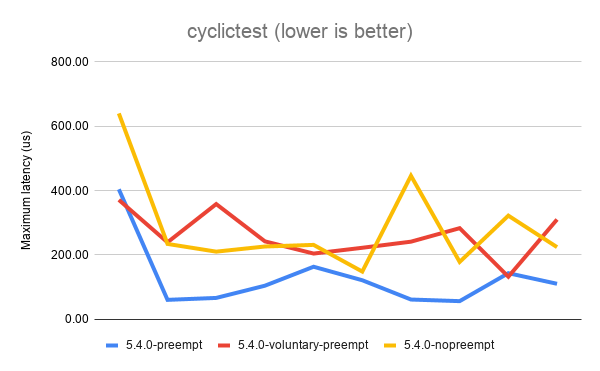
The above results show that the best (lowest) latency is achieved when
running with CONFIG_PREEMPT. It’s not a universal win, as you can see
from the first data point. But overall, CONFIG_PREEMPT does a decent job
of keeping those latencies down. CONFIG_PREEMPT_VOLUNTARY is a good
middle ground and exhibits slightly worse latency while
CONFIG_PREEMPT_NONE shows the the worst (highest) latencies of all.
Based on the descriptions of the kernel config options given in the
preemption models section, I’m sure we can all agree these are roughly
the results we expected to see.
Next, let’s look at sockperf’s TCP throughput results. sockperf is a network benchmark that measures throughput and latency over TCP and UDP. For this experiment, we’re only interested in the throughput scores.
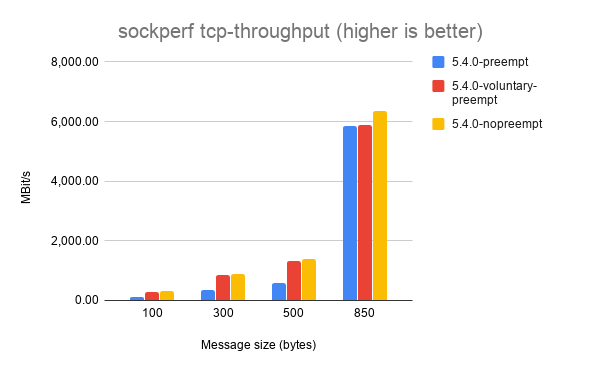
It’s a little hard to make out some of the results, but each of the
different message sizes shows that CONFIG_PREEMPT_NONE achieves the
best throughput, followed by CONFIG_PREEMPT_VOLUNTARY and with
CONFIG_PREEMPT coming last. Again, this is the expected result.
Things get a little weirder with sockperf’s UDP throughput results.
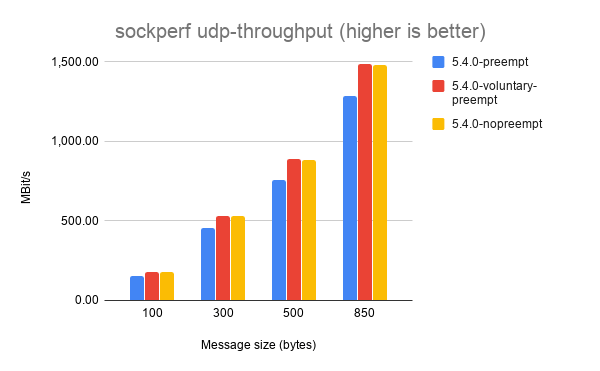
Here, CONFIG_PREEMPT_VOLUNTARY consistently achieves the highest
throughput. I haven’t dug into exactly why this might be the case, but
my best guess is that preemption doesn’t matter as much for UDP
workloads because it’s stateless and doesn’t exchange multiple messages
between sender and receiver like TCP does.
If you’ve got any ideas to explain the UDP throughput results please leave them in the comments!

2001 Ford F-350 Radiator Replacement
Elementary OS | Review From an openSUSE User
Let’s Talk About Anonymity Online
Let me show you what it looks like from the internet’s point of view when I go to a simple website using a normal Browser (Brave):
111.222.333.444 – – [18/Dec/2019:16:29:05 +0000] “GET / HTTP/1.1” 200 7094 “-” “Mozilla/5.0 (X11; Linux x86_64) AppleWebKit/537.36 (KHTML, like Gecko) Chrome/78.0.3904.108 Safari/537.36”
The 111.222.333.444 would be my IP address. With that, anyone can get a lot of information about. With just a simple google search, you can actually see in the general vicinity where an IP address originates from. For example, the public IP address for Google is 172.217.23.238. You can use services like https://whatismyipaddress.com/ to what company owns an IP and a map to where it is located. In this case, the IP for Google is probably in a datacenter in Kansas. When I look up my personal IP, the website shows a map of Prague and the company that I use for my internet provider.
What does this mean? To any website that I visit and I don’t say who I am, I am anonymous but I am trackable. My IP address and many other things about my computer and my browser give me an unique fingerprint. From the website that I run, if I wanted, I could see a list of every IP address that ever visited, where they come from, what kind of computer they use, what browser they use, what resolution their screen is, and a lot more. A law enforcement or legal organization can easily find out who I am personally by contacting my internet service provider and then I am no longer anonymous at all. Anonymity is a very tenuous concept online. It really isn’t difficult to find out who someone is in real life if you have the means to do so.
Now let’s change gears. You’re probably heard about Tor. I know I’ve written about it a lot here. Tor is a way to make yourself both anonymous and untrackable. Furthermore it makes your true IP address a secret so even law enforcement have a very hard time tracking down someone using it. Your ISP doesn’t know what you do online.
Let’s see what it looks like when visit my website using the Tor Browser:
45.66.35.35 – – [18/Dec/2019:16:49:41 +0000] “GET / HTTP/1.1” 200 7094 “-” “Mozilla/5.0 (Windows NT 10.0; rv:68.0) Gecko/20100101 Firefox/68.0”
The IP address is not mine. It belongs to an exit node which is run by a Tor volunteer. These IP addresses are publicly known and are often banned from many websites (we’ll talk about that later). Even though I am still running Linux, Tor Browser says that I am running Firefox on Windows 10. In fact every Tor Browser user appears to be running Windows 10 and they all have fake IP addresses.
If I do something that people don’t like, the best they could do it to contact and possibly ban the exit node but it is no simple feat to find someone using Tor. It takes a lot of big-government level money and resources to do so and even then it takes a lot of work.
Why is this important? Isn’t the amount of privacy that I have online enough? After all, if I log into Twitter or Reddit, I can create a new account and never tell anyone my real name. I am anonymous aren’t I?
To a point, you are anonymous but only on the most basic level. Again, it takes very little to pinpoint who you are in real life. Do one of these types of people sound like you? This list was written from a specific point of view. The thing that gets me most of all is that there are people in this world and perhaps in your country who are willing to use violence to keep opinions that they don’t like quiet. It is easy to keep quiet and hope not to get caught up. It is difficult to speak what you believe where the consequence could be loss of employment, injury, imprisonment, or even death. Anonymity isn’t cowardice. Sometimes it’s the only safe way to be heard.
Before I finish up, I have to talk about the negatives of anonymity. First and most obvious is that many online companies do not want you to be anonymous. They make money from giving you ads and tracking what you do. Do not be surprised if many website, including Google, stop working when using Tor. They have no reason to allow you to use their services if they can’t make money off of you and every reason to discourage it.
Secondly, bad people also use Tor. Not nearly as many as there are on the open internet, but they are there. Some are criminals. Some are merely trolls. A few do terrible things under the cover of anonymity online. Those are probably the stories that you have heard in the media and not about those who live under repressive regimes.
Not everyone agrees with me, but I believe that anonymity is important and it is crucial for safety online.
About
Welcome to my new blog. All static no data collected.
Hope the informations found here are helpful for you. New posts will be sporadic, but there will be some.
I will be mostly posting about openSUSE, opensource in general and packaging.
Always remember: Never accept the world as it appears to be. Dare to see it for what it could be.
The world can always use more heroes.

IPv6 for machines in Provo
After some back and forth, I'm happy to announce that more machines in the Provo data center use IPv6 in addition to their IPv4 address. Namely:
provo-mirror.opensuse.org (main mirror for US/Pacific regions)
status2.opensuse.org (fallback for status.opensuse.org)
proxy-prv.opensuse.org (fallback for proxy.opensuse.org)
provo-ns.opensuse.org (new DNS server for.opensuse.org - not yet productive)
Sadly neither the forums nor WordPress instances are IPv6 enabled. But we are hoping for the best: this is something we like to work on next year...
Root cause analysis of the OBS downtime 2019-12-14
Around 16:00 CET at 2019-12-14, one of the Open Build Service (OBS) virtualization servers (which run some of the backend machines) decided to stop operating. Reason: a power failure in one of the UPS systems. Other than normal, this single server had both power supplies on the same UPS - resulting in a complete power loss, while all other servers were still powered via their redundant power supply.
In turn, the communication between the API and those backend machines stopped. The API summed up the incoming requests up to a state where it was not able to handle more.
By moving the backends over to another virtualization server, the problem was temporarily fixed (since ~19:00) and the API was working on the backlog. The cabling on the problematic server is meanwhile fixed and the machine is online again. So we are sure that this specific problem will not happen again in the future.
