

 RNM
RNMGnome Asia summit 2020
 24-26 November 2020 @ https://events.gnome.org/event/24
I think it maybe too late to help out telling anyone about this event since registeration already closed but look like the registeration still open. Anyway, let see the schedule:

Some of the segment that offer good topic and caught my eyes :
- The Use and Benefits of Open Source Software in Tour & Travel Company - Rahman Nur
- Building a career in open source : Lessons and Learnings - Umang Jain
- Under COVID-19 pandemic, Korea’s Community Challenges and Futures - DaeHyun Sung
- Leveraging Open Source Tools for Distance Learning During Pandemic Season - Mohammad Hafiz Ismail
Gnome Asia summit 2020 will start by tomorrow today and conference will be online. This event was sponsor by Gitlab and openSUSE.

MicroOS & Kubic: New Lighter Minimum Hardware Requirements
You Spoke, We Heard
openSUSE MicroOS has been getting a significant amount of great attention lately.
We’d like to thank everyone who has reviewed and commented on what we are doing lately. One bit of clear feedback we received loud and clear was that the Minimum Hardware requirement of 20 GB disk space was surprisingly large for an Operating System calling itself MicroOS. We agree! And so we’ve reviewed and retuned that requirement.
New Minimum Storage Requirements
The New Minimum Supported Storage Requirements for MicroOS are
-
5 GBfor the read-only/ (root)partition, with 20GB as the recommended maximum size. -
5 GBfor the read-write/varpartition, with 40GB as the recommended size, or however large you require for your workloads.
Please Note, a standard installation of the minimal MicroOS system role currently uses no more than
-
450 MBwith bare metal hardware support. -
285 MBwithout bare metal hardware support.
Therefore these new lighter requirements still ensure that your MicroOS installations have plenty of room for many automated snapshots from transactional-updates. These changes will not compromise the promise that MicroOS can be updated and rolled back atomically without worry.
MicroOS Desktop Differences
The MicroOS Desktop, which is currently in Alpha and being actively developed, has a subtly different minimum requirement, as a result of its different use case.
-
5 GBfor the read-only/ (root)partition, with at least 40GB recommended, or however large you require for your desktop. -
/varand/homeare provided as read-writenoCoWsub-volumes as part of the/ (root)partition for the storage of containers, flatpaks and user-data.
Available Now
These changes have all been submitted to openSUSE:Factory, tested in openQA, and will soon be released as part of Snapshot version 20201121. They will soon be available for both MicroOS and Kubic across all ISO, Cloud, and VM Images.
Thanks and have a lot of fun!
The MicroOS & Kubic Team

Xfce Virtual Machine Images For Development
The openSUSE distributions offer a variety of graphical desktop environments, one of them being the popular and lightweight Xfce. Up to now there was the stable tested branch available in Tumbleweed already during install. Furthermore, for interested users the development OBS repository xfce:next offered a preview state of what’s coming up next to Tumbleweed.
Xfce Development in openSUSE
Thanks to the hard work of openSUSE’s Xfce team there is a third option: Xfce Development Repository aka RAT In a playful way, a rat is meant to represent the unpolished nature of this release: a rat is scruffy looking compared to a mouse (the cute and beloved mascot of Xfce). And the RAT repository provides packages automatically built right from the Git Master Branch of Xfce upstream development. The goal of this project is to test and preview the new software so that bugs can be spotted and fixed ahead of time by contributing upstream. The packages pull in source code state on a daily basis and offer a quite convenient way to test and eventually help development. So this is where the team builds and tests the latest and unstable releases of Xfce Desktop Environment for openSUSE.
One step beyond
While this has been around for quite some time now the openSUSE Xfce team managed to make things even more easy to use. Instead of having to install Tumbleweed yourself, add package repositories and install packages you can now let things be done for you by the use of OBS, Kiwi and Virtualization combined.
Standing on the shoulders of these great projects the Xfce team built KVM & Xen images use Xfce Git master with customized openSUSE settings. The build process happens fully automated and on a regular basis giving users qcow2 disk images with Xfce’s latest builds based on openSUSE’s rolling release Tumbleweed.
To help upstream Xfce development there is another disk image accompanying the openSUSE customized one. This so called “vanilla” disk image ships Xfce completely unmodified from Git sources and without any openSUSE visual tweakings. This gives Xfce devs (and testers alike) who want to build and test software inside a complete Xfce environment the most convenient way to do so. No more building everything themselves or maintaining test setups continuously. Just downloading the latest Xfce RAT disk image and you’re good to go!
Downloads
- openSUSE version:
https://download.opensuse.org/repositories/X11:/xfce:/rat:/images/images/ - Upstream version:
https://download.opensuse.org/repositories/X11:/xfce:/rat:/images:/upstream/images/
Usage
The most convenient way to use openSUSE’s Xfce RAT disk images is virt-manager. It is a desktop user interface for managing virtual machines through libvirt and primarily targets KVM VMs but is also capable for Xen and LXC. Read more about it on their website or install it from openSUSE’s standard repositories right away.
While virt-manager is the recommended way there are of course quite a few others like virt-install or Cockpit Web console. All of them are expected to work like any other solution supporting qcow disk images.
You can find more detailed information on how to use these images in the dedicated wiki page.
Contributing
Like any other team in openSUSE the Xfce team is always happy to welcome people interested in development, packaging, testing and reporting bugs. Find out more about our work here and say hello in the chat if you like!
News in openSUSE Packaging
If you are interested in openSUSE, sooner or later you will probably learn how packages and specfiles work. But packaging is not static knowledge that you learn once and are good to go. The rules change over time, new macros are created and old ones are erased from history, new file paths are used and the old ones are forgotten. So how can one keep up with these changes?
In this article, we will serve you with all recent news and important changes in openSUSE packaging on a silver platter. Whether you are a pro package maintainer or just a casual packager who wants to catch up, you will definitely find something you didn’t know here. We promise.
Table of contents
openSUSE macros

%_libexecdir
TL;DR
-
%_libexecdirmacro expands to/usr/libexecnow (not/usr/lib)
We will start with the most recent change, which is the %_libexecdir macro. In the past, it was a standard practice to store binaries that are not intended to be executed directly by users or shell scripts in the /usr/lib directory. This has been changed with a release of FHS 3.0 that now defines that applications should store these internal binaries in the /usr/libexec directory.
In openSUSE, the first discussions about changing the %_libexecdir macro from /usr/lib to /usr/libexec appeared in fall 2019 but it took several months for all affected packages to be fixed and the change to be adopted. It was fully merged in TW 0825 in August 2020.
Please note, openSUSE Leap distributions, including upcoming Leap 15.3, still expand %_libexecdir to the old /usr/lib.
systemd macros
TL;DR
- Use
%{?systemd_ordering}instead of%{?systemd_requires} - Use
pkgconfig(libsystemd)instead ofpkgconfig(systemd-devel) -
BuildRequires: systemd-rpm-macrosis not needed
In the past, you’ve been told that if your package uses systemd, you should just add the following lines to your spec file and you are good to go:
BuildRequires: systemd-rpm-macros
%{?systemd_requires}
Times are changing, though, and modern times require a bit of a different approach, especially if you want your package to be ready for inclusion inside a container. To explain it, we need to know what the %{?systemd_requires} macro looks like:
$ rpm --eval %{?systemd_requires}

Requires(pre): systemd
Requires(post): systemd
Requires(preun): systemd
Requires(postun): systemd
This creates a hard dependency on systemd. In the case of containers, this can be counterproductive as we don’t want to force systemd to be included when it’s not needed. That’s why the %{?systemd_ordering} macro started being used instead:
$ rpm --eval %{?systemd_ordering}

OrderWithRequires(post): systemd
OrderWithRequires(preun): systemd
OrderWithRequires(postun): systemd
OrderWithRequires is similar to the Requires tag but it doesn’t generate actual dependencies. It just supplies ordering hints for calculating the transaction order, but only if the package is present in the same transaction. In the case of systemd it means that if you need systemd to be installed early in the transaction (e.g. creating an installation), this will ensure that it’s ordered early.
Unless you need to explicitly call the systemctl command from the specfile (which you probably don’t because of the %service_* macros that can deal with it), you shouldn’t use %{?systemd_requires} anymore.
Also note, that systemd-rpm-macros has been required by the rpm package for some time, so it’s not necessary to explicitly require it. You can safely omit it unless you are afraid that rpm will drop it in the future, which is highly unlikely.
The last is the BuildRequires, this is needed in cases where your package needs to link against systemd libraries. In this case, you should use:
BuildRequires: pkgconfig(libsystemd)
instead of the older
BuildRequires: pkgconfig(systemd-devel)
as the new variant can help to shorten the build chain in OBS.
Cross-distribution macros
TL;DR
-
%leap_versionmacro is deprecated - See this table for all distribution macros and their values for specific distros
Commonly, you want to build your package for multiple target distributions. But if you want to support both bleeding-edge Tumbleweed and Leap or SLE, you need to adjust your specfile accordingly. That is why you need to know the distribution version macros.
The best source of information is the table on the openSUSE wiki that will show you the values of these distribution macros for every SLE/openSUSE version. If you want examples on how to identify a specific distro, see this table.
The biggest change between Leap 42 (SLE-12) and Leap 15 (SLE-15) is that %leap_version macro is deprecated. If you want to address e.g. openSUSE Leap 15.2, you should use:
%if 0%{?sle_version} == 150200 && 0%{?is_opensuse}
As you can see, to distinguish specific Leap minor versions, the %sle_version macro is used. The value of %sle_version is %nil in Tumbleweed as it’s not based on SLE.
If you want to identify SLE-15-SP2, you just negate the %is_opensuse macro:
%if 0%{?sle_version} == 150200 && !0%{?is_opensuse}
The current Tumbleweed release (which is changing, obviously) can be identified via:
%if 0%{?suse_version} > 1500
In general, if you want to show the value of these macros on your system, you can do it via rpm --eval macro:
$ rpm --eval %suse_version
1550
Deprecated macros
TL;DR
These macros are deprecated
-
%install_info/%install_info_delete -
%desktop_database_post/%desktop_database_postun -
%icon_theme_cache_post/%icon_theme_cache_postun %glib2_gsettings_schema-
%make_jobs(is now known as%cmake_buildor%make_build)
If you have been interested in packaging for some time, you probably learned a lot of macros. The bad thing is that some of them shouldn’t be used anymore. In this section, we will cover the most common of them.
Database/cache updating macros
The biggest group of deprecated macros is probably those that called commands for updating databases and caches when new files appeared in specific directory:
-
%install_info/%install_info_delete- update info/dir entries
-
%desktop_database_post/%desktop_database_postun- update desktop database cache when
.desktopfiles is added/removed to/from/usr/share/applications
- update desktop database cache when
-
%icon_theme_cache_post/%icon_theme_cache_postun- update the icon cache when icon is added to
/usr/share/icons
- update the icon cache when icon is added to
-
%glib2_gsettings_schema- compile schemas installed to
/usr/share/glib-2.0/schemas
- compile schemas installed to
For example, in the past whenever you installed a new .desktop file in your package, you should have called:
%post
%desktop_database_post

%postun
%desktop_database_postun
Since 2017, these macros have started being replaced with file triggers, which is a new feature of RPM 4.13. See File triggers section for more info.
%make_jobs
The %make_jobs macro was initially used in cmake packaging, but was later adopted in a number of other packages, confusingly sometimes with a slightly different definition. To make matters more confusing it also ended up being more complex than the expected /usr/bin/make -jX. Because of this and to bring the macro more inline with other macros such as meson’s, %make_jobs has been replaced with %cmake_build when using cmake and %make_build for all other usages.
In the past, you called: %cmake, %make_jobs, and %cmake_install.
Now it’s more coherent and you call: %cmake, %cmake_build, and %cmake_install when using cmake and just replace %make_jobs with %make_build in other cases.
For completeness, we will add that the naming is also nicely aligned with the meson and automake macros, that are:
%meson, %meson_build, and %meson_install
or
%configure, %make_build, and %make_install.
The %make_jobs macro is still provided by KDE Framework kf5-filesystem package and is used by about 250 Factory packages, but its use is being phased out.
Paths and Tags
Configuration files in /etc and /usr/etc
TL;DR
-
/usr/etcwill be the new directory for the distribution provided configuration files -
/etcdirectory will contain configuration files changed by an administrator
Historically, configuration files were always installed in the /etc directory. Then if you edited this configuration file and updated the package, you often ended up with .rpmsave or .rpmnew extra files that you had to solve manually.
Due to this suboptimal situation and mainly because of the need to fulfill new requirements of transactional updates (atomic updates), the handling of configuration files had to be changed.
The new solution is to separate distribution provided configuration (/usr/etc) that is not modifiable and host-specific configuration changed by admins (/etc).
This change of course requires a lot of work. First, the applications per se need to be adjusted to read the configuration from multiple locations rather than just good old /etc and there are of course a lot of packaging changes needed as well. There are 3 variants of how to implement the change within packaging and you as a packager should choose one that fits the best for your package.
Also, there is a new RPM macro that refers to the /usr/etc location:
%_distconfdir /usr/etc
Group: tag
TL;DR
-
Group:tag is optional now
Maybe you noticed a wild discussion about removing Group: tag that hit the opensuse-factory mailing list in Fall 2019. It aroused emotions to such an extent that the openSUSE Board had to step in and helped to resolve this conflict.
They decided that including groups in spec files should be optional with the final decision resting with the maintainer.
News in RPM

RPM minor version updates are released approximately once every two years and they always bring lots of interesting news that will make packaging even easier. Sometimes it’s a little harder to put some of these changes into practice as it can mean a lot of work or hundreds of packages or dealing with backward compatibility issues. This is why you should find more information about their current adoption status in openSUSE before you use new features in your packages.
Current SUSE and openSUSE status of rpm package is as follows:
| Distribution | RPM version |
| openSUSE:Factory | 4.15.1 |
| SLE-15 / openSUSE:Leap:15.* | 4.14.1 |
| SLE-12 | 4.11.2 |
The following paragraphs present a couple of the most interesting features introduced in recent RPM versions.
File Triggers
TL;DR
- File trigger is a scriptlet that gets executed whenever a package installs/removes a file in a specific location
- Used e.g. in Factory for
texinfo,glib schemas,mime,icons, anddesktopfiles, so your package doesn’t have to call database/cache updating macros anymore - Currently (Nov, 2020), zypper doesn’t handle
transfiletriggerproperly.
RPM 4.13 introduced file triggers, rpm scriptlets that get executed whenever a package installs or removes a file in a specific location (and also if a package with the trigger gets installed/removed).
The main advantage of this concept is that a single package introduces a file trigger and it is then automatically applied to all newly installed/reinstalled packages. So, instead of each package carrying a macro for certain post-processing, the code resides in the package implementing the file trigger and is transparently run everywhere.
The trigger types are:
filetrigger{in, un, postun}transfiletrigger{in, un, postun}
The *in/*un/*postun scriptlets are executed similarly to regular rpm scriptlets, before package installation/uninstallation/after uninstallation, depending on the variant.
The trans* variants get executed once per transaction, after all the packages with files matching the trigger get processed.
Example (Factory shared-mime-info):
%filetriggerin -- %{_datadir}/mime
export PKGSYSTEM_ENABLE_FSYNC=0
%{_bindir}/update-mime-database "%{_datadir}/mime"
This file trigger will update the mime database right after the installation of a package that contains a file under /usr/share/mime. The file trigger will be executed once for each package (no matter how many files in the package match).
File triggers can easily replace database/cache updating macros (like e.g. %icon_theme_cache_post). This approach has been used in Factory since 2017. File triggers are used for processing icons, mime and desktop files, glib schemas, and others.
You probably haven’t noticed this change at all, as in general having these database/cache updating macros in your specfile doesn’t harm anything now. The change has been made in corresponding packages (texinfo, shared-mime-info, desktop-file-utils, glib2) by adding a file trigger while all these old macros are now expanded to command without action. So you can safely remove them from your specfiles.
! IMPORTANT !
Currently (Nov, 2020), zypper doesn’t handle transfiletrigger properly. If there is a %transfiletrigger and a %post scriptlet in the transaction, then zypper will only call the scriptlet and not your %transfiletrigger. See more information in Bug#1041742.
%autopatch and %autosetup
TL;DR
- Use
%autopatchto automatically apply all patches in the spec file - Use
%autosetupto automatically run%setupand%autopatch
The old and classic way to apply patches was:
Patch1:     	openssl-1.1.0-no-html.patch
Patch2:     	openssl-truststore.patch
Patch3:     	openssl-pkgconfig.patch

%prep
%setup -q
%patch1 -p1
%patch2 -p1
%patch3 -p1
With the recent RPM, you can use %autosetup and %autopatch macros to automate source unpacking and patch application. There is no need to specify each patch by name.
%autopatch applies all patches from the spec. The disadvantage is that it’s not natively usable with conditional patches or patches with differing fuzz levels.
Example (Factory openssl-1_1.spec):
Patch1:     	openssl-1.1.0-no-html.patch
Patch2:     	openssl-truststore.patch
Patch3:     	openssl-pkgconfig.patch

%prep
%setup -q
%autopatch -p1
The -p option controls the patch level passed to the patch program.
The most powerful is the %autosetup macro that combines %setup and %autopatch so that it can unpack the tarball and apply the patchset in one command.
%autosetup accepts virtually the same arguments as %setup except for:
-
-vfor verbose source unpacking, the quiet mode is the default, so-qis not applicable -
-Ndisables automatic patch application. The patches can be later applied manually using%patchor with%autopatch. It comes in handy in cases where some kind of preprocessing is needed on the upstream sources before applying the patches. -
-Sspecifies a VCS to use in the build directory. Supported are for examplegit,hg, orquilt. The default ispatch, where the patches are simply applied in the directory using patch. Settinggitwill create a git repository within the build directory with each patch represented as a git commit, which can be useful e.g. for bisecting the patches
So the simplest patch application using %autosetup will look like this.
Example (Factory openssl-1_1):
Patch1:     	openssl-1.1.0-no-html.patch
Patch2:     	openssl-truststore.patch
Patch3:     	openssl-pkgconfig.patch

%prep
%autosetup -p1
%patchlist and %sourcelist
TL;DR
- Use
%patchlistsection directive for marking a plain list of patches - Use
%sourcelistsection directive for marking a plain list of sources - Then use
%autosetupinstead of %setup and%patch<number>
These are new spec file sections for declaring patches and sources with minimal boilerplate. They’re intended to be used in conjunction with %autopatch or %autosetup.
Example - normal way (Factory openssl-1_1):
Source:     	https://www.%{_rname}.org/source/%{_rname}-%{version}.tar.gz
Source2:    	baselibs.conf
Source3:    	https://www.%{_rname}.org/source/%{_rname}-%{version}.tar.gz.asc
Source4:    	%{_rname}.keyring
Source5:    	showciphers.c

Patch1:     	openssl-1.1.0-no-html.patch
Patch2:     	openssl-truststore.patch
Patch3:     	openssl-pkgconfig.patch

%prep
%autosetup -p1
The files need to be tagged with numbers, so adding a patch in the middle of a series requires renumbering all the consecutive tags.
Example - with %sourcelist/%patchlist:
%sourcelist
https://www.%{_rname}.org/source/%{_rname}-%{version}.tar.gz
baselibs.conf
https://www.%{_rname}.org/source/%{_rname}-%{version}.tar.gz.asc
%{_rname}.keyring
showciphers.c

%patchlist
openssl-1.1.0-no-html.patch
openssl-truststore.patch
openssl-pkgconfig.patch

%prep
%autosetup -p1
Here the source files don’t need any tagging. The patches are then applied by %autopatch in the same order as listed in the section. The disadvantage is that it’s not possible to refer to the sources by %{SOURCE} macros or to apply the patches conditionally.
%elif
TL;DR
- RPM now supports
%elif,%elifosand%elifarch
After 22 years of development, RPM 4.15 finally implemented %elif. It’s now possible to simplify conditions which were only possible with another %if and %else pair.
Example Using %if and %else only (Java:packages/ant):
%if %{with junit}
%description
This package contains optional JUnit tasks for Apache Ant.

%else
  %if %{with junit5}

%description
This package contains optional JUnit5 tasks for Apache Ant.

  %else

%description
Apache Ant is a Java-based build tool.

  %endif
%endif
Example Using %elif:
%if %{with junit}
%description
This package contains optional JUnit tasks for Apache Ant.

%elif %{with junit5}

%description
This package contains optional JUnit5 tasks for Apache Ant.

%else

%description
Apache Ant is a Java-based build tool.

%endif
The else if versions were implemented also for %ifos (%elifos) and %ifarch (%elifarch).
Boolean dependencies
TL;DR
- Factory now supports boolean dependency operators that allow rich dependencies
- Example:
Requires: (sles-release or openSUSE-release)
RPM 4.13 introduced support for boolean dependencies (also called “rich dependencies”). These expressions are usable in all dependency tags except Provides. This includes Requires, Recommends, Suggests, Supplements, Enhances, and Conflicts. Boolean expressions are always enclosed with parentheses. The dependency string can contain package names, comparison, and version description.
How does it help? It greatly simplifies conditional dependencies.
Practical example:
Your package needs either of two packages pack1 or pack2 to work. Until recently, there wasn’t an elegant way to express this kind of dependency in RPM.
The idiomatic way was to introduce a new capability, which both pack1 and pack2 would provide, and which can then be required from your package.
Both pack1 and pack2 packages would need adding:
Provides: pack-capability
And your package would require this capability:
Requires: pack-capability
So in order to require one of a set of packages, you had to modify each of them to introduce the new capability. That was a lot of extra effort and might not have always been possible.
Nowadays, using boolean dependencies, you can just simply add
Requires: (pack1 or pack2)
to your package and everything will work as expected, no need to touch any other package.
The following boolean operators were introduced in RPM 4.13. Any set of available packages can match the requirements.
-
and- all operands must be met
Conflicts: (pack1 >= 1.1 and pack2)
-
or- one of the operands must be met
Requires: (sles-release or openSUSE-release)- The package requires (at least one of)
sles-release,openSUSE-release
-
if- the first operand must be met if the second is fulfilled
Requires: (grub2-snapper-plugin if snapper)
-
if-else- same as
ifabove, plus requires the third operand to be met if the second one isn’t fulfilled Requires: (subpack1 if pack1 else pack2)
- same as
RPM 4.14 added operators that work on single packages. Unlike the operators above, there must be a single package that fulfills all the operands
-
with- similar to
and, both conditions need to be met BuildRequires: (python3-prometheus_client >= 0.4.0 with python3-prometheus_client < 0.9.0)- The
python3-prometheus_clientmust be in the range <0.4.0, 0.9.0)
- similar to
-
without- the first operand needs to be met, the second must not
Conflicts: (python2 without python2_split_startup)
-
unless- the first operand must be met if the second is not
Conflicts: (pack1 unless pack2)
-
unless-else- same as
unlessabove, plus requires the third operand to be met if the second isn’t fulfilled Conflicts: (pack1 unless pack2 else pack3)
- same as
The operands can be nested. They need to be surrounded by parentheses, except for chains of and or or operators.
Examples:
Recommends: (gdm or lightdm or sddm)
Requires: ((pack1) or (pack2 without func2))
Until recently, Factory only allowed boolean dependencies in Recommends/Suggests (aka soft dependencies), as it would have otherwise caused issues when doing zypper dup from older distros. Now all operators above are supported.
%license
TL;DR
- Pack license files via
%licensedirective, not%doc
A %license directive was added to RPM in 4.11.0 (2013) but openSUSE and other distributions adopted it later, in 2016. The main reason for it is to allow easy separation of licenses from normal documentation. Before this directive, license texts used to be marked with the %doc directive, that managed copying of the license to the %_defaultdocdir (/usr/share/doc/packages). With %license, it’s nicely separated as is copied to %_defaultlicensedir (/usr/share/licenses).
That’s also useful for limited systems (e.g. containers), which are built without doc files, but still need to ship package licenses for legal reasons.
Example:
%files
%license LICENSE COPYING
%doc NEWS README.SUSE
The license files are annotated in the rpm, which allows a search for the license files of a specific package:
$ rpm -qL sudo
/usr/share/licenses/sudo/LICENSE
OBS

New osc options
The osc command-line tool received several new features as well. Let’s have a quick look at the most interesting changes.
osc maintained –version
New --version option prints versions of the maintained package in each codestream, which is very useful e.g. when you want to find out which codestreams are affected by a specific issue. The only problem is that it’s not very reliable yet - sometimes it prints just “unknown”.
$ osc maintained --version sudo
openSUSE:Leap:15.1:Update/sudo (version: unknown)
openSUSE:Leap:15.2:Update/sudo (version: 1.8.22)
osc request –incoming
New --incoming option for request command shows only requests/reviews where the project is the target.
Example List all incoming request in the new or review state for Base:System project:
$ osc request list Base:System --incoming -s new,review
osc browse
Sometimes it’s just easier to watch the build status or build log in OBS GUI than via osc. With this new option, you can easily open specific packages in your browser. Just run:
$ osc browse [PROJECT [PACKAGE]
If you run it without any parameters, it will open the package in your current working directory.
Delete requests for entire projects
This is not something you want to call every day. But if you need to delete the entire project with all packages inside, you can just call:
$ osc deletereq PROJECT --all
Real names in changelogs
This is a change you probably noticed. If you create a changelog entry via osc vc, it adds not just your email to the changelog entry header but also your full name.
rdiff and diff enhancements
Also, the rdiff subcommand comes with new options. Probably the most useful is rdiff --issues-only that instead of printing the whole diff, shows just a list of fixed (mentioned really) issues (bugs, CVEs, Jiras):
Example osc rdiff --issues-only:
# osc rdiff -c 124 --issues-only openSUSE:Factory/gnutls
CVE-2020-13777
boo#1171565
boo#1172461
boo#1172506
boo#1172663
More new options were added for the osc diff command. The first is --unexpand that performs a local diff, ignoring linked package sources. The second is diff --meta that performs a diff only on meta files.
osc blame
osc finally comes with a blame command that you probably know from git. It shows who last modified each line of a tracked file.
It uses the same invocation as osc cat:
$ osc blame <file>
$ osc blame <project> <package> <file>
The drawback is that it shows the user who checked in the revision, such as the person who accepted the submission, not its actual author. But it also shows the revision number in the first column, so you can easily show the specific revision with the original author.
Example:
# osc blame openssl-fips-DH_selftest_shared_secret_KAT.patch
[...]
   2 (jsikes       2020-09-17 10:51:27    62) +
   5 (jsikes       2020-09-22 19:07:01    63) +    if ((len = DH_compute_key(shared_secret, dh->pub_key, dh)) == -1)
   2 (jsikes       2020-09-17 10:51:27    64) +        goto err;
   2 (jsikes       2020-09-17 10:51:27    65) +
[...]
Let’s say we’re interested in line 63, where DH_compute_key() is called. It was last changed in revision 5, so we’ll examine that revision:
> osc log -r 5
----------------------------------------------------------------------------
r5 | jsikes | 2020-09-22 17:07:01 | 16a582f1397aa14674261a54c74056ce | unknown | rq227064

Fix a porting bug in openssl-fips-DH_selftest_shared_secret_KAT.patch
----------------------------------------------------------------------------
The change was created by request 227064, so we can finally find the author of the actual code:
$ osc rq show -b 227064
227064  State:accepted   By:jsikes       When:2020-09-22T17:07:07
        submit:
        From: Request created: vitezslav_cizek -> Request got accepted: jsikes
        Descr: Fix a porting bug in openssl-fips-
               DH_selftest_shared_secret_KAT.patch
You can also blame the meta files and show the author of each line of the meta file, where it shows the author, as the metadata is edited directly.
$ osc meta pkg <project> <package> --blame
Please note that it works on project and package metadata but it doesn’t work on attributes.
osc comment
osc allows you to work with comments on projects, packages, and requests from the command line. That’s particularly useful for writing bots and other automatic handling.
-
osc comment list- Prints comments for a project, package, or a request.
-
osc comment create- Adds a new top-level comment, or using the
-poption, a reply to an existing one.
- Adds a new top-level comment, or using the
-
osc comment delete- Removes a comment with the given ID.
Examining workers and constraints
osc checkconstraints
When you have a package that has special build constraints, you might be curious about how many OBS workers are able to build it. osc checkconstraints does exactly that.
It can either print the list of matching workers
$ osc checkconstraints LibreOffice:Factory libreoffice openSUSE_Tumbleweed x86_64
Worker
------
x86_64:cloud137:1
x86_64:cloud138:1
x86_64:goat01:1
x86_64:goat01:2
[...]
or even a per-repo summary (when called from a package checkout):
$ osc checkconstraints
Repository            	Arch                  	Worker
----------            	----                  	------
openSUSE_Tumbleweed   	x86_64                	94
openSUSE_Factory_zSystems  s390x                   	18
[...]
osc workerinfo
This command prints out detailed information about the worker’s hardware, which can be useful when searching for proper build constraints.
Example:
$ osc workerinfo x86_64:goat01:1
It will print lamb51's kernel version, CPU flags, amount of CPUs, and available memory and disk space.
Multibuild
TL;DR
- Multibuild is an OBS feature that allows you to build the same spec file with different flavors (e.g. once with GUI and then without GUI)
multibuild is an OBS feature introduced in OBS 2.8 (2017) that offers the ability to build the same source in the same repo with different flavors. Such a spec file is easier to maintain than separate spec files for each flavor.
The flavors are defined in a _multibuild xml file in the package source directory. In addition to the normal package, each of the specified flavors will be built for each repository and architecture.
Example of a _multibuild file (from Factory python-pbr):
<multibuild>
  <package>test</package>
</multibuild>
Here OBS will build the regular python-pbr package and additionally the test flavored RPM. Users can then distinguish the different flavors in spec using and perform corresponding actions (adjusting BuildRequires, package names/descriptions, turning on additional build switches, etc.).
Here we can see, that an additional flavor is getting built:
$ osc r -r standard -a x86_64
standard         	x86_64 	python-pbr                 	succeeded
standard         	x86_64 	python-pbr:test            	succeeded
Example of spec file usage (python-pbr again):
%global flavor @BUILD_FLAVOR@%{nil}
%if "%{flavor}" == "test"
%define psuffix -test
%bcond_without test
%else
%define psuffix %{nil}
%bcond_with test
%endif
Name:       	python-pbr%{psuffix}
First, the spec defines a flavor macro as the value it got from OBS. Then it branches the spec depending on the flavor value. It sets a name suffix for the test flavor and defines a build conditional for easier further handling in the build and install sections.
If you need inspiration for your package, you can have a look at the following packages:
python39, libssh, python-pbr, or glibc.
Oldies
TL;DR
-
PreReqis nowRequires(pre) - Use
/run, not/var/run -
/bin,/sbin,/liband/lib64were merged into their counterpart directories under/usr -
SysVis dead, usesystemd
We realize that the changes described below are very, very, VERY old. But we put this section here anyway as we are still seeing it in some spec files from time to time. So let’s take it quickly.
PreReq → Requires(pre)
PreReq is not used anymore, it was deprecated and remapped to Requires(pre) in RPM 4.8.0 (2010).
/var/run → /run
Since openSUSE 12.2 (2012), /run directory was top-leveled as it was agreed across the distributions, that it doesn’t belong under /var. It’s still symlinked for backward compatibility but you should definitely use /run (%_rundir macro).
/usr Merge
/usr Merge was a big step in the history of all Linux distributions that helped to improve compatibility with other Unixes/Linuxes, GNU build systems or general upstream development.
In short, it aimed to merge and move content from /bin, /sbin, /lib and /lib64 into their counterpart directories under /usr (and creating backward compatibility symbolic links of course). In openSUSE it happened around 2012.
SysV is dead
The only excuse for missing the fact that SysV is dead is just that you’ve been in cryogenic hibernation for the last 10 years. If yes, then it’s the year 2020 and since openSUSE 12.3 (2013) we use systemd.
Automatic tools for cleaning
TL;DR
- Call
spec-cleaner -i mypackage.specto clean your specfile according to the openSUSE style guide. - Call
rpmlint mypackage.rpmor inspect the rpmlint report generated after the OBS build for common packaging errors/warnings.
If you read as far as here, you are probably a bit overwhelmed with all these new things in packaging. Maybe you ask yourself how you should remember all of it or more importantly, how you should keep all your maintained packages consistent with all these changes. We have good news for you. There are automated tools for it.
spec-cleaner
spec-cleaner is a tool that cleans the RPM spec file according to the style guide. It can put the lines in the right order, transform hardcoded paths with the correct macros, and mainly replace all old macros with new ones. And it can do much more.
It’s also very easy to use it, just call
$ spec-cleaner -i mypackage.spec
for applying all changes inline directly to your spec file.
If you just want to watch the diff of the changes that spec-cleaner would make, call:
$ spec-cleaner -d mypackage.spec
rpmlint
Another tool that will help you keep your package in a good shape is rpmlint. It checks common errors in RPM packages and specfiles. It can find file duplicates, check that binaries are in the proper location, keep an eye on correct libraries, systemd, tmpfiles packaging and much more. Inspecting your package from top to bottom, it reports any error or warning.
rpmlint runs automatically during the OBS build so it can fail the whole build if there are serious problems. It works as a tool for enforcing specific standards in packages built within OBS. If you want to run it on your own, call:
$ rpmlint mypackage.rpm
Both spec-cleaner and rpmlint implement the new packaging changes and new rules as soon as possible. But it’s possible that maintainers may miss something. In that case, feel free to report it as an issue on their github.
Acknowledgment
Thanks, Simon Lees, Tomáš Chvátal, and Dominique Leuenberger for suggestions, corrections, and proofreading. This post first appeared at https://packageninjas.github.io/packaging/2020/10/13/news-in-packaging.html.

 Member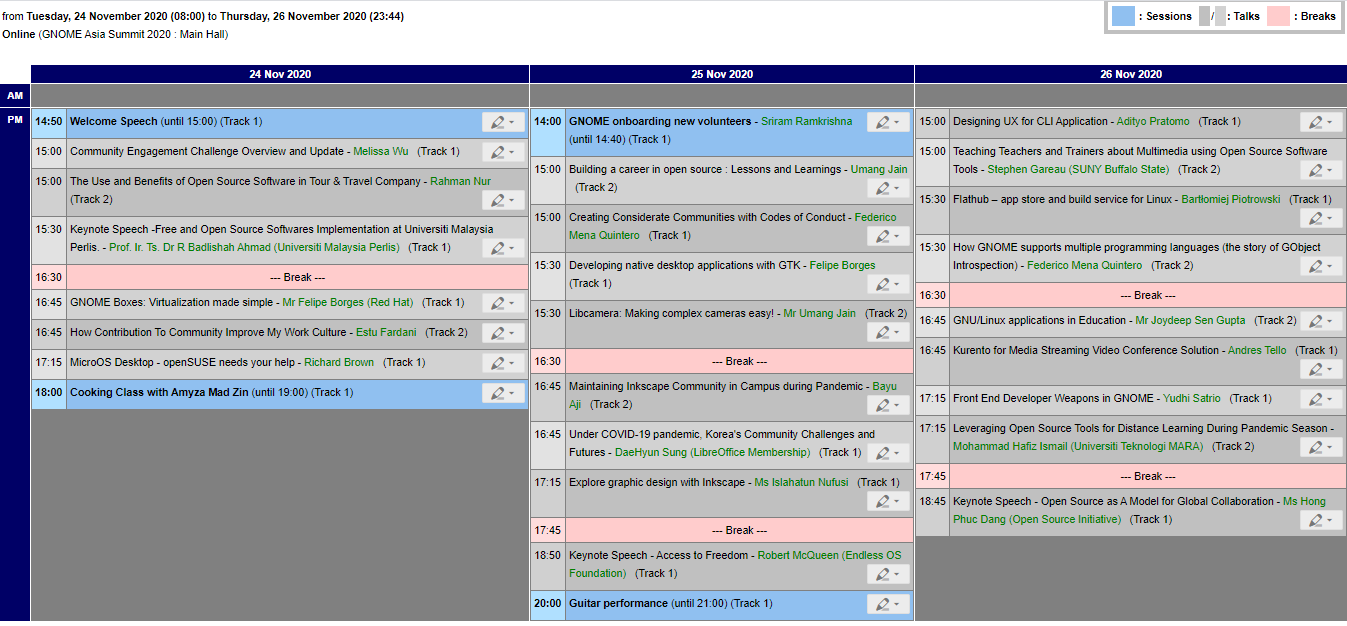
Humility
Extreme Programming describes five values: communication, feedback, simplicity, courage, and respect. I think that humility might be more important than all of these.
Humility enables compassion. Compassion both provides motivation for and maximises the return on technical practices. Humility pairs well with courage, helps us keep things simple, and makes feedback valuable.
Humility enables Compassion
Humility helps you respect the people you’re working with and see what they bring. We can’t genuinely respect them if we’re feeling superior; if we think we have all the answers.
If we have compassion for our teammates (and ourselves) we will desire to minimise their suffering.
We will want to avoid inflicting difficult merges on anyone. We will want to avoid wasting their time, or forcing them to re-work; having been surprised by our changes. The practice of Continuous Integration can come from the desire to minimise suffering in this way.
We will want those who come after us in the future to be able to understand our work—understand the important behaviour and decisions we made. We’ll want them to have the best safety net possible. Tests and living documentation such as ADRs can come from this desire.
We’d desire the next person to have the easiest possible job to change or build upon what we’ve started, regardless of their skill and knowledge. Simplicity and YAGNI can come from this desire.
Humility and compassion can drive us to be curious: what are the coding and working styles and preferences of our team mates? What’s the best way to collaborate to maximise my colleagues’ effectiveness?
Without compassion we might write code that is easiest for ourselves to understand—using our preferred idioms and style without regard for how capable the rest of the team is to engage with it.
Without humility our code might show off our cleverness.
Humility to keep things simple
To embrace simplicity we have to admit that we might be wrong about what we’ll need in the future.
Humility helps us acknowledge that we will find this harder and harder to maintain in the future. Even if we’re still part of the team. We all have limited capacity to deal with complexity.
We need humility to realise we will likely be wrong about what we’ll need in the future. We’ll have courage to try to predict our direction, but strive for the simplest possible code to support what we have now. This will make it easier for whomever must change it when we realise how we’re wrong.
Humility to value feedback
To value feedback we have to admit that we might be wrong
Why pair program if you already know what is best and have nothing to learn from others? They’ll just slow you down!
Why talk with the customer regularly to understand their needs. We’re the experts!
Why do user testing, anybody could use this!
So many tech practices are about getting feedback fast so we can iterate on code, on product, and on our team ways of working. Humility helps us accept that we can be better.
Letting design emerge from the tests with TDD requires the humility to accept that we might not have the best design already in mind. We can’t have foreseen all the interactions with the rest of the code and necessary behaviours.
Humility maximises blamelessness and learning opportunities. We talk about blameless post incident reviews and retrospectives: focusing on understanding and learning from things that happen. Even if we don’t outwardly blame those involved it’s easy to feel slightly superior: that there’s no way we would have made the mistake that triggered the incident. A humble participant would have more compassion for those involved. A humble participant would see that they are themselves part of the system of people that has resulted in this outcome. There is always something to learn about the consequences of our own actions and inactions.
Humility pairs well with Courage
Courage is not overconfidence. Courage is not fearlessness. Courage is being able to do something even though it might be hard or scary.
With humility we know we are fallible and may be wrong. We courageously seek out feedback to learn as early as possible.
Deploying changes to production always carries certain risk; even with safety nets like tests and canary deploys. (Delaying deploys creates even more risk).
An overconfident person might avoid deploying to production until they’re finished with a large chunk of work. After all, they know what they’re doing! Figuring out how to break it down into separately deployable chunks will take more time and be inefficient.
A fearless person might fire and forget changes into production. This is a safe change after all. Click deploy; go to the pub!
A humble person on the other hand understands they’re working with a complex system; bigger than they can fit in their head. They understand that they can’t be certain of the results of their change, no matter the precautions they’ve taken. Having courage to deploy anyway. Acting to observe reality and find out whether their fallible prediction was correct.
The post Humility appeared first on Benji's Blog.
openSUSE Tumbleweed – Review of the week 2020/47
Dear Tumbleweed users and hackers,
This was quite a strange week. Almost every single day has shown a new problem, be it with new Tumbleweed snapshots directly, or, more often, the infrastructure used to build/test it. Luckily, we do have a testing framework that saves us from publishing all those problems, and most infra issues also did not cause real problems, that would not be solved by simply waiting longer. With all this, we ended up publishing just two snapshots this week (1114 and 1117).
The main changes in those two snapshots were:
- Mesa 20.2.2
- Mozilla Thunderbird 78.4.3
- KDE Plasma 5.20.3
- Linux kernel 5.9.8
- PostgreSQL 13.1
The Staging area is currently filled with these changes:
- firewalld: switch from iptables backend to nftables
- The YaST changes as promised in https://yast.opensuse.org/blog/2020-11-10/sprint-112
- brp-check-suse: a bug fix in how it detected dangling symlinks (it detected the, but did not fail as it was supposed to) is causing some package build failures now (Staging:A at this moment)
- permissions package: prepares for easier listing, while supporting a full /usr merge
- RPM 4.16: still a few packages build failures
- Ruby 3.0: mainly YaST not ready for that switch
- First experiments with rpmlint 2.0 started in Staging:M
- openssl 3.0: currently alpha 9 in Staging:O
The attentive reader might have seen that GNOME 3.38.1 is neither listed in the updates that were shipped, not in the staging areas. It is in the current snapshot in QA, so no longer staged, but also not yet shipped. No promise yet, not all tests are conclusive, but there is a chance that it will finally be part of Tumbleweed in the next days.
Two Tumbleweed Snapshots update PostgreSQL, Mesa
Two openSUSE Tumbleweed snapshots were released so far this week.
Snapshot 20201117 provides the latest update of packages for the rolling release. Among the packages to update was Mozilla Thunderbird to version 78.4.3; the email client updated a Rust patch and brought in a new feature from a previous minor version that prompts for an address to be used when starting an email from an address book entry with multiple addresses. KDE’s Plasma 5.20.3 stopped the loading of multiple versions of the same plugin in the task manager KSysGuard and there were many other bug fixes for Plasma users. Four months of shell scripts were updated in the hxtools 20201116 version; one of the changes to gpsh changed the tmp location to /var/tmp, which was to avoid saving potentially large files to tmpfs. The Linux Kernel made a jump from 5.9.1 to 5.9.8, which had a change for Btrfs as well as several USB changes. Database package postgresql 13 had its first point release to 13.1, which took care of three Common Vulnerabilities and Exposures and fixed a time test case so it works when the USA is not observing daylight-savings time. The graphical tool for administering virtual machines, virt-manager slimmed down the filesystem device editor User Interface. Text editor vim had a fix for when a crash happens when using a popup window with “latin1” encoding and python 3.8.6 took care of CVE-2019-20916.
An update of the 3D Graphics and drivers package Mesa 20.2.2 was updated in snapshot 20201114. This new version of mesa was primarily a bug fix release and implemented the Vulkan 1.2 Application Programming Interfaces and OpenGL 4.6 API, but some drivers don’t support either. The only major version to arrive in Tumbleweed this week was Python module python-xdg 5.0.0; the new major version provides no upstream changelog. The patterns-desktop package update renamed the laptop pattern to mobile in it’s update from 20170319 to 20201106. The 3.5.8 package of postfix brought a memory leak fix and Secure Reliable Transport (SRT) Protocol, srt 1.4.2, package improved the logging functionality by means of defining new and more fine-grained Functional Areas (FA) to which log messages are assigned; this was done to prevent too many debug log messages from the library influencing performance with the debug logging turned on. Some CVE updates in the 20201110 ucode-intel package addressed security vulnerabilities in some Intel processors; these included updates of INTEL-SA-00381 and INTEL-SA-00389. The xen 4.14.0_12 package added several patches and improved performance of live migrations. YaST had some packages update, which included adding methods in the yast2 4.3.41 package to decide if hibernation should be proposed, and the yast2-storage-ng 4.3.20 package disabled the “Device” menu items for Network File System (NFS) shares.
Progress is being made on the Tumbleweed snapshot reviewer, but there is not date when it might be functioning again.

Bringing light to life
Some of you may be wondering what I have been up to lately since I took a break from my work in the KDE community. Well, it was time for a change, a change towards family, friends and a more local life. The result is a more balanced, a more grown up me. These changes in my life lead to me having a small family and a group of new friends, both of which I spend a lot of time with. They brought more light into my life, one could say.
That is not all I want to talk about, however. I the past 1.5 years I worked on a new project of mine that combines my love for software with the physical world. I created a product and brought it to the market last month. Now, we’re ready for the international launch of Organic Lighting. The product is a design smart lamp for the living room. It combines unique and dynamic visual effects with natural, sustainable materials.
Meet our Aurora lamp:
It’s a connected device that can be eighter controlled using its physical knob on the front, or via its web ui (or REST interface). Effects can be changed, tweaked and its firmware can be updated (nobody should want an IoT device that can’t get security of feature updates). The concept here, technically is to do “light in software”. The lamp is run by a microcontroller embedded in its foot. Its roughly 600 leds produce ca. 4000 Lumen and render effects at more than 200 frames per seconds.
The lamp is built with easy repairs in mind, and it’s designed for a long-lasting experience, it respects your privacy, and it creates a unique atmosphere in your living space.

With our products, we’re offering an alternative to planned deprecation, throw-away materials and hidden costs of cheap electronics that make you the product by consuming your data for breakfast.
In the future, we will build on these concepts and technology and offer more devices and components that match our principles and that enhance one-another. Stay tuned!

openSUSE Regular Board Election 2020
At this time of the year the Regular Board Election of openSUSE knocks at the door. Yesterday, Ariez Vaccha, from the openSUSE Election Committee, announced on the election on the project's mailing list.
The election wiki page has been updated with all relevant information.

The poster is a courtesy of our friends from the openSUSE Indonesia community.
openSUSE Board Election 2020 announced
The openSUSE Regular Board Election has been announced for the 15th of December 2020. Results will be published on the new year’s eve, i.e 31st December. Call for nominations and applications for the openSUSE Board candidacy is now open.
It’s election time (again)!
Yes, but this time, it is the regular board election that is happening. The previous elections that were conducted during the past year were due to ad-hoc and unforeseen circumstances. However, as per the regular election cycle, we have three seats that are going to be vacant on the openSUSE Board in December. They are the seats of Axel Braun, Marina Latini and Stasiek Michalski. Note that Stasiek was elected this year to replace Christian Boltz whose term ends in 2020. However, Stasiek is opting out from this election due to personal commitments.
My friend from the Election Committee, Ariez Vachha, made the election announcement on the project mailing list yesterday. The election wiki page has been updated accordingly, which includes the usual election schedule poster. That’s courtesy of our friends from the openSUSE Indonesia community.
At the time of writing this blog post, that is less than 24 hours since the annoucement of the election, we received emails from three members who wish to stand as candidate in this election. It’s a very good start.
The call for nominations and applications will continue until Sunday 29th of November. If you would like to nominate a member from the openSUSE community, please send us an email, election-officials@opensuse.org. We will be glad to inform the member about his/her nomination.
This article first appeared at https://sysadmin-journal.com/opensuse-board-election-2020-announced/.