
 Member
 federico1
Bzip2 in Rust - Basic infrastructure and CRC32 computation
I have started a little experiment in porting bits of the widely-used bzip2/bzlib to Rust. I hope this can serve to refresh bzip2, which had its last release in 2010 and has been nominally unmaintained for years.
I hope to make several posts detailing how this port is done. In this post, I'll talk about setting up a Rust infrastructure for bzip2 and my experiments in replacing the C code that does CRC32 computations.
Super-quick summary of how librsvg was ported to Rust
-
Add the necessary autotools infrastructure to build a Rust sub-library that gets linked into the main public library.
-
Port bit by bit to Rust. Add unit tests as appropriate. Refactor endlessly.
-
MAINTAIN THE PUBLIC API/ABI AT ALL COSTS so callers don't notice that the library is being rewritten under their feet.
I have no idea of how bzip2 works internally, but I do know how to maintain ABIs, so let's get started.
Bzip2's source tree
As a very small project that just builds a library and couple of executables, bzip2 was structured with all the source files directly under a toplevel directory.
The only tests in there are three reference files that get compressed, then uncompressed, and then compared to the original ones.
As the rustification proceeds, I'll move the files around to better places. The scheme from librsvg worked well in this respect, so I'll probably be copying many of the techniques and organization from there.
Deciding what to port first
I looked a bit at the bzip2 sources, and the code to do CRC32 computations seemed isolated enough from the rest of the code to port easily.
The CRC32 code was arranged like this. First, a lookup table in
crc32table.c:
UInt32 BZ2_crc32Table[256] = {
   0x00000000L, 0x04c11db7L, 0x09823b6eL, 0x0d4326d9L,
   0x130476dcL, 0x17c56b6bL, 0x1a864db2L, 0x1e475005L,
   ...
}
And then, three macros in bzlib_private.h which make up all the
CRC32 code in the library:
extern UInt32 BZ2_crc32Table[256];

#define BZ_INITIALISE_CRC(crcVar)              \
{                                              \
   crcVar = 0xffffffffL;                       \
}

#define BZ_FINALISE_CRC(crcVar)                \
{                                              \
   crcVar = ~(crcVar);                         \
}

#define BZ_UPDATE_CRC(crcVar,cha)              \
{                                              \
   crcVar = (crcVar << 8) ^                    \
            BZ2_crc32Table[(crcVar >> 24) ^    \
                           ((UChar)cha)];      \
}
Initially I wanted to just remove this code and replace it with one of the existing Rust crates to do CRC32 computations, but first I needed to know which variant of CRC32 this is.
Preparing the CRC32 port so it will not break
I needed to set up tests for the CRC32 code so the replacement code would compute exactly the same values as the original:
- Rename crc32table.c to crc32.c - that file is going to hold all the CRC32 code, not only the lookup table.
- Turn the CRC32 macros into functions - so I can move them to Rust and have the C code call them.
Then I needed a test that computed the CRC32 values of several strings, so I could capture the results and make them part of the test.
static const UChar buf1[] = "";
static const UChar buf2[] = " ";
static const UChar buf3[] = "hello world";
static const UChar buf4[] = "Lorem ipsum dolor sit amet, consectetur adipiscing elit, ";

int
main (void)
{
    printf ("buf1: %x\n", crc32_buffer(buf1, strlen(buf1)));
    printf ("buf2: %x\n", crc32_buffer(buf2, strlen(buf2)));
    printf ("buf3: %x\n", crc32_buffer(buf3, strlen(buf3)));
    printf ("buf4: %x\n", crc32_buffer(buf4, strlen(buf4)));
    // ...
}
This computes the CRC32 values of some strings using the original
algorithm, and prints their results. Then I could cut&paste those
results, and turn the printf into assert — and that gives me a
test.
int
main (void)
{
    assert (crc32_buffer (buf1, strlen (buf1)) == 0x00000000);
    assert (crc32_buffer (buf2, strlen (buf2)) == 0x29d4f6ab);
    assert (crc32_buffer (buf3, strlen (buf3)) == 0x44f71378);
    assert (crc32_buffer (buf4, strlen (buf4)) == 0xd31de6c9);
    // ...
}
Setting up a Rust infrastructure for bzip2
Two things made this reasonably easy:
- A patch from Stanislav Brabec, from Suse, to add an autotools framework to bzip2
- The existing Autotools + Rust machinery in librsvg.
I.e. "copy and paste from somewhere that I know works well". Wonderful!
This is the commit that adds a Rust infrastructure for bzip2. It does the following:
- Create a Cargo workspace (a
Cargo.tomlin the toplevel) with a single member, abzlib_rustdirectory where the Rustified parts of the code will live. - Create
bzlib_rust/Cargo.tomlandbzlib_rust/srcfor the Rust sources. This will generate astaticlibforlibbzlib_rust.a, that can be linked into the mainlibbz2.la. - Puts in automake hooks so that
make clean,make check, etc. all do what you expect for the Rust part.
As a side benefit, librsvg's Autotools+Rust infrastructure already handled things like cross-compilation correctly, so I have high hopes that this will be good enough for bzip2.
Can I use a Rust crate for CRC32?
There are many Rust crates to do CRC computations. I was hoping especially to be able to use crc32fast, which is SIMD-accelerated.
I wrote a Rust version of the "CRC me a buffer" test from above to see if crc32fast produced the same values as the C code, and of course it didn't. Eventually, after asking on Mastodon, Kepstin figured out what variant of CRC32 is being used in the original code.
It turns out that this is directly doable in Rust with the git version
of the crc crate. This crate lets one configure the CRC32
polynomial and the mode of computation; there are many variants of
CRC32 and I wasn't fully aware of them.
The magic incantation is this:
let mut digest = crc32::Digest::new_custom(crc32::IEEE, !0u32, !0u32, crc::CalcType::Normal);
With that, the Rust test produces the same values as the C code. Yay!
But it can't be that easy
Bzlib stores its internal state in the EState struct, defined in bzlib_private.h.
That struct stores several running CRC32 computations, and the state
for each one of those is a single UInt32 value. However, I cannot
just replace those struct fields with something that comes from Rust,
since the C code does not know the size of a crc32::Digest from
Rust.
The normal way to do this (say, like in librsvg) would be to turn
UInt32 some_crc into void *some_crc and heap-allocate that on the
Rust side, with whatever size it needs.
However!
It turns out that bzlib lets the caller define a custom
allocator
so that bzlib doesn't use plain malloc() by default.
Rust lets one define a global, custom allocator. However, bzlib's concept of a custom allocator includes a bit of context:
typedef struct {
    // ...

    void *(*bzalloc)(void *opaque, int n, int m);
    void (*bzfree)(void *opaque, void *ptr);
    void *opaque;
} bz_stream;
The caller sets up bzalloc/bzfree callbacks and an optional opaque
context for the allocator. However, Rust's GlobalAlloc is set up at
compilation time, and we can't pass that context in a good,
thread-safe fashion to it.
Who uses the bzlib custom allocator, anyway?
If one sets bzalloc/bzfree to NULL, bzlib will use the system's
plain malloc()/free() by default. Most software does this.
I am looking in Debian's codesearch for where bzalloc
gets set, hoping that I can figure out if that software really needs a
custom allocator, or if they are just dressing up malloc() with
logging code or similar (ImageMagick seems to do this; Python seems to
have a genuine concern about the Global Interpreter Lock). Debian's
codesearch is a fantastic tool!
The first rustified code
I cut&pasted the CRC32 lookup table and fixed it up for Rust's syntax, and also ported the CRC32 computation functions. I gave them the same names as the original C ones, and exported them, e.g.
const TABLE: [u32; 256] = [
   0x00000000, 0x04c11db7, 0x09823b6e, 0x0d4326d9,
   ...
};

#[no_mangle]
pub unsafe extern "C" fn BZ2_update_crc(crc_var: &mut u32, cha: u8) {
    *crc_var = (*crc_var << 8) ^ TABLE[((*crc_var >> 24) ^ u32::from(cha)) as usize];
}
This is a straight port of the C code. Rust is very strict about
integer sizes, and arrays can only be indexed with a usize, not any
random integer — hence the explicit conversions.
And with this, and after fixing the linkage, the tests pass!
First pass at rustifying CRC32: done.
But that does one byte at a time
Indeed; the original C code to do CRC32 only handled one byte at a time. If I replace this with a SIMD-enabled Rust crate, it will want to process whole buffers at once. I hope the code in bzlib can be refactored to do that. We'll see!
How to use an existing Rust crate for this
I just found out that one does not in fact need to use a complete
crc32::Digest to do equivalent computations; one can call
crc32::update()
by hand and maintain a single u32 state, just like the original
UInt32 from the C code.
So, I may not need to mess around with a custom allocator just yet. Stay tuned.
In the meantime, I've filed a bug against crc32fast to make it possible to use a custom polynomial and order and still get the benefits of SIMD.

Power Outage Corrupted XFS Filesystem | How I Fixed It

Spring cleanup
What you can probably spot from past posts on my blog, my open source contributions are heavily focused on Weblate and I've phased out many other activities. The main reason being reduced amount of free time with growing family, what leads to focusing on project which I like most. It's fun to develop it and it seems like it will work business wise as well, but that's still something to be shown in the future.
Anyway it's time to admit that I will not spend much time on other things in near future.
Earlier this year, I've resigned from being phpMyAdmin project admin. I was in this role for three years and I've been contributing to the project for 18 years. It has been time, but I haven't contributed significantly in last few months. I will stay with the project for few more months to handle smooth transition, but it's time to say good bye there.
On the Debian project I want to stay active, but I've reduced my involvement and I'm looking for maintainers for some of my packages (mostly RPM related). The special case is the phpMyAdmin package where I was looking for help since 2017, but it still didn't help from the package becoming heavily outdated with security issues what lead to it's removal from Buster. It seems that this has triggered enough attention to resurrect work on the updated packages.
Today I've gone through my personal repos on GitHub and I've archived bunch of them. These have not received any attention for years (many of them were dead by the time I've imported them to GitHub) and it's good to clearly show that to random visitors.
I'm still main developer behind Gammu, but I'm not really doing there more than occasional review of pull requests and merging them. I don't want to abandon the project without handing it out to somebody else, but the problem is that there is nobody else right now.

Why precompiled headers do (not) improve C++ compile times
Yeah, so would I. Who wouldn't. C++ is notorious for taking its sweet time to get compiled. I never really cared about PCHs when I worked on KDE, I think I might have tried them once for something and it didn't seem to do a thing. In 2012, while working on LibreOffice, I noticed its build system used to have PCH support, but it had been nuked, with the usual poor OOo/LO style of a commit message stating the obvious (what) without bothering to state the useful (why). For whatever reason, that caught my attention, reportedly PCHs saved a lot of build time with MSVC, so I tried it and it did. And me having brought the PCH support back from the graveyard means that e.g. the Calc module does not take 5:30m to build on a (very) powerful machine, but only 1:45m. That's only one third of the time.
In line with my previous experience, on Linux that did nothing. I made the build system support also PCH with GCC and Clang, because it was there and it was simple to support it too, but there was no point. I don't think anybody has ever used that for real.
Then, about a year ago, I happened to be working on a relatively small C++ project that used some kind of an obscure build system called Premake I had never heard of before. While fixing something in it I noticed it also had PCH support, so guess what, I of course enabled it for the project. It again made the project build faster on Windows. And, on Linux, it did too. Color me surprised.
The idea must have stuck with me, because a couple weeks back I got the idea to look at LO's PCH support again and see if it can be made to improve things. See, the point is, PCHs for that small project were rather small, it just included all the std stuff like <vector> and <string>, which seemed like it shouldn't make much of a difference, but it did. Those standard C++ headers aren't exactly small or simple. So I thought that maybe if LO on Linux used PCHs just for those, it would also make a difference. And it does. It's not breath-taking, but passing --enable-pch=system to configure reduces Calc module build time from 17:15m to 15:15m (that's a less powerful machine than the Windows one). Adding LO base headers containing stuff like OUString makes it go down to 13:44m and adding more LO headers except for Calc's own leads to 12:50m. And, adding even Calc's headers, results in 15:15m again. WTH?
It turns out, there's some limit when PCHs stop making things faster and either don't change anything, or even make things worse. Trying with the Math module, --enable-pch=system and then --enable-pch=base again improve things in a similar fashion, and then --enable-pch=normal or --enable-pch=full just doesn't do a thing. Where it that 2/3 time reduction --enable-pch=full does with MSVC?
Clang has recently received a new option, -ftime-trace, which shows in a really nice and simple way where the compiler spends the time (take that, -ftime-report). And since things related to performance simply do catch my attention, I ended up building the latest unstable Clang just to see what it does. And it does:


Now, in case there seems to be something fishy about the graphs, the last graph indeed isn't from MSVC (after all, its reporting options are as "useful" as -ftime-report). It is from Clang. I still know how to do performance magic ...
Coding is a Craft
I remember the exact room I was in the first time I realised that, for me, programming was about more than just solving problems. It was shortly before graduating from University, and I was sat in a meeting room in the Imagination Technologies office in Leeds. My soon-to-be-boss asked me:
“If you weren’t a programmer, what other job would you do?”
No one had ever asked me that before. And I don’t think I’ve ever been asked since. But thinking about it for all of 10 seconds, I realised that I wanted to create things, no matter what job I had.
It’s taken me a long time to accept that it’s OK to want to build things with software that doesn’t simultaneously solve a problem. It’s OK to write code for the sake of it.
Because, personally, writing code feels a lot like practicing a craft. Yes, you get better the more you do it. But it also fulfills a deep-seated desire to bring something into the world that didn’t exist before. Not that I’m saying no one’s ever written a boot loader before, but no one’s ever written a boot loader that way I wrote mine.
Viewed this way, side projects take on a whole new purpose. They’re a great way to exercise your creativity. You need side projects, not necessarily to learn new skills, but to use the ones you already have.
Writing code isn’t just about solving problems. It’s also good for the soul.
Linux perf and KCachegrind
Recently I finally gave Linux perf a try. Not quite sure why I didn't use it before, IIRC when I tried it somewhen long ago, it was probably difficult to set up or something. Using perf record has very little overhead, but I wasn't exactly thrilled by perf report. I mean, it's text UI, and it just gives a list of functions, so if I want to see anything close to a call graph, I have to manually expand one function, expand another function inside it, expand yet another function inside that, and so on. Not that it wouldn't work, but compared to just looking at what KCachegrind shows and seeing ...
When figuring out how to use perf, while watching a talk from Milian Wolff, on one slide I noticed a mention of a Callgrind script. Of course I had to try it. It was a bit slow, but hey, I could finally look at perf results without feeling like that's an effort. Well, and then I improved the part of the script that was slow, so I guess I've just put the effort elsewhere :).
And I thought this little script might be useful for others. After mailing Milian, it turns out he just created the script as a proof of concept and wasn't interested in it anymore, instead developing Hotspot as UI for perf. Fair enough, but I think I still prefer KCachegrind, I'm used to this, and I don't have to switch the UI when switching between perf and callgrind. So, with his agreement, I've submitted the script to KCachegrind. If you would find it useful, just download this do something like:
$ perf record -g ...$ perf script -s perf2calltree.py > perf.out$ kcachegrind perf.out
Weblate blog moved
I've been publishing updates about Weblate on my blog for past seven years. Now the project has grown up enough to deserve own space to publish posts. Please update your bookmarks and RSS readers to new location directly on Weblate website.
The Weblate website will receive another updates in upcoming weeks, I'm really looking forward to these.
New address for Weblate blog is https://weblate.org/news/.
New address for the RSS feed is https://weblate.org/feed/.

openSUSE 42.3 to 15.0 Upgrade notes

Table to json with jq and awk
The problem
Say you have a table that looks like this:
AGGREGATE_NEEDED    1
ARCH    x86_64
BASE_TEST_ISSUES    NUMBER
BUILD   :NUMBER:PACKAGE
DISTRI  DISTRIBUTION
FLAVOR  Server-DVD-Incidents-Install
INCIDENT_ID 99999
It’s just that it contains about 78 or more entries. Of course for a very skilled engineer or a person with a lot of tricks under the hood, this might be a very trivial task in vim or something like this, I guess that with a couple of replaces here and there, you’d get somewhere; but I’m not skilled, other than at eating.
The Solution
So I took my Key Value table saved it to a file and after googling a bit, now I’m more versed into awk :D:
    cat FILE.txt | \
    awk 'BEGIN { print "{" } \
        { printf "\"%s\":\"%s\",", $1,$2} \
        END { print "\"MANUALLY_GENERATED_ISO_POST\":1 }" }'
        | jq > x86_64-ready.json'"}'
I guess this could have been done easier and prettier, but fits my need and might save you too at some point.
Just make sure you have jq installed ok?
EasyTAG: Organize your music with openSUSE
Audio files in formats such as MP3, AAC, and Ogg Vorbis have made music ubiquitous and portable. With the explosive growth of storage capacity, you can store huge libraries of music. But how do you keep all that music organized? Just tag your music. Then you can access it easily locally and in the cloud. EasyTAG is a great choice for tagging music and is available in openSUSE.
Many audio file types support tagging, including:
- MP4, MP3, MP3, MP2
- Ogg Speex, Ogg Vorbis, Ogg Opus
- FLAC
- MusePack
- Monkey Audio
Installing EasyTAG
EasyTAG is easy to install from openSUSE repositories:

Or use Zypper in a terminal as Root:
# zypper install easytag
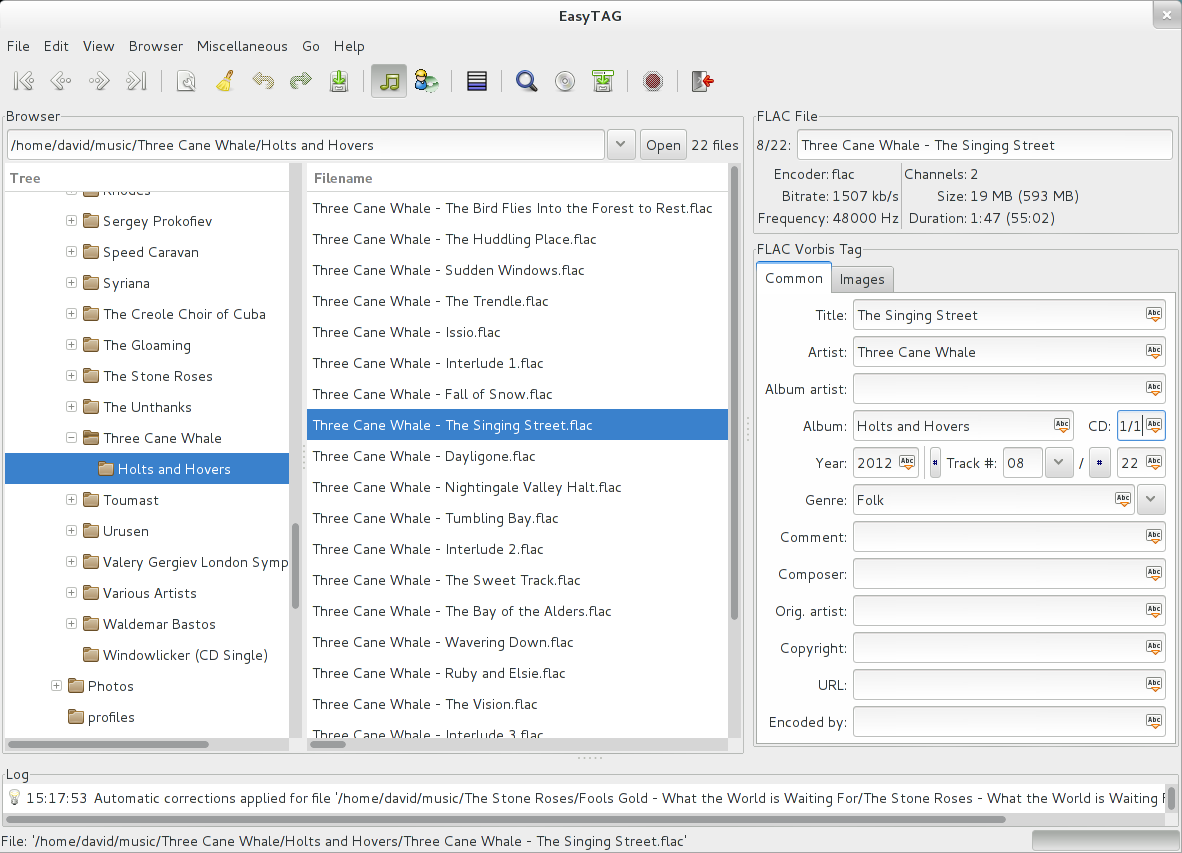
Then launch the program from the Software tool or the application menu for your desktop. EasyTAG’s straightforward interface works well in most desktop environments.
Tagging music
Select a folder where you have music you want to tag. By default, EasyTAG will also load subfolders. You can select each file and add tag information such as the artist, title, year, and so on. You can also add images to a file in JPG or PNG format, which most players understand.
Files you have altered appear in bold in the file listing. To save each, press Ctrl+S. You can also select the entire list and use Ctrl+Shift+S to save all the files at once.
One of the most powerful features of EasyTAG is the file scanner. The scanner recognizes patterns based on a template you provide. Once you provide the right template and scan files, EasyTAG automatically tags all of them for you. Then you can save them in bulk. This saves a lot of time and frustration when dealing with large libraries.
When you upload your tagged files to a cloud service, your tags allow you to quickly find and play the music you want anytime.
This article is an adaption of EasyTAG: Organize your music on Fedora under Creative Commons License.