
 Member
 cornelius
55.555 downloads of ownCloud in a box

When Frank started to discuss the idea of ownCloud and announced it at Camp KDE five years ago (another five, hooray) I was immediately intrigued. The idea of giving people control about their data in the cloud was powerful. Over the years it actually has gained even more power and relevance, as not only the cloud has become ubiquitous but also the threats to abuse it.
With SUSE Studio it became so easy to build easily deployable images for a broad variety of targets, such as a live CD, a VMware image, or an installation disk for a physical machine, that I just had to do it. It follows along the philosophy of ownCloud to make it as easy as possible to run it, so many people can do it on their own. ownCloud in a box is an easy way to try it and get started.
I'm looking forward to the next fives, whatever they will be. ownCloud has great success, and its development is coming along nicely, but I would still like to see some more things.
From a technical point of view, client-side encryption would allow to use a hosted ownCloud without having to trust who is hosting the server. That would extend the benefit of controlling your data in the cloud to a whole new group of people, who can't or don't want to run their own server. There is some work going on in this area. Let's see where this goes.
From a community point of view it would be great, if the contributor agreement would be a bit more fair towards contributors. It's quite asymmetric. You broadly give all rights on contributions to ownCloud Inc. but only get back what you would get anyway by publishing your code under the AGPL. I understand that this enables the ownCloud Inc. business model, and that a successful company is good for the community. I also have no doubt that the company is operating with the best intentions for the community. But if there needs to be a formal agreement, it would be nice if it would better take into account the interests of both sides. I'm sure there would be ways how to do that without jeopardizing the business model.
In general I'm very impressed with how far ownCloud has come, and I'm happy that I could contribute my little part in it.

Ixion 0.9.1 and its move to GitLab
Today I have two announcements to make.
First, the version 0.9.1 of the Ixion library is now available. You can download the 0.9.1 source package from the project’s main page.
This is purely a maintenance release to address portability problems in the python bindings as well as other minor build and packaging issues. Many thanks to David Tardon for single-handedly addressing these issues.
Now, here is the second announcement. We are officially moving the project’s home from the previous Gitorious one to the GitLab’s, following the announcement of the acquisition of Gitorious by GitLab and the imminent shutdown of the Gitorious hosting site resulted from the acquisition. The new official URL for the Ixion project will be https://gitlab.com/ixion/ixion. If you need to include an URL to the project, please use the new one from this point forward.
Thank you, ladies and gentlemen.
Plasma 5 live images for openSUSE and on the default openSUSE desktop
A lot has been happening on the KDE side of openSUSE… this post summarizes what’s been going on so far.
Live media for Plasma 5
One of the most-often requested ways to test Plasma 5, given it can’t be coinstalled with the 4.x Workspace, is the availability of live images to test either in VM or bare metal without touching existing systems.
Given that other distributions started doing so since a while, naturally openSUSE couldn’t stay still. ;) Thanks to the efforts of Hrvoje “shumski” Senjan, we have now live media available for testing out Plasma 5!
- Download location: the ISO file you’re looking for is called openSUSE-Plasma5 (currently x86_64 only)
The image is based on the current Tumbleweed and takes the latest code from git. If you test this in a virtual machine, bear in mind that there are some issues with VirtualBox and Plasma 5, and that QtQuick’s reliance on openGL can cause problems in general with virtual machines.
And if you find a bug… if it’s in the core distribution, or in the KDE packaging, head over to openSUSE’s Bugzilla. If it’s instead in the software, the KDE bug tracker is your friend.
Questions? Head over to the opensuse-kde ML, or the #opensuse-kde channel on Freenode.
Plasma 5 as default in openSUSE
You may have read on a recent Softpedia article that Plasma 5 is going to become the default in openSUSE. That’s correct (what did you expect, a retraction? ;): I and the others of the team (Raymond and Hrvoje) have been using Plasma 5 for a long time, not only because we like to stay on the bleeding edge ;) but also to see how it would fare for openSUSE. In the mean time, we reported bugs, sometimes fixed them, and occasionally landed one or two features in.
With the upcoming Plasma 5.3, we feel that it is of the level of quality expected from the default openSUSE desktop, and therefore we have set up preparations for the switch. As Rome wasn’t built in a day, it won’t happen straight away ;) but it will involve changes in the repositories and in the packaging, which are summarized below:
-
We will start the migration around the end of April, as long as the basic openQA tests are ready;
-
We will release KDE Applications 15.04 in Tumbleweed at the same time;
-
The KF5 ports of the applications present in KDE Applications 15.04 will obsolete their existing counterparts (hence the KF5 version will replace the 4.x version). The same will happen for the kdebase4-workspace and Workspace 4.x packages;
-
Afterwards, the 4.x Workspace will not be supported or maintained for Tumbleweed. Help from the community is welcome in case anyone wants to step up and maintain the packages.
-
The default menu applet will be Kicker (as opposed to Kickoff used in the 4.x tiems;
-
The default theme for Plasma 5 will be Breeze (the upstream default), and we will use the menu structure provided by upstream KDE (as opposed to the custom structure we use today);
-
The repository layout will change. We will have three repositories holding KDE software:
- KDE:Frameworks - the KF5 libraries and Plasma 5;
- KDE:Applications - KDE Applications releases
- KDE:Extra - Other KDE/Qt related community packages.
-
For each of these repositories, there will be also an “unstable” variant, tracking the current git master state.
(The full IRC log of the last meeting outlines these points in detail)
There are still some points open for discussion, in particularly for the update applet: should we keep Apper? Would Muon be a drop-in replacement? Or are we better off without an applet at all?
Of course, input and help from the community is welcome. Hop on IRC or on the ML (see above for where to look) if you want to help and participate in this large transition.

Kraft Release 0.58
Heute habe ich Kraft Version 0.58 freigegeben. Download.
0.58 ist ein weiteres Release, das Fehler in der Kraft 0.5x Reihe behebt. Es wurde ein Fehler bei der Berechnung der Mehrwertsteuer auf den PDF-gerenderten Dokumenten behoben. Ausserdem kann jetzt der Schrägstrich (‚/‘) in Nummernkreis-Vorlagen verwendet werden, was vorher zu einem Fehler geführt hat.
Ausserdem habe ich den Build-Prozess etwas aufgeräumt und die kraftcat Bibliothek entfernt. Die Dateeien werden jetzt auch direkt mit Kraft gebaut.
Die Bibliothek hatte nie eine öffentliche API und war nie stabil, so dass sie auch nicht ausserhalb von Kraft verwendet wurde. Paketieren von Kraft ist damit einfacher und standardkonformer.
Ein Update auf Version 0.58 wird für Produktionssysteme empfohlen.
The Space-Time Continuum of KDE's Activities
Orthogonal or hierarchical?
The premise of Björn's quest for a new metaphor is that the current one doesn't fit the mental model of the people using activities, especially how activities are related to virtual desktops. He sees activities not as an orthogonal concept to virtual desktops, but as an hierarchical one.Matching the mental model of the user is crucial, because this defines how natural and easy it is to use them. You can learn abstract concepts and be trained in creating new mental models or in using rules to work with concepts without having a good deeper understanding. But this needs time and effort, which especially casual users are rightfully not willing to spend. And it's not fun.
Orthogonal concepts are independent of each other, they live in different dimensions, you can use one without affecting the other. Hierarchical concepts use the same dimension, but there is an order, one concept is above the other, such as one providing a grouping for another.
You could see activities as independent of virtual desktops, and that's how they are implemented. But there is one issue with that. The presentation we use addresses the same mental model, that of areas arranged in space.

That makes it hard for the user to know where things are. Does the screen present an activity or a desktop? Do I have to change the activity to go to my email client or do I have to switch desktops? When I go to the left or right, do I change activities or desktops? You can learn the concept of activities to be able to answer these questions, but if you use the same mental model for activities and desktops it can appear confusing and inconsistent.
I think there are two ways to address this issue. One is to clearly express that the concepts are orthogonal in the user interface and the naming. The other is to make activities and virtual desktops fit into the same mental model by clearly separating their responsibilities, and eliminate the metaphors which use the same mental model for different parts of functionality.
Time
One powerful way of expressing the orthogonality of activities and virtual desktops would be to represent virtual desktops in space and activities in time. These are two different dimensions, and it actually would go quite naturally with what the two concepts represent.Virtual desktops are different segments of the space of your desktop. They are usually arranged in a plane and there is a relation of left/right and above/below. Desktop effects support this model by providing spacial transitions when switching desktops.
Activities are less about where you do something but about when you do it. They represent projects or different times of your usage of a computer. You program as part of your job in your IDE in the morning, browse the web and watch YouTube movies in the evening, and once everybody else is sleeping you play a game. You use different applications at different times, need different configurations of your desktop, and there is a relation of before/after between these.
To express this in the UI the activity switcher and configuration should not use concepts of space which overlap with how virtual desktops are presented. The closest idea I have seen is the activity switcher in Plasma Active. This uses a different and specific mechanism to switch activities. It even vaguely resembles a clock with its circular movement of activities when browsing through available activities, expressing the concept of time.
 |
| Screenshot from contourproject |
Space
Following the idea of a hierarchical relationship of activities and virtual desktops we could represent them using the same dimension, but express activities in groups of virtual desktops.Here is a mockup illustrating this idea:

Activities would control how groups of virtual desktops would behave. They would be used to define what wallpaper and which desktop widgets to show, what applications to start or stop, what settings for notifications or power saving to use, etc. All this would be tied to on what virtual desktop the user is. But there wouldn't be two different ways how to switch between desktops and activities, but there would only be one. Activities would implicitly be switched by switching between virtual desktops.
So when you are at work you would be on the left side of your desktop with your corporate wallpaper, running IDE, web browser, what you need for work. The right side of your desktop with the games would be shut off. For a presentation you would go to the desktop which switches off notifications and power saving. Email would be there as a shared resource all the time. In your free time you would be on the right of your desktop, with nude pictures of your cat as background, running inappropriate videos in your web browser, and switching off everything else than your games for maximum frame rates. Or something like that...
In some way activities would be a subset of virtual desktops and in some other way they would be a configuration for a virtual desktop. This follows along the lines of the "Different widgets for each desktop" configuration option, where each virtual desktop more or less gets its own activity.
The hierarchy would not strictly be activities above and desktops below, but there would be two concepts, the group above the desktop, and the configuration below the desktop.
This would need a few changes in representation of activities and virtual desktops, but it could better match the mental models of users, because concepts are clearly separated and existing understanding of controls can be used.
When going with this mental model and the corresponding metaphors, suitable names for activities could be "desktop groups" and "desktop configuration", and virtual desktops would just remain "desktops".
Conclusion
Naming is important, but even more important is expressing concepts clearly and unambiguously. In the user interface behavior and visual representation trumps names. That said, for talking about the concepts, especially in code and documentation, good names are essential.To me seeing activities as configuration of groups of desktops is most natural. That matches my mental model.
Building a Hackerspace
We spent a few months talking about making a Hackerspace in Thessaloniki and almost a couple of months some people decided to stop talking and start acting. So we made Tech Ministry , a 180 square meters place in the center of Thessaloniki where everybody can find a home for their projects. Of course we are still building it, literally a hackerspace is never over, but we still need a few things to make it functional. We plan to have it fully functional but the end of next week, but I know really well that everybody has a plan until they get hit, LoL.
If you have some money left in your paypal and you want to help you can do it by donating to our Hackerspace here. We could also use any kind of equipment that you don't need so all you have to do is contact me here by sending a comment or by sending me an email. If you are an FOSS Project Tech Ministry is always happy to support you by promoting your project in our members, so just send us all the information you think we will need for that.
What DAW (or other music software) is the right for me?
Is Ableton Live the right DAW for me?
I am not a musician or "producer". I don't know how to play any instrument. I don't really know musical notation (and have little desire to learn). But I do have some basic understanding of musical theory, an open mind, and would enjoy making experimental music. The kind I like to listen to. (Or, for the matter, why not more traditional electronic music, even dancey stuff, too.)
(I do listen to more "normal" music, too, not just experimental bleeps and drones;)
Among my favourite composers / artists are the usual suspects like Scelsi, Ligeti, Reich, Glass, Eno, Fripp, Kraftwerk, and contemporary ones like Max Richter, Anna Thorvaldsdottir, Nils Frahm, and of course acts like Circlesquare, Monolake, Plastikman etc. My favourite radio show is WNYC's New Sounds .
The software I have been ogling most is Ableton Live. What I like about it is that it is popular, cool, and has a thriving development, apparently, with relatively frequent updates etc. It seems not likely to go away suddenly. I love the total (?) lack of skeuomorphism in the user interface. (I strongly dislike the trend of faux real hardware look and feel in 3rd-party plugins.)
I certainly have no wish to use the "live" aspect of Live. And, as one of the main points, as I understand it, of Live is to make it easy to launch clips that will be automatically properly aligned in live performance scenarios, will Live be suitable for stuff like having multiple loops or patterns playing simultaneously *without* being synchronised? You know, like emulating Frippertronics, or patterns being slightly out of phase in the style of Reich, or Eno.
And what about microtonal aspects?
So, will Live have too many limitations? Should I look somewhere else? Maybe the generative music scene is what I should be looking into, like Intermorphic's Noatikl? Although with that I would definitely be afraid of the proprietary-software-maker-goes-belly-up scenario.
Maybe even some Open Source software? Csound? Pd? Note that I wouldn't want to get lured into hacking (programming) on some Open Source software, for once I want to be "just a user"...
Oh, and I use a Mac as my desktop environment, so that is also a limiting factor.
Or am I silly to even think I could create something interesting (to myself, that is) without starting by learning how to do stuff "by the book" first?
--tml
GitLab CE Quick install for our rpm
General
Official Install Documentation
Repositories
- use the repositories from devel:languages:ruby and home:darix:apps
- zypper in –from home:darix:apps redis gitlab-ce gitlab-shell
config redis:
See also: /usr/share/doc/packages/redis/README.SUSE
$ cd /etc/redis
$ cp default.conf.example gitlab.conf
$ vi gitlab.conf

* daemonize no
* pidfile /var/run/redis/gitlab.pid
* logfile /var/log/redis/gitlab.log
* dir /var/lib/redis/gitlab/

$ install -d -m 0750 -o redis -g redis /var/lib/redis/gitlab/
$ chown root:redis gitlab.conf
$ sc start redis@gitlab
$ sc enable redis@gitlab
GitLab Shell
cd /usr/share/gitlab/shell/; cp config.yml{.example,}- set up redis socket matching /etc/redis/gitlab.conf
- maybe enable
audit_usernames(but see warning)
config rails app
- cd /srv/www/vhosts/gitlab-ce/
- configure database.yml (based on postgresql example)
- cp config/gitlab.yml.{example,}
- host, port, https, email_from in gitlab section
- optionally ldap settings
- cp config/resque.yml.{example,}
- adapt socket for redis. should match /etc/redis/gitlab.conf
export RAILS_ENV="${RAILS_ENV:=production}"gitlab-ce-updaterake db:seed_fu- check for new files which are now owned by root:root (e.g. .gitlab_shell_secret) they should be owned by root:gitlab with permissions
u=rw,g=r,o= - make sure you have the symlink
.gitlab_shell_secret /srv/www/vhosts/gitlab-ce/.gitlab_shell_secret - Configure git for gitlab user as seen in official docs
sc start gitlab-ce-unicorn gitlab-ce-sidekiq gitlab-workhorsesc enable gitlab-ce-unicorn gitlab-ce-sidekiq gitlab-workhorse
Testing things
- ssh access
ssh -T gitlab@gitlab.suse.de
Welcome to GitLab, $yourusername!
UnReal World RPG and propiertary applications in linux ecosystem part SDL2 take 2
My opinion is Simple Direct Layer 2 library is awesome piece of code. SDL2 delivers 99.9% what it promises. When SDL2 works it makes good habit to stay away your mind but now I want to talk about when SDL2 doesn’t work and when you want to deliver closed source application.
It seems that there is some problems with OpenGL/DirectX and other accelerations APIs that they don’t play together without tweaking and researching ways to make them work. Okay this ain’t SDL2 fault completely this manufacturer problem again but.. you use SDL2 to get rid of hardware problems.
All those problems are solvable with current SDL2 version but again they takes lots of time and someone who is willing to debug application in non-working machine and remember this is normal stuff in development and not a big thing. But it’s big thing when you are about to releasing your new bling bling game with megalomanic blitting and your surfaces starts to blink every time you blit with some random machines. Even in not so bling bling UnReal Wolrd RPG you have problem with that but they are solved now but I builded many many Mac OS X and Linux builds before problem was traced to SDL2 related. If you are Apple people I point my finger to you. What the heck you are doing to openGL in Mac OS X??
SDL2 is what open source library but their biggest problems (in my opinion) are these: Hey Wiki is nice but have proper Doxygen or something documentation (which should be official), You have Bugzilla but there is no connection (or I just didn’t noticed) how bugs and Mercurial repository communicate each other and where/how you communicate with you users (mailinglists are so 90′ how about posting some news)?
What this leads is people post patches to Bugzilla where they get to nowhere and other one are using them because they solve their problem. This leads in situation where there is unofficial SDL2 libraries that are not compatible with each other. This is normal situation in open source world and SDL2 is under ZLib license so you can do it but what happens when they fix something that was broken to official SDL2 library and you using older one in development that is patched to work?
This is not SDL2 specific thing it’s very common situation with many open source projects (and yes they tend to have limited man power if you like to fix them you can! Learn to communicate with those people like I should with SDL2 people) but in a way SDL2 have deep connection with Valve (They use it in Linux steam client at least) and Steam ain’t small company they should but power behind this or let it go.
At the end remember this ain’t rant against SDL2 or SDL2 developers. They are doing hard work for you getting mostly nothing out of it. Because Eastern is all about pain and unhappiness so this was my contribution to that or no not really people!! Life is too short for sadness so have a lot’s of fun all eastern!

Limba Project: Another progress report
And once again, it’s time for another Limba blogpost 
Limba is a solution to install 3rd-party software on Linux, without interfering with the distribution’s native package manager. It can be useful to try out different software versions, use newer software on a stable OS release or simply to obtain software which does not yet exist for your distribution.
Limba works distribution-independent, so software authors only need to publish their software once for all Linux distributions.
I recently released version 0.4, with which all most important features you would expect from a software manager are complete. This includes installing & removing packages, GPG-signing of packages, package repositories, package updates etc. Using Limba is still a bit rough, but most things work pretty well already.
So, it’s time for another progress report. Since a FAQ-like list is easier to digest. compared to a long blogpost, I go with this again. So, let’s address one important general question first:
How does Limba relate to the GNOME Sandboxing approach?
(If you don’t know about GNOMEs sandboxes, take a look at the GNOME Wiki – Alexander Larsson also blogged about it recently)
First of all: There is no rivalry here and no NIH syndrome involved. Limba and GNOMEs Sandboxes (XdgApp) are different concepts, which both have their place.
The main difference between both projects is the handling of runtimes. A runtime is the shared libraries and other shared ressources applications use. This includes libraries like GTK+/Qt5/SDL/libpulse etc. XdgApp applications have one big runtime they can use, built with OSTree. This runtime is static and will not change, it will only receive critical security updates. A runtime in XdgApp is provided by a vendor like GNOME as a compilation of multiple single libraries.
Limba, on the other hand, generates runtimes on the target system on-the-fly out of several subcomponents with dependency-relations between them. Each component can be updated independently, as long as the dependencies are satisfied. The individual components are intended to be provided by the respective upstream projects.
Both projects have their individual up and downsides: While the static runtime of XdgApp projects makes testing simple, it is also harder to extend and more difficult to update. If something you need is not provided by the mega-runtime, you will have to provide it by yourself (e.g. we will have some applications ship smaller shared libraries with their binaries, as they are not part of the big runtime).
Limba does not have this issue, but instead, with its dynamic runtimes, relies on upstreams behaving nice and not breaking ABIs in security updates, so existing applications continue to be working even with newer software components.
Obviously, I like the Limba approach more, since it is incredibly flexible, and even allows to mimic the behaviour of GNOMEs XdgApp by using absolute dependencies on components.
Do you have an example of a Limba-distributed application?
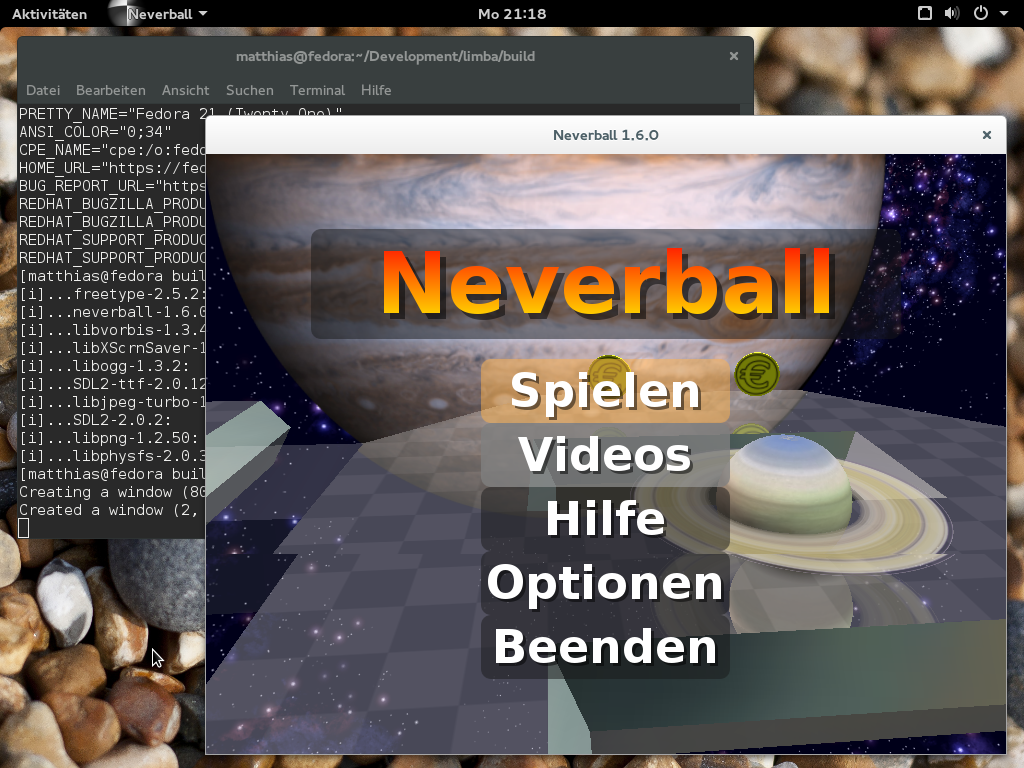
Yes! I recently created a set of package for Neverball – Alexander Larsson also created a XdgApp bundle for it, and due to the low amount of stuff Neverball depends on, it was a perfect test subject.
One of the main things I want to achieve with Limba is to integrate it well with continuous integration systems, so you can automatically get a Limba package built for your application and have it tested with the current set of dependencies. Also, building packages should be very easy, and as failsafe as possible.
You can find the current Neverball test in the Limba-Neverball repository on Github. All you need (after installing Limba and the build dependencies of all components) is to run the make_all.sh script.
Later, I also want to provide helper tools to automatically build the software in a chroot environment, and to allow building against the exact version depended on in the Limba package.
Creating a Limba package is trivial, it boils down to creating a simple “control” file describing the dependencies of the package, and to write an AppStream metadata file. If you feel adventurous, you can also add automatic build instructions as a YAML file (which uses a subset of the Travis build config schema)
This is the Neverball Limba package, built on Tanglu 3, run on Fedora 21:
Which kernel do I need to run Limba?
The Limba build tools run on any Linux version, but to run applications installed with Limba, you need at least Linux 3.18 (for Limba 0.4.2). I plan to bump the minimum version requirement to Linux 4.0+ very soon, since this release contains some improvements in OverlayFS and a few other kernel features I am thinking about making use of.
Linux 3.18 is included in most Linux distributions released in 2015 (and of course any rolling release distribution and Fedora have it).
Building all these little Limba packages and keeping them up-to-date is annoying…
Yes indeed. I expect that we will see some “bigger” Limba packages bundling a few dependencies, but in general this is a pretty annoying property of Limba currently, since there are so few packages available you can reuse. But I plan to address this. Behind the scenes, I am working on a webservice, which will allow developers to upload Limba packages.
This central ressource can then be used by other developers to obtain dependencies. We can also perform some QA on the received packages, map the available software with CVE databases to see if a component is vulnerable and publish that information, etc.
All of this is currently planned, and I can’t say a lot more yet. Stay tuned! (As always: If you want to help, please contact me)
Are the Limba interfaces stable? Can I use it already?
The Limba package format should be stable by now – since Limba is still Alpha software, I will however, make breaking changes in case there is a huge flaw which makes it reasonable to break the IPK package format. I don’t think that this will happen though, as the Limba packages are designed to be easily backward- and forward compatible.
For the Limba repository format, I might make some more changes though (less invasive, but you might need to rebuilt the repository).
tl;dr: Yes! Plase use Limba and report bugs, but keep in mind that Limba is still in an early stage of development, and we need bug reports!
Will there be integration into GNOME-Software and Muon?
From the GNOME-Software side, there were positive signals about that, but some technical obstancles need to be resolved first. I did not yet get in contact with the Muon crew – they are just implementing AppStream, which is a prerequisite for having any support for Limba[1].
Since PackageKit dropped the support for plugins, every software manager needs to implement support for Limba.
So, thanks for reading this (again too long) blogpost There are some more exciting things coming soon, especially regarding AppStream on Debian/Ubuntu!
[1]: And I should actually help with the AppStream support, but currently I can not allocate enough time to take that additional project as well – this might change in a few weeks. Also, Muon does pretty well already!