
 pasky
paskyStudying in Prague? Join us at eClub Summer Camp!
With kind support of the Medialab foundation and Jan Šedivý, we are looking hard for students in Prague to work with us on a summer internship! We actually have two options for you:
- eClub Summer Camp (main option) – we have some ambitious projects and ideas for you to try out if you are excited by machine learning, big data and artificial intelligence. Exploratory, exciting, state-of-art research without required previous in-depth knowledge! (Just good basic math and programming.)
- Summer Job (auxiliary option, full-time coder) – we need help polishing the edges of some of our projects, seeking students that are skilled programmers.
We are mainly affiliated with FEL CVUT, but we also have students from MFF UK and we’ll welcome students from other Czech universities too. As long as you are a competent programmer, want to do something more than yet another Android game, and willing to come in person three times a week – let’s do something groundbreaking together!

 Member
openSUSE and ownCloud at FOSSCOMM 2016, April 16-17 2016 @ University of Pireaus

This weekend (April 16-17), I'll be at FOSSCOMM (Free and Open Source Software Communities Meeting). FOSSCOMM is an annual Greek event that FOSS communities gather and present what's new.
I'll present "Why you should use openSUSE Tumbleweed". I'll show how this version is built, tested and released to the end users.
Another presentation will be about ownCloud 9.0. I'll start with what is cloud and why we use it. Using the cloud we should consider about our privacy. Regarding privacy, ownCloud is the best solution to use cloud technology.
The conference will have streaming (according to the organizers). So you should check the site.
My presentations will be (I'll be glad to see you there):
Why You Should Use Tumbleweed: April 16 @ 11:00 - 12:00
Own Cloud 9: April 16 @ 12:30 - 13:00
If you want to meet me, you can visit openSUSE booth. Ask for Stathis or diamond_gr.
Have phun
YodaQA Grand Challenge!
Recently, the YodaQA team is collaborating with Falk Pollok from RWTH Aachen who is interested in using Question Answering in education to help people digest what they have learned better and to generally assist with studying. To this end, he has created PalmQA – a QA application that multiplexes between many question answering backends, ensembling them together to a more accurate system.
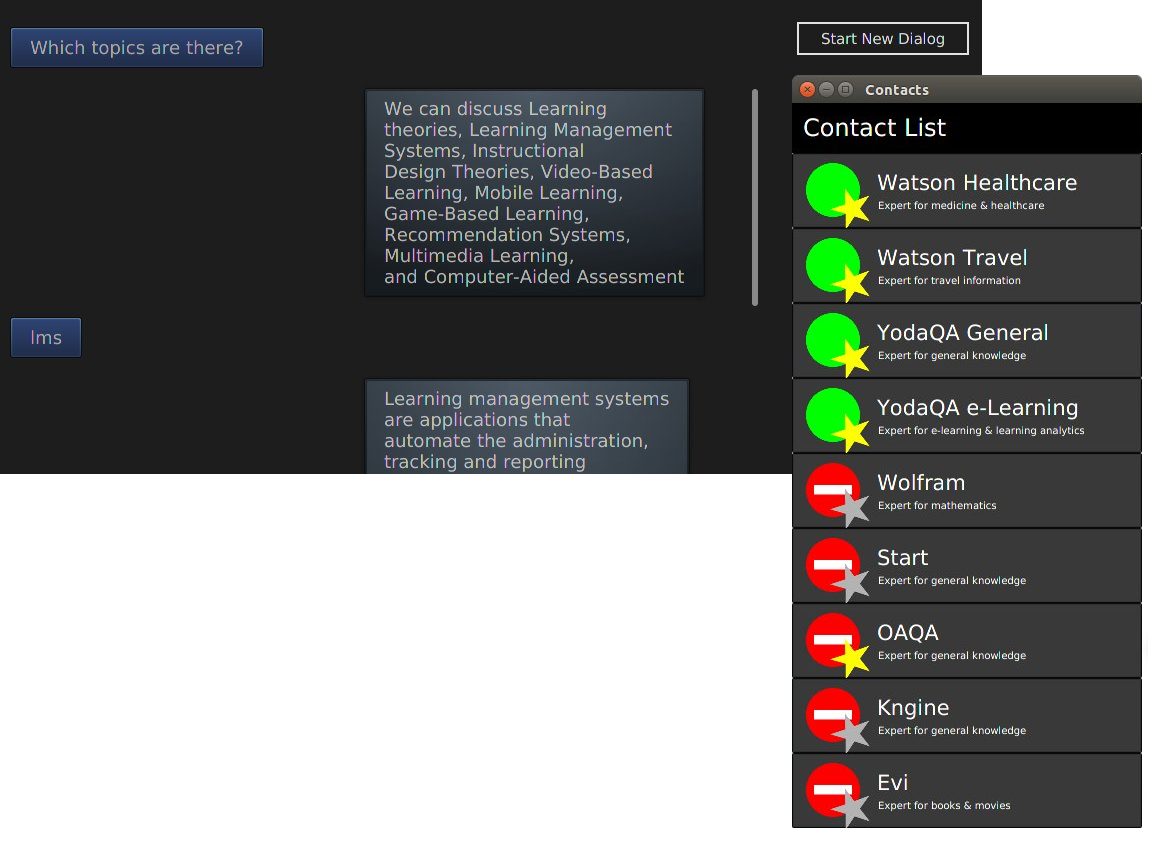
Falk has built backends for IBM Watson’s DeepQA among others (Google, Evi, Kngine and MIT’s Start), but in the end, the combination of YodaQA and Wolfram Alpha is “a match made in heaven,” as Falk said in an email a short while ago.
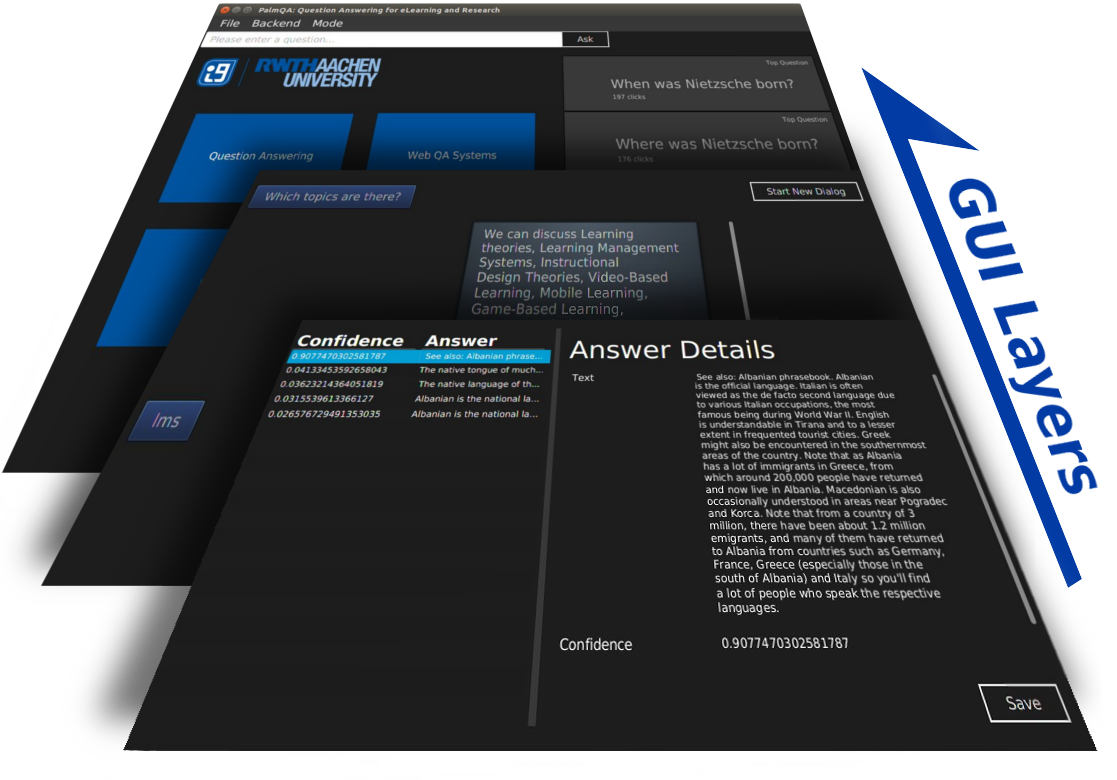

As a finishing touch to his work (being submitted as a diploma thesis), Falk made a Grand Challenge – letting an independent third party make a list of 30 factoid questions of varying difficulty, and pitching the PalmQA against a wide variety of humans. Perhaps not quite as dramatic or grandiose as IBM Watson’s Jeopardy participation, but still a nice showcase of where we are now.
Well, PalmQA did great! 26 people competed, and typically could get about 15 out of the 30 right. The best human answered 24 questions correctly. But no matter – PalmQA managed to answer 25 out of 30 questions right!
So, in this challenge, Falk’s ensemble-enhanced YodaQA beats the best human!
As mentioned above, PalmQA offers integration of YodaQA with Wolfram Alpha, Google QA, MIT’s Start, Amazon’s Evi and Kngine. We hope to merge this ensembling system into the YodaQA project in the future!
I also entered just plain YodaQA into the Grand Challenge, in the configuration that’s running at live.ailao.eu right now. It got 18 questions right, still better than an average human! If we also included purely “computational” questions (algebra, unit conversions) that YodaQA just isn’t designed to answer (it’s still essentially a search engine), that’d make 24 questions out of 30. Pretty good!
See the Grand Challenge Github issue for more info. We should get the complete details of the challenge, comparisons to other public QA engines (like Google) etc. in Falk’s upcoming thesis.
This is how the plain YodaQA fared:
| Question Text | correct | found | |
|---|---|---|---|
| What is the capital of Zimbabwe? | ✓ | Harare | Harare |
| Who invented the Otto engine? | ✓ | Nikolaus Otto | Nikolaus Otto |
| When was Pablo Picasso born? | ✓ | 1881 | 1881 |
| What is 7*158 + 72 – 72 + 9? | ✗ | 1115 | 78.182.71.65 78 |
| Who wrote the novel The Light Fantastic? | ✓ | Terry Pratchett | Terry Pratchett |
| In which city was Woody Allen born? | ✓ | New York | New York |
| Who is the current prime minister of Italy? | ✓ | Matteo Renzi | Matteo Renzi |
| What is the equatorial radius of Earth’s moon? | ✗ | 1738 | the Moon and Su |
| When did the Soviet Union dissolve? | ✓ | 1991 | 1991 |
| What is the core body temperature of a human? | ✗ | 37 | Bio 42 and cour |
| Who is the current Dalai Lama? | ✓ | Tenzin Gyatso | Tenzin Gyatso |
| What is 2^23? | ✗ | 8388608 | the Gregorian c |
| Who is the creator of Star Trek? | ✓ | Gene Roddenberr | Gene Roddenberr |
| In which city is the Eiffel Tower? | ✓ | Paris | Paris |
| 12 metric tonnes in kilograms? | ✗ | 12 *000 | SI |
| Where is the mouth of the river Rhine? | ✓ | the Netherlands | the Netherlands |
| Where is Buckingham Palace located? | ✓ | London | London |
| Who directed the movie The Green Mile? | ✓ | Frank Darabont | Frank Darabont |
| When did Franklin D. Roosevelt die? | ✓ | 1945 | 1945 |
| Who was the first man in space? | ✓ | Yuri Gagarin | Yuri Gagarin |
| Where was the Peace of Westphalia signed? | ✗ | Osnabrück | France |
| Who was the first woman to be awarded a Nobel Priz | ✗ | Marie Curie | Elinor Ostrom |
| 12.1147 inches to yards? | ✗ | 0.3365194444 | CUX 570 17 577 |
| What is the atomic number of potassium? | ✓ | 19 | 19 |
| Where is the Tiananmen Square? | ✓ | China | China |
| What is the binomial name of horseradish? | ✓ | Armoracia Rusti | Armoracia Rusti |
| How long did Albert Einstein live? | ✗ | 76 | Germany |
| Who earned the most Academy Awards? | . | Walt Disney | Jimmy Stewart |
| How many lines does the London Underground have? | ✗ | 11 | Soho Revue Bar |
| When is the next planned German Federal Convention | ✗ | 1850 |
YodaQA learned to tweet
Guest post by Petr Marek (source)
YodaQA learned how to use twitter during easter holidays. You can ask it by sending tweet with question to @askYodaQA . YodaQA will answer you shortly. How is it possible? I created app in the Googleâ€ s App Script, which handles receiving question from twitter and answering them.
Why did I create it? YodaQA can reach more users in the new interesting form thanks to it. I believe they will help us to find even more ways how YodaQA can help them. It is pretty symbiosis. YodaQA will help twitter users, and they will help it back. Letâ€s look how it is made.

The two important tools
The most important ingredient was Googleâ€s App Script. It is basically JavaScript with the connection to Google services. You can make your own App Script apps in Google Drive. The best thing is that you can make triggers run the app every minute for example. And itâ€s for free.
The second thing you need is to create twitter app on account, which your bot will use to communicate with its followers. It will grant you access tokens, which you need to connect to twitter API. I used Twitter Lib for Google Apps Script to simplify the communication with API. It allowed me to tweet and get tweets with questions easily. You just need to call the right function with some arguments.
General idea behind
That was the tools that I used. But how did I make it work? I will describe the general idea now. I set App Script project to run my code every minute. The code does basically two things.
The first step is to obtain answers from twitter and to ask YodaQA. Bot searches all tweets with @askYodaQA. It saves the users that tweeted them and the time when it found the tweets. Then it sends the text of the tweet to YodaQA. YodaQA replies with dialog id and question id, which it saves to the list of questions.

The second step is to go through list of questions and to ask YodaQA for answers to these questions. Bot sends questions to users as soon as the answers are finished. You can even rely on features of the Hub, such as dialogs and coreference resolution. Two questions are connected to dialog when they are asked within five minutes interval.
I said that I save some information. Where? I used spreadsheet as memory. I use one sheet as “user memoryâ€, the second as “asked question list†and the last as memory for the id of the last served tweet. I even log some information into a Google Docs text document. It may sound simple (and it is simple), but it works.
You can try it right now. Just tweet question with @askYodaQA and answer will arrive within few minutes. You can even use hashtags or mention other users. They will also receive the answer.
You can see the whole code on GitHub. You can use it and modify it for your own twitter bots too, maybe on your own data?

openSUSE & You
The openSUSE Project is awesome. We’re doing facinating stuff that is treading new ground in the world of Free and Open Source Software.
If you’re interested in how and why we’re doing this stuff, if you’d like to get involved, then this blog post is for you.
After reading you should have an idea of how we work and how to get started working with us.
- “How does the openSUSE Project work?”
- “Who decides what happens?”
- “What do you need me to do?”
- “How do I get started?”
How does the Project work?
The Project is a self-organised, self-governed, community working on the openSUSE Distributions (Tumbleweed & Leap) as well as various other Free and Open Source Software, including OBS, openQA, OSEM, Portus, Machinery, and more.
We have no Product Managers, Project Managers, or Community Managers.
We have no Technical Committees or Steering Groups.
For those who have read “The Cathedral and the Bazaar”, openSUSE is very much a “Bazaar” and hardly anything like a “Cathedral”. Whatever Teams we do have are self-organised by the members of those teams, with different ways of working together to accomplish whatever particular goals within the project they are working on.
The Project does have the openSUSE Board, who’s role is to ‘lead’ the Project by acting as a central point of contact and conflict resolution.
In other words, they help keep everyone in the loop with what everyone else is doing, help resolve any conflicts that arise, and act as the ‘decision makers of last resort’ in situations where decisions need to be made and there is no one else available or willing to do so.
The Board is a little like the ‘A-Team’ - If you have a problem, if no one else can help, then the Board is there for you, either to help out, or help you find better help elsewhere.
The Board is elected by the openSUSE Members, those contributors who have demonstrated sustained and substantial contributions to the Project.
SUSE are the primary sponsor of the openSUSE Project. All SUSE employees are encouraged to contribute to the openSUSE Project. These contributions are carried out as ‘peers’;
No special treatment is granted to SUSE employees, in fact the employer of a contributor should be irrelevant within the openSUSE Project.
In areas of particular interest or importance to SUSE, they may hire folk to work in particular roles within the openSUSE Project. With one exception (the role of Chairman of the Board), none of these roles should be considered exclusive to SUSE. There is scope for anyone to contribute to the openSUSE project at any level, assuming they are willing and capable to do the work.
Who decides what happens?
You Do.
We are driven by our contributions. If something is not being done, it’s because no one has decided to do it. We do our best to make openSUSE very accessible in order to make us the natural choice to be the Project through which you give your time & effort.
The openSUSE Project is structured the way it is to empower our contributors to really shape the direction of the Project. Also a significant amount of the tools we have as a Project exist in order to make those contributions easier. OBS and OSEM are obvious examples, but this is true in all aspects of the project, from the technical parts to the diverse range of other activities, marketing, advocacy, outreach, community, wiki, documentation, and more.
You don’t need to ask permission to get started, you just need to know what you want to do.
What do you need me to do?
You Decide.
Please don’t be terrified by this! To quote The Cathedral and the Bazaar:
“Every good work […] starts by scratching a […] personal itch.”
– “The Cathedral and the Bazaar”, Eric S. Raymond
Find things inside openSUSE, our Project, our distributions, our tools, our wiki, that you do not like, that affect you, that get in your way, and decide to change them.
While it may sound selfish, there is no better motivation than solving the issues which affect you first and foremost, the benefit of doing that as part of a community means your work ends up helping others, and others will in turn help you when they share that same itch that needs scratching.
Don’t expect someone else to do it. Don’t think it is someone else’s job to fix. It is your responsibility to help make openSUSE succeed in the areas that matter to you.
And don’t expect anyone else to tell you what to do or what needs doing - volunteers are rarely motivated when given orders from others, so that just isn’t typically the openSUSE way.
That said, I do believe we could do with having some indications of particular areas where we need help; The new openSUSE Mentoring website is a perfect example of something the Project now has to solve that problem.
In the highly unlikely event that you think everything is wonderful and there is nothing that annoys you, but you still want to give something back to the openSUSE project, then dig a little deeper, try something new, either technically in our products, or get involved in a new aspect of the Project that interests you.
I guarantee you’ll find something somewhere which could do with your help.
How to get started?
So, you’ve picked something to work on, how to get started. Here is my advice.
Do your homework
Make sure you understand the topic you are tackling. Dig through the problem to make sure you haven’t missed something.
Read our wiki pages on the topic. Use Google. Look at how other FOSS Projects deal with the problem. Is their solution better or worse than what you are thinking?
Talk to people who might know stuff about the topic, and bounce your ideas off them. Our IRC channels are a good place for such discussions, as are events like our openSUSE Conferences.
Plan your solution
You’ve decided what you want to do, now you need to decide how you intend to do it.
You don’t need to have all the details worked out, but you should have a clear understanding of the direction you want to go in, and how things should look when you are done
Do you need help?
Is this going to impact other people in a noticeable way? Do you want a second opinion?
If the answers to any of these questions are yes, continue to “Share with the Project”.
If no, skip to “Do It”.
Share with the Project
Take everything you have learned, and what you plan, and put it all together in a clear, succinct email for the mailinglists.
Avoid writing open ended questions. Despite everyone’s best intentions, coming to the Project with a question like “What do you think we should do about X?” will lead to either silence, or an almost infinite number of responses, many of which will disagree with you, often without proposing alternatives.
Write the email from the perspective of “This is what I think we need to do, and this is what I intend to do about it”.
Describe your findings from “Do your homework”, explain your plan. Include proof of concepts if you have them.
Post this mail to an appropriate mailinglist.
If you cannot identify an appropriate list, or you think the topic is deserving of a project-wide audience, then use either opensuse-factory@opensuse.org for technical changes, and opensuse-project@opensuse.org for everything else.
Once you are happy the email makes it possible for everyone else to understand the problem, and that this is your problem and you are going to solve it, fire away!.
Now it is the responsibility of everyone else in the Project to convince you that you need to do things differently.
Listen
The openSUSE Project is full of very clever people. Listen to their feedback, consider it.
As your proposal included your reasoning, their feedback should be equally reasoned and informative, and so even a ‘failure’ of a proposal at this point is a learning experience.
And that is a good thing, sometimes better than accomplishing the thing you set out to do in the first place.
Respond
Fast feedback drives innovation.
If people are giving you feedback, discuss back with them, tell them when you agree with what they’re saying, tell them when you disagree and why.
This is how you will find other people to work with you on this thing.
Decide
You do not need to accept all, or any, of the feedback.
If nothing comes up that convinces you to deviate from your plan, then carry on as you planned.
If something gets in the way, then work together to find a solution, either one that includes a compromise that everyone is equally unhappy with, or one where ‘both’ options are possible.
This is an aspect of the openSUSE community that we often overlook - when we have two sets of contributors wanting to pull in two different directions, our collective natural instinct is to often find a way of accomplishing both.
How else do you think we ended up with KDE, GNOME, XFCE, LXDE, Enlightenment, etc?
This is a good thing, makes our project reflect everything which our contributions want to work on, and something which really sets us apart from many other Projects out there.
Do it
You’re all set! Get to work. Start your engines! Time to inconvinience some electrons with your code! and don’t forget, Have Fun!
Talk about it!
Our statistics show that the openSUSE Project is on the up and up, and we are in many ways ahead of a great many similar projects who are often perceived as being more successful than us.
A big part of that is because we excel at doing stuff, and are lousy about talking about it.
So this is a call to action to ask that everyone reading this post keeps in mind the cool stuff that they’re working on as part of openSUSE, and talk about it.
Social media, conferences, meetups, whenever you get a chance, tell the world about what you’re doing. It is not just a case of being ‘Green and Proud’, but talking about recent successes often leads to conversations that reveal what the next challenge is, and so the cycle continues, but at least it’s a lot of fun ;)
You can start with this post. Please share it on Facebook, Twitter, Google+, Reddit, Hacker News and anywhere and everywhere else people might be interested in contributing to openSUSE.
openSUSE is amazing, it can be even more incredible, and we want YOU to help us shape it and make it into something even more special.
Dialog for YodaQA!
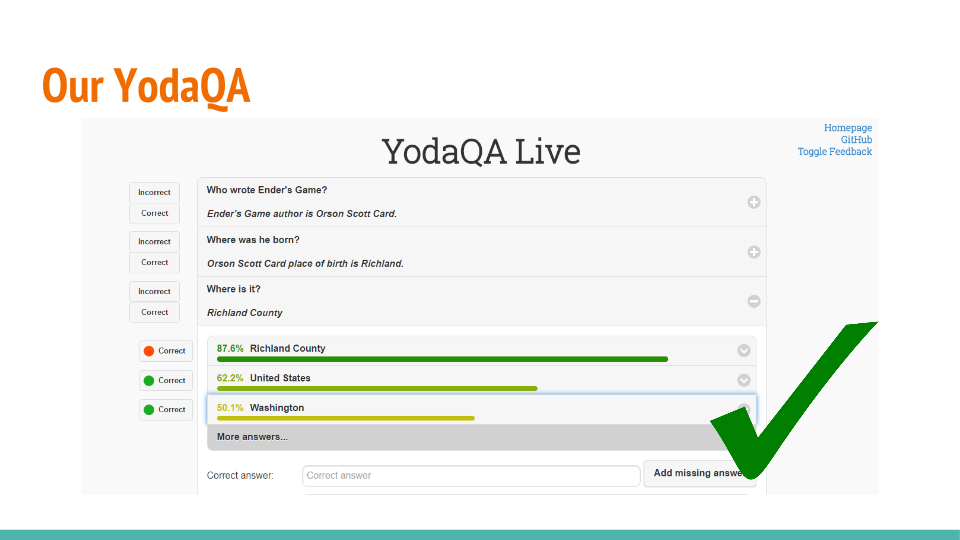
One of our great student interns at eClub/Ailao Petr Marek who also made the current YodaQA web interface is now working on adding a new element to our ecosystem – the Hub. This is an interface between the web app and the YodaQA system which takes care of various tasks that don’t fit a “pure question answering” system well. For example, it tracks dialog context or allows domain-specific question handling (if you want to add support for retrieving current traffic information, TV schedules or custom question transformations).
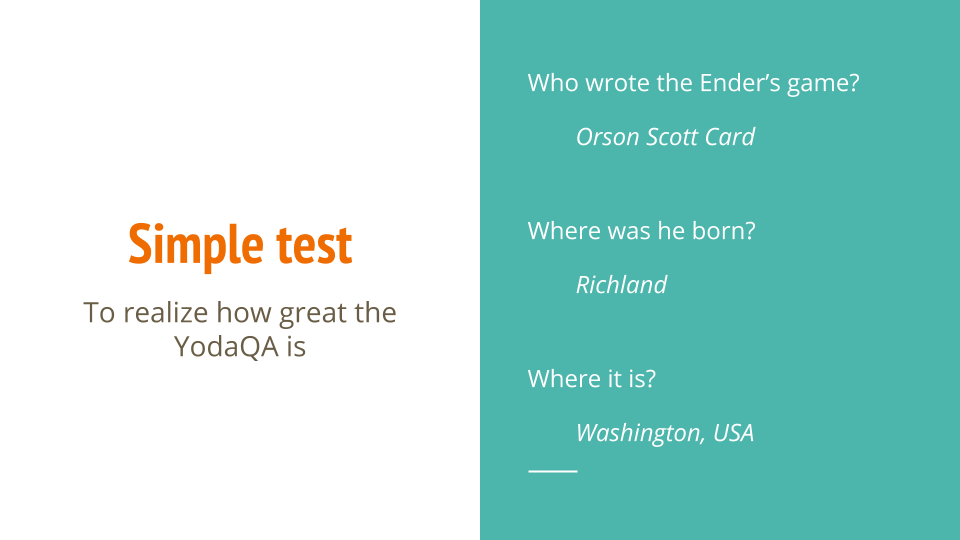
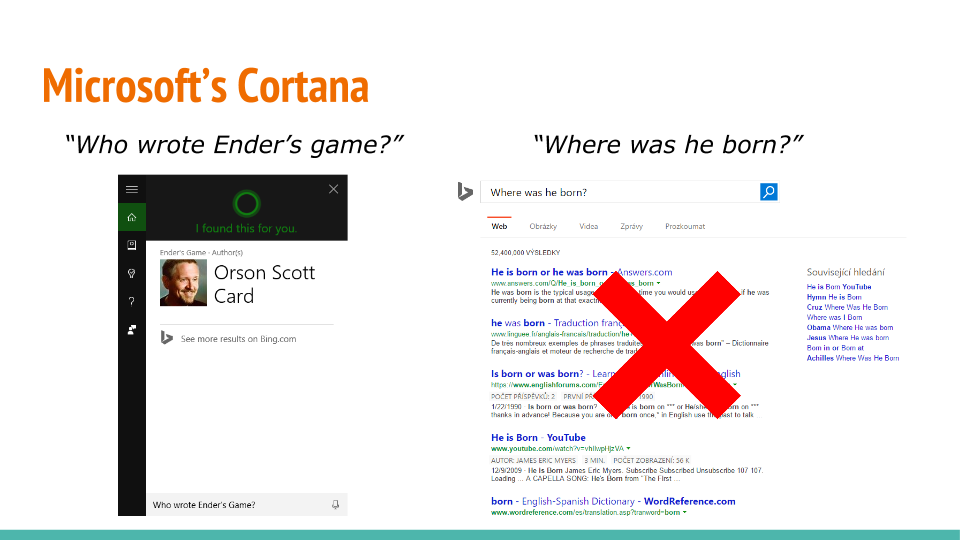
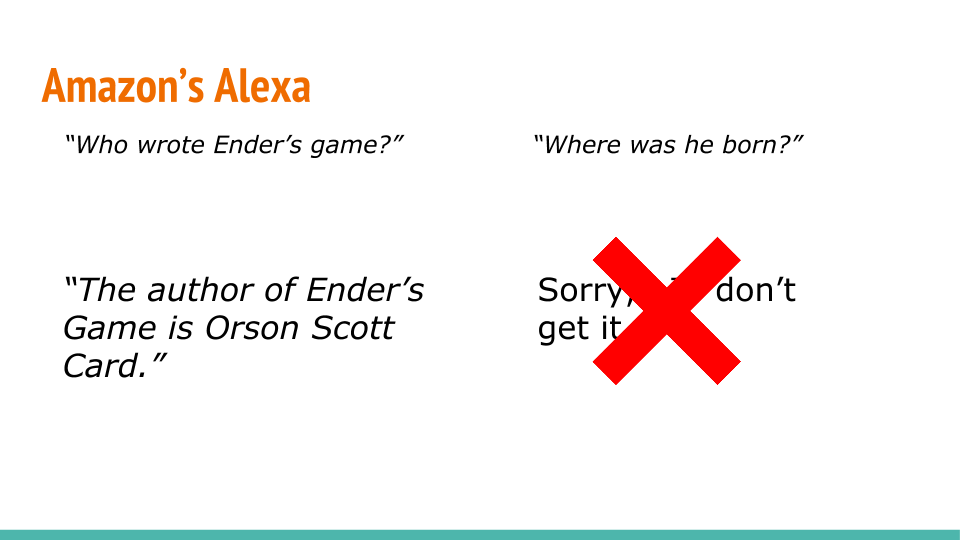
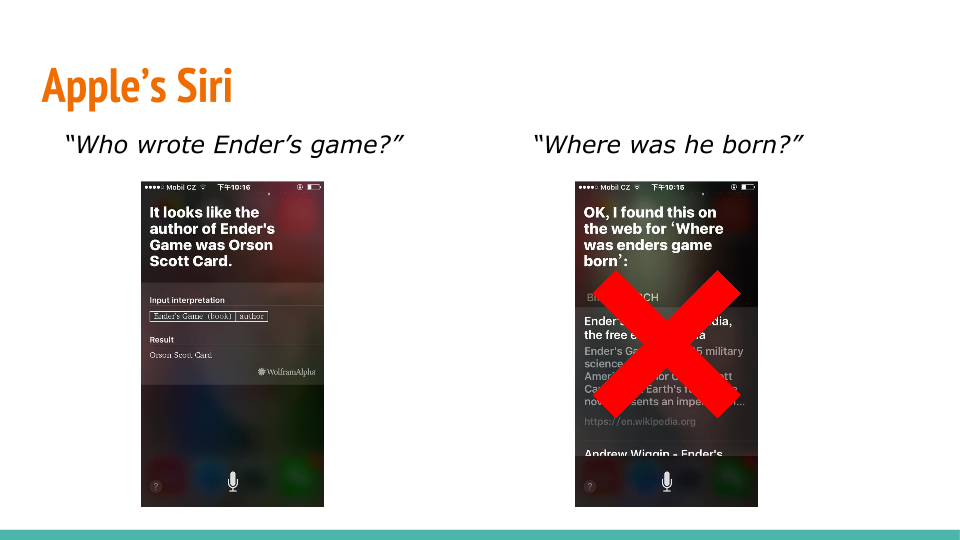
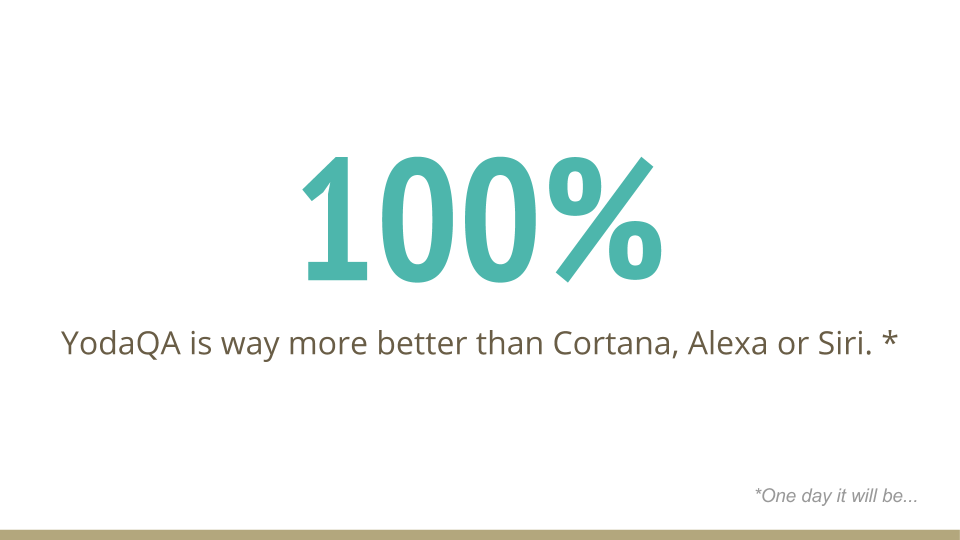
We see voice (and chat) as the perfect fit for question answering systems like YodaQA, and together with this, dialog comes naturally. This is why Petr M. has recently transformed our live QA interface to the dialog format (and it now goes through the Hub). The dialog tracking is internally still relatively simplistic from a scientific point of view, but it’s more than enough to already create a great impression. And right now, in a simple, tongue-in-cheek informal test, YodaQA does great compared to “competition”!

docker unstable package install with openSUSE Leap 42.1 ( + ansible )
I need install docker unstable version with testbed, so I write the note and ansible playbook with openSUSE Leap 42.1
-
-s - detail, but not much than -v "verbose"
-
--match-exact - match the package name
-
like --match-words ^docker$


-
--gpg-auto-import-keys - auto add repo key
-
-f - auto refresh
Loading repository data...
Why You Should Use Tumbleweed
People often ask me why they should use openSUSE Tumbleweed and how it compares to other distributions like Fedora or Ubuntu. The fact is Tumbleweed is actually rather hard, if not impossible to compare to Linux distributions like Fedora or Ubuntu.
Both are ‘traditional’, released-based distributions. They build it carefully over a few months, they ship it, and they then cautiously patch things (often keeping those changes as small as possible, backports, etc) to keep it secure/usable for their users over their chosen lifespan.
If you’re interested in an openSUSE like that, we have Leap, and I believe Leap to be better than Fedora and Ubuntu for a whole bunch of reasons, starting with the fact that Leap has an Enterprise codebase (SUSE Linux Enterprise to be exact) at its heart with the openSUSE Project building a fully-fledged community distribution ontop of it.
But today I want to talk about Tumbleweed.
While Leap aims to be rock-solid, Tumbleweed rolls.
It’s more like Arch and Gentoo in that regard. Tumbleweed today contains the latest packages of every software stack that has been packaged by the openSUSE Project. Latest kernel, libraries, desktop environments, everything in Tumbleweed can and does change regularly.
But, unlike other rolling distributions, Tumbleweed does it smarter.
Built Correctly
Tumbleweed is built like a ‘traditional’ distribution. All packages in Tumbleweed are built together as a cohesive distribution, and shipped together as a cohesive distribution. If a new package is checked in that potentially can invalidate another package (eg. new glibc, new libraries, new kernel, etc) then the dependant packages are rebuilt, just like traditional distributions.
But where as traditional distributions take days, sometimes weeks to do such, we do it in hours, because we have the Open Build Service.
- You can learn more about Open Build Service HERE.
- You can see, and use the openSUSE Build Service for free, today.
This produces a ‘snapshot’. At this point a traditional distribution would probably call this a ‘release candidate’, an ISO and a set of repositories with all the software built and ready for testing.
Most distributions take weeks to produce coherently built and tested disk images & repositories. Tumbleweed does it about 5 times a week.
Tested Well
But building is only half the story. A good distribution needs to be tested. A good rolling distribution needs to be tested quickly. Arch and Gentoo rely on manual testers and purposefully delaying the inclusion of packages in their main repos in order to give people time to test stuff. openSUSE has openQA.
Before any human being is allowed anywhere near a snapshot, openQA tests that snapshot over 100 times across four different hardware architectures (i586, x86_64, ppc64, and aarch64).
These are not artificial ‘some developer writing some code to poke around some APIs’ kind of tests.
openQA actually does proper real-world scenarios. Installations, upgrades, dual booting, encrypted LVM, kde, gnome, xfce, live CD’s, network installs.
You name it, we test it. And if we don’t test it well enough, we most certainly want to, and you can help contribute tests as everything in openQA is 100% open source.
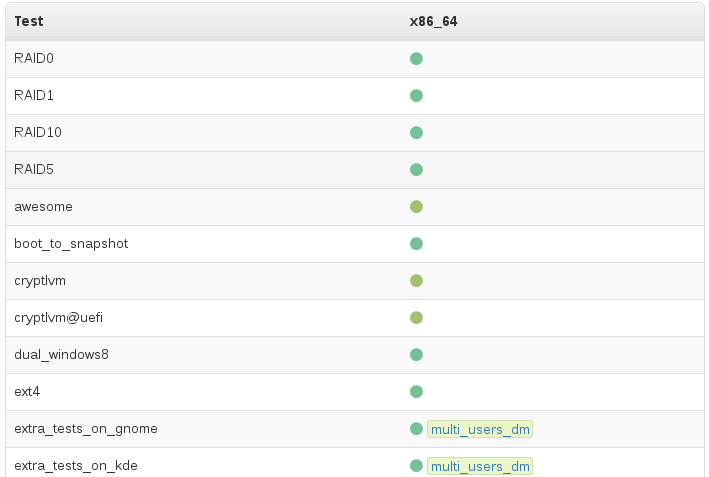
Again, these aren’t some kind of artificial ‘some fancy coder wrote a robot that can mash buttons in the right order’ tests. openQA can actually see the screens it is testing.
It uses openCV and a library of reference screenshots (with areas of interest selected to allow openQA to ignore things we don’t care about) which we call ‘needles’.
So every test checks that every screen looks the way we want it to look for users. Every function that is tested presses the same keys and clicks on the same mouse buttons that a user would, and then openQA confirms that piece of software behaves in the way it has been taught to expect.
openQA does this for every step in installations & upgrades.
openQA checks all the core console commands, systemd, zypper, YaST in ncurses mode, curl, vim, firewall, ssh, etc, etc.
openQA then logs into the desktop environment of choice (GNOME, KDE, lxde, xfce, etc) and checks graphical applications. Is gedit working? firefox? thunderbird? libreoffice? inkscape? gimp? etc, etc.
And it does this all in dozens of different scenarios, over and over again, in parallel across many VMs and machines.
We even do extra testing on incoming package submissions, so many cases we catch things before they get anywhere near a snapshot, and our developers get nice fast feedback about their otherwise potentially destructive change. Yes, we have implimented Continuous Integration for distributions, and if you were using OBS and openQA you could be doing it too.
Delivered Quickly
1000’s of tests, over 100 scenarios…and with our current hardware (thanks SUSE!) a full snapshot gets tested in about 3 hours.
And if it passes, it ships, automatically.
Most distributions take weeks to produce coherently built and tested disk images & repositories.
Tumbleweed does it about 5 times a week.
And a ‘quiet’ week can consist of approx new/updated 150 packages and a new kernel.
A normal week is double, if not triple that, and it’s moving faster and faster..
All that extra work doesn’t get in the way. We often beat other rolling distributions into delivering tested versions of KDE Plasma and GNOME, because we can test them quicker and ship them with a certainty that nothing breaks.
That’s not universally true though, good testing finds bugs, those bugs need to be fixed, so if you ever notice something taking longer than you’d like, it’s often a sign that we could do with more contributors helping Package that particular software. You can learn how to contribute to Tumbleweed HERE.
Trusted by More and More
Most of what I describe above was implimented after July 2014 and culminated in the ‘merger’ of Old Tumbleweed and Factory in November 2014.
Since then, the adoption rate of Tumbleweed has been nothing short of astronomical.. 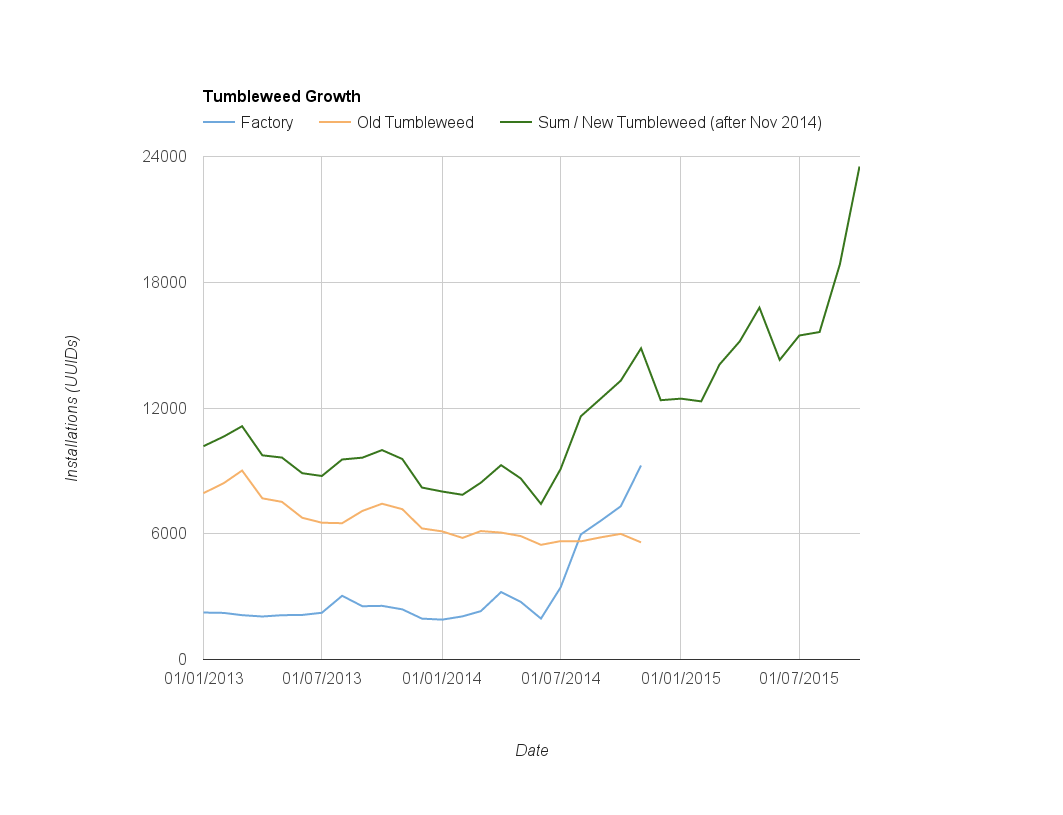
If public numbers are to be believed Tumbleweed might already be larger than ‘more famous’ rolling distributions. Whether or not that’s true doesn’t change one fact - We want YOU to try Tumbleweed.
And you’ll be in good company. Not only amongst those users, but companies like SoftIron who ship Tumbleweed on their Overdrive 3000 64-bit ARM servers, and Fujitsu who offer Tumbleweed as their chosen community Linux to customers with Skylake hardware. GNOME advertise Tumbleweed-based GNOME:Next LiveCD’s so their users can play with their latest releases as soon as they are shipped, even before the tested packages appear in Tumbleweed properly.
I may be biased, but Tumbleweed is the only rolling distribution I’d recommend to any Linux enthusiast as their daily driver.
If you care about Linux, you want the latest packages, but you only want them when they actually work, Tumbleweed is the best choice, bar none.
And anyone who disagrees with me is welcome to join the openSUSE Project, find us on opensuse-factory@opensuse.org Mailing List and help make it even better ;).
NOTE: This blog post started as a response to a Reddit Post. Thanks to the OP for the inspiration!
The end of Facebook and WhatsApp on BlackBerry 10
I am a proud owner of a BlackBerry Passport since more than a year now and have been extremely satisfied with this device. But the latest update of the Facebook app and the announcements around Facebook for BlackBerry 10 and WhatsApp leave me with some frustration.
It is no secret that the Facebook app for BlackBerry 10 never was on par with the Facebook apps on Android or iOS - neither feature nor stability wise. Facebook for BlackBerry 10 always had some hick ups here and there, but in the...

Connect to your server in your LAN via your WAN url: an openWRT solution.
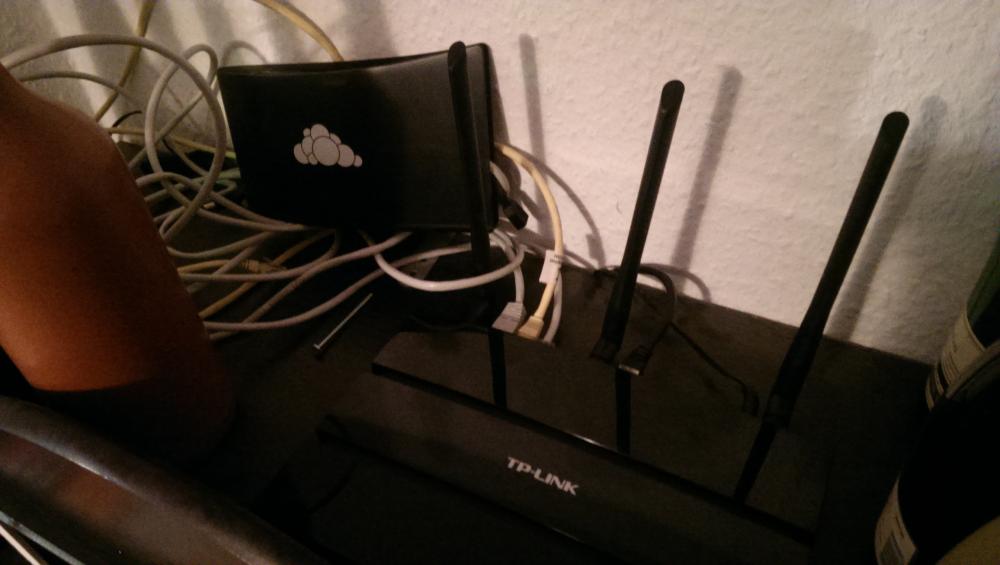
Can't reach the server from the LAN
Of course, I sync files on my desktop between my laptop and phone. The desktop client is setup with the IP address of the server in my living room. But my phone and laptop, configured to connect to my public, DynDNS URL (so they work when I'm traveling), can't connect from the home network. Triple-uncool. I like my photos from my phone to by auto-uploaded when I connect to wifi at home; and more importantly my laptop should sync when I get home from travel!Danimo blamed my router - a Cisco (Linksys) E4200. That was (once upon a time) an expensive, high-end router. Sadly, having been abandoned by its manufacturer, it has become an expensive, high-end liability. I can't even log into the administration interface, browsers tell me that the connection is insecure. There are more issues, like the slow WLAN-LAN transfer speeds I experienced and I'm not even talking about security here. Linus once eloquently expressed his feelings towards NVIDIA, a resentment I now feel towards CISCO.
openWRT to the rescue
I learned my lesson. No router not able to run an open source firmware will get in my house. While I don't feel any need whatsoever to fiddle with things that do their job, Linksys screwed up here: they left me on broken software long before I had any need for new hardware.After some digging, I learned that TP-Link has been (mostly inadvertently) a decent citizen for OpenWRT fans. So, even if they'd abandon their router like Linksys/Cisco did, there was a future. I bought a TP-Link Archer C7. Affordable and it can run OpenWRT.
After setting it up initially, things worked. For a day. After that, no amount of fiddling could make it work again. Magic. Today I gave up on the original firmware and installed OpenWRT. It was easy - as easy as upgrading to a new TP-Link firmware:
download the openWRT firmware, go to the upgrade interface, select it, hit start. A while later you ca visit the web interface. Which is a tad more complicated, but not much - and noticeably more capable. It didn't take me any longer than on the original firmware to set up my wifi and guest networks.How to make it work
But it didn't solve the problem. I had to resort to a web search and found a neat trick, which I'm happy to share (assuming 192.168.1.11 is your server on your LAN):- Log into your router over ssh
- Add to your /etc/dnsmasq.conf file the following:
address=/example.com/192.168.1.11 - Add to your /etc/hosts file:
192.168.1.111 example.com
Essentially, the DNS provider in OpenWRT will provide your local server address to local clients... It thus breaks when you use another DNS than the one provided by the router via DHCP.
I'd be happy to hear from other and/or better solutions. Heck, this might only work for a day or might be horrible or maybe I changed something else which made it work. What do I know...