
My openSUSE 13 Journal 1: Getting IBM Notes 9.0.1 to work!
In the meantime, a few readers has corresponded with me via comments in my previous post about getting IBM
I hope to blog more on 13.1 at a later date but will only focus on getting IBM Notes 9.0.1 working on 13.1 in this entry. I have been having some difficulties in my personal health lately and that only takes time away from pursuing my hobbies (blogging here being one of them).
First, I would like to acknowledge Craig for bringing to my attention the challenge and so proactively providing the links to his discussions in the Lotus forum (here). I would also like to Thank Ashu for his encouraging comments left on my previous blog entry and hope this entry will be just as useful to those out there who share the same fascination of using openSUSE and IBM Notes.
Installation - Easy as pie
As documented in previous blog entries, installation of IBM Notes 9.0.1 is really a piece of cake. You download the binaries (NOTES_9.0.1_LINUX_RPM_EN.tar), untar it into an empty directory and you will find 5 RPMs (i586 - 32-bit) and a few other files.As root, execute the following in the same directory:
zypper in *.rpm
Done! You will find the IBM Notes icon in the Recently Installed Apps folder in KDE4. Alternatively, the launch icon can also be found in the KDE::Applications::Office::More Programs::IBM Notes. Right-click and Add to Favourites to easily find it the next time.
First sign of trouble
First sign of trouble, at least for me, only occurred after successfully launching IBM Notes and when I get into my mailbox, view calendar or log into SameTime. The GUI would freeze and then IBM Notes would terminate and NSD runs.Read more »

 oy
oy2013 Development Updates
In presentations I like to use colourful graphics. Some of those graphics are generated automatically by the Cairo based oyranos-profile-graph 2D grapher tool. In git that tool obtained a option to show black body spectra based on kelvin. The spectra are scaled for better illustration.

CIE D65 and black body 6500 Kelvin spectral power distributions (SPD)
Some other work in Oyranos went on with the device mapping to JSON serialisation, as is useful to store device configurations using the Oyranos API. Through JSON files it is possible to support new device classes without to worry about creating a native Oyranos device module. The basic idea is to let users bring in a OpenICC device description and a weighting description. Oyranos is then able to find matches inside its DB and weight the resulting properties according to the provided weighting file. The example code is inside oyranos-test-device and needs still some polishing to become a stable tool. For instance more integration with the frontends and UI parts is needed, to make sure everything gives a nice user experience. Raw images can now be rendered better in image_display and do not show the artefacts from table based conversion of linear camera space to gamma encoded monitor spaces.
During spring 2013 I decided to abstain from public activities and paused coding completely. After some months I was mentally able to enjoy work on self contained stuff. That was first without any community involvement. Months later I contacted some people to explain that situation and want to thank here all those friendly souls who directly encouraged me. After what happened in the last years, I learned, that it can be pretty healthy to not to stay in public light and become involved in highly controversial discussions. Especially the later can become easily burning. As a result of that personal lesson, I skipped 2013 LGM and other meetings and outside activities. Now after around 9 months I feel really better and hope to become slowly more involved. Still I am learning how to keep others opinions at arms length. And that lesson appears key for me to stay welcoming and focused. Well, time will show how well .
Oyranos supports Elektra-0.8.4 in git as a result of friendly behind the scene discussions later in 2013. A new image filter, called “scale“, is currently used inside the image-display example viewer. It does so far no interpolation, but it might become useful for other applications as well, in order to select only a subset of unaltered image pixels. ICC named colour list reading was added. More changes happened around documentation, building external modules and use of threading inside the image-display application.
AbiWord import filter in LibreOffice: another tool for the swiss army knife
It all started by an innocent (?) question on 28th of November 2013. The inimitable Caolán asked whether anybody considered writing an import filter for AbiWord document format. And the distinguished readership of this blog knows well what makes your servant tick. So, the very evening, a skeleton was written and libabw, a library to read AbiWord file-format, started. It was pretty exciting to write -- after a host of libraries for file-formats that are not documented anywhere -- a filter for a file-format of our cousin. There was a hope that existence of a reference implementation whose source code is widely accessible would make the endavour easy. It is undeniable that grepping for values of different enums made the work a bit easier. Nonetheless, a huge part of the work was still figuring out what is permitted in AbiWord and how a change of one parameter affects the rendering of a document. Other thing to find out was how to map the concepts in the ABW files into the libwpd API that is heavily influenced by ODF concepts.
But the date of the start meant that soon came the Christmas and with it a possibility to spend some free time on the library. Eventually it became very usable and the import filter made it -- as a late feature -- into the LibreOffice 4.2 line and users of the upcoming LibreOffice 4.2.0 release.
The library currently supports both the plain xml ABW files as well as the gzipped ZABW files. The converted features include:
- Tables, including nested tables
- Headers and footers, including different left, right and first page headers/footers
- Footnotes and endnotes
- Multi-column sections
- Embedded images
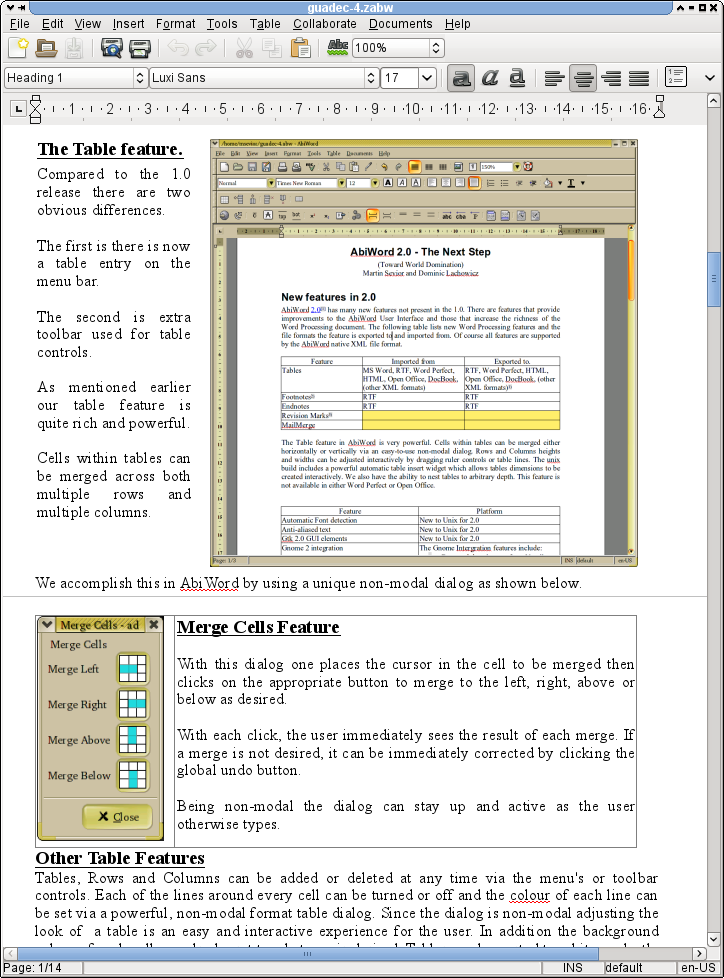
And since a picture speaks louder then hundred words, here are some screenshots:
 |
  | 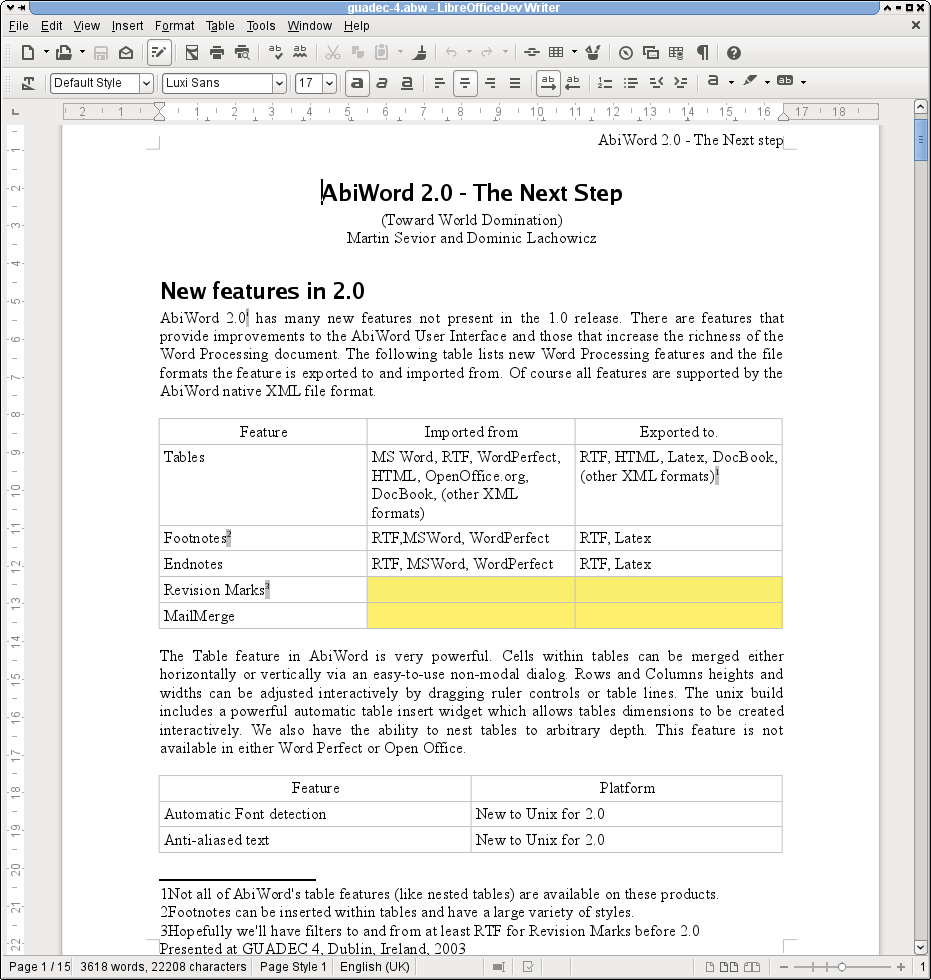 |
| A sample ABW file openedin AbiWord |   | The same ABW file openedin the upcoming LibreOffice 4.2.0 |
 |
  | 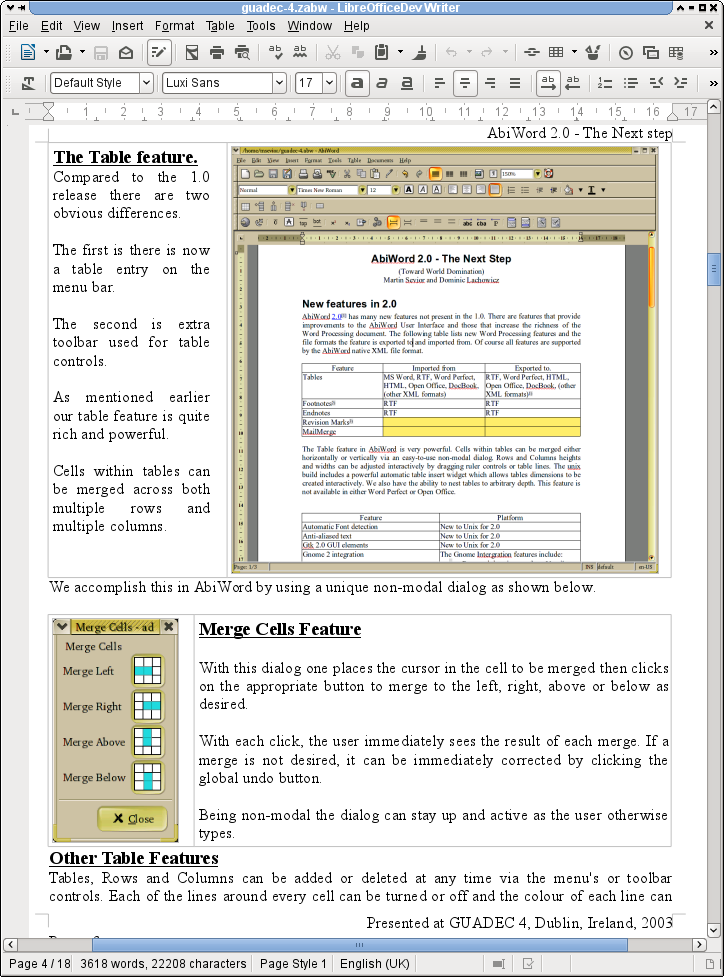 |
| A sample (zlib compressed) ZABWfile opened in AbiWord |   | The same ZABW file openedin the upcoming LibreOffice 4.2.0 |
As you can see from the screenshots, the world domination that we are actively seeking is having several contenders. But if you believe that we are the closest to its realization, please join the filter-writing fun! Show up on #libreoffice-dev channel at irc.freenode.net. You are also encouraged to follow my twitter and Google+ accounts. And stay tuned for more exciting news in the near future. We can promise you that you will have a lot of fun in the growing community of LibreOffice filter writers.
Root into a virtual machine (KVM)
single or init=/bin/bash to the kernel boot line in GRUB do not work. The only option left is to boot from a rescue disc, but this is a virtual machine -- there is no DVD drive. Oh, no -- what to do?NEWS FLASH: I just learned from a colleague that there is a much easier method. It is possible to
chroot directly into the VM from the virtualization host. Will post detailed instructions as soon as I get them. Until then, there is always the "long route" described below.Read more »
No forgotten patch to YaST anymore
As I wrote in the last blog post, we try try to open YaST development as much as possible. When I thought what is the most annoying thing for me when contributing to an open source project, then it is when my contribution is ignored. So if I send a patch and do not get any response or I get response, but my patch is not merged without any reason, then I do not contribute again as I see it as a waste of time. To prevent such situation in YaST I’ve created an automatic reminder of pending pull requests for the YaST repos at GitHub.
How it is done? I want to have it transparent, reusable and automatic. The core component is a small ruby script I wrote to fetch pending requests for an organization on GitHub. It uses the GitHub API and tries to find any pull request without activity for three working days.
This script is handled by our public Jenkins server where it pulls the latest version of the script every working day and if there is any pending pull request it will send an email with its result to the YaST mailing list.
After a month of sending emails we have handled all longer running pull requests we have for YaST, so none of them have gone without activity longer than a month. I hope it encourages developers to create more pull requests as they will not be forgotten. We plan also to deploy such reminder for the libyui organization.

 Member
2013 Learning Retrospective
- Learnt a lot about kernel space filesystems. Tried to write a beginner level introductory tutorial and then abandoned it. Instead started writing a simple kernel space filesystem from the scratch that can help as a teaching material - https://github.com/psankar/simplefs
- Implemented B Trees in Go. Researched a bit about B Trees, Log structured merge trees and gave a talk on how B Trees are used in filesystems https://github.com/psankar/btree-go
- Released a new version of my chrome extension with support for searching and highlighting multiple strings in Chrome https://github.com/psankar/Find-Many-Strings
- Learnt a bit about ext4 filesystem (de)fragmentation implementation. Started working on some tools to simulate filesystem ageing and filesystem fragmentation. Work in progress. This is part of the dayjob though and not done in the freetime
- Learnt more about the Go programming language. Almost all the projects last year were done on Go. Understood how to deploy my application in the Google cloud engine. Did some minor comparisons across various online appengines, such as heroku, amazon, google etc.
- Gave SublimeText a honest try and just as it happens with every other editor, came back to Vim, although this time with a few new plugins: https://github.com/Valloric/YouCompleteMe & https://github.com/tpope/vim-pathogen specifically
- Inspired by gotour, Implemented a HTML 5 based slideshow tool where the slides can be written in markup, slide contents can talk to any compiler and show the output in the webpages. This will come handy in teaching programming languages https://github.com/psankar/kuvalai
- Learned about bootstrap and angularjs. Did some non-trivial websites using these technologies
- Learned a bit about the architecture of various distributed filesystems
- As an extra unplanned activity in the dayjob, did a big buildcleanup by migrating to CMake from a proprietary buildsystem and was able to shed about 30k lines of buildfiles. Became well-versed in CMake, RPM generation as a side effect. Tried to play with ninja, tup too and learnt about their architecture
- Read few nice papers such as The Ubiquitous BTree by Douglas Comer, Vnodes: An Architecture for Multiple FileSystem Types in Sun UNIX, Build System Rules and Algorithms, Analysis of six distributed filesystems etc.
- Learnt a bit about linear time sorting by reading papers on sorting. Could not get to implementation sadly
- Take some coursera courses on Security, Compilers, Hardware software interface and Algorithms
- Learn Rust, Haskell and Dart programming languages
- Research more about Logstructured merge tree, implementing it and write a blogpost (or get more understanding) on how the changing hardware (SSDs etc.) affect our datastructures, performance etc. from a storage perspective
- Get a technical paper published :(
- Spend more time in the openSUSE community and mailing lists

Mirrored / Gespiegelt - Android App Updated
Mirrored / Gespiegelt - Android App Updated
Well, never actually blogged about this one. Although the project's initial release has been done in late 2010. It basically started as a proof of concept to see what those Android apps are all about. And it was a good exercise for doing some Java I used to need at university that time.
So what is it all about? Mirrored (German name "Gespiegelt") is a simple news reader to read the articles posted on Spiegel Online. What is special about it? It has been around even before the Spiegel published the official application. Though there is more, it has the capability to download and save the articles to read them offline. Comes in handy when having no internet flat rate or being on the subway without proper broadband people tell in comments.

Anyway, it is up on Google Play and can be installed from your favorite Android device. The source code and more information is available on Gitorious.
I just released version 0.2.5 fixing a bug in offline storage and a minor menu alignment issue caused by the latest design changes. Bug fixing, let me call it maintenance instead, is basically everything I do for Mirrored though. It is feature complete and my personal motivation for doing high level programming with Java is rather low.
So last but not least, let me seize the chance to thank Frank Scheffold and Doccrazy for their bug fixing and improvements during the last couple of years. I am really grateful for any patches or improvements I receive. Even if someone would like to take over maintainership, go for it.

Unterstanding the nvidia driver process

The NVIDIA drivers for openSUSE 13.1 took a while to appear. Many users have asked why this was and we’d like to explain what happened and what we plan to do to prevent this in the future. This post was written with input from the openSUSE developers who maintain these drivers at SUSE and work with NVIDIA to make them available for our users.
How it should work
Legally, the Linux kernel GPLv2 license leaves proprietary binary drivers in a bit of a tangle. While some claim it should be OK, others say not – and that is what most distributions currently assume: one can not ship a Linux distribution with proprietary, binary drivers. NVIDIA has agreed that our users can grab their drivers from the official NVIDIA servers. They are packaged by SUSE engineers however. They take care of both SLE and openSUSE proprietary driver packaging for NVIDIA hardware, and have contacts at NVIDIA who get the drivers up on their ftp mirrors.

The packages are build on a dedicated system, but the package spec (skeleton for building) is in OBS – for example, G03 is here. Anybody could use these to build the nvidia driver locally (the nvidia binary driver is grabbed from the nvidia driver during building). The command sequence for local building can be found in the README.
Once the packages are build, they are send to NVIDIA, which signs the packages with their key and generates and signs repositories, making them available to the public.
To note is the fact that this is all manual and takes a while on NVIDIA’s side (and ours). This of course is part of the reason why we don’t offer NVIDIA packages for Factory, our fast-rolling development repository.
What happened
What occurred for 13.1 is a typical case of “everything went wrong”.
Up until a few weeks before the release, the driver did not build against the Linux Kernel version 3.11. NVIDIA warned against the use of a patch for this problem created by third parties so the driver team did not have a running build. Due to a holiday, it took a while to get the packages build and pushed to NVIDIA. Unfortunately, by the time this was done, the holiday period at NVIDIA blocked progress for another week. Once the package was signed, it took the webteam at NVIDIA another week to get the repository published. It all added up to almost a month and brought quite some inconvenience for users eager to use their latest NVIDIA cards with the latest openSUSE.
About a week later, the openSUSE 13.1 NVIDIA drivers disappeared again from the nvidia servers for a day or so. We don’t know exactly what happened there, it might have simply been a server issue.
What we will do
The first and most obvious thing to change would be to improve coordination. The developers taking care of the NVIDIA packages should be made aware as early as possible about the release planning and a replacement in case for holidays should be available. We noted this in our 13.1 release report and will make sure that there will be a task in our task tracker for this for the next release. We also need to talk to NVIDIA about this to make sure that there, too, somebody can fill in for SUSE’s contacts.
But there are also thoughts on how to improve further. Some of the current ideas:
- To get drivers for Factory the process needs more automation as the driver may break on kernel or X changes
- We could try to open the process and work with community members to secure the process in case the SUSE folks are unavailalbe
- It would be nice if we could make NVidia to see benefit of working more on the driver in openSUSE, e.g. by doing some testing
- We could write some scripts that check regularly whether repo and packages are still available and in a valid state (meta data matches available RPMs)
We’ll have to see which of these we can implement, when and how. But rest assured that we will do what we can to prevent this in the future!

And the stats!
After a bit of a hiatus, we’re back with the numbers. Development has slowed down around new year and isn’t back to speed yet so the 10th spot is shared by quite a big group of people…
| Spot | Name |
| 1 | Stephan Kulow |
| 2 | Denisart Benjamin |
| 3 | Tomáš Chvátal, Dirk Mueller, Michal Vyskocil |
| 4 | Hrvoje Senjan |
| 5 | Ciaran Farrell |
| 6 | Petr Gajdos |
| 7 | Lars Vogdt, Pascal Bleser |
| 8 | Jan Engelhardt, Charles Arnold |
| 9 | Andreas Stieger, Michal Marek, Niels Abspoel, Kyrill Detinov |
| 10 | Dinar Valeev, Bjørn Lie, Ulrich Weigand, Tobias Klausmann, Marcus Meissner, Alexander Graf, Robert Schweikert, Martin Vidner |

Kdbus Details
Now that linux.conf.au is over, there has been a bunch of information running around about the status of kdbus and the integration of it with systemd. So, here’s a short summary of what’s going on at the moment.
Lennart Poettering gave a talk about kdbus at linux.conf.au. The talk can be viewed here, and the slides are here. Go read the slides and watch the talk, odds are, most of your questions will be answered there already.
mounting TrueCrypt volumes in GNU/Linux using cryptsetup
cryptsetup as of 1.6, which shipped in openSUSE 13.1, is able to mount TrueCrypt volumes without the use of TrueCrypt code otherwise, which I previously noted is problematic due to it’s license, at least for inclusion in the openSUSE distribution.
Here, then, is how you mount it:
cryptsetup open --type tcrypt /var/run/media/username/volume_name encrypted_volume

mount /dev/mapper/encrypted_volume /mnt
For read only access, add --readonly and -o ro respectively. When done:
umount /mnt

cyrptsetup close encrypted_volume
See man 8 cryptsetup for all details and options.