
 Member
 crowbyte
Vulkan API specifications released by Khronos Group
Yesterday the Khronos Group with participants from all segments of the graphics industry - including big players like AMD, nVidia, Samsung, Sony, Valve, Intel and many others - has anounced the availability of the first final and open specification of the Vulkan-API. It is comparable with Microsoft's Direct3D and Apple's Metal and planned as the successor to OpenGL.
The Vulkan-API is based on large parts of the AMD exclusive and closed source Mantle-API. Therefore it's no big surprise that A...

Sugar on openSUSE
Built openSUSE Leap based Sugar test images on SUSE Studio, get it from here.
If you wish to get involved with the project maintaining packages, fixing/reporting bugs, follow the links on the X11:Sugar build service project page.

Ixion 0.11.0
Version 0.11.0 of the Ixion library has been just released. You can download it from the project’s home page.
Here is the full list of changes since 0.9.1.
- C++11 is a hard requirement.
- implement R1C1 formula name resolver.
- remove boost dependency from the public headers (except for boost::thread).
- fix incorrect life-cycle management of pooled string instances.
- make it buildable on OSX.
- other general code cleanups.
- python
- correctly catch and translate
general_errorinto python’s, forDocument.append_sheet()method. - make python module build configurable.
- add
ixion.column_label()to convert numeric column indices into column labels. A1 and R1C1 are supported.
- correctly catch and translate

OpenStack Summit Austin 2016 Presentation Votes (ends Feb. 17th, 2016)
I have submitted a handful of sessions which I hope will be voted for. Below are some short summary's and links to their voting pages.
Operations and Management of your OpenStack Multi-Tenant Platform ( Speaker: Cameron Seader )
You need to deploy your OpenStack infrastructure with ease and without interruption. Audit your OpenStack environment for known vulnerabilites and quickly remediate them. When your growth creates a necessity to fine tune your storage, compute, and control resources you need to quickly determine your bottlenecks and easily...
https://www.openstack.org/summit/austin-2016/vote-for-speakers/presentation/7837
Shared Filesystems Management (Manila); Forging the way ahead ( Speakers: Cameron Seader, Anika Suri - NetApp )
Manila is the OpenStack shared filesystem service that was announced September 2013. In January 2015 it was labeled as an officially incubated OpenStack program. Now with the current stable release in Liberty, Manila is providing the management of file shares (for example, NFS and CIFS) as a core service to OpenStack. Manila currently works with a variety of vendors, including NetApp, Red Hat Storage (GlusterFS), EMC, IBM GPFS, Hitachi, HPE, and on a base Linux NFS server...
https://www.openstack.org/summit/austin-2016/vote-for-speakers/presentation/7927
Your Software-Defined Data Center Leading the Way; Agile DevOps ( Speakers: Cameron Seader, Simon Briggs)
With new tooling comes opportunity to change the way we do things. So take a journey through time, looking at where we have come from and where we are going.... OpenStack leading the way towards a software-defined data center. How can the software-defined data center take us to the cloud with OpenStack. Will we be able to adapt teams to these new methods? How to get there? Well learn about Agile development and DevOps and how they meet together to fill the gaps in your software-defined data center approach...
https://www.openstack.org/summit/austin-2016/vote-for-speakers/presentation/8261
mdds 1.1.0
I’m pleased to announce the availability of mdds 1.1.0. As always, the source package can be downloaded from the project’s home page.
This release includes the addition of 2 new data structures – trie_map and packed_trie_map, significant performance improvement on sorted_string_map, general bug fixes on some of the existing data structures, enhancement on multi_type_matrix, and support for user-defined event handlers for multi_type_vector.
Huge thanks to Markus Mohrhard for sorted_string_map’s performance improvement as well as the bug fixes and the enhancement on multi_type_matrix’s walk() method.
In addition, thanks to David Tardon, we now use automake as our build system which will simplify the process of package generation and integrity check among other things.
Here is the full list of changes since version 1.0.0:
- all
- switched our build system to using automake.
- packed_trie_map (new)
- new data structure that implements a trie also known as a prefix tree. This implementation requires all key values be known at construction time, after which its content is considered immutable. Internally it packs all its nodes in a single contiguous array for space and lookup efficiencies.
- trie_map (new)
- new data structure that implements a trie. It works similar to packed_trie_map except that this version is mutable.
- multi_type_matrix
- added a variant of walk() that takes the upper-left and lower-right corners to allow walking through a subset of the original matrix.
- multi_type_vector
- fixed incorrect return values of the increment and decrement operators of in-block iterators. They would previously return a value_type pointer which did not conform to the behaviors of STL iterators.
- added support for custom event handlers for element block acquisitions and releases.
- flat_segment_tree
- fixed incorrect return values of the increment and decrement operators of its leaf-node iterators as in multi_type_vector’s fix.
- sorted_string_map
- significantly improved the performance of its find() method by switching from using linear search to using binary search. The improvement is especially visible with a large number of elements.
Documentation
I’ve also added Doxygen documentation for this library for those who are more used to the Doxygen style comprehensive code documentation. The official API documentation has also received some love in the code examples for multi_type_vector. I plan on adding more code examples to the documentation as time permits.
Why I prefer openSUSE over other distributions

I recently had a discussion on Facebook in the openSUSE users group at Facebook about the reasons why we prefer openSUSE over other distributions like Ubuntu.
An almost complete list of openSUSE's benefits
Installation
One of the first benefits of openSUSE you will recognize is the Installation process. You can easily hit the Next button a few times, give some basic inputs like the username of your account and end up with a fully featured and functional copy of openSUSE on your hard...
Dual Boot configuration for Windows 10 and openSUSE with full UEFI and Secureboot support
Questions and preamble
As has become normal, the FOSS/Linux community is peppered with anxiety over yet another major change to the tech landscape issuing forth from Redmond. With the release of Windows 10 comes a great many questions for the thoughtful, and this is especially true for our very own Linux communities. With gratitude we can recall our own past relief upon discovering that UEFI and Secureboot are not the herald of the end-times we had feared them to be. That being so does not however relieve the question of safely upgrading our dual-booting computers to Windows 10 without losing our ability to run Linux in tandem.Excitement for Windows 10 was largely absent in me. I had grown quickly comfortable to the Windows 8.1 work-flow as it shared some similarities in those key areas which I had already grown to love in the GNOME Shell. Further, Windows served a role limited to usage for proprietary software that I deemed not sensible to coax into service on a Linux OS. However it did make sense for me to upgrade for my employment as a repair technician. It seems incumbent on me to familiarize myself with the upgrade process and the general operation issues of Windows 10.
Can I perform the upgrade safely?
How about a fresh installation?
Can I still get the free Windows 10 upgrade even if I want to cleanly install it?
How to install Linux alongside Windows 10
Prepare your hard drive
Create free space
In Windows, open the Disk Management module from the Control Panel. You can find this simply by searching for it from the Start Menu/Cortana. Select your Windows partition (this is probably C:\ and the largest) and right click. The context menu will show an option to "Shrink Partition." Select this, and specify the size you would like.
If Windows is not allowing the amount of space you would like for your openSUSE installation, you can try clearing your temp files with a utility (I use Glary Utilities) and rebooting. If this still does not work, you can use an advanced utility such as PerfectDisk by Raxco which has a special mode specifically for preparing the partition for shrinking.
Now Install
Post-installation configuration (critical)
"sudo zypper up"Now reboot, and you should be able to successfully boot into your Windows system. From GRUB, select the Windows entry since the next steps will need to be taken from within Windows. Though the same changes can be applied from within openSUSE, I find it much simpler to do from within Windows.
Optional step necessary for a few rare systems.
"bcdedit /set {bootmgr} path \EFI\opensuse\shim.efi"This line will instruct the computer's firmware (EFI which is the successor to the BIOS) to use openSUSE's GRUB boot loader.
And that's it. Have a lot of fun!
Why I use openSUSE over other distributions.
The below is a response to a Facebook query on why we use openSUSE over Ubuntu. I was happy with how it turned out and thought it could prove helpful to a larger audience.
There are a great number of reasons why we use openSUSE. Ultimately, what one prefers boils down to personal taste. I'll tell you why I use openSUSE.
1) YaST:
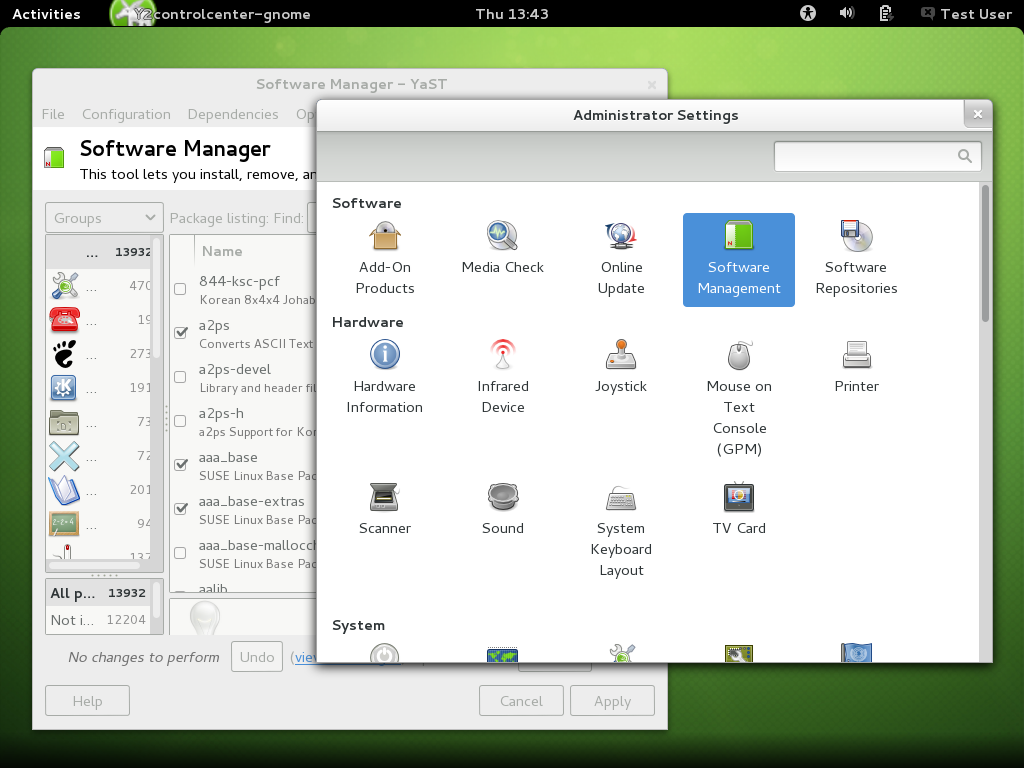
2) zypper:
Our package manager is called zypper. It has the most advanced dependency resolution available of any package manager whether it be Linux or another operating system. What this means is that it is trivial for us to perform complex installations and configurations that would be difficult or impossible elsewhere. In my experience with Ubuntu, I've had several instances where apt resolved a problem by removing X entirely, which broke the GUI system and was difficult to repair. In openSUSE, zypper prevents this sort of thing from happening.3) Desktops;
On openSUSE all Desktop Environments (such as Gnome, KDE, etc.) are treated equally, and can coexist on the same installation. Installing a new desktop environment is no more complex than installing any other package. Once they are installed, they can be selected from a dropdown on the login screen. Other distributions typically rely on 'spins' for delivering alternative desktop environments, such as Ubuntu Gnome. Part of why we can do this is that zypper has superior logic, and can handle this complexity better than other package managers.4)Help;
The openSUSE community is famed for its responsive and competent forums. Rarely is a user left without a solution for more than a day. Competent professionals and developers answer user questions in the relevant forums. Our community is friendly and helpful.5)KDE and Gnome;
openSUSE is famed for having one of the most stable and well integrated KDE environments of any distribution. Less well known is our incredibly well done Gnome implementation as well, which is what I prefer and am always happy with the job our team does.6) OBS;
Our Open Build Service gives users and developers a common place to build and share their software with the entire community. OBS works in concert with our online software.opensuse.org portal to allow easy Direct Install (formerly One-Click) of any software built on OBS. Direct Install will automate the adding of repositories, resolution of dependencies, and installation of the software. This makes otherwise complex or time consuming tasks swift and trivial. It also allows for an ever expanding library of software, and the distribution of complex packaged solutions in the form of YaST meta-packages.In conclusion, though Ubuntu claims to be the most user-friendly, I find that claim to be unjustified. I've always found it to be more prone to breakage. And once there is a problem, it is much harder to fix than it would be in openSUSE since we have YaST and don't often need to rely on the command line or manually editing text configuration files.
7 cups of tea – Product review
Juggling between homework, working on my part time job and searching for a full time sums up my life. As I try to balance my life, there are slumps when I wished I had someone to vent out my frustrations to. But then, everyone is so busy that no one has time for anyone. If a friend has time to talk to you, can I be sure that they won’t judge you for having this super awkward conversation which no one wants to talk about? I can not be sure about this. I wished to have someone to talk outside my peer group, hopefully immediately without scheduling an appointment and without getting judged will provide a bit of support when I needed it the most.
After talking to my peers, I found out that I was not alone. A major portion of undergraduates and graduate students alike report mental stress or related issues because of increasing workloads. As they combat these mental and emotional stress, they want an outlet to vent out their feelings without being judged by their peers. Campus resources are inadequate as they are coupled with long waits. Students have to wait for weeks before making an appointment with the campus psychological services. During these wait times, if the issues are not solved, they get exacerbated.
This was when I was came across 7 Cups. 7 Cups is an on-demand emotional health and well-being service that connects people anonymously with trained listeners. By using this service, people can
- talk to someone who will not know them
- talk to groups of people anonymously who have faced the same problem regulated by a listener.
- talk on various topics ranging from mental disorders to daily activities like College Life.
- can get some help when they are waiting to be counselled by a professional counselor.


The ability to talk to people about various stress sources / mental disorders was incredibly useful. To validate my hypothesis that the application might be useful, I tried it a couple of times and spoke to a listener. I felt lighter and better after our conversation. So, I spoke to various students around the campus and see what they felt about handling stress. Out of the 18 students I spoke to, I received at least 3 or more students who shared that having an outlet will be useful.
Students quoted
[…]the times when I can’t get over the hump on my own, I wish I had someone there to give me just the motivation I needed.
It would be nice to talk to people, but maybe not here
“Sleep helps, talking to people helps, putting things in perspective also helps.”
Help yourself section
7 cups also provides a set of resources for its users when they do not want to talk to anyone but are looking for specific strategies or resources that can help them manage their problems on their own.
The Help Yourself section provides
- a set of exercises that the users can use for self improvement
- forums where they can ask questions
- self-help guides that students can refer when they want to


Customized Portals
7 cups has customized portals that identifies the needs of specific communities. Identifying their needs is important as different communities will have different problems. Couples running households will have different problems and invariably face stress in a different form than teenagers. While the categories address that, 7 cups of Tea has extended the same notion beyond categories and come with customized portals.
They have launched a customized portal for startups where startups can talk to list for listeners who are trained to listen to entrepreneurs. Along with that, they have customized resources where they can look for help that can improve their daily lives, relationships with families and friends across.
Directly quoted from their website, we find that even when entrepreneurs go through depression and other problems.
The ups and down of startups are often compared to a roller coaster. The downs can be really rough. Talking to others who have gone through what you are going through can really help. – JESSICA LIVINGSTON, Partner, Y Combinator
Most of my life I have struggled with depression. I’ve written about it, talked about it, coached and listed to others fighting with it. It’s a horrible isolating and debilitating condition. – Zak Homuth, Co-Founder & CEO, Upvert
My wish – Customized portals for Universities
Over the past few months, I have spoken to over 30 students by conducting formal interviews or randomly surveying them in the hallways, I have realized that there is an urgent need, and universities create a unique environment that contribute to stress for students. Having customized portals for universities can go a long way in helping students combat daily emotional and mental sources of stress.
Research at the University of Michigan suggests that different student population react differently to stress. A study led by Prof. Daniel Eisenberg, approximately one-third of college students experience a mental health issue at some point. However, only 10 percent of student athletes with depression or anxiety take advantage of mental health resources – as compared to 30 percent of students overall. Students at campuses often face different kind of stress that can be because of their academics, gender, sexual orientation, race etc.
Repeatedly, from the user interviews I conducted, I found that students needed an outlet to share their feelings. Customized portals for Universities will not only make listeners aware of the issues at the University, but will also help them tailor their conversational skills for the community groups. Additionally, universities can provide more training opportunities for students who are enrolled in their Social Work program to make them better future counselors.
Not only does it makes sense for 7 Cups to have separate portals for Universities, research shows that it makes business sense for Universities to trial run new emotional well being and mental wellness services. A revenue model developed by Prof. Eisenberg shows the potential loss for students who drop out of college because of stress and the loss in revenues. The example table at the end of the post shows that student productivity is lost valued at $3,125,000. The university fails to make an additional $ 1,562,500 revenue per year because of students dropping out.
There are other products like Breakthrough which provide confidential counselling, however 7 Cups differentiates themselves from other competitors by
- Pricing their product for free and opening up premium features at a very low cost (7.99$ / month for a year’s package).
- They provide active listening services and in no way a replacement to real counselling. The listeners are explicitly asked to not give advice, prescribe medicines to their clients and refer their clients to a counselor / psychiatrist in such cases.
On a concluding note, I find 7 cups a very interesting product in an interesting space, and is trying to solve a much needed problem that is often not realized or talked about in public spaces. By leveraging technology, 7 Cups can potentially change a lot of interactions in the mental health community. Despite all of the positives, products like 7 Cups should be used with a pinch of salt. Users might not realize and start seeing their listeners as mental health providers. In this process, the users might start avoiding mental health providers and their issues can get worse. 7 Cups and other services should make it exceedingly clear that they are not professional mental health providers but an individualized support system where they provide help to their users. Coupling these services with professional counselors and mental health providers can go a long way. Services like 7 Cups can provide a stand-by when users wait to seek help from experts.
Appendix
- Example Table (ref from Prof. Eisenberg’s revenue model)

- Thanks to Nick Sands and Mitchell Boldin from School of Information, University of Michigan who helped me with the user interviews.
- This blog post is part of the application process for KPCB Product Fellows
- This blog post was posted on Indian Standard Time.
- I will be working with 7 Cups over the next 2.5 months to test their products at the University of Michigan as a Product Management Intern. The research has been done independently and has no association with 7 Cups.
Running live image from RAM
Some time back I wrote a patch to KIWI that allows running openSUSE live entirely from RAM(tmpfs).
How to use it?
Pass “toram” parameter at the boot menu. Try it on Li-f-e.
Benefits:
Running the OS from RAM make it lot more responsive than running from DVD or USB device, for example it is most useful for running a demo computer where many users try lot of applications installed in the live system. USB or the DVD can be ejected once the OS is loaded. It can be used to load OS to RAM directly from iso in a virtual machine as well.
Caveat:
Needs enough RAM to copy the entire iso to RAM and then some spare to operate the OS, Li-f-e for instance would need minimum 5G RAM available. It also takes a bit longer to boot as the entire image is copied to RAM.