
Greek openSUSE community, Translation of openSUSE Weekly news in Greek (issue 205)

Hello everyone!
I am very pleased to announce the new issue (205) of openSUSE Weekly News in Greek.
In this issue you will read about:
* Jos Poortvliet: Calligra…
* The Tumbleweed subforum
* ITworld/Brian Proffitt: SUSE: Global Linux jobs on the rise
* ITWire/Sam Varghese: A tale of two distros: openSUSE and Linux Mint
* Will Stephenson: openSUSE Board Election – My Manifesto
As well as many interesting news about openSUSE and useful advice, which can make our lives easier.
Enough said though... Read more at: http://own.opensuse.gr, http://el.opensuse.org/Weekly_news or www.os-el.gr
We are always looking forward to receiving your comments as well as suggestions regarding things you would like to read about in our next issue.
The openSUSE Weekly News is being translated in the Greek language from issue #150. You can read older translated issues here: http://el.opensuse.org/Κατηγορία:Weekly_news_issues
Enjoy it!
Efstathios Agrapidis (efagra)

Using direct textures on Android
I’ve been working at Mozilla on Firefox Mobile for a few months now. One of the goals of the new native UI is to have liquid smooth scrolling and panning at all times. Unsurprisingly, we do this by drawing into an OpenGL texture and moving it around on the screen. This is pretty fast until you run out of content in the texture and need to update it. Gecko runs in a separate thread and can draw to a buffer there without blocking us, but uploading that data into the texture is where problems arise. Right now we use just one very large texture (usually 2048x2048), and glTexSubImage2D can take anywhere from 25ms to 60ms. Given that our target is 60fps, we have about 16ms to draw a frame. This means we’re guaranteed to miss at least one frame every time we upload, but likely more than that. What we need is a way of uploading texture data asynchronously (and preferably quicker). This is where direct textures can help.
If you haven’t read Dianne Hackborn’s recent posts on the Android graphics stack, you’re missing out (part 1, part 2). The window compositing system she describes (called SurfaceFlinger) is particularly interesting because it is close to the problem we have in Firefox. One of the pieces Android uses to to draw windows is the gralloc module. As you may have guessed, gralloc is short for ‘graphics alloc’. You can see the short and simple API for it here. Android has a wrapper class that encapsulates access to this called GraphicBuffer. It has an even nicer API, found here. Usage is very straightforward. Simply create the GraphicBuffer with whatever size and pixel format you need, lock it, write your bits, and unlock. One of the major wins here is that you can use the GraphicBuffer instance from any thread. So not only does this reduce a copy of your image, but it also means you can upload it without blocking the rendering loop!
To get it on the screen using OpenGL, you can create an EGLImageKHR from the GraphicBuffer and bind it to a texture:
#define EGL_NATIVE_BUFFER_ANDROID 0x3140
#define EGL_IMAGE_PRESERVED_KHR   0x30D2

GraphicBuffer* buffer = new GraphicBuffer(1024, 1024, PIXEL_FORMAT_RGB_565,
                                          GraphicBuffer::USAGE_SW_WRITE_OFTEN |
                                          GraphicBuffer::USAGE_HW_TEXTURE);

unsigned char* bits = NULL;
buffer->lock(GraphicBuffer::USAGE_SW_WRITE_OFTEN, (void**)&bits);

// Write bitmap data into 'bits' here

buffer->unlock();

// Create the EGLImageKHR from the native buffer
EGLint eglImgAttrs[] = { EGL_IMAGE_PRESERVED_KHR, EGL_TRUE, EGL_NONE, EGL_NONE };
EGLImageKHR img = eglCreateImageKHR(eglGetDisplay(EGL_DEFAULT_DISPLAY), EGL_NO_CONTEXT,
                                    EGL_NATIVE_BUFFER_ANDROID,
                                    (EGLClientBuffer)buffer->getNativeBuffer(),
                                    eglImgAttrs);

// Create GL texture, bind to GL_TEXTURE_2D, etc.

// Attach the EGLImage to whatever texture is bound to GL_TEXTURE_2D
glEGLImageTargetTexture2DOES(GL_TEXTURE_2D, img);
The resulting texture can be used as a regular one, with one caveat. Whenever you manipulate pixel data, the changes will be reflected on the screen immediately after unlock. You probably want
to double buffer in order to avoid problems here.
If you’ve ever used the Android NDK, it won’t be surprising that GraphicBuffer (or anything similar) doesn’t exist there. In order to use any of this in your app you’ll need to resort to
dlopen hacks. It’s a pretty depressing situation. Google uses this all over the OS, but doesn’t seem to think that apps need a high performance API. But wait, it gets worse. Even after jumping
through these hoops, some gralloc drivers don’t allow regular apps to play ball. So far, testing indicates that this is the case on Adreno and Mali GPUs. Thankfully, PowerVR and Tegra allow it, which covers a fair number of devices.
With any luck, I’ll land the patches that use this in Firefox Mobile today. The result should be a much smoother panning and zooming experience on devices where gralloc is allowed to work.

My openSUSE 12 Journal - 5: Desktop Bits & Bytes
Can't locate your hidden Wifi access point?
Here is a neat command (as root) that you can execute to help NetworkManager connect to a hidden wireless access point OR when NetworkManager is unable to detect your desired wireless point fast enough in a wifi-saturated environment.
where wlan0 is usually your default wifi device, if you are unsure, execute ip add to verify.
MyWifi is the name of your desired/hidden wireless access point. For ease of use, you could wrap this into a nice little script.
Read more »

 Member
 wstephenson
openSUSE Board Election – My Manifesto
TL;DR: openSUSE as a project needs to raise its game, and the next openSUSE Board can guide the project to agree a tight set of goals for our releases and work to a higher standard on them. Otherwise we risk being an undirected mess of pet projects, bikeshedding discussions and bickering tribes.
Read more at my platform page. Then go and vote!

XDC 2012: Nuremberg!
For 2012 we (Egbert Eich, Professor Hopf, and I) will be hosting the annual X conference in Nuremberg!
Egbert will try to get the main SuSE conference room, or, failing that, Matthias will try to get us a university aula, so the venue itself will work itself out beautifully in one way or another. Then... Nuremberg is one of those places which is perfect for large crowds who need food and some liquids in the evening (frankonian/bavarian beergarten culture), so it is the perfect (and highly affordable) conference area from that point of view. And, the best part, even though Nuremberg is not the international hub that Frankfurt is, or the european hub that Munich is, it is halfway between the two, and travel is relatively easy from either of those points, either you take the plane, or you take a much more comfortable train from either airport, and get to Nuremberg in pretty much the same time. You can really make a big save comparing those two airports when flying inside european aerospace, and this for no time difference. One insider tip though: you get to ride the ICE at full speed (300+km/h!) when traveling from Munich (you do have to endure the rather pedestrian S-bahn for 45 minutes though).
Anyway, the main action item now is that Egbert can start to poke SuSE to see when their main conference room is available for 3 days in september 2012 (working network and enough power sockets are a given then!). I doubt that we will get an answer still in the three remaining weeks of this year.
The actual proposal e-mail sent to the board is sadly only available to X.org foundation members, but a wiki page will soon be created which recreates most of that information. But rest assured, we will get close to the wonderful experiences of XDC Toulouse (thank you Matthieu!) and XDC chicago (thank you Michael!) indeed!
(oh, and btw, we have a FOSDEM DevRoom this year, which is rapidly getting its schedule filled! If you are coming, get your talk in right now: first come, first serve!)
The Exo Typeface Family
Some week ago, I’ve stumbled upon a very promising font project. It’s called the Exo Typeface Family and I think this could be a valuable addition to our distribution:
The sans serif font is beautifully crafted and contains 9(!) different width as you can see in the following graphic:
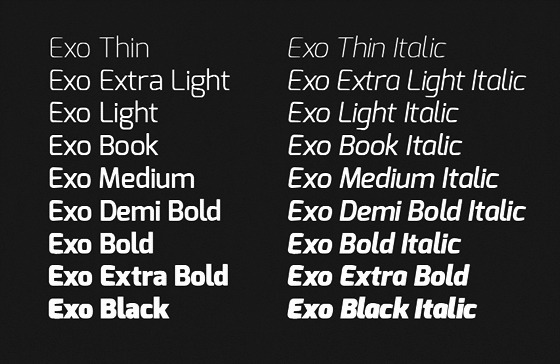
Natanael, the graphic designer, wrote about his font:
Today Exo is already a very mature font family, with over 700 characters supporting most Western, Central and Eastern European languages – and it can still go further! This coverage has been reached for all 9 weights, the maximum possible on the web. Each weight has an upright style and the corresponding ‘true’ italic style. Many ‘techno’ fonts have only the simple slanted oblique companion styles, but for the highest typographic quality it is essential to have true italics that are drawn specially.
Some unique OpenType features:
- small caps
- discretionary ligatures
- stylistic alternates
- old style figures, tabular figures, fractions
- a lot more…
If this project reaches its funding goal it will be published in Google Web Fonts under the SIL Open Font License. Currently, almost 80% is pledged, but only 18 days are left. If you find this project useful, please help Natanael and make the Web a more beautiful place. I already did so. Thanks!
Cooking with DocBook
Hi DocBook lovers,
browsed through a book, used your favorite search engine, or posted on LinkedIn, Xing, or the DocBook mailinglist to hunt for answers to your problems?
As an additional alternative, I’m happy to announce my latest project:
The DoCookBook Project
(released under Creative Commons License)
The tongue-twisting name is a word play and picks up the two central topic about DocBook and cookbook.
What is the “DoCookBook Project”?
This project is a collection of problems and solution towards DocBook and the DocBook stylesheets. The book contains helpful topics with step-by-step instructions.
Why another project about DocBook?
Information about DocBook can be find in books or somewhere in the Internet. However, it can be an exhausting task to extract the necessary piece which fits to your problem. This project can help you to get your work done more quickly.
Is it done?
Not yet. Currently it is a draft. However, the structure is almost complete. The book contains some useful topics and it will be improved and extended over time.
Can I see the source code?
Sure! The source code of this book is published and maintained as a Mercurial repository.
Ok, you’ll get me! How can I support the project?
- Register on the project mailinglist to influence the direction or to get updates
- Point out typos, ambiguities, inconsistencies, or errors.
- Let me know what’s your favorite topic.
Send me your topics directly or use the project’s ticket system (see Ticket#15).
If you want to use the latter, you’ll have to register at Sourceforge - Write your own topics.
- Create a cool new layout.
- Support this project and donate a small amount.
Have fun!


AppStream Software Center on Fedora
Watching software-center code changes, this one came into my attention: an effort from Giovanni Campagna into bringing Software Center to Fedora, using the PackageKit backend I’ve been working on this summer.
It’s nice to see someone showing interest, and also picking up the code  .
.
I must definitely get the time to fix my experimental OBS build, and see the openSUSE version running again. For the record, there is room for improvement on the performance part (especially starting up speed).
Xen or KVM
Since little more than half a year, I am in the process of installing a new virtualization Platform. One of the hardest decisions to make was if we should use Xen or go with KVM. We already have Xen in production and I know that it works well. From KVM we expect, that it will be growing faster then Xen and be the right thing on the long run.
The machines that I have as hosts are quite powerful. They are 48 Core AMD Opteron with 256 GByte of memory, and FCoE based Storage devices for the guests. We are using a converged network where both, FC and Ethernet, go over the same redundant 10GBit ethernet line. Storage is external FC storage from different devices.
The most important features that we need for such a platform are these:
- Stability
- Performance
- Tools
After doing a number of tests, it is obvious that both systems are stable. I did not encounter crashes related to the hypervisor technology.
Performance is also an interesting point. Especially the speed of block and network devices is not the best when using virtualized guests. This holds true for both, KVM and Xen. Note, that comparing CPU or Memory performance in standard environments is not very useful. Even if one of the systems performs slightly better, both are very close to hardware speed in terms of CPU and Memory. However outbound connectivity is an issue for both.
One exception is when you invest some more effort and use the new NUMA features provided with the latest Xen. The IO performance of network devices was roughly 4 times the performance without using NUMA.
One of the drawbacks when using NUMA on Xen is, that you have to use the tool “xl” instead of “xm”. For some unknown reason, you can dump configurations from “xl” only in SXP format, but “xl” won’t let you start a guest from such a configuration. This renders the tool quite useless in a production environment.
This brings me to Tools. For me, Xen has the tools that are easier to operate than KVM. Especially life migration syntax is way easier on Xen. On the other hand, both are simple enough to be operated by experienced people. For those that do not like the command line, “libvirt” offers a number of graphical tools that can cope with both, Xen and KVM.
One thing to mention is, that with Xen you can enable a locking mechanism that prevents you from running the same guest on different Hosts. I have yet to find similar functionality on KVM.
Now let me add some words about issues I encountered. As I already told, we have Xen running productive and it works quite well. I also found the Xen developers being relatively responsive when some bug occurs. From my other blog entries you can see, that Xen also offers a number of debugging capabilities.
With KVM, there are two major issues I have right now
- Life migrations are not safe in KVM. I repeatedly encountered block device corruptions when doing life migrations. This also holds true when using “cache=none” for the qemu configuration. Simple migrations still work without problems.
- The networking inside a 10GBit environment behaves strangely. When connecting a Guest to a remote server I get connection speeds at about 30-40kByte/s. All the connections between the respective hobs in this environment work as expected (Guest -> Host, Host -> Server).
Resume:
Both, KVM and Xen are usable if you do not need life migrations. OTOH life migration is an essential feature in a production environment. It enables you to service a Host without taking down the guests. If the life migration feature is not fixed until SLES11-SP2, I will have to return to Xen.
For the moment, KVM is not on par with Xen. However, in the long run I expect that KVM will gain momentum and eventually be the platform of choice. If I had to select a platform in a critical business environment today, I would go with Xen. On the long run, it might be better to go with KVM, but this depends on the further development of KVM.
The major development areas that will influence my decisions in future will be
- IO Speed
- Support of NUMA architectures
- Support for HA features like “Remus” or “Kemari”
The race is still open…
My openSUSE 12 Journal - 4: Minor Frustrations
Boot 12.1 using the old System V init
In my first journal entry, I complained the lack of "chattiness" during boot since the adoption of Systemd. You can easily switch to the old System V init on boot. At the grub boot loader screen (usual 8 seconds delay) and before you hit Enter to boot, press the F5 button to switch from default to System V. Now, press Enter to boot and press the Esc key during the splash screen to see the familiar System V init messages.

init=/sbin/sysvinit
For example, in /boot/grub/menu.lst, at the end of the line starting with "kernel /boot/vmlinuz-3.1.0-1.2-desktop...", append the line above and save the file. On the next boot, you can verify the change in the Boot Options field. Press Enter and you will boot up 12.1 under the old System V init.
Read more »