
 Member
 IonutVan
Access a running X session via x11vnc
I am using FreeNX but here is a solution to access a running X session with x11vnc.
* install the package:
$ sudo zypper install x11vnc
* ssh to remote machine and:
$ x11vnc -display :0
* ok, now on local machine:
$ vncviewer your_remote_ip:0
For more details and some comments (password option, ...) check the following link and try: man x11vnc
closest book meme
- Grab the nearest book.
- Open it to page 56.
- Find the fifth sentence.
- Post the text of the sentence in your journal along with these instructions.
- Don’t dig for your favorite book, the cool book, or the intellectual one: pick the CLOSEST.
"Taking Burgundy and Provence peaceably by marriage, he proceeded to make Italy the fulcrum of his new empire."
The quote comes from A Mighty Fortress: A New History of the German People by Steven Ozment.
Developing with libyui/libzypp & python – part4
Let’s extend the application to make it even more useful!
* add support for YaST-Repositories
* add Support for different architectures
* use always a random temporary directory
Now, it looks like this:
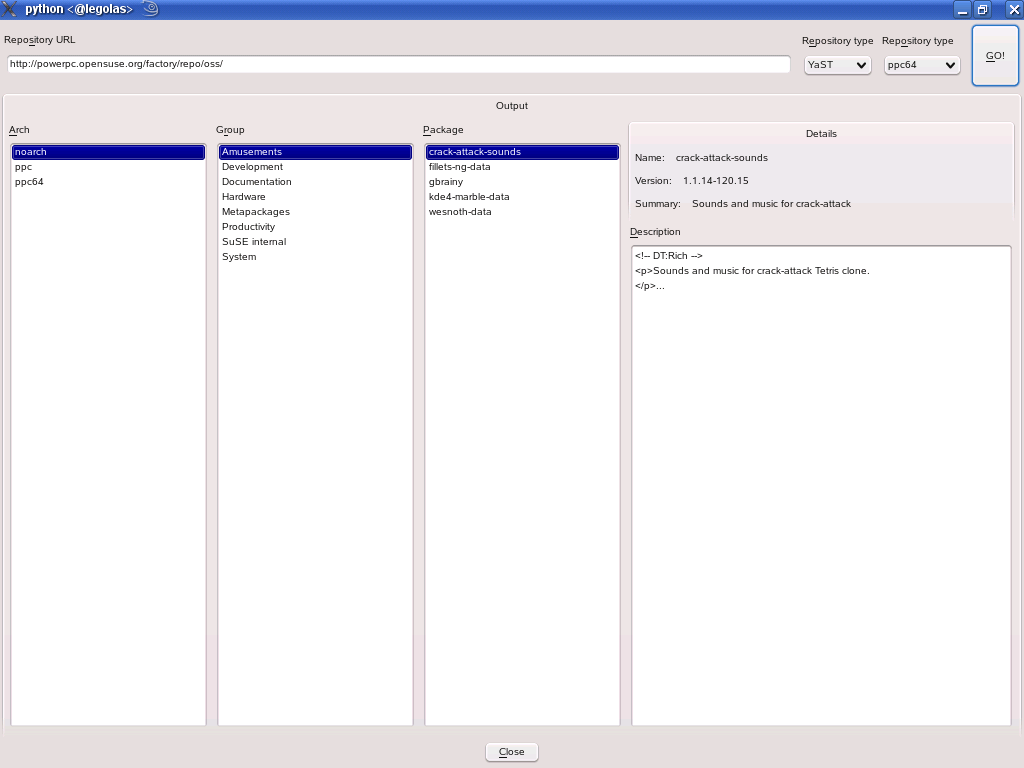
You can grab it out of my home: in the openSUSE Build Service (for openSUSE 11.0).
Start it with “repoviewer”, add the repository’s url, select the type, the architecture and hit “Go!” .
You can choose the architectures only for the “highest” type of the family as they list the “lower” types, too.
So to see “ppc” packages. use “ppc64” in the combobox and later “ppc” in the “Arch” column.
For big repos (like factory) it takes some time to download and parse the metadata.
Also try in a console-window:
unset DISPLAY; repoviewer
 thanks to libyui, that just works !
Update: You can access also local directories (like mounted CDs/DVDs).
Just use “file:///” and the full path ! E.g.: “file:///media/SU1100.001/”
Brasero 0.8.3 release
Hi,
brasero 0.8.3 has been released.
Again the focus has been bug fixing but some features were added:
- allow use of remote files
- drives are now probed asynchronously and may not popup immediatly but brasero starts faster
- some parts of GUI were revisited (in particular the burn option dialogs)
Also there is a new nautilus extension which can be installed in parallel with NCB.
#558343 – Cover Editor accessibility issue.
#558469 – Audio CD cloning fails but brasero reports success
#558207 – Labels in start page of New Audio Disc is not accessible to screen reader.
#557810 – Video Project Compute File size Hang
#556725 – command line option for video projects
#557833 – Brasero Graphical Interaface Disappears after simulate & during writing
#556874 – Error is shown when trying to select an image file to burning
#556146 – brasero crashed with SIGSEGV in g_main_context_dispatch()
#556724 – Brasero main GUI appears after closing the dialog when opening an ISO file using Nautilus
#555860 – Brasero fails make distcheck
#547395 – Support for remote filesystems
#556449 – Session error : Insufficient space on media when copying an audio CD (same problem with trunk)
#552811 – crash after delete used directory
#551051 – Brasero shows absurdly large %-done when burning a symlink-to-ISO
#555776 – Brasero will fail to get disck information on big-endian machines
#555703 – brasero delete original files in VIDEO_TS folder
#535330 – Volume label should be part of the project
#550526 – Wrong drive's speed displayed
#553349 – Cannot burn a .m3u playlist file when the logical steps below are followed
#465175 – Location field not working
#547874 – Unable to choose order audio tracks in a Audio CD project
#554722 – Main window does not fit on a 600px vertical screen (netbooks)
#552834 – burning image file fails
#554292 – brasero crashed with SIGSEGV in brasero_mkisofs_base_write_to_files()
#550050 – First run dialog after burn
#549852 – Data DVD+RW detected badly as multisession
#538298 – Burn image dialog history
#547731 – warn idiot users ...
And many other bugs that were fixed before they were reported in bugzilla.
Thanks to all the people who contributed to this release through patches, translations, advices, artwork and bug reports.
>
Congrats for Philippe for his daughter that born last week. yay
Zypper 1.0.0
So what's next?
Several ideas and problems appeared so far. Some need to be implemented in libzypp itself, some are purely zypper's. Here is a list of the most important things for zypper 2.
- Configuration file (.zypperrc).
- Nice overall install progress.
- Much improved install summary (options to view version/vendor/arch changes, changelog, ...).
- More options to handle patterns (remove, install suggested, ...).
- Advanced media error handling with options like eject DVD drive, select DVD drive, edit failed URI, enable/disable medium specific options.
- Fixed or removed zypper shell (can it be useful enough to be worth to maintain it?)
- Interface to new libzypp functionality like 'download only'.
- and more...
Stay tuned on features.opensuse.org, this TODO file, this blog and blogs of other ZYpp hackers (see my links).
Kubuntu upgrade from 7.10 to 8.10
I am using Kubuntu in Vmware just to play arround with it, so I decided to upgrade from 7.10 to 8.10, and this means that I will have as well KDE4. The upgrade process has been very easy, but I needed to upgrade first to 8.04 and finally to 8.10, so, here are the steps:
7.10 to 8.04
$ sudo apt-get update
$ sudo apt-get upgrade
$ kdesudo "adept_manager --dist-upgrade" # (using ALT+F2 in KDE)
8.04 to 8.10
$ kdesudo "adept_manager --dist-upgrade" # (using ALT+F2 in KDE)
That's all.
Zypper Command Reference
I needed an overview of all zypper's commands and options, so i created this little script that prints all the help texts. It can be used to search for options through all commands, or to create a reference sheet for printing like this:
$ ./zypper-help-all | fold -s | a2ps -rjB --columns 3 -o file.ps
todo: fix some inconsistencies in option names (see this thread for discussion)
todo: wrap the help texts at 79th column, bug #423007 (no more need for 'fold -s' in the command above)
Off to Egypt!
But to keep a bit SUSE relevant ...
We (well mostly Novell Technical Support Developers) now put my CVE index in an official place! It is updated once daily.
If you find incorrect stuff or older CVEs not yet linked, do not hesitate to mail us at security@suse.de (be aware that new published issues take a some days through QA usually).
Also, Wine 1.1.8 has been released and is in the openSUSE buildservice repository as usual.
YaST releases independent of openSUSE releases?
YaST is one of the cornerstones of openSUSE. It is developed for openSUSE and is released as part of openSUSE. There never was a release of YaST independent of openSUSE. Even the versioning of YaST is tied to openSUSE – the versions are 2.X.Y, where X is increased for every openSUSE release (17 for 11.1) and Y is simply a patch level, whenever a new fix or feature is added. Even more, every YaST package has its own versioning, so the only way to ensure you have a consistent set of YaST packages is via dependencies set in the .spec file of the YaST packages.
But in principle, YaST is a tool that can be used across distributions and there are people interested in this to happen. There are technical barriers to do releases independent of openSUSE (e.g. a lot of openSUSE-specific knowledge and behavior coded in YaST) as well as procedural. During past years, a lot of these non-technical issues has been addressed as we opened up the YaST development (re-licensing the code under GPL, opening up source control system and mailing lists, etc).
But still, there is one big thing left: YaST packages are released in concert with openSUSE. Yes, it is very convenient for openSUSE, but it makes it almost impossible to track the development during for people outside of our great distribution.
If one looks at the way the YaST packages are updated during the hotphase of an openSUSE release, the core parts of YaST (yast2-devtools, yast2-core, libyui, …) are rarely updated, they get a bug fix here and there. However, the distribution specific parts (yast2-pkg-bindings, yast2 common libraries, bootloader, storage, networking, …) get a fast flow of patch-level releases, typically several between openSUSE milestones.
Thus, the way forward I like the most right now is a compromise: a core YaST system should be released independently of the openSUSE release cycle while specific modules could keep their crescendo during openSUSE hot phase. How to do that?
For core YaST packages (a list to be defined) would be released independently of openSUSE and during hot phase, they would be handled the way other FOSS parts of openSUSE are – by patching the code in the package. The rest of the YaST, current practice would stay untouched.
There are clearly advantages – the YaST developers can do a proper release management of the core code and it is much more predictable how the core part of YaST will be released. On the other hand, people would need to be aware of the split.
However, I can imagine there is a lot of I did not realize. I’m definitely interested in comments about this topic.