
openSUSE Conference Schedule Set
The schedule for openSUSE Conference 2024 is out and it is filled with several talks about open-source ecosystem and includes several breaks for networking opportunities.
Open-source enthusiasts, developers and contributors will meet at the Z-Bau from June 27 to June 29 to share, discuss and showcase the latest advancements in open-source technologies, projects and communities. The conference will feature a series of talks, workshops, meetups and keynote speakers providing valuable insights into current and future directions of open-source software.
Santiago Zarate, Oliver Kurz, and Livdywan are scheduled to kick off with a session on openQA - Current State and Moving Forward. The talk will highlight the evolution of openQA as a crucial tool for ensuring the stability of openSUSE’s systems and expanding its impact beyond openSUSE, Fedora and SUSE.
Marcus Meissner and Johannes Segitz will present The XZ Backdoor - Report from Our Side and provide a retrospective on a significant supply chain attack involving the xz compression library. They will discuss the attack’s impact, response measures and future security considerations.
Two keynotes will take place on the first day. SUSE’s CEO Dirk-Peter van Leeuwen will speak about the importance of community and fostering collaborative open-source environments.
Luca Di Maio will provide a keynote session on Developing on Aeon with Distrobox. The presentation will introduce Distrobox and demonstrate how it can be used as a development environment within Atomic and Transactional systems like Aeon.
The second day is scheduled to begin with Alfonso Hernandez’s Midori is Much More Than a Web Browser talk. Hernandez will explore the features and benefits of Midori, a lightweight, fast and secure browser, and its role in promoting user privacy and security.
Jsrain will provide a SUSE ALP: State of the Matters talk. The session will cover recent developments, upcoming releases and how the openSUSE project can build on SUSE’s ALP development.
Rick Spencer, General Manager at SUSE, will deliver another keynote. His talk Why openSUSE Matters will share his insights on the significance of openSUSE in the broader open-source ecosystem.
The final day will feature Dan Čermák’s The Tragedy of Community Enterprise Linux Distributions. Čermák will discuss the challenges faced by community variants of enterprise Linux distributions and propose potential solutions.
Markus Feilner will present Exchange Your Exchange: grommunio - An Open Source Drop-In and So Much More and highlight grommunio as a comprehensive open-source replacement for Microsoft Exchange, which offers groupware, video conferencing, chat, file sync and more.
A Fedora Hatch Meetup, led by Čermák, will provide an informal space for Fedora contributors and enthusiasts to discuss their experiences and network.
Tobias Görgens’ sdbootutil: Mastering the Art of Boot Management talk will introduce a tool designed to simplify bootloader management on openSUSE to make the process more intuitive and robust.
The openSUSE Conference 2024 is expected to be a great informative event for sharing, collaborating, learning and innovating.
For more information and to register, visit events.opensuse.org.

gnome-remote-desktop: D-Bus system service in GNOME release 46 (CVE-2024-5148)
Table of Contents
- Introduction
- Review Motivation and Scope
- A) Unauthenticated Handover D-Bus Interface (CVE-2024-5148)
-
B)
find_cr_lf()Suffers from a one Byte Overread -
C)
grdctlUtility Accepts Cleartext Password on the Command Line - Timeline
- References
Introduction
gnome-remote-desktop offers access to the graphics system either via the VNC or the RDP (Microsoft remote desktop) network protocol. Before version 46, gnome-remote-desktop was only used in the context of existing graphical user sessions. Starting with version 46, one can also configure a system daemon, that allows to connect to the GNOME display manager (GDM), allowing to create graphical sessions remotely.
The system daemon runs as a dedicated “gnome-remote-desktop” user. It provides a D-Bus interface on the D-Bus system bus. The daemon also interacts with a newly introduced D-Bus interface provided by GDM, to create remote displays.
While reviewing the new system service I found a number of local security issues and areas for security improvement. The more relevant issues are discussed in this report, while an upstream Gitlab issue contains a more detailed report and discussions also covering less severe aspects found during the review.
This report relates to gnome-remote-desktop release 46.0. Bugfixes for the issues described are found in release 46.2, except for item C) for which no fix is available yet.
Review Motivation and Scope
D-Bus system services require a review by the SUSE security team, before they can be added to openSUSE distributions and derived products. With the addition of the system daemon, a review of gnome-remote-desktop became necessary, before adding it to openSUSE Tumbleweed in the context of the larger GNOME 46 release.
The review was mainly concerned with the newly introduced system level gnome-remote-desktop daemon. The focus was furthermore on code paths related to the RDP protocol, which is the default and preferred over the VNC protocol.
Since the codebase of gnome-remote-desktop is rather large, I focused the review on the security of the D-Bus methods, the Polkit authentication and parts of the network processing. I also did not look closely into the FreeRDP library, which is used by gnome-remote-desktop for processing the majority of the RDP protocol.
A) Unauthenticated Handover D-Bus Interface (CVE-2024-5148)
Only the “org.gnome.RemoteDesktop.Rdp.Server” D-Bus interface is
protected by Polkit. auth_admin authorization is required on this
interface for all methods. The other two interfaces “Dispatcher” and
“Handover” are not authorized and are accessible to all local users in
the system. This leads to a number of local security issues described in
the following subsections.
Local Private Key Leak
The system daemon keeps public SSL certificates and their corresponding private keys in “/var/lib/gnome-remote-desktop/.local/share/gnome-remote-desktop/certificates”. Access to the service’s home directory in “/var/lib/gnome-remote-desktop” is restricted to the service user “gnome-remote-desktop”, mode 0700.
Through the “org.gnome.RemoteDesktop.Rdp.Handover” D-Bus interface any
local user can intercept the private SSL key, though. The private key is
returned from the StartHandover D-Bus function. When a remote desktop
client connects to the system daemon, then there is a rather long time
window, during which any local user (even nobody) can call this method on
the created session object. This is an example call to achieve this:
gdbus call -y -d org.gnome.RemoteDesktop -o /org/gnome/RemoteDesktop/Rdp/Handovers/sessionc11 \
    -m org.gnome.RemoteDesktop.Rdp.Handover.StartHandover someuser somepass
The username and password parameters are not important here, they will only be forwarded to the connecting client. Doing this, as another effect, also results in a denial-of-service, because the proper connection handover will be prevented.
A local attacker does not necessarily have to wait for somebody to connect to the system daemon, it can connect on its own via localhost, to achieve the same result. Valid credentials for RDP authentication are necessary to get to the handover stage, however.
The impact of this problem is a local information leak and local DoS. The information leak means that the integrity and privacy of RDP connections on the system are compromised. This simple Python script allows to reproduce the issue.
System Credentials Leak
If an RDP connection uses shared system credentials (see struct member
GrdRemoteClient.use_system_credentials), then a local attacker with
low privileges can obtain these credentials in cleartext in a similar
fashion to the private key leak, by calling the unauthenticated
GetSystemCredentials() D-Bus method of the Handover interface.
Using these system credentials, the attacker will be able to connect to the display manager via RDP. This should not directly grant access to a session, since a login on display manager level still has to happen. An exception would be if things like automatic login are enabled (I don’t know whether they apply to remote connections).
The Socket Connection can be Obtained via TakeClient()
The equally unauthenticated D-Bus method Handover.TakeClient() allows
any local user in the system to obtain the file descriptor pertaining to
the RDP client that is in handover state. This could allow a local user
to perform a denial-of-service of the RDP connection or to setup a crafted RDP
session.
Obtaining the socket via this call only works in certain system daemon
states, most notably it seems the StartHandover() needs to have been
performed for this to succeed. I did not fully investigate what the
exact preconditions are.
Bugfix and Affectedness
This CVE only affects gnome-remote-desktop releases 46.0 and 46.1, since the system daemon was only introduced in these versions. The bugfix is available starting from version 46.2 and is found in commit 9fbaae1a.
With the bugfix applied, only the user for whom a new session has been created will be able to call the handover interface anymore. This still means that all users with RDP access share the same private key, which, according to upstream, is by protocol design.
B) find_cr_lf() Suffers from a one Byte Overread
This function processes untrusted pre-authentication RDP protocol
network data (the routing token) and looks for a terminating \r\n
sequence. The size calculation in the function’s for loop is wrong: if
the final byte of the buffer is 0x0D, then the logic will access the
next byte out of bounds. This buffer is not null terminated.
The impact should be negligible in most cases. This is the output of Valgrind I obtained after sending a crafted packet to the daemon:
==31119== Invalid read of size 1
==31119==    at 0x15A1EF: UnknownInlinedFun (grd-rdp-routing-token.c:65)
==31119==    by 0x15A1EF: UnknownInlinedFun (grd-rdp-routing-token.c:159)
==31119==    by 0x15A1EF: UnknownInlinedFun (grd-rdp-routing-token.c:239)
==31119==    by 0x15A1EF: peek_routing_token_in_thread (grd-rdp-routing-token.c:281)
<snip>
Bugfix
The bugfix is found starting in release 46.2 in commit 663ad63172.
C) grdctl Utility Accepts Cleartext Password on the Command Line
The text-based grdctl configuration utility, which is used for both,
system and session context RDP setups, accepts cleartext passwords in
the following invocation styles:
grdctl [--system] rdp set-credentials <username> <password>
grdctl [--system] vnc set-password <username> <password>
This means that the cleartext password will leak via the /proc file
system and will be visible in the process task list via ps, when
configured this way. Other users can thus get access to the
authentication data.
Bugfix
Upstream declined assignment of a CVE for this issue. They consider the shared credentials to be of rather low sensitivity and state that other ways exist for users to set the credentials, that don’t leak information to other users (GNOME Control Center, the D-Bus API, writing the credentials file directly). A feature request to allow reading the password via stdin has been added to an existing Gitlab issue.
Timeline
| 2024-04-19 | I reported the issues and other recommendations and remarks via a private issue in the upstream Gitlab, offering coordinated disclosure. |
| 2024-04-22 | Upstream decided to handle all findings except for the unauthenticated Handover D-Bus methods publicly. No formal coordinated release date was established for the remaining private issue. |
| 2024-04-26 | I requested a CVE from Mitre to track the unauthenticated Handover D-Bus methods issue described in section A). |
| 2024-05-13 | After Mitre did not assign a CVE for weeks, it was agreed that upstream would request a CVE from RedHat instead. |
| 2024-05-20 | Upstream received CVE-2024-5148 to track the unauthenticated Handover D-Bus methods issue. |
| 2024-05-21 | After asking for the expected time frame for publication of the remaining private issue, upstream decided to publish right away. |
References


Python 3.13 Beta 1

Python 3.13 beta 1 is out, and I've been working on the openSUSE Tumbleweed package to get it ready for the release.
Installing python 3.13 beta 1 in Tumbleweed
If you are adventurous enough to want to test the python 3.13 and you are using openSUSE Tumbleweed, you can give it a try and install the current devel package:
# zypper addrepo -p 1000 https://download.opensuse.org/repositories/devel:languages:python:Factory/openSUSE_Tumbleweed/devel:languages:python:Factory.repo
# zypper refresh
# zypper install python313
What's new in Python 3.13
Python interpreter is pretty stable nowadays and it doesn't change too much to keep code compatible between versions, so if you are writing modern Python, your code should continue working whit this new version. But it's actively developed and new versions have cool new functionalities.
-
New and improved interactive interpreter, colorized prompts,
multiline editing with history preservation, interactive help with
F1, history browsing withF2, paste mode withF3. - A set of performance improvements.
- Removal of many deprecated modules: aifc, audioop, chunk, cgi, cgitb, crypt, imghdr, mailcap, msilib, nis, nntplib, ossaudiodev, pipes, sndhdr, spwd, sunau, telnetlib, uu, xdrlib, lib2to3.
Enabling Experimental JIT Compiler
The python 3.13 version will arrive with an experimental functionality
to improve performance. We're building with the
--enable-experimental-jit=yes-off so it's disabled by default but it
can be enabled with a virtualenv before launching:
$ PYTHON_JIT=1 python3.13
Free-threaded CPython
The python 3.13 has another build option to disable the Global
Interpreter Lock (--disable-gil), but we're not enabling it because
in this case it's not possible to keep the same behavior. Building
with disabled-gil will break compatibility.
In any case, maybe it's interesting to be able to provide another version of the interpreter with the GIL disabled, for specific cases where the performance is something critical, but that's something to evaluate.
We can think about having a python313-nogil package, but it's not
something trivial to be able to have python313 and python313-nogil
at the same time in the same system installation, so I'm not planning
to work on that for now.
 Member
 DimStar
openSUSE Tumbleweed – Review of the weeks 2024/19 & 20
Dear Tumbleweed users and hackers,
Last week, there was a public holiday on Thursday in some parts of the world (Ascension Day). Unsurprisingly, many devs, including myself and Ana, took Friday off to enjoy a longer weekend (and I can tell you: the weather was fantastic). As a result, I have to span two weeks of changes to Tumbleweed here once again. We have published 12 snapshots since my last review (0502…0515, snapshots 0504 and 0513 were not built due to weekends)
The most relevant changes delivered as part of those snapshots were:
- Mozilla Firefox 125.0.3
- LibreOffice 24.2.3.2
- GNOME 46.1
- GIMP 2.10.38
- LLVM 18.1.5
- GCC 14.1
- KDE Frameworks 6.2.0
- PHP 8.3.7
- PostgreSQL 16.3
- Systemd 255.5 & 255.6
- Linux kernel 6.8.9 (with linux-glibc-devel already prepared at 6.9)
- Ruby 3.3.1
- QEmu 8.2.3
- util-linux 2.40.1
Snapshot 0515 contained an openssh update, that mistakenly recommended installation of the subpackage openssh-server-config-rootlogin; this package has existed since the default configuration of openSSH was changed to not permit root login anymore, so admins could easily switch it back on. Due to an error, this had been triggered for automatic installation. This has since been corrected and a version of openssh-server was published to the update channel, which is NOT recommended. Please check your installation and remove the package again, should it be installed and you don’t need it (we can’t auto-remove it without breaking users that explicitly wanted it)
The following things are known to be worked on at the moment and are reaching you in some upcoming snapshot:
- chkstat package being renamed to permctl
- Rust 1.78
- Mesa 24.0.7
- Linux kernel 6.9.1
- Ninja 1.12
- dbus-broker: some networking issue after upgrades left to work out
- GCC 14: phase 2: use gcc14 as the default compiler – lots of help needed: https://build.opensuse.org/project/show/openSUSE:Factory:Staging:Gcc7
Releasing version 8
The YaST Team is back with more news about Agama. On our previous post we exposed the first two steps of our roadmap for 2024: a more powerful user interface for the storage setup and a new Cockpit-free architecture with a better API for external callers. Now we are proud to announce Agama 8, delivering initial versions of both features.
The great architectural change
As explained at the mentioned blog post and detailed at this Github discussion, we got powerful reasons to rethink Agama's architecture, getting rid of Cockpit and switching from D-Bus to HTTP as main communication protocol between the different Agama components.
The changes are useful to integrate Agama into bigger solutions and are obviously beneficial for remote or unattended installations. But turns out they also improved dramatically Agama's start-up time and general speed. Some parts, like the ones related to storage setup, still rely internally on components of the previous architecture and have not benefited yet from the speedup. But you can expect improvements in the mid term.
You may miss some features compared to previous releases of Agama, like the integrated terminal or the management of DASD and zFCP devices. We sacrified those features in favor of the "release early, release often" motto. But all the important features will be reintroduced on the following months.
A more powerful user interface to setup storage
The removal of the mentioned features may not be the most exciting news about Agama's user-facing functionality, but we have something to offer in exchange. A new interface to configure the storage setup that, although is still a bit rough around the edges, makes it possible to squeeze all the juice from the traditional YaST storage proposal (also known as the YaST Guided Setup).

The new interface aims to be understandable to newcomers. But, since we know (open)SUSE users have big expectations in terms of customizing their setups, it offers many possibilities in order to specify where to place every new partition or LVM logical volume, including the possibility to mount previous file systems or format existing devices. The new interface also makes it possible to configure several aspects regarding booting and encryption and to select which partitions should be resized or deleted.
Other changes
But the storage screen is not the only part of Agama that got some love for this release. The YaST team worked on some areas like:
- A new interface for selecting the software patterns, more aligned with the rest of Agama.
- Better guidance for configuring TPM-based full disk encryption.
- A mostly rewritten network stack.
- Visual and usability fixes on several widgets.
Even more important, we also got several improvements contributed by volunteer developers out of the regular YaST Team at SUSE. On the one hand, Nagender Rao improved the form to edit a file system. On the other hand, Balsa Asanovic continues growing his already impressive contribution to Agama with better visualization of the installation issues and enhancements in the interface to create a user.
See it in action
We couldn't be more grateful to Balsa, Nagender and all other supporters out there, like the translators that make it possible to use Agama in more than 10 languages. Of course, coding or translating is not the only way to contribute to the project. You can also test Agama 8 and give us feedback. Moreover, that is the best way to get a glimpse of all the possibilities regarding the new interface to configure the storage setup and all the other changes mentioned above.
The easiest way to get your hands on Agama 8 is to download one of the Agama Live ISO testing images and boot it on a virtual or bare-metal machine. Bear in mind this is one of the most experimental pre-releases of Agama ever, since we wanted it to be tested at as many scenarios as possible after the big architectural change. Do not hesitate to report any misbehavior that is still not tracked.
See you soon
We are already working on Agama 9, that should be released in one month from now. The focus will be on improving the support for unattended installations and the compatibility with AutoYaST. We also expect to acomplish a rather significative reorganization of the web interface and to bring back some of the features that were left behind in the switch to the new architehocture.
If everything goes as expected, that's the version you will see in action at the two sessions the
YaST Team will hold at openSUSE Conference 2024. If
you will not be there or simply don't want to wait, you can always reach us at the
YaST Development mailing list,
our #yast channel at Libera.chat or the
Agama project at GitHub.
Have a lot of fun!

Announcing Agama 8
The YaST Team is back with more news about Agama. On our previous post we exposed the first two steps of our roadmap for 2024: a more powerful user interface for the storage setup and a new Cockpit-free architecture with a better API for external callers. Now we are proud to announce Agama 8, delivering initial versions of both features.
The Great Architectural Change
As explained at the mentioned blog post and detailed at this Github discussion, we got powerful reasons to rethink Agama’s architecture, getting rid of Cockpit and switching from D-Bus to HTTP as main communication protocol between the different Agama components.
The changes are useful to integrate Agama into bigger solutions and are obviously beneficial for remote or unattended installations. But turns out they also improved dramatically Agama’s start-up time and general speed. Some parts, like the ones related to storage setup, still rely internally on components of the previous architecture and have not benefited yet from the speedup. But you can expect improvements in the mid term.
You may miss some features compared to previous releases of Agama, like the integrated terminal or the management of DASD and zFCP devices. We sacrified those features in favor of the “release early, release often” motto. But all the important features will be reintroduced on the following months.
A More Powerful User Interface to Setup Storage
The removal of the mentioned features may not be the most exciting news about Agama’s user-facing functionality, but we have something to offer in exchange. A new interface to configure the storage setup that, although is still a bit rough around the edges, makes it possible to squeeze all the juice from the traditional YaST storage proposal (also known as the YaST Guided Setup).

The new interface aims to be understandable to newcomers. But, since we know (open)SUSE users have big expectations in terms of customizing their setups, it offers many possibilities in order to specify where to place every new partition or LVM logical volume, including the possibility to mount previous file systems or format existing devices. The new interface also makes it possible to configure several aspects regarding booting and encryption and to select which partitions should be resized or deleted.
Other Changes
But the storage screen is not the only part of Agama that got some love for this release. The YaST team worked on some areas like:
- A new interface for selecting the software patterns, more aligned with the rest of Agama.
- Better guidance for configuring TPM-based full disk encryption.
- A mostly rewritten network stack.
- Visual and usability fixes on several widgets.
Even more important, we also got several improvements contributed by volunteer developers out of the regular YaST Team at SUSE. On the one hand, Nagender Rao improved the form to edit a file system. On the other hand, Balsa Asanovic continues growing his already impressive contribution to Agama with better visualization of the installation issues and enhancements in the interface to create a user.
See it in Action
We couldn’t be more grateful to Balsa, Nagender and all other supporters out there, like the translators that make it possible to use Agama in more than 10 languages. Of course, coding or translating is not the only way to contribute to the project. You can also test Agama 8 and give us feedback. Moreover, that is the best way to get a glimpse of all the possibilities regarding the new interface to configure the storage setup and all the other changes mentioned above.
The easiest way to get your hands on Agama 8 is to download one of the Agama Live ISO testing images and boot it on a virtual or bare-metal machine. Bear in mind this is one of the most experimental pre-releases of Agama ever, since we wanted it to be tested at as many scenarios as possible after the big architectural change. Do not hesitate to report any misbehavior that is still not tracked.
See You Soon
We are already working on Agama 9, that should be released in one month from now. The focus will be on improving the support for unattended installations and the compatibility with AutoYaST. We also expect to acomplish a rather significative reorganization of the web interface and to bring back some of the features that were left behind in the switch to the new architehocture.
If everything goes as expected, that’s the version you will see in action at the two sessions the
YaST Team will hold at openSUSE Conference 2024.
If you will not be there or simply don’t want to wait, you can always reach us at the YaST
Development mailing list,
our #yast channel at Libera.chat or the Agama project at
GitHub.
Have a lot of fun!
Experimental syslog-ng packages for Amazon Linux 2023
Last year, I received many requests about syslog-ng for Amazon Linux 2023, but I could not find an easy way to create syslog-ng packages. Recently, however, I found that Fedora Copr supports building packages for Amazon Linux 2023. So, with a little bit of experimentation, I got a cut down version of syslog-ng compiled.
Read more at https://www.syslog-ng.com/community/b/blog/posts/experimental-syslog-ng-packages-for-amazon-linux-2023

syslog-ng logo
Copr: build your Fedora / RHEL packages for POWER
I’m often asked, how can I be an IBM Champion for POWER, if I do not own an IBM POWER server or workstation. Yes, life would definitely be easier if I had one. However, I have an over 30 years history with POWER, and there are some fantastic resources available to developers for free. Both help me to stay an active member of the IBM POWER open source community.
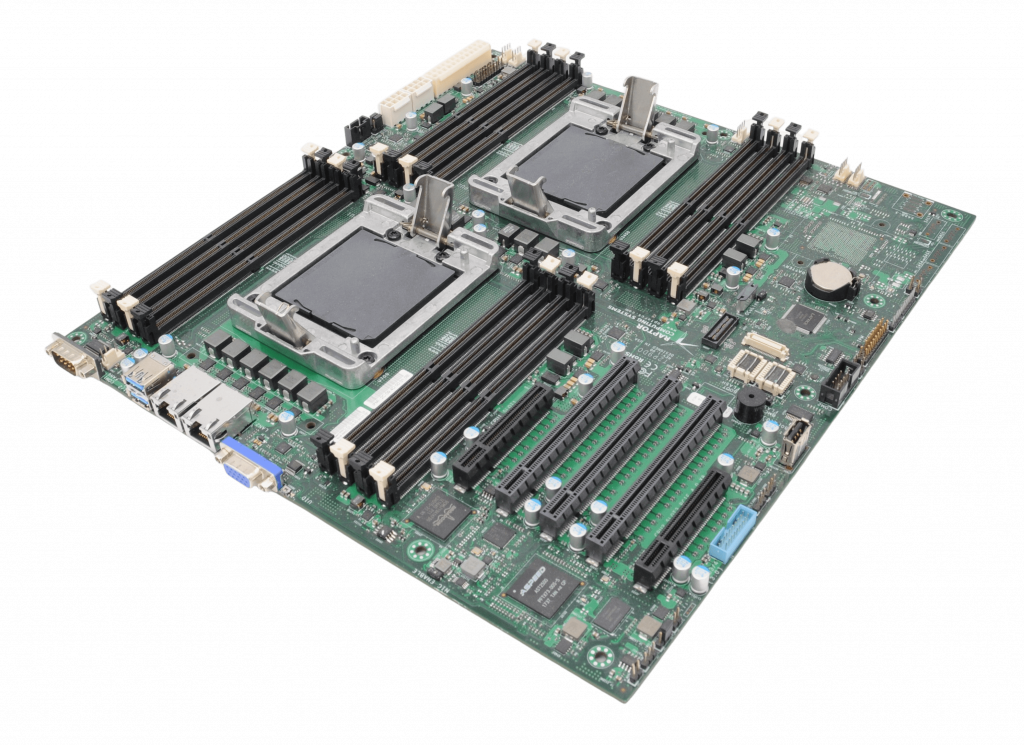
Talos II POWER9 mainboard
Last time I introduced you to the openSUSE Build Service. This time I show you Copr, the Fedora build service.
Copr
Just like OBS, Fedora Copr also started out as a (relatively) simple service to build Fedora and CentOS packages for x86. As Copr is a project by Fedora, the public instance maintained by Fedora at https://copr.fedorainfracloud.org/ only allows you to build open source software. However, you can also install Copr yourself on your own infrastructure. The source code of Copr is available at https://copr.fedorainfracloud.org/, where you can also find links to the documentation.
Today you can use Copr to build packages not just for Fedora x86, but almost all RPM distributions, including openSUSE and OpenMandriva. In addition to x86, you can build packages for 64 bit ARM (aarch64), IBM mainframes (s390x), and IBM POWER 64 bit, little Endian (ppc64le).

Platform selection in Fedora Copr
You can access Copr using its web interface. There is also a command-line utility, but it was very limited when I last checked. Enabling support for POWER in your project is easy: just select the POWER architecture versions of distributions when you setup the project. You can enable support for POWER also later, but Copr does not automatically build packages for the new architecture. TL;DR: enable support for POWER before building any packages to make your life easier.
How do I use Copr?
Just as with the openSUSE Build Service, my first use of Copr was to make up-to-date syslog-ng packages available to the community. Along the way I used Copr to build some syslog-ng dependencies not yet available in Fedora or RHEL. Some of these are already part of the official distributions.
I did not have a chance yet to benchmark syslog-ng on POWER10, however in the POWER9 era POWER was the best platform to run syslog-ng. I measured syslog-ng collecting over 3 million log messages a second on a POWER9 box when x86 servers could barely go above the 1 million mark.
When I make the latest syslog-ng versions available, I build my EPEL (Extra Packages for Enterprise Linux) packages not just for x86, but also for POWER. I do not know how accurate Copr download statistics are, but for some syslog-ng releases it shows that almost a fourth of all downloads were for POWER syslog-ng packages: https://copr.fedorainfracloud.org/coprs/czanik/syslog-ng44/.
Why Copr?
If your primary focus is to build packages for the Red Hat family of operating systems, Copr provides you with the widest range of possibilities. You can regularly test if your software still compiles on Fedora Rawhide, while providing your users with packages for all the Fedora and RHEL releases. Best of all: even if you do not have a POWER server to work on, you can serve your users with packages built for POWER.
OpenVINO Arrives in openSUSE Releases
While focused on the openSUSE Innovator initiative as an openSUSE member and Intel Innovator, it was frustrating for me to see that openVINO did not have support on the openSUSE Linux distribution.
In October 2023, I decided to take the personal initiative to start working on compiling and using OpenVINO from the source code for the openSUSE platform. I humbly contributed and published the first adaptations for our distribution on GitHub.
My motivation for this effort stemmed from the potential of OpenVINO to democratize the use of artificial intelligence for those who do not have the resources to invest in expensive GPUs. This library provides multicore programming and the acceleration registers of Intel processors, as well as the resources of ARM processors, allowing the use of AI on processors from the 6th generation onwards.
With the emergence of technologies such as VPU, NPU, and AMX, it is now possible to run LLMs and generative AI without the need for a dedicated GPU. Therefore, I started working on the RPM packaging for openSUSE. This work would not have been successful without the support and assistance of Ilya Lavrenov from Intel and Atri Bhattacharya on the openSUSE Build Service. They not only shared their knowledge with me but also collaborated to ensure compatibility between Intel and openSUSE’s technical policies.
As a result of all this collaborative effort, openSUSE became the first Linux distribution to offer [OpenVINO in its native repository, compiled from the source code. It is a great source of pride to have contributed to this project, which will undoubtedly make a difference in future endeavors. As members of an open-source community, it is our duty to strive to democratize emerging technologies and reduce digital exclusion in society.
For more information, visit here or get it at software.opensuse.org!

A Shallow Understanding of openSUSE
A Shallow Understanding of openSUSE
Introduction
As part of my job at SUSE, I have been using openSUSE Leap and Tumbleweed, in addition to SLE Micro for a while now. After some experimentation last weekend, and asking some friends some questions, I think I finally have a mental model of SUSE's distro options. I thought I would test that understanding by trying to write it out a bit here. I already know that there are a lot of details I glossed over, and a lot of people see things differently.
I think that openSUSE is the most useful and stable distro available, and more people should know about it and use it. Part of what makes SUSE’s distros great is the community and open source ethics that go into the distros, including the Enterprise versions. With any healthy open source community comes innovation, and with innovation comes choice. But with choice comes decision making, it can be hard to know where to start.
In general, when choosing a SUSE distro, I think there are 3 points to consider:
- What package lifecycle do you want?
- How do you want to manage the OS?
- Do you want Enterprise support or not?
Lifecycle
openSUSE has two major flavors of distros: Tumbleweed and Leap.
Tumbleweed, The Reliable Rolling Release
The major difference between them is that Tumbleweed’s package repositories are constantly updated, and as soon as the automated tests all pass, package updates are released to users. Major and minor version updates can be released as soon as they are ready and tests pass, so distribution updates are available as often as daily.
Unlike rolling releases from other distros, Tumbleweed updates are low drama for the user. They almost always work, and the packages are securely built on SUSE’s Open Build Service, so there is no fussing with local compilation and such.
Tumbleweed provides a great option if you like to have the most up to date software, but you don’t want to hassle with keeping the software up to date yourself. I am running it on a laptop that I use for work, and it is working quite well.
Leap, The Stable Release
By contrast, Leap tracks the SUSE Linux Enterprise release cycles. The package versions in the repositories receive security and bug fixes, but new versions of the software are only provided via point releases. For example, the upcoming release of 15.6 will offer some updated package versions.
This means that you can lock in on a working configuration and run it for a long time with minimal maintenance and overhead.
“Stability”
Both Tumbleweed and Leap are “stable” in the sense that they pass quality control checks and aren’t prone to crashes etc… I like to use the word “reliable” for this quality of openSUSE. By “stability” in this context, I really refer to how often the major package versions do or do not change. Management
Management
The second dimension that you can consider is if you want to manage a read only file system, or a traditional file system. This boils down to deciding between traditional openSUSE and Micro.
Both versions support transactional updates, as described below.
Traditional
If you opt for a traditional install (as I do) then you manage the system with zypper (or whatever package management tool you prefer) and use zypper to install packages like applications, and to keep the system up to date. Zypper makes changes directly to the system by doing things like installing dependencies, etc…
If you are using a traditional SUSE flavor, you don’t typically need to reboot the system after running installations and updates (there are exceptions of course). You can also use repositories to install software packaged as RPMs to install directly on the system or use things like Flatpaks and containers, depending on your preference.
Before updating the system or installing software, it’s a good idea to take a snapshot so that you can roll back easily if you need to or want to. This is done with the tool Snapper. One neat thing is that, in the default configuration, when you run the zypper dup command, it takes a snapshot for you automatically.
Micro
“SUSE Linux Micro” is the Enterprise version, whereas “openSUSE Leap Micro” is the community Leap version, and “openSUSE MicroOS” is the community Tumbleweed version. For simplicity I will refer to them collectively as “Micro” here.
Micro flavors come with a read only root file system. This provides a lot of benefits in terms of safety, but it requires a different approach to managing the system.
If you try to use zypper to install, it won’t work because you can’t make changes directly to the filesystem. Rather, if you want to install an RPM, you need to create a transaction wherein Micro will create a new copy of the root filesystem, update that copy, and then reboot into it. If the reboot fails, no problem, it will fall back to the original. As such, you can’t really use zypper in the normal way, but rather apply transactional updates.
Micro is designed with Flatpak, Containers, and VMs in mind for running applications. The idea is that your applications are containerized and can be safely installed and updated without touching the root filesystem.
In this approach, your applications come with their dependencies bundled in, so there are fewer dependencies in the base system in the first place. This makes Micro smaller, but also means that there are fewer dependencies to be updated, so updating the base system is less frequent as well.
Micro also keeps a list of previous states, so you can easily rollback to a previous transaction point for the base OS.
Enterprise Support
SUSE’s Enterprise Support includes critical benefits such as:
Certifications such as CC EAL 4+, FIPS, etc… Dedicated support engineers available around the clock Level 3 Support Dependable, clearly documented, and long life cycles for releases
If you need, or think you might need to opt for Enterprise support but you want to start with openSUSE, then you should stick with Leap (either traditional or Micro). This is because Leap is built out of the same repositories that SUSE Linux Enterprise is built out of, and opting into SUSE Support can, in some cases, be as simple as installing some packages.
Conclusion
Like any healthy distro, the openSUSE community has seen a flowering of innovation as community members put together solutions based on their own interests. For example, the community also maintains a sort of “in between” version called Slowroll. There is also an image based on MicroOS that includes a full desktop experience, called Aeon, and lots of other options. Too much richness to cover here, but I tried to cover the essential decision points.
Want some links? Community supported “choose your version” site
Leap 15.5 (stable traditional version
Tumbleweed (rolling traditional version
openSUSE Leap Micro (stable read only file system version
MicroOS (rolling read only file system version