
The [openSUSE Project(https://www.
The [openSUSE Project(https://www.opensuse.org/) is asking interested people to submit a call for hosts for the openSUSE Conference 2025. This event is a cornerstone of the openSUSE community and aims to bring together a diverse group of users, developers and enthusiasts to share, learn and collaborate. The aim is not only to strengthen the existing community but also to welcome new members into the fold.
Having the conference in different locations allows the project to be more accessible to people and can help with increasing awareness about the openSUSE Project and open source. While the project is unable to commit to a host being selected based on the project’s available funds, participants in the community encourage people/groups to provide a submission. This will let members of the community discover areas where the project can have a conference if funding allows it.
What We Are Looking For
Hosting the openSUSE Conference is an opportunity to showcase your community and city. The project seeks passionate teams who can address the following key criteria in their submissions:
- New Attendees: Strategies to attract and engage new participants.
- Accessibility: Ensuring the venue and events are accessible to all.
- Community Involvement: Hosts must attend community meetings and provide regular updates if selected.
- Cost Efficiency: Detailed budget plan showing the total cost to run the event.
- Community Growth Goal: A plan to make the conference as successful as previous ones in gaining new members.
- Engaging Educational Institutions: Technical universities and educational bodies willing to host an openSUSE Conference is an ideal demographic for a submission.
- Bidding Process: Similar to the Debian Conference Bidding Process proposals will be submitted via openSUSE Wiki pages. There is a potential that it can be followed by a community voting process.
- Submission Period: Please refer to the openSUSE Conference wiki for detailed timeline and submission deadline.
- Season Flexibility: The event can be planned for any season, allowing flexibility for the hosts.
How to Submit Your Proposal
- Prepare Your Proposal: Detailing how you’ll address the above criteria.
- Submit on openSUSE Wiki: Create a dedicated page for your bid on the openSUSE Wiki and use the template provided at en.opensuse.org/openSUSE:Call_for_hosts to assist with developing the proposal.
- Community Voting: The final selection will involve a voting process by the openSUSE community.
Why Host the openSUSE Conference?
Hosting the openSUSE Conference can spotlight your local community. It’s an opportunity to contribute to the growth of the project.
More Information and Submission Guidelines
Visit the conference checklist for more information on guidelines to help host an openSUSE Conference.

darkhttpd: timing attack and local leak of HTTP basic auth credentials
This report deals with HTTP basic auth issues in the darkhttpd project. Darkhttpd is a minimal HTTP web server implemented in the C programming language, for serving static files. The version under review was 1.14.
A version 1.15 bugfix release containing a bugfix and an additional warning message is available.
Basic Auth Timing Attack (CVE-2024-23771)
The issue is found in darkhttpd.c line 2272. Here the HTTP
basic authentication string supplied by a client is compared against the
secret configured via the --auth command line parameter. For this comparison
a regular strcmp() function call is used.
Since strcmp() performs an efficient linear comparison, it will terminate
earlier if the first bytes of the supplied authentication string don’t match
compared to if they do match. This difference in runtime can be used for
timing attacks to try and find out the correct authentication credentials to
access the web server.
To fix this, a constant-time string comparison function needs to be used
that always takes the same amount of computation time for the comparison
independently of how many bytes of the provided data match the actual
authentication secret. An example for such a function is the
CRYPTO_memcmp() function provided by the openSSL library.
Darkhttp does not support SSL encrypted traffic by itself. When darkhttpd is used for unencrypted http:// over the Internet then it could be argued that the authentication data will be sent unencrypted over an untrusted channel anyway. If darkhttpd is used behind a reverse proxy that uses SSL and thus uses a secure channel, then a major security property will be violated by this issue though.
Bugfix
After discussing the available options with him, the upstream author decided to implement a custom constant-time string comparison algorithm to address the issue. This algorithm is a rather simple xor operation over the complete range of bytes.
Local Leak of Authentication Parameter in Process List (CVE-2024-23770)
The only way to configure the HTTP basic auth string in darkhttpd is to pass
it via the --auth command line parameter. On Linux all local users can view
the parameters of other programs running on the system. This means if there
are other users or programs running in different security domains, then these
can obtain the authentication credentials for the web server.
To fix this an alternative mechanism needs to be provided to pass the
authentication credentials in a safe way. Typically this can be solved by
using an environment variable or a protected configuration file. If the
existing --auth command line switch is kept around, then the fact that this
leaks the authentication credentials on Linux systems should be documented.
Bugfix
The upstream author decided to only document the security implications by adding a warning to the command line usage output.
Review Summary
Apart from these HTTP basic authentication related issues, I have not found any problematic spots in the code base of darkhttpd. I focused on the potential for log file spoofing, escaping the web root via crafted URLs and memory corruption, e.g. through specifying bad byte ranges in HTTP headers. The code is robust in these areas.
Timeline
| 2024-01-12 | I reported the findings to the upstream author emikulic@gmail.com, offering coordinated disclosure. |
| 2024-01-13 | The author confirmed the security issues but declined a formal embargo period. |
| 2024-01-15 | I requested two CVEs from Mitre to track the two findings found during the review. |
| 2024-01-18 | After some discussions about the bugfixes, the author published the new version 1.15 containing the changes. |
| 2024-01-25 | Mitre assigned the CVEs. |
References
 Member
 DimStar
openSUSE Tumbleweed – Review of the week 2024/03
Dear Tumbleweed users and hackers,
As we can see in the number of larger and smaller things going through the staging process, the holiday season is over. To get all the changes out to the users, we have published six snapshots (0112, 0114…0118) this week.
The main changes delivered were:
- Linux kernel 6.6.11
- Pipewire 1.0.1
- Samba 4.19.4
- Mozilla Firefox 121.0.1
- Systemd 254.8
- KDE Frameworks 5.114.0
- ffmpeg 6.1.1
- Bash 5.2.26
- elfutils 0.190
- gnutls 3.8.3
- Wine 9.0
The staging projects currently show the community working on these changes:
- RPM 4.19.1: getting closer to be ready. packagers: please ensure to read/understand Ana’s announcement at https://lists.opensuse.org/archives/list/factory@lists.opensuse.org/thread/HG2JKUIKDTWQQIQSA43A4VWHX7YKJQT3/
- rpm-config-SUSE: enable full ksym() dependencies in Tumbleweed
- Mesa 23.3.3
- Linux Kernel 6.7
- QEmu 8.2.0
- dbus-broker: a big step forward; upgrades seem to be an issue that need to be addressed
- Ruby 3.3: all buld fails have been fixed/have a fix submitted. QA should happen next week.
- libxml 2.12.x: slow progress
- openSSL 3.2.0
- c-ares 1.21.0: nodejs build fails have been resolved, but a new cycle has formed: appstream-glib, c-ares, curl, googletest, nghttp2, python311
Running WebAssembly workloads with Podman
WebAssembly (abbreviated Wasm) is a portable binary instruction format. It has gained popularity for its portability as a compilation target that enables deployment on the web for both client and server applications.
We can leverage the portability of Wasm to run Wasm workloads alongside Linux containers by combining crun and Podman. crun supports running Wasm workload by using WasmEdge, Wasmtime, or Wasmer runtimes. While Podman defaults to runc, runc, and crun can be used interchangeably.
WasmEdge is a lightweight, high-performance, and extensible WebAssembly runtime for cloud-native and edge applications. WasmEdge was recently added to openSUSE Tumbleweed and this can give us support for Wasm workloads on containers if we enable an experimental feature in crun.
Now that we have WasmEdge in openSUSE Tumbleweed and crun experimental support for Wasm workloads we can run WebAssembly workloads on Podman. This new feature was introduced into Podman in Tumbleweed and also a new package.
The blog post shows how to use it.
Preparing our environment
We first need to install crun as runc in the default OCI runtime for Podman.
zypper in crun
Once crun is installed check if you have Wasm support.
$ crun -v
crun version 1.9
commit: a538ac4ea1ff319bcfe2bf81cb5c6f687e2dc9d3
rundir: /run/user/1000/crun
spec: 1.0.0
+SYSTEMD +SELINUX +APPARMOR +CAP +SECCOMP +EBPF +CRIU +LIBKRUN +WASM:wasmedge +YAJL
In the above output, we can see that crun supports WasmEdge (+WASM:wasmedge).
Preparing our application
We are going to create a simple “Hello” application in Rust.
First, ensure you have Rust and WasmEdge installed.
zypper in rust wasmedge
Now let’s create our “Hello” application in Rust.
$ cargo new hello --bin
$ cd hello
Change the message in src/main.rs to Hello WebAssembly! or any other message you want.
Now let’s compile our application, but the target machine will be Wasm.
$ cargo build --target wasm32-wasi
We can now execute the binary we just compiled and check that it works as expected.
$ wasmedge run target/wasm32-wasi/debug/hello.wasm
Hello WebAssembly!
You have successfully built your Wasm application.
Creating a Wasm container
With our Wasm binary in hand, let’s add it to a container.
Create a file named Containerfile and add the following to it:
FROM scratch
COPY target/wasm32-wasi/debug/hello.wasm /
CMD ["/hello.wasm"]
Let’s build our Wasm container with Buildah.
$ buildah build --platform=wasi/wasm -t hello-wasm .
You should have a Wasm container by now.
Running a Wasm workload
Let’s run our Wasm container with Podman.
$ podman run --rm hello-wasm
Hello WebAssembly!
Great, we have a working Wasm container.
Conclusion
WebAssembly is a fairly recent topic, but it has gained a lot of attention because you can reuse most of what you already know or use and easily port applications.
Running a native Wasm container is another example of how portable this format is.
Clarifying Misunderstandings of Slowroll
Results from a use case survey gave some insightful information about how people perceive openSUSE Slowroll.
Some view it as a replacement for openSUSE Leap, but recent news about a clear course set for Leap should help to explain that Slowroll has a different path.
Slowroll is an experimental distribution introduced in 2023. It was designed as a variant of openSUSE Tumbleweed when the future of openSUSE Leap was not yet clear.
The main characteristic of this distribution is a slower rolling release compared to Tumbleweed.
Some users might find value in this balance between rapid updates of Tumbleweed and a traditional stable release like openSUSE Leap. After all, the purpose and principles of open-source software is to promote software freedom, enable users to freely study, modify, and distribute software for any purpose; Slowroll is doing all of the above.
Slowroll integrates big updates every one month or so along with continuous bug fixes and security updates as they are available.
The idea behind Slowroll is to offer a distribution that improves stability without losing access to new features in the base packages such as the kernel, desktop environments and packaging. These slower update cycles allow for more extensive testing and validation of packages before their inclusion. Think of Slowroll as more of a skip than a Leap.
Regarding Slowrolls relationship with openSUSE Leap, it’s important to note that Slowroll is not a replacement for Leap. Rather, it provides an alternative for users seeking more up-to-date software at a slower pace than Tumbleweed, but much faster than Leap. This is particularly relevant in the context of the future branch of the SUSE Linux Enterprise distribution transitioning to ALP (Adaptive Linux Platform). The development of Slowroll originated from discussions among openSUSE developers about the future of the openSUSE Leap distribution, but has no other relation to the Leap release.
Slowroll is still rather new and is based on openSUSE Tumbleweed packages.
While Slowroll is a significant addition to the openSUSE family, it caters to users choosing a slightly slower up-to-date software system. The name Slowroll was chosen to reflect its slower update cycle and has been retained after a community voting process.
pam: pam_namespace misses O_DIRECTORY flag in protect_dir() (CVE-2024-22365)
This is report about a local denial of service vulnerability in the
pam_namespace.so PAM module. This module is part of the core PAM
modules that are found in the linux-pam project.
This report was previously shared with the linux-distros mailing list and is now published after linux-pam upstream released a new version 1.6.0 containing the bugfix on 2024-01-17.
Introduction
The pam_namespace module allows to setup “polyinstantiated directories” when
setting up a user’s session during login. The typical example is setting up a
private /tmp and/or /var/tmp for every user.
To achieve this a separate mount namespace is setup during login and a bind mount is performed in configured locations. Different methods are offered for this like a fixed per-user directory that is bind mounted (i.e. per-user contents are persistent and shared between sessions) or an ephemeral temporary directory (contents are lost after a session is closed).
The Vulnerability
The PAM module explicitly supports bind mounting of polyinstantiated
directories in user controlled locations, like beneath the user’s home
directory. Operating with root privileges in user controlled directories
comes with a lot of dangers. To avoid them the function protect_dir()
implements a special algorithm to protect the target path of a bind
mount.
The function follows the target path for the bind mount starting from the file system root. Each path component that is under non-root control is protected from user manipulation, by bind mounting the path upon itself.
While this approach feels unusual, it should be effective to prevent any shenanigans on the side of the unprivileged user for whom the directory is mounted.
There is one bit missing though: The algorithm is not passing the
O_DIRECTORY flag to openat() and is thus subject to special files like
FIFOs being placed in user controlled directories. This can easily be
reproduced e.g. using this configuration entry in the namespace.conf
configuration file:
$HOME/tmp /var/tmp/tmp-inst/ user:create root
An unprivileged user (that is not yet in a corresponding mount namespace with ~/tmp mounted as a polyinstantiated dir) can now place a FIFO there:
nobody$ mkfifo $HOME/tmp
A subsequent attempt to login as this user with pam_namespace
configured will cause the openat() in protect_dir() to block,
causing a local denial of service.
The Bugfix
The bugfix I suggested fixes the issue by passing the
O_DIRECTORY open flag to cause the open to fail if the path does not refer
to a directory. With this some existing explicit checks of the file type can
be dropped now.
Even with this patch applied the unprivileged user can still prevent the
polyinstantiated directory from being mounted by placing a FIFO in the
mount location. I don’t believe that pam_namespace gives (or should
give) any guarantees in this regard, so I don’t consider it a problem.
Timeline
| 2023-12-27 | I reported the finding to the linux-pam maintainers, offering coordinated disclosure and a suggested patch. |
| 2023-12-27 | An upstream maintainer quickly responded, stating that the linux-pam project does not treat security issues specially for their purposes, but suggested setting up a short embargo anyway to allow other downstream consumers to prepare. |
| 2023-12-29 | Since upstream intended to make a new version release in January anyway we agreed to share the issue with the distros mailing list some time before that release. |
| 2024-01-05 | I requested a CVE to track this issue from Mitre. |
| 2024-01-09 | Mitre assigned CVE-2024-22365. |
| 2024-01-09 | Upstream communicated to me the planned release date of 2024-01-17 which will contain the bugfix. |
| 2024-01-09 | I shared the issue with the linux-distro mailing list. |
| 2024-01-17 | linux-pam upstream released version 1.6.0 containing the bugfix as planned. |
References

Chafa 1.14: All-singing, all-dancing
Dear friends, comrades, partners in crime and moderate profit! I am pleased to announce the immediate availability of Chafa 1.14.0. There are release notes, but who's got time for that? All the fun stuff is in this post. You should be reading it instead.
Pixel perfection
Images can now be padded instead of stretched to fit their cell extent exactly –

– so I'll no longer have to explain why our 50kLOC monstrosity couldn't do pixel-perfect output, while sixcat (300LOC) did so effortlessly. Naturally, I had to make this as hard as possible for myself by splicing in padding before and after each row as they're processed for channel reordering and such, but on the plus side, this maximizes cache friendliness and parallelism behind a nice and homogeneous internal API.
You can get the old behavior back with --exact-size off. It defaults to auto, which will do the right thing (i.e. pad if image fits in viewport without scaling and scaling wasn't explicitly requested).
Another improvement in this vein is that sRGB is properly linearized in scaling operations now. This is pipelined along with everything else, and should be suitably fast.
Multiplexer passthrough
Previously, it was impossible to do better than character art inside multiplexers like tmux and GNU Screen. This is no longer the case; kitty has a new trick that allows for persistent raster image placement in these, which we implement. The above mentioned multiplexers have slight differences in their passthrough protocols; we support both with the new --passthrough argument.
We also support sixel passthrough. Sixels will be wrecked by multiplexer updates, so this is off by default. You can enable it with e.g. -f sixel --passthrough screen. tmux tends to dispose of the image immediately after we exit, so it may be a good idea to use --passthrough tmux -d 5 there so you get a chance to look at it first.
To my knowledge, Chafa is the only terminal graphics toolkit to offer passthrough for all four combinations of sixel/kitty and tmux/screen. I think the iTerm2 protocol would be doable too, if only.
MS Windows compatibility
It runs pretty well on Windows. You can use it in PowerShell. @oshaboy added support for ConHost, so it can technically be used on very old Windows versions – although this hasn't gotten much testing yet.
Python bindings
Erica Ferrua Edwardsdóttir's amazing Python bindings have been around for a while now, yet nary a peep from me on my blag. This shameful deficit stands in contrast to the stunning professionalism of her work. You need to do this:
pip install chafa.pyDo it now. Everything's well structured, the documentation is entertaining and well written, and there's even a tutorial. It's rare to see a project that simultaneously delivers and channels the spirit of F/OSS this well. You'll also find it on GitHub.
JavaScript enablement
Héctor Molinero Fernández started doing WebAssembly builds, which means you can now use the Chafa API from JavaScript. Like so:
npm install chafa-wasmHe also made a cool web app to show off all the bells and whistles!
Cheerleading aside, I've had no hand in either of these projects. The glory belongs to their respective maintainers, along with all of the praise, stars, code submissions and issue reports, heh heh.
Art!
@clort81 sent me this picture:

What's special about it? Well, it's character art!

You have to zoom in a bit before it becomes obvious; there're only two colors per character cell.
The glyphs are something else, though. You see, @clort81 wasn't happy with the limited offering of block drawing symbols in Unicode, and set out to create Blapinus, a 6125-glyph (!) hand-pixeled 6×12 PCF font with all the shapes you could ever want.
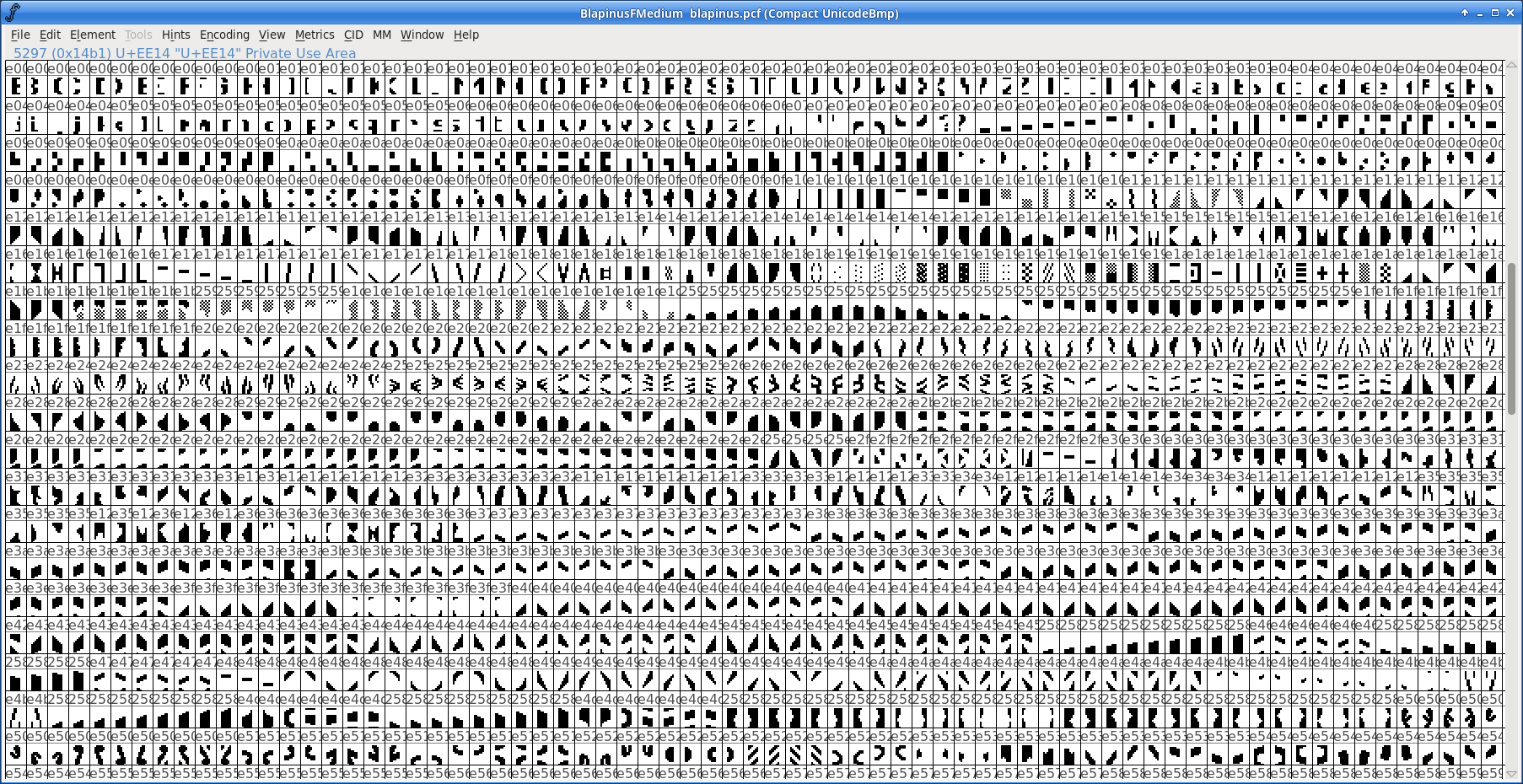
Plug that into your terminal (and Chafa), et voilà:
sudo cp blapinus.pcf.gz /usr/share/fonts/misc/
xterm -font -blap-*
Note that your fonts may live somewhere else, so relocate accordingly. Then inside XTerm, run:
chafa -f symbols --glyph-file blapinus.pcf.gz --symbols imported hello.pngIf you see strange symbols in your output, you can try excluding some wide and ambiguous code points, e.g. --symbols imported-wide-ued00..uffff.
You can probably set this up in other terminals and display servers too, but know that it could be a long and winding path you're going down. Traveler beware. Or push the pedal to the metal and write a trip report. I'd love to read it.
If your terminal renders the font correctly, this can even have somewhat practical qualities:
First, it integrates perfectly with tmux and GNU Screen. Redraw, scrollback and editing just works, no passthrough tricks required.
Second, albeit lossy, the compression ratio is surprisingly good. Assuming four bytes per pixel, a 6×12 cell is 288 bytes uncompressed. We turn this into 39 bytes at most (a maximum of 36 bytes for the direct color sequence plus 3 bytes for the UTF-8 character), or an 86% reduction. Not bad, considering the compression dictionary is a 100kB font file.
Deflate will further compress this kind of data by 3/4, so if you're running this in a compressed ssh session, you can expect the total gain to be about 95%.
Prior art!
I've mentioned Mo Zhou's work before, but I'd be remiss not to bring it up here; they focused their considerable ML skills on a generator that takes a lot of the pain out of the font creation process. Just point it at an image collection, and by the magic of k-means clustering and a minimal increase in your carbon footprint, out pops a new font brimming with delectable puzzle pieces. You get scalable TTF, with SVG as an intermediate format, which is more agreeable with modern rendering stacks. Here it is in VTE:
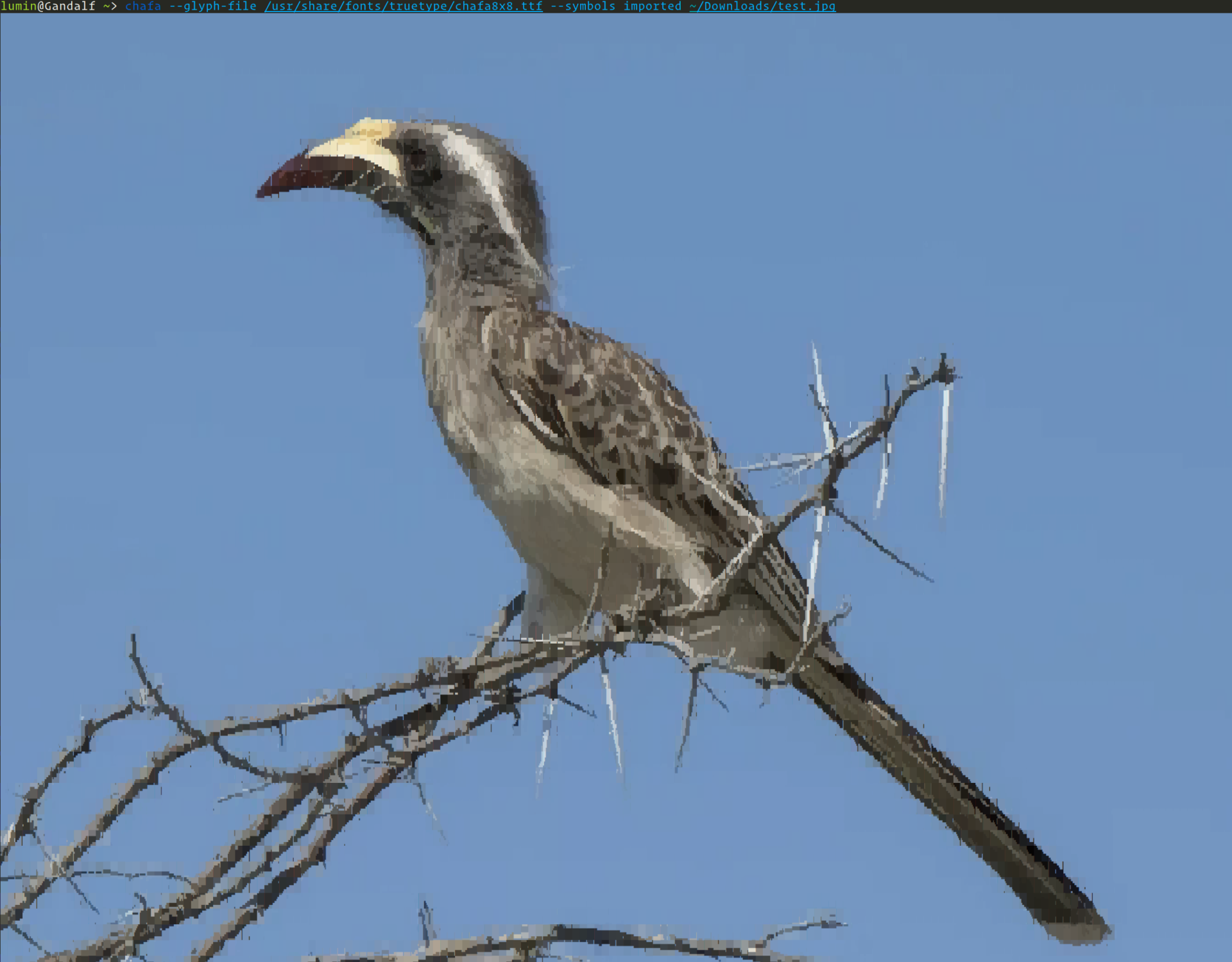
This ML-generated font makes for a more organic look. There are unfortunately still some artifacts caused – presumably – by VTE's cell padding. The generator has offset hacks to work around it, but it's hard to make custom connective glyphs look perfect in every terminal.
You can read more about it in one of our longest-running GitHub issues. We're taking it all the way.
Cool applications
Chafa's found its way into the nooks and crannies of many a sweet application by now. I'd especially like to mention these three here:

ANSIWAVE BBS, the brainchild of Zach Oakes, is written in Nim and contains an embedded build of Chafa for character graphics generation. As a one-time (and sometimes) BBS sysop and denizen, this hits me right in the feels.
Felix is a nice file browser by Kyohei Uto written in Rust. It uses Chafa as an external image previewer.
kew, a terminal music player by the mysterious @ravachol, is written in C and uses the native Chafa API to generate cover previews. Development on this has been moving very quickly.
A laid-back place to chat about all this stuff
Issue trackers are formal and supposedly high-SNR. If you'd like a more relaxed place to chat about Chafa, your own programs, terminal graphics (modern or ancient), graphics programming in general or artistic expression related to any of these, drop by our secret business Matrix channel, #chafa:matrix.org. We'll be waiting.

I'm also enjoying Mastodon these days. Occasional announcements and amusements go there. It's good.
Thanks
Last, but not least: a big thank you to everyone who wrote code, reported bugs, filed suggestions and helped test this time around. And an extra big thanks to all the packagers and distributors who make the F/OSS world turn. You're the best.
Clear Course is Set for openSUSE Leap
The openSUSE release team confirms there will be a successor to Leap 15 and it’s a numerical leap forward.
As many eagerly await the arrival of Leap 15.6 this year, a path for Leap 16 as a successor awaits. Based on SUSE’s new Adaptable Linux Platform (ALP) codebase, openSUSE Leap 16 will combine the benefits of an advanced enterprise server distribution and user-friendly maintenance and security that is a hallmark of the Leap series.
Leap 16 is aiming to strike a balance between a cutting-edge and a traditional Linux operating system emerging from SUSE’s development of ALP and initiatives to effectively integrate community packages.
The transition to Leap 16 is not just a numerical step-up but symbolizes a significant path forward in technology and user experiences. The future of openSUSE Leap is based on the innovative concept of SUSE’s Adaptable Linux Platform.
The Adaptable Linux Platform powers the next-generation openSUSE Leap, Leap Micro, and SUSE solutions. It makes distributions more adaptable and suitable for cloud-native workloads while also being capable of handling a rapid pace of innovation.
There are no plans to drop the classical (non-immutable) option for Leap; both non-immutable or immutable installation variants are available for Leap 15 and are planned for Leap 16. This is set to remain the preferred way for people to deploy Leap.
Everyone is encouraged to engage in the development of these new platforms by providing feedback, packaging, testing, documenting and any other way.
Leap will continue to follow the openSUSE factory development model.
The development process will involve gathering requirements, including those from community workshops, to ensure that Leap 16.0 meets the evolving needs of its users. The openSUSE community is already eyeing the horizon with the anticipated introduction of Leap 16.
Alongside Leap 16, Leap Micro 6.0 will succeed the Leap Micro 5 series. It’s based on SUSE Linux Enterprise Micro 6.0, which focuses on containerized and virtualized workloads.
Leap and Leap Micro will both provide users with clear migration paths and sufficient time to upgrade. In case of Leap 16 delays, the release team may extend the life cycle of Leap 15.6 or, as a last resort, release Leap 15.7 to ensure sufficient overlap. Leap 16 will ensure there is no gap between the release and Leap 15’s End of Life cycle.
People can find information updates about Leap 16 on the project’s roadmap page. The release team will share when Leap 16 development starts and how to get involved through official openSUSE channels.

openSUSE.Asia Summit 2023
openSUSE.Asia Summit 2023

openSUSE.Asia summit 2023 hosted in Chongqing, China.
This is our first face to face summit after COVID 19.
It's great to see old friends and meet new friends in openSUSE.Asia summit.
Thanks again for local committee to host this summit, we saw many students and friends interested with openSUSE and open source.

In openSUSE.Asia summit - I share " Using openSUSE in the Public Cloud "

Slide link
Smile and fun to share - I think that is the most important factor in community.


I had lots gift from summit 🙂

openSUSE Asia photo albums still travel in different community zones.


Let's wait for the openSUSE.Asia summit 2024 and meet old friends and new friends again.
Thanks again for openSUSE / SUSE / Sponsor support for our summit.
Thanks to the local community for organizing this great event.
“All the honor belong to our strong local committee and staff”
openSUSE Tumbleweed – Review of the week 2024/02
Dear Tumbleweed users and hackers,
Tumbleweed is back at full speed – with seven snapshots released in as many days. The release team could again not let their hands off the system even on the weekend and delivered all the changes as fast as possible.
The most relevant changes in those seven snapshots were:
- Bind 9.18.21
- GStreamer 1.22.8
- SELinux 3.6
- firewalls 2.1.0
- Linux kernel 6.6.10
- GNOME 45.3
- Node.js 21.5.0
- Grub 2.12
- Meson 1.3.1
While looking at the staging projects, there has been some progress, but the list of older requests is mostly unchanged. With the holiday period over, we can all expect changes there relatively soon. Currently, we have these changes staged:
- Linux kernel 6.6.11
- systemd 254.8
- RPM 4.19: all fixes have arrived, and the final phase has started. We expect openQA runs over the weekend and will likely ship it soon. With RPM 4.19, we will have to promote cmake to ring0
- Ruby 3.3: yast failures are being debugged and worked on
- libxml 2.12.x: slow progress
- openSSL 3.2.0
- c-ares 1.21.0: nodejs build fails have been resolved, but a new cycle has formed: appstream-glib, c-ares, curl, googletest, nghttp2, python311
- dbus-broker: no progress: openQA fails to launch the network stack in the installer