
 gmzysk
Fedora Activity Day at FOSDEM

 Member
Story telling your Gitorious exploits

Tip: transparent editing of gpg encrypted files with vim
If you are vim user and also use gpg to encrypt stuff, you might appreciate that you can teach vim to transparently open gpg encrypted files with vim gnupg plugin. Just install vim-plugin-gnupg from Contrib repository:
# zypper install vim-plugin-gnupg
Also, you should add following two lines to your .bashrc to make the plugin work properly:
GPG_TTY=`tty`

export GPG_TTY
Then, if you tell vim to open gpg encrypted file, it will ask for passphrase, transparently decrypts it and after you make changes, it will encrypt the file again.
Storytelling with Storytlr

News from libstorage/YaST partitioner insectarium
NFS to the power of 4
After ext4 and btrfs in openSUSE 11.2, nfs4 is the next filesystem to be fully supported by libstorage (libstorage is the engine that makes YaST partitioner moving). In the upcoming first milestone of openSUSE 11.3, you can already try mounting nfs4 shares from partitioner during installation and later too (*cough* it has been possible to opt for mounting the share as nfs4 already in 11.1, but GUI option was just dummy, you ended up with regular nfs3 anyway *cough* ;-) ). Big thanks to Arvin and Thomas for implementing it (if you want to help with libstorage hacking, read here how, if you are not into hacking, you can contribute your ideas).And slightly off-topic (as this post tends to be storage-related): you can also give nfs4-based software repositories a try - openSUSE 11.3 libzypp (hence also zypper and YaST repo manager) is now nfs4-enabled, too.
Sheep^WDisk cloning
Imagine a box with four brand-new clean disks you want to combine into RAID5. Unless you're proficient in CLI tools usage and script writing, here's what you'd probably do: go to YaST partitioner, click first disk, click Add (1st partition), enter the data, click Finish, click Add again (for 2nd partition), enter the data, click Finish ... the same procedure for all partitions on the first disk. Now multiply that by four - isn't so much clicking around an annoying waste of time and energy?Well, it doesn't have to be so anymore. As disks in RAIDs tend to have identical (or at least, very similar) partition layout, you can make use of new disk cloning feature (openSUSE 11.3 is the first one to have it - the original code was written by me for SLE11 SP1, and ported to 11.3 by captain Arvin):
Here you just partition one disk and pick the cloning option from the menu. A dialog with list that pops up shows all available disks that are suitable candidates for being the clone of the first one [1] Select one or more of those, confirm with OK and after committing the changes, voila! - there are now few clone brothers with the same partition layout, ready to be bundled into RAID (or LVM). It's easy :)
I wonder if any of other distro's partitioning tools can clone, too, and what approach they're using for setting up complex storage scenarios in an user-friendly way ...
[1] Of course, only the same size or bigger disks qualify, and for simplicity sake, they must share the cylinder size as well
Updated site

Banshee 1.5.3
We've just released Banshee 1.5.3, containing a lot of exciting new features and bug fixes.
New Features:- Sync device from playlist option
- Type-ahead find in track, artist, and album lists
- Optional cover art in lower-left corner
- Cover art editable via drag-and-drop and right-click
- Audiobooks library extension
- Library-folder watcher extension
- eMusic importer/downloader extension
- GIO file backend, supports non-local files
Read the 1.5.3 Release Notes for the full scoop and some screenshots of the new features.
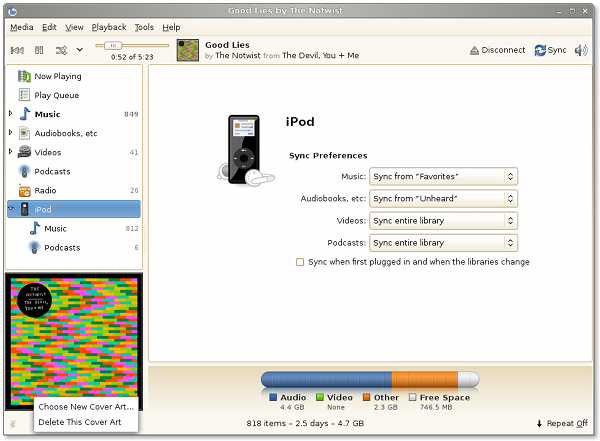
This release is what will become Banshee 1.6 and be picked up by distros; your help testing it and filing bugs is important and appreciated!
Try ItYou can get packages for your distro, grab the source tarball, or follow the bleeding edge by trying it from git master.
Aaron worked hard to bring back the OS X build this release, too.

Tomboy 1.1.1 Released, Tomboy Online Plans Solidify
After a brief release hiatus, I bring you Tomboy's latest development release: version 1.1.1!
Probably the coolest new feature in this release, courtesy of Stefan Cosma, is support for Windows 7 Jump Lists, which are totally awesome and should be added to GNOME.
 Jump Lists In Action
Another cool fix that will make Dave Richards (and everyone else who has ever wanted to copy and paste a Tomboy note into an email or OpenOffice.org document) very happy. Gabriel Burt fixed a long-standing problem with gtk# to enable this (requires not-yet-released gtk# 2.12.10), and patched Tomboy to make rich HTML available in the clipboard. Thanks dude!
 Pasting rich note content into Evolution (click for OO.o Writer and plain-text email examples)
I was planning on having a preview of automatic background sync in this release, but I just didn't get as far as I wanted on it. I'll be merging that feature in before the next release, though.
But while I was playing with autosync, I was doing a lot of restarting Tomboy, and got tired of the 2 second startup time. Most Tomboy users always run it, so startup time is not a huge deal, but for developers this just gets irritating after awhile. So I rejiggered some startup work to be delayed, causing the Tomboy icon to show up within about 0.5-1.0 seconds on my machine. This pleased me, so I included it in Tomboy 1.1.1. Take that fascist scum!
The Future of Snowy and Tomboy Online
You may have seen Brad's blog last week about our Snowy meeting. If you read the meeting minutes, you'll see that we're shifting our focus to be a little more goal-oriented. Our plan is to get a Snowy instance on GNOME servers as soon as the sysadmin team will let us. This instance will be Tomboy Online, and its needs will drive core Snowy development. We'll start with a private alpha and go from there.
Right now we're working on a Tomboy Online roadmap that breaks outstanding work into basic tasks so that contributors know where they can help. Once this roadmap is in better shape, I'll be blogging again to let you know what our plans are and how you can help us.
In the meantime, if you have any resources to share on automated testing of web sites, REST APIs, and overall web/server security, I'd really appreciate it. Ponies are great...pwnies, not soo much.
By the way, if you have opinions about GNOME hosting Free web services like Tomboy Online, please take Stormy's survey on GNOME Foundation goals for 2010! :-)
Socialising With Developers And Communnities
Yes, i may have said it to a few people already but
For those new to FOSDEM, all I can say is it is a blast! Seriously, there are people from all over the world there talking about all sorts of things – personally I’m not overly bothered about most of the talks. For me the biggest win from FOSDEM is the social aspect. The pre-event drinks on Friday night are great, and yes I have to admit there is one thing that those adorable little blue Belgians do right – Beer!!! I have met many a great person, some of whom I had never heard of before but many whom I had. The atmosphere just rules.
As for the main event, like I said there are loads of talks (have a look at the schedule) and there are lots of stands with some giving away some nifty swag. I will be lurking around the openSUSE stand (hopefully helping out & not getting in the way) and also going to speak to some of the other distros/projects. I’m hoping to be able to speak to some of the lovely Intel folk (and others) about Moblin, as well as speaking to some of the e-mail/messaging projects to see what the Bongo Project can learn. One key item is that of synchronising of data.
So if you are in the vicinity of, or can be in the area, head on over to FOSDEM. You’ll be able to meet face to face with many luminaries – not just from openSUSE but from the FOSS world in general. By the way for the uninitiated our very own yaloki is also one of the organisers so be good to him as he and the others have been working their little socks off!
Banshee Release Schedule
- 1.5.3 - Jan 27 - Wednesday!
- 1.5.4 - Feb 24
- 1.5.5 - Mar 10 - String Freeze
- 1.6.0 - Mar 31
Subscribe to the Banshee development calendar, find out how to help test the latest Banshee, and/or contribute your creativity and sweat!