
 Member
 baltolkien
Juegos libres de calidad y en desarrollo junio 2024
Repito entradilla del mes pasado y es que este mes casi que tampoco llego. En esta ocasión ha sido el incremento de temas académicos, final de curso y seminarios doctorales. Os recuerdo que esta entrada mensual tiene como objetivo promocionar los juegos libres, pero no como una página que quede obsoleta o sea un cementerio de proyectos muertos, así que la voy a realizar poco a poco y con conocimiento de causa. Por ello, y conciendo mis limitaciones y mi estilo de trabajo, la voy a ir actualizando de forma mensual y su contenido se irá ampliando poco a poco a. De esta forma, bienvenidos a la entrada de juegos libres de calidad y en desarrollo de junio 2024 en la que recopilo los juegos libres presentados en forma de entrada «tocha» en el blog ampliándola con Hedgewars y con noticias breves algunos de los juegos presentados.
Juegos libres de calidad y en desarrollo junio 2024

Como decía al principio, esta entrada de la serie Juegos Libre de Calidad y en Desarrollo prentende ser una entrada viva y creciente, que tenga una parte fija pero dinámica en la que muestre no solo juegos libres sino también su estado de desarrollo, sus novedades principales y, si es posible, alguna noticia relevante de alguno de ellos: lanzamientos especiales, vídeos, premios, cambios notables, etc.
Para empezar utilizaré una tabla para mostrar la información y los juegos iniciales que aparecen son aquellos que he analizado a fondo en el blog dado que son los que tengo más claro su desarrollo, y cada més añadiré el siguiente que tengo en mente analizar.
| Género | Nombre | Presentado en el blog | Última actualización | Comentario | Otros juegos alternativos Libres o no. |
| Conducción | Speed-dreams | Si | Marzo 2024 Versión 2.3 |
Muy activos últimamente en redes | Need For Speed |
| Conducción | SuperTux Kart | Si | Septiembre 2023 1.4 |
Última entrada de la serie Juegos Linux del blog | SuperMario Kart |
| Estrategia por turnos | The Battle of Wesnoth | Si | 22 de junio de 2024 Versión Estable 1.19.1 |
Tiene dos ramas de desarrollo: la 1.19. 1 (estable) y 1.17 (beta). Más información: Forum Wesnoth |
?¿?League of Legends??¿ |
| Estrategia por turnos | Hedgewars | Si | Versión 1.0 el 9 de octubre de 2019 | Publicado | Worms Warmux (proyecto libre sin desarrollo) |
| FPS | Xonotic | Si |
20/06/2023 Versión 0.8.6 |
No necesita instalación | Quake, Doom, Nexuiz |
| MMORPG | Ryzom | Si | 3 de julio de 2021 Versión 3.4.0 |
Es posible que esta no sea la última versión ya que se parchea muy seguido. | World of Warcraft |
| Plataformas | Supertux | Si | 2021 Versón 0.6.3 |
Se estima que la 0.7.0 saldrá en agosto de 2024. | Super Mario |
| Simulación | OpenTTD | Si | 3 de mayo 2024 14.1 |
Disponible en Steam y Gog. | Transport Tycoon Deluxe |
| Simulación | Simutrans | Si | 3 de junio 2024 Simutrans 124.1 |
Disponible para Linux, Windows, Max, Steam y Android. | Transport Tycoon Deluxe |
Novedades de los juegos de la tabla
Esta sección la voy a dedicar a ofrecer una noticia de actualidad de los juegos de la tabla, de esta forma podremos ver si las comunidades siguen activas:
- Empezamos con Speed-dreams que ha actualziado su utilidad de configuración de volantes de la mano de @bernat_arlandis. Ahora Oversteer tiene una versión en Flatpak y se puede descargar desde Flathub.
- Si quieres conocer la variedad de circuitos, conductores y arenas de SuperTux Kart no dejes de visitar: https://online.supertuxkart.net/index.php
- The Battle of Wesnoth sigue lanzando actualizaciones. Esta nuevea vesión de junio no trae nuevas animaciones, como la del cuerpo a cuerpo para el Dragón y el Caballero o la de bob herido para el Cavalier.
- Puedes encontrar una versión portable para Windows de Hedgewars en PortableApps.com.
- Nuevo vídeo de Xonotic que lleva por título «Xonotic – Fast paced arena shooter – Fantastic Free Games». Cinco minutos de acción a raudales.
- Mejoras en los foros de Ryzom. A partir de ahora van a ser traducidos automáticamente utilizando Deepl. Más información en este hilo.
- Supertux fue patrocinado en la cuenta de Twitter de Canaima GN/Linux.
¿Jugamos SuperTux?
— Canaima GNU/Linux (@CanaimaGNULinux) June 19, 2024
La mascota del kernel Linux #Tux debe pasar una serie de mundos para llegar a la fortaleza del malvado #Nolok quien ha secuestrado a su amada #Penny
Acompaña al pingüino #Tux en esta aventura llena de extraordinarios mundos y coloridos gráficos.#SuperTux pic.twitter.com/3k2f4BnbaG
- Os presento un gran tutorial de : «OPENTTD #1 – Primeros pasos TUTORIAL COMLETO – El Mejor Juego gestión de transporte – gratis Español»
Y este mes no hay tiempo para más.
La entrada Juegos libres de calidad y en desarrollo junio 2024 se publicó primero en KDE Blog.
Simutrans, otro simulador de transportes – Juegos Linux (X)
Nueva entrada de la serie de grandes juegos libres en el que ya he tocado muchos de los géneros: estrategia por turnos (The Battle for Wesnoth, Hedgewars), velocidad (Speed Dreams, SuperTuxKart), MMORPG (Ryzom), plataformas (SuperTux), FPS (Minestest) o simulador (OpenTTD). Hoy, fruto de la investigación de éste último, os voy a presentar Simutrans, otro simulador de transporte libre que seguro que es un pozo de horas.
Simutrans, otro simulador de transportes – Juegos Linux (X)
El mes pasado hablamos de un simulador, hecho que me hizo investigar sobre el tema y que me llevó a descubrir Simutrans, otro simulador de transporte gratuito y de código abierto cuya existencia desconocía y que parece que tiene una más que numerosa comunidad.

En palabras de sus desarrolladores, Simutrans tiene como objetivo:
[…] establecer una empresa de transporte de éxito. Transporte pasajeros, correo y mercancías por ferrocarril, carretera, barco e incluso aire. Interconecte distritos, ciudades, edificios públicos, industrias y atracciones turísticas construyendo la red de transporte que siempre soñó.
En otras palabras, Simutrans es un software de código abierto, como lo son algunos paks de gráficos y algunos objetos de paksets gratuitos que recibe contribuciones de personas de todo el mundo, desde ideas hasta traducciones y dibujos, pasando por fragmentos de código.
Según la Wikipedia Simutrans está bajo licencia Artistic License 1.0 para Windows, AmigaOS, BeOS, Mac OS X y Linux. Originalmente fue creado por Hansjörg Malthaner, y ahora es mantenido y desarrollado por un pequeño equipo.
Un aspecto gráfico 100% configurable
Quizás uno de los aspectos más destacados de Simutrans es que su aspecto gráfico es independiente del motor del juego, lo que significa que es posible reemplazar fácilmente todos los gráficos del juego de una sola tacada.
Esto ha dado lugar al desarrollo de múltiples paksets de gráficos (conocidos como paksets), mantenidos por distintos desarrolladores, que permiten tener «muchas pieles» disponibles para los jugadores, desde el clásico (conocido como Pak64) al más detallado (Pak128) pasando por el estilo comic, el estilo japonés o el británico, por comentar algunos de ellos.

Las características de Simutrans
Este simulador ofrece las siguientes características:
- Multimodalidad: Permite gestionar distintos tipos de transporte, incluyendo trenes, autobuses, camiones, barcos, aviones y tranvías.
- Mapas y Escalas: Ofrece la posibilidad de jugar en mapas de diferentes tamaños y escalas, desde pequeñas ciudades hasta grandes regiones.
- Economía Dinámica: La economía del juego es dinámica y está influenciada por factores como la oferta y la demanda, la competencia entre jugadores y la eficiencia de las rutas de transporte.
- Personalización: Simutrans es altamente personalizable. Los jugadores pueden modificar gráficos, reglas de juego y más. Existen numerosos «paksets» que cambian la apariencia y características del juego.
- Gráficos Isométricos: Utiliza gráficos isométricos en 2D que pueden variar según el pakset utilizado, ofreciendo diferentes estilos visuales.
- Construcción de Infraestructuras: Los jugadores pueden construir y gestionar una variedad de infraestructuras de transporte como vías férreas, carreteras, aeropuertos, puertos y estaciones.
- Conexiones y Enrutamiento: Permite crear redes de transporte complejas con múltiples conexiones y rutas optimizadas para la eficiencia.
- Compatibilidad Multiplataforma: Simutrans es compatible con varios sistemas operativos, incluyendo Windows, Linux y macOS.
- Actualizaciones y Comunidad Activa: El juego sigue siendo actualizado y cuenta con una comunidad activa que desarrolla nuevos contenidos y ofrece soporte a los jugadores.
- Juego en Solitario y Multijugador: Simutrans puede ser jugado tanto en modo solitario como en multijugador, permitiendo la colaboración o competencia entre jugadores.
- Gestión Detallada: Ofrece una gestión detallada de los aspectos financieros y operativos de las compañías de transporte, incluyendo tarifas, costos de mantenimiento y optimización de rutas.
- Desafíos y Misiones: Incluye desafíos y misiones que añaden objetivos específicos para los jugadores, aumentando la profundidad y el reto del juego.

¿Cómo conseguir Simutrans?
Como está siendo habitual, estos juegos libres los podemos encontrar en casi todos los sistemas operativos disponibles. No hay más que visitar la página de descargas para ver que puedes jugar a Simutrans en casi todas las distribuciones GNU/Linux, Windows, MacOS, o conseguir el código fuente.
También lo puedes encontrar en Steam y, me informan en comentarios, que también hay una versión para Android.

¿Puedo participar en su desarrollo?
Evidentemente la respuesta es que si. Cualquier proyecto libre necesita ayuda para su desarrollo bien sea programando, diseñando, organizando, etc. Además, siempre puede ayudar donando para los temas económicos como mantenimiento de servidores y, porqué no decirlo, para intentar que el juego tenga desarrolladores a tiempo completo.
Para el caso de Simutrans, en su página oficial tenemos los siguientes casos:
Programa: El código fuente de Simutrans es mantenido por un equipo de codificadores, que incluyen los parches de código que ellos y otros hacen al código principal. Ellos se aseguran de que el código sea bueno y seguro para ser incluido y que cumpla con el concepto de Simutrans. Probablemente te ayudarán mucho a la hora de codificar.
Diseña: Gracias a Volker Meyer por su diseño del «Simutrans Pakfile System», puedes ampliar fácilmente Simutrans con nuevos vehículos, edificios, industrias, carreteras, tipos de mercancías y otros objetos de juego. Es sencillo y bastante satisfactorio ver una de tus propias creaciones funcionando en Simutrans.

Traduce: Simutrans puede traducirse a muchos idiomas y tú puedes ayudar a traducirlo a tu idioma. Algunos tableros de idiomas de nuestro foro tienen hilos creados especialmente para hablar de traducciones. Si tu idioma no tiene uno, puedes crear un nuevo hilo en ese subforo o iniciar una discusión en el foro de Traducción y Textos de Ayuda.
La entrada Simutrans, otro simulador de transportes – Juegos Linux (X) se publicó primero en KDE Blog.

Google lança Gemma 2, sua próxima geração de modelos abertos

A inteligência artificial (IA) possui o potencial de solucionar grandes desafios globais, mas isso só será possível se as ferramentas necessárias estiverem ao alcance de todos. A família Gemma foi expandida com adições como CodeGemma, RecurrentGemma e PaliGemma, cada um com características únicas para diferentes aplicações de IA, e disponíveis através de parcerias com entidades como Hugging Face, NVIDIA e Ollama.
Agora foi lançado oficialmente o Gemma 2 para pesquisadores e desenvolvedores em todo o mundo. Disponível em tamanhos de parâmetros de 9 bilhões (9B) e 27 bilhões (27B), o Gemma 2 tem desempenho superior e é mais eficiente na inferência do que a primeira geração, com avanços de segurança significativos incorporados. para modelos com mais do que o dobro do seu tamanho, proporcionando o tipo de desempenho que só era possível com modelos proprietários até dezembro. E isso agora é possível em uma única GPU NVIDIA H100 Tensor Core ou host TPU, reduzindo significativamente os custos de implantação.
Um novo padrão de modelo aberto para eficiência e desempenho
Foi Construido o Gemma 2 em uma arquitetura redesenhada, projetada para oferecer desempenho excepcional e eficiência de inferência. Aqui está o que o destaca:
Inferência extremamente rápida em hardware: o Gemma 2 é otimizado para funcionar a uma velocidade incrível em uma variedade de hardware, desde poderosos laptops para jogos e desktops de última geração até configurações baseadas em nuvem. Experimente Gemma 2 com total precisão no Google AI Studio , desbloqueie o desempenho local com a versão quantizada com Gemma.cpp em sua CPU ou experimente em seu computador doméstico com NVIDIA RTX ou GeForce RTX por meio de Hugging Face Transformers.
Desempenho extraordinário: com 27B, o Gemma 2 oferece o melhor desempenho para sua classe de tamanho e ainda oferece alternativas competitivas para modelos com mais que o dobro do seu tamanho. O modelo 9B Gemma 2 também oferece desempenho líder na categoria, superando o Llama 3 8B e outros modelos abertos em sua categoria de tamanho. Para análises detalhadas de desempenho, confira o relatório técnico .
Eficiência e economia de custos incomparáveis: o modelo 27B Gemma 2 foi projetado para executar inferências com eficiência e precisão total em um único host Google Cloud TPU, GPU NVIDIA A100 80GB Tensor Core ou GPU NVIDIA H100 Tensor Core , reduzindo significativamente os custos e mantendo o alto desempenho. Isso permite implantações de IA mais acessíveis e econômicas.

Construído para desenvolvedores e pesquisadores
O Gemma 2 não é apenas mais poderoso, ele foi projetado para ser integrado mais facilmente aos seus fluxos de trabalho:
- Aberto e acessível: Assim como os modelos Gemma originais, o Gemma 2 está disponível sob nossa licença Gemma comercialmente amigável , dando aos desenvolvedores e pesquisadores a capacidade de compartilhar e comercializar suas inovações.
- Ampla compatibilidade de estrutura: use facilmente o Gemma 2 com suas ferramentas e fluxos de trabalho preferidos, graças à sua compatibilidade com as principais estruturas de IA, como Hugging Face Transformers, e JAX, PyTorch e TensorFlow por meio de Keras 3.0 nativo, vLLM, Gemma.cpp , Llama.cpp e Ollama . Além disso, o Gemma é otimizado com NVIDIA TensorRT-LLM para rodar em infraestrutura acelerada pela NVIDIA ou como um microsserviço de inferência NVIDIA NIM , com otimização para o futuro NeMo da NVIDIA . Você pode fazer o ajuste fino hoje com Keras e Hugging Face. Estamos trabalhando ativamente para permitir opções adicionais de ajuste fino com eficiência de parâmetros.1
- Implantação sem esforço: a partir do próximo mês, os clientes do Google Cloud poderão implantar e gerenciar facilmente o Gemma 2 no Vertex AI .
Explore o novo Gemma Cookbook , uma coleção de exemplos práticos e receitas para guiá-lo na construção de seus próprios aplicativos e no ajuste fino de modelos Gemma 2 para tarefas específicas. Descubra como usar facilmente o Gemma com as ferramentas de sua preferência, inclusive para tarefas comuns, como geração de recuperação aumentada.
Desenvolvimento responsável de IA
A Google tem o compromisso de fornecer aos desenvolvedores e pesquisadores os recursos necessários para criar e implantar IA de maneira responsável, inclusive por meio de nosso kit de ferramentas de IA generativa responsável . O LLM Comparator, de código aberto recentemente, ajuda desenvolvedores e pesquisadores na avaliação aprofundada de modelos de linguagem. A partir de hoje, você pode usar a biblioteca Python complementar para executar avaliações comparativas com seu modelo e dados e visualizar os resultados no aplicativo. Além disso, estamos trabalhando ativamente para abrir o código-fonte de nossa tecnologia de marca d’água de texto, SynthID , para modelos Gemma.
Ao treinar o Gemma 2, seguimos nossos robustos processos internos de segurança, filtrando dados de pré-treinamento e realizando testes e avaliações rigorosos em relação a um conjunto abrangente de métricas para identificar e mitigar possíveis preconceitos e riscos. Publicamos nossos resultados em um grande conjunto de benchmarks públicos relacionados à segurança e danos representacionais.
O modelo também é otimizado para operar eficientemente em uma variedade de hardware, reduzindo o tempo e o custo de implementação. Esta otimização ajuda a tornar tecnologias de ponta mais acessíveis e práticas para desenvolvedores em todo o mundo. Para mais informações, você pode acessar o blog do Google.

Solving DNS Name Resolution Issues on OPNsense
Mi escritorio Plasma de junio 2024 #viernesdeescritorio
Esta sexta entrega del año de la iniciativa #viernesdeescritorio viene algo justa, finalizando el mes. Y es que creía que los meses de junio iban a ser más tranquilos pero parece ser que no. No obstante, bienvenidos a mi escritorio Plasma de junio 2024, realizado sobre mi Kymera Slimbook.Con este ya serán 49 las entregas compartiendo «Mi escritorio» de forma mensual.
Mi escritorio Plasma de junio 2024 #viernesdeescritorio
Esta va a ser la cuadragésimonovena (49 para los que nos cuesta leer esto) vez que muestro mi escritorio Plasma 6 en público, lo cual es número nada desdeñable de entradas que sigue creciendo de forma constante. Hice un recopilatorio con los 12 escritorios del 2022 y este diciembre he hecho una con los 13 del 2023. Por fin he encontrado el momento perfecto para hacer este tipo de entradas.
Y en esta ocasión, como en el mes anterior, voy a mostrar mi Slimbook Kymera el cual tiene instalado un KDE Neon con Plasma 6.1.0, sobre una versión de KDE Frameworks 6.3 y una versión de Qt 6.7. El servidor gráfico es Wayland y el Kernel es 6.5.0-41-generic (64 bits).
Respecto al tema general sigo con Brisa oscuro al que le he añadido el reloj Almanac Asimetric que presenté en el blog hace un tiempo.
El resultado de mi escritorio Plasma de junio de 2024 es un entorno de trabajo oscuro y, como siempre, funcional que podéis ver en la imagen inferior (pinchad sobre ella para verlo un poco más grande).

La entrada Mi escritorio Plasma de junio 2024 #viernesdeescritorio se publicó primero en KDE Blog.
Releasing version 9
Agama 8 was a massive release. It took almost five months of work and, as a result, Agama got a new HTTP API and a more powerful user interface for setting up storage devices. Not that bad, uh?
After such a big release, our UX expert came with a completely new prototype for the web user interface and we thought it would be cool to get it on time for the openSUSE Conference. So here we are: presenting Agama 9 and the new user interface during the conference. If you missed the first talk, you can enjoy the recording.
However, that's not the only remarkable change in this release. As usual, let's have a look at the most relevant changes.
A new web user interface
The most noticeable feature in this release is the debut of the new web user interface. Agama was born as a simplified installer that allowed the user to deploy the system with just a few clicks. However, as new features were introduced, we discovered that the user interface would not scale.
The new interface uses a more classic approach, with a sidebar that makes navigation easier. Moreover, all the sections received significant updates, with special mention of the networking area.
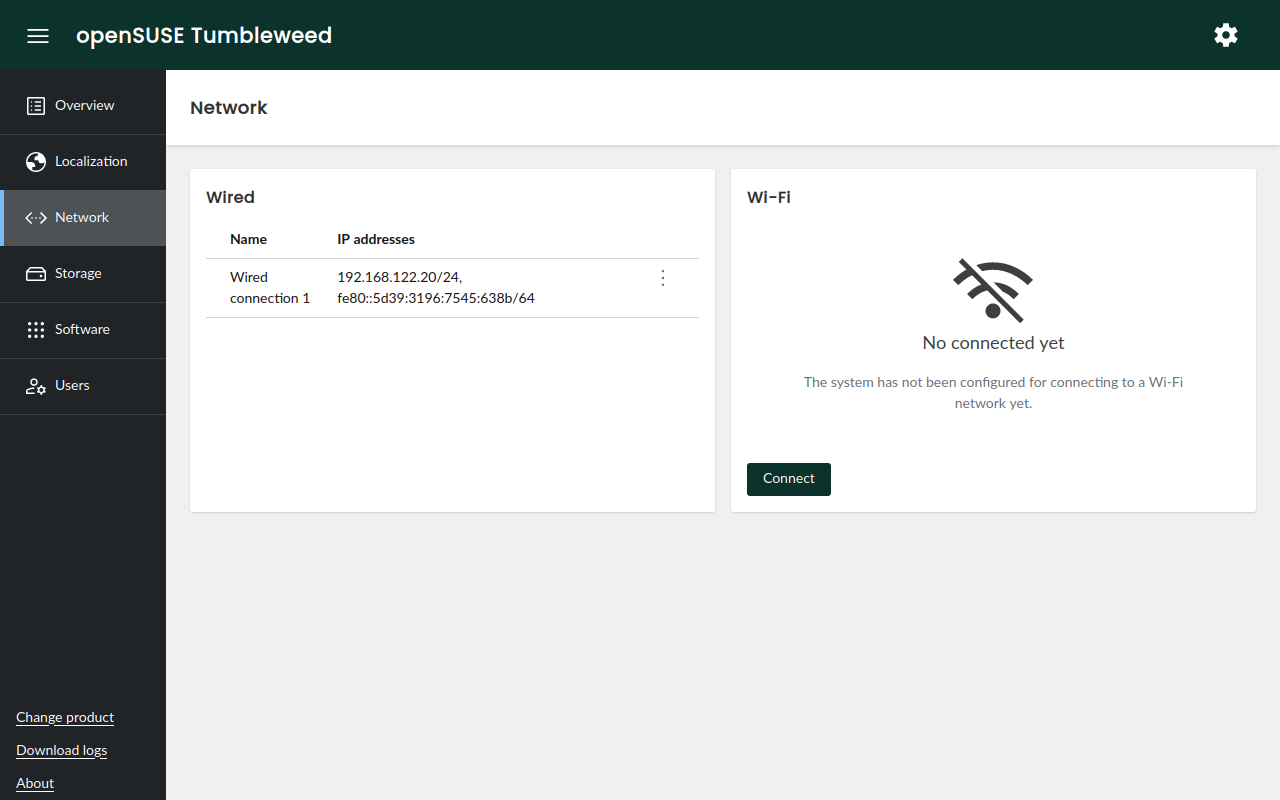
Despite all these changes, we still consider the new interface a work in progress and expect it to evolve significantly in the upcoming weeks. Stay tuned!
AutoYaST compatibility
Many (open)SUSE users rely on AutoYaST for their automated deployments. So the question is obvious: what happens with those AutoYaST profiles they have been crafting for years? We have good news: at least partially, you can use them in Agama.
Agama and YaST are different beasts and will not implement the same features. For that reason, there
might be many AutoYaST elements that will not be supported in Agama. However, don't panic! We plan
to support the most relevant sections, like partitioning, networking, software, scripts,
etc.
As a first step, Agama 9 introduces support for importing an AutoYaST profile and automatically converting it to something it can understand. Moreover, Rules/Classes, Embedded Ruby and pre-scripts are fully supported.
Automated installation
Support for automated installations using Agama has been greatly improved in this release too. The most noticeable changes are:
- Agama provides more hardware information during Jsonnet profiles evaluation. You can find an example in the repository.
- A new
legacy-autoyast-storagesection makes it possible to use an AutoYaST<partitioning />section in Agama. - The command-line interface has received a significant update, including a handy
agama config editthat allows you to change and apply the configuration from the comfort of your favorite editor.

A better installation media
The Agama Live ISO includes many security-related improvements. Until now, you could connect to a
system running the ISO by simply using linux as the root password. It was OK at the beginning of
the development process, but for security reasons it's not acceptable anymore.
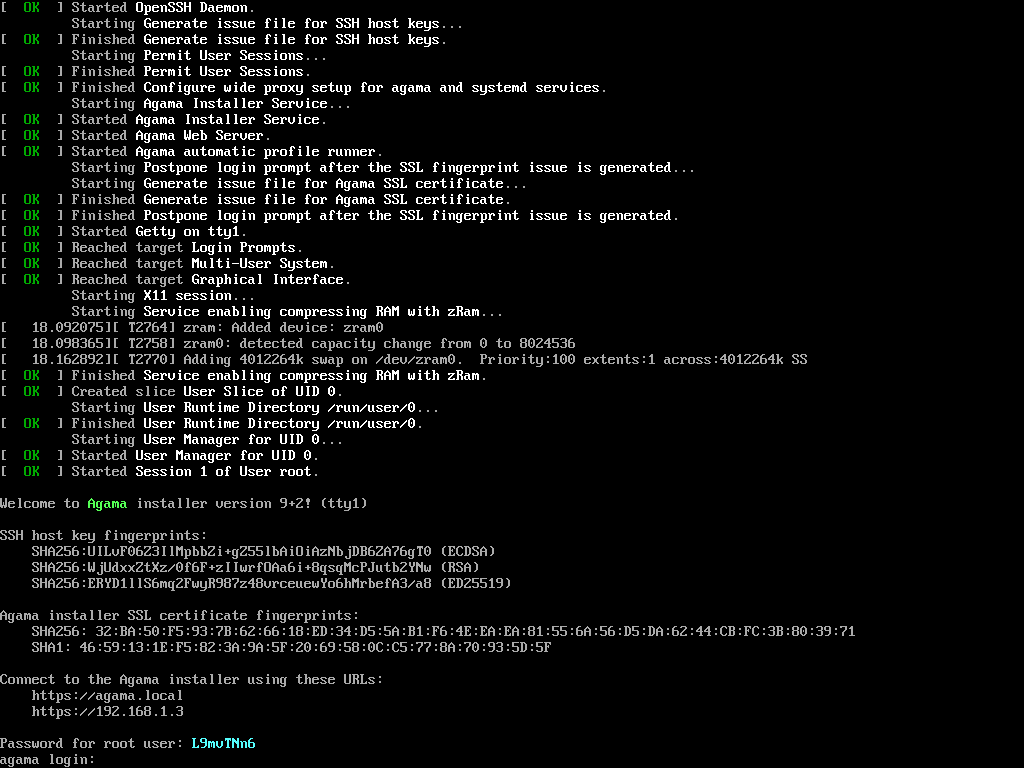
Now you can set your own password or, if you prefer, let Agama Live ISO generate a random one. You can find the password in the local console which, additionally, includes the fingerprints for the SSH host keys and the web server SSL certificate.
Another exciting addition is installing your own packages in the running Live system. In previous versions, Agama locked the packages database, but that's not the case anymore. It enables you to update Agama, add your own modifications, fixes, etc. And it makes development a little bit easier.
See it in action
Do you want to give it a try to the new user interface? Or are you an "automate all the things" kind of person? In any case, you can grab the Agama Live ISO testing images and boot it on a virtual or bare-metal machine.
If you find any bug, please, do not hesitate to report it through our issues tracker
See you soon
As we anticipated the last week, part of the team is present at the
openSUSE Conference 2024 and we would love to hear
from you. But even if you are not visiting the conference, you can always reach us at the
YaST Development mailing list,
our #yast channel at Libera.chat or the
Agama project at GitHub.
Have a lot of fun!

Announcing Agama 9
Agama 8 was a massive release. It took almost five months of work and, as a result, Agama got a new HTTP API and a more powerful user interface for setting up storage devices. Not that bad, uh?
After such a big release, our UX expert came with a completely new prototype for the web user interface and we thought it would be cool to get it on time for the openSUSE Conference. So here we are: presenting Agama 9 and the new user interface during the conference. If you missed the first talk, you can enjoy the recording.
However, that’s not the only remarkable change in this release. As usual, let’s have a look at the most relevant changes.
A New Web User Interface
The most noticeable feature in this release is the debut of the new web user interface. Agama was born as a simplified installer that allowed the user to deploy the system with just a few clicks. However, as new features were introduced, we discovered that the user interface would not scale.
The new interface uses a more classic approach, with a sidebar that makes navigation easier. Moreover, all the sections received significant updates, with special mention of the networking area.

Despite all these changes, we still consider the new interface a work in progress and expect it to evolve significantly in the upcoming weeks. Stay tuned!
AutoYaST Compatibility
Many (open)SUSE users rely on AutoYaST for their automated deployments. So the question is obvious: what happens with those AutoYaST profiles they have been crafting for years? We have good news: at least partially, you can use them in Agama.
Agama and YaST are different beasts and will not implement the same features. For that reason, there
might be many AutoYaST elements that will not be supported in Agama. However, don’t panic! We plan
to support the most relevant sections, like partitioning, networking, software, scripts,
etc.
As a first step, Agama 9 introduces support for importing an AutoYaST profile and automatically converting it to something it can understand. Moreover, Rules/Classes, Embedded Ruby and pre-scripts are fully supported.
Automated Installation
Support for automated installations using Agama has been greatly improved in this release too. The most noticeable changes are:
- Agama provides more hardware information during Jsonnet profiles evaluation. You can find an example in the repository.
- A new
legacy-autoyast-storagesection makes it possible to use an AutoYaST<partitioning />section in Agama. - The command-line interface has received a significant update, including a handy
agama config editthat allows you to change and apply the configuration from the comfort of your favorite editor.

A Better Installation Media
The Agama Live ISO includes many security-related improvements. Until now, you could connect to a
system running the ISO by simply using linux as the root password. It was OK at the beginning of
the development process, but for security reasons it’s not acceptable anymore.
Now you can set your own password or, if you prefer, let Agama Live ISO generate a random one. You can find the password in the local console which, additionally, includes the fingerprints for the SSH host keys and the web server SSL certificate.

Another exciting addition is installing your own packages in the running Live system. In previous versions, Agama locked the packages database, but that’s not the case anymore. It enables you to update Agama, add your own modifications, fixes, etc. And it makes development a little bit easier.
See it in Action
Do you want to give it a try to the new user interface? Or are you an “automate all the things” kind of person? In any case, you can grab the Agama Live ISO testing images and boot it on a virtual or bare-metal machine.
If you find any bug, please, do not hesitate to report it through our issues tracker
See You Soon
As we anticipated the last week, part of the team is present at the
openSUSE Conference 2024 and we would love to hear
from you. But even if you are not visiting the conference, you can always reach us at the
YaST Development mailing list,
our #yast channel at Libera.chat or the
Agama project at GitHub.
Have a lot of fun!
Lançado openVINO 2024.2
Em 18 de junho, foi lançado a versáo 2024.2 do OpenVINO, um kit de ferramentas de código aberto para otimizar e implantar modelos de aprendizagem profunda da nuvem até a borda. Ele acelera a inferência de aprendizado profundo em vários casos de uso, como IA generativa, vídeo, áudio e linguagem com modelos de estruturas populares como PyTorch, TensorFlow, ONNX e muito mais. Converta e otimize modelos e implante em uma combinação de hardware e ambientes Intel®, no local e no dispositivo, no navegador ou na nuvem.

Abaixo as principais mudanças.
Maior cobertura nas tecnologias de IA de última geração e integrações de frameworks para minimizar mudanças de código:
- Otimizações Llama 3 para CPUs, GPUs integradas e GPUs discretas para melhor desempenho e uso eficiente de memória.
- Suporte para Phi-3-mini, uma família de modelos de IA que aproveita o poder de modelos de linguagem pequenos para processamento de texto mais rápido, preciso e econômico.
- Operação Personalizada Python agora habilitada no OpenVINO, facilitando para desenvolvedores Python programarem suas operações personalizadas em vez de operações personalizadas em C++ (também suportadas). A Operação Personalizada Python permite aos usuários implementar suas próprias operações especializadas em qualquer modelo.
- Expansão de notebooks para garantir melhor cobertura para novos modelos. Notebooks notáveis adicionados: DynamiCrafter, YOLOv10, notebook de Chatbot com Phi-3 e QWEN2.
Maior suporte a Modelos de Linguagem de Grande Escala (LLM) e mais técnicas de compressão de modelos:
- Método GPTQ para compressão de pesos de 4 bits adicionado ao NNCF para inferência mais eficiente e desempenho melhorado de LLMs comprimidos.
- Melhorias significativas no desempenho de LLM e redução de latência para GPUs integradas e discretas.
- Melhoria significativa na latência do segundo token e na pegada de memória de LLMs com pesos FP16 em plataformas de CPU baseadas em AVX2 (processadores Intel® Core
 de 13ª Geração) e AVX512 (Processadores Escaláveis Intel® Xeon® de 3ª Geração), especialmente para tamanhos de lotes pequenos.
 de 13ª Geração) e AVX512 (Processadores Escaláveis Intel® Xeon® de 3ª Geração), especialmente para tamanhos de lotes pequenos.
Maior portabilidade e desempenho para executar IA na borda, na nuvem ou localmente:
- Aprimoramentos no Serviço de Modelos:
- Prévia: OpenVINO Model Server (OVMS) agora suporta API compatível com OpenAI juntamente com Batching Contínuo e PagedAttention, permitindo throughput significativamente maior para inferência paralela, especialmente em processadores Intel® Xeon®, ao servir LLMs para muitos usuários simultâneos.
- Backend OpenVINO para Triton Server agora suporta GPUs integradas e discretas, além de suporte a formas dinâmicas.
- Integração do TorchServe através do backend OpenVINO torch.compile para fácil implantação de modelos, provisionamento para múltiplas instâncias, versionamento de modelos e manutenção.
- Prévia: adição da API Generate, uma API simplificada para geração de texto usando modelos de linguagem de grande escala com apenas algumas linhas de código. A API está disponível através do novo pacote OpenVINO GenAI.
- Suporte para Processador Intel Atom® Série X. Para mais detalhes, veja Requisitos do Sistema.
- Prévia: Suporte para processador Intel® Xeon® 6.
Mais informações aqui: https://github.com/openvinotoolkit/openvino/releases/tag/2024.2.0
Iconos Hatter para tu PC, redondeados y volumétricos
Hago una descanso en la difusión de las noveades de aplicaciones KDE para traeros una entrada ligera. Os presento el tema de iconos Hatter para tu PC, una colección de avatares para aplicaciones, acciones y otros elementos gráficos que destacan por estilo redondeado, volumétrico y colorido.
Iconos Hatter para tu PC, redondeados y volumétricos
Como he dicho muchas veces, me fascina la variedad que tenemos a nuestra disposición tanto de forma, estilo o colores. Tenemos iconos clásicos, minimalistas, lineales, 3D, que simulan otros sistemas operativos, imaginativos, que recuerdan a objetos cotidianeos, etc.
Hoy os presento un pack de iconos creados por Waarisbal que ha nombrado como Hatter. Se trata de unos iconos nada minimalistas ya que son redondeados, con uns aspecto 3D muy acentuado y que utiliza una gama de colores bastante variada.

En palabras de su creador:
Basado en el tema de iconos Whitesur de Vinceliuice, el tema de iconos Mkos-Big-Sur de zayronXIO y el tema de iconos Win10Sur de yeyushengfan258.
Tema de iconos cuadrados redondeados dirigido a distribuciones linux con escritorio Gnome como Fedora Workstation.
El objetivo de este tema es crear un tema cuadrado redondeado que sea
fiel a la identidad de la aplicación, el nombre, el esquema de color y la
marca, no imitando otro programa o sistema operativo.
Además, el tema redondeado cubre los mapas, los mimetypes y los dispositivos.
Y como siempre digo, si os gusta el pack de iconos podéis pagarlo de muchas formas en la página en continua evolución de KDE Store, que estoy seguro que el desarrollador lo agradecer: puntúale positivamente, hazle un comentario en la página o realiza una donación. Ayudar al desarrollo del Software Libre también se hace simplemente dando las gracias, ayuda mucho más de lo que os podéis imaginar, recordad la campaña I love Free Software Day 2017 de la Free Software Foundation donde se nos recordaba esta forma tan sencilla de colaborar con el gran proyecto del Software Libre y que en el blog dedicamos un artículo.
Más información: KDE Store
La entrada Iconos Hatter para tu PC, redondeados y volumétricos se publicó primero en KDE Blog.
Mix novedades de KDE Gear 24.05
Siguiendo el objetivo de mostrar qué ofreció el pasado mayo la Comunidad KDE en cuanto a aplicaciones a lo largo de estos últimos días he hablado de las nueva aplicaciones del ecosistema, de Dolphin, de Itinerary, de Neochat, de Tokodon y de Kdenlive. Llego al final de la serie con el mix de novedades de KDE Gear 24.05, un recpilatorio de aquellas aplicaciones que han recibido mejoras importantes pero poco numerosas.
Mix novedades de KDE Gear 24.05
Muchas han sido las novedades en muchas aplicaciones que nos ofreció KDE Gear 24.05 y que han sido presentadas en el blog, pero os puedo asegurar que muchas son las que no se conocen ya que los desarrolladores, en muchas ocasiones, simplemente van trabajando en su código y no tienen tiempo ni de publicar las mejoras.
Para finalizar esta serie, y como viene siendo habiatual, queda dar el último repaso a esas aplicaciones que solo han presentado una novedad en el anuncio de lanzamiento y que suelo agrupar para dar densidad a su merecida entrada:
- Elisa, el elegante y funcional reproductor de música de KDE, añade la posibilidad de cambiar entre las vistas de lista y de cuadrícula.
-
Ark, gestor de archivos comprimidos y de archivadores, puede ahora abrir y extraer archivos comprimidos
.exeautoextraíbles. - Merkuro, calendario personal, es significativamente más rápid ya que se ha optimizado el selector de fecha y hora.
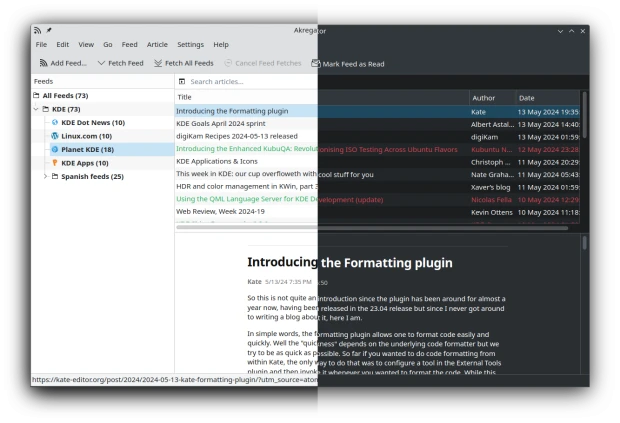
- Akregator, el lector de noticias RSS de KDE, ha mejora la experiencia de lectura gracias a un nuevo diseño y a la compatibilidad con temas oscuros.
Más información: KDE Gear 24.05
La entrada Mix novedades de KDE Gear 24.05 se publicó primero en KDE Blog.