
 Member
 baltolkien
Quinta actualización de Plasma 6
Me alegra compartir con todos vosotros la quinta actualización de Plasma 6, iniciando así una serie de revisión de software que le dotará de más estabilidad, mejores traducción y resolución de errores. Estas actualizaciones son 100% recomendables y casi obligatorias para cualquier usuario ya que lo único que hacen es mejorar la versión sin comprometer sus funcionalidades.
Quinta actualización de Plasma 6
No existe Software creado por la humanidad que no contenga errores. Es un hecho incontestable y cuya única solución son las actualizaciones. Es por ello que en el ciclo de desarrollo del software creado por la Comunidad KDE se incluye siempre las fechas de las mismas siguiendo una especie de serie de Fibonacci.
La Comunidad KDE ha publicado se se ha lanzado la primera actualización de Plasma 6, una versión que ha supuesto una salto muy importante en cuanto a tecnología y que, francamente, ha salido bastante bien ya, por ejemplo, KDE Neon se actualizó pasadas unas horas del lanzamiento, con problemas menores y completamente funcional (de hecho, estoy trabajando desde el jueves 29 con él en todos mis equipos).
Creo es un buen momento para reflexionar: yo tardé casi un año en dar el salto a KDE 4 a Plasma 5, ya que es cuando pensé acertadamente que ya se ofrecía algo bastante estable para el trabajo diario. Para dar el salto de KDE 3 a KDE 4 fueron varios años, así que estamos ante un hito que marca un pico de calidad en el mundo del Software Libre.
Para dar el salto de Plasma 5 a Plasma 6 han bastado 5 horas. ¡Y lo mejor está por llegar! Y es que en realidad, los desarrolladores de KDE simplemente se han centrado en portar Plasma 5 a Plasma 6 y todas las novedades de la nueva tecnología está todavía en desarrollo y se irá implementando poco a poco.
Así que me congratula en presentar que el martes 21 de mayo de 2024, casi tres meses después de liberar el código la Comunidad KDE presenta la quinta actualización de errores entre los que destacan:
- Dr Konqi: Postman ya no se ejecuta tan frecuentemente.
- Fondo de pantalla del día: Se ha corregido el arrastre de la imagen de vista previa en Qt 6.7.
- Se ha corregido los problemas al navegar con el teclado
Más información: KDE
Las novedades básicas del Plasma 6
Han sido días tan frenéticos que no he podido hacer todavía la entrada detallando las novedades de Plasma 6 o de KDE Gears, pero he aquí una pincelada de las mismas .
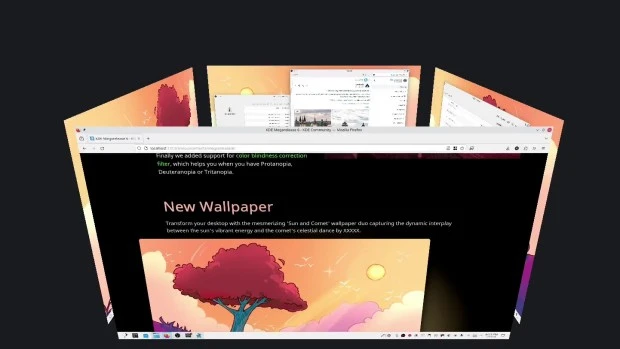
- Nuevo efecto de vista general: se han combinado los efectos de Vista general y Cuadrícula de escritorios en uno, con grandes mejoras en los gestos del panel táctil.
- Color mejorado: Plasma en Wayland ya tiene compatibilidad parcial con alto rango dinámico (HDR).
- Nuevo fondo de escritorio: Árbol escarlata, creado por axo1otl.
- Panel flotante: en Plasma 6, el panel flota de forma predeterminada. Se puede cambiar, por supuesto.
- ¡Nuevos valores predeterminados!
- Brisa refrescada: se ha rediseñado el tema Brisa para que presente un aspecto más moderno, con menos marcos y con un espaciado más consistente.
- Preferencias reorganizadas: se ha mejorado la aplicación de Preferencias para que resulte más amigable y tenga menos páginas anidadas.
- ¡El cubo ha vuelto!
- Mejoras en la búsqueda de Plasma: ahora personalizar el orden de los resultados de la búsqueda y es mucho más rápida.
- Mejoras en Plasma Mobile.
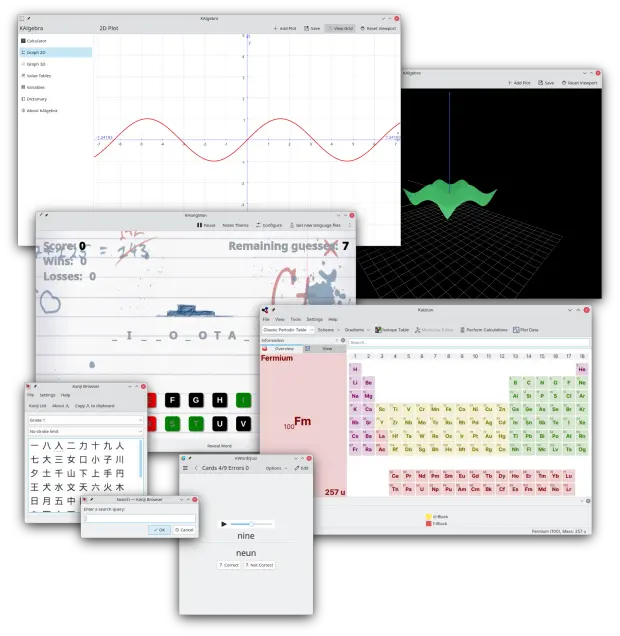
- Cambios en todas las aplicaciones de KDE Gear: Kontact, Kleopatras. Itineray, KDE Edu, KDEnlive, Dolphin, Spectacle, etc.
La entrada Quinta actualización de Plasma 6 se publicó primero en KDE Blog.

New Episode Launches in Workshop Series
The openSUSE Project continues its Contribution Workshop series today with a new episode at 19:15 UTC on the project’s YouTube & X channels.
The new episode will take viewers on an insightful journey into the world of testing and breaking builds. The session focuses on the automation of repetitive tasks and will demonstrate how to leverage tools and techniques to automate build testing.
Episode 8: Testing and Breaking Builds - Offloading Repetitive Tasks to Computers, While You Have Fun Exploring
In the upcoming Episode 8, openQA engineer Santiago Zarate will do a live talk and explain how open-source contributors can maintain high standards of testing quality while reducing the manual workload.
These workshops offer a platform for learning and for contributors to ask questions and engage directly with developers, maintainers and experienced members of the openSUSE community.
The espisdoes for the Contribution Workshop go over a variety of topics including package maintenance, infrastructure, or understanding the overall project landscape. These following episodes are tailored to provide an overview and practical advice for open-source software developments and contributions.
The following episodes were already released:
- Episode 1: openSUSE Contribution Workshop: Basic use of OBS osc using a version bump as an example
- Episode 2: openSUSE Contribution Workshop: From 0 to an rpm package packaging GNU Hello
- Episode 3: openSUSE Contribution Workshop: openSUSE Leap 15.6 Beta Bug Day
- Episode 4: openSUSE Contribution Workshop: Packaging Rust in Open Build Service
- Episode 5: Contributing to openSUSE Leap - Project Structure, Feature Tracking, Package Updates for SLES Packages
- Episode 6: Host Your Own openSUSE Mirror
- Episode 7: openSUSE Contribution Workshop: Custom Leap Micro image spin in a few minutes
(Image made with DALL-E)
openSUSE Asia Summit 2024 Logo Competition Announcement
openSUSE.Asia Summit 2024 Logo Competition
We are pleased to announce the launch of our logo contest for the openSUSE.Asia Summit 2024! The logo plays a crucial role in representing the spirit and identity of the event. Each year, the distinct logos from previous Summits have beautifully reflected the diverse communities that host them. We invite you to participate in this year’s contest and design a remarkable logo for the 2024 summit.
The openSUSE.Asia Summit 2024 will be held in Tokyo, Japan, with more details coming soon. The competition is currently open and will close on July 21, 2024. To thank the winner, the organizers will present a special “Geeko Mystery Box” to the creator of the best logo.
Deadline: 21 July 2024
Announcement Winner: 29 July 2024
The Rules of the contest are as follows:
- Licensing: The logo should be licensed under CC-BY-SA 4.0 and must allow everyone to use it without attribution if it is chosen as the logo for openSUSE.Asia Summit 2024. Note that attribution will be shown on the summit website.
- Originality: The design must be original and should not include any third-party materials.
- Formats: Both monochrome and color formats are essential for submission.
- File Format: Submissions must be in SVG format.
- Community Reflection: The design should reflect the openSUSE community in Asia.
-
Avoid: The logo should not include:
- Brand names or trademarks of any kind.
- Illustrations that may be considered inappropriate, offensive, hateful, tortuous, defamatory, slanderous, or libelous.
- Sexually explicit or provocative images.
- Violence or weapons imagery.
- Alcohol, tobacco, or drug use imagery.
- Discrimination based on race, gender, religion, nationality, disability, sexual orientation, or age.
- Bigotry, racism, hatred, or harm against groups or individuals.
- Religious, political, or nationalist imagery.
- Guidelines: The logo should adhere to the openSUSE Project Trademark Guidelines.
- Branding: The openSUSE branding guidelines will be helpful in designing your logo (optional).
Please submit your design to opensuseasia-summit@googlegroups.com with the following details:
- Subject Line: openSUSE.Asia Summit 2024 Logo Design - [Your Name]
- Contact Information: Your name and email address.
- Design Philosophy: A document (in TXT or PDF format) explaining the philosophy behind your design.
- Vector File: The design in SVG format ONLY.
- Bitmap File: A bitmap image of the design as an attachment, with a minimum size of 256x256 pixels in PNG format.
- File Size: Ensure the file size is less than 512 KB.
The openSUSE.Asia Summit Committee will review all submissions to ensure they meet the requirements. The final decision will be made by the committee and may not necessarily be the highest-scoring design. We recommend using Inkscape, a powerful, free, and open-source vector graphics tool, for your design work.
syslog-ng Prometheus exporter
Prometheus is an open-source monitoring system that collects metrics from your hosts and applications, allowing you to visualize and alert on them. The syslog-ng Prometheus exporter allows you to export syslog-ng statistics, so that Prometheus can collect it.
While an implementation in Go has been available for years on GitHub (for more information, see this blog entry), that solution uses the old syslog-ng statistics interface. And while that Go-based implementation still works, syslog-ng 4.1 introduced a new interface that provides not just more information than the previous statistics interface, but does so in a Prometheus-friendly format. The information available through the new interface has been growing ever since.
The syslog-ng Prometheus exporter is implemented in Python. It also uses the new statistics interface, making new fields automatically available when added.
Read more at https://www.syslog-ng.com/community/b/blog/posts/syslog-ng-prometheus-exporter

syslog-ng logo
openSUSE Conference Schedule Set
The schedule for openSUSE Conference 2024 is out and it is filled with several talks about open-source ecosystem and includes several breaks for networking opportunities.
Open-source enthusiasts, developers and contributors will meet at the Z-Bau from June 27 to June 29 to share, discuss and showcase the latest advancements in open-source technologies, projects and communities. The conference will feature a series of talks, workshops, meetups and keynote speakers providing valuable insights into current and future directions of open-source software.
Santiago Zarate, Oliver Kurz, and Livdywan are scheduled to kick off with a session on openQA - Current State and Moving Forward. The talk will highlight the evolution of openQA as a crucial tool for ensuring the stability of openSUSE’s systems and expanding its impact beyond openSUSE, Fedora and SUSE.
Marcus Meissner and Johannes Segitz will present The XZ Backdoor - Report from Our Side and provide a retrospective on a significant supply chain attack involving the xz compression library. They will discuss the attack’s impact, response measures and future security considerations.
Two keynotes will take place on the first day. SUSE’s CEO Dirk-Peter van Leeuwen will speak about the importance of community and fostering collaborative open-source environments.
Luca Di Maio will provide a keynote session on Developing on Aeon with Distrobox. The presentation will introduce Distrobox and demonstrate how it can be used as a development environment within Atomic and Transactional systems like Aeon.
The second day is scheduled to begin with Alfonso Hernandez’s Midori is Much More Than a Web Browser talk. Hernandez will explore the features and benefits of Midori, a lightweight, fast and secure browser, and its role in promoting user privacy and security.
Jsrain will provide a SUSE ALP: State of the Matters talk. The session will cover recent developments, upcoming releases and how the openSUSE project can build on SUSE’s ALP development.
Rick Spencer, General Manager at SUSE, will deliver another keynote. His talk Why openSUSE Matters will share his insights on the significance of openSUSE in the broader open-source ecosystem.
The final day will feature Dan Čermák’s The Tragedy of Community Enterprise Linux Distributions. Čermák will discuss the challenges faced by community variants of enterprise Linux distributions and propose potential solutions.
Markus Feilner will present Exchange Your Exchange: grommunio - An Open Source Drop-In and So Much More and highlight grommunio as a comprehensive open-source replacement for Microsoft Exchange, which offers groupware, video conferencing, chat, file sync and more.
A Fedora Hatch Meetup, led by Čermák, will provide an informal space for Fedora contributors and enthusiasts to discuss their experiences and network.
Tobias Görgens’ sdbootutil: Mastering the Art of Boot Management talk will introduce a tool designed to simplify bootloader management on openSUSE to make the process more intuitive and robust.
The openSUSE Conference 2024 is expected to be a great informative event for sharing, collaborating, learning and innovating.
For more information and to register, visit events.opensuse.org.
Último día para apuntarte al programa social de #akademyes 2024 de València #esLibre edition
El 24 y 25 de mayo se va a celebrar el mayor evento de la Asociación KDE España, este año también hemos preparado algunas actividades sociales para que nuestros asistentes disfruten en una Valencia menos centrada en el Software Libre y más en su rica historia y fabulosa gastronomía. La entrada de hoy es un ultimatum ya que hoy es el último días para apuntarte al programa social de Akademy-es 2024 de València #esLibre edition que se ha programado para el viernes y el domingo (ya que la mayoría de visitantes seguro que alargan su estancia). Los actos sociales del sábado los anunciaremos el viernes durante las charlas.
Último día para apuntarte al programa social de #akademyes 2024 de València #esLibre edition
De momento son tres los actos sociales que tenemos previsto hacer el fin de semana del 24 al 26 de mayo. Una cosa importante que debéis tener en cuenta es que para participar en los eventos, es necesario completar el formulario de inscripción, ya sabéis, por el tema de reservar plazas y que tenéis de plazo hasta esta noche (miércoles 22 de mayo a las 23:59)

Cena de confraternización, Viernes 24 de mayo a las 21:30
El viernes a las 21:30 celebraremos una cena de confraternización en la cervecería Pinocchio, localizada cerca de las Naves.
El menú estará compuesto principalmente por tapas y bocadillos variados. El precio aproximado será de unos 20 euros por persona.
Visita a Valencia, Domingo 26 de mayo de 10:30 a 13:30
El domingo por la mañana realizaremos una visita por los lugares más emblemáticos de la ciudad. Será una excelente oportunidad para conocer Valencia con los asistentes a Akademy-es en un ambiente distendido.
Visitaremos, entre otros, el Ayuntamiento, la Catedral, la Plaza de La Reina, La Lonja y las Torres de Serrano.
Comida valenciana, Domingo 26 de mayo a las 13:30
Para recuperar fuerzas tras la visita, comeremos en el restaurante Entretorres, en donde podremos degustar platos típicos de la gastronomía local, como el tomate Valenciano, el jamón ibérico, y como no podía ser de otra forma, la paella (varias opciones a elegir). Por supuesto, también habrá alternativas vegetarianas y veganas.
El precio de este almuerzo será de 30 euros e incluirá la comida, la bebida, el postre y café. Ver menú.

.
Más información: KDE España
¿Qué es Akademy-es?
Akademy-es (#akademyes, que es la etiqueta para las redes sociales) es evento más importante para los desarrolladores y simpatizantes de KDE, que se ha ido celebrando desde el 2006 con éxito creciente.
En general, las Akademy-es son el lugar adecuado para conocer a los desarrolladores, diseñadores, traductores, usuarios y empresas que mueven este gran proyecto.
En ellas se realizan ponencias, se presentan programas, se hace un poco de caja para los proyectos libres (camisetas, chapas, etc) pero sobre todo se conoce a gente muy interesante y se cargan baterías para el futuro.
Podéis repasar las anteriores ediciones en estas entradas del blog:
- Camino Akademy-es 2013: Las anteriores ediciones (I): 2006 – 2008
- Camino Akademy-es 2013: Las anteriores ediciones (II): 2009-2010
- Camino Akademy-es 2013: Las anteriores ediciones (III): 2011-2012
- Anteriores ediciones de Akademy-es (IV): 2013 y 2014
La entrada Último día para apuntarte al programa social de #akademyes 2024 de València #esLibre edition se publicó primero en KDE Blog.
gnome-remote-desktop: D-Bus system service in GNOME release 46 (CVE-2024-5148)
Table of Contents
- Introduction
- Review Motivation and Scope
- A) Unauthenticated Handover D-Bus Interface (CVE-2024-5148)
-
B)
find_cr_lf()Suffers from a one Byte Overread -
C)
grdctlUtility Accepts Cleartext Password on the Command Line - Timeline
- References
Introduction
gnome-remote-desktop offers access to the graphics system either via the VNC or the RDP (Microsoft remote desktop) network protocol. Before version 46, gnome-remote-desktop was only used in the context of existing graphical user sessions. Starting with version 46, one can also configure a system daemon, that allows to connect to the GNOME display manager (GDM), allowing to create graphical sessions remotely.
The system daemon runs as a dedicated “gnome-remote-desktop” user. It provides a D-Bus interface on the D-Bus system bus. The daemon also interacts with a newly introduced D-Bus interface provided by GDM, to create remote displays.
While reviewing the new system service I found a number of local security issues and areas for security improvement. The more relevant issues are discussed in this report, while an upstream Gitlab issue contains a more detailed report and discussions also covering less severe aspects found during the review.
This report relates to gnome-remote-desktop release 46.0. Bugfixes for the issues described are found in release 46.2, except for item C) for which no fix is available yet.
Review Motivation and Scope
D-Bus system services require a review by the SUSE security team, before they can be added to openSUSE distributions and derived products. With the addition of the system daemon, a review of gnome-remote-desktop became necessary, before adding it to openSUSE Tumbleweed in the context of the larger GNOME 46 release.
The review was mainly concerned with the newly introduced system level gnome-remote-desktop daemon. The focus was furthermore on code paths related to the RDP protocol, which is the default and preferred over the VNC protocol.
Since the codebase of gnome-remote-desktop is rather large, I focused the review on the security of the D-Bus methods, the Polkit authentication and parts of the network processing. I also did not look closely into the FreeRDP library, which is used by gnome-remote-desktop for processing the majority of the RDP protocol.
A) Unauthenticated Handover D-Bus Interface (CVE-2024-5148)
Only the “org.gnome.RemoteDesktop.Rdp.Server” D-Bus interface is
protected by Polkit. auth_admin authorization is required on this
interface for all methods. The other two interfaces “Dispatcher” and
“Handover” are not authorized and are accessible to all local users in
the system. This leads to a number of local security issues described in
the following subsections.
Local Private Key Leak
The system daemon keeps public SSL certificates and their corresponding private keys in “/var/lib/gnome-remote-desktop/.local/share/gnome-remote-desktop/certificates”. Access to the service’s home directory in “/var/lib/gnome-remote-desktop” is restricted to the service user “gnome-remote-desktop”, mode 0700.
Through the “org.gnome.RemoteDesktop.Rdp.Handover” D-Bus interface any
local user can intercept the private SSL key, though. The private key is
returned from the StartHandover D-Bus function. When a remote desktop
client connects to the system daemon, then there is a rather long time
window, during which any local user (even nobody) can call this method on
the created session object. This is an example call to achieve this:
gdbus call -y -d org.gnome.RemoteDesktop -o /org/gnome/RemoteDesktop/Rdp/Handovers/sessionc11 \
    -m org.gnome.RemoteDesktop.Rdp.Handover.StartHandover someuser somepass
The username and password parameters are not important here, they will only be forwarded to the connecting client. Doing this, as another effect, also results in a denial-of-service, because the proper connection handover will be prevented.
A local attacker does not necessarily have to wait for somebody to connect to the system daemon, it can connect on its own via localhost, to achieve the same result. Valid credentials for RDP authentication are necessary to get to the handover stage, however.
The impact of this problem is a local information leak and local DoS. The information leak means that the integrity and privacy of RDP connections on the system are compromised. This simple Python script allows to reproduce the issue.
System Credentials Leak
If an RDP connection uses shared system credentials (see struct member
GrdRemoteClient.use_system_credentials), then a local attacker with
low privileges can obtain these credentials in cleartext in a similar
fashion to the private key leak, by calling the unauthenticated
GetSystemCredentials() D-Bus method of the Handover interface.
Using these system credentials, the attacker will be able to connect to the display manager via RDP. This should not directly grant access to a session, since a login on display manager level still has to happen. An exception would be if things like automatic login are enabled (I don’t know whether they apply to remote connections).
The Socket Connection can be Obtained via TakeClient()
The equally unauthenticated D-Bus method Handover.TakeClient() allows
any local user in the system to obtain the file descriptor pertaining to
the RDP client that is in handover state. This could allow a local user
to perform a denial-of-service of the RDP connection or to setup a crafted RDP
session.
Obtaining the socket via this call only works in certain system daemon
states, most notably it seems the StartHandover() needs to have been
performed for this to succeed. I did not fully investigate what the
exact preconditions are.
Bugfix and Affectedness
This CVE only affects gnome-remote-desktop releases 46.0 and 46.1, since the system daemon was only introduced in these versions. The bugfix is available starting from version 46.2 and is found in commit 9fbaae1a.
With the bugfix applied, only the user for whom a new session has been created will be able to call the handover interface anymore. This still means that all users with RDP access share the same private key, which, according to upstream, is by protocol design.
B) find_cr_lf() Suffers from a one Byte Overread
This function processes untrusted pre-authentication RDP protocol
network data (the routing token) and looks for a terminating \r\n
sequence. The size calculation in the function’s for loop is wrong: if
the final byte of the buffer is 0x0D, then the logic will access the
next byte out of bounds. This buffer is not null terminated.
The impact should be negligible in most cases. This is the output of Valgrind I obtained after sending a crafted packet to the daemon:
==31119== Invalid read of size 1
==31119==    at 0x15A1EF: UnknownInlinedFun (grd-rdp-routing-token.c:65)
==31119==    by 0x15A1EF: UnknownInlinedFun (grd-rdp-routing-token.c:159)
==31119==    by 0x15A1EF: UnknownInlinedFun (grd-rdp-routing-token.c:239)
==31119==    by 0x15A1EF: peek_routing_token_in_thread (grd-rdp-routing-token.c:281)
<snip>
Bugfix
The bugfix is found starting in release 46.2 in commit 663ad63172.
C) grdctl Utility Accepts Cleartext Password on the Command Line
The text-based grdctl configuration utility, which is used for both,
system and session context RDP setups, accepts cleartext passwords in
the following invocation styles:
grdctl [--system] rdp set-credentials <username> <password>
grdctl [--system] vnc set-password <username> <password>
This means that the cleartext password will leak via the /proc file
system and will be visible in the process task list via ps, when
configured this way. Other users can thus get access to the
authentication data.
Bugfix
Upstream declined assignment of a CVE for this issue. They consider the shared credentials to be of rather low sensitivity and state that other ways exist for users to set the credentials, that don’t leak information to other users (GNOME Control Center, the D-Bus API, writing the credentials file directly). A feature request to allow reading the password via stdin has been added to an existing Gitlab issue.
Timeline
| 2024-04-19 | I reported the issues and other recommendations and remarks via a private issue in the upstream Gitlab, offering coordinated disclosure. |
| 2024-04-22 | Upstream decided to handle all findings except for the unauthenticated Handover D-Bus methods publicly. No formal coordinated release date was established for the remaining private issue. |
| 2024-04-26 | I requested a CVE from Mitre to track the unauthenticated Handover D-Bus methods issue described in section A). |
| 2024-05-13 | After Mitre did not assign a CVE for weeks, it was agreed that upstream would request a CVE from RedHat instead. |
| 2024-05-20 | Upstream received CVE-2024-5148 to track the unauthenticated Handover D-Bus methods issue. |
| 2024-05-21 | After asking for the expected time frame for publication of the remaining private issue, upstream decided to publish right away. |
References


Python 3.13 Beta 1
Python 3.13 beta 1 is out, and I've been working on the openSUSE Tumbleweed package to get it ready for the release.
Installing python 3.13 beta 1 in Tumbleweed
If you are adventurous enough to want to test the python 3.13 and you are using openSUSE Tumbleweed, you can give it a try and install the current devel package:
# zypper addrepo -p 1000 https://download.opensuse.org/repositories/devel:languages:python:Factory/openSUSE_Tumbleweed/devel:languages:python:Factory.repo
# zypper refresh
# zypper install python313
What's new in Python 3.13
Python interpreter is pretty stable nowadays and it doesn't change too much to keep code compatible between versions, so if you are writing modern Python, your code should continue working whit this new version. But it's actively developed and new versions have cool new functionalities.
-
New and improved interactive interpreter, colorized prompts,
multiline editing with history preservation, interactive help with
F1, history browsing withF2, paste mode withF3. - A set of performance improvements.
- Removal of many deprecated modules: aifc, audioop, chunk, cgi, cgitb, crypt, imghdr, mailcap, msilib, nis, nntplib, ossaudiodev, pipes, sndhdr, spwd, sunau, telnetlib, uu, xdrlib, lib2to3.
Enabling Experimental JIT Compiler
The python 3.13 version will arrive with an experimental functionality
to improve performance. We're building with the
--enable-experimental-jit=yes-off so it's disabled by default but it
can be enabled with a virtualenv before launching:
$ PYTHON_JIT=1 python3.13
Free-threaded CPython
The python 3.13 has another build option to disable the Global
Interpreter Lock (--disable-gil), but we're not enabling it because
in this case it's not possible to keep the same behavior. Building
with disabled-gil will break compatibility.
In any case, maybe it's interesting to be able to provide another version of the interpreter with the GIL disabled, for specific cases where the performance is something critical, but that's something to evaluate.
We can think about having a python313-nogil package, but it's not
something trivial to be able to have python313 and python313-nogil
at the same time in the same system installation, so I'm not planning
to work on that for now.
Promociones de ponentes de Akademy-es 2024 de València esLibre Edition #akademyes
Como ya sabréis este año se celebra Akademy-es 2024 se celebrará en de forma presencial en València, junto a esLibre del 24 al 25 de mayo, viernes y sábado. Ya hace un tiempo que fue publicado el programa oficial de charlas y que fue anunciado en el blog, pero hoy me complace compartir con todos vosotros las promociones de ponentes de Akademy-es 2024 de València esLibre Edition montados por Damian, con una intro basada en el cartel de Rosanna García y el cartel de esLibre. Si no te convencemos para que vengas yo ya no sé.
Anuncios del programa de charlas de Akademy-es 2024 de València esLibre Edition #akademyes
El 24 y 25 de mayo se va a celebrar Akademy-es 2024 de València que se celebrará organizado por KDE España y de forma paralela a otro gran evento como es esLibre, gracias al esfuerzo de la asociación sin ánimo de lucro de GNU/Linux València.

Este año volvemos a tener un gran programa de ponencias pero condensado es un solo día ya que se ha pensado que dado que estamos en un gran evento es una buena idea que los organizadores también nos mezclemos con el resto de asistentes.
En el programa de charlas, que pondré a continuación, podrás ver la diversidad de ponencias que hemos preparado, condensando a algunos de los grandes comunicadores de la Comunidad KDE y algunos artistas invitados de prestigio. Además, como novedad este año se nos ha ocurrido que algunos ponentes graben un pequeño vídeo para promocionar su charla y el evento en general.
De esta forma vais a encontrar a ponentes de la talla de Lorenzo Carbonell (Atareao), Aleix Pol, Albert Astals y Baltasar Ortega (un servidor) comentando su charla y animándoos a asistir.
Viernes 24 de mayo
Jornada matinal
12:00 – 12:05 Ceremonia de apertura de Akademy-es – Adrián Chaves, Presidente de KDE España
12:05 – 12:45 Craft: la distribución de KDE para plataformas no Linux – Albert Astals Cid, Coordinador de traduciones de KDE
12:45 – 13:30 Python y Qt – José Millán Soto, KDE España
13:30 – 14:00 Typst como alternativa a LaTeX y Markdown – Lorenzo Carbonell (Atareao), desarrollador
Jornada vespertina
15:30 – 16:00 ¿Qué es KDE España? – Junta de KDE España
16:00 – 16:45 Pintando con Krita: técnicas de ilustración – Alien
16:45 – 17:30 Cómo puedes utilizar OSS KB para desarrollar KDE – Agustín Benito, consultor
17:30 – 18:15 Charlas relámpago
Foto de grupo
18:30 – 19:15 Mirando más allá de Plasma 6 – Aleix Pol i González, Presidente de KDE eV – En remoto
19:15 – 20:00 10 cosas que no sabías que podías hacer (o sí) en Plasma 6 – Baltasar Ortega, Editor de kdeblog
20:00 Ceremonia de clausura de Akademy-es
Nota: Las charlas y horarios pueden sufrir ligeras modificaciones dependiendo de la disponibilidad de los ponentes
La entrada Promociones de ponentes de Akademy-es 2024 de València esLibre Edition #akademyes se publicó primero en KDE Blog.
Publicado MarkNote 1.2 de #KDE
La comunidad de KDE ha publicado MarkNote 1.2 la aplicación para tomar notas en MarkDown y organizarlas en carpetas

MarkNote no es un editor de archivos en formato MarkDown, es un programa que te permite crear notas de texto enriquecido y organizarlas fácilmente en cuadernos.
Puedes personalizar tus cuadernos eligiendo un ícono o un color distinto para cada uno, lo que facilita distinguirlos facilmente.
Las notas se guardan como archivos Markdown en texto plano en tu carpeta Documentos, por tanto se pueden editar y modificar con otros editores de texto. Aunque MarkNote te facilita organizar las notas, clasificarlas, etc.
Y el pasado 17 de mayo de 2024 se ha publicado su versión 1.2, llena de mejoras, introducción de nuevas funcionalidades y correcciones de errores.
En esta versión se ha añadido la capacidad de elegir una carpeta personalizada donde almacenar tus notas. También se ha añadido la posibilidad de cambiar la clasificación de las notas de alfabéticamente a ordenar por fecha. Además en esta versión se ha ha hecho posible agregar y editar tablas.
Además, ahora el texto en MarkDown se comienza a transformar directamente en texto enriquecido a medida que se escribe. De momento no está disponible para todos los formatos disponibles, pero poco a poco se irán añadiendo. Y además ya se puede personalizar la fuente utilizada por el editor.
Además de poder editar texto, ahora también es posible crear bocetos de dibujo o imagen directamente desde MarkNote. En medios con pantalla táctil puede resultar muy útil. Ya que también se han hecho mejoras para que esté disponible para PlasmaMobile. Y para sistemas privativos.
