
 Member
 baltolkien
Mi escritorio Plasma oscuro de febrero 2023 #viernesdeescritorio
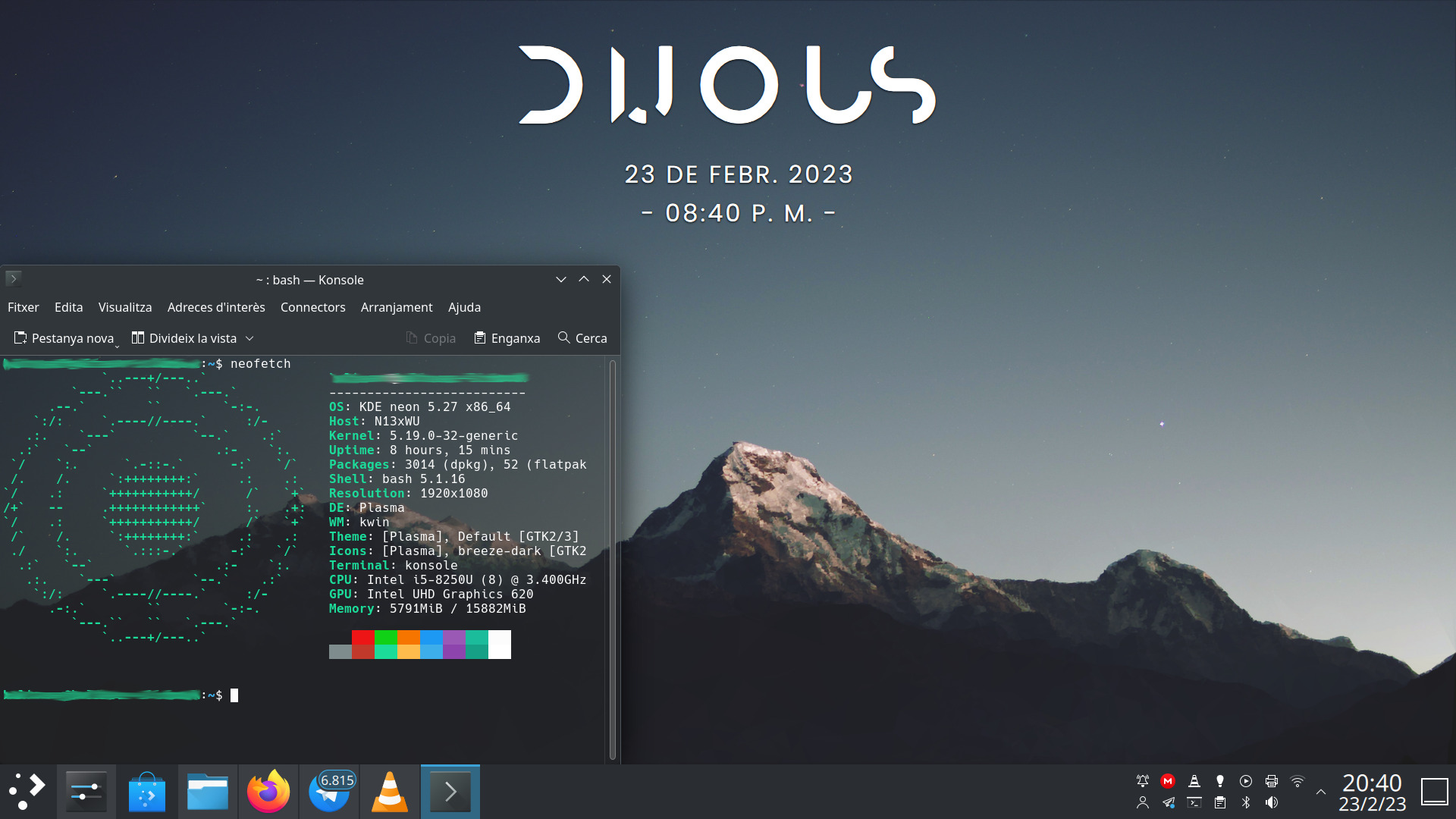
Este mes voy a hacer dobletes con la serie de la iniciativa #viernesdeescritorio con una nueva captura, con la que llegaré a más de un año y medio compartiendo «Mi escritorio» de forma mensual, una mirada a la intimidad de mi entorno de trabajo. De esta forma, bienvenidos a mi escritorio oscuro Plasma de febrero 2023, el tercero del año, que está dedicado al recientemente lanzado Plasma 5.27, último de la serie, y con el que utilizaré su tema básico oscuro.
Mi escritorio Plasma oscuro de febrero 2023 #viernesdeescritorio
Esta va a ser la trigésimatercera vez que muestro mi escritorio Plasma 5 en público, lo cual es número nada desdeñable de entradas que sigue creciendo de forma constante. Hice un recopilatorio con los 12 escritorios del 2022 y tengo pendiente seguir con otros, para finalizar con una entrada que los recopile todos… pero eso será en un futuro.
Respecto al mes pasado, y como he dicho en la introducción, está basado en el tema Brisa Oscuro del VDG de la Comunidad KDE: tema global, ventanas, colores, iconos, etc.
Respecto a plasmoides, he despejado el escritorio de ellos ya que me ha gustado tanto el fondo de pantalla que me apetecía verlo sin distracciones. No obstante al utilizar el tema oscuro, el mismo fondo cambia para que quede más harmonioso con el tema global. Sigo dejando solamente el plasmoide Modern Clock, que encaja a la perfección. El resto de cosas que necesito (calendario, conexiones, volumen, etc,) lo tengo en la barra de tareas a un solo click.
Sigo, tras unos meses mostrando mi Slimbook Kymera AMD de sobremesa, a realizar la captura sobre mi portátil Slimbook Pro de 13 pulgadas, el cual tiene instalado un KDE Neon con Plasma 5.27.1, siendo mi sistema gráfico Wayland que ya ha se ha establecido definitivamente.
El resultado de mi escritorio oscuro de febrero de 2023 es un entorno de trabajo claro y, como siempre, funcional que podéis ver en la imagen inferior (pinchad sobre ella para verlo un poco más grande). Por cierto, he añadido un poco de transparencia a Konsole.
La entrada Mi escritorio Plasma oscuro de febrero 2023 #viernesdeescritorio se publicó primero en KDE Blog.

Projeto transforma YouTube em armazenamento infinito.
Impressionante a criatividade dos nerds. Um amigo meu e do meu filho chamado Homero Caom, enviou o link de um projeto chamado ISG (Infinite-Storage-Glitch). Este projeto permite aos usuários a capacidade de usar o YouTube como um serviço de armazenamento em nuvem, permitindo que eles façam upload de qualquer tipo de arquivo, seja ele um documento, uma imagem ou mesmo um vídeo.
Uma vez carregado, os arquivos injetados podem então ser baixados e recuperados a qualquer momento. Com isso, o YouTube se transforma em um serviço de armazenamento em nuvem praticamente ilimitado. O YouTube não limita a quantidade de vídeo para upload, assim criando a brecha para este projeto.
Conceito:
Todos os arquivos são feitos de bytes que podem ser interpretados como números de 0 a 255. Esse número pode ser representado com pixels usando um dos dois modos: RGB ou binário. RGB: No modo RGB cada byte se encaixa perfeitamente dentro de uma das cores de um pixel RGB. Um pixel RGB pode conter 3 bytes por vez. Você apenas continua adicionando pixels assim até que acabe os dados. É muito mais eficiente e rápido que o binário.

Post-mortem: Downtime on February 23, 2023

Νους υγιής εν κώδικα υγιεί

Ένα υγιές μυαλό οδηγεί σε υγιή κώδικα. Το ένα είναι απαραίτητο για να έχουμε το άλλο. Το θέμα το λάτρεψα διότι συνέβη και σε εμένα κατά τη διάρκεια του έτους. Πέρασε χρόνος που δεν αισθανόμουν ιδιαίτερα καλά λόγω προσωπικών θεμάτων.
Νομίζω ότι είναι απαραίτητο να υπενθυμίσουμε στους εαυτούς μας ότι δεν είμαστε ρομπότ. Χρειαζόμαστε ελεύθερο χρόνο κάθε τόσο και πρέπει να ισορροπήσουμε σωστά τη ζωή μας. Θα πρέπει να ζείτε τη ζωή σας. Δεν πρέπει να ξοδεύετε κάθε στιγμή που ξυπνάτε στο project που δουλεύετε, διότι δεν είναι υγιές. Μπορείτε να ξοδέψετε ένα μεγάλο μέρος του χρόνου σας σε projects που σας ευχαριστούν.
Το πιο σημαντικό πράγμα είναι να λέτε συχνά ΟΧΙ. Αυτό είναι και δικό μου λάθος. Μπορείτε να πειτε ΟΧΙ δεν μπορώ όταν κάποιος σας ρωτά "Μπορείς να κάνεις αυτό;". Βέβαια μπορείτε να πείτε και ΝΑΙ μερικές φορές. Μην τα ισοπεδώνουμε.
Υπάρχουν άλλα σημαντικά πράγματα.
- Ένα από τα πιο σημαντικά πράγματα είναι ο ύπνος. Να κοιμάστε πολλές ώρες. Να ξεκουραστείτε.
- Επίσης σημαντικές είναι οι φιλίες. Μπορείτε να έχετε φιλίες. Φιλίες εντός του project είτε εκτός. Θα σας κάνουν να αισθανθείτε περίφημα.
- Υιοθετήστε έναν έναν υγιεινό τρόπο ζωής και ίσως μερικές φορές σκεφτείτε τη δική σας κατάσταση του μυαλού. Πώς αισθάνεστε και πώς σας κάνει να νιώθετε το project που συνεισφέρετε. Ίσως επειδή ίσως σας αγχώνουν, είναι καλό να καταλάβετε γιατί αγχώνεστε και έτσι κάνετε σωστά την ερώτηση στον εαυτό σας.
Να έχετε υπόψη σας ότι τα projects ανοικτού λογισμικού αποτελούν μια εθελοντική προσπάθεια. Δεν βγάζετε κάτι από αυτό, σωστά; Οπότε θα πρέπει να έχετε στο νού σας να πάρετε κάτι από αυτό. Ίσως είναι απόλαυση, ίσως είναι απλώς η αίσθηση της κοινότητας, η αίσθηση της φιλίας που βιώνουμε. Αυτό που σίγουρα δεν θέλετε να έχετε είναι να χάσετε τον ύπνο σας. Γι' αυτό αν υπάρχει ένα ιδιαίτερα δύσκολο πρόβλημα που αντιμετωπίζετε στην καθημερινή σας δουλειά στο project σας, απλώς ρωτήστε κάποιον άλλο. Πάρτε τη γνώμη κάποιου άλλου. Μην χάσετε τον ύπνο σας. Ο ύπνος είναι πολύ σημαντικός. Φυσικά μερικές φορές μπορεί απλώς να χρειαστεί να αποστασιοποιηθείτε από τα πράγματα.
Ορίστε μερικές συμβουλές, μερικές πολύ γενικές συμβουλές:
- Να ξέρετε τα όριά σας. Μην αγχώνεστε πολύ αν δεν μπορείτε να διορθώσετε όλα τα σφάλματα στον κόσμο. Τα μισά από αυτά μπορεί να ειναι ΟΚ. Μην απλώσετε το εύρος ζώνης σας, ακόμα και αν πιστεύετε ότι αυτό που θα κάνετε θα σας αποφέρει ευχαρίστηση.
- Μερικές φορές είναι εντάξει να κάνετε διακοπές για μερικά χρόνια. Εννοώ ότι μπορείτε να απέχετε από το project ανοικτού λογισμικού που συνεισφέρετε. Όλη η κοινότητα θα σας αγαπά ακόμα όταν επιστρέψετε. Και ελπίζω ότι θα επιστρέψετε.
- Δεν χρειάζεται να σχεδιάζετε υπερβολικά τη ζωή σας. Να είστε ελεύθεροι να δεσμευτείτε στο project που σας άρεσε και συνεισφέρατε τόσο χρόνο, μόνο και μόνο επειδή συντηρείτε ένα κομμάτι λογισμικού δεν σημαίνει ότι έχετε το παντρευτήκατε και πρέπει να το συντηρείτε για πάντα. Μπορεί να κάνετε ένα βήμα πίσω και να μπείτε σε ένα άλλο έργο πχ έρευνας και ανάπτυξης.
- Αν διαπιστώσετε ότι κάτι δεν σας προσφέρει ικανοποίηση, δεν σας προσφέρει απόλαυση, μειώστε τον χρόνο που διαθέτετε σε αυτό. Καλύτερα είναι να το αφήσετε τελείως, ιδιαίτερα αν είναι μια λίστα αλληλογραφίας ή κάτι άλλο που δεν οδηγεί σε τίποτα παραγωγικό ούτως ή άλλως

Νους υγιής εν κώδικα υγιεί
Ένα υγιές μυαλό οδηγεί σε υγιή κώδικα. Το ένα είναι απαραίτητο για να έχουμε το άλλο. Το θέμα το λάτρεψα διότι συνέβη και σε εμένα κατά τη διάρκεια του έτους. Πέρασε χρόνος που δεν αισθανόμουν ιδιαίτερα καλά λόγω προσωπικών θεμάτων.
Νομίζω ότι είναι απαραίτητο να υπενθυμίσουμε στους εαυτούς μας ότι δεν είμαστε ρομπότ. Χρειαζόμαστε ελεύθερο χρόνο κάθε τόσο και πρέπει να ισορροπήσουμε σωστά τη ζωή μας. Θα πρέπει να ζείτε τη ζωή σας. Δεν πρέπει να ξοδεύετε κάθε στιγμή που ξυπνάτε στο project που δουλεύετε, διότι δεν είναι υγιές. Μπορείτε να ξοδέψετε ένα μεγάλο μέρος του χρόνου σας σε projects που σας ευχαριστούν.
Το πιο σημαντικό πράγμα είναι να λέτε συχνά ΟΧΙ. Αυτό είναι και δικό μου λάθος. Μπορείτε να πειτε ΟΧΙ δεν μπορώ όταν κάποιος σας ρωτά "Μπορείς να κάνεις αυτό;". Βέβαια μπορείτε να πείτε και ΝΑΙ μερικές φορές. Μην τα ισοπεδώνουμε.
Υπάρχουν άλλα σημαντικά πράγματα.
- Ένα από τα πιο σημαντικά πράγματα είναι ο ύπνος. Να κοιμάστε πολλές ώρες. Να ξεκουραστείτε.
- Επίσης σημαντικές είναι οι φιλίες. Μπορείτε να έχετε φιλίες. Φιλίες εντός του project είτε εκτός. Θα σας κάνουν να αισθανθείτε περίφημα.
- Υιοθετήστε έναν έναν υγιεινό τρόπο ζωής και ίσως μερικές φορές σκεφτείτε τη δική σας κατάσταση του μυαλού. Πώς αισθάνεστε και πώς σας κάνει να νιώθετε το project που συνεισφέρετε. Ίσως επειδή ίσως σας αγχώνουν, είναι καλό να καταλάβετε γιατί αγχώνεστε και έτσι κάνετε σωστά την ερώτηση στον εαυτό σας.
Να έχετε υπόψη σας ότι τα projects ανοικτού λογισμικού αποτελούν μια εθελοντική προσπάθεια. Δεν βγάζετε κάτι από αυτό, σωστά; Οπότε θα πρέπει να έχετε στο νού σας να πάρετε κάτι από αυτό. Ίσως είναι απόλαυση, ίσως είναι απλώς η αίσθηση της κοινότητας, η αίσθηση της φιλίας που βιώνουμε. Αυτό που σίγουρα δεν θέλετε να έχετε είναι να χάσετε τον ύπνο σας. Γι' αυτό αν υπάρχει ένα ιδιαίτερα δύσκολο πρόβλημα που αντιμετωπίζετε στην καθημερινή σας δουλειά στο project σας, απλώς ρωτήστε κάποιον άλλο. Πάρτε τη γνώμη κάποιου άλλου. Μην χάσετε τον ύπνο σας. Ο ύπνος είναι πολύ σημαντικός. Φυσικά μερικές φορές μπορεί απλώς να χρειαστεί να αποστασιοποιηθείτε από τα πράγματα.
Ορίστε μερικές συμβουλές, μερικές πολύ γενικές συμβουλές:
- Να ξέρετε τα όριά σας. Μην αγχώνεστε πολύ αν δεν μπορείτε να διορθώσετε όλα τα σφάλματα στον κόσμο. Τα μισά από αυτά μπορεί να ειναι ΟΚ. Μην απλώσετε το εύρος ζώνης σας, ακόμα και αν πιστεύετε ότι αυτό που θα κάνετε θα σας αποφέρει ευχαρίστηση.
- Μερικές φορές είναι εντάξει να κάνετε διακοπές για μερικά χρόνια. Εννοώ ότι μπορείτε να απέχετε από το project ανοικτού λογισμικού που συνεισφέρετε. Όλη η κοινότητα θα σας αγαπά ακόμα όταν επιστρέψετε. Και ελπίζω ότι θα επιστρέψετε.
- Δεν χρειάζεται να σχεδιάζετε υπερβολικά τη ζωή σας. Να είστε ελεύθεροι να δεσμευτείτε στο project που σας άρεσε και συνεισφέρατε τόσο χρόνο, μόνο και μόνο επειδή συντηρείτε ένα κομμάτι λογισμικού δεν σημαίνει ότι έχετε το παντρευτήκατε και πρέπει να το συντηρείτε για πάντα. Μπορεί να κάνετε ένα βήμα πίσω και να μπείτε σε ένα άλλο έργο πχ έρευνας και ανάπτυξης.
- Αν διαπιστώσετε ότι κάτι δεν σας προσφέρει ικανοποίηση, δεν σας προσφέρει απόλαυση, μειώστε τον χρόνο που διαθέτετε σε αυτό. Καλύτερα είναι να το αφήσετε τελείως, ιδιαίτερα αν είναι μια λίστα αλληλογραφίας ή κάτι άλλο που δεν οδηγεί σε τίποτα παραγωγικό ούτως ή άλλως

Safely clone a job on a production instance
When developing new openQA tests you will have to run a lot of verification and debug test runs. This is why I typically encourage people to do all openQA testing on their own instances, to prevent spamming of the production instances.
Lanzada la primera actualización de 5.27 edición ‘KDE 💖 Free Software’
Con un poco de retraso respecto al calendario de lanzamiento de los desarrolladores, la Comunidad KDE han comunicado que ha sido lanzada la primera actualización de Plasma 5.27. Una noticia que aunque es esperada y previsible es la demostración palpable del alto grado de implicación de la Comunidad en la mejora continua de este gran entorno de escritorio de Software Libre.
Lanzada la primera actualización de 5.27 edición ‘KDE  Free Software’
 Free Software’
No existe Software creado por la humanidad que no contenga errores. Es un hecho incontestable y cuya única solución son las actualizaciones. Es por ello que en el ciclo de desarrollo del software creado por la Comunidad KDE se incluye siempre las fechas de las actualizaciones.
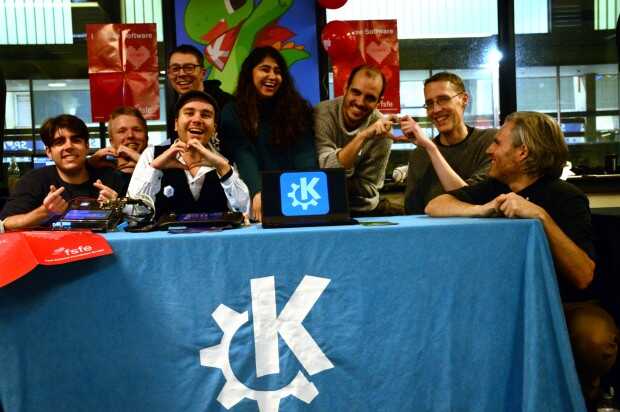
La Comunidad KDE ha publicado hoy que ha lanzado la primera actualización de Plasma 5.27, una versión que nos ofrecen un gran conjunto de novedades y propuestas que nos acercan a lo que vendrá cuando se realice la transición a Plasma 6. No obstante, en esta versión se han dedicado a introducir la presentación en mosaico de las ventanas, las nuevas pantallas de bienvenida y mejoras notables en Discover, por nombrar solo tres de ellas.
Entre los errores solucionados nos encontramos con:
- KWin: Se ha añadido compatibilidad con Lima, V3D, VC4 (basado en https://github.com/OpenMandrivaAssociation/kwin/blob/master/kwin-5.21.4-add-support-for-panfrost-driver.patch, creado por Bernhard Rosenkraenzer) y se ha actualizado la lista de dispositivos compatibles con Panfrost.
- KScreen: Se ha corregido un fallo potencial al definir nuevas configuraciones.
- Espacio de trabajo Plasma: Mejor gestión de la eliminación de pantallas.
Más información: KDE
Las novedades de Plasma 5.27
Tengo pendiente aún hablar de las novedades de Plasma 5.27 así que simplemente hablo de las pinceladas que nos han comentado los desarrolladores:
- Nuevas pantallas de bienvenida.
- Mejoras en las preferencias de permisos para Flatpak.
- Mejoras en la refactorización multimonitor.
- Sistema de mosaicos de KWin.
- Añadido el Calendario Hebreo en el calendario emergente del reloj digital.
- Mejoras en Discover.
- Más funcionalidades para Krunner.
- Mejoras en los plasmoides.
En los próximas entradas más detalles.
La entrada Lanzada la primera actualización de 5.27 edición ‘KDE 💖 Free Software’ se publicó primero en KDE Blog.

Super Mario World Widescreen on the SteamDeck
Flathub Brand Refresh
While Flatpak itself is an architecturally decentralized way to distribute apps, Flathub embraces the convenience for people to come to one place to install apps. There’s some fairly big changes coming to Flathub that I’m extremely excited about, that will make sure the new wave of Linux apps doesn’t fizzle out and we’ll maintain a sustainable application ecosystem.
Thus there is no better time to refresh what has become a little dated, Flathub’s visual identity. It centers around the core of what Flathub is — the apps themselves. The identity isn’t very loud and shouty. The flashy colors and emphasis remains on the apps themselves, Flathub is the neutral platform for the apps to shine.

Take a peek at the brand guidelines to learn more about the new Flathub brand or download the logos in scalable format. The download buttons for app websites are also available.


Building a brand on neutral greys isn’t quite an easy sell, but precisely targets the main point of the Flathub brand. It creates the stage for apps to shine. Flathub isn’t flashy by itself. It allows the apps to be at the center of your attention.
If you’ve read until this point, you deserve a treat! Here’s some eye candy from the early stages of the process. Wallpapers derived from the elemental shapes of the logomark. Clearly off limits now, but can’t just throw them away, can I?


Big shoutout to razze for his ongoing work on the website and implementing the brand so quickly. Many thank yous to Tobias Bernard for significant involvment in this during the Berlin Mini GUADEC and Václav Vančura for sensible feedback.

Awareness Sessions About Projects Available for GSoC Applicants
Mentors and administrators of openSUSE are excited to be accepted as a mentorship organization for this year’s Google Summer of Code and will be available for potential mentee to discuss the projects that are listed on 101.opensuse.org.
There will be 15 minute sessions prior to all openSUSE community meetings where mentees can join our Jitsi meeting room to get in touch with members of the openSUSE community who can help them navigate the projects available during this year’s GSoC.
Community meetings are every Tuesday and Thursday and the times vary. The Tuesday session for mentee applicants starts at 15:15 UTC and the Thursday session begins at 19:45 UTC. Meeting times begin at 15:30 UTC and 20:00 UTC respectively.
Potential mentee applicants can view a list of projects on 101.opensuse.org and communicate directly with mentors leading the project through commenting on the GitHub issue listing the project of interest. Not all mentors are available during the time slotted for the awareness sessions, but those who are available will help the best they can with the information they have available about a project.
Sessions will be available from Feb. 23 - April 4. There are 15 projects listed this year. Some of the projects listed involve topics related to devops, artificial intelligence, security, cryptography, Kubernetes, containers and quality assurance. Many of the projects’ languages include Python, Rust, Perl, ReactJS, JavaScript, Ruby and more.