
 Member
 vavai
vavaiMid Semester Perkuliahan
Pekan ini dan pekan depan adalah jadwal mid semester. Alhamdulillah dosennya baik, sehingga mid semester untuk beberapa mata kuliah memiliki jadwal berbeda dan masing-masing punya mekanisme sendiri.
Untuk mata kuliah Business Intelligence misalnya, mid semester dalam bentuk presentasi hasil pengolahan data yang diambil dari UCI atau Kaggle Dataset. Dapatkan data, overview data awal, check exploratory data analysis (EDA), masukkan ke algoritma machine learning dan dapatkan insight.
Proses presentasi diawali dari overview kemudian ke insight, baru ke data-data pendukung pengambilan kesimpulan insight tersebut, misalnya dalam bentuk pattern maupun bentuk grafik.
Karena business intelligence, machine learning dan deep learning merupakan ilmu baru, saya harus mengejar ketertinggalan ilmu basicnya. Sampai dengan Jumat siang, saya masih kalut dalam memahami ilmu basicnya. Meski demikian, saya sudah buatkan semacam template mengenai materi yang akan dipresentasikan.


Saat presentasi saya mendapat giliran nomor 7 namun akhirnya maju ke giliran nomor 6 karena satu orang student mengalami gangguan koneksi. Sayapun sempat terkendala sedikit terkait koneksi mic ke Airpods, namun karena sudah menyiapkan alternatif, saya bisa lekas mengatasinya dan bisa melakukan presentasi.
Alhamdulillah, meski tidak sehebat para presenter yang awal-awal memberikan presentasi (urutan presentasi diambil dari nilai keaktifan selama pertemuan-pertemuan sebelumnya dan yang presentasi awal memang sudah jago melakukan analisa dan coding), saya mendapat nilai 80 untuk presentasi tersebut.
Masih banyak hal yang harus saya perbaiki baik dari sisi persiapan, analisa, presentasi maupun pengambilan kesimpulan dan penggunaan toolsnya, namun untuk ukuran pribadi, nilai itu menjadi awalan yang baik untuk bisa lebih baik lagi pada proses berikutnya.
Hari Minggu kemarin sampai dengan hari Rabu ada mid task terkait IT Forensics dan ini berupa gabungan analisa, penjelasan dan praktek implementasi materi yang dilakukan selama pertemuan kelas sebelumnya. Saya tidak hendak menundanya dan mulai membuat tugas tersebut pagi ini agar bisa selesai tepat waktu (selesai sebelum batas waktu maksudnya).
Untuk tugas Ubiquitous Computing dan Research Methodology, mid tasknya adalah membuat paper sedangkan untuk mata kuliah Information Retrieval, mid tasknya nanti dilakukan di awal November dan sifatnya analisa dan pemahaman terhadap materi yang diberikan.
Pengalaman mid task dan pembelajaran yang dilakukan ini merupakan hal baru bagi saya. Perlu persiapan yang lebih baik dan juga kemampuan manajemen waktu yang harus terus ditingkatkan agar bisa mengatur waktu disela-sela pekerjaan di Excellent, Aktiva dan Zeze Zahra dan disela-sela permintaan presentasi dari klien di hari kerja.
Cómo mostrar los commits en git realizados en una fecha concreta
Vamos a ver cómo podemos ver qué commits se realizaron en un repositorio git en una fecha concreta gracias al comando git log

Con el comando git log y sus opciones disponibles, podremos ver una lista de los commits realizados en un repositorio git, fecha, quien lo hizo y más información.
Hace un tiempo ya publiqué por el blog un artículo sobre git log:
En este caso vamos a aprender cómo poder filtrar esa muestra de los registros por una fecha específica o entre dos fechas.
Este artículo es una traducción/adaptación del artículo escrito por Agil Antony para la web opensource.com y publicado bajo una licencia CC-by-sa.
Mostrar los commits de git realizados ayer mismo
Dentro de una carpeta de un repositorio git, nos situamos en la rama del repositorio que queremos ver los cambios realizados y podremos ejecutar varias acciones.
Podremos ver los cambios realizados hoy en el repositorio mediante:
git log --since="yesterday"
El anterior comando nos mostrará el hash generado para los commits realizados, quién los realizó, a qué hora y el comentario del commit.
Si el comando anterior nos muestra demasiada información, podemos reducirla para que cada cambio lo muestre únicamente usando una línea:
git log --oneline --since="yesterday"
Mostrar los commits de git realizados por una persona
Si sigue siendo mucha información, podremos buscar los commits realizados filtrando por un usuario en concreto mediante la opción --author , de la siguiente manera:
git log --oneline --since="yesterday" --author="Victorhck"
Mostrar commits de git realizados entre dos fechas
Para ver los commits realizados entre dos fechas concretas podremos ejecutar:
git log --oneline --since="15-10-2022" --until="16-10-2022"
Mostrar los commits de git realizados hasta o desde una fecha en concreto
Pero no es necesario que aportemos un rango de fecha si no es lo que queremos. Podemos ver los commits enviados al repositorio de git desde una fecha en concreto:
git log --oneline --since="15-10-2022"
O los commits realizados desde el inicio hasta una fecha en concreto:
git log --oneline --before="15-10-2022"
¿Y si queremos el número de commits que se han realizado?
Para ello, podemos pasar el comando anterior con el comando wc de GNU, para que nos cuente el número de líneas, en este caso commits, que devuelve el comando git log:
git log --oneline --since="15-10-2022" | wc -l
Que en mi caso me muestra un valor de 7, por tanto 7 commits realizados desde el día 15/10/2022.
¿Y desde el incio del repositorio?
git log --oneline --before="today" | wc -l
Esta es una buena manera de revisar los cambios realizados en una fecha en concreto, filtrando por autor, etc. Aunque te recomiendo leer la página man de git log donde te mostrará mucha más ayuda sobre el comando y todas sus opciones.

Las novedades de Plasma Bigscreen de Plasma 5.26
Hace un tiempo que presenté este proyecto, que poco a poco ha ido evolucionando en silencio hasta que en este pasado lanzamiento de la Comunidad KDE ha dado un paso de gigante. Así que hoy es el momento de hablar de las novedades de Plasma Bigscreen de Plasma 5.26, el entorno gráfico orientado a ser utilizado en pantalla grades y a se utlizado con un mando a distancia.
Las novedades de Plasma Bigscreen de Plasma 5.26
La Comunidad KDE publicó el psado 11 de octubre la versión Plasma 5.26 de su escritorio, una versión que sigue ofreciéndones novedades y propuestas que nos acercan a lo que vendrá cuando se realice la transición a Plasma 6 (o como se decida nombrarlo).
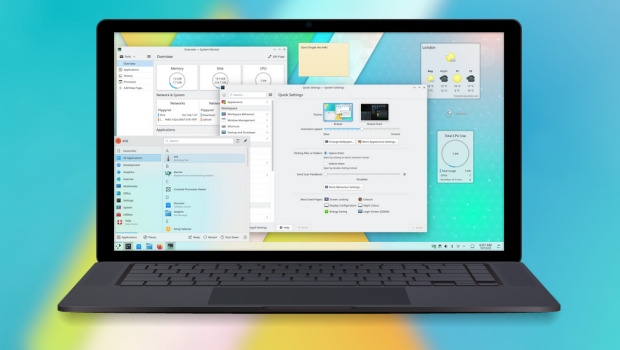
Como dice el día de su lanzamiento, en esta versión los desarrolladores se han dedicado a, entre otras cosas, a presentar grandes novedades para su proyecto Plasma Bigscreen, un entorno gráfico que proporciona una interfaz gráfica adecuada para su uso en pantallas grandes como Televisores o proyectores, y cuyo manejo estáoptimizado para mandos a distancia.
De esta forma, en Plasma 5.26 Bigscreen ha presentado a Aura, un navegador especialmente diseñado para grandes pantallas con grandes y claramente recuadros etiquetados que nos permiten navegar por Internet usando el mando a distancia desde el sofá.
Por otra parte, también se ha presentado el Reproductor Plank, un reproductor multimedia sencillo y fácil de usar con el que podrás reproducir vídeos de cualquier dispositivo de almacenamiento que conectes al televisor.
Vale la pena recordar que Plasma Bigscreen es toda una alternativa funcional para liberar tu «Televisor Inteligente» que se sustenta en sus grandes ventajas:
- Es Software Libre y Open Source.
- Ofrece innovación ya que supone un reto de adaptación de las aplicaciones a una nueva forma de interaccionar con ellas.
- Puede ser controlado por voz.
- Es abierto y, por tanto, puede ser fácilmente ampliado con nuevas funcionalidades y aplicaciones.
- Está soportada por la Comunidad KDE, garantía de calidad.
Y, si quieres estar todavía más libre os comento que Plasma Bigscreen ya ha sido probado con una Raspberry Pi conectada a un TV por su entrada HDMI, y funciona a las mil maravillas.
Más información: KDE
La entrada Las novedades de Plasma Bigscreen de Plasma 5.26 se publicó primero en KDE Blog.

Request Page Redesign - Build results and superseded conversations
Negosiasi : Permintaan Dadakan dan Meeting Offline
Salah satu masalah yang kerap dialami jika kita mengelola perusahaan jasa di Indonesia adalah permintaan dadakan. Sebagai contoh, tiba-tiba ada calon klien yang bilang malam-malam, “Pak Vavai, besok diminta datang presentasi ke kantor ya…”
Dan saya gelagepan harus jawab gimana. Kerapkali yang meminta request dadakan seperti ini dari instansi pemerintah, dimana atasan mereka waktunya terbatas dan perintah pimpinan adalah perintah yang harus dilaksanakan.
Masalah buat Excellent adalah tidak siap jika dadakan. Bukan soal materi presentasinya, melainkan agenda waktu, siapa yang ditunjuk dan apa saja yang harus disiapkan.
Sebagai contoh, agenda pekan depan atau bulan depan biasanya sudah disiapkan dari pekan atau bulan sebelumnya. Karena staff terbatas, otomatis kita harus mengatur waktu, antara memberikan support dan services ke klien yang dimiliki saat ini (existing) dan memberikan presentasi atau penawaran untuk klien baru.

Presentasi itu kadang tidak cukup hanya oleh team sales, karena banyak juga yang butuh penjelasan teknis, misalnya terkait migrasi data, teknik switch sistem dan mekanisme support.
Solusi internal yang dilakukan adalah menambahkan kemampuan teknis dasar ke team sales. Namun hal ini tidak menyelesaikan masalah, terutama jika ada permintaan yang berbarengan waktunya.
Masalah kedua selain soal pendadakan adalah permintaan untuk visit atau datang langsung ke kantor klien. Jika permintaan visit ini dilakukan untuk klien yang sudah deal, itu sebenarnya oke saja. Kendalanya adalah jika permintaan presentasi tatap muka itu dilakukan baru awalan atau overview penawaran. Ada banyak faktor yang harus dipikirkan oleh perusahaan kecil, antara lain terkait biaya transport dan akomodasi, waktu dan tenaga yang harus dialokasikan.
Perjalanan visit di lokasi seputaran Jabotabek saja menguras tenaga dan waktu, selain juga alokasi biaya untuk transportasi dan makan team staff. Perjalanan pergi pulang ke kantor klien di Jakarta bisa menyita waktu setengah hari sendiri. Kelihatannya ini hal sepele, tapi jika tidak dikelola dengan baik, banyak pengeluaran yang terjadi yang bahkan lenyap begitu saja karena projectnya tidak deal.
Orang bisa bilang bahwa ini merupakan resiko pekerjaan, karena kan kita tidak tahu mana opportunity yang akan menjadi pekerjaan dan mana yang gagal. Namun saya pribadi lebih cenderung untuk mengantisipasinya.
Jika klien setuju meeting secara online, ini merupakan pilihan pertama. Meeting online jika dilakukan secara komprehensif malah lebih optimal dibandingkan meeting offline. Hemat biaya, waktu dan tenaga juga. Team yang terbatas juga bisa menyambi kerja.
Meeting offline tidak dinafikan begitu saja, namun meeting offline ini lebih diutamakan untuk tindak lanjut pekerjaan. Misalnya untuk kick-off meeting atau meeting awal membahas pekerjaan. Bukan meeting yang masih ngalor ngidul membahas project mentah yang belum ketahuan ujungnya.
Rekan saya punya pengalaman. Ia punya perusahaan startup dibidang development aplikasi. Calon klien minta ia beberapa kali datang untuk presentasi. Dari Bandung ke Jakarta paling tidak menyita biaya hingga 500 ribu rupiah sekali perjalanan. Klien tidak mau dicharge biaya itu karena kan baru presentasi penawaran. Akhirnya ia memasukkan komponennya kedalam penawaran harga. Namun alokasi biaya itu tidak tergantikan karena projectnya tidak deal.
Jika ada beberapa model project seperti itu, pengeluaran yang tidak perlu jadi semakin banyak. Ini bisa menyebabkan kemacetan disisi cash flow usaha, karena biaya itu pasti sedangkan pemasukan belum tentu pasti.
Jadi jika ada request ke Excellent dan pilihan pertama ditawarkan meeting secara online, itu bukan nggak sopan atau malas, melainkan agar lebih efektif dan efisien bagi kedua belah pihak. Kalau kalian mau langganan ke provider besar seperti AWS atau Azure atau GCP, kan kalian juga tidak bisa sembarangan minta mereka datang kecuali nilai projectnya cukup besar atau ada hal tertentu yang bisa menjadi pertimbangan mereka.
Untuk permintaan dadakan, saya biasanya mengecek apakah secara kesiapan memungkinkan atau tidak. Jika memang memungkinkan dan secara peluang bisnis itu masuk akal (make sense), saya bisa meminta team untuk menyiapkannya. Bisa juga hal tersebut dilakukan dalam menjaga relasi bisnis, bukan semata-mata soal projectnya.
Jika kondisinya tidak memungkinkan, saya akan menyampaikannya baik-baik dan menawarkan opsi lain. Bisa opsi online meeting atau bisa juga reschedule waktu. Ini bukan tanpa resiko, karena ada calon klien yang merasa kurang dihargai jika permintaan mereka tidak diterima apa adanya. Mereka tidak mau meeting online dan juga tidak mau digeser waktu atau harinya. Untuk kondisi seperti ini, ada prinsip dasar yang dipegang di Excellent. Prinsip dasarnya adalah : Tidak semua project harus diambil.
Mungkin, adakalanya, deal untuk tidak deal adalah pilihan terbaik bagi kedua belah pihak. Jika itu yang dilakukan, tidak usah merasa menyesalinya, karena bisa jadi itu cara agar kedua belah pihak tetap memiliki relasi yang baik dan dilain waktu baru bisa bekerja sama.
Control Center – Plasmoides de KDE (208)
En el entorno más personalizable que puedes tener en tu ordenador tiene opciones para todos lo gustos… y entre ellos mimetizar algunos aspectos de otros entono de trabajo. Es el caso de Control Center el plasmoide 208 para Plasma de la Comunidad KDE que nos permite tener centralizadas algunas opciones de la bandeja del sistema al estilo del sistema operativo de las manzanas.
Control Center – Plasmoides de KDE (208)
Llevo diciéndolo varios artículos, por norma general los plasmoides sirven para decorar, ampliar funcionalidades o proporcionar información que nuestro sistema tiene de su funcionamiento.
Hoy tenemos el ejemplo de uno que une las tres opciones antes comentadas ya que con Control Center, una creación de prayagjain que nos permite tener centralizadas algunas opciones de la bandeja del sistema. Como vemos en la imagen inferior Control Center es un elemento decorativo, nos informa del estado de servicios como la red wif o el Bluetooth y, evidentemente, nos permite cambiar algunos parámetros.

Su estado de desarrollo es muy inicial ya que, por ejemplo, en la versión que he utilizado para realizar esta entrada no tiene implementada la opción del control de brillo, algo que sí tiene la versión beta, tal y como leemos en el GitHub del programador.
Y como siempre digo, si os gusta el plasmoide podéis “pagarlo” de muchas formas en la cambiante página de KDE Store, que estoy seguro que el desarrollador lo agradecerá: puntúale positivamente, hazle un comentario en la página o realiza una donación. Ayudar al desarrollo del Software Libre también se hace simplemente dando las gracias, ayuda mucho más de lo que os podéis imaginar, recordad la campaña I love Free Software Day 2017 de la Free Software Foundation donde se nos recordaba esta forma tan sencilla de colaborar con el gran proyecto del Software Libre y que en el blog dedicamos un artículo.
Más información: KDE Store
¿Qué son los plasmoides?
Para los no iniciados en el blog, quizás la palabra plasmoide le suene un poco rara pero no es mas que el nombre que reciben los widgets para el escritorio Plasma de KDE.
En otras palabras, los plasmoides no son más que pequeñas aplicaciones que puestas sobre el escritorio o sobre una de las barras de tareas del mismo aumentan las funcionalidades del mismo o simplemente lo decoran.
La entrada Control Center – Plasmoides de KDE (208) se publicó primero en KDE Blog.
Kebun Anggur Zeze Zahra
Usia bibit rata-rata 4-5 bulan. Tinggi primer 30-50 cm, Sekunder 2 meter dan Tersier 1.5 sd 3 meter.
Jenis bibit beraneka ragam. Sebagian ada anggur hijau kemerahan (Trans), Anggur hitam (Akademik dan Black Panther), Anggur Merah Kehitaman (Cherny Crystal), Anggur merah Ninel dan Nizina, Anggur hijau Shine Muscat dan beberapa jenis lainnya.


Media tanam campuran tanah, sekam bakar, kohe dan pasir. Ada treatment urin dan kotoran kelinci sebagai pupuk organik karena kebetulan pelihara kelinci Flemish Giant dan Kelinci lokal di sudut kebun.
History persiapan kebun, penanaman bibit dan kondisi awal kebun bisa dilihat di channel Zeze Zahra https://youtube.com/zezevavai
Selain belajar menanam anggur, baca buku dan artikel soal anggur, lihat channel di Youtube dan ikut di komunitas, saya juga jadi sekalian belajar bikin video untuk mendokumentasikan proses penanaman hingga mulai berbuah 😊
Lokasi kebun : Sumber Jaya, Tambun Selatan, Kabupaten Bekasi.
Iklan : Misalnya mau cari bibit, pupuk, media tanam dan lain-lain 🤭🤗 : Toko Pertanian Zeze Zahra https://goo.gl/maps/tTCA6vzJ1h42MWZM9
Controla qué escritorio utilizas con Minimal Desktop Indicator – Plasmoides de KDE (207)
En el entorno más personalizable que puedes tener en tu ordenador tener varias opciones para una misma cosa es fundamental para poder afinar en tu configuración. De tal forma que me complace presentar Minimal Desktop Indicator, el plasmoide 207 de esta serie que controla qué escritorio utilizas en tu Plasma de unaforma sencilla, elegante y efectiva.
Controla qué escritorio utilizas con Minimal Desktop Indicator – Plasmoides de KDE (207)
Llevo diciéndolo varios artículos, por norma general los plasmoides sirven para decorar, ampliar funcionalidades o proporcionar información que nuestro sistema tiene de su funcionamiento.
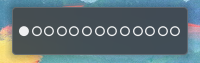
Hoy volvemos a tener un ejemplo de este último caso ya que con Minimal Desktop Indicator, un plasmoide creado por dualitykyle, que nos informa qué escritorio virtual estamos visualizando en este momento en nuestra pantalla utilizando de una forma sencilla y mimalista, no exenta de funcionalidades interesantes como:
- Acciones personalizables de clic izquierdo/clic derecho
- Cambio de escritorios mediante el widget de desplazamiento
- Mostrar los escritorios en una sola fila o seguir la configuración de Plasma
- Tamaño del indicador personalizable
Y como siempre digo, si os gusta el plasmoide podéis “pagarlo” de muchas formas en la cambiante página de KDE Store, que estoy seguro que el desarrollador lo agradecerá: puntúale positivamente, hazle un comentario en la página o realiza una donación. Ayudar al desarrollo del Software Libre también se hace simplemente dando las gracias, ayuda mucho más de lo que os podéis imaginar, recordad la campaña I love Free Software Day 2017 de la Free Software Foundation donde se nos recordaba esta forma tan sencilla de colaborar con el gran proyecto del Software Libre y que en el blog dedicamos un artículo.
Más información: KDE Store
¿Qué son los plasmoides?
Para los no iniciados en el blog, quizás la palabra plasmoide le suene un poco rara pero no es mas que el nombre que reciben los widgets para el escritorio Plasma de KDE.
En otras palabras, los plasmoides no son más que pequeñas aplicaciones que puestas sobre el escritorio o sobre una de las barras de tareas del mismo aumentan las funcionalidades del mismo o simplemente lo decoran.
La entrada Controla qué escritorio utilizas con Minimal Desktop Indicator – Plasmoides de KDE (207) se publicó primero en KDE Blog.

三大雲平台工具容器升級小記 - gcloud 406.0 / AWS Cli 2.8.5 / ansible 2.11.12
三大雲平台工具容器升級小記 - gcloud 406.0 / AWS Cli 2.8.5 / ansible 2.11.12
OS: container with openSUSE Leap 15.4
上次升級是 2022/4 , 這次會來升級的原因是
OS 更新到 openSUSE Leap 15.4
更新 gcloud 以及 AWS Cli 版本
Ansible 在 2.10 以後的版本, 有很多 module 被移動到 Ansible Collections, 也就是說現在不是如同 Ansible 官網上面的 pip3 install ‘ansible[azure]’ 的安裝方式. 接下來就是透過 collection 方式來進行安裝
參考網路上的文章 https://stackoverflow.com/questions/64921336/warning-ansible-2-10-3-does-not-provide-the-extra-azure
微軟官網文章 https://docs.microsoft.com/zh-tw/azure/developer/ansible/install-on-linux-vm?tabs=azure-cli
這樣也是好事, 之前也是因為這樣報了一個 issue ( 目前還是有 Bug, 持續回報中 )
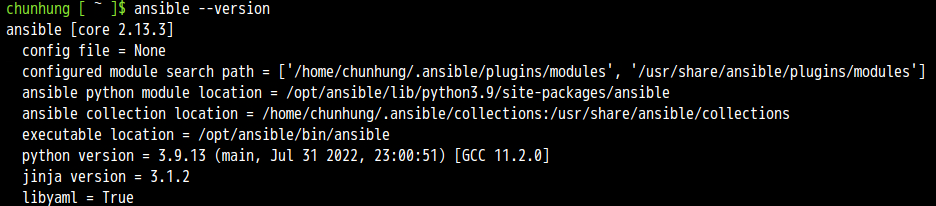
同步紀錄一下目前 Azure CloudShell 上面的 Ansible 資訊
Ansible: 2.13.3 / python 3.9.13
先整理結果
升級前
OS: openSUSE Leap 15.3
awscli: aws-cli/2.5.6 Python/3.9.11
gcloud: Google Cloud SDK 381.0.0
azure-cli: 2.35.0 (目前有 bug)
ansible: 2.11.10
升級後
OS: openSUSE Leap 15.4
awscli: aws-cli/2.8.5 Python/3.9.11
gcloud: Google Cloud SDK 406.0.0
azure-cli: 2.35.0 (目前有 bug)
ansible: 2.11.12
AWS CLI v2 安裝文件
GCP Cloud SDK 版本
另外執行 ansible --version 也會收到之後 ansible 需要 python 3.8 以上的告警, 訊息如下
[DEPRECATION WARNING]: Ansible will require Python 3.8 or newer on the controller starting with Ansible 2.12. Current version: 3.6.15 (default, Sep 23
2021, 15:41:43) [GCC]. This feature will be removed from ansible-core in
version 2.12. Deprecation warnings can be disabled by setting
deprecation_warnings=False in ansible.cfg.
這個部份應該是因為 openSUSE Leap 15.x 還是基於 SLES 15, 所以 python 的策略是還在 3.6, 只能先這樣
這次的做法還是會透過 docker build 指令來進行
我有比較過 docker build 以及使用現有的 docker image 修改後再使用 docker commit 建立的 image 大小還是很有差異的
Dockerfile 的部分我是拿之前的 Dockerfile 來修改目前是 openSUSE Leap 15.3
修改細節
Update time
Google SDK 版本還有下載的檔案路徑以及檔案名稱
列出 diff 的結果給大家參考
> diff opensuseLeap153_ansible_20220417_Dockerfile opensuseLeap154_ansible_20221022_Dockerfile
1,2c1,2
< # openSUSE Leap 15.3 with ansible, azure-cli, aws cli, gcloud
< FROM opensuse/leap:15.3
---
> # openSUSE Leap 15.4 with ansible, azure-cli, aws cli, gcloud
> FROM opensuse/leap:15.4
6c6
< # update time: 20220417
---
> # update time: 20221022
78,79c78,79
< RUN wget https://dl.google.com/dl/cloudsdk/channels/rapid/downloads/google-cloud-sdk-381.0.0-linux-x86_64.tar.gz && \
< tar zxvf google-cloud-sdk-381.0.0-linux-x86_64.tar.gz && \
---
> RUN wget https://dl.google.com/dl/cloudsdk/channels/rapid/downloads/google-cloud-sdk-406.0.0-linux-x86_64.tar.gz && \
> tar zxvf google-cloud-sdk-406.0.0-linux-x86_64.tar.gz && \
Dockerfile 內容如下
我檔案的名稱取名爲 opensuseLeap154_ansible_20221022_Dockerfile
# openSUSE Leap 15.4 with ansible, azure-cli, aws cli, gcloud
FROM opensuse/leap:15.4
# Author
# MAINTAINER 已經棄用, 之後要使用 LABEL 方式
# update time: 20221022
LABEL maintainer="sakana@cycu.org.tw"
# Set LANG for UTF-8 - for Chinese
ENV LANG C.UTF-8
# Install python3-pip, upgrade pip, ansible, boto, boto3
RUN zypper refresh && \
zypper install -y python3-pip && \
pip3 install --upgrade pip && \
pip3 install ansible && \
pip3 install boto boto3
# Install openssh, set ls alias
RUN zypper install -y openssh
RUN echo "alias ls='ls --color=tty'" >> /root/.bashrc
# Install wget, download azure_rm.py, set permission
RUN zypper install -y wget
# azure_rm.py no need to download
# Starting with Ansible 2.8, Ansible provides an Azure dynamic-inventory plug-in
# https://docs.ansible.com/ansible/latest/plugins/inventory/azure_rm.html
# old azure_rm.py URL https://raw.githubusercontent.com/ansible/ansible/devel/contrib/inventory/azure_rm.py
#
# Create working directory in /root
RUN mkdir /root/.azure && \
mkdir /root/.aws && \
mkdir /root/playbook && \
mkdir -p /root/.config/gcloud && \
wget https://raw.githubusercontent.com/sakanamax/LearnAnsible/master/template/ansible.cfg && \
mv /ansible.cfg /root && \
wget https://raw.githubusercontent.com/sakanamax/LearnAnsible/master/template/hosts && \
mv /hosts /root
#### Azure ####
# Install azure-cli
# 2020/11/29 Still have az login issue in Github https://github.com/Azure/azure-cli/issues/13209
RUN zypper install -y curl && \
rpm --import https://packages.microsoft.com/keys/microsoft.asc && \
zypper addrepo --name 'Azure CLI' --check https://packages.microsoft.com/yumrepos/azure-cli azure-cli && \
zypper install --from azure-cli -y azure-cli
# Install Ansible azure module
# After ansible 2.10, some module move to ansible collect, change install method
RUN zypper install -y curl && \
curl -O https://raw.githubusercontent.com/ansible-collections/azure/dev/requirements-azure.txt && \
pip3 install -r requirements-azure.txt && \
rm -f requirements-azure.txt && \
ansible-galaxy collection install azure.azcollection
#install vim tar gzip jq unzip less bind-utils iputils groff
RUN zypper install -y vim tar gzip jq unzip less bind-utils iputils groff
RUN echo "set encoding=utf8" > /root/.vimrc
#### AWS ####
# Install awscli v1
#RUN pip3 install awscli
#RUN echo "source /usr/bin/aws_bash_completer" >> /root/.bashrc
# Install awscli v2
RUN curl "https://awscli.amazonaws.com/awscli-exe-linux-x86_64.zip" -o "awscliv2.zip" && \
unzip awscliv2.zip && \
/aws/install
RUN echo "complete -C '/usr/local/bin/aws_completer' aws" >> /root/.bashrc
#### GCP ####
# Install google cloud SDK 381.0.0
ENV CLOUDSDK_CORE_DISABLE_PROMPTS 1
RUN wget https://dl.google.com/dl/cloudsdk/channels/rapid/downloads/google-cloud-sdk-406.0.0-linux-x86_64.tar.gz && \
tar zxvf google-cloud-sdk-406.0.0-linux-x86_64.tar.gz && \
/google-cloud-sdk/install.sh && \
echo "if [ -f '/google-cloud-sdk/path.bash.inc' ]; then . '/google-cloud-sdk/path.bash.inc'; fi" >> /root/.bashrc && \
echo "if [ -f '/google-cloud-sdk/completion.bash.inc' ]; then . '/google-cloud-sdk/completion.bash.inc'; fi" >> /root/.bashrc
使用 docker build 指令建立 image
> docker build -t sakana/ansible_opensuse154:20221022 -f ./opensuseLeap154_ansible_20221022_Dockerfile .
使用 -f 指定 Dockerfile 名稱
最後是 ” . “ 目前的目錄
這邊有個網路問題自己小記一下, 不知為何, 在家中如果是用固定 IP, 可能是有走 IPv6, 在執行 docker build 就有連線問題, 切成浮動 IP 或是先 ping 外部 就沒有相關問題, 日後再研究
測試 container image
> docker run -v ~/.aws:/root/.aws -v ~/.azure:/root/.azure -v ~/.config/gcloud:/root/.config/gcloud -it sakana/ansible_opensuse154:20221022 /bin/bash
測試結果 OK, 建立 tag
這邊目前因為 openSUSE Leap 15 使用舊的 azure cli 以及相依性, 所以現在 az 指令會有問題, 已經 update issue 以及花了很多時間調整, 目前還是要等 openSUSE and Azure 看是否會有後續更新
目前 az 指令可能會暫時透過 Azure cloud shell, ansible with Azure 目前有問題, 後面要再測試
觀察資訊
> docker images
REPOSITORY TAG IMAGE ID CREATED SIZE
sakana/ansible_opensuse154 20221022 d7eaacc18701 10 minutes ago 3.67GB
opensuse/leap 15.4 b59a33a9e95e 10 days ago 112MB
建立 tag
> docker tag d7eaacc18701 sakana/ansible_opensuse154:latest
登入 docker
> docker login
上傳 image
> docker push sakana/ansible_opensuse154:20221022
> docker push sakana/ansible_opensuse154:latest
完工, 以後使用就用
> docker run -v ~/.aws:/root/.aws -v ~/.azure:/root/.azure -v ~/.config/gcloud:/root/.config/gcloud -it sakana/ansible_opensuse154 /bin/bash
額外小記: 更新 blog 就會順道檢查 Azure 的認證資訊有沒有超過一年, 參考之前自己的筆記
http://sakananote2.blogspot.com/2020/05/azure-dynamic-inventory-with-ansible.html
使用 az ad sp list --all --output table | grep azure-cli 找出舊的認證,
刪除他 ex: # az ad sp delete --id d06f8905-ad21-425b-9da5-3e0bcf22a853
然後建立新的認證 ex: # az ad sp create-for-rbac --query '{"client_id": appId, "secret": password, "tenant": tenant}'
查詢 subscription_id, ex: # az account show --query "{ subscription_id: id }"
更新 ~/.azure/credentials 內的 client_id 以及 secret
~ enjoy it
Reference:
https://sakananote2.blogspot.com/2022/04/ansible-21110-aws-cli-256-gcloud-3810.html
https://sakananote2.blogspot.com/2021/12/ansible-2116-aws-cli-245-gcloud-3650.html
http://sakananote2.blogspot.com/2021/05/ansible-2109-aws-cli-224-gcloud-3400.html
http://sakananote2.blogspot.com/2020/11/ansible-2103-azure-module.html
https://sakananote2.blogspot.com/2020/11/opensuse-leap-152-container.html
https://stackoverflow.com/questions/64921336/warning-ansible-2-10-3-does-not-provide-the-extra-azure
http://sakananote2.blogspot.com/2020/08/opensuse-leap-152-container.html
https://sakananote2.blogspot.com/2020/05/aws-cli-v2-with-opensuse-leap-151.html
http://sakananote2.blogspot.com/2020/01/python-3-with-opensuse-leap-151.html
http://sakananote2.blogspot.com/2019/07/with-opensuse-leap-15-container.html
http://sakananote2.blogspot.com/2019/05/ansible-azure-cli-awscli-gcloud-with.html
http://sakananote2.blogspot.com/2019/11/with-opensuse-leap-151-container.html
#openSUSE Tumbleweed revisión de la semana 42 de 2022
Tumbleweed es una distribución «Rolling Release» de actualización contínua. Aquí puedes estar al tanto de las últimas novedades.

openSUSE Tumbleweed es la versión «rolling release» o de actualización continua de la distribución de GNU/Linux openSUSE.
Hagamos un repaso a las novedades que han llegado hasta los repositorios estas semanas.
El anuncio original lo puedes leer en el blog de Dominique Leuenberger, publicado bajo licencia CC-by-sa, en este este enlace:
En este periodo, para Tumbleweed se han publicado 7 snapshots (1014…1020), lo que viene siendo una semana normal en la distro.
Entre los cambios que han llegado a los repositorios, se pueden destacar las siguientes actualizaciones:
- Linux kernel 6.0.1 & 6.0.2
- KDE Gear 22.08.2
- Libzypp 17.31.3
- libxml 2.10.3
- Node.JS 18.11.0
- KDE Plasma 5.26.1
- Virtualbox 6.1.40
- Meson 0.63.3
Y para próximas actualizaciones de openSUSE Tumbleweed, ya se están preparando:
- Systemd 251.6
- Mesa 22.2.2
- fwupd 1.8.6
- Mozilla Thunderbird 102.4.0
- Mozilla Firefox 106.0
- Samba 4.17.1
- Swig 4.1.0 (beta 1)
- gpgme 1.18.0
- python Sphinx 5.3.0
- suse-module-tools 16.0.24
Si quieres estar a la última con software actualizado y probado utiliza openSUSE Tumbleweed la opción rolling release de la distribución de GNU/Linux openSUSE.
Mantente actualizado y ya sabes: Have a lot of fun!!
Enlaces de interés
- ¿Por qué deberías utilizar openSUSE Tumbleweed?
- zypper dup en Tumbleweed hace todo el trabajo al actualizar
- ¿Cual es el mejor comando para actualizar Tumbleweed?
- ¿Qué es el test openQA?
- http://download.opensuse.org/tumbleweed/iso/
- https://es.opensuse.org/Portal:Tumbleweed

——————————–