
 Member
 baltolkien
Camino a Plasma 5.21 (I): nuevo lanzador de aplicaciones
Hoy inicio una serie de artículos que nos van a ir informando de las novedades que nos esperan en la nueva versión del escritorio Plasma de la Comunidad KDE. Así que bienvenidos a «Camino a Plasma 5.21 (I): nuevo lanzador de aplicaciones» donde hablaremos de este importante cambio que se avecina: el nuevo kickoff.
Camino a Plasma 5.21 (I): nuevo lanzador de aplicaciones
El pasado 21 de enero fue lanzado la beta de Plasma 5.21, una versión no apta todavía para el usuario domésticos, y que se libera para ir solucionando errores.
En el artículo del pasado jueves ya hablé por encima de sus novedades pero hoy quiero describir más a fondo una de ellas: el nuevo lanzador de aplicaciones.
Plasma 5.21 nos ofrecerá un nuevo lanzador de aplicaciones que contará con una interfaz de usuario de doble panel, mejoras en la navegación con el teclado y el ratón, mejor accesibilidad y compatibilidad con los idiomas con escritura RTL (es decir, de izquierda a derecha como la árabe, la china, la japonesa o la coreana)
El nuevo lanzador incluye una vista alfabética de «Todas las aplicaciones», una vista de favoritos al estilo de una cuadrícula y acciones de poder visibles por defecto con sus etiquetas.

Por último, pero no por ello menos importante, hemos corregido la mayoría de los errores reportados por los usuarios, garantizando un acceso más fluido a todas tus cosas.
Por otra parte, es destacable que el antiguo lanzador de aplicaciones Kickoff sigue estando disponible en store.kde.org.
Más información: KDE.org
Pruébalo y reporta errores

Todas las tareas dentro del mundo del Software Libre son importantes: desarrollar, traducir, empaquetar, diseñar, promocionar, etc. Pero hay una que se suele pasar por alto y de la que solo nos acordamos cuando las cosas no nos funcionan como debería: buscar errores.
Desde el blog te animo a que tú seas una de las personas responsables del éxito del nuevo lanzamiento de Plasma 5.20 de la Comunidad KDE. Para ello debes participar en la tarea de buscar y reportar errores, algo básico para que los desarrolladores los solucionen para que el despegue del escritorio esté bien pulido. Debéis pensar que en muchas ocasiones los errores existen porque no le han aparecido al grupo de desarrolladores ya que no se han dado las circunstancias para que lo hagan.
Para ello debes instalarte esta beta y comunicar los errores que salgan en bugs.kde.org, tal y como expliqué en su día en esta entrada del blog.

Digest of YaST Development Sprint 116
2021 is here and it doesn’t look like it’s going to be a boring year… at least in the YaST side! The YaST team just restarted the work a couple of weeks ago and we already have some development news to share with you, including some improvements our users requested through the openSUSE’s End of the Year Community Survey.
- Writing NetworkManager configuration during system installation
- Refining the mechanism to reuse existing EFI partitions
- Using more stable and consistent names to reference devices in the bootloader
- Improving AutoYaST behavior when no product has been specified
- Updating the roles offered by yast2-vm
- Many more small improvements here and there
Let’s start with an installer improvement quite some people was waiting for. Both openSUSE and SUSE
Linux Enterprise can use either wicked or NetworkManager to handle the system’s network
configuration. Only the former can be fully configured with YaST (which is generally not a problem
because there are plenty of tools to configure NetworkManager). Moreover, during the standard
installation process, wicked is always used to setup the network of the installer itself. If the
user decides to rely on wicked also in the final system, then the configuration of the installer
is carried over to it. But, so far, if the user opted to use NetworkManager then the installer
configuration was lost and the network of the final system had to be be configured again using
NetworkManager this time. Not anymore!
That’s not the only installer behavior we have refined based on feedback from our users. In some scenarios, the logic used to decide whether an existing EFI System Partition (ESP) could be reused was getting in the way of those aiming for a fine-grained control of their partitions. That should now be fixed by the changes described in this pull request, that have been already submitted to Tumbleweed and will be part of the upcoming releases (15.3) of both openSUSE Leap and SLE.
We also fine-tuned how hibernation is configured during installation. To be precise, we improved the
corresponding resume= parameter passed to the kernel by the bootloader. From now on, that
parameter will use a device name that will be fully
consistent with the names used in other parts of
the installer and that will be often based on the swap
UUID.
As usual, AutoYaST also got its quota of love during this sprint. This time on form of an usability improvement. As you may know, SUSE Linux Enterprise offers a whole set of products for different needs. When using AutoYaST to upgrade a system using a multiproduct repository, it’s necessary to specify the concrete product in the AutoYaST profile. When that was not correctly done, the system failed in a not-exactly-elegant way. In upcoming versions of products of the SLE family, that will be handled in a much nicer way.

And apart from the installation and auto-installation process, we also introduced several small fixes and improvements in other parts of YaST. Like bringing up-to-date the options offered by yast2-vm, speeding up the process of reading the network devices in s390 mainframes, improving the usability when the hostname needs to be adapted… and many other things you can check in Github or the Open Build Service if you want to know more.
As you can see, the new year has not diluted our enthusiasm to keep improving YaST bit by bit. So now it’s time to go back to work, hoping to meet you again in a couple of weeks with more news. Have a lot of fun!

Session One Meetup Generates Enhancements, Actions
The first session of the openSUSE Project’s meetup regarding the End of the Year Survey Results on Jan. 23 is already starting produce some actionable items from contributors.
The session on openSUSE’s Jitsi instance had engagement from about 20 people from around the globe.
Topics discussed in the two-hour session focused on addressing pain points, transferring knowledge and promoting openSUSE projects.
Members of the “let’s improve the openSUSE learning experience” shared statics and analysis from the survey and attendees engaged in generating ideas and actions to enhance and improve the above mentioned items.
Actions to take voiced during the session were enhancing the project’s websites to better direct visitors to appropriate communication mediums, documenting easier “getting started” guides and coming up with monthly or quarterly workshops.
The discussions during the meetup lead to other topics like having more surveys to extract greater information about hardware difficulties and other pain points. Discussions also talked about enhancing the wording and live images on software.opensuse.org.
Most of the ideas were captured on https://etherpad.opensuse.org/p/EOY2020Meetup.
The next sessions will start at 13:00 UTC on openSUSE’s Jitsi instance on Jan. 30.
Topics to be discussed in the Jan. 30 session include:
- Tools driving switchers to openSUSE (Where are users coming from)
- Discuss flagship project/s
- Expanding global users
- Increasing diversity
- Increase usage with people under 34
The meetup will take place at https://meet.opensuse.org/EOY2020.
More details about the End of the Year Community Survey results can be found on the openSUSE Wiki.

VICE v3.5 | Versatile Commodore Emulator on openSUSE
#openSUSE Tumbleweed revisión de la semana 3 de 2021
Tumbleweed es una distribución “Rolling Release” de actualización contínua. Aquí puedes estar al tanto de las últimas novedades.

openSUSE Tumbleweed es la versión “rolling release” o de actualización continua de la distribución de GNU/Linux openSUSE.
Hagamos un repaso a las novedades que han llegado hasta los repositorios estas semanas.
El anuncio original lo puedes leer en el blog de Dominique Leuenberger, publicado bajo licencia CC-by-sa, en este enlace:
Desde la anterior revisión semanal, 6 son las snapshots nuevas que han llegado a los repositorios de openSUSE Tumbleweed (0114, 0115, 0118, 0119, 0120 y 0121).
Los cambios más destacables que han traído esas snapshots son:
- Linux kernel 5.10.7
- GNOME 3.38.3
- Mozilla Tunderbird 78.6.1
- Mesa 20.3.3
- openSSH 8.4p1
- Tcl/Tk 8.6.11
- Bash 5.1.4
- PHP 8 was added
- Wine 6.0
- Múltiples versionde de python 3 instalables de manera paralela.
Algunos de los cambios que están siendo testados para incluirse en próximas snapshots son:
- Postfix: cambia la base de datos predeterminada de lmdb a BerkleyDB.
- icu 68.1
- Rust 1.49
- Automake 1.16.3
- Autoconf 2.70
- Migración a LUA 5.4 como interpretador principal de lua.
Si quieres estar a la última con software actualizado y probado utiliza openSUSE Tumbleweed la opción rolling release de la distribución de GNU/Linux openSUSE.
Mantente actualizado y ya sabes: Have a lot of fun!!
Enlaces de interés
-
-
- ¿Por qué deberías utilizar openSUSE Tumbleweed?
- zypper dup en Tumbleweed hace todo el trabajo al actualizar
- ¿Cual es el mejor comando para actualizar Tumbleweed?
- Comprueba la valoración de las “snapshots” de Tumbleweed
- ¿Qué es el test openQA?
- http://download.opensuse.org/tumbleweed/iso/
- https://es.opensuse.org/Portal:Tumbleweed
-

——————————–
Convierte una imagen en un mosaico de varias hojas con PosteRazor
Hoy me salgo un poco de los temas kdeeros y quiero presentaros PosteRazor, una aplicación online que convierte una imagen en un mosaico de varias hojas. Y es que la he descubierto esta semana y es de esas aplicaciones que creo que interesa tener a mano.
Convierte una imagen en un mosaico de varias hojas con PosteRazor
Me encanta pensar que todo aquello que puede hacerse en informática de forma manual pero que puede resultar muy pesado tiene asociada una aplicación que lo simplifica.
Por simple cuestión de usuarios y empresas, este tipo de aplicaciones específicas tienen segura su versión en Windows, pero poco a poco el mundo de GNU/Linux no se queda atrás.
Y no solo eso, ya que el auge de las aplicaciones online en algunas ocasiones se puede realizar de esta forma y evitarnos el problema de la instalación del Software.
Justo eso me pasó el pasado jueves: para el día de la Paz en el colegio, que se celebra el 30 de enero, se nos ocurrió imprimir el famoso cuadro del «Guernika» casi a tamaño real utilizando folios A3.
En otras palabras, debíamos aprender cómo convertir una imagen en un mosaico de varias hojas, en nuestro caso en folios de tamaño A3.
Tras realizar una búsqueda por la red encontré algunas alternativas windoseras pero al final llegué a la mejor solución ya que se trata de una aplicación online basada en Qt: PosteRazor.

Leyendo la definición que hacen sus creadores,
«El PosteRazor corta una imagen en trozos que pueden imprimirse en una impresora y unirse para formar un póster.
Como imagen de entrada, se admiten archivos rasterizados de varios formatos de archivo de imagen. En lugar de imprimir directamente el póster, PosteRazor produce un archivo PDF de varias páginas que contiene las piezas del póster.
Es un programa de código abierto que depende de otros proyectos de código abierto. El PosteRazor está alojado en posterazor.sourceforge.net.«
De esta forma, simplemente debes seguir las instrucciones que te muestra la minimalista página web de Posterazor y que se pueden resumir en: subir imagen, decidir en cuantas partes quieres dividir la imagen y crear un pdf.
openSUSE Tumbleweed – Review of the week 2021/03
Dear Tumbleweed users and hackers,
Shame on me for giving you the information about the changes in Tumbleweed during this week only now, but at least technically this is still the review of Week 03. Since the last weekly review, there have been 6 snapshots published (0114, 0115, 0118, 0119, 0120, and 0121).
The main changes this week include:
- Linux kernel 5.10.7
- GNOME 3.38.3
- Mozilla Tunderbird 78.6.1
- Mesa 20.3.3
- openSSH 8.4p1
- Tcl/Tk 8.6.11
- Bash 5.1.4
- PHP 8 was added
- Wine 6.0
- Multiple versions of python 3 parallel installable. Besides all python-FOO packages being built for python 3.8, they are now also built for python 3.6 (where they make sense and are buildable). The packages are named python36-FOO and python38-FOO. As Python 3.8 is currently the default python 3 interpreter in Tumbleweed, all python38-FOO packages provide/obsolete the python3-FOO symbol, in order to facilitate the migration to the new naming scheme.
The future changes that are currently being planned, worked on and being tested include:
- Postfix: change the default database format to lmdb, migrating away from BerkleyDB.
- icu 68.1: breaks a few things like PostgreSQL. Staging:I
- Rust 1.49: breaks librsvg
- Automake 1.16.3
- Autoconf 2.70: breaks quite a few packages. The list of failures has been noted on the current SR; no active staging left for it (no progress in the last days/weeks on it)
- Migrate to LUA 5.4 as main lua interpreter, mainly relevant in context of RPM and thus the distro bootstrap
Bellas Artes en GCompris – A fondo @g_compris (3)
Sigo aprovechándome de una publicación de Valencia Tech en la que se realizaba un listado completo de juegos que ofrece GCompris he empezado una serie donde se describen con más detalles los juegos. Seguimos la serie con la sección de «Bellas Artes» en GCompris la cual tiene como objetivo hacer que «juguemos» con esta parte básica que despierta el gusto por la belleza y la creatividad humana.
Bellas Artes en GCompris – A fondo @g_compris (3)
Para poder tener claro lo que hacen las aplicaciones de GCompris he pensado hacer una revisión a su enorme colección de juegos y actividades, realizando una simple captura de pantalla y una breve descripción.
Ya hemos descrito la sección de «Descubre la computadora» y los «Juegos de lógica«, es hora de hablar de las «Bellas Artes y Música» en GCompris.
En la subsección de Bellas Artes nos encontramos con:
Monta el rompecabezas: actividad clásica en la que montaremos un puzzle de un cuadro. Al empezar a montarlo nos muestra el nombre de la obra, su autor y el año de creación. Los rompecabezas no tienen demasiadas piezas, con lo que es ideal para utilizar con los más pequeños. En niveles avanzados desaparecen las típicas «muescas» de los puzzles.

Encuentra los detalles: en esta ocasión nos muestra la obra pictórica completa y nos invita a buscar y colocar detalles que nos presentan en la zona de las piezas. Si pinchamos en el cuadro no muestra el nombre de la obra, su autor y el año de creación. Para aprender a disfrutar de los detalles de los cuadros.

Explora los continentes: interesante actividad que nos presenta diferentes mapas con puntos donde se encuentran monumentos. Al pinchar sobre los puntos aparece la información de la construcción. Después nos pedirá que los localicemos. De momento solo hay disponibles solo 7 mapas, pero seguro que poco a poco se irán añadiendo muchos más.

Latency Numbers Every Team Should Know
We design systems around the size of delays that are expected. You may have seen the popular table “latency numbers every programmer should know” which lists some delays that are significant in technology systems we build.
Teams are systems too. Delays in operations that teams need to perform regularly are significant to their effectiveness. We should know what they are.
Ssh to a server on the other side of the world and you will feel frustration; delay in the feedback loop from keypress to that character displayed on the screen.
Here’s some important feedback loops for a team, with feasible delays. I’d consider these delays tolerable by a team doing their best work (in contexts I’ve worked in). Some teams can do better, lots do worse.
| Operation | Delay |
| Run unit tests for the code you’re working on | < 100 Milliseconds |
| Run all unit tests in the codebase | < 20 Seconds |
| Run integration tests | < 2 Minutes |
| From pushing a commit to live in production | < 5 Minutes |
| Breakage to Paging Oncall | per SLO/Error Budget |
| Team Feedback | < 2 Hours |
| Customer Feedback | < 1 Week |
| Commercial Bet Feedback | < 1 Quarter |
What are the equivalent feedback mechanisms for your team? How long do they take? How do they influence your work?
Feedback Delays Matter
They represent how quickly we can learn. Keeping the delays as low as the table above means we can get feedback as fast as we have made any meaningful progress. Our tools/system do not hold us back.
Feedback can be synchronous if you keep them this fast. You can wait for feedback and immediately use it to inform your next steps. This helps avoid the costs of context switching.
With fast feedback loops we run tests, and fix broken behaviour. We integrate our changes and update our design to incoporate a colleague’s refactoring.
Fast is deploying to production and immediately addressing the performance degradation we observe. It’s rolling out a feature to 1% of users and immediately addressing errors some of them see.
With slow feedback loops we run tests and respond to some emails while they run, investigate another bug, come back and view the test results later. At this point we struggle to build a mental model to understand the errors. Eventually we’ll fix them and then spend the rest of the afternoon trying to resolve conflicts with a branch containing a week’s changes that a teammate just merged.
With slow deploys you might have to schedule a change to production. Risking being surprised by errors reported later that week, when it has finally gone live, asynchronously. Meanwhile users have been experiencing problems for hours.
Losing Twice
As feedback delays increase, we lose twice:
a) We waste more time waiting for these operations (or worse—incur context switching costs as we fill the time waiting)
b) We are incentivised to seek feedback less often, since it is costly to do so. Thereby wasting more time & effort going in the wrong direction.
I picture this as a meandering path towards the most value. Value often isn’t where we thought it was at the start. Nor is the route to it often what we envisioned at the start.
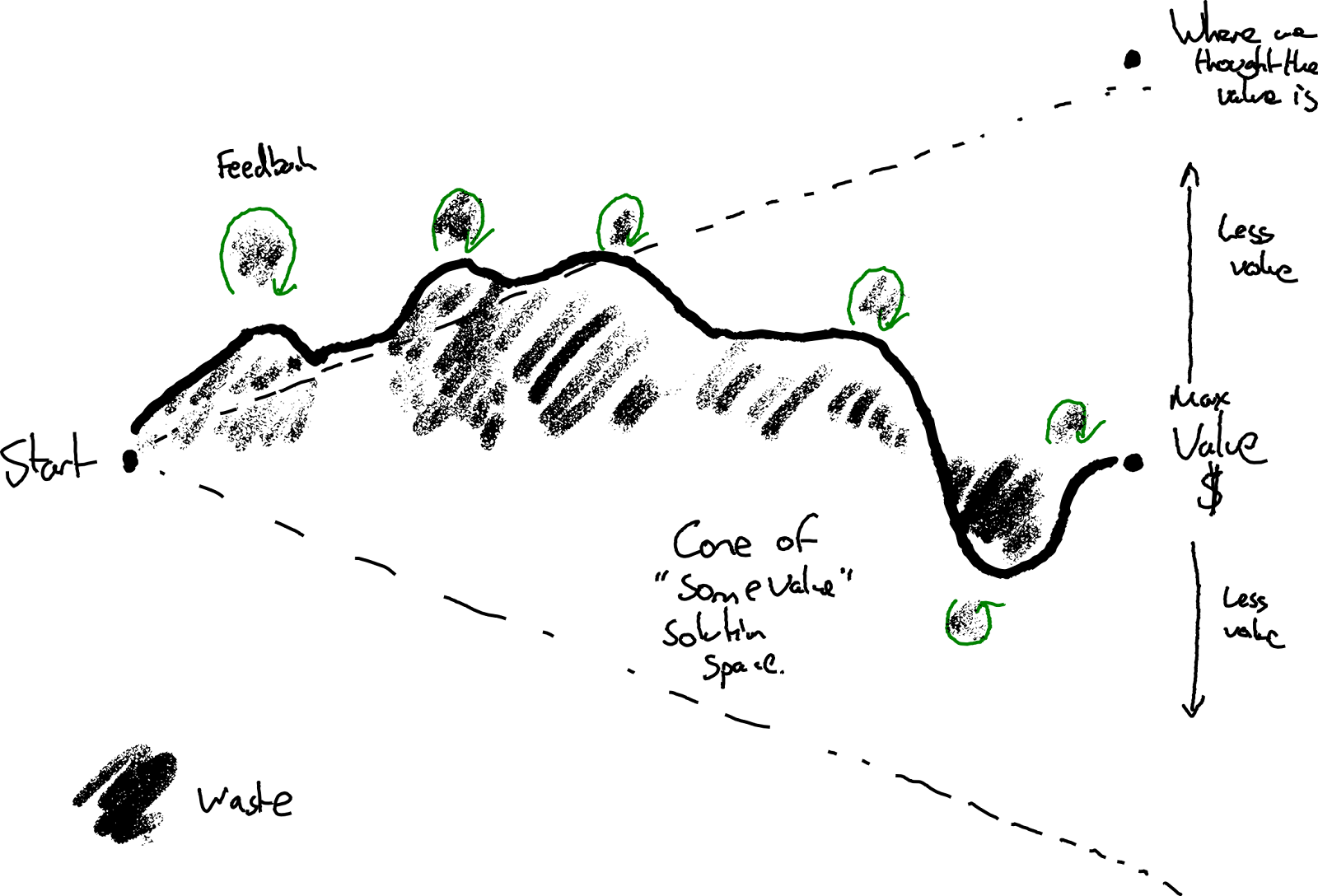
We waste time waiting for feedback. We waste time by following our circuitous route. Feedback opportunities can bring us closer to the ideal line.
When feedback is slow it’s like setting piles of money on fire. Investment in reducing feedback delays often pays off surprisingly quickly—even if it means pausing forward progress while you attend to it.
This pattern of going in slightly the wrong direction then correcting repeats at various granularities of change. From TDD, to doing (not having) continuous integration. From continuous deployment to testing in production. From customers in the team, to team visibility of financial results.
Variable delays are even worse
In recent times you may have experienced the challenge of having conversations over video links with significant delays. This is even harder when the delay is variable. It’s hard to avoid talking over each other.
Similarly, it’s pretty bad if we know it’s going to take all day to deploy a change to production. But it’s so worse if we think we can do it in 10 minutes, when it actually ends up taking all day. Flaky deployment checks, environment problems, change conflicts create unpredictable delays.
It’s hard to get anything done when we don’t know what to expect. Like trying to hold a video conversation with someone on a train that’s passing through the occasional tunnel.
Measure what Matters
The time it takes for key types of feedback can be a useful lead indicator on the impact a team can have over the longer term. If delays in your team are important to you why not measure them and see if they’re getting better or worse over time? This doesn’t have to be heavyweight.
How about adding a timer to your deploy process and graphing the time it takes from start to production over time? If you don’t have enough datapoints to plot deploy delay over time that probably tells you something ;)
Or what about a physical/virtual wall for waste. Add to a tally or add a card every time you have wasted 5 mins waiting. Make it visible. How big did the tally get each week?
What do the measurements tell you? If you stopped all feature work for a week and instead halved your lead time to production, how soon would it pay off?
Would you hit your quarterly goals more easily if you stopped sprinting and first removed the concrete blocks strapped to your feet?
What’s your experience?
Every team has a different context. Different sorts of feedback loops will be more or less important to different teams. What’s important enough for your team to measure? What’s more important than I’ve listed here?
What is difficult to keep fast? What gets in the way? What is so slow in your process that synchronous feedback seems like an unattainable dream?
The post Latency Numbers Every Team Should Know appeared first on Benji's Blog.
Cómo instalar juegos Humble Bumble en Linux con Lutris
Hace poco hablé de Lutris, y en estos días de vacaciones he decidido investigar un poco sobre su funcionamiento. Así que bienvenidos a cómo instalar juegos Humble Bumble en Linux con Lutris paso a paso utilizando como ejemplo Outlast, como ya expliqué con juegos Steam hace un tiempo.
Requisitos previos
Antes de empezar quisiera recordar que Lutris es una aplicación que busca centralizar todos los juegos que tu equipo pueda ejecutar (o al menos lo intentará) recopilando los juegos que tengas tiendas virtuales como GOG, Humble Bumble o la todopoderosa Steam y, además, gestionará los juegos que tengas instalados en tu equipo, tanto nativos como emulados.
Evidentemente antes instalar juegos debemos tener instalado Lutris y tener una cuenta de Humble Bumble con juegos adquiridos. Yo tengo unos cuantos, aunque he de reconocer que todos son ofertas y han sido adquiridos muy baratos (o gratis).
Para instalar Lutris os aconsejo seguir las instrucciones de esta reciente entrada del blog en la que se explica con detalle, sobre todo para los usuarios de sistemas Ubuntu y derivados, como hacerlo.

Cómo instalar juegos Humble Bumble en Linux con Lutris
Para nuestro ejemplo he elegido instalar Outlast un juego con gráficos 3D de horror de supervivencia en primera persona desarrollado y publicado por Red Barrels Inc, como vemos en el siguiente vídeo.
Para instalar juegos Humble Bumble en Lutris os recomiendo ir a la sección de «Sources» y buscar el juego en la pestaña de «Community Installers«, seleccionarlo y pulsar el botón de control inferior (quedaos con ese botón en mente que es importante) que tiene el comando «Install«.

A continuación aparecerá una ventana emergente que te indica de qué fuente quieres instalar el juego. En mi caso selecciono desde Humble Bumble, ya que lo tengo en esa tienda. Evidentemente pinchamos en «Install«.

Nos pedirá el directorio de instalación. Se lo decimos y pinchamos en «Install«.

Nos aparecen las dependencias. En este punto podríamos decir que instale algún archivo en local, pero en este caso no era necesario, así que pinchamos en «Continue» y empezará a bajar todo lo necesario.


Una vez terminado pinchamos en «Launch«.

El juego ya está instalado, aparecerá el botón de control con el comando «Stop» preselecccionado y, en mi caso,el juego se ejecutó de inmediato.


Una vez instalado si buscamos el juego aparecerá el botón de control con el comando «Play«, que evidentemente podemos pulsar para empezar a jugar.

Por cierto, para desinstalar simplemente debemos pulsar en la flecha del lado del Botón de Control y seleccionar «Remove«.

Os recuerdo que para que se cierre del todo el juego, además de salir de él debéis pulsar «Stop» del botón de control.