
起動するkubeletのバージョンを上げる
私はKubicでKubernetesを構築しているのですが、Kuibcをアップデートしてkubeletのバージョンが1.19に上がったはずなのにもかかわらず、kubectl get nodeでずっとバージョンが1.18となっていて悩んでいました。
結論
/etc/sysconfig/kubelet に設定されている KUBELET_VERを、1.18から1.19に変更する
調査
パッケージを確認
まず、パッケージがなんのバージョンが入っているかを確認します。
kubic1-host:~ # zypper se kubelet
S | Name | Summary | Type
—+——————————-+—————————+——–
i | kubernetes-kubelet | Kubernetes kubelet daemon | package
i | kubernetes1.17-kubelet | Kubernetes kubelet daemon | package
| kubernetes1.17-kubelet-common | Kubernetes kubelet daemon | package
i | kubernetes1.18-kubelet | Kubernetes kubelet daemon | package
i | kubernetes1.18-kubelet-common | Kubernetes kubelet daemon | package
i+ | kubernetes1.19-kubelet | Kubernetes kubelet daemon | package
| kubernetes1.19-kubelet-common | Kubernetes kubelet daemon | package
| kubernetes1.20-kubelet | Kubernetes kubelet daemon | package
| kubernetes1.20-kubelet-common | Kubernetes kubelet daemon | package
どうやら、1.17、1.18、1.19、と、いろいろなバージョンが入ってるようです。
今見たら、1.20も入ってますね。
使ってるバイナリを確認
kubic1-host:~ # type kubelet
kubelet is hashed (/usr/bin/kubelet)
ふむふむ。/usr/bin/kubelet、ですね。
こういう実行ファイルはスクリプトの場合があったりするので、種別を調べてみます。
kubic1-host:~ # file /usr/bin/kubelet
/usr/bin/kubelet: POSIX shell script, ASCII text executable
なるほど、スクリプトっぽいですね。
中身を確認します。
kubic1-host:~ # cat /usr/bin/kubelet
#!/bin/sh
# Loader Script for Multi-Version Kubelet arrangement introduced to openSUSE in March 2020
source /etc/sysconfig/kubelet
if [ -z “$KUBELET_VER” ]
then
echo “ERROR: KUBELET_VER= not defined in /etc/sysconfig/kubelet”
exit 1
else
/usr/bin/kubelet$KUBELET_VER “$@”
fi
どうやら、/etc/sysconfig/kubeletの値を参照しているようです。こちらを確認してみます。
kubic1-host:~ # cat /etc/sysconfig/kubelet
KUBELET_VER=1.19
KUBELET_EXTRA_ARGS=”–container-runtime=remote –container-runtime-endpoint=unix:///var/run/crio/crio.sock –runtime-request-timeout=15m –c
group-driver=systemd -v=2 –runtime-cgroups=/systemd/system.slice –kubelet-cgroups=/systemd/system.slice”
なるほど、KUBELET_VERが定義されています。nodeのバージョンが低いときは、ここが1.18となっていましたので、それを1.19に更新しました。
それからKubernetesを起動すると、見事バージョンが1.19にあがってました。
今なら1.20に上がる予感・・・・
メーリングリスト
最近忙しいこともあって、なかなかメーリングリストなどの情報源にあたれず・・・もしかしたら、こういったことはとうに情報共有されていたのかもしれません。また、この設定がKubic独自なのか、一般的なのか、といったことも追いきれておらず。追って調査したいと思います。
そもそもの使い方
アップデートで使い続けるのではなく、折を見て最新プリメイドイメージに乗り換えていく運用が今っぽいのかも・・・・・
 Member
 baltolkien
Novedades de Dolphin de diciembre de 2020
La pasada actualización de las aplicaciones de KDE nos ofreció interesantes nuevas funcionalidades. En el artículo del anuncio ya hablamos largo y tendido de las novedades de Kontact, y ahora toca las novedades de Dolphin de diciembre de 2020, que son muchas muchas y variadas y que mantienen en todo lo alto este explorador de archivos.
Novedades de Dolphin de diciembre de 2020

La evolución continua y Dolphin, el gestor de archivos y carpetas de KDE que no deja indiferente a quien lo utiliza, llega con varios cambios en la interfaz de Dolphin para facilitar la navegación por los dispositivos de almacenamiento y los documentos, fotos, canciones y directorios.
De esta forma ahora, la barra de direcciones de Dolphin está ahora en la barra de herramientas con lo que se optimiza el espacio y, en el modo de Vista detallada, se puede definir el tamaño para incluir todo en la carpeta, incluidas las carpetas anidadas dentro de la principal.
Además, debido a un cambio en Frameworks, el motor de todo el ecosistema del Software de la Comunidad KDE, el panel Lugares de Dolphin, de los diálogos de archivos y de otros sitios más, incluye ahora entradas para las carpetas Música, Imágenes y Vídeos de forma predeterminada.

Por otra parte, las capturas de pantalla realizadas con Spectacle, que versión a versión mejora a pasos agigantados, aparecen ahora en la lista de documentos recientes en el Panel de lugares. Este Panel de lugares es visible en Dolphin, los diálogos de archivos y en otras piezas de software como Gwenview.
Y una novedad más que importante es que ahora Dolphin dispone ahora de soporte táctil completo, con lo que ahora es más fácil usar Dolphin en pantallas táctiles como en convertibles (debo decir que en los Yoga de Lenovo funciona muy bien)
Como vemos, muchas mejoras interesantes que siguen manteniendo a Dolphin como el mejor explorador de archivos que puedes tener un tu dispositivo.
Más información: KDE

On the Graying of GNOME
The GNOME project turned 23 this year, and despite equally persistent rumors to the contrary, it's still alive and kicking.
Just how alive, though? All I know is this: Where the topic of GNOME's health goes, accurate data rarely follows. Of course, there is data — lots of it in fact, in public source code repositories. Though flawed in many ways, it allows us to make comparisons to the past — and maybe predictions for the future: Are a few organizations carrying most of the workload, making them critical points of failure? Are new contributors able to pick up the slack from those who leave? Is the project graying (i.e. increasingly dominated by veterans)?
In one of my occasional fits of hubris, I set out to process this data to see if I could shake out anything meaningful. I'm usually fine with just satisfying my own curiosity and leaving it at that, but it's one of those times where the results seem interesting enough for a blog post. So here we are.
I'm going to lead with the nice graphs and follow on with a section on methodology. The latter is long, boring, and mandatory reading.
Active contributors
By generation
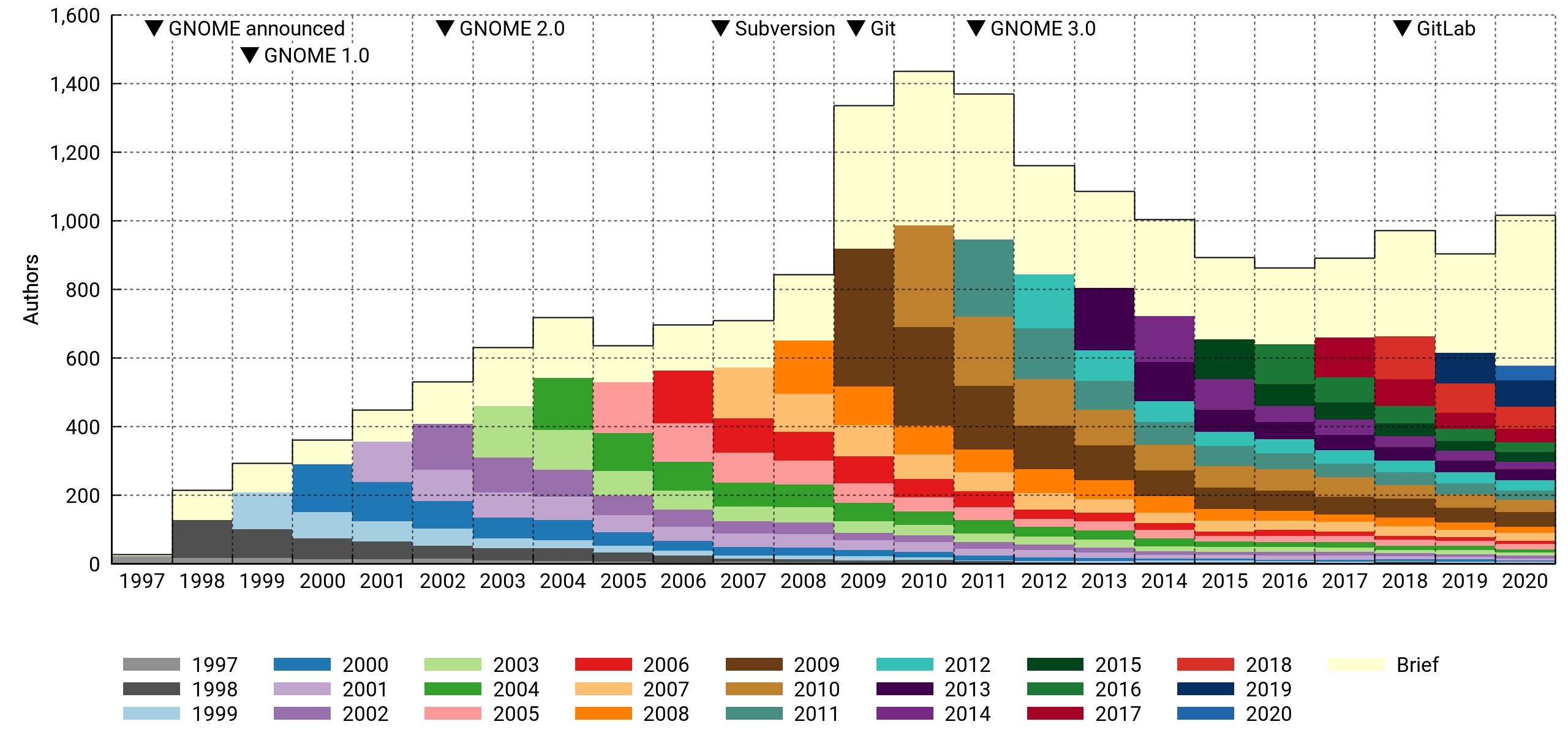
The stacked histogram above shows the number of contributors who touched the project on a yearly basis. Each contributor is assigned to a generational cohort based on the year of their first contribution. The cohorts tend to shrink over time as people leave.
There's a special "drive-by" cohort (in a fetching shade of off-white) for contributors who were only briefly involved, meaning all their activity fits in a three-month window. It's a big group. In a typical year, it numbers 200-400 persons who were not seen before or since. Most of them contribute a single commit.
According to this, GNOME peaked at slightly above 1,400 contributors in 2010 and went into decline with the GNOME 3.0 release the following year. However, 2020 saw the most contributors in a long time, even with preliminary data — there's still two weeks to go. Who knows if it's an anomaly or not. It's been an atypical year across the board.
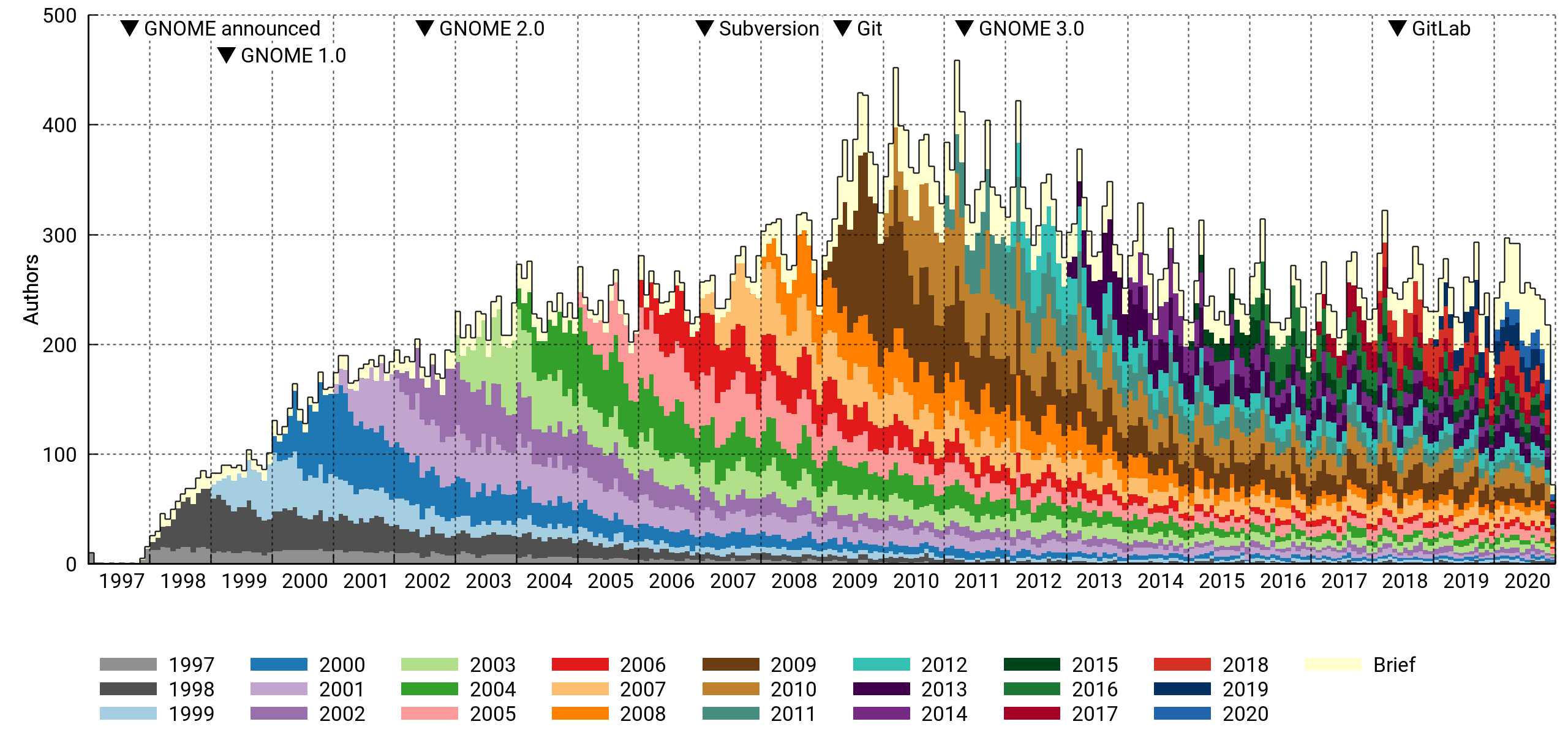
This is the same histogram, but with per-month bins. There's a clear periodicity caused by the semiannual release cycle. The peak month was March 2011, right before the GNOME 3.0 release. About 450 contributors got involved that month.
The drive-by cohort is relatively smaller on a monthly basis. This makes sense, as it has little overlap from month to month, and the per-year bins tend to add them all up.
By affiliation
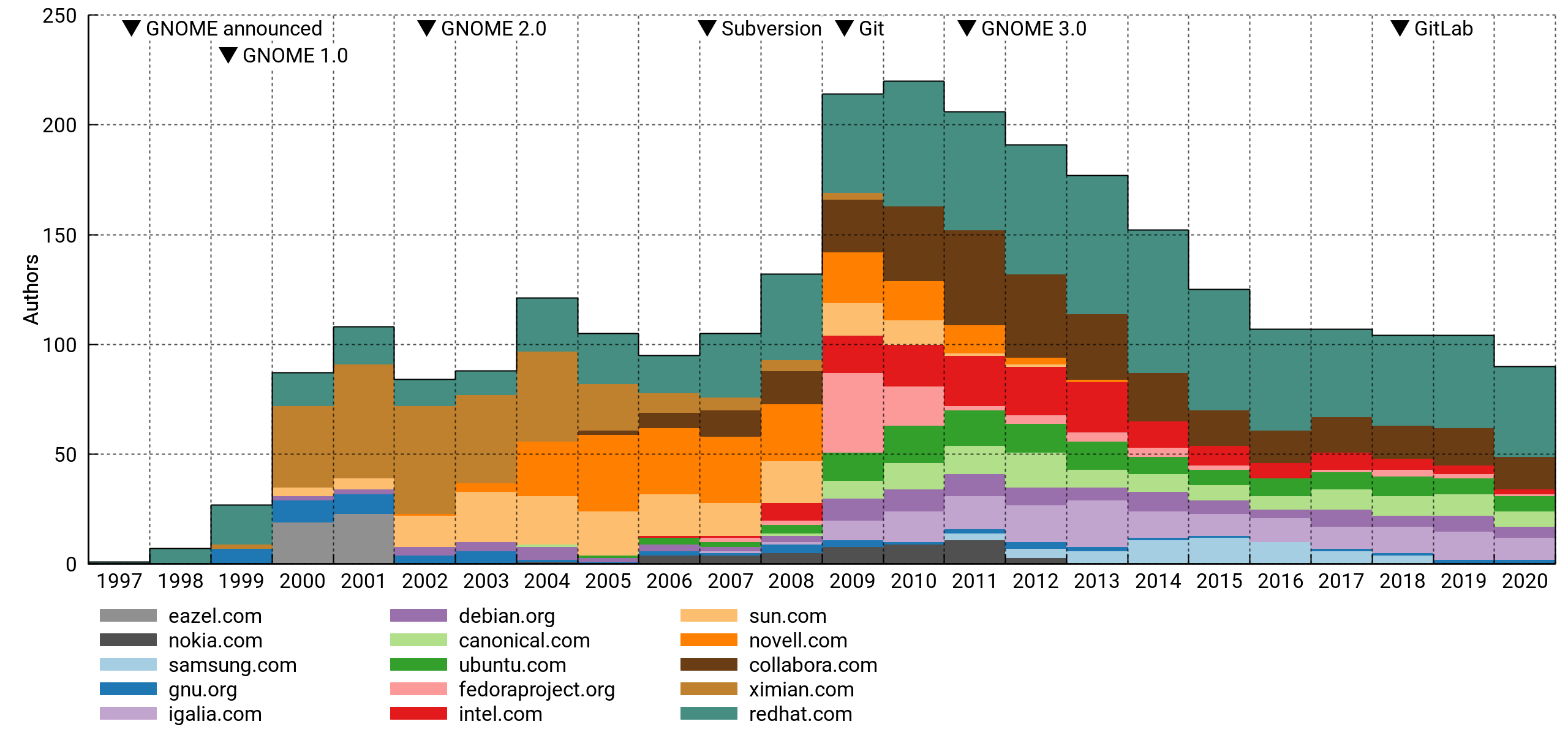
Above, the top 15 affiliations of active contributors. I've excluded personal accounts. This is pretty flawed (details below), but interesting nonetheless. For what it's worth, it mostly lines up with my memory of things.
The pattern tracks well with the total despite only capturing a minority portion of it. I think this means that paid and unpaid contributions are driven by the same underlying trends, or that there's a lot of the former hiding in the latter.
Commit count
By generation
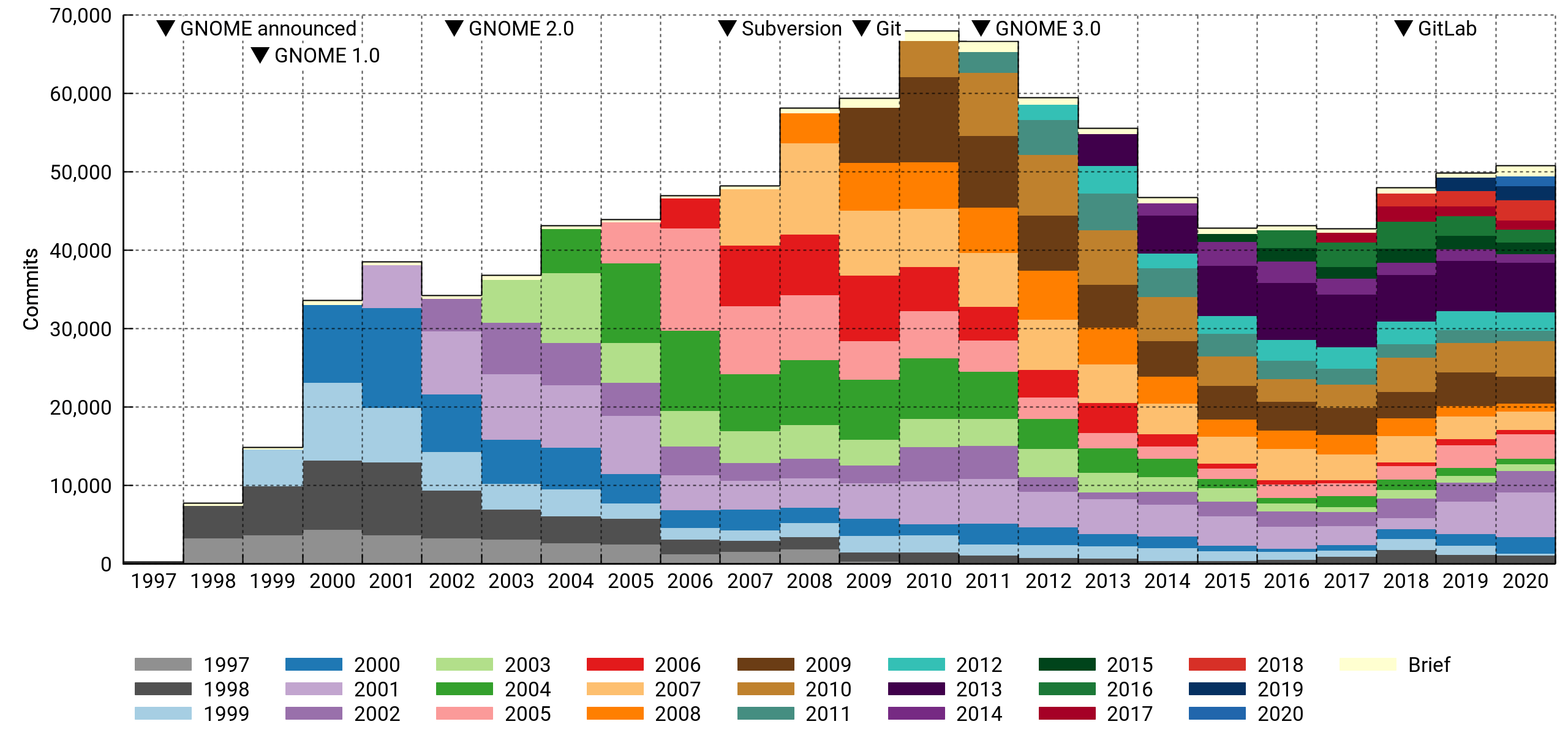
Here I'm counting the number of commits per year in the various cohorts.
At first glance, this looks much less dire. However, note how newcomers are having a smaller impact, especially from 2014 on. And the 2018-2020 bounce is entirely due to a handful of veterans making a comeback.
Half the commits in 2020 were made by contributors who've been with the project for ten years or more. Also noteworthy, drive-by commits are a vanishingly small portion of the total.
By affiliation
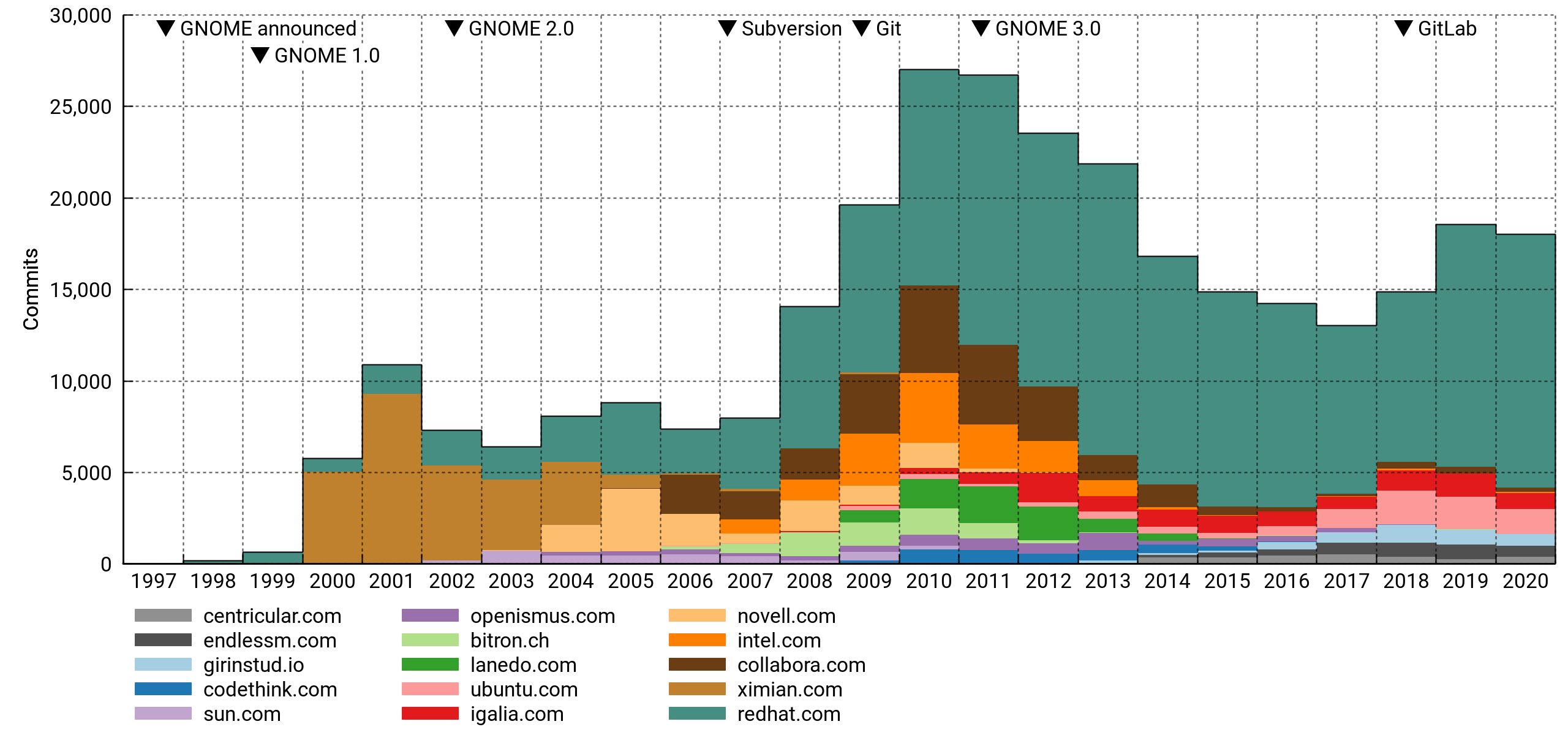
Top 15 affiliations again, but now ordered by commit counts. It's safe to say that GNOME is dependent on paid developers in a big way. Specifically, and to no one's surprise, it leans heavily on Red Hat.
General observations
A few observations can be made with confidence:
- By F/OSS standards, the project is not unhealthy. It has hundreds of experienced and first-time contributors every year. It is well-organized and arguably well-funded compared to its peers. But:
- Every metric has the project peaking around 2010.
- A diminishing number of veterans is doing an increasing share of the work.
- Although recruitment is stable, newcomers don't seem to be hitting their stride in terms of commits.
- Corporate sponsorship is probably necessary to keep the project going, but the field of sponsors has kept thinning.
I think GNOME is addressing the risk factors competently by modernizing infrastructure (GitLab, Discourse). This has obvious value even in the absence of quantifiable results, but it'll be interesting to see if the effect can be measured over the next couple of years.
Diminished enthusiasm may also be due to there being fewer ways for a new contributor to make their mark or assume a role of responsibility. GNOME has become more conservative, certainly much more so than it was a decade ago in the run-up to GNOME 3. The rationale and phrasing in the announcement of the new versioning scheme (e.g. "Radical technological and design changes are too disruptive for maintainers, users, and developers") seems indicative of this trend1.
Notes on methodology
So what's wrong with this analysis? If you're so inclined, you can find the details under the next couple of subheadings and pass harsh, harsh judgement.
I've set the unscientific rigor bar high enough to hopefully yield something useful, but low enough that I could do it in my spare time and not get stuck in the dreaded state commonly known as "90% done".
Module selection
I aggregated data from 189 Git repositories. The vast majority of these are hosted on gnome.org, with a handful from freedesktop.org and github.com. Commits are uniquely identified by their commit hash, meaning trivial duplicates are counted only once.
GNOME has always been a decentralized, big-tent project, so it's not obvious how to delineate it. I've tried to be fair by including most of the repositories from a full meta-gnome-desktop jhbuild, including fairly low-level dependencies like Cairo, Pango, and Pipewire, as well as past, present and would-be flagship applications under the GNOME umbrella. Documentation and infrastructure is represented, as are many archived projects (e.g. ORBit2, Bonobo, Sabayon, GAL).
I was a little uncertain about what to do with X.Org and Wayland. In the end I decided to include the latter, but not the former, since Wayland has close ties to GNOME (it even references GTK+ in its TODO file), while X.Org has its roots in the much older XFree86.
Mono is another project I resisted including; its development was tangential to GNOME proper, diverging completely in the most recent decade. However, I did include GtkSharp and several GNOME-hosted C# applications common on desktops in the 2005-2010 time frame.
Since I haven't established hard criteria for module selection, it's subject to various biases. Older code is probably underrepresented, since providers of important functionality were more loosely attached to the project early on (e.g. GNOME Online Accounts and Telepathy got pulled in, should I have included Gaim or Pidgin too? How about XChat?).
Anyway, the list isn't terrible, but there's room for improvement.
Contributor identities
Similar studies often identify contributors by their e-mail addresses. I used full author names instead, since there's good reason to think they're more stable over a 20-year time span. We're fairly consistent in spelling our own names, and we change them rarely (often never). On the other hand, e-mail addresses come and go with different hosting arrangements, employers, etc.
An added challenge with this approach is that sometimes different people have the exact same name. In practice, I'm not aware of any instances of this happening in GNOME. It seems to be rare enough that I doubt it'd introduce significant error in most projects.
I should add here that the drive-by cohort depends on a fair amount of hindsight (you never know when someone might come back with more contributions, but the likelihood drops off quickly as time passes). This means the cohorts for 2020 are preliminary. They'll be a lot more accurate with another run late next year.
Domain names
I'm using e-mail domain names as a proxy for organizations in some of the graphs. This is a notoriously unreliable approach for at least three reasons:
- Contributors often use personal e-mail addresses for paid work, leading to significant undercounting in general.
- Specific companies may require their employees (or ask them nicely) to use company e-mail for collaboration. Out of the listed companies, I know of at least one that definitely did this. However, there are many that don't, and these will be comparatively less well represented.
- The mapping between DNS and organizations isn't one-to-one. A company may operate under multiple names or TLDs (e.g.
.co.ukand.com).
Despite these weaknesses, it's common to slice the data this way. It's difficult to do better without access to semi-closed data troves, and depending on your views on privacy and ability to handle PII safely, it might not be something you'd want to get into anyway. But I bet you'd be well-positioned for it if you were, say, the corporate owner of both LinkedIn and GitHub.
When grouping by organization, the goal is to get an idea of which outside entities are sponsoring contributions. Therefore, I've filtered out addresses from the biggest mass e-mail providers like @gmail.com and project-centric providers of personal accounts (e.g. @gnome.org, @gtk.org).
I took the liberty of reassigning the personal domains of a few extra prolific authors who would've otherwise showed up as individual organizations. Since there's no way I'm doing it for everyone, this introduces some bias. The full details are in the project's metadata file (see: code).
Version control systems
Changeovers in version control systems divide GNOME's VCS history into three eras with noticeable discontinuities between them.
Before 1998: Dark ages
In the Bad Old Days, Free Software would often use plain RCS or no version control at all. I have basically no data for this era: The GIMP, being the ur-project from which GTK+ spawned, was imported to CVS in November 1997, but by then it had already been in development since at least mid-1995. It may be possible to reconstruct it somewhat by diffing old tarball releases. Linux historians have done this for the kernel.
1998-2009: Centralized
GNOME projects were mostly maintained in CVS from 1998 on, with infrastructure provided by Red Hat. A few companies (e.g. Ximian) maintained projects in their own CVS instances that were later consolidated under GNOME.
CVS had many limitations. For instance, history edits and other complex operations — like, oh, renaming a file — fell under the technical term "surgery" and the auspices of a competent server-side surgeon. The centralization of accounts also fostered a workflow where outside contributions were committed without any formal authorship metadata. This shows up in my plots as undercounting of active contributors.
GNOME moved to Subversion in 2007. While technically superior to CVS, it was still a centralized file-tracking solution and didn't change the workflow very much.
2009-present: Decentralized
Subversion didn't last long; 2009 saw the move to Git. The active contributor count shot up that year, and part of this is due to more accurate authorship metadata. I think there's a case to be made that involvement had been gradually increasing even before Git's introduction, but moving to a proper DVCS certainly didn't hurt.
Since a lot of contributors moved off @gnome.org in this switch, and affiliations are assigned based on e-mail addresses, the discontinuity is most visible in these graphs.
I expected the improved history management (and reduced commit anxiety) in Git's wake would also have produced more numerous commits. The data doesn't really bear this out — the count did increase the following year, but it's hard to distinguish from the general momentum leading up to GNOME 3.
Code
I wrote a small program to automate this somewhat. It's nothing much, but at least it can serve as a humorous example of what can happen when your reach starts to exceed awk's grasp and it occurs to you that hey, I should use Rust for scripting!
CSV files
I've uploaded the report data used in the charts in CSV format. It should be fairly self-explanatory and can be imported directly in LibreOffice (UTF-8, comma-separated).
Disclaimer
According to a quick tally, I've done enough work on GNOME projects for a place in the top 3% of committers2. That's decent enough, but the lion's share of it is, shall we say, not very recent. I don't presume to speak for the project or, in fact, any group at all.
1 Not necessarily a bad thing. There's something to be said for not constantly yanking the rug out from beneath everyone's feet.
2 Humblebrag aside, I'd like to emphasize that since there are so many small contributions ("long tail"), it's easy to end up in a high percentile even with a modest commitment.

Alpha Releases of openSUSE Leap 15.3 are Available for Testing
Alpha images of openSUSE’s next stable fixed release openSUSE Leap 15.3 are now available for testing at software.opensuse.org/distributions/testing.
Release Manager Luboš Kocman announced the availability of the Alpha images yesterday in an email to developers on the openSUSE Factory mailing list.
“I’d like to inform you that you can already find openSUSE Leap 15.3 testing images on software.opensuse.org,” Kocman wrote. “You may notice that Installation images for all arches can be now found in the Installation tabs, and the tab Ports no longer exist. This new structure corresponds with the way how we build images in 15.3.”
openSUSE Leap 15.3 is based on the Jump concept that was developed over the past several months, which makes it and SUSE Linux Enterprise compatible. openSUSE Leap aligns with SLE and its Service Packs (SP), which keeps the system updated, stable and patched. Upon General Availability of this release, there will be a whole new level of harmony between Leap 15.3 and SUSE Linux Enterprise 15 SP3.
The end of CentOS 8 announced last week aligns well for those users who are ready to move away from RedHat’s community enterprise release to a release model with openSUSE Leap, which has a life cycle of about 18 months of maintenance and security updates per minor release.
The point release of Leap 15.3 enters its Alpha build phase. During the Alpha phase, regular Alpha images will be built on a rolling basis until mid-February, when it is scheduled to transition to a Beta build phase. The beta submission deadline is February 12. The Beta phase has a similar model until the General Availability of the release; at GA, the rolling builds stop and Leap transitions into a maintenance and security update phase.
“Any update request to existing packages should be simply submitted against openSUSE:Leap:15.3 and OBS will determine where to redirect the request either to SLE or openSUSE Backports,” the email states. “Please note that new packages need to be currently submitted against openSUSE:Backports:SLE-15-SP3.opensuse-factory@ We know it’s inconvenient and we’ll work with the Autobuild team to make it a default destination place for any new package submission for openSUSE Leap 15.3.”
Distro hoppers, hobbyists, users and tech enthusiasts can download the current builds and help test the releases at software.opensuse.org/distributions/testing.
Users of openSUSE Leap 15.1 have until January of 2021 before it reaches its End of Live and users need to update to Leap 15.2. The Public Availability of Leap 15.3 is scheduled to be released in July, 2021, according to the releases roadmap Users of Leap 15.2 will need to update to the newer version within six months of the release of Leap 15.3.

My Platform for the 2020 openSUSE Board Election

Un VPN serait un plus à votre avis ?
openSUSEの日本語マニュアルページは最新なのか?
Geeko Blog » マニュアルのみのRPMファイルを作ってみた で、Sambaの日本語マニュアルパッケージを作成した時に参照したLinuxの日本語マニュアルページですが、2017年12月15日バージョンでした。これは openSUSE 15.0 から変わっていません。ちょっと古いですね。そこで、他のディストリビューションなどと比較して見ることにしました。結果は以下の通りです。なお、各ディストリビューションとも、各種コマンドでパッケージの最新化をして確認するか、配布サイトのパッケージ情報を見ています(※のもの)。
- CentOS 7 20130615版
- Debian10 20180315版
- openSUSE 15.2 20171215版
- openSUSE Thumbleweed 20191215版(※)
- Fedora 20200315版(※)
- Oracle Linux 20130615版(※)
- Arch Linux なし(※)
- Gentoo Linux 20180315版(※)
CentOS(=RedHat=Oracle Linux)はちょと古すぎますね。Fedora はやはりというか新しいです。しかし、Thumbleweed も結構新しい方でしょう。とりあえず15.2で使うのであれば、Thumbleweed版を持ってきて入れてしまうと言うのも手かもしれません。rpmファイルの中身はテキストだけなので、バイナリの互換性で引っかかることはないですから。
ちなみに、日本語マニュアルについては、Open Build Service で20201115版を作成し、更新をお願いしておきましたので、そのうちopenSUSE用の最新版が提供されるようになるのではないかと思います。
ただ、ls コマンドのマニュアルを見てみると、openSUSE 15.2 での日本語マニュアルはは GNU Fileutils のバージョンが4.1であると表示されますが、英語版は バージョン8.29 となっています。となると、日本語マニュアルに頼りすぎるのは少々危険かもしれません。
Disponible el vigesimosegundo número de la revista digital SoloLinux
Ya tenemos disponible el vigesimosegundo número de la revista digital SoloLinux la cual, como siempre, podéis leer online o descargar para poder disfrutar en vuestro lugar de vacaciones si tenéis una conexión de internet limitada.
Disponible el vigesimoprimer número de la revista digital SoloLinux
La introducción es repetitiva, pero es que es interesante hacer un poco de historia. Hubo un tiempo en que las revistas sobre Linux digitales estuvieron de moda. Tenemos todavía publicándose Atix y Full Circle Magazine (en inglés, gracias Vampiro Nocturno), pero antes teníamos a Linux+, Papirux, Begins o TuxInfo, por citar algunas discontinuadas.
Desde hace un tiempo una revista digital SoloLinux tiene su entrada mensual en el blog, tener todas las alternativas posibles para compartir conocimiento es algo que caracteriza al Conocimiento Libre.
En palabras de sus creadores:
«Ya estamos aquí otra vez, da lo mismo que llueva, que truene, que nieve o que haga sol, nosotros no fallamos. Somos así, el equipo de sololinux siempre esta al pie del cañón.
Debo reconocer que la cosa esta mal, el COVID 19 sigue haciendo mella y cada vez es más difícil sacar un trabajo bien hecho adelante. Gracias Adrián.
Ya he comentado varias veces, que estamos inmersos en un foro sobre linux, para que cualquier usuario pueda solventar sus dudas e interactuar con otros usuarios más experimentados (incluso con el equipo de sololinux). El desarrollo está bastante avanzado, pero se aceptan nuevos colaboradores tanto para el foro como para otras tareas diversas. Si tienes tiempo libre anímate, contacta con nosotros aquí.«
Más información: Revista Sololinux N22

Así que, ya tenemos disponible el vigésimosegundo número de la revistas digital SoloLinux, el cual llega cargado de contenidos y con el siguiente índice.
|
NOTICIAS Linux Mint agrega Chromium a sus repositorios oficiales Top 5 – Las supercomputadoras más potentes del 2020 MANUALES Eliminar módulos del kernel con el comando Rmmod Extraer archivos en bash con una función 20 ejemplos de uso del comando nmap en linux Actualizar Fedora 32 a Fedora 33 sin problemas Listar los procesos que se ejecutan en linux Actualizar Transmission en Ubuntu 20.04 y derivados Como crear archivos torrent con Transmission 8 formas de verificar las conexiones ssh activas Como instalar Nextcloud en Ubuntu 20.04 Instalar Nextcloud Client en Ubuntu 20.04 Conectar por SSH incluyendo el password 4 formas de buscar la ip de un dominio en terminal Como usar el comando Hexdump en linux Como usar zip en linux Configurar OPCache en Ubuntu 20.04 Extraer archivos zip con unzip Instalar php 8.0 en Ubuntu 20.04 Ajustar la frecuencia de la cpu con CpuPower-GUI |
HARDWARE Equilibrar la carga entre la memoria ram y swap Probar el rendimiento del disco con KdiskMark Configurar el Bluetooth en Linux SEGURIDAD Antivirus para linux – ClamAV y ClamTK El nuevo Kali Linux 2020.4 se pasa a ZSH SOFTWARE Instalar Zoom Client en Ubuntu, Linux Mint y derivados Descargar Cisco Packet Tracer 7.3.1 y versiones anteriores Instalar el navegador Microsoft Edge en Linux, ya!!! REDES HTTPie – El cliente http en linea de comandos DISTROS LINUX Los mejores derivados de Arch Linux del 2021 ENTREVISTAS Entrevista a Hernán Administrador de su Blog personal hernanalbornoz.wordpress.com |
La revista puede ser descargada o simplemente visualizarla en línea, ya que se cuelga en diferente servicios como Calameo. A continuación os dejo los enlaces de descarga y visualización directa de todos los números publicados hasta la fecha.
Además, recordar que desde el número anterior se ha abierto el canal oficial sololinux.es de Telegram: https://t.me/sololinux_es
Descarga:
Visualización directa:
Evidentemente, este proyecto no se centra en exclusivo a los contenidos de su web y está abierto a colaboraciones de todo tipo. De esta forma si estas interesado en insertar publicidad en nuestra revista, o quieres que publiquemos algún articulo que hayas escrito tu mismo, puedes contactar con «Adrián» por correo electrónico: adrian @ sololinux. com
Muchos ánimos en este proyecto que ya parecer estar consolidad y que que facilita la difusión del Software Libre de una forma que ya no es tan habitual en estos tiempos pero que es igual de válida y necesaria en algunas ocasiones.


Disponible #openSUSE Leap 15.3 versión Alfa para testear
La comunidad de openSUSE ha liberado la versión Alfa de desarrollo de openSUSE Leap 15.3

openSUSE Leap 15.3 se está desarrollando y ya se han liberado las imágenes ISO de la versión Alfa, para descargarlas y testearlas en nuestros equipos para probar y reportar fallos.
Según ha anunciado Lubos Kocman en las listas de correo de openSUSE, ya se han hecho públicas las imágenes de openSUSE Leap 15.3 en su versión Alfa.
Esta versión de desarrollo no es apta para equipos de uso diario, ya que pueden contener errores y todavía no estar todo el software disponible para esta versión.
Estas primeras imágenes del proceso de desarrollo de esta distribución de GNU/Linux sirven para instalarlas en equipos y reportar errores, fallos de funcionalidades, etc.
Esos reportes sirven para ir puliendo la distribución en diferentes equipos, arquitecturas, hardware, escenarios, modos de uso, compatibilidad con entornos de escritorios, etc.
Esta openSUSE Leap 15.3 es la tercera versión menor o “service pack” de la versión 15 de openSUSE Leap y es algo especial respecto de otras versiones.
Esta versión Leap 15.3 es la primera de openSUSE en la que se comparten los mismos binarios que la versión de SUSE Linux Enterprise (SLE) 15.3 que también está desarrollándose.
Esto implica que los mismos binarios de paquetes compilados que forman la versión empresarial serán los que formen la versión comunitaria. En openSUSE estamos acostumbrados a tener una distribución de GNU/Linux robusta y estable.
Esto creo que lo lleva un paso más allá, ya que la versión empresarial requiere satisfacer unos altos requisitos en cuanto a estas características de fiabilidad y estabilidad y eso también redundará en la versión comunitaria de openSUSE.
Puedes visitar la página de descargas de openSUSE Leap y descargar la ISO de la versión y arquitectura que prefieras:
Te remito al correo de Lubos Kocman, si quieres saber más sobre cómo reportar errores, o hacer peticiones de nuevos paquetes dentro de la distribución de openSUSE Leap 15.3, si es que te animas a mantener un paquete de software para openSUSE.
