
 Member
 Victorhck
Fossil la alternativa a Git
Fossil es un sistema de control de versiones, de igual forma que Git, pero con otra filosofía y muchas opciones más

Git se ha convertido en una herramienta de trabajo ampliamente utilizada. Es un sistema de control de versiones de archivos, que puede gestionar los aportes de muchas personas trabajando sobre los mismos archivos.
En el blog ya he tratado muchos artículos sobre esta herramienta creada por Linus Torvalds, pensada para ser utilizada en el desarrollo del kernel Linux pero ampliamente utilizada en muchos otros proyectos.
Pero acabo de enterarme de una alternativa creada por el desarrollador de SQLite que ofrece un sistema de control de versiones, pero muchas otras cosas de manera nativa como: seguimiento de errores, una wiki, un foro y documentación del proyecto.
El proyecto en cuestión se llama Fossil, y ofrece todo lo mencionado:
Fossil es un sistema de administración de configuración de software distribuido, simple y de alta confiabilidad con estas características avanzadas:
- Seguimiento de errores, wiki, foro y otas técnias integradas: Además de ser un software de control de versiones distribuidas de un arhivo o archivos como Git o Mercurial, Fossil también ofrece seguimiento de errores, wiki, forum, y notas técnicas
- Interfaz web integrada:- Fossil tiene una interfaz web integrada, configurable, extensible e intuitiva con una amplia variedad de páginas de información (ejemplos) que ofrecen información del desarrollo del proyecto. El propio sitio web de Fossil es una instancia de Fossil (valga la redundancia). Sus páginas son wikis o documentación incrustrada o (en el caso de la página de desargas) archivos que no entran en las versiones. Cuando clonas un proyecto en Fossil, desde uno de sus repositorios auto alojados, descargas más que únicamente el código fuente, descargas el sitio completo.
- Auto contenido: Fossil es un simple y único ejecutable. Para instalarlo, simplemente descarga un binario precompilado para GNU/Linux, Mac, o Windows y ponlo en tu $PATH. También puedes compilar el código fuente.
- Red sencilla: No se necesitan protocolos personalizados o puertos TCP. Fossil utiliza el conocido protocolo HTTP (o HTTPS o SSH) para las comunicaciones por red, así que funciona sin problemas destrás de firewalls, incluyendo proxies. El protocolo es eficiente en cuanto al ancho de banda hasta el punto que puede ser utilizado en lugares con poca cobertura de red o con redes de datos.
- Configuraciones simples del servidor: No es necesario un servidor central, pero si quieres puedes configurar uno. Fossil admite diferentes configuraciones de servidor incluyendo CGI, SCGI, o HTTP. También puedes configurar tu repositorio Fossil fácilmente para servir de réplica (o m”mirror”) del contenido de GitHub.
- Sincronizado automático: Fossil admite el modo “autosync” que ayuda a que los proyectos sigan avanzando al reducir la cantidad de bifurcaciones y fusiones innecesarias que a menudo se asocian con proyectos distribuidos.
- Robusto y fiable: Fossil almacena el contenido utilizando un formato de archivo duradero en una base de datos SQLite que es fiable incluso cuando hay una caida de tensión o un colapso. Automáticamente de auto comprueba verificando que todos los aspectos del repositorio están a salvo respecto a un commit anterior.
- Libre y de código abierto: Está publicado pajo licencia 2-clause BSD license.
No he podido probarlo, pero he estado leyendo sobre el proyecto en su web y seguro que es una opción más que interesante para algunos proyectos.
Tiene unos comandos y flujo de trabajo muy similares a Git, por lo que empezar a trabajar con Fossil no debería ser muy rupturista. Cierto, que tiene otra filosofía y otras herramientas, que habrá que ir descubriendo poco a poco.
Estas serían las principales diferencias entre Git y Fossil. Es una tabla resumida. Tienes información más detallada en su web.
| GIT | FOSSIL |
|---|---|
| Solo versiones de archivos | sistema de versiones, tickets, wiki, docs, notes, foro, UI, RBAC |
| Extenso e ineficiente | Auto contenido y eficiente |
| Almacén de datos de pila de archivos personalizado único | La base de datos más popular del mudo |
| Se ejecuta de manera nativa solo en sistemas POSIX | Nativo en equipos de escritorio y plataformas de servidores |
| Sistema de desarrollo estilo Bazar | Sistema de desarrollo estilo Catedral |
| Diseñado para el desarrollo del kernel Linux | Diseñado para el desarrollo de la base de datos SQLite |
| Muchos colaboradores | Colaboradores seleccionados |
| Se enfoca en ramas individuales | Se enfoca en árboles de cambios completos |
| Un check-out por repositorio | Muchos check-outs por repositorio |
| Recuerda lo que debiste haber hecho | Recuerda lo que realmente hiciste |
| Primero so los commits | Primero son las pruebas |
| SHA-2 | SHA-3 |
Una cosa a destacar es su interfaz web intuitiva, que ofrece información interesante y con los desarrolladores pueden interactuar. Echa un vistazo a este ejemplo del propio Fossil.
Puedes seleccionar diversos hitos, viendo información sobre las diferencias. Navegar por los cambios aportados y ver de manera gráfica todo el proyecto.
Te invito a que eches un vistazo al proyecto y compruebes si te podría servir para ese proyecto que te estás trayendo entre manos…  Si es así utiliza los comentarios del blog para compartir tu experiencia.
Enlaces de interés

Presenting Cockpit Wicked
What is Cockpit?
If you are into systems management, you most likely have heard about
Cockpit at some point. In a nutshell, it offers a good looking
web-based interface to perform system tasks like inspecting the logs, applying system updates,
configuring the network, managing services, and so on. If you want to give it a try, you can install
Cockpit in openSUSE Tumbleweed just by typing zypper in cockpit.
And Cockpit Wicked?
Recently, the YaST team got informed that MicroOS developers wanted to offer Cockpit as an option for system management tasks. Unfortunately, Cockpit does not have support for Wicked, a network configuration framework included in SUSE-based distributions.
As we are experts in systems management, we were given the task of building a Cockpit module to handle network configuration using Wicked instead of NetworkManager. And today we are presenting the first version of such a module. It is still a work in progress, but it already supports some basic use cases:
- Inspect interfaces configuration.
- Configure common IPv4/IPv6 settings.
- Set up wireless devices, although only WEP and WPA-PSK authentication mechanisms are supported.
- Set up bridges, bonding and VLAN devices.
- Manage routes (work in progress).
- Set basic DNS settings, like the policy, the search list or the list of static name servers.
Why a new module?
Cockpit already features a nice module to configure the network so you might be wondering why not extending the original instead of creating a new one. The module shipped with Cockpit is specific to NetworkManager and adapting it to a different backend can be hard.
In our case, we are trying to build something that could be adapted in the future to support more backends, but we are not sure how realistic this idea is.
See It In Action
Before giving it a try, we guess you would like to see some screenshots, right? So here you are. Below you can see the list of interfaces and some details about their configurations. It features a switch to activate/deactivate each device and a button to wipe the configuration. You can change the configuration by clicking on the links.

While applying the changes, Cockpit Wicked tries to keep you informed by updating the user interface as soon as possible. And, if something goes wrong, you will get an error message. Sure, we need to improve those messages, but you have something to look into it.

At this point, WEP and WPA-PSK authentication is supported by wireless devices, and we plan to expand the support for the same mechanisms that are already supported by YaST.

Another interesting feature is the support for some virtual devices like bridges, bonding and VLAN.

And last but not least, support for routes management or DNS configuration is rather simple but already functional.

Installation
The module has started its way to Tumbleweed. But, if you are interested in giving it a try, you can grab the RPM from the GitHub release page.
If you are already using Wicked, we recommend you to take a backup of your network configuration
just in case something goes wrong. Just copying the /etc/sysconfig/network directory is enough. In
case you are using NetworkManager but you are curious enough to give this module a try, you can
easily switch to Wicked using the YaST2 network module.YaST2 Network
Bear in mind that this module will replace the one included by default in Cockpit. If you want the
original module back, you need to uninstall the cockpit-wicked package.
What’s Next?
Apart from polishing what we already have and fixing bugs, there are many things to do. In the short term, we are focused on:
- Submitting the strings for translation so you can enjoy the module in your preferred language.
- Improving the UX according to our usability experts.
- Filtering out interfaces that are not managed by Wicked (like
virbr0).
But before deciding our next steps, we would love to hear from you. So please, if you have some time and you are interested, give the module a try and tell us what you think.
Additional Links
- GitHub repository: https://github.com/openSUSE/cockpit-wicked
- Development tips: https://github.com/openSUSE/cockpit-wicked/blob/master/DEVELOPMENT.md
GCompris llega a su versión 1.0
En realidad ocurrió la semana pasada, pero entre el lanzamiento de KDE PinePhone y Akademy-es 2020 en línea esta noticia quedó eclipsada. Así que me complace anunciar que GCompris llega a su versión 1.0 para celebrar su vigésimo aniversario.
GCompris llega a su versión 1.0

Para quienes no lo sepan, GCompris es una suite educativa que hace un par de años entró a formar parte de KDE Edu, la rama educativa de la Comunidad KDE y que proporciona una increíble colección de actividades que abarcan casi todas las ramas de conocimiento que cualquier estudiante, profesor o escuela necesita.
Este año se celebrar su vigésimo aniversario, lo cual ha motivado a sus desarrolladores a lanzar su primera versión 1.0 dando a entender la madurez de un proyecto que, a mi parecer, es poco conocida en el ámbito educativo.

En palabras de sus desarrolladores:
«¡Hola!
Para celebrar el 20 aniversario de GCompris, nos complace anunciar el lanzamiento de GCompris versión 1.0.
Esta nueva versión contiene una importante nueva funcionalidad: se ha añadido un menú de preferencias de las actividades que permite escoger entre más de 50 actividades, facilitando una selección más específica de lo que se puede aprender en las actividades.»
Otras novedades de esta versión se han añadido 4 nuevas actividades:
- Actividad sobre electricidad analógica, que nos permite dibujar circuitos y realizar su simulación.
- Aprender los números y dos subactividades para aprender a sumar y a restar.El teclado para niños, donde cada vez que se pulsa una tecla se muestra en la pantalla y se reproduce su correspondiente voz, si existe.
- La gravedad, que sustituye a la anterior introducción a la gravedad, y que explica mejor el concepto y es más realista.
En la página del anuncio oficial podéis encontrar vídeo de todas las nuevas actividades. Aquí os dejo solo una:
¿Qué es GCompris?
GCompris es un colección de aplicaciones educativas que contiene diferentes actividades para niños entre 2 y 10 años de edad. Originalmente GCompris estaba escrito lenguaje C y Python utilizando las herramientas de GTK+ pero a principios de 2014, desde que sus desarrolladores anunciaron que pasaban a ser un proyecto de la Comunidad KDE, se ha reescrito en a C++ y QML utilizando las herramientas Qt.
Entre otras actividades nos podemos encontrar:
- Descubriendo la computadora: teclado, ratón, pantalla táctil…
- Lectura: letras, palabras, práctica de lectura, escritura de texto…
- Aritmética: números, operaciones, memoria en tablas, enumeración, tabla de doble entrada…
- Ciencia: esclusa de canal, el ciclo del agua, energía renovable…
- Geografía: países, regiones, cultura…
- Juegos: ajedrez, memoria, alinear 4, juego del ahorcado, tres en raya…
- Otros: colores, formas, alfabeto Braille, aprender a decir la hora…
Más información: GCompris

Gaming Rack Design and Construction
Mediainfo – Service menu para KDE (17)
Mientras descanso de la pasada Akademy-es y prepara artículos recordando tan magno evento, hoy quiero segur con artículos ligeros. Como los seguidores habituales del blog ya sabrán me encanta los Service Menu como el que os presento hoy llamado Mediainfo y que nos ofrece información extra sobre archivos multimedia.
Mediainfo – Service menu para KDE (17)
Aunque con el panel que suele estar a la derecha de Dolphin solemos tener toda la información necesaria de nuestros archivos nunca está de más tener alguna que otra alternativa por si alguien quiere ahorrarse ese espacio en su pantalla.
Hoy me complace compartir con vosotros este Service Menu llamado Mediainfo, con el que podemos acceder con un simple click derecho del ratón a toda la información del archivo multimedia que tengamos.
Se trata de una creación de ALEX1701C que basándose en getMediaInfo ha conseguido adaptarlo a Plasma 5.

Hay que insistir que al programador de este Mediainfo le encantará que le deis me gusta en la KDE Store y que le comentéis como os funciona. Os recuerdo que ayudar al desarrollo del Software Libre también se hace simplemente dando las gracias, ayuda mucho más de lo que os podéis imaginar, recordad la campaña I love Free Software Day 2017 de la Free Software Foundation donde se nos recordaba esta forma tan sencilla de colaborar con el gran proyecto del Software Libre y que en el blog dedicamos un artículo.
Más información: KDE Store
¿Qué son los Dolphin Service Menu?
La personalización de KDE y Plasma está más que demostrada y prueba de ello son los Dolphin Service Menu, que no son más que la posibilidad de disponer un menú auxiliar en el gestor de archivos Dophin o en Konqueror que se activa con el botón derecho del ratón.
Con ellos tendremos nuevas acciones como:
- Accesos directos a los servicios de Dropbox.
- Accesos directos a las acciones de 7zG.
- Realizar acciones como root automáticamente.
- Enviar un adjunto con el Thunderbird
Y muchos más como hemos explicado en varias ocasiones en el blog. Puedes encontrar estos servicios se pueden encontrar en la sección Dolphin Service Menu en la Store de KDE.
Web interfaces for your syslog server – an overview
This is the 2020 edition of my most read blog entry about syslog-ng web-based graphical user interfaces (web GUIs). Many things have changed in the past few years. In 2011, only a single logging as a service solution was available, while nowadays, I regularly run into others. Also, while some software disappeared, the number of logging-related GUIs is growing. This is why in this post, I will mostly focus on generic log management and open source instead of highly specialized software, like SIEMs.
Why grep is not enough?
Centralized event logging has been an important part of IT for many years for many reasons. Firstly, it is more convenient to browse logs in a central location rather than viewing them on individual machines. Secondly, central storage is also more secure. Even if logs stored locally are altered or removed, you can still check the logs on the central log server. Finally, compliance with different regulations also makes central logging necessary.
System administrators often prefer to use the command line. Utilities such as grep and AWK are powerful tools, but complex queries can be completed much faster with logs indexed in a database and a web interface. In the case of large amounts of messages, a web-based database solution is not just convenient, it is a necessity. With tens of thousands of incoming messages per second, the indexes of log databases still give Google-like response times even for the most complex queries, while traditional text-based tools are not able to scale as efficiently.
Why still syslog-ng?
Many software used for log analysis come with their own log aggregation agents. So why should you still use syslog-ng then? As organizations grow, so does the IT staff starts to diversify. Separate teams are created for operations, development and security, each with its own specialized needs in log analysis. And even the business side often needs log analysis as an input for business decisions. You can quickly end up with 4-5 different log analysis and aggregation systems running in parallel and working from the very same log messages.
This is where syslog-ng can come handy: creating a dedicated log management layer, where syslog-ng collects all of the log messages centrally, does initial basic log analysis, and feeds all the different log analysis software with relevant log messages. This can save you time and resources in multiple ways:
-
You only have to learn one tool instead of many.
-
Only a single tool to push through security and operations teams.
-
There are less computing resources on clients.
-
Logs travel only once over the network.
-
Long term archival in a single location with syslog-ng instead of using multiple log analysis software.
-
Filtering on the syslog-ng side can save significantly on the hardware costs of the log analysis software, and also on licensing in case of a commercial solution.
The syslog-ng application can collect both system and application logs, and can be installed both as a client and a server. Thus, you have a single application to install for log management everywhere on your network. It can reliably collect and transport huge amounts of log messages, parse (“look into”) your log messages, enrich them with geographical location and other extra data, making filters and thus, log routing, much more accurate.
Logging as a Service (LaaS)
A couple years ago, Loggly was the pioneer of logging as a service (LaaS). Today, there are many other LaaS providers (Papertrail, Logentries, Sumo Logic, and so on) and syslog-ng works perfectly with all of them.
Structured fields and name-value pairs in logs are increasingly important, as they are easier to search, and it is easier to create meaningful reports from them. The more recent IETF RFC 5424 syslog standard supports structured data, but it is still not in widespread use.
People started to use JSON embedded into legacy (RFC 3164) syslog messages. The syslog-ng application can send JSON-formatted messages – for example, you can convert the following messages into structured JSON messages:
-
RFC5424-formatted log messages.
-
Windows EventLog messages received from the syslog-ng Agent for Windows application.
-
Name-value pairs extracted from a log message with PatternDB or the CSV parser.
Loggly and other services can receive JSON-formatted messages, and make them conveniently available from the web interface.
A number of LaaS providers are already supported by syslog-ng out of the box. If your service of choice is not yet directly supported, the following blog can help you create a new LaaS destination: https://www.syslog-ng.com/community/b/blog/posts/how-to-use-syslog-ng-with-laas-and-why
Some non-syslog-ng-based solutions
Before focusing on the solutions with syslog-ng at their heart, I would like to say a few words about the others, some which were included in the previous edition of the blog.
LogAnalyzer from the makers of Rsyslog was a simple, easy to use PHP application a few years ago. While it has developed quite a lot, recently I could not get it to work with syslog-ng. Some of the popular monitoring software have syslog support to some extent, for example, Nagios, Cacti and several others. I have tested some of these, I have even sent patches and bug reports to enhance their syslog-ng support, but syslog is clearly not their focus, just one of the possible inputs.
The ELK stack (Elasticsearch + Logstash + Kibana) and Graylog2 have become popular recently, but they have their own log collectors instead of syslog-ng, and syslog is just one of many log sources. Syslog support is quite limited both in performance and protocol support. They recommend using file readers for collecting syslog messages, but that increases complexity, as it is an additional software on top of syslog(-ng), and filtering still needs to be done on the syslog side. Note that syslog-ng can send logs to Elasticsearch natively, which can greatly simplify your logging architecture.
Collecting and displaying metrics data
You can collect metrics data using syslog-ng. Examples include netdata or collectd. You can send the collected data to Graphite or Elasticsearch. Graphite has its own web interface, while you can use Kibana to query and visualize data collected to Elasticsearch.
Another option is to use Grafana. Originally, it was developed as an alternative web interface to the Graphite databases, but now it can also visualize data from many more data sources, including Elasticsearch. It can combine multiple data sources to a single dashboard and provides fine-grained access control.
Loki by Grafana is one of the latest applications that lets you aggregate and query log messages, and of course, to visualize logs using Grafana. It does not index the contents of log messages, only the labels associated with logs. This way, processing and storing log messages requires less resources, making Loki more cost-effective. Promtail, the log collector component of Loki, can collect log messages using the new, RFC 5424 syslog protocol. Learn here how syslog-ng can send its log messages to Loki.
Splunk
One of the most popular web-based interfaces for log messages is Splunk. A returning question is whether to use syslog-ng or Splunk. Well, the issue is a bit of apples vs. oranges: they do not replace, but rather complement each other. As I already mentioned in the introduction, syslog-ng is good at reliably collecting and processing huge amounts of data. Splunk, on the other hand, is good at analyzing log messages for various purposes. Learn more about how you can integrate syslog-ng with Splunk from our white paper!
Syslog-ng based solutions
Here I show a number of syslog-ng based solutions. While every software described below is originally based on syslog-ng Open Source Edition (except for One Identity’s own syslog-ng Store Box (SSB)), there are already some large-scale deployments available also with syslog-ng Premium Edition as their syslog server.
-
The syslog-ng application and SSB focus on generic log management tasks and compliance.
-
LogZilla focuses on logs from Cisco devices.
-
Security Onion focuses on network and host security.
-
Recent syslog-ng releases are also able to store log messages directly into Elasticsearch, a distributed, scalable database system popular in DevOps environments, which enables the use of Kibana for analyzing log messages.
Benefits of using syslog-ng PE with these solutions include the logstore, a tamper-proof log storage (even if it means that your logs are stored twice), Windows support, and enterprise grade support.
LogZilla
LogZilla is the commercial reincarnation of one of the oldest syslog-ng web GUIs: PHP-Syslog-NG. It provides the familiar user interface of its predecessor, but also includes many new features. The user interface supports Cisco Mnemonics, extended graphing capabilities, and e-mail alerts. Behind the scenes, LDAP integration, message de-duplication, and indexing for quick searching were added for large datasets.
Over the past years, it received many small improvements. It became faster, and role-based access control was added, as well as the live tailing of log messages. Of course, all these new features come with a price; the free edition, which I have often recommended for small sites with Cisco logs is completely gone now.
A few years ago, a complete rewrite became available with many performance improvements under the hood and a new dashboard on the surface. Development never stopped, and now LogZilla can parse and enrich log messages, and can also automatically respond to events.
Therefore, it is an ideal solution for a network operations center (NOC) full of Cisco devices.
Web site: http://logzilla.net/
Security Onion
One of the most interesting projects utilizing syslog-ng is Security Onion, a free and open source Linux distribution for threat hunting, enterprise security monitoring, and log management. It is utilizing syslog-ng for log collection and log transfer, and uses the Elastic stack to store and search log messages. Even if you do not use its advanced security features, you can still use it for centralized log collection and as a nice web interface for your logs. But it is also worth getting acquainted with its security monitoring features, as it can provide you some useful insights about your network. Best of all, Security Onion is completely free and open source, with commercial support available for it.
You can learn more about it at https://www.syslog-ng.com/community/b/blog/posts/syslog-ng-and-security-onion
Elastisearch and Kibana
Elasticsearch is gaining momentum as the ultimate destination for log messages. There are two major reasons for this:
-
You can store arbitrary name-value pairs coming from structured logging or message parsing.
-
You can use Kibana as a search and visualization interface.
The syslog-ng application can send logs directly into Elasticsearch. We call this an ESK stack (Elasticsearch + syslog-ng + Kibana).
Learn how you can simplify your logging to Elasticsearch by using syslog-ng: https://www.syslog-ng.com/community/b/blog/posts/logging-to-elasticsearch-made-simple-with-syslog-ng
syslog-ng Store Box (SSB)
SSB is a log management appliance built on syslog-ng Premium Edition. SSB adds a powerful indexing engine, authentication and access control, customized reporting capabilities, and an easy-to-use web-based user interface.
Recent versions introduced AWS and Azure cloud support and horizontal scalability using remote logspaces. The new content-based alerting can send an e-mail alert whenever a match between the contents of a log message and a search expression is found.
SSB is really fast when it comes to indexing and searching log data. To put this scalability in context, the largest SSB appliance stores up to 10 terabytes of uncompressed, raw logs. With SSB’s current indexing performance of 100,000 events per second, that equates to approximately 8.6 billion logs per day or 1.7 terabytes of log data per day (calculating with an average event size of 200 bytes). Using compression, a single, large SSB appliance could store approximately one month of log data for an enterprise generating 1.7 terabytes of event data a day. This compares favorably to other solutions that require several nodes for collecting this amount of messages, and even more additional nodes for storing them. While storing logs to the cloud is getting popular, on-premise log storage is still a lot cheaper for a large amount of logs.
The GUI makes searching logs, configuring and managing the SSB easy. The search interface allows you to use wildcards and Boolean operators to perform complex searches, and drill down on the results. You can gain a quick overview and pinpoint problems fast by generating ad-hoc charts from the distribution of the log messages.
Configuring the SSB is done through the user interface. Most of the flexible filtering, classification and routing features in the syslog-ng Open Source and Premium Editions can be configured with the UI. Access and authentication policies can be set to integrate with Microsoft Active Directory, LDAP and RADIUS servers. The web interface is accessible through a network interface dedicated to the management traffic. This management interface is also used for backups, sending alerts, and other administrative traffic.
SSB is a ready-to-use appliance, which means that no software installation is necessary. It is easily scalable, because SSB is available both as a virtual machine and as a physical appliance, ranging from entry-level servers to multiple-unit behemoths. For mission critical applications, you can use SSB in High Availability mode. Enterprise-level support for SSB and syslog-ng PE is also available.
■ Read more about One Identity’s syslog-ng and SSB products here.
Digest of YaST Development Sprint 113
Time flies and it has been already two weeks since our previous development report. On these special days, we keep being the YaST + Cockpit Team and we have news on both fronts. So let’s do a quick recap.
Cockpit Modules
Our Cockpit module to manage wicked keeps improving.
Apart from several small enhancements, the module has now better error reporting and correctly
manages those asynchronous operations that wicked takes some time to perform. In addition, we have
improved the integration with a default Cockpit installation, ensuring the new module replaces the
default network one (which relies on Network Manager) if both are installed. In the following days
we will release RPM packages and a separate blog post to definitely present Cockpit Wicked to the
world.
On the other hand, we also have news about our Cockpit module to manage transactional updates. We are creating some early functional prototypes of the user interface to be used as a base for future development and discussions. You can check the details and several screenshots at the following pull requests: request#3, request#5.
Btrfs Subvolumes in the Partitioner
Regarding YaST and as already mentioned in our previous blog post, we are working to ensure Btrfs subvolumes get the attention they deserve in the user interface of the YaST Partitioner, becoming first class citizens (like partitions or LVM logical volumes) instead of an obscure feature hidden in the screen for editing a file system.
As part of that effort, we improved the existing mechanism to suggest a given list of subvolumes, based on the selected product and system role. See more details and screenshots at the corresponding pull request.
We also added some support for Btrfs quotas, a mechanism that can be used to improve space
accounting and to ensure a given subvolume (eg. /var or /tmp) does not grow too much and ends
up filling up all the space in the root file system. This pull
request explains the new feature with several
screenshots, including the new quite informative help texts.
All the mentioned changes related to subvolumes management will be submitted to openSUSE Tumbleweed in the following days.
More YaST enhancements
Talking about the YaST Partitioner, you may know that we recently added a menu bar to its interface. During this sprint we improved the YaST UI toolkit to ensure the keyboard shortcuts for such menu bar stay as stable as possible. Check the details at this pull request.
We have also been working in making the installer more flexible by adding support to define, per product and per system role, whether YaST should propose to configure the system for hibernation. In the case of SUSE Linux Enterprise, we have adapted the control file to propose hibernation in the SLED case, but not for other members of the SLE family.
See you soon
Of course, we have done much more during the latest two weeks. But we assume you don’t want to read about small changes and boring bug-fixes… and we are looking forward to jump into the next sprint. So let’s go back to work and see you in two weeks!


Gnome Asia summit 2020
 24-26 November 2020 @ https://events.gnome.org/event/24
I think it maybe too late to help out telling anyone about this event since registeration already closed but look like the registeration still open. Anyway, let see the schedule:
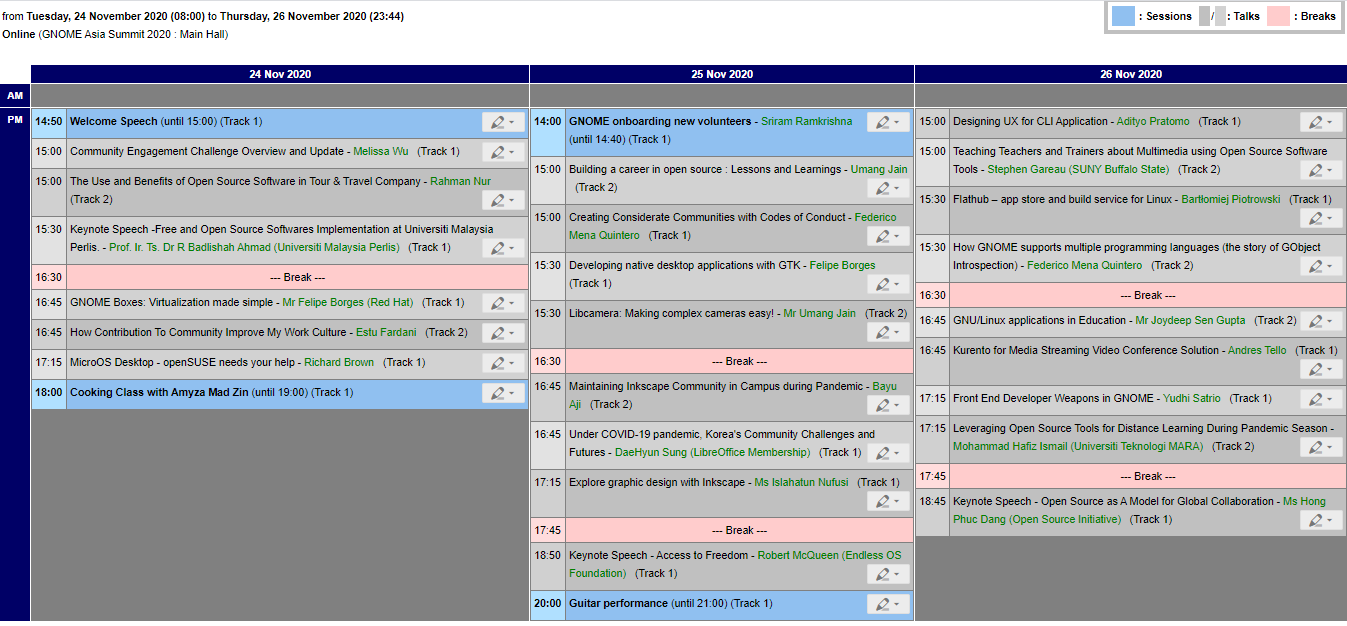

Some of the segment that offer good topic and caught my eyes :
- The Use and Benefits of Open Source Software in Tour & Travel Company - Rahman Nur
- Building a career in open source : Lessons and Learnings - Umang Jain
- Under COVID-19 pandemic, Korea’s Community Challenges and Futures - DaeHyun Sung
- Leveraging Open Source Tools for Distance Learning During Pandemic Season - Mohammad Hafiz Ismail
Gnome Asia summit 2020 will start by tomorrow today and conference will be online. This event was sponsor by Gitlab and openSUSE.

MicroOS & Kubic: New Lighter Minimum Hardware Requirements
You Spoke, We Heard
openSUSE MicroOS has been getting a significant amount of great attention lately.
We’d like to thank everyone who has reviewed and commented on what we are doing lately. One bit of clear feedback we received loud and clear was that the Minimum Hardware requirement of 20 GB disk space was surprisingly large for an Operating System calling itself MicroOS. We agree! And so we’ve reviewed and retuned that requirement.
New Minimum Storage Requirements
The New Minimum Supported Storage Requirements for MicroOS are
-
5 GBfor the read-only/ (root)partition, with 20GB as the recommended maximum size. -
5 GBfor the read-write/varpartition, with 40GB as the recommended size, or however large you require for your workloads.
Please Note, a standard installation of the minimal MicroOS system role currently uses no more than
-
450 MBwith bare metal hardware support. -
285 MBwithout bare metal hardware support.
Therefore these new lighter requirements still ensure that your MicroOS installations have plenty of room for many automated snapshots from transactional-updates. These changes will not compromise the promise that MicroOS can be updated and rolled back atomically without worry.
MicroOS Desktop Differences
The MicroOS Desktop, which is currently in Alpha and being actively developed, has a subtly different minimum requirement, as a result of its different use case.
-
5 GBfor the read-only/ (root)partition, with at least 40GB recommended, or however large you require for your desktop. -
/varand/homeare provided as read-writenoCoWsub-volumes as part of the/ (root)partition for the storage of containers, flatpaks and user-data.
Available Now
These changes have all been submitted to openSUSE:Factory, tested in openQA, and will soon be released as part of Snapshot version 20201121. They will soon be available for both MicroOS and Kubic across all ISO, Cloud, and VM Images.
Thanks and have a lot of fun!
The MicroOS & Kubic Team

Xfce Virtual Machine Images For Development
The openSUSE distributions offer a variety of graphical desktop environments, one of them being the popular and lightweight Xfce. Up to now there was the stable tested branch available in Tumbleweed already during install. Furthermore, for interested users the development OBS repository xfce:next offered a preview state of what’s coming up next to Tumbleweed.
Xfce Development in openSUSE
Thanks to the hard work of openSUSE’s Xfce team there is a third option: Xfce Development Repository aka RAT In a playful way, a rat is meant to represent the unpolished nature of this release: a rat is scruffy looking compared to a mouse (the cute and beloved mascot of Xfce). And the RAT repository provides packages automatically built right from the Git Master Branch of Xfce upstream development. The goal of this project is to test and preview the new software so that bugs can be spotted and fixed ahead of time by contributing upstream. The packages pull in source code state on a daily basis and offer a quite convenient way to test and eventually help development. So this is where the team builds and tests the latest and unstable releases of Xfce Desktop Environment for openSUSE.
One step beyond
While this has been around for quite some time now the openSUSE Xfce team managed to make things even more easy to use. Instead of having to install Tumbleweed yourself, add package repositories and install packages you can now let things be done for you by the use of OBS, Kiwi and Virtualization combined.
Standing on the shoulders of these great projects the Xfce team built KVM & Xen images use Xfce Git master with customized openSUSE settings. The build process happens fully automated and on a regular basis giving users qcow2 disk images with Xfce’s latest builds based on openSUSE’s rolling release Tumbleweed.
To help upstream Xfce development there is another disk image accompanying the openSUSE customized one. This so called “vanilla” disk image ships Xfce completely unmodified from Git sources and without any openSUSE visual tweakings. This gives Xfce devs (and testers alike) who want to build and test software inside a complete Xfce environment the most convenient way to do so. No more building everything themselves or maintaining test setups continuously. Just downloading the latest Xfce RAT disk image and you’re good to go!
Downloads
- openSUSE version:
https://download.opensuse.org/repositories/X11:/xfce:/rat:/images/images/ - Upstream version:
https://download.opensuse.org/repositories/X11:/xfce:/rat:/images:/upstream/images/
Usage
The most convenient way to use openSUSE’s Xfce RAT disk images is virt-manager. It is a desktop user interface for managing virtual machines through libvirt and primarily targets KVM VMs but is also capable for Xen and LXC. Read more about it on their website or install it from openSUSE’s standard repositories right away.
While virt-manager is the recommended way there are of course quite a few others like virt-install or Cockpit Web console. All of them are expected to work like any other solution supporting qcow disk images.
You can find more detailed information on how to use these images in the dedicated wiki page.
Contributing
Like any other team in openSUSE the Xfce team is always happy to welcome people interested in development, packaging, testing and reporting bugs. Find out more about our work here and say hello in the chat if you like!