
 Member
Gérer les instantanés de Snapper
Le but de cet article n’est pas de détailler le fonctionnement de Snapper, snapshots mais la gestion connexe de btrfs. Snapper étant un produit openSUSE** de facto renforce notre voeu pour cerner celui-ci ou plutôt ses habitudes de créer des snapshots qui remplissent votre disque dûr. openSUSE et SUSE sont configurés pour automatiqement faire des […]
The post Gérer les instantanés de Snapper appeared first on Cybersécurité, Linux et Open Source à leur plus haut niveau | Network Users Institute | Rouen - Normandie.

 Futureboy
Cubicle Chat | 27 Mar 2021

Escape the Permission Trap with Healthy Habits
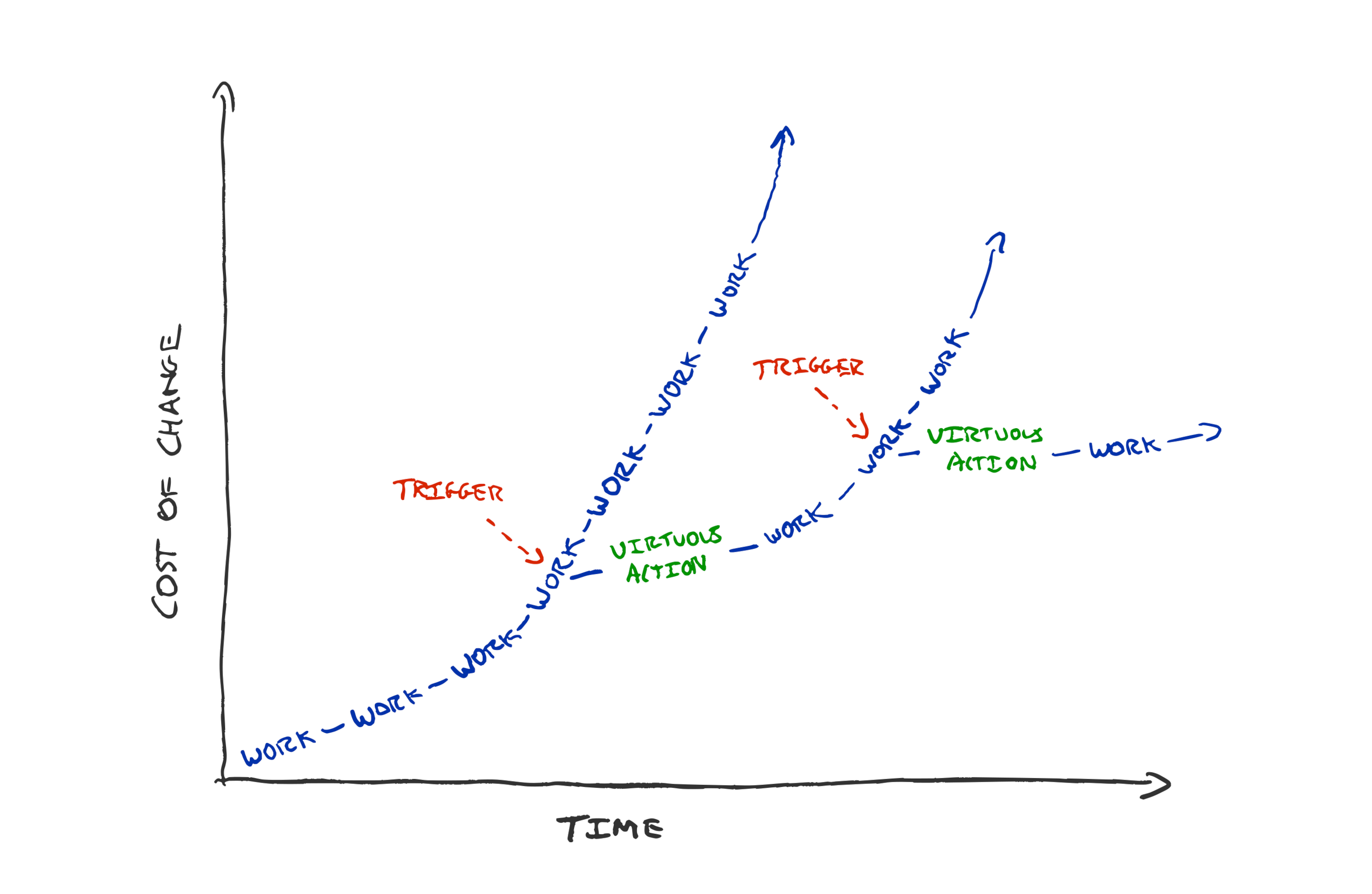
If you’re struggling with how to get to tidy code, fast feedback loops, joyful work. How to get permission, or buy-in. Try team habits.
Create working agreements of the form “When we see <observable trigger>, instead of <what we currently do> we will <virtuous action>”. This is a mechanism to pre-approve the desired action.
In last week’s “level up” newsletter Pat Kua likened developers asking product managers whether to do activities such as refactoring and testing, to a chef offering washing and cleaning to customers. i.e. it shouldn’t be a discussion.
I strongly agree, but I can see that some people might still be stuck with the how. Especially if you’re the only cook in the kitchen who seems to care that there is mess everywhere.
I recently suggested every team should be paying attention to the delays in their feedback loops. Keeping time to production under 5 minutes. Running all programmer tests in a matter of seconds.
Measuring what matters is a good step towards being able to improve it. But it’s not enough. Especially if your manager, product manager, or fellow developers seem unperturbed by the build time creeping up, the flaky tests in your build, or the accumulating complexity.
How we get stuck
Maybe you point to graphs and metrics and are met with “yes but we have a deadline next week” or “just do something else while you’re waiting for the slow build”. We easily get stuck at how to break out of seeking permission.
How can we become a team with code we’re proud of? How can we become a team that has fast effective feedback loops?
I’m a big fan of radiating intent rather than asking for forgiveness, but what if you’re the only person on your team that seems to care? Acting autonomously takes courage. It sends a positive signal to your coworkers, but it could easily be shut down by an unsupportive or unaware manager.
You might give up when your small solo efforts make little headway against a mammoth task. It’s easy to become despondent when a new teammate rants about the state of the huge codebase you’ve been refactoring bit by bit for weeks. “Ah, but you should have seen it before” you sigh.
People get stuck asking for permission. Asking permission, or taking a risk to do the right thing every time is wearisome. “Just do it” is easy to say but is risky. Especially if you have leaders who are reluctant to let go of control.
Is quality code only something that teams with sympathetic managers can achieve? Are fast feedback loops something only very talented engineers can achieve? By no means!
A trap that lots of teams fall into is making the safe, sustainable, faster path improvement path the special case. We create systems whereby people have to ask for permission to clean and to tidy. We need to change the expectations in the team. It should be that tolerating a messy workspace is seen as the deviance that needs permission or risk taking. Not vice versa.
How to change this? Propose a new a beneficial habit to your team.
“When we see <observable trigger>,
instead of <what we currently do>
we will <virtuous action>”
How can you convince your team to try a new way of working? Make a prediction of the benefit and propose running an experiment for 2-4 weeks, after which the team can review.
Good habits give teams superpowers. Habits can pre-approve the right actions. Habits unstick us from “doing things” to take necessary actions, when they’re needed, continuously.
What do I mean by good habits? Refactoring constantly, making the build a bit faster every day, talking with customers. Feedback loops that increase our chances of success.
Make them team habits and the onus will be on managers and team members to convince each other to not do the good things rather than the other way round.
Examples of good habits
TDD
TDD is great for habit forming—it creates triggers to do the right thing. When we see a red failing test we trigger the habit of implementing new behaviour. We never have untested code because the habit we’ve formed for writing code is in response to a failing test. When we see a green test suite we trigger the habit of refactoring. Every few minutes we see a green test suite and trigger our habit: spending some time thinking about how the code could be tidier, easier to understand, and then making it so.
Sure we could convince our pair to skip the refactoring step, but the onus is on us to make the case for deviating from the sensible default, habitual path.
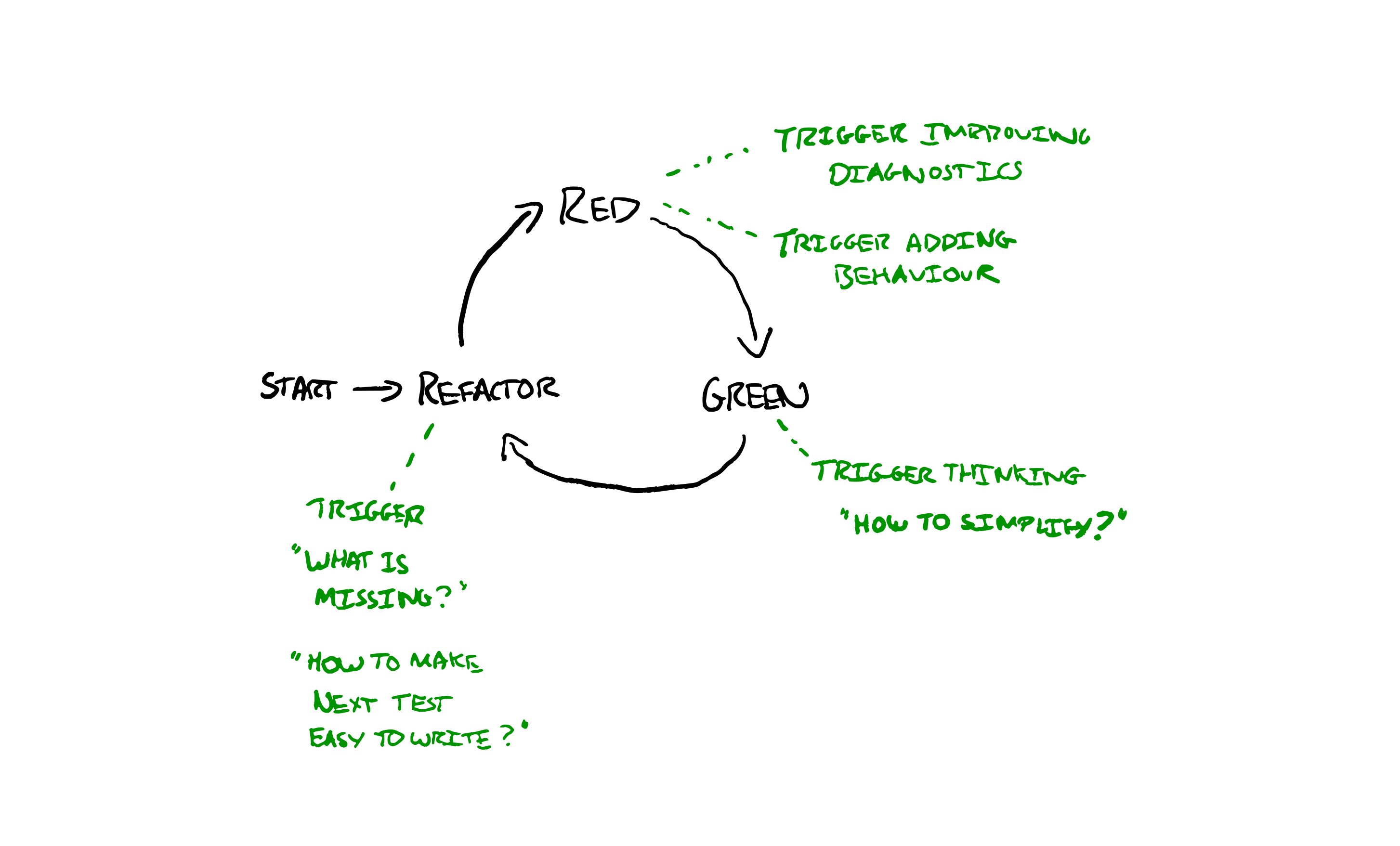
“When we write code, instead of starting to implement the feature we will write a failing test first”
“When we see a red test suite, instead of writing lots of code we will write the simplest possible code to make it pass”
“When we see a green test suite, instead of moving on to the next capability we will stop and do at least one refactoring”
Zero Tolerance of Alerts
Are you suffering from over-alerting? Do you have flickery production alerts that go off frequently and then resolve themselves without action? Use them as a trigger for a habit. Agree as a team that every time an alert fires the whole team will down tools, investigate and work together. Every time an alert happens: come up with your best idea to stop it going off again for the same reason.
If that’s too extreme you could try with a nominated person investigating. The point is to make a habit. Pre-agree expected, good, behaviour in response to a common trigger. Then there’s no need to seek permission to do the right thing, plus there’s some social obligation to do the right thing.
“When we see an alert fire, instead of waiting to see if recovers by itself we will stop and investigate how to stop it firing again”
Max Build Time
Is your build getting slower and slower? You’ve made it measurable but it’s still not helping? Create a habit that will improve it over time. e.g. Every time you see the build has got a minute slower the next task the team picks up will be making the build at least two minutes faster.
Now the onus is on someone to argue that something else is more important at the time. The default, habitual, behaviour is to respond to a trigger of a slowed build with investing time in speeding it up.
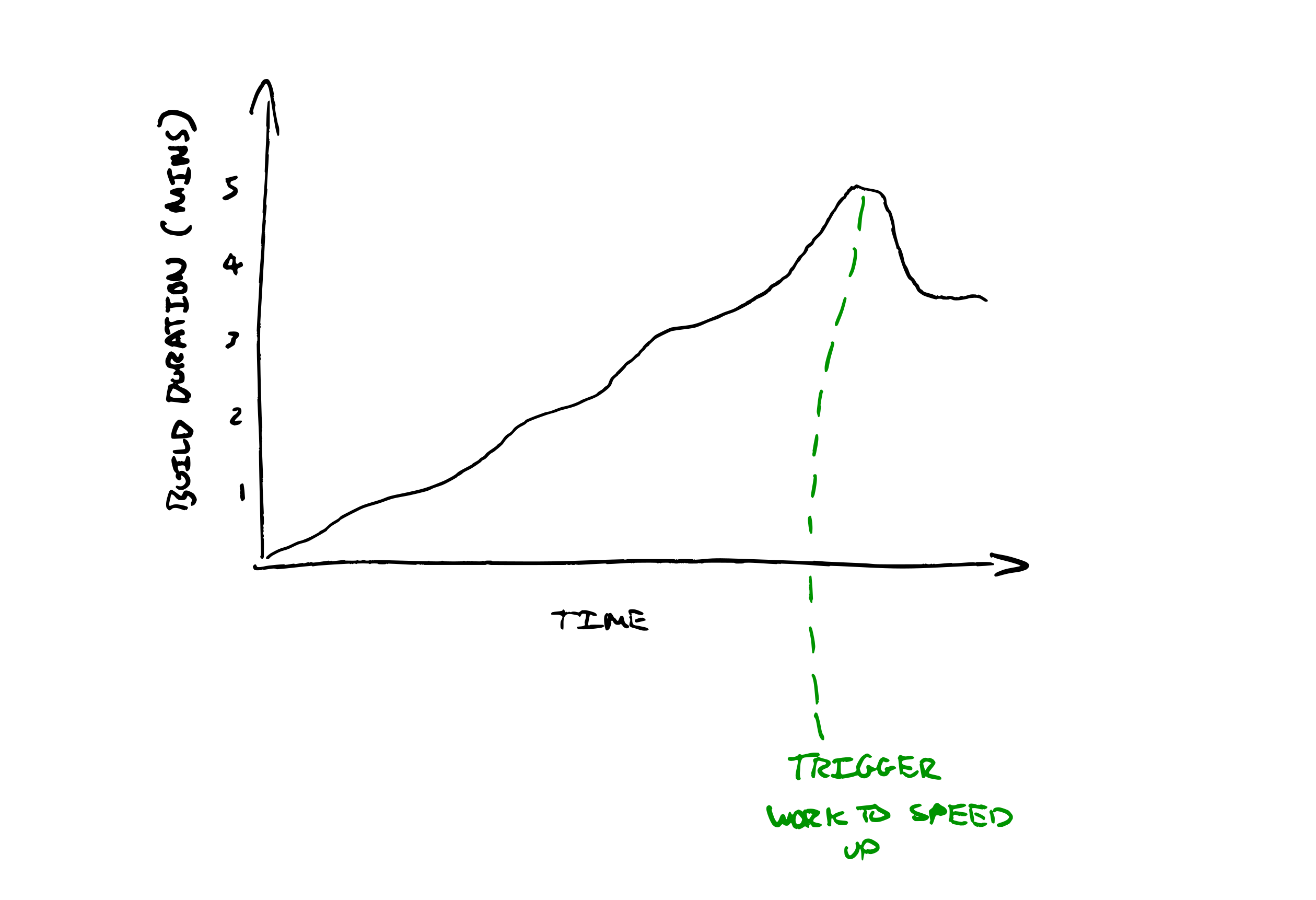
“When we see the median build time cross the next whole minute, instead of ignoring it we will prepend a task to our ‘next’ queue to reduce the build by at least 2 minutes”
Time Waste Limit
Do you feel like your team is drowning in technical debt? Maybe you’re dealing with such a mountain of technical debt. Perhaps it feels like nothing you do will make a difference? Build a habit to make it better in the most impactful areas first. e.g. Make wasting an hour understanding an area of the codebase trigger improvement. When you realise you’ve wasted an hour, update a shared team tally of hours wasted by area of code. When you go to add a tally mark and there’s already a couple of marks there, drop what you were going to do and spend the rest of the day tidying it up.
If you pre-agree to do this then the default behaviour is to make things a bit better over time. Permission seeking is needed to skip the cleanup.
“When we notice we’ve spent an hour trying to understand some complicated code , instead of pressing ahead we will record the time wasted”
“When we notice our team has wasted 5 hours in one area of the code instead of finishing our feature we will spend the rest of the day tidying up”
Spend Limits
Does your team’s work always take far longer than expected? Are you struggling to deliver a slice of value in a week? Maybe even when you think a story can be completed in a day it ends up taking two weeks? Make a habit triggered by length of time spent on a given story. Keep a tally of elapsed days. When it hits double what we expected, the team stops and has a retrospective to understand what they can learn from the surprise.
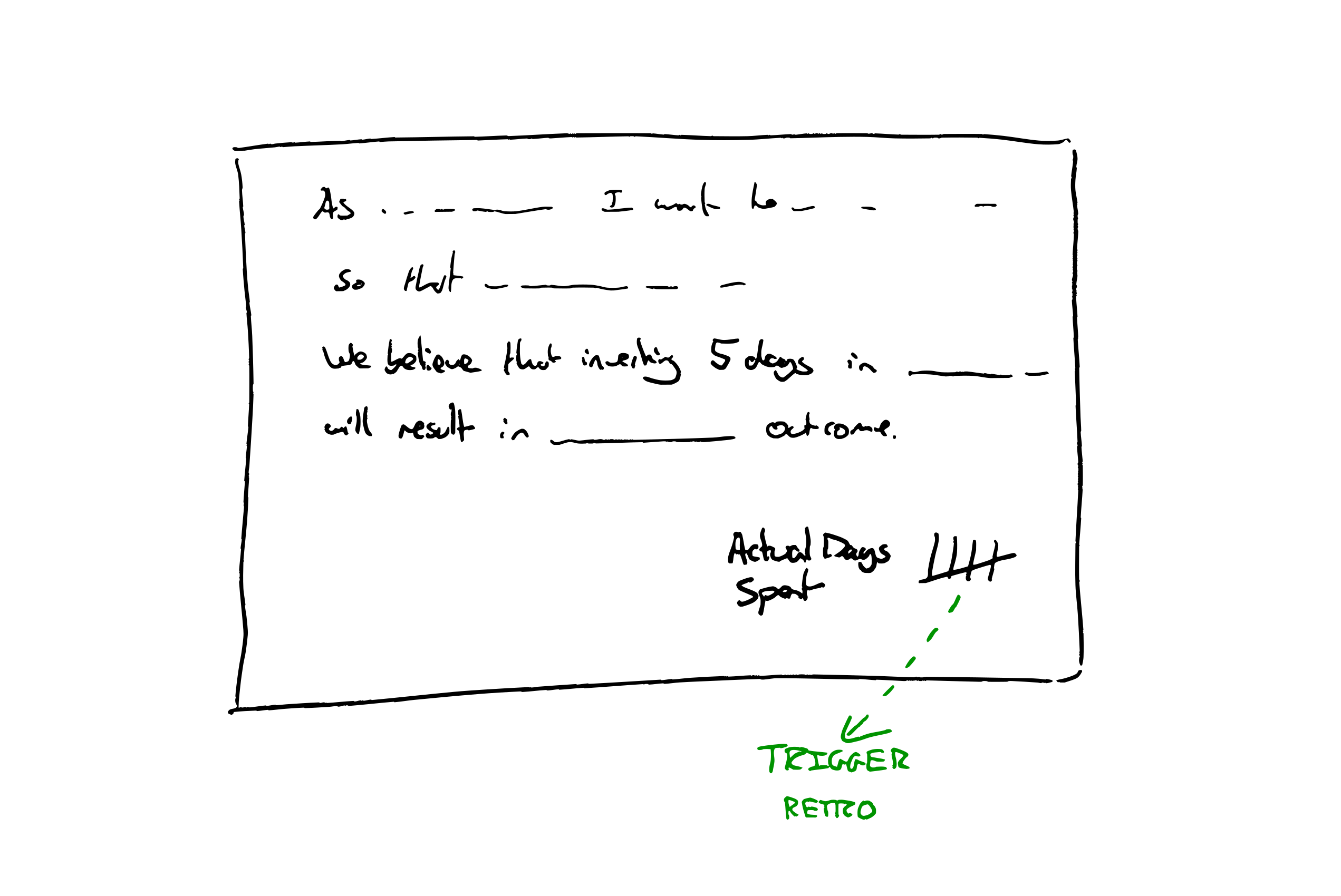
“When we have spent 5 days on one story instead of carrying on we will hold a team retrospective to understand what we can learn to help us work smaller next time”
How to help your team form a good habit
Asking your team to try to form a new habit is something anyone can do. You don’t need to be a manager.
- Look for a suitable trigger mechanism, in day to day working.
- Think of a virtuous action that could be taken upon that trigger.
- Propose an experiment of a habit to try, combining items 1+2
- Write it down, as a working agreement for the team.
“When we see a green test suite, instead of moving on to the next capability we will stop and do at least one refactoring”
- Review your working agreements next retrospective.
There’s lots of good habits that you can steal from other effective teams (such as TDD).
A team committing to try to form a habit will make a more effective experiment than one person trying to do the right thing against the flow.
Let me know how it goes. What resistance do you run into? What are your team’s most powerful habits?
The post Escape the Permission Trap with Healthy Habits appeared first on Benji's Blog.
Experimenta en GCompris – A fondo @g_compris (5)
Sigo aprovechándome de una publicación de Valencia Tech en la que se realizaba un listado completo de juegos que ofrece GCompris he empezado una serie donde se describen con más detalles los juegos. Seguimos la serie con la sección de «Experimenta» en GCompris la cual tiene como objetivo hacer que aprendamos los conceptos básicos de la naturaleza que nos rodea: física, biologia, ecología, astronomía, etc.
Experimenta en GCompris – A fondo @g_compris (5)
Para poder tener claro lo que hacen las aplicaciones de GCompris he pensado hacer una revisión a su enorme colección de juegos y actividades, realizando una simple captura de pantalla y una breve descripción.
Ya hemos descrito la sección de «Descubre la computadora». los «Juegos de lógica«, las «Bellas Artes» y la «Música«, es hora de hablar de la actividades de la sección «Experimenta» en GCompris.
Controla las esclusas del canal: simple actividad lógica donde deberemos ayudar a Tux a pasar con su velero un sistema de esclusas. La forma más sencilla de entender este mecanismo.

Explora los animales de la granja: descubre qué animales hay en una granja mediante sus sonidos característicos y la descripción de sus características fundamentales.

Bombillas binarias: excelente actividad mediante la cual podemos aprender los fundamentos de la numeración binaria, desde la utilización de dos simples bombillas binarias hasta el considerablemente número de 7.

Gravedad: entiende los efectos de la gravedad sobre tu pequeña nave alienígena en tu viaje espacia entre planetas de diversos tamaños.

Ciclo del agua: aprende los fundamentos del ciclo del agua, fuente de vida y el primer paso para entender que sin sistemas circulares no se puede sobrevivir eternamente.

Mezcla de colores de pintura: utiliza los colores básicos y la cantidad necesaria de los pigmentos para conseguir el color deseado. Recuerda que mezclando todos los pigmentos básicos obtenemos el negro.

Mezcla de colores de la luz: utiliza los colores básicos y la cantidad necesaria de luces de colores para conseguir el color deseado. Recuerda que mezclando todos los colores de luz básicos obtenemos el blanco.

Explora los animales del mundo: existen animales fabulosos y únicos alrededor del mudo, descúbrelos y aprende sus costumbres básicas y donde viven,

Energía renovable: aprende las distintas formas de energías renovables que puede utilizar Tux para encender su bombilla: hidroeléctrica, eólica, etc.

Sistema Solar: aprende sobre nuestro sistema solar y sus características.

Electricidad analógica: enciende la bombilla utilizando los fundamentos de la electricidad básicas: pilas, interruptores, cables, etc.

Electricidad digital: iniciarse en la lógica digital es muy sencillos con los ejercicios propuestos por esta actividad de GCompris: leds, puertas AND; OR y NOT, etc.


Neste Feriadão dia 30/03: Aproveite o Meetup OWASP SP
Nesta terça-feira, dia 30 de março, a OWASP SP proporcionará o segundo Meetup com mais duas palestras de extrema relevância, sendo uma vez que o mundo vive uma crise no contexto de segurança da informação. Todo dia nos deparamos com um novo vazamento de dados. Sendo assim, quanto maior a propagação de conhecimento, mais novos softwares e sistemas seguros minimizarão estes fatos.
19h30 : Tema: Kubernetes Security: Atacando e Defendendo K8s Clusters
Palestrante : Magno Logan

Esta apresentação tem como principal objetivo mostrar diferentes cenários de ataque em Kubernetes Clusters. Mostraremos cenários de ataques reais utilizando aplicações reais para demonstrar as diferentes maneiras que invasores e usuários mal-intencionados podem usar para explorar seu cluster e as aplicações rodando nele. Depois disso, forneceremos algumas dicas e melhores práticas para proteção de K8s clusters com base nos cenários demonstrados como também no CIS Benchmarks para Kubernetes. Veremos como utilizar o RBAC, habilitar Audit Logs para melhor visibilidade e depuração de problemas, e configuraremos algumas Network Policies para evitar a comunicação entre pods e impedir qualquer movimentação lateral de invasores.
Mini-Bio: Magno Logan works as an Information Security Specialist for Trend Micro Cloud and Container Security Research Team. He specializes in Cloud, Container, and Application Security Research, Threat Modelling, Red Teaming, DevSecOps, and Kubernetes Security, among other topics. He has been tapped as a resource speaker for numerous security conferences around the globe including Canada, USA, Portugal, and Brazil. He is also the founder of JampaSec and a member of the CNCF SIG-Security team.
20h30 : Tema: Mantenha seu Código “safe” durante seu desenvolvimento usando ferramenta OpenSource.
Palestrante : Filipi Pires

Durante essa apresentação estaremos caminhando sobre conceitos de Desenvolvimento Seguro, entendendo o movimento Shft Left, e colocando todos na mesma página sobre SSDLC (Secure Software Development Life Cycle), além de demonstração prática de ferramenta opensource tool exemplificando como a pessoa desenvolvedora pode usar uma ferramenta SAST para análise estática de vulnerabilidade de código, executando ela no código fonte, byte code e/ou binário, demonstrando algum possível “Leak”, através de análise do código fonte validando possíveis vazamentos de credenciais, chaves privadas ou senhas Hard coded e demonstrando no final como podemos ter um relatório com todas as informações de forma prática para apresentar para Tech Leads/Heads/Managers.
Mini-Bio: Filipi Pires é Advocate e Pesquisador de Segurança na Zup Innovation, Instrutor e Pesquisador da Hackersec, faz parte da Staff do DEFCON Group São Paulo, tem palestrado em eventos de Segurança nos EUA, Alemanha, Polônia, Hungria, República Tcheca, Brasil e em outros países, atuou como Professor Universitário em cursos de graduação e MBA em faculdades como FIAP / Mackenzie / UNIBTA e UNICIV, além de ser criador e Instrutor do Curso – Análise de Malware – Fundamentals (HackerSec Company).

Podcast 07×06 Software Libre y abogacía
Bienvenidos al Podcast 07×06 Software libre y abogacía donde seguimos estudiando si es posible el uso de entorno libres en la abogacía y para ello tuvimos con nosotros a Bárbara Romás y Marelisa Blanco, dos de las cuatro integrantes de nolegaltech, un buffete de abogados especializados en tecnología.
Podcast 07×06 Software Libre y abogacía
En esta ocasión copio y pego la introducción que la gente de KDE España ha realizado en su publicación oficial del podcast:
«Sexto podcast de la temporada en el que tenemos como invitadas a Bárbara Román y Marelisa Balnco de Nolegaltech y con las que tuvimos el placer de compartir casi dos horas de reflexiones judiciales que llegaron a escala casi planetaría. Un podcast muy diferente al que solemos hacer donde no pudimos pasar de la primera línea del guion (śí, tenemos guion)

Con este podcast seguimos la serie que iniciamos sobre el uso de software libre en los entornos profesionales, siendo este la segunda parte de la trilogía (sí, trilogía que nos quedemos cortos con el tiempo asignado para todos los temas que queríamos tratar en este) de abogacía y Software Libre (https://www.youtube.com/watch?v=dGIWAtp0n4E)
Aprovechamos para seguir pidiendo colaboración para localizar a profesionales no relacionados con la informática que conozcáis que estén usando software libre y Gnu/Linux como su entorno principal de trabajo: electricistas hasta carpinteros pasando por ingenieros, gestorías, veterinarios…«
Y no os entretengo más, os dejo con el vídeo que dura su dos horas y 30 minutos, uno podcast largo pero muy denso tanto en la presentación de aplicaciones, proyectos y futuro.
Enlaces de interés
Nolegaltech: https://nolegaltech.com/
Akademy 2021 ha abierto el Call for Papers: https://akademy.kde.org/2021/cfp
Linux App Summit 2021: https://linuxappsummit.org/
Camino a Plasma 5.22: https://www.kdeblog.com/camino-hacia-plasma-5-22.html
Espero que os haya gustado, si es así ya sabéis: “Manita arriba“, compartid y no olvidéis visitar y suscribiros al canal de Youtube de KDE España.
Como siempre, esperamos vuestros comentarios que os aseguro que son muy valiosos para los desarrolladores, aunque sean críticas constructivas (las otras nunca son buenas para nadie). Así mismo, también nos gustaría saber los temas sobre los que gustaría que hablásemos en los próximos podcast.

Noodlings 26 | Redemption
Prime Select – Plasmoides de KDE (175)
Añadimos un nuevo plasmoide para la lista de esos pequeños programas que sirven para decorar, informar o aumentar las funcionalidades de nuestro escritorio Plasma de la Comunidad KDE. En esta ocasión se trata de Prime Select, un simple widget que nos permite seleccionar la tarjeta intel o nvidia de nuestro sistema, siempre que tengamos esa tipo de tarjetas en nuestro sistema.
Prime Select – Plasmoides de KDE (175)
En esta ocasión la redacción de este artículo viene de la mano de su propio creador, franciscot, el cual ha aceptado a colaborar
El plasmoid Prime select te permite cambiar fácilmente entre la gráfica integrada y la dedicada de tu portátil usando la tecnología de Nvidia Optimus en las distribuciones de la familia ubuntu, como kubuntu o kde neon.
Normalmente te permite cambiar entre usar la gráfica dedicada exclusivamente (Nvidia), usar la integrada (normalmente Intel) o el modo híbrido que te permite usar la integrada (menos consumo) y puntualmente la gráfica dedicada para ciertas aplicaciones (mayor rendimiento).
Además de un equipo que disponga de esta tecnología, se necesita tener instalador los drivers propietarios de Nvidia. El modo híbrido es compatible a partir de la generación gráfica Turing de Nvidia y de drivers versión 435.


Y como siempre digo, si os gusta el plasmoide podéis “pagarlo” de muchas formas en la nueva página de KDE Store, que estoy seguro que el desarrollador lo agradecerá: puntúale positivamente, hazle un comentario en la página o realiza una donación. Ayudar al desarrollo del Software Libre también se hace simplemente dando las gracias, ayuda mucho más de lo que os podéis imaginar, recordad la campaña I love Free Software Day 2017 de la Free Software Foundation donde se nos recordaba esta forma tan sencilla de colaborar con el gran proyecto del Software Libre y que en el blog dedicamos un artículo.
Más información: KDE Store
¿Qué son los plasmoides?
Para los no iniciados en el blog, quizás la palabra plasmoide le suene un poco rara pero no es mas que el nombre que reciben los widgets para el escritorio Plasma de KDE.
En otras palabras, los plasmoides no son más que pequeñas aplicaciones que puestas sobre el escritorio o sobre una de las barras de tareas del mismo aumentan las funcionalidades del mismo o simplemente lo decoran.
#openSUSE Tumbleweed revisión de la semana 12 de 2021
Tumbleweed es una distribución “Rolling Release” de actualización contínua. Aquí puedes estar al tanto de las últimas novedades.

openSUSE Tumbleweed es la versión “rolling release” o de actualización continua de la distribución de GNU/Linux openSUSE.
Hagamos un repaso a las novedades que han llegado hasta los repositorios estas semanas.
El anuncio original lo puedes leer en el blog de Dominique Leuenberger, publicado bajo licencia CC-by-sa, en este enlace:
Esta semana se han publicado 4 snapshots (0318, 0319, 0320 y 0321).
Entre los cambios que se han publicado, se puede destacar:
- transactional-updates 3.2.2
- KDE Plasma 5.21.3
- Perl 5.32.1
- GTK+ 3.24.27
- SQLite 3.35.2
En próximas actualizaciones podremos encontrar:
- SELinux 3.2
- GNOME 40
- MicroOS Desktop – basado en GNOME
- Módulos de Python 3.9
- GCC 11 como compilador predeterminado
Si quieres estar a la última con software actualizado y probado utiliza openSUSE Tumbleweed la opción rolling release de la distribución de GNU/Linux openSUSE.
Mantente actualizado y ya sabes: Have a lot of fun!!
Enlaces de interés
-
-
- ¿Por qué deberías utilizar openSUSE Tumbleweed?
- zypper dup en Tumbleweed hace todo el trabajo al actualizar
- ¿Cual es el mejor comando para actualizar Tumbleweed?
- Comprueba la valoración de las “snapshots” de Tumbleweed
- ¿Qué es el test openQA?
- http://download.opensuse.org/tumbleweed/iso/
- https://es.opensuse.org/Portal:Tumbleweed
-

——————————–
openSUSE Tumbleweed – Review of the week 2021/12
Dear Tumbleweed users and hackers,
This has been a week in which we focused a little bit less on Staging, as it was SUSE HackWeek. ‘Less’ does not mean we ignored it of course. We still managed to release 4 snapshots (0318, 0319, 0320, and 0321) during this week.
The changes delivered this week included:
- transactional-updates 3.2.2
- KDE Plasma 5.21.3
- Perl 5.32.1
- GTK+ 3.24.27
- SQLite 3.35.2: fixes an issue in combination with Tracker timing out
The future, near or far, will bring those updates:
- SELinux 3.2
- GNOME 40
- MicroOS Desktop – GNOME-based
- Python 3.9 modules: besides python36-FOO and python38-FOO, we are testing to also shop python39-FOO modules; we already have the interpreter after all. Python 3.8 will remain the default for now.
- UsrMerge is gaining some traction again, thanks to Ludwig for pushing for it
- GCC 11 as the default compiler