
New default: tmpfs on /tmp
Intro
We made an important change for our Container Host OS openSUSE
MicroOS, which our Kubernetes
platform openSUSE Kubic will inherit since it is
based on openSUSE MicroOS: we use now tmpfs for /tmp.
tmpfs is a temporary filesystem that resides in memory. Mounting directories
as tmpfs can be an effective way of speeding up accesses to their files and
to ensure that their contents are automatically cleared upon reboot.
A fresh installation will use tmpfs for /tmp by default. Old installations
needs to be converted to this manually, but it is still possible to switch
back to use disk space for /tmp. This is especially useful and important, if
big files are stored in /tmp.
If temporary files or directories are needed below /tmp, this can be created
at boot by using tmpfiles.d.
But never store important files in /tmp, they will not survive the next
reboot.
Converting old installations to use tmpfs
As tmpfs will be mounted on top of /tmp, existing files will be no longer
accessible. The following steps will cleanup /tmp and enable /tmpfs:
- Backup all important files currently stored in
/tmp! - Remove the line for
/tmpfrom /etc/fstab - Remove all files in
/tmp - Reboot
After reboot, tmpfs should be used for /tmp.
Using disk space for /tmp
After creating a new btrfs subvolume for /tmp and adding this to
/etc/fstab, tmpfs will no longer be used for /tmp.
The easierst way to archive this is to use mksubvolume from snapper 0.8.12 or newer:
# transactional-update shell
transactional update # mksubvolume /tmp
transactional update # exit
# systemctl reboot
Afterwards, all files are stored again on the disk and will survive a reboot.
Future plans
In the future we plan to harden the system by default even more, e.g. by
marking /tmp and other write-able parts of the filesystem with noexec.

 Member
 Victorhck
Libros sobre programación gratuitos
Siempre está bien tener a mano documentación o un libro ya sea físico o, como en este caso, electrónico para consultar. Aquí te dejo una recopilación de libros gratuitos sobre programación.

¿Tienes alguna duda sobre programación? ¿Quieres consultar o aprender sobre programación? Aquí tienes una serie de recursos de libros en formato electrónico sobre programación, seguro que encuentras alguno interesante.
El otro día revisando los artículos de PlanetaLibre, me encontré con uno de la web “Tomates Asesinos” (siempre me ha parecido muy curioso el nombre para un blog sobre software libre) en el que MD detallaba los repositorios de GitHub a los que ha marcado con una “estrellita“.
Entre ellos encontré un interesante repositorio de recopilación sobre libros y otros recursos sobre programación. Hay listas en inglés, pero también hay una lista de libros y recursos sobre programación en español, y que abarca una gran temática y lenguajes de programación.
La lista inicialmente fue un clonado de una lista que se recopilaba por en StackOverflow, y ha pasado a un repositorio de GitHub donde la lista ha crecido aún más incluyendo muchas más referencias de cosulta.
La lista de libros en inglés sobre programación es muy extensa, pero la lista en español también cotiene unas cuantas referencias. Te animo a que le eches un vistazo, y lo compruebes. Seguro que encuentras algo interesante. Si es así, también puedes tu darle “una estrellita” en GitHub.
Enlaces de interés
- https://github.com/EbookFoundation/free-programming-books
- https://ebookfoundation.github.io/free-programming-books/
- https://ebookfoundation.github.io/free-programming-books/free-programming-books-es.html

Lanzado digiKam 7.0, con mejoras en el reconocimiento de caras
Que una aplicación sea excepcional no significa que su desarrollo haya finalizado. El mejor gestor de imágenes de la Comunidad KDE (y una de las mejores del mercado tanto libre como privado) sigue su desarrollo. De esta forma ha sido lanzado digiKam 7, una nueva versión que incluye muchas novedades en el algoritmo de reconocimiento de caras.
Lanzado digiKam 7.0

El pasado 19 de julio fue lanzado digiKam 7.0, la nueva versión de uno de los gestores de imágenes más completo que puedes encontrar en el mundo GNU/Linux, e incluso en el mundo privativo.
Este nuevo digiKam ha recibido un intenso trabajo en la renovación del algortimo de reconocimiento de caras ya que todavía se estaba utilizando el primero que se introdujo en la aplicación, justo con digiKam 2.0 y, por lo tanto, su código estaba algo obsoleto y no basado en tecnologías de Aprendizaje Profundo (Deep-Learning).
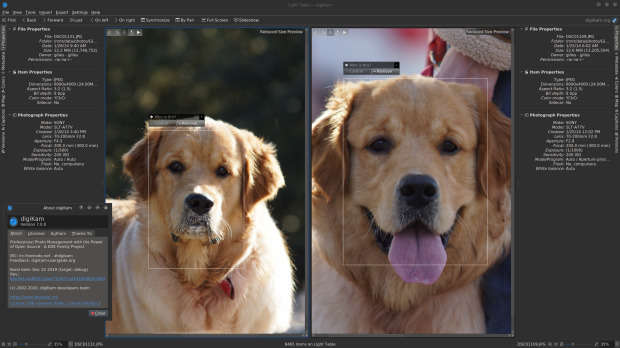
De esta forma se ha pasado del Cascade Classifier de la librería OpenCV que requería mucha interacción por parte del usuario, al primer intento de utilizar el aprendizaje profundo en 2017 de la mano del estudiante Yingjie Liu (que no proporcionó los resultados esperados y no fue implementado) a la tecnología que se presenta en este lanzamiento, gracias al trabajo de Thanh Trung Dinh, que utiliza, Deep Neural Network también de la librería OpenCV. Los resultados no pueden ser más satisfactorios, como veremos a continuación en las novedades.
Más información: digiKam
Las novedades de digiKam 7
Aunque gran parte del trabajo para esta nueva versión, como he dicho, se lo ha llevado el reconocimiento facial con interesantes mejoras, digiKam también nos ofrece jugosas novedades. Hagamos un repaso:
- Mejoras reconocimiento facial como:
- Porcentaje de acierto de un 97%.
- Mejoras en rapidez y eficiencia en el uso de recursos.
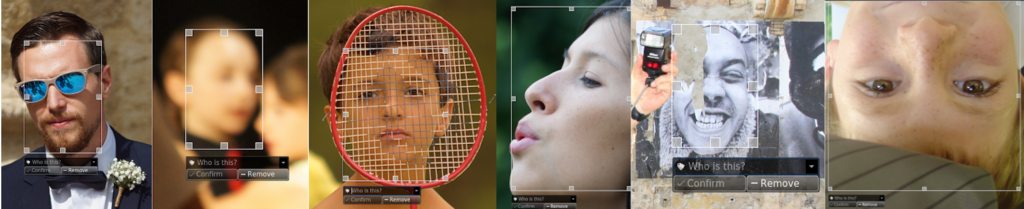
- Posibilidad de detectar caras no-humanas. ¡También podremos tener registradas a nuestras mascotas!
- Posibilidad de detectar caras borrosas, cubiertas, pintadas, parciales, etc.
- Nuevo soporte para ficheros RAW files para nuevas cámaras como Canon CR3 o Sony A7R4.
- Mejorado el soporte para las imágenes con formato HEIF.
- Mejoras en el paquete binario con soporte para FlatPak.
- Nueva herramienta, ImageMosaicWall, para crear una imagen basada en otra colección de fotos.
- Nuevas opciones para escribir información de geolocalización en los metadatos del archivo.
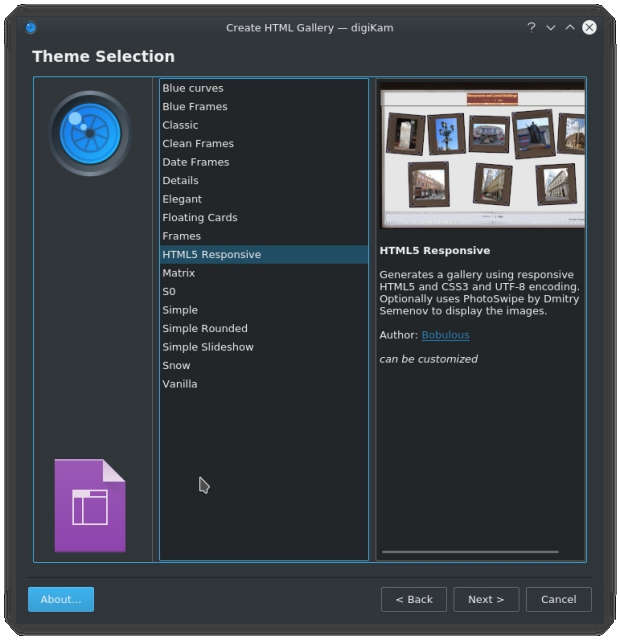
- El plugin HTMLGallery introduce un nuevo tema llamado «Html5Responsive».
Y, por supuesto, muchos errores solucionados, con lo que parece que tendremos la mejor versión de digiKam que puede tener vuestro ordenador.
¿Qué es digiKam?
La mejor forma de definir digiKam es buscar como se describe esta aplicación de userbase.kde.org y realizar una pequeña síntesis:
«DigiKam es una aplicación que te permite la importación de fotografías desde cámaras, creación de álbumes, etiquetado con fechas, temas y otras propiedades, utilidades de búsqueda excelentes y modificación de imágenes en masa.»
Pero, Profesor…
Oculta la barra de título con Hide Titles
Me sigue sorprendiendo el control total de los elementos de Plasma que puede tener un usuario de este entorno de trabajo. Hoy os quiero presentar Hide Title, un script de Kwin muy sencillo que oculta la barra de título al maximizar las ventanas. Estoy seguro que le será útil a más de un usuario.
Oculta las barra de título con Hide Titles
De la mano de Bahamondev nos llega un script para Kwin que dota de una funcionalidad que puede ser muy interesante para Plasma.
Se trata de Hide Titles, un pequeña funcionalidad que nos permite ocultar la barra de título cuando maximizamos una ventana, con lo que se gana un espacio extra en nuestra pantalla.

He realizado la instalación básica de Hide Titles y funciona a la perfección, aunque tiene un pequeño inconveniente: una vez maximizada no es evidente minimizarla o convertirla. Para solucionarlo, y a falta de buscar un atajo de teclado, podemos simplemente utilizar la tecla [Alt] y arrastrar la ventana para volver a convertir la aplicación en un a ventana.
Hay que insistir que al programador de este Hide Title le encantará que le deis me gusta en la KDE Store y que le comentéis como os funciona. Os recuerdo que ayudar al desarrollo del Software Libre también se hace simplemente dando las gracias, ayuda mucho más de lo que os podéis imaginar, recordad la campaña I love Free Software Day 2017 de la Free Software Foundation donde se nos recordaba esta forma tan sencilla de colaborar con el gran proyecto del Software Libre y que en el blog dedicamos un artículo.
Más información: KDE Store – KWin Scripts -Hide Tittle
Cómo instalar Hide Titles
La instalación de este Script es muy sencilla ya que se realiza directamente desde las Preferencias del Sistema. Los pasos exactos son los siguientes:
- Iniciamos el Lanzador de aplicaciones o Kickoff
- Clicamos en la Preferencias del sistema.
- Ahora pinchamos en Gestión de Ventanas.
- Nos dirigimos a la sección de Guiones de KWin.
- Ahora pinchamos en Obtener nuevos guiones.
- Buscamos Hide Titles y pinchamos en Instalar.
- Ahora activamos el guión y pulsamos en Aplicar.
Sencillo y, a partir de ahora, imprescindible en todos mis escritorios Plasma de mis ordenadores.

Zoom Meeting Large UI Elements | Fix
Trucos KDE (III): gráficas con Krunner y encontrando ventanas
Tercer capítulo de la sección que presenté hace un tiempo días y que está teniendo un ritmo de publicación adecuado por parte de la cuenta de Youtube de KDE Commnity. Bienvenidos a Trucos KDE (III), una entrada donde repasaremos dos nuevos trucos que está publicando el grupo de promoción de la Comunidad KDE con el objetivo de mostrar al mundo algunas de las cosas sencillas que ofrecen. Es esta nueva edición veremos trucos para dibujar gráficas con Krunner y encontrar esas ventanas perdidas en nuestro escritorio.
Trucos KDE (III): gráficas con Krunner y encontrando ventanas
Dibujando gráficas con Krunner
Si tenemos gnuplot instalado, gracias a krunner podemos realizar gráficas directamente desde Krunner, algo muy útil tanto para estudiantes como para científicos en general. Lo único que necesitamos es seguir los siguientes pasos:
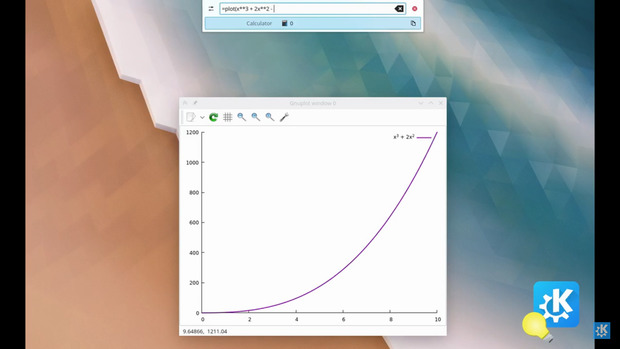
1. Abrir KRunner con [Alt] + [Space] o [Alt] + [F2] (que es el que estoy acostumbrado)
2. Escribir «=plot( [some function] )», Por ejemplo.: =plot(sin(x)^2*cos(x))
3. Y ¡ya está!
Encontrando la ventana perdida
Soy una de esas personas que suele tener abiertas un número indecente de ventanas en mi entorno de trabajo, con lo que en ocasiones «las pierdo» o invierto mucho tiempo rotando entre ellas hasta encontrar la que me interesa (en ocasiones se convierte en una distracción casi hipnótica)
Es por ello que me encanta esta funcionalidad con la que podemos encontrar la ventana perdida sabiendo una parte del nombre de la misma de una forma visual.
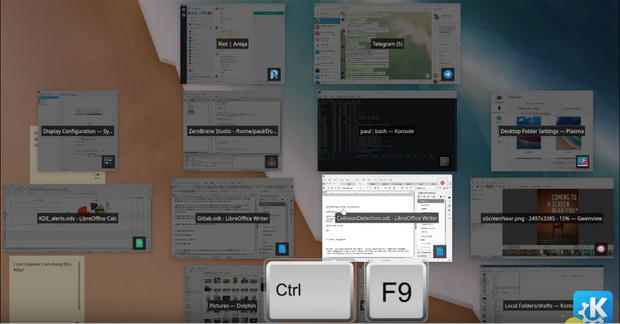
Estos son los pasos:
1. Pulsa [Ctrl] + [F9] ( [Ctrl] + [F10] si queréis buscar en más de un esritorio)
2. Empieza a escribir el nombre de la ventana que estás biscando.
3. Las ventanas cuyo nombre no coincide irán desapareciendo hasta quedar solo la que buscas. 
4. Si te arrepientes pulsa en el fondo de pantalla o pulsa [Esc] para salir de esta funcionalidad.
Lo cierto es que ambos trucos son muy interesantes y prácticos, una demostración más de la versatibilidad del entorno de trabajo Plasma de la Comunidad KDE.
Proposing a new newsgroup: Internet History
I am thinking about making a formal proposal for one of two new
unmoderated groups. The group would either be comp.internet.history or
soc.history.internet. I think you can see where these two names could
possibly overlap.
The general idea of the new group is to discuss retro internet
technologies such as IRC, ftp sites, BBSs (telnet and otherwise), MUDS,
MOOs, and of course Usenet and others. We could also discuss the culture
that surrounded many of these technologies especially IRC and Usenet as
they were maturing. Many of use don’t consider these technologies to be
“retro” because we use them everyday and yet interest in them is waning
and in order for them to continue, fresh interest must be continually be
added.
I don’t know if anyone could possibly be interested, but the only way to
find out is to ask. If I get enough positive feedback, I’ll write up an
official CFD and submit it to the board. I won’t do anything if no one is
interested.
TUXEDO Pulse 15 | Possible AMD Linux Laptop Upgrade
#openSUSE Tumbleweed revisión de la semana 30 de 2020
Tumbleweed es una distribución “Rolling Release” de actualización contínua. Aquí puedes estar al tanto de las últimas novedades.

openSUSE Tumbleweed es la versión “rolling release” o de actualización continua de la distribución de GNU/Linux openSUSE.
Hagamos un repaso a las novedades que han llegado hasta los repositorios estas semanas.
El anuncio original lo puedes leer en el blog de Dominique Leuenberger, publicado bajo licencia CC-by-sa, en este enlace:
Debido a un cambio de empaquetado en un paquete de bajo nivel (krb5), Dominique decidió lanzar un recompilado de openSUSE:Factory. Ya que muchos paquetes hacen referencia a krb5-config para encontrar la ubicaciones correctas, pero no pudo encontrar una lista concluyente.
El riesgo de no realizar un recompilado completo y tener todos los paquetes siguiendo el cambio de krb5 podría acarrear resultados devastadores, y no quiso correr ese riesgo. Esto ocasionó que OBS estuviera ocupado bastante tiempo, por lo que solo se han podido publicar dos nuevas snapshots (0717 y 0720). La siguiente que se publicará (0721) será la del recompilado completo.
Las dos snapshots publicadas trajeron entre otros, estos cambios:
- VirtualBox 6.1.12
- gtk2
- Linux kernel 5.7.9
- Kubernetes 1.18.6 y 1.17.9
Los cambios que llegará en próximas actualizaciones:
- Mesa 20.1.4
- GCC 10.2
- LibreOffice 7.0rc2
- openSSL 3.0
- Cambios en el nombre de Python 38 para que pueda haber varias versiones de Python en el mismo sistema.
- Cambios en RPM.
Si quieres estar a la última con software actualizado y probado utiliza openSUSE Tumbleweed la opción rolling release de la distribución de GNU/Linux openSUSE.
Mantente actualizado y ya sabes: Have a lot of fun!!
Enlaces de interés
-
-
- ¿Por qué deberías utilizar openSUSE Tumbleweed?
- zypper dup en Tumbleweed hace todo el trabajo al actualizar
- ¿Cual es el mejor comando para actualizar Tumbleweed?
- Comprueba la valoración de las “snapshots” de Tumbleweed
- ¿Qué es el test openQA?
- http://download.opensuse.org/tumbleweed/iso/
- https://es.opensuse.org/Portal:Tumbleweed
-

——————————–