
 Member
 jimmac
Conferences
This year I haven't done any drone-related travelling. The sponsorship deal fell through and Rotorama didn't participate in DCL. I admit I haven't been practicing as much as I would need to to do any better in the local races either.
So at least I got the world of FOSS to get out of the couch.
Berlin
Tobias organized yet another icon-related hackfest in Berlin earlier this year. This time we had some talented young developers help us out with the tooling. This effort to focus on the tools as well as the assets is continuing and we'll have some more exciting news to share soon.
Thessaloniki
GUADEC continues bringing awesome southern locations, which a vitamin D deprived monkey from a rainy climate can't appreciate enough. I have fallen back to my comfort zone and only given a short workflow/demo on icon design this year, mainly because Tobias has been giving great talks on focusing on design.
I still have a video to finish editing, but it ended up more of a personal one so I'm not sure I'll publicize it that much.
The Hague
And we're closing the year with another design hackfest. Big shout out to Hans de Goede and Carlos Garnacho for organizing a shell hackfest in the Netherlands, and mainly allow some designers crash the party to revive our efforts in attacking some of the downsides of the current overview design. The facilities of Revspace allowed us to meet face to face, mind map on the whiteboard, iterate on some prototypes and move forward considerably compared to the usual cycle spanning months.

Déployer son blog avec Github Actions et Rsync
Un article rapide sur l'usage des Actions Github dans le but de déployer un blog, ce qui peut être utile et faciliter votre flux de rédaction si, comme c'est le cas pour ce blog, les sources sont hébergées sur Github.
Les Actions Github sont un mécanisme permettant de construire des flux de travail assez intéressants pour de la compilation de code ou du déploiement. C'est plutôt bien documenter ici donc je ne vais tout réexpliquer mais simplement fournir un exemple de déploiement simple via Rsync.
Lorsque vous créez une action, cela se fait dans un fichier .yml situé dans un sous-dossier ".github/workflows situé dans votre dépôt. Vous pouvez nommer ce fichier comme voulez, il faut évidemment que son nom illuste le flux de travail qu'il réalise pour vous.
Voici un exemple:
name: CI_DEPLOY

on: [push]

jobs:
  build:

    runs-on: ubuntu-latest

    steps:
    - uses: actions/checkout@v1
    - name: Deploy my blog
      env:
        KEY: ${{ secrets.SSH_PRIVATE_KEY }}
      run: |
        set -eu
        echo "Deploying blog files"
        SSHPATH="$HOME/.ssh"
        mkdir "$SSHPATH"
        echo "$KEY" > "$SSHPATH/key" && chmod 400 "$SSHPATH/key"
        SERVER_DEPLOY_PATH="user@ip_du_serveur:/chemin/vers/le/dossier/de_/destination"
        sh -c "rsync -arv --delete -e 'ssh -o StrictHostKeyChecking=no -i $SSHPATH/key -p 22' $GITHUB_WORKSPACE/ $SERVER_DEPLOY_PATH"
Vous noterez la variable d'environnement KEY, il s'agît d'un secret Github me permettant de me connecter via SSH à mon serveur.
Pour le reste, c'est un simple script Shell utilisant rsync. Les arguments qu'on lui passe sont à adapter à votre usage.
Mises à jour de GNOME, LLVM, Samba, Ruby dans Tumbleweed
Deux instantanés openSUSE Tumbleweed ont été publiés cette semaine, mettant à jour plusieurs bibliothèques et une nouvelle version de GNOME, Ruby, Samba, Mozilla et le compilateur LLVM.
L'instantané 20191018 a fourni des mises à jour mineures pour Mozilla Firefox 69.0.3 et Thunderbird 68.1.2. La mise à jour de Firefox a corrigé un bug qui invitait les utilisateurs de Yahoo mail à télécharger des fichiers en cliquant sur les courriels et la mise à jour Thunderbird a corrigé quelques problèmes ainsi que l'importation de contacts dans le carnet d'adresses à partir d'un fichier CSV. La suite logicielle GNOME a été mise à jour vers la version 3.34, qui pourrait être la version qui entrera dans openSUSE Leap 15.2. Cette version de GNOME, nommée Thessaloniki, inclut des mises à jour visuelles pour un certain nombre d'applications et les paramètres de sélection d'arrière-plan ont également fait l'objet d'une refonte, ce qui facilite la sélection d'arrière-plans personnalisés. Les développeurs utilisant GNOME 3.34 remarqueront davantage de sources de données dans Sysprof facilitant le profilage des performances des applications. Les améliorations apportées à Builder incluent un inspecteur intégré D-Bus. Les liaisons Javascript pour GNOME ont également été mises à jour avec la version gjs 1.58.1 et la version gtk3 3.24.12 a corrigé un décalage de pointeur sous X11 et Wayland. L'environnement d'exécution Python2 a été supprimé avec la mise à jour de samba 4.11.0; python 3.4 ou une version ultérieure est désormais requise.
L'instantané 20191018 apportait une mise à jour du nouveau langage de programmation vala 0.46.3 qui se concentre sur les développeurs GNOME. Le langage de programmation ruby 2.6.5 a corrigé une vulnérabilité d'injection de code avec trois autres Vulnérabilités et expositions courantes. La paquet Snapper d'OpenSUSE 0.8.5 a été mis à jour pour permettre le suivi des commentaires dans les fichiers de configuration. Le noyau Linux a été mis à jour en 5.3.6. NetworkManager 1.18.4 a amélioré la gestion des règles de routage, des règles ajoutées en externe et des règles reprises après le redémarrage d'un service NetworkManager. Le package NetworkManager-applet 1.8.24 a ajouté la prise en charge de l'authentification SAE (WPA3 Personnel). Des correctifs de régression ont été apportés aux versions 2.62.1 de glib2 et de glib-networking; ce dernier a également inclus deux corrections de fuite mémoire. Les autres paquets remarquables mis à jour dans l'instantané étaient webkit2gtk3 2.26.1, libsoup 2.68.2, grilo 0.3.10 et dconf 0.34.0.
Selon le commentateur de clichés Tumbleweed, l’instantané a une cote stable de 92.
La plupart des mises à jour de l'instantané 20191016 concernaient des paquets YaST2. Un plantage causé par une méthode de widget a été corrigé dans yast2-network 4.2.23 et au moins 10 langues ont été mises à jour dans le package yast2-trans. Les personnes peuvent contribuer au projet en traduisant via l'instance openSUSE's Weblate. Il y avait une poignée d'autres paquets mis à jour dans l'instantané, mais le plus important à noter est une nouvelle version majeure de llvm9. La nouvelle version majeure du compilateur nécessite uniquement une base python3 au lieu des paquets python3 complets. L'optimiseur LLVM convertira désormais les appels à memcmp en appels à bcmp dans certaines circonstances. La version majeure ne considère plus non plus la cible RISCV comme "expérimentale". Il est maintenant construit par défaut, plutôt que d'avoir besoin d'être activé avec LLVM\ EXPERIMENTAL\ TARGETS_TO_BUILD.
Cet instantané a enregistré une note stable de 91, selon le commentateur de clichés Tumbleweed.
Updated via GHActions
Tags: opensuse
Skia branch merged to master
All(?) the necessary info about how to enable it etc. are in this mail, but there are things that better fit a blog post than a mail, and in this case that's going to be a table and a picture showing how well it may perform. Note that these results are from running visualbackendtest, which is not really a benchmark, so these numbers should be taken with a grain of salt. It's just a test that draws a gradient, several big polygons (each circle is actually 720 lines) and short text.

| Render method | FPS |
|---|---|
| Linux gen (X11) | 86 |
| Linux gtk3 | 70-90 |
| Linux OpenGL | 45 |
| Linux Skia Vulkan (GPU) | 65-90 |
| Linux Skia raster (CPU) | 5 |
| Windows GDI | 64 |
| Windows OpenGL | 40-60 |
| Windows Skia Vulkan (GPU) | 175-185 |
| Windows Skia raster (CPU) | 75-85 |

Broken Headband on Bluetooth Headphones | Repair Instead of Replace

Moving gnome-shell's styles to Rust
Gnome-shell uses CSS processing code that dates from HippoCanvas, a CSS-aware canvas from around 2006. It uses libcroco to parse CSS, and implements selector matching by hand in C.
This code is getting rather dated, and libcroco is unmaintained.
I've been reading the code for
StTheme
and
StThemeNode,
and it looks very feasible to port it gradually to Rust, by using the
same crates that librsvg uses, and eventually removing libcroco
altogether: gnome-shell is the last module that uses libcroco in
distro packages.
Strategy
StTheme and StThemeNode use libcroco to load CSS stylesheets and
keep them in memory. The values of individual properties are just
tokenized and kept around as a linked list of CRTerm; this struct
represents a single token.
Later, the drawing code uses functions like
st_theme_node_lookup_color(node, "property_name") or
st_theme_node_lookup_length() to query the various properties that
it needs. It is then that the type of each property gets
determined: prior to that step, property values are just tokenized,
not parsed into usable values.
I am going to start by porting the individual parsers to Rust, similar to what Paolo and I did for librsvg. It turns out that there's some code we can share.
So far I have the parser for colors implemented in Rust. This removes a little bunch of code from the C parsers, and replaces it with a little Rust code, since the cssparser crate can already parse CSS colors with alpha with no extra work — libcroco didn't support alpha.
As a bonus, this supports hsl() colors in addition to rgb() ones
out of the box!
After all the parsers are done, the next step would be to convert the representation of complete stylesheets into pure Rust code.
What can we expect?
A well-maintained CSS stack. Firefox and Servo both use the crates in question, so librsvg and gnome-shell should get maintenance of a robust CSS stack "for free", for the foreseeable future.
Speed. Caveat: I have no profile data for gnome-shell yet, so I don't know how much time it spends doing CSS parsing and cascading, but it looks like the Rust version has a good chance of being more efficient.
The selectors crate has some very interesting optimizations from Mozilla Servo, and it is also now used in Firefox. It supports doing selector matching using Bloom filters, and can also avoid re-cascading child nodes if a change to a parent would not cause its children to change.
All the parsing is done with zero-copy parsers thanks to Rust's string
slices; without so many malloc() calls in the parsing code path,
the parsing stage should really fly.
More CSS features. The selectors crate can do matching on
basically all kinds of selectors as defined by recent CSS specs; one
just has to provide the correct hooks into the calling code's
representation of the DOM tree. The kind of matching that StTheme
can do is somewhat limited; the rustification should make it match
much more closely to what people expect from CSS engines in web
browsers.
A well-defined model of property inheritance. StThemeNode's
model for CSS property inheritance is a bit ad-hoc and inconsistent.
I haven't quite tested it, but from looking at the code, it seems that
not all properties get inherited in the same way. I hope to move it
to something closer to what librsvg already does, which should make it
match people's expectations from the web.
In the meantime
I have a merge request ready to simply move the libcroco source code directly inside gnome-shell's source tree. This should let distros remove their libcroco package as soon as possible. That MR does not require Rust yet.
My playground is here:
- Gnome-shell branch to rustify the styles
- Stylish, a Rust library that will implement gnome-shell's styling code.
This does not compile yet! I'll plug things together tomorrow.
(Oh, yes, the project to redo Firefox's CSS stack in Rust used to be called Stylo. I'm calling this Stylish, as in Styles for the Shell.)
Ubuntu 19.10 | Review from an openSUSE User
Aruba IAP-105 Wireless Access Point Setup

अगला openSUSE Asia Summit भारत में होगा
पिचले सितंबर को Bali, Indonesia के Udayana University में openSUSE Asia Summit 2019 घटित हुआ। लगातार दो दिनों तक दुनिया के कोने कोने से आए हुए इंजीनियरों, डेवलपर्स, डिजाइनरों और कइ तरह के openSUSE योगदानकर्ताओं ने मिलकर तकनीकी प्रदर्शन तथा अन्य कार्यशालाएँ आयोजित कीं।
इस सम्मेलन के द्वारा openSUSE समुदाय अपने उपयोगकर्ताओं और योगदानकर्ताओं को एक साथ लाता हें ताकि इन में openSUSE प्रोजैक्ट को लेकर बातचीत हो सके। बोर्ड के सदस्य समुदाय को प्रोजैक्ट से संबंधित जानकारी देते हैं। नए उपयोगकर्ता इस सम्मेलन से बहुत लाभ उठा सकते हैं।

सम्मेलन के समापन समारोह से पहले यह घोषित कि गइ की अगला सम्मेलन, याने कि openSUSE Asia Summit 2020, मानव रचना इंटरनेशनल इंस्टिट्यूट ऑफ़ रिसर्च एंड स्टडीस (Manav Rachna Int'l Institute of Research & Studies), फरीदाबाद, हरियाणा, भारत (Faridabab, Haryana, India) में होगा। इंस्टिट्यूट की प्रतिनिधि, शोभा त्यागी, ने विस्तार से अपना प्रस्ताव बाताया जोकी सम्मेलन के आयोजकों ने स्वीकार किया।

將GCP Stackdriver Alert 傳送到 telegram 小記


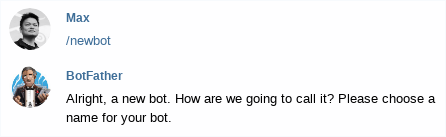

- 這邊的命名規則不給輸入 - , 所以我用底線



- Bot 名稱( 顯示名稱 ): sakana-gcp
- Bot 使用者名稱(帳號): sakana_gcp_bot
- 預設是 Enable, 就是 bot 可以被加入群組
- 如果被要求輸入 bot , 要輸入的是 bot 使用者名稱, @sakana_gcp_bot


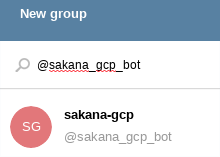

- 這邊的 YOUR_TOKEN 就是剛剛 @botfather 給的 TOKEN
- 如果result 是空的, 就把 bot 從群組踢出去再加入一次, 再試試看

- -X 是 request , -d 是 data
- 注意雙引號各把 host 以及 data 內容標示住
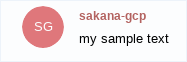
- 要有 npm 套件, 等等在 container 內建立, 不影響自己環境
- trigger 是名稱
- region 的部分, asia-east 只有 asia-east2
- Project 後面請用自己的 project ID



- Alert Policy 建立可以參考之前的文章 http://sakananote2.blogspot.com/2019/11/stackdriver-gce-cpu.html


- 登入該台 VM, 使用 # stress-ng -c 4 --cpu-method all 進行壓測

- Bot 的管控
- Cloud function with iam policy binding
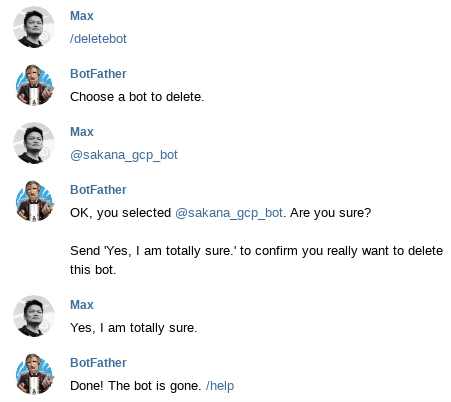


- 感謝 ikala Ken 與 ikala Lee Wei 提供相關資訊