
 Member
 Ilmehtar
Why You Should Use Tumbleweed
People often ask me why they should use openSUSE Tumbleweed and how it compares to other distributions like Fedora or Ubuntu. The fact is Tumbleweed is actually rather hard, if not impossible to compare to Linux distributions like Fedora or Ubuntu.
Both are ‘traditional’, released-based distributions. They build it carefully over a few months, they ship it, and they then cautiously patch things (often keeping those changes as small as possible, backports, etc) to keep it secure/usable for their users over their chosen lifespan.
If you’re interested in an openSUSE like that, we have Leap, and I believe Leap to be better than Fedora and Ubuntu for a whole bunch of reasons, starting with the fact that Leap has an Enterprise codebase (SUSE Linux Enterprise to be exact) at its heart with the openSUSE Project building a fully-fledged community distribution ontop of it.
But today I want to talk about Tumbleweed.
While Leap aims to be rock-solid, Tumbleweed rolls.
It’s more like Arch and Gentoo in that regard. Tumbleweed today contains the latest packages of every software stack that has been packaged by the openSUSE Project. Latest kernel, libraries, desktop environments, everything in Tumbleweed can and does change regularly.
But, unlike other rolling distributions, Tumbleweed does it smarter.
Built Correctly
Tumbleweed is built like a ‘traditional’ distribution. All packages in Tumbleweed are built together as a cohesive distribution, and shipped together as a cohesive distribution. If a new package is checked in that potentially can invalidate another package (eg. new glibc, new libraries, new kernel, etc) then the dependant packages are rebuilt, just like traditional distributions.
But where as traditional distributions take days, sometimes weeks to do such, we do it in hours, because we have the Open Build Service.
- You can learn more about Open Build Service HERE.
- You can see, and use the openSUSE Build Service for free, today.
This produces a ‘snapshot’. At this point a traditional distribution would probably call this a ‘release candidate’, an ISO and a set of repositories with all the software built and ready for testing.
Most distributions take weeks to produce coherently built and tested disk images & repositories. Tumbleweed does it about 5 times a week.
Tested Well
But building is only half the story. A good distribution needs to be tested. A good rolling distribution needs to be tested quickly. Arch and Gentoo rely on manual testers and purposefully delaying the inclusion of packages in their main repos in order to give people time to test stuff. openSUSE has openQA.
Before any human being is allowed anywhere near a snapshot, openQA tests that snapshot over 100 times across four different hardware architectures (i586, x86_64, ppc64, and aarch64).
These are not artificial ‘some developer writing some code to poke around some APIs’ kind of tests.
openQA actually does proper real-world scenarios. Installations, upgrades, dual booting, encrypted LVM, kde, gnome, xfce, live CD’s, network installs.
You name it, we test it. And if we don’t test it well enough, we most certainly want to, and you can help contribute tests as everything in openQA is 100% open source.
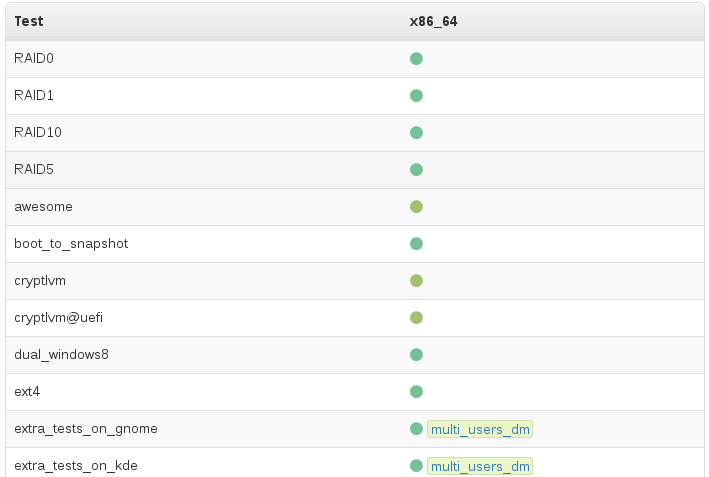
Again, these aren’t some kind of artificial ‘some fancy coder wrote a robot that can mash buttons in the right order’ tests. openQA can actually see the screens it is testing.
It uses openCV and a library of reference screenshots (with areas of interest selected to allow openQA to ignore things we don’t care about) which we call ‘needles’.
So every test checks that every screen looks the way we want it to look for users. Every function that is tested presses the same keys and clicks on the same mouse buttons that a user would, and then openQA confirms that piece of software behaves in the way it has been taught to expect.
openQA does this for every step in installations & upgrades.
openQA checks all the core console commands, systemd, zypper, YaST in ncurses mode, curl, vim, firewall, ssh, etc, etc.
openQA then logs into the desktop environment of choice (GNOME, KDE, lxde, xfce, etc) and checks graphical applications. Is gedit working? firefox? thunderbird? libreoffice? inkscape? gimp? etc, etc.
And it does this all in dozens of different scenarios, over and over again, in parallel across many VMs and machines.
We even do extra testing on incoming package submissions, so many cases we catch things before they get anywhere near a snapshot, and our developers get nice fast feedback about their otherwise potentially destructive change. Yes, we have implimented Continuous Integration for distributions, and if you were using OBS and openQA you could be doing it too.
Delivered Quickly
1000’s of tests, over 100 scenarios…and with our current hardware (thanks SUSE!) a full snapshot gets tested in about 3 hours.
And if it passes, it ships, automatically.
Most distributions take weeks to produce coherently built and tested disk images & repositories.
Tumbleweed does it about 5 times a week.
And a ‘quiet’ week can consist of approx new/updated 150 packages and a new kernel.
A normal week is double, if not triple that, and it’s moving faster and faster..
All that extra work doesn’t get in the way. We often beat other rolling distributions into delivering tested versions of KDE Plasma and GNOME, because we can test them quicker and ship them with a certainty that nothing breaks.
That’s not universally true though, good testing finds bugs, those bugs need to be fixed, so if you ever notice something taking longer than you’d like, it’s often a sign that we could do with more contributors helping Package that particular software. You can learn how to contribute to Tumbleweed HERE.
Trusted by More and More
Most of what I describe above was implimented after July 2014 and culminated in the ‘merger’ of Old Tumbleweed and Factory in November 2014.
Since then, the adoption rate of Tumbleweed has been nothing short of astronomical.. 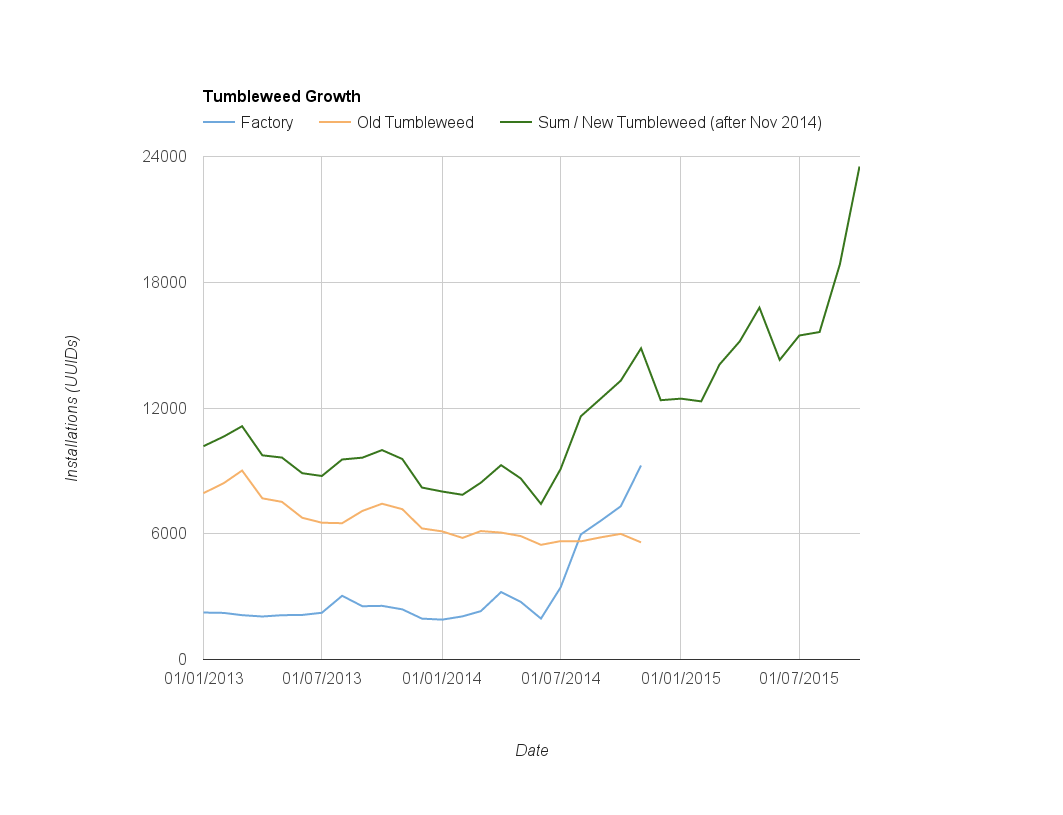
If public numbers are to be believed Tumbleweed might already be larger than ‘more famous’ rolling distributions. Whether or not that’s true doesn’t change one fact - We want YOU to try Tumbleweed.
And you’ll be in good company. Not only amongst those users, but companies like SoftIron who ship Tumbleweed on their Overdrive 3000 64-bit ARM servers, and Fujitsu who offer Tumbleweed as their chosen community Linux to customers with Skylake hardware. GNOME advertise Tumbleweed-based GNOME:Next LiveCD’s so their users can play with their latest releases as soon as they are shipped, even before the tested packages appear in Tumbleweed properly.
I may be biased, but Tumbleweed is the only rolling distribution I’d recommend to any Linux enthusiast as their daily driver.
If you care about Linux, you want the latest packages, but you only want them when they actually work, Tumbleweed is the best choice, bar none.
And anyone who disagrees with me is welcome to join the openSUSE Project, find us on opensuse-factory@opensuse.org Mailing List and help make it even better ;).
NOTE: This blog post started as a response to a Reddit Post. Thanks to the OP for the inspiration!

Thoughts after a whole day using Leap 42.1
This a copy of the message that I tried to share with openSUSE user mail list (opensuse@opensuse.org) but I’ve got blocked :/
I’m writing this e-mail to share my experiences after a whole day using openSUSE Leap 42.1.
The installation was pretty easy and worked ok.
IMHO, the boot screen is awful. But it’s a taste thing, so nevermind.
Everything started to go down the hill after logging into KDE. Unfortunately, Plasma 5 is really broken, the desktop environment is so unstable that I’ve missed the panel, the krunner and/or, kwin multiple times. Working with two displays (multihead) was kind of impossible. The graphics and animations are jumpy and not smooth. It was taking forever to reboot and shutdown. I’ve tried also to update KDE with extras and applications repository. Things didn’t get any better.
Baloo was consuming all my disk I/O. I could only use the computer after ionice it to -c3.
I’ve left my post installation notes here [1].
Of course, that was my experience w/ Leap 42.1 w/ KDE. Maybe others had a different luck within it.
After all, I’ve came back to openSUSE 13.1. Well, if 13.1 will reach EOL at Nov/2016 [2], this means that if I want to keep using openSUSE I’ll have to jump on 13.2 bandwagon until the next 42.2 comes around [3]. And then, I’ll have two months [3] to check if 42.2 is a stable boat to jump in. Right?
What I didn’t get is: if Leap 42.1 were supposed to be a stable release, why it was shipped with this not-that-stable Plasma 5?
Best regards,
[1] – http://wiki.mattos.eng.br/wikka.php?wakka=openSUSEPostInstall
[2] – https://en.opensuse.org/openSUSE:Evergreen
[3] – https://en.opensuse.org/Lifetime—
Leonardo M. N. de Mattos
www.mattos.eng.br
UPDATE 1: Eventually I’ve found the answer of this e-mail here. However, I don’t know for sure if I agree.
The end of Facebook and WhatsApp on BlackBerry 10
I am a proud owner of a BlackBerry Passport since more than a year now and have been extremely satisfied with this device. But the latest update of the Facebook app and the announcements around Facebook for BlackBerry 10 and WhatsApp leave me with some frustration.
It is no secret that the Facebook app for BlackBerry 10 never was on par with the Facebook apps on Android or iOS - neither feature nor stability wise. Facebook for BlackBerry 10 always had some hick ups here and there, but in the...
Das Ende von Facebook und WhatsApp auf BlackBerry 10
Ich bin ein stolzer Besitzer eines BlackBerry Passport seit mittlerweile etwas mehr als einem Jahr und bin bisher stets extrem zufrieden mit dem Gerät gewesen. Doch das neuste Update der Facebook App und die Ankündigungen rund um Facebook für BlackBerry 10 und WhatsApp lassen mich doch mit einigem Frust zurück.
Es ist kein Geheimnis, dass die Facebook App für BlackBerry 10 nie auf einem Level mit den Apps für Android oder iOS war - weder in Sachen Features, noch im Sinne der Stabilität. Faceb...

Connect to your server in your LAN via your WAN url: an openWRT solution.
Can't reach the server from the LAN
Of course, I sync files on my desktop between my laptop and phone. The desktop client is setup with the IP address of the server in my living room. But my phone and laptop, configured to connect to my public, DynDNS URL (so they work when I'm traveling), can't connect from the home network. Triple-uncool. I like my photos from my phone to by auto-uploaded when I connect to wifi at home; and more importantly my laptop should sync when I get home from travel!Danimo blamed my router - a Cisco (Linksys) E4200. That was (once upon a time) an expensive, high-end router. Sadly, having been abandoned by its manufacturer, it has become an expensive, high-end liability. I can't even log into the administration interface, browsers tell me that the connection is insecure. There are more issues, like the slow WLAN-LAN transfer speeds I experienced and I'm not even talking about security here. Linus once eloquently expressed his feelings towards NVIDIA, a resentment I now feel towards CISCO.
openWRT to the rescue
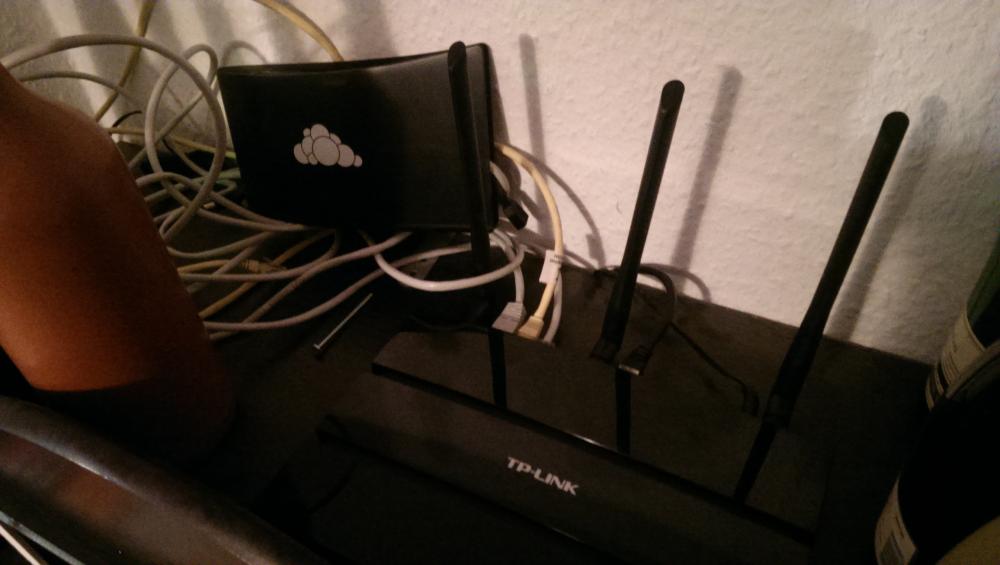
I learned my lesson. No router not able to run an open source firmware will get in my house. While I don't feel any need whatsoever to fiddle with things that do their job, Linksys screwed up here: they left me on broken software long before I had any need for new hardware.After some digging, I learned that TP-Link has been (mostly inadvertently) a decent citizen for OpenWRT fans. So, even if they'd abandon their router like Linksys/Cisco did, there was a future. I bought a TP-Link Archer C7. Affordable and it can run OpenWRT.
After setting it up initially, things worked. For a day. After that, no amount of fiddling could make it work again. Magic. Today I gave up on the original firmware and installed OpenWRT. It was easy - as easy as upgrading to a new TP-Link firmware:
download the openWRT firmware, go to the upgrade interface, select it, hit start. A while later you ca visit the web interface. Which is a tad more complicated, but not much - and noticeably more capable. It didn't take me any longer than on the original firmware to set up my wifi and guest networks.How to make it work
But it didn't solve the problem. I had to resort to a web search and found a neat trick, which I'm happy to share (assuming 192.168.1.11 is your server on your LAN):- Log into your router over ssh
- Add to your /etc/dnsmasq.conf file the following:
address=/example.com/192.168.1.11 - Add to your /etc/hosts file:
192.168.1.111 example.com
Essentially, the DNS provider in OpenWRT will provide your local server address to local clients... It thus breaks when you use another DNS than the one provided by the router via DHCP.
I'd be happy to hear from other and/or better solutions. Heck, this might only work for a day or might be horrible or maybe I changed something else which made it work. What do I know...
GNOME 3.20 veröffentlicht
Heute wurde eine neue Version des Gnome Desktops veröffentlicht. Es ist das erste Mal, dass ich eine Veröffentlichung des Gnome Projekts ankündige, da ich auf openSUSE Tumbleweed Gnpme in der Version 3.18 für einige Monate verwendete (sehr viel länger als ursprünglich geplant, da es nur als Testlauf gedacht gewesen ist) und obwohl ich aus der Welt von KDE, Xfce und i3 komme, war ich doch sehr beeindruckt wie gut Gnome auf meinem Laptop lief.
Version 3.20 bringt keine großen Veränderungn, aber...
GNOME 3.20 released
Today a new major release of the Gnome desktop environment has been released. It is the first time that I announce that on my Blog because I used it on openSUSE Tumbleweed in version 3.18 for a few months (much longer than actually planned as it was meant to be a test run only) and although coming from KDE, Xfce and i3 I was quite impressed by how it performed on my Laptop.
Version 3.20 is not bringing big changes to the table but many nice improvements. A short overview from the Gnome annou...
KDE Plasma 5.6 veröffentlicht
Heute wurde eine neue Version des Plasma Desktop veröffentlicht und bringt viele schöne Verbesserungen mit.
Eine kurze Zusammenfassung beinahe aller Verbesserungen:
- Taskmanager
- anzeigen von Prozessfortschritten (kopieren, herunterladen etc.)
- Medienkontrollen im Tooltip
- Schnellsprunglisten (z.B. für private Firefox-Fenster, für Steam etc.)
- KRunner
- schöneres Aussehen
- Widgets
- Drag und Drop für die Ordnersicht im Panel
- Rückkehr des Wetter-Widgets
- Aktivitäten
- Wayland-Unter...
KDE Plasma 5.6 released
Today a new version of the Plasma desktop environment has been released. It comes with a lot of nice improvements.
A short summary of almost all of them:
- task manager
- showing task progress (copy, download etc.)
- media controls in tooltip
- jump lists (e.g. for Firefox Private Windows, for Steam etc.)
- KRunner
- smoother look
- widgets
- drag and drop for panel folder view
- weather widget returned
- activities
- Wayland support
- window decorations are now supported for Wayland client...
openSUSE Face-to-Face Board Meeting 2016 Minutes - Part 3/3
18th-20th March
Present:
- Richard Brown - Chair
- Michal Hrušecký
- Kostas Koudaras
- Tomas Chvatal
- Gertjan Lettink
- Bryan Lunduke - Extra special thanks goes to Bryan for attending via video conference at ridiculous hours in his local timezone after urgent personal matters kept him from attending the meeting in person.
As this years Board Meeting Minutes are so long, they are split into 3 sections
- Meetings - Covering the meetings the Board had with various SUSE executives, managers, and engineers.
- General - Covering the general agenda items/day-to-day issues
- Strategy - Covering the ‘big picture’ issues the Board discussed
This email is Part 3, containing ‘big picture’ strategy issues discussed
Part 1 is available HERE
Part 2 is available HERE
Strategy
Improve Visibility
Obviously, we want to improve the visibility of the openSUSE Project.
We have great distributions, great tools, and great technologies, and we want them to be adopted by as many people and other projects as possible.
We also want to be a natural choice for new contributors and new projects to come to openSUSE, work with us, and host their projects with us.
SUSE
SUSE is our closest, largest, partner. We have strong practical ties with them, but that does not mean we can forget about things such as regular clear communication and ‘internal marketing’.
SUSE are working on a number of exciting new things, and it’s important that internally openSUSE is seen as a natural home for SUSE’s open source contributions.
Working closely together also should enable SUSE’s corporate marketing experts to help spread the good word about all the awesome stuff the openSUSE Project is doing
AI:Bryan to investigate the possibility of Doug being invited to Weekly team meetings for SUSE Corporate Communications
AI:Bryan to drive ensuring openSUSE is well integrated with SUSE’s ongoing marketing.
Outreach
There’s no point only targeting our existing contributors and partners like SUSE. Any open source project needs new people and with new people comes new ideas, new solutions, and new exciting projects for people to hack on.
A huge challenge for new contributors and projects is understanding what is available
- Who is the openSUSE Project?
- What services do we provide?
- Where do I go to get involved?
- How do I get started?
These are questions which are key to have simple, clear, easy to find answers to
CALL FOR HELP: The Board wants to see getting started guides for
- New Users
- New Contributors
- New Projects- to encourage other projects to come use openSUSE as their home
to answer the above questions. These should be simple, clear, and relatively short. The produced guides should be easily usable on a wiki, the website, on flyers at conferences, short blog posts..we want to be able to spread them everywhere
The guides for new Contributors and new Projects are considered a Priority by the board- to use a football related quote “There is no point having fans, if you don’t have your 11 on the pitch to play for them”
AI:Board intends to create a skeleton of the above guides to help bootstrap this idea, and will drive this, but the Board is keen to see if anyone from the community dives in and gets to work on this immediately.
Other Projects
While openSUSE is keen to see other projects call the openSUSE Project it’s home, we recognise that it’s not viable for many, especially those larger ones with their own established communities
In cases like this the Board wants to encourage strong relationships with such Projects, and seek out partnerships and other arrangements with such Projects for the benefit of all involved
Examples include ownCloud and Kolab, where we believe openSUSE is in a perfect position to offer tools, community, and a solid environment for these projects to use as a default or recommended platform for their users
AI:Bryan to arrange information exploratory discussions
Hardware vendors
Having hardware sponsors and partners is nice but is hard. Solid hardware support requires the hardware to be available and in the hands of the right contributors to make it happen.
Otherwise there is no way how to support special hardware without the things available for testing.
However, we do have some relationships which are happening, and we want to highlight those who do stuff with us, such as
- Soft Iron are shipping 64-bit ARM servers with openSUSE Tumbleweed as standard
- Fujitsu offer openSUSE Tumbleweed to thier customers who want a Linux option on their Desktop & Server Hardware
- Epson have some printers using openSUSE and YaST
- Open Mainframe are investigating the possibility of building an openSUSE distribution for s390x
Reform and Remove Mess
Improving viability and reaching out to new areas is all well and good, but we need to make sure the project internals are tidy, clear, and easy to use
The Board discussed the state of many infrastructure and project policies and processes.
We agreed a principle of, when something is imperfect, we Reform (aka improve) or Remove it.
Services identified to be removed or reformed:
- Software.o.o:
- Media download needs to be easier, prefferable static page
- package search adds too much mess to the installed systems. Invalid repos should not be distributed by 1-click installs
- somehow redesign and reduce confusion to ensure that users do not end up with 80+ additional repos.
- Wiki:
- In order to fix the wiki quickly ,the board approved the idea of deploying the latest version of mediawiki on a new server without branding
- branding can always be redone later
- Blogs/Planet:
- Only a handful of people use lizards, but it takes a lot of resources to keep it running. We want to shut it down, and encourage it’s users move to their own blogs, which will then be aggregated on planet.opensuse.org
- Improve planet.opensuse.org. Find a maintainer, use a clean upstream OSS soltion if possible
AI:Kostas to contact the few Lizards bloggers to discuss their migration options
- News.o.o:
- Wordpress consumes too many resources and poses too many security risks
- Replace with something lightweight
AI:Richard talk with Douglas about this
- i18n.o.o: Translations site is being migrated to l10n.o.o as we speak and i18n will be killed including the svn prior Leap 42.2 release.
- Legal layout of Board/membership: The current layout of the Board Election Rules, Membership Rules, and such are sometimes confusing and missing some details The documents will be updated and restructured to be more clear This should set the framework for discussing any reforms of the Membership process once the Membership tidy-up is complete
AI:board- get Infra team to provide list of services we have, soon to help with this endevour