 Member
 swyear

The simplest package ever
This is the package I am using
https://build.opensuse.org/package/show/home:jordimassaguerpla:test/simple
Feel free to "fork" it.
Battleship – Sinclair ZX Spectrum
The first computer, which was in my family, was ZX Spectrum. I think, I was about 6 when my father bought the first computer. This computer I used for gaming of course. I started programming later and on PC. I will never forget the sound of loaded games on Spectrum (software was distributed on audio cassette tapes and loading into memory was a sound (perceived by the human ear), interpreted as a sequence of bytes)…
Last weekend I played with my 5 years old son in Battleship. I showed him this game first time and we used pencil and paper. He teaches the alphabet and I think this could be a good experience for him. You know that feeling when you have something to show your children, do you remember your childhood. I don’t know why, but I remembered not a “paper version”, but our first computer and how I with my older brother played in Battleship on Spectrum against the computer.

I thought about this until evening and at the same evening found this game in net. I found a lot of different information about this game, the most important of which was the fact that this game can be installed on any PC running GNU/Linux. Yaaay… I can’t remember what I planed to do on this night, but until I went to sleep I installed spectrum’s Battleship on my x86_64 openSUSE and plunged into childhood for few hours 

To install spectrum’s programs on UNIX/Linux you need to install emulator. In case of openSUSE, you need to add Emulators project first. After that install FUSE package. It just works. Just start fuse-binary with game-file-name as a parameter.

I would like to thank FUSE developers and openSUSE FUSE mainainers. I don’t play in “today’s” games, but time-to-time can spend a bit time for games of my childhood.
Let's breathe life back into my blog
I haven’t updated it in a while and the content is quite old and maybe boring :)
But here I am and the first step was to migrate from Wordpress to Pelican. That way will be faster for me to publish content and to maintain it, as well. I decided to keep the old posts, just for reference, so, if you see any strange things, just let me know and I will try to fix them.
Let's hope that my future posts will teach you something useful or at least will make you think.

Orcus 0.11.0
I’m very pleased to announce that version 0.11.0 of the orcus library is officially out in the wild! You can download the latest source package from the project’s home page.
Lots of changes went into this release, but the two that I would highlight most are the inclusions of JSON and YAML parsers and their associated tools and interfaces. This release adds two new command-line tools: orcus-json and orcus-yaml. The orcus-json tool optionally handles JSON references to external files when the --resolves-refs option is given, though currently it only supports resolving external files that are on the local file system and only when the paths are relative to the referencing file.
I’ve also written an API documentation on the JSON interface in case someone wants to give it a try. Though the documentation on orcus is always work-in-progress, I’d like to spend more time to make the documentation in a more complete state.
On the import filter front, Markus Mohrhard has been making improvements to the ODS import filter especially in the area of styles import. Oh BTW, he is also proposing to mentor a GSOC project on this front under the LibreOffice project. So if you are interested, go and take a look!
That’s all I have at the moment. Thank you, ladies and gentlemen.

Debugging why ping was Broken in Docker Images
All complicated bugs start with the simplest of observations. I recently was assigned a bug on our openSUSE Docker images complaining that ping didn't work. After a couple of days of debugging, I was taken into a deep and dark world where ancient Unix concepts, esoteric filesystem features and new kernel privilege models culminate to produce this bug. Strap yourself in, this is going to be a fun ride.

Programmers guide to Microservices/SOA
Introduction
SOA or Service Oriented Architecture is one of the buzzwords among architects/senior-developers, job descriptions for the last few years. However, most of the definitions of SOA online are riddled with formal words, such as the one from OASIS, which says: "A paradigm for organizing and utilizing distributed capabilities that may be under the control of different ownership domains. It provides a uniform means to offer, discover, interact with and use capabilities to produce desired effects consistent with measurable preconditions and expectations."Microservices
Splitting a single application into multiple services, imposes a few restrictions on our coding, but in turn gives us a lot of flexibility and power in scaling. Let us look at some of the coding/design constraints.
Stateless Systems
Let us take a simple example, we are building a rudimentary Shopping application with just one type of item stored. The Shopping application has two parts, the Inventory part that adds new items and the Sales part that removes items. Let us consider the following pseudo-code:
var mu = &sync.Mutex{}
var stockItemCount = 10

func (i *Inventory) AddToStock(n int) {
 mu.Lock()
 stockItemCount += n
 mu.Unlock()
}

func (s *Sales) UpdateStock(n int) bool {
 mu.Lock()
 defer mu.Unlock()
 if stockItemCount >= n {
  stockItemCount -= n
  return true
 } else {
  return false
 }
}
In the above code snippet (trivialized for brevity), we have a global variable stockItemCount, which is protected by a mutex mu. The AddToStock function of the Inventory class/type, adds to this global variable whereas the UpdateStock function of the Sales class/type, removes from the global variable. The mu lock synchronizes the access, such that the functions have exclusive access to the global variable on execution.
In a SOA, the Inventory and the Sales classes will become their own individual HTTP webservices. These new individual classes, viz., SalesService and InventoryService, may now run on different machines.
Inter-Service Co-ordination
So how do these different services potentially running on different machines, share and synchronize access to common data ? The solution is simple. We move away from the globalVariable+mutex pattern and implement a publish-subscribe or queueing pattern. What does that mean ?We move the stockItemCount management into a separate StockService which is accessible by both the InventoryService and SalesService (earlier considered classes/type). Let us take a look at a sample pseudo-code:
// Stock Service on Machine A
var count = 10
func (s *StockService) ProcessQ() {
    for {
        op := Q.Read()
        if op.Type == “Inventory” {
            count += n
        } else if op.Type == “Sale” {
            if count >= n {
                count -= n
                http.POST(op.callbackURL, "success");
            } else {
                http.POST(op.callbackURL, "failure");
            }
        }
    }
}

type Operation struct {
    Type string
    Value int
    Callback URL
}
// Inventory Service on Machine B
func (i *InventoryService) AddToStock(n int) {
 Q.Write(Operation{“Add”, n, nil})
}
// Sales Service on Machine C
func (s *SalesService) UpdateStock(n int) {
 Q.Write(Operation{“Remove”, n, callbackURL})
}

func (s *SalesService) POSTHandler(w http.Response, *r http.Request) {
    s.Notify(r.Body) // success or failure
}
Benefits of SOA
As we just saw above, what was a simple single process with two classes, became three different classes and a queueing system with four different processes across four (or more) different machines, to accommodate SOA. Why should a programmer put up with so much of complexity ? What do we get in return ? We will see some of the benefits in this section.Horizontal Scalability
If we have a server with 4GB RAM serving a 100k requests per second for our above Shopping site, and due to an upcoming holiday season, there will be an estimated increases in the visitors count and we will have to serve, 400k parallel requests per second, we could do one of two things. (1) We could buy more expensive hardware, say a 16GB RAM machine. We could move our site deployment to this bigger machine until the holiday season and get back to the old system later. (2) We could launch another three of 4 GB RAM machines and handle the increased load. The former is called Vertical Scaling and the latter is called Horizontal Scaling.Vertical scaling is appealing for small workloads but is costlier as we have to provision huge machines. Even if you could rent high-end VMs in the cloud, the pricing is not too friendly. Horizontal scaling is cheaper on your wallet as well as provides more throughput and allows for more dynamism.
Auto-Scaling
In our Shopping application, we saw that the Sales and the Inventory Services are stateless. So we could horizontally scale them individually. For example, we could launch 3 new instances of the SalesService to handle a holiday-traffic while maintaining the single machine for the Inventory service. This kind of flexibility would not have been possible with our earlier monolithic design. However, note that the Stock Service that we had was stateful and so it could not be horizontally scaled. This is the drawback of having stateful components in your architecture.Once we know that the systems could be horizontally scaled, the next logical progression is to make the scaling automatic. There are systems like Amazon Beanstalk and Google AppEngine (to a certain extent (with vendor lockin)) that allow your application code to automatically horizontally scale by launching new instances whenever the demand is higher. The new instances will be automatically shutdown when the burst of traffic is reduced. This reduces huge IT administration overheads. We could have such nice features, only because our application architecture was composed of stateless services.
Serverless Systems
The next step in the evolution of auto-scaling, is to have code that automatically decides the number of servers on which it should run, instead of having to provision anything. To quote, Dr. Werner Vogels, CTO of Amazon, "No server is easier to manage than no server". We are clearly moving in this direction with serverless webapps. Amazon Lambda brings to life this functional programming dream. Google is not far behind and have recently launched Cloud Functions (but not as rich as AWS Lambda yet imho). We have frameworks to build entire suite of applications without servers, using these services.Polyglot Development
As we are deploying each service independently, we could use different programming languages, frameworks and technologies for each of the services. For example, any CPU intensive service could be written in a performant language like Go while a bunch of front end code could be written in parallel in React or nodejs.Mobile First
Since we have developed proper HTTP APIs for our application, in addition to the webclient, any mobile client too could use our webservices. In this day, most of the companies start with a mobile-first or mobile-only strategy and do not require a webclient. Some pro-monolithic engineers tend to argue that the first iteration of development should be in a monolithic model and we could re-engineer for a SOA at a later stage of development, as development speed is faster in monolithic design. Personally, I disagree to this. If we start with a SOA in mind from scratch, with our modern day development stack, we could easily plumb existing things instead of reinventing wheel and could do projects faster. There are frameworks and techniques to auto-generate a lot of code, once we have finalized the APIs. I have had experience building web applications both as a monolith and in SOA from scratch, I have felt happier with SOA code every time, YMMV.Auxiliary Parts
If we are building a SOA based system, we need to have a lot more auxiliary support systems. If we do not have these auxiliary parts in place, it will be very difficult to measure, debug or optimize. Different companies implement different parts below, based on their business needs and deadlines.Performance Metrics
The most important auxiliary aspect of SOA is to have precise performance metrics for each of the services. If we have SOA without performance/metrics measurement, It will be as ineffective as trying to do bodybuilding or weightloss without observing what we eat. We will not be able to rate limit requests, prevent DoS attacks, understand the health of the service without measurement. The performance measurement can be done in two ways, (1) Measure the performance and show metrics by realtime event monitoring (2) Log various events, errors, response times, etc., aggregate these logs and batch process them later, to understand the health of various components. We will need a combination of both the approaches for any large scale systems.Luckily there are plenty of tools, services and libraries available for this. AWS API Gateway is perhaps the easiest way to register your APIs and monitor the endpoints. However we may need more finegrained measurements too (such as how long the calls to the database takes, which user is causing more load, what times are the loads high, etc.). There are various tools that we could use such as statsd, ganglia, nagios, etc. and various companies that offer hosted solutions too, such as sematext, signalfx, newrelic, etc.
Distributed Tracing
Tracing is a concept that is supplementary to metrics and performance measurement. When a new request comes to a service, it may in turn make use of 3-4 other services to serve the original request. Those 3-4 other services may in turn call 3-4 other services. Tracing helps us find out, on a per-request basis, the map of which services are used to serve it, how long it took at each point, where the request is stuck if could not be serviced, etc.We could achieve tracing by giving a unique id / context object to each incoming new request in the outermost API which receives the request, pass it along as we make further API requests until the final response is finished. This context could be passed along as a parameter in the webservice calls. The monitoring of the tracing events could again be realtime or deducted from log-aggregation.
Dapper is a paper released by Google summarizing how tracing is done in Google. Twitter have released Zipkin, a FOSS implementation of the above Dapper paper, that is in production.
Pagination
Assume that we are exposing an API in our StockService to list all the items that we have, along with its RetailPrice. If we have say a billion products, the response to the API will be huge. Not just the response, the system resources needed to build that response, on the server side will be tremendous. If we are fetching the billion items from the database, the caches will be thrashed, the network will be clogged, etc. To avoid all these issues, any API that could potentially list a lot of items should consider paginating its response by a pagenumber, i.e., an API call should take a page number as a parameter and should return only M number of items in a page. The value of M could be decided based on the size of each item on the response. We can optionally get the number of results that the user wants, also as a HTTP Parameter.For example:
- http://127.0.0.1:8080/posts/label/tech - Returns the first 10 blog posts with label "tech"
- http://127.0.0.1:8080/posts/label/tech/1 - Same as above
- http://127.0.0.1:8080/posts/label/tech/2 - Returns blog posts 11 -> 20 with label "tech"
- http://127.0.0.1:8080/posts/label/tech/?limit=5 - Returns the first 5 blog posts with label "tech"
- http://127.0.0.1:8080/posts/label/tech/?start=15&limit=5 - Returns the blog posts 15 to 20 with label "tech"
API Versioning
If software never changes, we software engineers will be out of jobs. It is good that software evolves. However, we need some contracts/APIs, so that the changes are smooth and does not bring down the entire ecosystem when a change happens. Once we have an exposed an API outside our developer team, it is wiser to never change its request/response parameters.In our StockService example (that we discussed a few paragraphs ago), we could have the following API:
http://stockservice/items/ - Returns all the items.
Later someone figured out that, it is not wise to return all the items always and decides to change the behavior to return only the first 10 items. This change will break all the existing clients, who will all assume that there are only 10 items in total while in reality we may have a billion more items waiting to be paginated.
The easiest way to regulate the API changes is by adding version to APIs. For example, if the original API to return all the items had a version param, we could just increment it like:
http://stockservice/V1/items/ - Returns all the items
http://stockservice/V2/items - Returns the top 10 items
The version need not be part of the URL always. We could take the Version as an extra HTTP header also, instead of creating a new URL endpoint. It is a matter of taste and each approach has its own pros and cons.
CircuitBreaking
Once we have multiple components in a system, there is a high chance that some part of the system may be down for updates. When such a thing happens, a service could choose to wait for some time before making any attempts to retry if it knows that the service will be failing. Martin Fowler has written in detail about this, which is a good read.Service Discovery
The easiest and probably most used way to identify these services is through DNS. However, there are plenty of other tools available for this purpose too. ZooKeeper from Apache, etcd from CoreOS are all strongly consistent, distributed datastores which could be used for service discovery. Consul from HashiCorp, Eureka from Netflix are dedicated service discovery software. All of the above are FOSS projects as well. If your application has only less than a dozen services, probably it makes sense to just read from a shared file, across these services, instead of deploying a complex suite of software too. But keep in mind that it won't scale as you grow and so it is better to start with good practices as a habit from the beginning.
SDKs
A new TCP connection takes time to establish because of the initial handshake delay. It will be foolish to not reuse these connections. There is an inherent need for retrying things in HTTP if things fail, before giving up. Some programmers do not like writing HTTP client code always either. It is often recommended to release SDKs for the APIs that we release, to facilitate programmers to consume our APIs easily. For example, a python programmer can merely import our SDK's classes to add an item to our StockService, instead of having to write http retry code.In the past we have had technologies like DCOM, CORBA, RMI etc. that aimed at doing distributed computing within walled gardens of technology. They lost out in market share due to the simplicity of REST services where HTTP verbs (GET, PUT, POST, DELETE) could perform remote operations, without the need for complex and mostly platform-specific stubs/skeletons etc.
Further Information
- A very good read on the need for SOA is Steve Yegge's Platforms rant.
- Read the techblog of companies who are moving to SOA (not just those who have moved already)
- Talk to engineers from Netflix, Amazon Web Services, if you know someone. Sadly both of those companies do not exist in India (as of 2016), even though the both the services are available.
- Follow Netflix techblog http://techblog.netflix.com/
- Watch AWS reInvent videos and if you have a chance attend that event (instead of events like Google I/O which are more business driven)
- If you like this post, share it with your friends.
- Please send any comments / feedback regarding the language or content used. I am planning to use this for teaching material in a college, for a 1 hour talk, shortly. Should some other topics be covered ?
- All opinions expressed are purely personal.

TOSprint or not to sprint?

Report of a week of sprint
TOSprint in Paris has just ended (wiki page).
What a week!
First of all I want to warmfully thank the sponsors, especially Olivier Courtin from Oslandia for the organization, and Mozilla France for hosting us.
What is TOSprint?
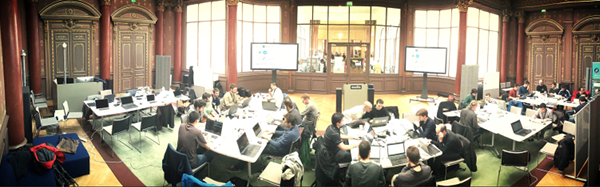
Once a year a bunch of hackers from projects under OsGeo umbrella, meet in a face to face sprint.
This year it happenned in Paris with great number of participants (52).
There was globally five big groups, and if each community was running its own schedule,
there was a lot of cross echanges too.
Personal objectives
My main objective, except being enough luckly to be a sponsor, was to go there and be in direct contact with upstream.
This can help a lot to improve packages, and create new ones.
Moreover, as one of my openSUSE’s Application:Geo peer maintainer, Angelos Kalkas was also participating, we decided to make somes changes, and improve the situation of the repository.
openSUSE packaging
We were using a Staging repository to test the global changes to minimize the breakage on the main repo, kinda à la Factory 
Let’s talk about what you will get once the rebuild will finished:
* gdal goes to 2.0.2 which is big jump since version 1.11
* postgis got upgrade to 2.2.1 with sfcgal as dependency so 3D operations are avalaible.
I added two interesting extensions for postgresql/postgis database
– pgRouting : a long time missing extension in our repository. see pgrouting.org
– pointcloud : allow you to store and work with pointcloud in postgresql and also contain a postgis extension. see https://github.com/pgpointcloud/pointcloud
Both packages are respecting the postgresql/postgis naming scheme: so to install pointcloud on a postgresql94 server you will install postgresql94-pointcloud package.
They are available at least for 13.2, Leap 42.1, Tumbleweed.
A big thanks to Paul Ramsey for his help resolving the issues raised. Especially the advise to stick to -j1 during compilation of postgis 
* PDAL pdal.io (with libght) is a point cloud abstraction layer which is under active development and should
in the future replace libLAS once the compatible C interface will be written.
A big thanks to Howard Butler, for helping to get all packaging issues resolved.
* Mapserver : mapserver.org
During the week, mapserver team made impressive changes:
– First by closing numerous github issues which didn’t get updates for a long time.
They run a bot script which automatically close the github issue, and users get a nice message about it.
Perhaps it could inspire us, on how we write closing ticket in bugtriage.

  This is an automated comment

  This issue has been closed due to lack of activity. This doesn't mean the issue is invalid,
  it simply got no attention within the last year. Please reopen with missing/relevant information
  if still valid.

  Typically, issues fall in this state for one of the following reasons:

      Hard, impossible or not enough information to reproduce
      Missing test case
      Lack of a champion with interest and/or funding to address the issue
– Part of the team took the challenge to update all the tutorial material.
– A number of question about the future of mapscript : lacking maintenance resources (humans and or funding)
– Bugfix release on thursday night. 6.4.3 and 7.0.1
For openSUSE, I’ve been discussing a lot with Thomas Bonfort.
The idea would be to be able to propose at least two or more versions that receive security and bug fixes. Actually the 6.4 and the 7.0 branches.
This will allow people to smoothly upgrade their map files, when there’s breakage or adaptation needed.
I classify this request as a good idea, and started analyzing what we can do. So its actually a work in progress.
Conclusion
There’s nothing more enthusiastic (for me) than participating to a FLOSS event. If some days are more frustrating than others, the others serve to build this free world we all need.
So I would like to ping your attention : all FLOSS software and communities need your contribution . If you’re using one of them, become interested in how it is built, organized, start to learn today how to contribute, and enjoy your journey.
There’s more to come, especially on the mapserver side, and more and more packages.
Stay tuned!
Of gases, Qt, and Wayland
Ever since the launch of Argon and Krypton, the openSUSE community KDE team didn’t really stand still: a number of changes (and potentially nice additions) have been brewing this week. This post recapitulates the most important one.
I’d like the most recent Qt, please
As pre-announced by a G+ post, the openSUSE repositories bringing KDE software directly from KDE git (KDE:Unstable:Frameworks and KDE:Unstable:Applications) have switched their Qt libraries from Qt 5.5 to the recently released Qt 5.6. This move was made possible by the heroic work of Christophe “krop” Giboudeaux, who was able to beat QWebEngine into submission and make it build in the OBS.
Qt 5.6 comes with a much improved multiscreen handling and a lot of fixes contributed by people from KDE. A certain number of issues that were plaguing Plasma users should be gone with this version. Be wary however that’s not yet released in stable form, and there may be plenty of bugs. Also, the interaction of KDE software with Qt 5.6 is not completely tested: be sure to try it, and report those bugs!.
For these reasons, Qt 5.6 is not yet in Tumbleweed (the stable release will be submitted once it is out). Therefore you will need an additional repository to be able to update, KDE:Qt56. If you have KDE:Qt55 in your repository list, you must remove it and replace it with KDE:Qt56.
You can add the repository easily like this:
zypper ar -f obs://KDE:Qt56 KDE_Qt56 # Tumbleweed
zypper ar -f obs://KDE:Qt56/openSUSE_Leap_42.1 KDE_Qt56 # for Leap
Then force an update to this repository
zypper ref
zypper dup --from KDE_Qt56
Then update from KDE:Unstable:Frameworks first, then KDE:Unstable:Applications.
A bit of Wayland in my gases, too!
Of course, this change has also trickled down to the Argon and Krypton media, which have been updated to reflect this change. But that’s not all. The KDE team is now proud to offer a Wayland-based Krypton image, which accompanies the standard one. Thanks to KIWI, making this was faster than shouting Ohakonyapachininko! Well, perhaps not, but still quite easy.

If you want to try out the Wayland base image, be aware that it is nowhere near alpha level. There is a lot going on and development is heavy, so it may be broken in may interesting ways before you even notice it. You have been warned!
Where do you find all this goodness? The KDE:Medias directory on download.opensuse.org has all the interesting bits. The three kinds of images residing there are:
- openSUSE_Argon (x86_64 only): Leap based, X11 based KDE git live image;
- openSUSE_Krypton (i586 and x86_64): Tumbleweed based, X11 based KDE git live image;
- openSUSE_Krypton_Wayland (i586 and x86_64): Tumbleweed based, Wayland based KDE git live image.
Let’s not forget about bugs!
Borrowing from my previous entry:
Chances are that you might run into one or more bugs. This is software from git, and code review/continuous integration can only do so much. What should you do in such a case?
- (NOT recommended) Kick and scream and demand a refund ;)
- If your bug is in the distribution stack, like drivers or packaging, file a bug on openSUSE’s bugzilla with enough details so that it can be looked at;
- If your bug is instead in KDE software, turn to KDE’s bugzilla.
As always, “have a lot of fun!”
openSUSE présente KDE Argon et KDE Krypton
Il y a quelques jours, les développeurs KDE annonçaient KDE neon. Un dépôt constamment mis à jour pour avoir les tous derniers logiciels KDE sur Kubuntu.

L’initiative est intéressante mais la communauté fut étonnée que les développeurs KDE travaillent sur un projet favorisant une distribution par rapport aux autres.
Cela reste enthousiasmant et le site conçu pour l’occasion est magnifique : http://neon.kde.org.uk/
Aujourd’hui le projet openSUSE a réagi !
openSUSE présente deux distributions contenant les logiciels KDE très à jour : KDE Argon basée sur openSUSE Leap et KDE Krypton basée sur openSUSE Tumbleweed.
 Ce sont donc les distributions habituelles mais avec les dépôts KDE:Unstable, compilées et fournies en images lives.
Vous pouvez donc télécharger ces ISO pour les tester sans avoir à changer quoi que ce soit sur votre ordinateur, nous avons enfin un live Leap !
Vous pouvez les récupérer ici : http://download.opensuse.org/repositories/KDE:/Medias/images/iso/
Et GNOME n’est pas laissé pour compte, GNOME Next est un projet similaire à Argon et Krypton, avec dans ses dépôts la branche instable de GNOME, actuellement la 3.19.x, mais bientôt la version 3.21.x. Vous pouvez le télécharger ici : http://download.opensuse.org/repositories/GNOME:/Medias/images/iso/?P=GNOME_Next*
L’annonce officielle [en] : https://news.opensuse.org/2016/02/19/opensuse-offers-choices-for-kde-git-builds/
Un article sur le même sujet [en] : https://www.dennogumi.org/2016/02/where-are-my-noble-gases-i-need-more-noble-gases/
—
Syvolc