
The Running Geek
 Member
PostfixAdmin 3.0 (beta) slides
|
I gave a talk about PostfixAdmin 3.0 (beta) at the openSUSE conference and the LUG Landau, and finally have some time to upload the slides. Here we go: |
Nachdem ich auf der openSUSE Conference und bei der LUG Landau einen Vortrag über PostfixAdmin 3.0 (beta) gehalten habe, gibt es hier die Folien: |
|
|
|
|
|
|
English slides (PDF; with fancy openSUSE background) |
Deutsche Folien (PDF, mit langweiligem Hintergrund ;-)) |
Tutorial Menggunakan KDE Connect
Sebelum melanjutkan tulisan ini, penulis sangat berterima kasih kepada Albert Vaca atas usaha kerasnya untuk membuat sebuah aplikasi di lingkungan desktop KDE. KDE Connect memungkinkan setiap orang yang mempunyai perangkat genggam atau handphone (dengan sistem operasi Android) bisa terhubung dengan desktop KDE sehingga pengguna bisa melakukan kontrol penuh terhadap desktop.
Untuk bisa menggunakan KDE Connect pastikan bahwa desktop yang Anda gunakan adalah KDE. KDE Connect saat ini belum tersedia di repositori standard openSUSE, namun Anda bisa menginstalnya melalui repositori OBS. Caranya kunjungi https://software.opensuse.org/ kemudian pada kolom pencarian ketik kde-connect. Setelah terinstal, KDE-Connect bisa diakses melalui System Settings.
Agar bisa tersinkronisasi diantara dua device ( Android dan PC ) KDE-Connect juga harus sudah terinstal di device Android, untuk menginstalnya bisa dilakukan melalui PlayStore. Pastikan juga bahwa tersedia jaringan WiFi untuk koneksi diantara keduanya.
Di openSUSE, secara default kondisi firewall dalam kondisi enable atau running, sehingga device Android Anda tidak bisa terhubung ke PC karena adanya proteksi dari firewall tersebut. Oleh karena itu, agar PC terindetitas di Android maka firewall tersebut harus dimatikan. Untuk mematikan atau disable, Anda bisa menggunakan YaST2 dan pilih firewall kemudian klik button Stop Firewall Now.
Dari device Android buka aplikasi KDE-Connect, gunakan icon refresh untuk memperbarui perangkat yang tersedia.
Tap hostname atau id PC yang terindetitas, kemudian tap button Request Pairing.
Pada panel desktop akan muncul notifikasi permintaan pairing, pilih Accept.
Buka aplikasi KDE-Connect di PC melalui menu System Settings, jika Button (disamping nama device yang telah pair) berwarna hijau maka koneksi berhasil dan device Android dalam kondisi aktif.
Dengan melalui KDE-Connect Anda bisa menggunakan touchpad, multimedia control dan sinkronisasi melalui device Android.

Multimedia Remote Control, Audacious Music Player yang dikontrol melalui Device Android

Menggunakan touchpad melalui device Android
Selamat Mencoba 
Back again … no idea if this means more frequent updates though
 einar77
Dynamically static
Since 26th December 2005, I’ve been runnning this blog with Wordpress. At the time there were little alternatives and finally I had got hold of a host (Dreamhost, at the time) that supported PHP and MySQL without being overly restrictive. 10 years later, things have somehow changed.
The issue
The main reason lies in how Wordpress has evolved over time: no, I’m not speaking about the subjective “bloat”, but the fact that it’s been moving towards a full-blown CMS, which is not what I have in mind to run my blog. Also, performance with many plugins had somehow worsened, in particular when accessing things like the administration interface. Not to mention that plugins itself are still somewhat fragile, and upgrade could still cause harm to your whole site. Lastly, the mere fact that I had to use plugins to lessen the performance impact was off-putting.
It wasn’t just Wordpress, of course. In the past years I’ve found myself unable to write long texts in a browser (and hoping that they won’t get lost in case I accidentally close a tab) and also the way I write posts changed. I much prefer a specialized editor (like this one I’m using) to compose the posts I write.
An alternative is found
So I went and loooked for alternatives around. I’ve looked at Ghost, and while it was reasonably appealing, there weren’t many themes that wanted this page to be like I wanted to (and I wasn’t convinced in handing out money for a premium theme before I was sure it did what I wanted). So I turned to static engines, and for now at least I went for Jekyll, which is what made the page as you see it today.
The learning curve wasn’t particularly steep, and with the help of some tools I was able to convert all the posts from dnenogumi.org with little effort. I also took the time to update some very outdated sections. What took most of the time in the migration was keeping links “WP-compatible”, that is preserving the structure of the page (more or less) as it was before to prevent many 404s, in particular for feeds which are aggregated on Planet KDE. With the aid of (many) plugins and a few tweaks to the nginx configuration, I can say that most of the structure should be in place.
As for the theme, I went for Feeling Responsive by Phlow, but not verbatim. I had to make changes (in short, a fork) because it was meant originally for portfolios and certain features I needed were not present by design. What I did was to clone the repo and hack in whatever I needed.
Deployment
I use my own GitLab instance to host the repository (now private, I’ll make it public the moment everything is up and running), coupled with micro Flask application that fires off the rebuilding to a script running to my server. I also wrote a couple of programs to make a new posts and commit the data (or to make new drafts).
All that glitters is not gold
A bad note is comments: I had to go for Disqus unfortunately, as even when I managed to set up Discourse, the complexity of the platform was overwhelming for me, which required only comments for a blog, and nothing else. That, and the reliance on Docker, which meant another PostgresQL server running (I have already one up which powers my GitLab instance. I’m really not happy about it. Should you know a better solution, let me know!
Should you find issues with the page, also let me know. I’ve been testing this for a while but of course I didn’t manage to find everything. In particular now the “Gallery” is gone, and I’ll still need to experiment for plugins to auto-create thumbnails and so on.
Credits
Of course this leverages on work of other people, which I feel they’d be credited:
- The aforementioned Phlow for the theme;
- Melissa Adkins for her work on banner images and typography.

Travel Support Program presentation video from oSC15

With this post, I would like to thank Andy Waafa for presenting Travel Support Program at openSUSE Conference 2015 at Den Haag.
Unfortunately, I couldn't make it to the conference due to family health problems (everything will be fine by the end of June 2015).
For those of you who didn't make it to the conference, here is the presentation.
Thank you Andy for helping me, Izabel and Marcel.
Working remotely as a Software Engineer


SUSE Ruling the Stack in Vancouver

Last week during the the OpenStack Summit in Vancouver, Intel organized a Rule the Stack contest. That's the third one, after Atlanta a year ago and Paris six months ago. In case you missed earlier episodes, SUSE won the two previous contests with Dirk being pretty fast in Atlanta and Adam completing the HA challenge so we could keep the crown. So of course, we had to try again!
For this contest, the rules came with a list of penalties and bonuses which made it easier for people to participate. And indeed, there were quite a number of participants with the schedule for booking slots being nearly full. While deploying Kilo was a goal, you could go with older releases getting a 10 minutes penalty per release (so +10 minutes for Juno, +20 minutes for Icehouse, and so on). In a similar way, the organizers wanted to see some upgrade and encouraged that with a bonus that could significantly impact the results (-40 minutes) — nobody tried that, though.
And guess what? SUSE kept the crown again. But we also went ahead with a new challenge: outperforming everyone else not just once, but twice, with two totally different methods.
For the super-fast approach, Dirk built again an appliance that has everything pre-installed and that configures the software on boot. This is actually not too difficult thanks to the amazing Kiwi tool and all the knowledge we have accumulated through the years at SUSE about building appliances, and also the small scripts we use for the CI of our OpenStack packages. Still, it required some work to adapt the setup to the contest and also to make sure that our Kilo packages (that were brand new and without much testing) were fully working. The clock result was 9 minutes and 6 seconds, resulting in a negative time of minus 10 minutes and 54 seconds (yes, the text in the picture is wrong) after the bonuses. Pretty impressive.
But we also wanted to show that our product would fare well, so Adam and I started looking at this. We knew it couldn't be faster than the way Dirk picked, and from the start, we targetted the second position. For this approach, there was not much to do since this was similar to what he did in Paris, and there was work to update our SUSE OpenStack Cloud Admin appliance recently. Our first attempt failed miserably due to a nasty bug (which was actually caused by some unicode character in the ID of the USB stick we were using to install the OS... we fixed that bug later in the night). The second attempt went smoother and was actually much faster than we had anticipated: SUSE OpenStack Cloud deployed everything in 23 minutes and 17 seconds, which resulted in a final time of 10 minutes and 17 seconds after bonuses/penalties. And this was with a 10 minutes penalty due to the use of Juno (as well as a couple of minutes lost debugging some setup issue that was just mispreparation on our side). A key contributor to this result is our use of Crowbar, which we've kept improving over time, and that really makes it easy and fast to deploy OpenStack.
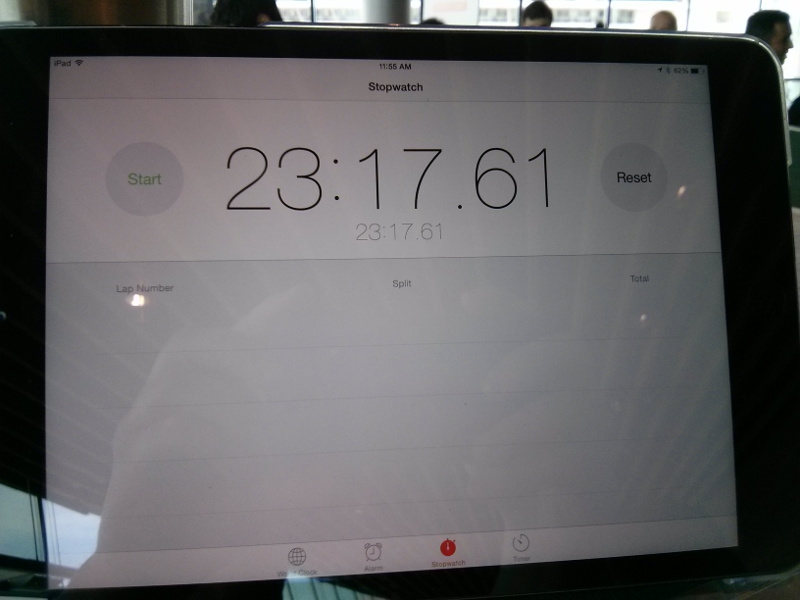
Wall-clock time for SUSE OpenStack Cloud
These two results wouldn't have been possible without the help of Tom and Ralf, but also without the whole SUSE OpenStack Cloud team that works on a daily basis on our product to improve it and to adapt it to the needs of our customers. We really have an awesome team (and btw, we're hiring)!
For reference, three other contestants succeeded in deploying OpenStack, with the fastest of them ending at 58 minutes after bonuses/penalties. And as I mentioned earlier, there were even more contestants (including some who are not vendors of an OpenStack distribution), which is really good to see. I hope we'll see even more in Tokyo!
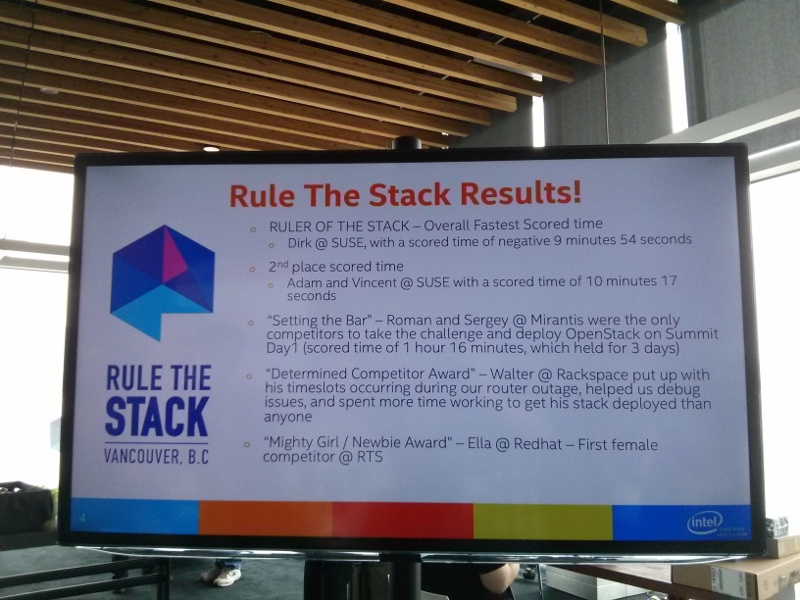
Results of the Rule the Stack contest
Also thanks to Intel for organizing this; I'm sure every contestant had fun and there was quite a good mood in the area reserved for the contest.
Update: See also the summary of the contest from the organizers.
Happy Towel Day! - or: How to DoS an open source project
Happy Towel Day!
I know I'm a bit late for the people living in germany, but it's still early enough for those living on the other side of the planet ;-) - especially for the other AppArmor developers!
Yesterday and today, I sent a flood of patches to the AppArmor mailinglist. You can easily see this as a (productive) DoS attack because AppArmor has a policy that every patch must be reviewed within a week...
Including some patches from the last days that didn't get a review yet, I have the answer - 42 patches pending for the AppArmor utils :-)
The biggest patches move the handling of change_profile and rlimit rules into classes and add tests for them. Another set of patches starts to unify the code of aa-logprof and aa-mergeprof (and fixes some bugs while doing that). The patch flood also contains some small bugfix and cleanup patches.
I'm quite sure the other developers will need some time to review all those patches *g*
If you are interested what exactly I changed, have a look at the AppArmor mailinglist archive and check my mails with the [patch] prefix.
For those who are more interested in statistics, here's the diffstat of my patch flood:
 /aa-mergeprof                         |  517 +++++++++++++---------------------
 /apparmor/aa.py                       |  363 +++++++++--------------
 /apparmor/regex.py                    |    7
 /apparmor/rule/__init__.py            |   41 ++
 /apparmor/rule/capability.py          |   11
 /apparmor/rule/change_profile.py      |   19 +
 /apparmor/severity.py                 |   13
 /apparmor/tools.py                    |   11
 /test/minitools_test.py               |   11
 /test/test-aa.py                      |   29 +
 /test/test-baserule.py                |    5
 /test/test-capability.py              |   32 ++
 /test/test-change_profile.py          |   18 +
 /test/test-severity.py                |   25 -
 utils/aa-audit                        |    1
 utils/aa-cleanprof                    |    1
 utils/aa-complain                     |    1
 utils/aa-disable                      |    1
 utils/aa-enforce                      |    1
 utils/aa-mergeprof                    |   50 ++-
 utils/apparmor/aa.py                  |   34 --
 utils/apparmor/regex.py               |   10
 utils/apparmor/rule/__init__.py       |    6
 utils/apparmor/rule/capability.py     |   14
 utils/apparmor/rule/change_profile.py |  173 +++++++++++
 utils/apparmor/rule/network.py        |   16 +
 utils/apparmor/rule/rlimit.py         |  265 +++++++++++++++++
 utils/apparmor/severity.py            |    4
 utils/apparmor/tools.py               |    7
 utils/test/common_test.py             |   22 +
 utils/test/minitools_test.py          |   25 -
 utils/test/test-aa.py                 |   55 +++
 utils/test/test-baserule.py           |    4
 utils/test/test-capability.py         |   46 ---
 utils/test/test-change_profile.py     |  443 +++++++++++++++++++++++++++++
 utils/test/test-example.py            |    4
 utils/test/test-network.py            |   17 +
 utils/test/test-rlimit.py             |  468 ++++++++++++++++++++++++++++++
 utils/test/test-severity.py           |  201 ++++---------
 39 files changed, 2183 insertions(+), 788 deletions(-)
Install ddclient on your openSUSE Raspberry Pi
1. First of all, install the program.
2. Create the confing file
with the following content
timeout=10
syslog=no # log update msgs to syslog
#mail=root # mail all msgs to root
#mail-failure=root # mail failed update msgs to root
pid=/var/run/ddclient.pid # record PID in file.
ssl=yes # use ssl-support. Works with
# ssl-library
use=if, if=eth0
server=freedns.afraid.org
protocol=freedns
login=login_name
password=the_password
somedomain.mooo.com
Change the ones that are in bold letters.
3. Start the service
Reboot