
Echoes from oSC’14: state of Factory and openQA

There has a been a lot of work going on regarding the stabilization of Factory. It is still ongoing process. We have a lot of submissions, Factory is moving really fast and was hard to keep stable. Over the time, there were more and more checks added to the process to make Factory more stable and usable in everyday life. Last of them being added right now are rings and openQA. You can learn more about that in the talk by our release manager coolo. It will also allow you a quick peek behind the curtain on what future will bring.
In that future, one of the core roles in making Factory stable will be played by openQA. As such it got quite some attention during openSUSE Conference 2014 in Dubrovnik. Stable Factory will not happen by itself, it need quite some work. Currently openQA is under heavy development to match the new needs. You can help improving it! The work is being coordinated in a progress.o.o project, the sources are available in a Github’s organization and there is even a talk to introduce you to the world of openQA development 
At some point, when openQA gets integrated well enough, users will be able to enjoy “almost” bug free Factory as a rolling distro. How bugfree it will be will depend on our test coverage of the distribution. What is the current state? We have basics pretty well covered, but still sometimes existing tests break and sometimes we miss more tests. If you want to help with making Factory better tested, you can get openQA running locally and start writing tests for stuff that matters to you! During a nice workshop in openSUSE Conference, Ludwig Nussel trained some geekos on how to get a local openQA running and start writing tests. Luckily, workshop was recorded so even if you missed the conference, you can watch it and start writing tests. New tests are welcome, although due to performance reasons (we want openQA to finish at some point, right?), not everything might get run every time. Even though, you can always run your own openQA instance for testing stuff that you care about and reporting to bugzilla!
Looks like there is a bright future in front of us with stable well tested Factory continually rolling forward. There is plenty of work to be done to achieve this, but progress made so far is starting to show results and we will approach the final goal faster as we get more people involved.

 Member
 ademmer
Bash: Verzeichnisse nach Größe sortieren

Nidal 2014 y streaming de vídeo a Youtube con Linux
Este año le estaba haciendo poco ó ningún caso a las cajas nido de la terraza y a sus webcams, entre otras cosas porque en años anteriores la crianza de los gorriones que las habitan suele ser un rotunda fracaso.
Pero no un fracaso extraordinario, sino un fracaso común y corriente.Y es que los gorriones normalmente ponen 5-6 huevos, nacen todos y van muriendo hasta quedar 1 ó 2 el día que toca salir del nido. De esos 1 ó 2, excepcionalmente, uno sobrevive al primer año. Si prestáis un poco de atención en estas fechas veréis que raramente a un hembra la siguen más de 1 ó 2 volantones, 3 con mucha suerte.
Eso, más o menos es lo normal (al menos es lo que yo llevo observando), lo anormal es que llegue el día en que van a echar a volar y haya en el nidal cinco polluelos (como ocurre actualmente en uno de los nidales de casa) y en un más que sorprendentemente buen estado de salud.
Así es que para celebrar el inminente acontecimiento he conectado la cámara al streaming de Youtube como os indico a continuación y de paso estreno la herramienta de Eventos en directo que apenas he tenido tiempo de probar.
Eventos en vivo
Desde hace un año (aprox. en España) Youtube ofrece la posibilidad de crear lo que ellos llaman Eventos en directo, es decir conectar y ver ( o insertar en tu página ) grabaciones que se están produciendo en ese instante, en tiempo real (o casi). Muy usado para eventos deportivos y conciertos pero también para la retransmisión de webcam y creación de vídeotutoriales (conectas la webcam y le explicas a alguien el método para hacer tal ó cual).
Existen ya varios servicios de este estilo que se han popularizado mucho en internet ( Ustream.tv o Justin.tv ) muy usados actualmente para la emisión en directo de manifestaciones o escraches e imposibilitando de esta manera el secuestro policial del material grabado ya que este se difunde públicamente en el mismo momento que se genera, vaya lo que viene siendo un canales de información en vivo y en directo de cualquiera acontecimiento público.
He probado los tres sitios comentados para la emisión de eventos en directo y creo que me voy a quedar con el de Youtube por varios motivos: Es el más popular, conocido y que llega a más gente. Dispone de soporte para gran número de navegadores y plataformas. Permite un control más personalizado de la publicidad que el canal inserta (normalmente) al inicio de la retransmisión.
Creación de eventos
Los tres sitios que he probado hasta ahora (Justin.tv, Ustream.tv y Youtube) son gratuitos. Todos insertan publicidad (normalmente al principio). Los dos primeros ofrecen la posibilidad de retirar la publicidad mediante pago del servicio. En Youtube en cambio podéis desactivar la inserción de publicidad en vuestros vídeos de forma gratuita (aunque creo que la cuenta tiene que reunir algunas condiciones previas para poder hacerlo).
Todos generan archivos de vídeo de lo emitido desde el canal que van quedando almacenados en el servidor. Todos disponen de aplicaciones/métodos para embeber los eventos en tu página web. Todos disponen de métodos de recepción del flujo de vídeo desde un terminal Linux y todos disponen de su propia aplicación web (normalmente desarrollada en Flash Macromedia) que nos permite hacer lo mismo consumiendo muchos más recursos de nuestro ordenador y obligándonos a mantener abierta la ventana del navegador mientras dure la retransmisión.
Para crear un evento en vivo en Youtube, dirígete a la página de Eventos en vivo y logéate si no lo estás. La cuenta de Youtube desde la cual quieras retransmitir debe estar confirmada (normalmente mediante SMS a tu móvil) antes de poder crear el evento, si la ya tienes confirmada llegarás a una página como esta:
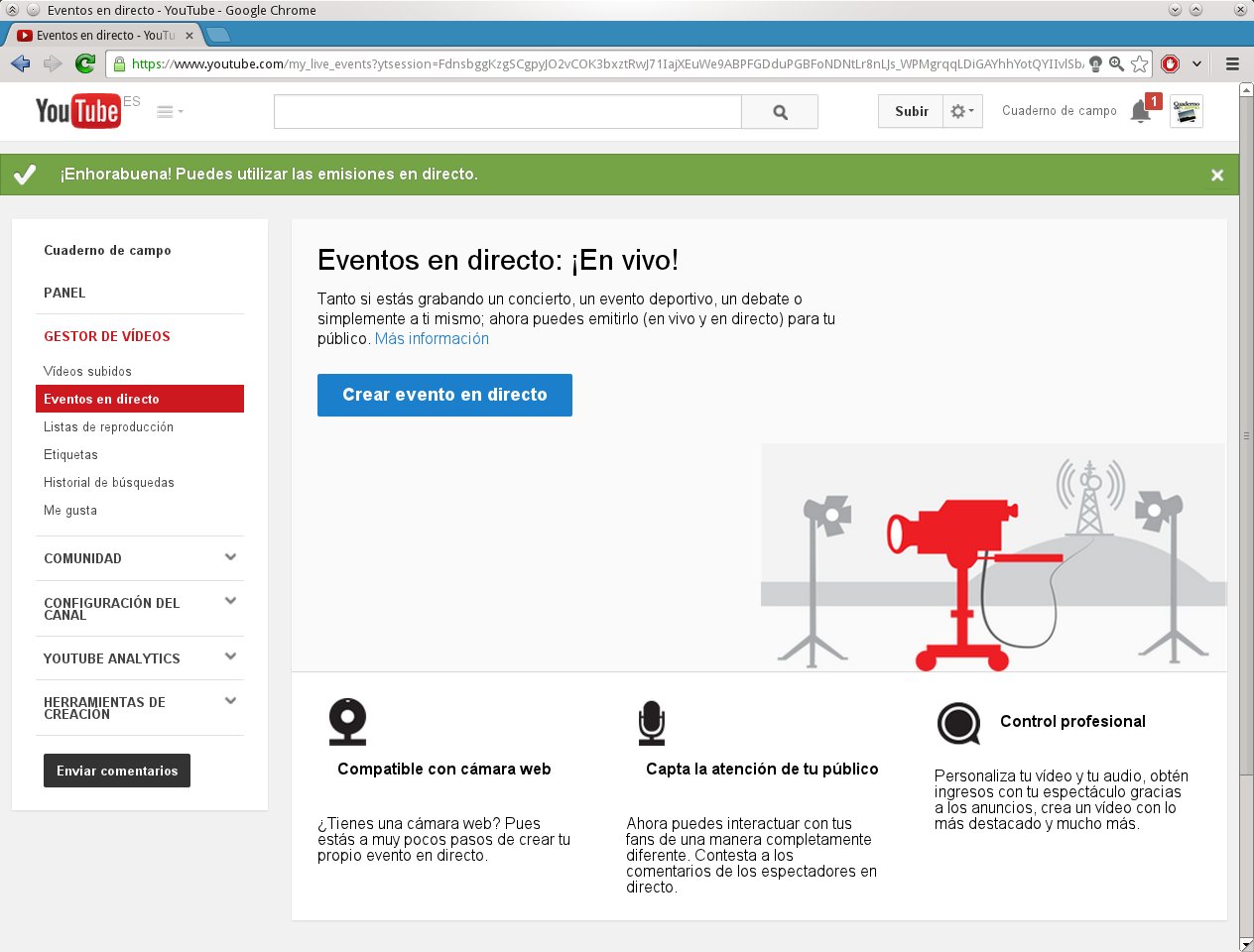
Pulsa crear evento para entrar en la página de configuración. Marca la casilla de abajo “Acepto los términos…” y (IMPORTANTE) la casilla de abajo a la derecha ” TIPO > Personalizar (más opciones de codificación) “.
Observa la hora de inicio del evento. Youtube permite el inicio de eventos en fracciones de 30 min. (9:00, 9:30, 10:00, … ). El inicio de tu evento debería ser posterior al momento en que empieces a enviar datos, es decir: cuando el evento empiece tu ya deberías llevar 3-4 minutos enviando flujo de vídeo. De esta manera se genera una caché que evita que la retransmisión sufra demasiados “parones”.
Pulsa Crear Evento.
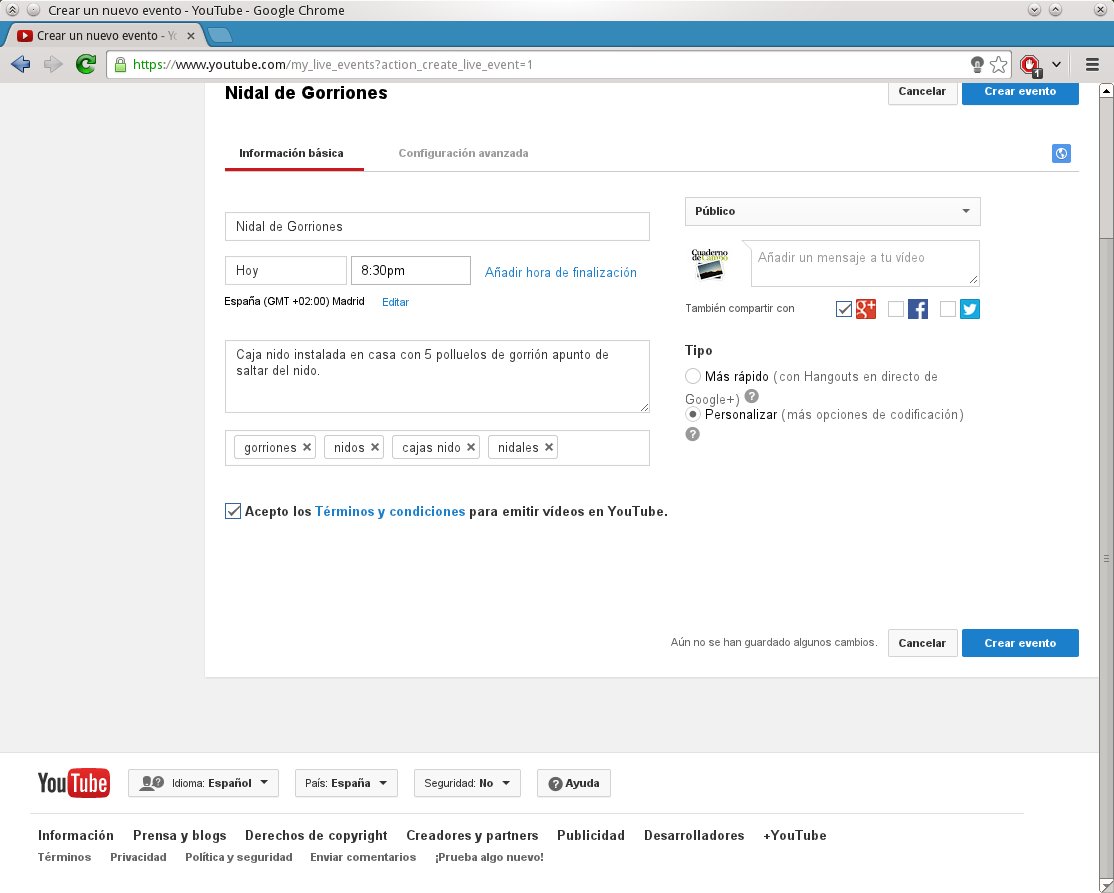
Entrareis en la página de configuración avanzada del evento donde debéis especificar la calidad de la “ingestión” (creo que “inyección” habría resultado menos digestivo). Para una retransmisión casera standar os aconsejo usar la Ingestión básica > 300kbs – 700Kbps (240px).
Si queréis o necesitáis eventos con muy buena calidad podéis aumentarla gradualmente hasta los HD1080, claro, siempre y cuando vuestra conexión de subida lo permita.
En el desplegable Selecciona tu codificador selecciona Otros codificadores para que la página os muestre las URLs de ingestión. No compartas esta URL.
Copia el contenido de URL del servidor principal y añádele detrás Nombre de la emisión para componer una URL aprox. como
rtmp://a.rtmp.youtube.com/live2/cuaderno-de-cam-XXXX-xxxx-XXXX-xx
Esa es la dirección donde tienes que inyectar el flujo de vídeo con ffmpeg
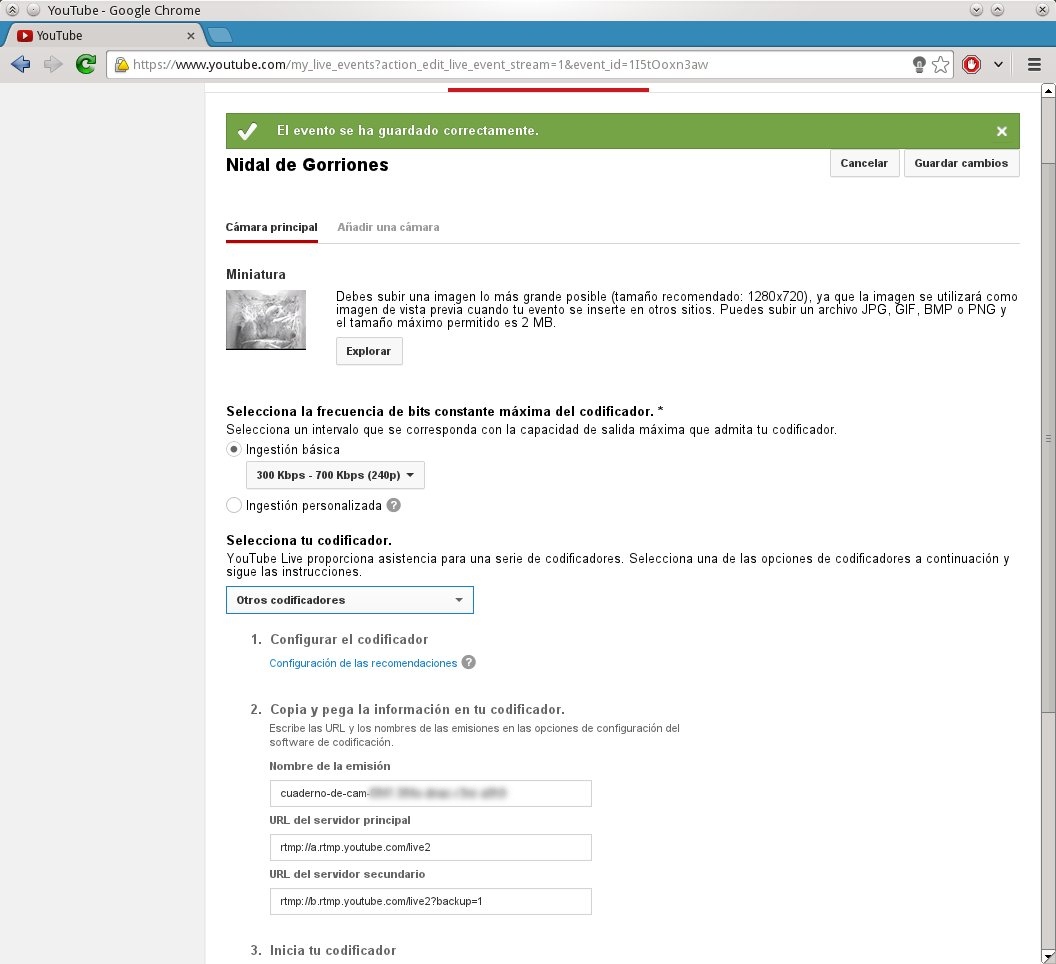
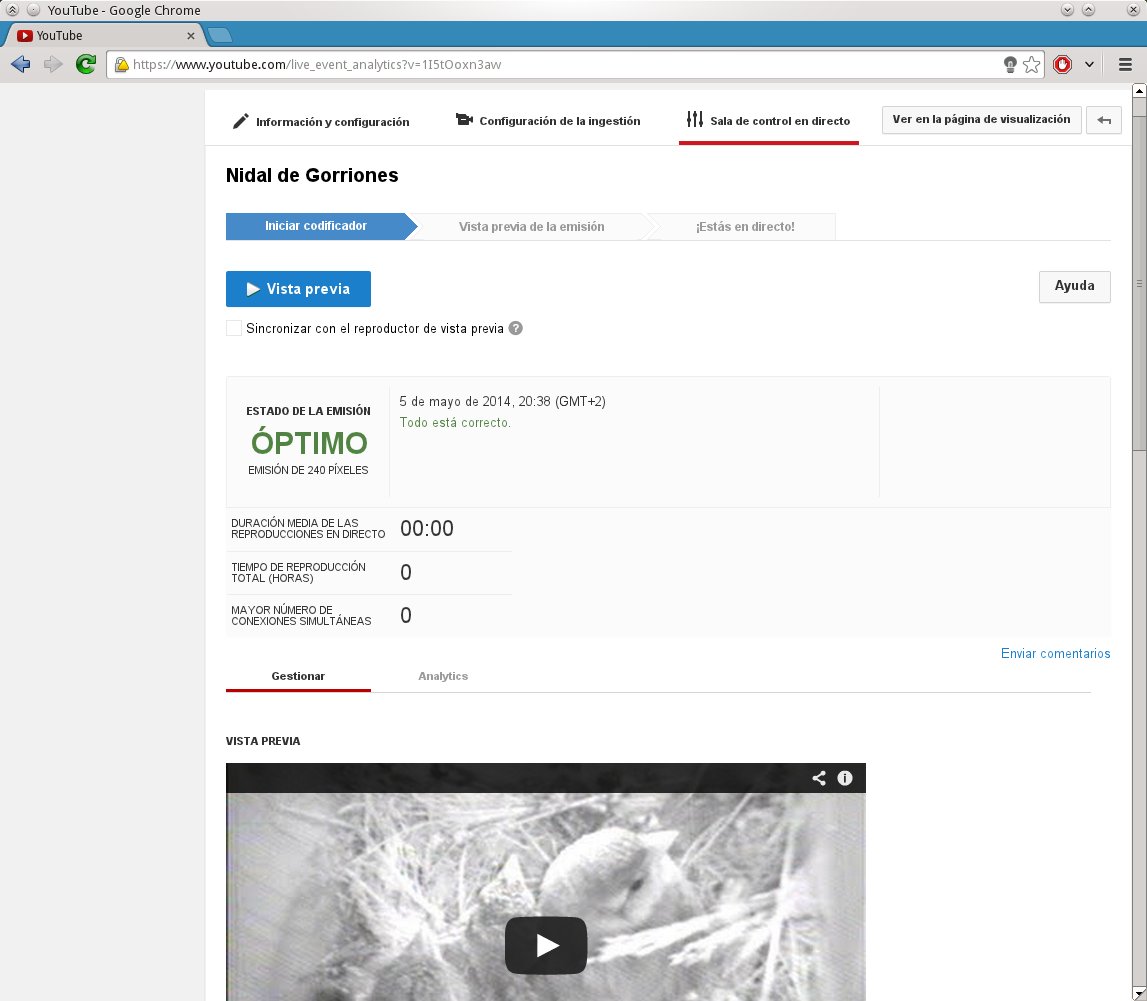
Después de guardar los cambios puedes cambiar arriba a “Sala de control en directo” desde donde la página te informa de si se está recibiendo o no el flujo de vídeo en condiciones ó los errores que hubiera (útil para depuración).
Configuración de FFMPEG
Una vez tenemos el espacio de emisión reservado en Youtube procedemos a rellenarlo con el video de nuestra webcam. Para ello con ffmpeg y usando la URL ofrecida por Youtube ( rtmp://xxxxx ) procedemos a codificar la imagen original al formato FLV, vídeo codec libx264 y audio codec MP3. La orden que estoy usando para emitir la señal del nidal de gorriones es:ffmpeg -loglevel fatal -f alsa -i default -ac 2 -f video4linux2 -i /dev/video7 -vcodec libx264 -f flv -r 15 -q 3 -b:v 320k -s 320x240 -acodec libmp3lame -ar 44100 -ab 128k -threads 0 -bufsize 64k -force_key_frames 0:00:01 "rtmp://a.rtmp.youtube.com/live2/cuaderno-de-cam-xxxx_xxxx_xxxx_xxxx"
En las primeras pruebas deberías quitar la opción -loglevel fatal para depurar y buscar posibles errores. Youtube es bastante pelmazo con la calidad del audio y aunque el sonido del nidal no es ninguna maravilla emite errores si le reduzco la calidad por debajo de 128k, 64k o similar.
Todos estos sistemas de streaming de vídeo también suelen dar muchos problemas si tratáis de emitir un vídeo SIN audio. Si por cualquier motivo no queréis insertar sonido os aconsejaría no anularlo sino emitir una pista vacía, por ejemplo cambiando –i default de ALSA por -i /dev/zero, de lo contrario vais a tener problemas casi seguro.
Una vez empecéis a enviar el flujo de vídeo la página de control de la emisión en Youtube os debería mostrar un mensaje del estado de emisión OPTIMO ó en su defecto información relevante sobre el origen del fallo. Si todo va como debería, desde dicha página podéis dar al PLAY para empezar la retransmisión (siempre y cuando la hora de inicio se haya cumplido) y para compartir la URL del evento.
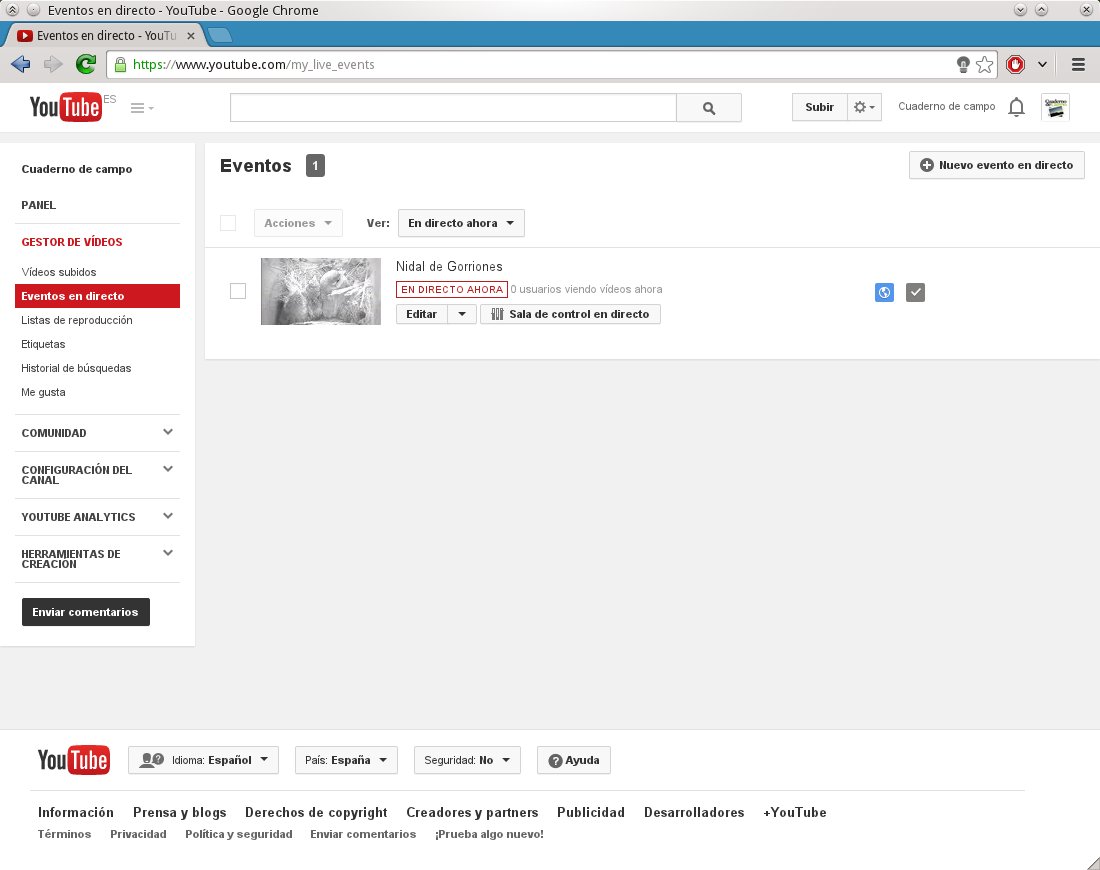
Respetando los parámetros de configuración deberíais poder hacer la emisión con cualquier otro programa que permita retransmitir vídeo a un servidor RTMP, he preferido FFMPEG porque es mucho más liviano y lo conozco algo mejor pero igualmente VLC podría seros más cómodo.
NotaEn el tiempo en que escribía el apunte parte de los polluelos del nidal han echado a volar. Ahora solo quedan 2. Pero como se puede rebobinar y ver las grabaciones de hace 4 horas podéis que no miento y había 5 polluelos. ;)

The Week that was oSC14

Building docker images with KIWI
I’m pleased to announce Marcus Schäfer has just made possible to build docker images with KIWI.
For those who never heard about it, KIWI is a tool which creates Linux systems for both physical and virtual machines. It can create openSUSE, SUSE and other types of Linux distributions.
Update: I changed the required version of kiwi and the openSUSE 13.1 template. Kiwi just received some improvements which do no longer force the image to include the lxc package.
Why is this important?
As you might know Docker has already its build system which provides a really easy way to create new images. However these images must be based on existing ones, which leads to the problem of creating the 1st parent image. That’s where KIWI comes to the rescue.
Indeed Kiwi can be used to build the openSUSE/SUSE/whatever docker images that are going to act as the foundation blocks of other ones.
Requirements
Docker support has been added to KIWI 5.06.87. You can find this package inside of the Virtualization:Appliances project on OBS.
Install the kiwi and the kiwi-doc packages on your system. Then go to the
/usr/share/doc/packages/kiwi/examples/ directory where you will find a simple
openSUSE 13.1 template.
Building the system
Just copy the whole /usr/share/doc/packages/kiwi/examples/suse-13.1/suse-docker-container
directory to another location and make your changes.
The heart of the whole image is the config.xml file:
<?xml version="1.0" encoding="utf-8"?>

<image schemaversion="6.1" name="suse-13.1-docker-guest">
  <description type="system">
    <author>Flavio Castelli</author>
    <contact>fcastelli@suse.com</contact>
    <specification>openSUSE 13.1 docker image</specification>
  </description>
  <preferences>
    <type image="docker" container="os131">
      <machine>
        <vmdisk/>
        <vmnic interface="eth0" mode="veth"/>
      </machine>
    </type>
    <version>1.0.0</version>
    <packagemanager>zypper</packagemanager>
    <rpm-check-signatures>false</rpm-check-signatures>
    <rpm-force>true</rpm-force>
    <locale>en_US</locale>
    <keytable>us.map.gz</keytable>
    <hwclock>utc</hwclock>
    <timezone>US/Eastern</timezone>
  </preferences>
  <users group="root">
    <user password="$1$wYJUgpM5$RXMMeASDc035eX.NbYWFl0" home="/root" name="root"/>
  </users>
  <repository type="yast2">
    <source path="opensuse://13.1/repo/oss/"/>
  </repository>
  <packages type="image">
    <package name="coreutils"/>
    <package name="iputils"/>
  </packages>
  <packages type="bootstrap">
    <package name="filesystem"/>
    <package name="glibc-locale"/>
    <package name="module-init-tools"/>
  </packages>
</image>
This is a really minimal image which contains just a bunch of packages.
The first step is the creation of the image’s root system:
kiwi -p /usr/share/doc/packages/kiwi/examples/suse-13.1/suse-docker-container \
     --root /tmp/myimage
The next step compresses the file system of the image into a single tarball:
kiwi --create /tmp/myimage --type docker -d /tmp/myimage-result
The tarball can be found under /tmp/myimage-result. This can be imported
into docker using the following command:
docker import - myImage < /path/to/myimage.tbz
The image named myImage is now ready to be used.
What’s next
In the next days I’ll make another blog post explaining how to build docker images using KIWI and the Open Build Service. This is a powerful combination which allows to achieve continuous delivery.
Stay tuned and have fun!

GSoC 2013 with Gnome
In summer 2013, Tomasz Maczynski worked on Banshee as a GSoC student, and he did great work! He developed a SongKick extension, and a FanArt.tv one. Both were worked on in the banshee-community-extensions repository. They work very well but there are a few downsides about this work, which we didn't have time to fix:
- The FanArt.TV extension depended on some Banshee API that hasn't been added yet to mainline. The patch to add it lived in bugzilla for a while, in a bug about a feature request to have images in the artist list. The reason for not committing the patch even if I had already reviewed it was because I was wary about it, since it allowed FanArt.TV to hook its ArtistList widget, but wouldn't be really extension friendly. What I mean is that if there was other extension that wanted to also attach a different ArtistList, it would conflict with FanArt extension when enabled at the same time. The ideal thing would be to expose this functionality as an extension point, so that if more than one extension attached a new kind of ArtistList widget, the user could switch between the two from the UI when both extensions were enabled. When I mentioned this in the bug, awesome Banshee-extension developer Frank Ziegler jumped in and created the extension interface necessary for this. I've been reviewing the patches in the last days (couldn't do it before because I really wanted to release 2.9.1 and 2.6.2 versions before landing this work) and I'll likely commit them this week.
- The FanART.TV extension uses Hyena's ListView widget to show images. This is the main widget that Banshee uses for showing the tracks in the main view. It's a great custom widget because it allows very fast rendering of data coming from an SQLite database, but it wasn't optimized for rendering images. The main disadvantage of it is in the case that images have different heights, because the ListView will just allocate a height for each row equal to the tallest of the images used. This means that the widget shown could be a bit ugly if you have many artists in your library and some of them have very differently sized images. Tomasz worked on this a bit, but couldn't finish it because of lack of time (we have a WIP patch). But fortunately this will be fixed this summer!
- Both SongKick and FanArt.TV don't implement caching yet. This is not only important to save bandwidth from the point of view of the client, but also from the point of view of the server! (We could even violate their ToS if we didn't implement this, IIRC.) Fortunately this will be fixed this summer!
- SongKick extension provides several ways to discover gigs: searching by city, by artist, etc. It even suggests you artists extracted from your library that composed songs which you marked with a high rating! But IMO this is not enough, SongKick extension should even be smarter and query ahead of time looking for your favorite artists *and* near your area (doing the latter via GeoLocation). Fortunately this will be fixed this summer! (and we will use Gnome infrastructure for it)
That is all folks! Stay tuned for the next blog post, which will explain the plan for GSoC 2014 (this year I get to mentor three students!).
Belated Gnome .NET Hackfest post
- I got my house refurbished in the last months, which has been such a long planning endeavour, and a real stressful PITA while it was being done.
- Before the above started, and after it was finished, I had to move, so that's 2 moves! (I hate moving)
- I've been kind of busy in regards to Gnome-related contributions: we released Banshee 2.6.2, GStreamer-Sharp 0.99.0, Banshee 2.9.1, and a big etcetera (including pre-mentoring for GSoC! more about that in a subsequent post).
- Hylke Bons, sparkleshare creator, Red Hat designer.
- Mirco Bauer, smuxi creator and debian developer (mono packager).
- Jo Shields, debian developer (mono packager), Collabora sysadmin.
- Robert Nordan, Pinta contributor.
- Jared Jennings, Tomboy contributor.
- Stephen Shaw, ex-Novell coworker (build developer), and currently at Xamarin. (Yes, I was Stephen's team-mate when at Novell, but had never met him in person!)
- Stefan Hammer, Tomboy contributor and hackfest local-host.
- Timo Dörr, Tomboy and Banshee contributor, GSoC student.
- Stephan Sundermann, GSoC student for GStreamerSharp and Bindinator.
(BTW I didn't include the awesome Bertrand Lorentz, fellow Banshee co-maintainer and GtkSharp gatekeeper, in the list, because I had already met him before, it wasn't my first time!).
And it was with the latter Stephan (not Stefan) the one I ended up spending more time with, because we decided to work on the new GStreamerSharp bindings since the 2nd day of the hackfest (the 1st day I mainly worked with Bertrand to release Banshee 2.9.0, our first Gtk3 compatible release, which he already blogged about).
So what was special about this work?
- GStreamerSharp 0.10.x releases were not compatible with GStreamer 1.x releases, so this had to be fixed soon. However, much of the architecture of this old version of the bindings used many manually crafted binding code.
- Stephan, by using the new Bindinator (a GObjectIntrospection metadata parser that outputs GAPI metadata, that allows generating .NET bindings, created by Andreia Gaita) in his GSoC, created a better foundation for the new bindings.
- He targetted GI metadata from GStreamer 1.0 and 1.2 versions (the jump from 0.10 to 1.0 was a big and not easy leap, since lots of APIs were modified and deprecated).
- We needed to polish them enough to make Banshee be able to consume them without glitches.
Main kudos should go to him though. I mainly added Banshee expertise, gtk-sharp contributing expertise, and lots of motivation (or at least I thought).
We had a big success: a Banshee playing audio with GStreamerSharp. Unfortunately video playback was freezing. But some months later after the hackfest we fixed it, and we released first GStreamerSharp 1.0 preview, which we called "0.99.0", and we released the first Banshee release that depends on this work: 2.9.1.
And it was my first time in Austria (and in Vienna). Overall a great experience, and I need to mention our awesome sponsors:





Após 1 ano sem postar absolutamente nada, precisei "forçar" um pouco as coisas: - Tirei uma certificação (ISTQB CTFL); - Parei um pouco o desenvolvimento e estou me concentrando em criar um processo p/ a equipe de teste na empresa onde trabalho.
GNOME 3.12 arrives to openSUSE Tumbleweed, and it is fabulous
Elegance

Shell Function

Online Accounts
- Google has not changed much, though it does seem to have gained support for Google Cloud Print. You can still access your Drive documents in the GNOME Documents application.
- Windows Live has seen massive improvements. You can now access your OneDrive documents through the GNOME Documents application, and it will also set up your email account (outlook.com for example) with Evolution mail. Most impressive though is that it actually works reliably and consistently.
- Pocket formerly known as Read it Later has also been added, though it currently does very little. So far only 'Videos' makes use of Pocket as a plugin to play your Pocket saved videos. Developers say they will add integration to Epiphany or 'Web' in a future release of the browser.
- Flickr is included and is used by the 'Photos' application. I read somewhere that it can be used in some special way for desktop wallpapers.
- IMAP and SMTP accounts can be set up directly from here for use with Evolution mail.
- I believe the above are the only truly new notables to 3.12, I encourage you to take a look and see if you discover something new. I can revise this later.
Software
- gnome-software is the app-store style interface (PackageKit frontend) in upstream GNOME. This is not installed by default in openSUSE. Besides installing software, the new user defined application folders in the shell are set up by this program. It can be installed in openSUSE, but appears to be broken as it repeatedly asks for authentication for setting a network proxy. However, I have no need of application folders since I merely search for whatever I want and find it's package management capability massively redundant in light of YaST and our own Software Search portal.
-
Gedit is the default GNOME text editor since time immemorial. In 3.12 it has received a massive interface overhaul following the minimalist UI philosophy of GNOME 3. Despite the minimalistic new design overhaul, it appears that none of its familiar functionality has been removed. I like it.
- Nautilus or 'Files' as it's labeled appears to have changed little, excepting that you may now connect to servers straight from the app menu on the activities bar. For me, this is a very welcome change since the last time I needed this functionality it had been entirely removed into a separate module that needed to be invoked from the CLI.
- gnome-photos is not installed by default in openSUSE as the default photo manager, that distinction goes to the revered Shotwell. Photos however is a simple and elegant photo manager, now with Facebook integration through the GNOME Online Accounts. Likewise it also supports Flickr via the same mechanism.
- Totem or 'Videos' as it is now labeled has seen a massive cosmetic makeover. Under the hood though, it sees a new plugin architecture for online video services. Notably, Online Accounts has support for Pocket and any saved videos there will be accessible in Videos.
- Epiphany or 'Web' as it is labeled now has seen major changes both under the hood and cosmetically. The minimalistic UI gets out of your way enabling your content. Each tab now has it's own process, and so when one page crashes the rest of the browser will not be affected. In my testing of it, I've found it to be swift and reliable like no other non-mainstream browser before. I can for once see people actually using this browser. It also enables with a quick menu option the ability to save a page as a Web App that will then be added to your applications, launchable immediately from the shell. Support for Pocket should be added in a later version. When Epiphany is installed, it enables the ability to perform internet searches directly from the shell.
- Polari is an early 'preview' application. Polari is the new GNOME upstream default IRC client. XChat for GNOME is shipped by default in openSUSE. Polari however is a beautiful and easy to use client, which immediately became my new favorite. Polari has excellent integration with the GNOME Shell, using Online Accounts and the notification and chat frameworks allowing you to see pending private messages in the lock screen, and responding to them directly from the shell notifications.
- gnome-logs is a new system log viewer for GNOME. It is not shipped by default in openSUSE and is redundant since we have a YaST module for this purpose. It also appears that it does not yet work under openSUSE, likely due to wrong permissions. Though 'Logs' may not be an important application for us in openSUSE, it represents a significant step forward for less experienced users in any GNOME distribution since it makes it much easier to fulfill the request, "Ok, in order to help you I'm going to need a couple system logs."