
 Member
 yaloki
openSUSE 12.1 Beta testing
So it's openSUSE 12.1 Beta 1 testing time !
Before filing new bugs, make sure you search for existing bugs first.
If you're as annoyed by Bugzilla's search interface as I am, you can use this page to search for 12.1 Beta 1 bugs: just type in keywords and done.
The page also has an opensearch descriptor in order to add 12.1 Beta bug search to the list of search engines in your favorite browser.

Learning about Connect openSUSE
In the wiki page about it there is more about technical details then about social aspects, which is not surprising:
- Guys that created it are technicians, software developers, that know how to handle code and have a lot to say about it, but they seldom have great popularization skills, like marketing guys. I like this way, as being popular in the software world doesn't relate always to a good code,
- Wiki article was written when Connect was in initial stages without many add on features (plugins) it has now, so it is time to take a new look at it.
- Comment on existing layout and features.
- Propose new ones, specially if you, or someone that you know, can code and come up with working solution, or at least something that is easy to adjust to Connect.

Terrible Vagrant/Virtualbox performance on Mac OS X
I recently started using Vagrant to test our auto-provisioning of servers with Puppet. Having a simple-yet-configurable system for starting up and accessing headless virtual machines really makes this a much simpler solution than VMware Fusion. (Although I wish Vagrant had a way to take and rollback VM snapshots.)
Unfortunately, as soon as I tried to really do anything in the VM my
Mac would completely bog down. Eventually the entire UI would stop
updating. In Activity Monitor, the dreaded kernel_task was taking
100% of one CPU, and VBoxHeadless taking most of another. Things
would eventually free up whenever the task in the VM (usually apt-get install or puppet apply) would crash with a segmentation fault.
Digging into this, I found an ominous message in the VirtualBox logs:
AIOMgr: Host limits number of active IO requests to 16. Expect a performance impact.
Yeah, no kidding. I tracked this message down to the “Use host I/O cache” setting being off on the SATA Controller in the box. (This is a per-VM setting, and I am using the stock Vagrant “lucid64” box, so the exact setting may be somewhere else for you. It’s probably a good idea to turn this setting on for all storage controllers.)
When it comes to Vagrant VMs, this setting in the VirtualBox UI is not very helpful, though, because Vagrant brings up new VMs automatically and without any UI. To get this to work with the Vagrant workflow, you have to do the following hacky steps:
- Turn off any IO-heavy provisioning in your Vagrantfile
-
vagrant upa new VM -
vagrant haltthe VM - Open the VM in the VirtualBox UI and change the setting
- Re-enable the provisioning in your Vagrantfile
-
vagrant upagain
This is not going to work if you have to bring up new VMs often.
Fortunately this setting is easy to tweak in the base box. Open up
~/.vagrant.d/boxes/base/box.ovf and find the StorageController node.
You’ll see an attribute HostIOCache="false". Change that value to
true.
Lastly, you’ll have to update the SHA1 hash of the .ovf file in
~/.vagrant.d/boxes/base/box.mf. Get the new hash by running
openssl dgst -sha1 ~/.vagrant.d/boxes/base/box.ovf and replace the
old value in box.mf with it.
That’s it. All subsequent VMs you create with vagrant up will now
have the right setting.
Update
Thanks to this comment on a Vagrant bug report you can enable the host cache more simply from the command-line for an existing VM:
VBoxManage storagectl <vm> --name <controllername> --hostiocache on
Where <vm> is your vagrant VM name, which you can get from:
VBoxManage list vms
and <controllername> is probably "SATA Controller".
The VM must be halted for this to work.
You can add a section to your Vagrantfile to do this when new VMs are created:
config.vm.provider "virtualbox" do |v|
    v.customize [
        "storagectl", :id,
        "--name", "SATA Controller",
        "--hostiocache", "on"
    ]
end
And for further reading, here is the relevant section in the Virtualbox manual that goes into more detail about the pros and cons of host IO caching.

Target ARM Hardware
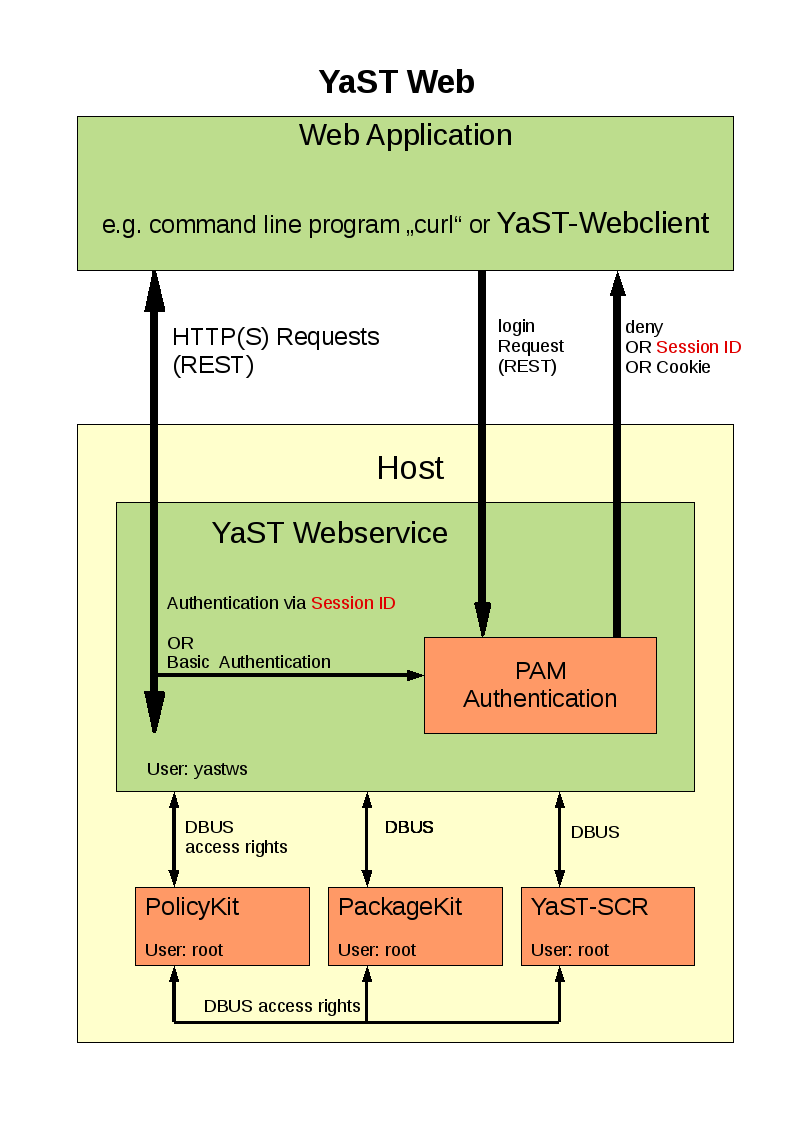
Знакомьтесь, YaST... WebYaST!
- Удаленное управление системой, используя только браузер
- Отсутствие необходимости экспертных знаний по настройке системы
- Широкие возможности по настройке системы
- Возможность легкой интеграции сторонних модулей
- Широкие возможности по брендированию
- REST-интерфейс
- Базовые настройки сети
- Базовое управление пользователями
- Установка и изменение пароля для root-а
- Настройка уведомлений администратора, включая SMTP
- Запуск / остановка служб и сервисов
- Настройки часового пояса, даты и времени
- Обзор статуса системы (используемая / свободная память, использование диска, сетевой монитор и пр.)
- Просмотр основных Логов
- Установка обновлений и патчей
- Удаленная перезагрузка системы


1001 bugs - or: the golden rules of bad programming

If you missed my talk at the openSUSE conference or want to see the slides (including notes) again - here we are:
1001 bugs - or: the golden rules of bad programming as PDF
(If you need an editable LibreOffice file, just drop me a note.)
FOSDEM 2012: call for devrooms
So here we go again, FOSDEM, the largest and coolest open source contributor event in Europe is prepping up for its 2012 edition.
I've just opened the Call for Developer Rooms, the deadline for submissions is 2011-10-27.
Other call-for-stuffs will open very soon (lightning talks, stands, main tracks).
Discovering Connect openSUSE
Connect openSUSE is a hub helping people with different interests within openSUSE to find each other and connect in interest groups. There is relatively old wiki article about Connect that was created in very early stages, and talks more about technical aspects and some plans then social benefits that we can have from place like Connect.
Group is meant as a place where we can publish events and group contact information in one place. It will make easy for new openSUSE users that look for some activity, or want to give idea how to improve wiki, to find and contact us by simply typing "wiki" in the Connect search.
It is idea that is just started so we will for sure try to improve on it.
Here is announcement to opensuse-wiki mail list.

Chromium browser got accepted into openSUSE:Factory
After maintaining the Chromium browser in the openSUSE Contrib repositories, the last few weeks things got accelerated and as of this moment the Chromium browser has become officially part of openSUSE:Factory (the future 12.1).

Greek openSUSE community, Translation of openSUSE Weekly news in Greek (issue 193)

Hello everyone!
I am very pleased to announce the new issue (193) of openSUSE Weekly News in Greek.
In this issue you will read about:
* JosPoortvlieet: openSUSE Conference Fun!
* Andreas Jaeger: openSUSE Conference 2011 is over – Photos uploaded
* Nelson Marques: GNOME:Ayatana – Looking for contributor…
* Petr Mladek: LibreOffice 3.4 available for openSUSE
* Linux Journal/Joey Bernard: Parallel Programming Crash Course
As well as many interesting news about openSUSE and useful advice, which can make our lives easier.
Enough said though... Read more at: http://own.opensuse.gr, http://el.opensuse.org/Weekly_news or www.os-el.gr
We are always looking forward to receiving your comments as well as suggestions regarding things you would like to read about in our next issue.
The openSUSE Weekly News is being translated in the Greek language from issue #150. You can read older translated issues here: http://el.opensuse.org/Κατηγορία:Weekly_news_issues
Enjoy it!
Efstathios Agrapidis (efagra)