
 Member
 baltolkien
Las mejoras de aplicaciones en Plasma 6.5
Hace ya muchas semanas que fue lanzado el nuevo entorno de escritorio de la Comunidad KDE y todavía no he tenido tiempo para difundirlas todas como se merece. Sigo hoy la serie con las mejoras de los plasmoides de Plasma 6.5, un extenso repaso a todo el gran trabajo del equipo de desarrolladores de KDE.
Las mejoras de aplicaciones en Plasma 6.5
La distinción entre los diferentes equipos de desarrollo de la Comunidad KDE es complicada ya que hay aplicaciones que están tan integradas en el escritorio Plasma que el lanzamiento de éste último también conlleva mejoras en esa rama de desarrollo.
De esta forma, esta quinta versión de la sexta rama de Plasma nos ofrece estas mejoras notables, por ejemplo, en Discover, el gestor de software/tienda de aplicaciones de Plasma, que se ha centrado en el rendimiento y en las valoraciones. Deberíamos notar que Discover arranca más rápido en Plasma 6.5. Y cuando no lo es, mostrará más información sobre lo que está haciendo, de modo que pueda detectar la fuente que lo está ralentizando.
Por otra parte, Discover también ha ganado compatibilidad con las URL de tipo flatpak+https://, lo que permite que los botones «Instalar» de Flathub abran Discover automáticamente.

Por último comentar que Discover puede mostrar los controladores de hardware disponibles para instalar en los sistemas operativos que sean compatibles con esta funcionalidad.
También el Selector de emojis ha recibido mejoras (prueba a ejecutarlo con Meta+.). En esta nueva versión al abrir el selector se visualizará una página que muestra todo en lugar de en una página «Recientes» vacía.

Además, el campo de búsqueda está visible en todo momento y las búsquedas se ampliarán a todo el conjunto de emojis si no hay coincidencias en la página actual.
Por último, Spectacle, la utilidad de Plasma para realizar capturas de pantalla o grabarla en vídeo, también incluirá ahora en las grabaciones de pantalla cualquier ventana emergente que cree la ventana objetivo, ideal para crear tutoriales.
Más información: Plasma 6.5
La entrada Las mejoras de aplicaciones en Plasma 6.5 se publicó primero en KDE Blog.
Muchas cosas interesantes – Esta semana en Plasma
Es increíble el trabajo de promoción que está realizando Nate en su blog, desde hace más del tiempo que puedo recordar. Cada semana hace un resumen de las novedades más destacadas, pero no en forma de telegrama, sino de artículo completo. Su cita semanal no falla y voy a intentar hacer algo que es simple pero requiere constancia. Traducir sus artículos al castellano utilizando los magníficos traductores lo cual hará que la gente que no domine el inglés esté al día y que yo me entere bien de todo. Bienvenidos pues a » Mejoras en la interfaz de usuarios y el rendimiento«de la serie Esta semana en Plasma. Espero que os guste.
Muchas cosas interesantes – Esta semana en Plasma
Nota: artículo original en Blogs KDE. Traducción realizada utilizando Perplexity. Esta entrada está llena de novedades de la Comunidad KDE. Mis escasos comentarios sobre las mejoras entre corchetes.
¡Bienvenido a una nueva edición de Esta semana en Plasma
Esta semana hubo bastante trabajo en nuevas funciones y mejoras en la interfaz de usuario para Plasma 6.6. ¡Échale un vistazo!
Nuevas funcionalidades
Plasma 6.6.0
Ahora hay acciones globales para avanzar o retroceder 5 o 30 segundos en el medio actualmente reproduciéndose. Estas funcionan siempre que el reproductor de medios actual admita que otras aplicaciones controlen el avance mediante MPRIS. Las acciones no tienen atajos de teclado asignados por defecto, pero puedes configurarlos tú mismo. (Christoph Wolk, enlace) [Las acciones globales siempre son bienvenidas, cuanto más lejos del ratón más eficiente ].
Ahora puedes configurar el widget Lista de ventanas para que muestre su menú al pasar el ratón por encima, o para ocultar el icono y solo mostrar el nombre de la ventana activa. (Shubham Arora, enlace 1 y enlace 2)
Ahora puedes configurar el orden de los iconos mostrados en el widget Bloqueo/Cerrar sesión. (Shubham Arora, enlace)
Mejoras en la interfaz de usuario
Plasma 6.6.0
Se continuó puliendo los diálogos del portal XDG. Esta vez, el diálogo selector de pantalla y ventana se ha simplificado y mejorado aún más. (Harald Sitter, enlace)

Cancelar un pegado de algunos archivos en el escritorio de Plasma ya no produce una notificación de error innecesaria. (Nicolas Fella, enlace)
Se añadieron botones de fijar a los widgets de Navegador web y Volumen de audio, para que si los tienes en forma independiente en un panel, puedas mantener sus ventanas emergentes abiertas mientras los usas. (Alexander Lohnau y Nate Graham, enlace 1 y enlace 2) [Las chichetas para fijar widgets son más útiles de lo que parecen].

Se mejoró la usabilidad de la búsqueda usando el widget Lanzador de aplicaciones Kickoff de varias maneras: ahora puedes usar las teclas de flecha para navegar desde la vista de resultados de búsqueda de vuelta al campo de búsqueda, y los nuevos resultados de búsqueda que llegan tarde no hacen que el resaltado de selección salte. (Christoph Wolk, enlace 1 y enlace 2) [¡Navegación con teclado bien!].
Se mejoró la apariencia y usabilidad de los discos mostrados en la página de Estado S.M.A.R.T. del Centro de información. (Joshua Goins, enlace)
Limpiar el portapapeles mientras muestra un código QR de uno de los elementos ya limpiados ahora también descarta el código QR. (Fushan Wen, enlace)
El widget Menú de aplicaciones Kicker ya no muestra brevemente un mensaje diciendo «No se encontraron coincidencias» justo después de buscar cosas. (Christoph Wolk, enlace)
Se mejoró la experiencia de mover rápidamente el puntero sobre elementos de menú de nivel superior en el widget de Aplicaciones Kicker; ahora los submenús aparecen de la misma manera que en otros menús de las aplicaciones. (Christoph Wolk, enlace)
Al usar el widget Menú de aplicaciones Kicker en un panel en el borde derecho de la pantalla, los sub-submenús ahora se abren a la izquierda de su padre, en lugar de a la derecha donde cubren el menú principal. Esto también funciona correctamente ahora con un idioma RTL y un panel en el borde izquierdo de la pantalla. (Christoph Wolk, enlace 1, enlace 2)
KDE Frameworks 6.21, con el efecto completo llegando en Plasma 6.6.0
Los encabezados de las aplicaciones basadas en Kirigami ahora tienen la misma altura que los de las aplicaciones basadas en QtWidgets. En el proceso de mejorar esto, también se logró igualar el relleno en los cuatro lados de los elementos de lista resaltados, y hacerlos consistentes con el relleno externo de los elementos de encabezado. (Marco Martin, enlace 1, enlace 2, enlace 3, enlace 4, enlace 5, enlace 6 y enlace 7)
El widget Fifteen Puzzle ahora tiene un nuevo icono bonito, y también usa un icono simbólico cuando se coloca en un panel. (Martin Sh, enlace 1 y enlace 2)
KDE Frameworks 6.21
Se revirtió un cambio realizado hace unos meses que ocultaba los archivos .desktop con NoDisplay=true de los menús «Abrir con» de las aplicaciones. Aunque el cambio original parecía técnicamente correcto, tenía efectos secundarios negativos que superaban sus ventajas. (Nate Graham, enlace)
Corrección de errores importantes
Plasma 6.5.4
Se corrigió un fallo aleatorio de Plasma. (Nicolas Fella, enlace)
Se corrigió un caso en el que activar las actualizaciones automáticas en Discover hacía que este se cerrara en segundo plano en lugar de ejecutar las actualizaciones. (Aleix Pol Gonzalez, enlace)
Se corrigió un problema que rompía el pegado de imágenes desde el portapapeles en Dolphin. (Vlad Zahorodnii, enlace)
Se corrigió un caso en el que dibujar con ciertas tabletas gráficas de comportamiento extraño dibujaba fuera del área de pantalla. (Xaver Hugl, enlace)
Se corrigió un caso en el que reasignar los botones del stylus de la tableta de dibujo no funcionaba. (Joshua Goins, enlace)
Plasma 6.6.0
Se corrigió un problema que desordenaba la disposición de iconos del escritorio al arrastrar algo al escritorio mientras usaba uno de los modos de ordenación automática. (Błażej Szczygieł, enlace)
Se corrigió un problema que hacía que ciertas GPUs se mostraran como «llvmpipe» en el Centro de información. (Oleg Gorobets y Harald Sitter, enlace 1 y enlace 2)
Se corrigieron algunos problemas que hacían que el escritorio de Plasma a veces no detectara archivos recién creados, eliminados o modificados. (Błażej Szczygieł, enlace)
Se corrigió un problema que impedía reabrir el teclado virtual inmediatamente después de cerrarlo, pero antes de hacer clic o enfocar cualquier otra cosa. (Xaver Hugl, enlace)
KDE Frameworks 6.21
Se corrigió un problema que deformaba la visualización de dispositivos cuyos nombres contienen caracteres Unicode en las notificaciones de conexión/desconexión USB. (Nicolas Fella, enlace)
Al arrastrar y soltar un elemento desde una ventana de Dolphin que accede a una ubicación de red que requiere autenticación Kerberos, soltarlo en el escritorio ahora descarga correctamente el archivo. (Kai Uwe Broulik, enlace)
Otra información de errores destacables:
- 5 errores Plasma de muy alta prioridad (uno más que la semana pasada). Lista actual de errores
- 36 fallos de Plasma de 15 minutos (2 más que la semana pasada). Lista actual de fallos
Mejoras de rendimiento y aspectos técnicos
Plasma 6.6.0
Se implementó soporte para emulación XRandr en KWin, lo que permite que se comporte de manera sensata al ejecutar aplicaciones que usan XWayland y que hacen uso de APIs de X11 para cambiar la resolución de pantalla de forma que requiere letterboxing o pillarboxing. (Xaver Hugl, enlace)
Se mejoró el rendimiento de la caja rectangular que puedes arrastrar en el escritorio para seleccionar elementos. (Błażej Szczygieł, enlace)
Se implementó soporte para la configuración estándar «reduced motion» que informa a las aplicaciones que deseas minimizar las animaciones. Ahora se activa automáticamente cuando desactivas las animaciones en Configuración del sistema. (Nicolas Fella, enlace)
Plasma 6.5.4
Se corrigió una fuga de memoria en Plasma. (Vlad Zahorodnii, enlace)
Cómo puedes ayudar
¡Donad a la recaudación de fondos de 2025 de KDE! Realmente marca una gran diferencia.
Si andáis mal de dinero, podéis ayudar a KDE convirtiéndoos en un miembro activo de la comunidad e involucrándoos de alguna manera. Cada colaborador marca una enorme diferencia en KDE — ¡no sois un número ni un engranaje en una máquina! Tampoco es necesario que seáis programadores; también existen muchas otras oportunidades.
No tienes que ser programador. Existen muchas otras oportunidades:
- Clasificar y confirmar informes de errores, tal vez incluso identificar su causa raíz.
- Contribuir al diseño de fondos de pantalla, iconos e interfaces de aplicaciones.
- Diseñar y mantener sitios web
- Traducir elementos de texto de la interfaz de usuario a su propio idioma.
- Promover KDE en su comunidad local
- …¡Y un montón de cosas más!
Para obtener una nueva característica de Plasma o una corrección de errores mencionada aquí, siéntase libre de enviar un commit a la solicitud de fusión correspondiente en invent.kde.org.
La entrada Muchas cosas interesantes – Esta semana en Plasma se publicó primero en KDE Blog.
コンソールのカーソルが変わってしまったのを四角のものに戻す方法
この記事は openSUSE Advent Calendar 2025 の1日目です。
openSUSE 15.6 を teraterm から使っているのですが、何かの拍子にカーソルが■からアンダーラインになってしまいました。teraterm 側で端末リセットしてもダメ、コンソール側で clear コマンド叩いてもダメ。視認性が悪くなって困ってしまいました。
しかし、https://infrapod.net/teraterm/manual/4.74/html/usage/tips/vim.html にヒントが。teraterm 側でカーソルのコントロールシーケンスを受ける設定に変更後、
echo -en “\033[0 q”
と入力すれば元に戻りました。
コンソールでトラブったときにお試し下さい。

I want to have a hot shower
It all started last summer
When my family moved to a new place. In our previous home we had a district heating service that included unlimited hot water for a fixed price. That was awesome - not very environmentally friendly and actually not very cheap, but we never ran out of hot water.


In our new home we are independent from the city’s hot water services. This is good because we pay exactly for the energy we use. It means that we have a 300-liter hot water heater that we turn on when we want to make as much hot water as we need. In most households such a hot water boiler has a thermostat set to a specific temperature and the heater keeps all 300 liters of water as hot as it is set. I do not like this, because regardless of how great the insulation on the water tank is, it loses temperature over time. I needed a smarter system.
Las mejoras de los plasmoides de Plasma 6.5
Hace ya muchas semanas que fue lanzado el nuevo entorno de escritorio de la Comunidad KDE y todavía no he tenido tiempo para difundirlas todas como se merece. Sigo hoy la serie con las mejoras de los plasmoides de Plasma 6.5, un extenso repaso a todo el gran trabajo del equipo de desarrolladores de KDE.
Las mejoras de los plasmoides de Plasma 6.5
Los plasmoides son esenciales en el esenciales en el escritorio Plasma de la Comunidad KDE, y no hablo solo de los que podemos añadir, sino de aquellos que ya están tan integrados que no parecen que lo sean.
Ese es el caso de KRunner, la utilidad de Plasma para buscar/lanzar/convertir unidades/calculadora/«pero espera, que todavía hay más», usa búsqueda difusa para encontrar aplicaciones. Esto significa que, incluso si se equivoca al escribir el nombre de una aplicación, es muy probable que KRunner la encuentre. También se ha mejorado la forma de ordenar el resultado de las búsquedas, y KRunner empezará a mostrar resultados en cuanto escriba el primer carácter.
Siguiendo con las mejoras, también las Notas adhesivas han recibido bastante cariño. Ahora estos paneles permiten cambiar su tamaño para hacerlas mucho más pequeñas, además, sSe puede cambiar su color de fondo desde el menú de contexto y, si elige que sea transparente, el fondo de color de las notas desaparece completamente.

Para finalizar, en Wayland, se puede cambiar el orden de los escritorios virtuales directamente en el widget del Paginador. Si cambia su orden en la cuadrícula del efecto «Vista general», también se modificará en el widget del paginador.
Más información: Plasma 6.5
La entrada Las mejoras de los plasmoides de Plasma 6.5 se publicó primero en KDE Blog.
4th Linux Mobile Hackday at SUSE Prague
A lively day at the office SUSE Prague hosted the fourth Linux Mobile Hackday last Thursday from eleven in the morning until the late afternoon. David Heidelberg organised the event and twelve people joined. The hackday took place one day after the very busy SUSE Open House, so the office felt quiet at first. The […]
The post 4th Linux Mobile Hackday at SUSE Prague appeared first on SUSE Communities.
#openSUSE Tumbleweed revisión de las semanas 47 y 48 de 2025
Tumbleweed es una distribución de GNU/Linux «Rolling Release» o de actualización contínua. Aquí puedes estar al tanto de las últimas novedades.

openSUSE Tumbleweed es la versión «rolling release» o de actualización continua de la distribución de GNU/Linux openSUSE.
Hagamos un repaso a las novedades que han llegado hasta los repositorios esta semana.
Y recuerda que puedes estar al tanto de las nuevas publicaciones de snapshots en esta web:
El anuncio original lo puedes leer en el blog de Dominique Leuenberger, publicado bajo licencia CC-by-sa, en este este enlace:
En este lapso de 2 semanas desde la revisión anterior, se han publicado un total de 10 nuevas snapshots, que han traido muchas actualizaciones importantes a los reposirtorios.
Las actualizaciones más destacadas de esta semana:
- GStreamer 1.26.8
- Pipewire 1.5.83
- Mesa 25.2.7 & 25.3.0
- Mozilla Firefox 145.0
- btrfsprogs 6.17.1
- KDE Frameworks 6.20.0
- fwupd 2.0.17
- XEN 4.20.2 & 4.21.0
- Linux kernel 6.17.8 & 6.17.9: habilitado efidrm y vesadrm
- KDE Plasma 6.5.3
- cURL 8.17.0
- Freetype 2.14.1
- Samba 4.22.6
- GNOME 49.2
- gpg 2.5.14
- Qt 6.10.1
Y para próximas snapshots, ya se están preparando las siguientes actualizaciones:
- Systemd 258.2
- openSSL 3.6.0
- Ruby 4.0
Si quieres estar a la última con software actualizado y probado utiliza openSUSE Tumbleweed la opción rolling release de la distribución de GNU/Linux openSUSE.
Mantente actualizado y ya sabes: Have a lot of fun!!
Enlaces de interés
- ¿Por qué deberías utilizar openSUSE Tumbleweed?
- zypper dup en Tumbleweed hace todo el trabajo al actualizar
- ¿Cual es el mejor comando para actualizar Tumbleweed?
- ¿Qué es el test openQA?
- http://download.opensuse.org/tumbleweed/iso/
- https://es.opensuse.org/Portal:Tumbleweed
——————————–
Mi escritorio Plasma de noviembre 2025 #viernesdeescritorio
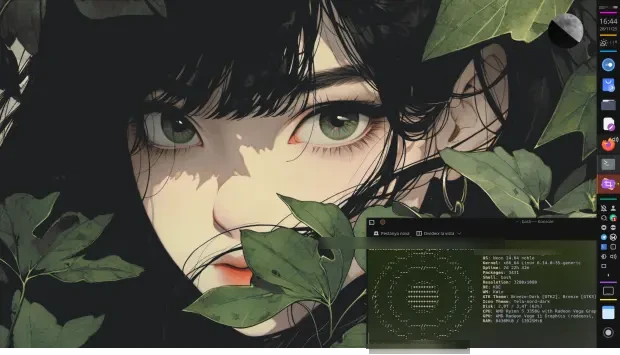
Sigo con la décima entrada de este año de la iniciativa #viernesdeescritorio. Bienvenidos a mi escritorio Plasma de noviembre 2025, que sigo realizando sobre ordenador de sobremesa, un Slimbook Kymera, con el que llegamos a las 66 entregas compartiendo «Mi escritorio» de forma mensual.
Mi escritorio Plasma de noviembre 2025 #viernesdeescritorio
Esta va a ser la sexagésimasexta (66 para los que nos cuesta leer esto) vez que muestro mi escritorio Plasma 6 en público, lo cual es número nada desdeñable de entradas que sigue creciendo de forma constante.
De nuevo lo realizo de nuevo sobre mi Slimbook Kymera, el cual tiene instalado un KDE Neon con Plasma 6.5.1, sobre una versión de KDE Frameworks 6.19.0 y una versión de Qt 6.9.2. El servidor gráfico es Wayland y el Kernel es 6.14.0-35-generic (64 bits).
En este equipo sigo utilizando un aspecto oscuro y sigo utilizando el tema global dado que el gran Jorge Dangelo, conocido también como Jomada,que me sigue gustando mucho. Os recuerdo que se trata de con el tema global Bart (oscuro, con transparencias y con resaltado de color naranja) combinado con el paquete de iconos Tela Nord Dark.
La barra de tareas a la izquierda se ha quedado para siempre (solamente la muevo en dos segundos cuando hago clase porque me molesta al seleccionar los pinceles de dibujo) y contiene (de arriba a abajo) el selector de escritorios virtuales, el reloj digital, widget de Clima Plus,el gestor de tareas solo iconos, la bandeja del sistema, el visor del escritorio y un pequeño bloc de notas para acceder de forma rápida a esas cosas que pasan por mi mente y necesito apuntar para recordar después y el lanzador de aplicaciones. Todo ello separados por barras gruesas que le dan un aspecto definido y colorido.
Para el fondo he seleccionado el segundo que viene por defecto con el tema Global Bart llamado «Green Eyes» (que por cierto tiene entrada propia en el blog de Jomada) que además contiene el plasmoide que muestra las fases de la luna llamado Luna 3 de Samuel Jiménez, que ya lleva mucho tiempo conmigo.
El resultado de mi escritorio Plasma de noviembre de 2025 es un entorno de trabajo oscuro y, como siempre, funcional que podéis ver en la imagen inferior (pinchad sobre ella para verlo un poco más grande).
La entrada Mi escritorio Plasma de noviembre 2025 #viernesdeescritorio se publicó primero en KDE Blog.

Planet News Roundup
This is a roundup of articles from the openSUSE community listed on planet.opensuse.org.
The below featured highlights listed on the community’s blog feed aggregator are from November 22 to 28.
Blog posts this week highlight a broad mix of desktop improvements, community efforts, and privacy awareness. KDE Plasma sees notable progress in accessibility and KDE also launches its 2025 fundraising campaign while some prepare for a major open-source seminar. Elsewhere, there’s hands-on Linux hardware coverage with Intel NPU drivers, packaging guidance for RPM maintainers, an openSUSE Hack Week aiming to improve membership workflows, and sharp commentary on user privacy as well as concerns about Smart TV terms-of-service.
Here is a summary and links for each post:
Most of the access to Plasma 6.5
KDE Blog outlines accessibility improvements in Plasma 6.5 aimed at making the desktop more usable for visually or hearing-impaired users. Screen readers like Orca can now announce Caps Lock status and better describe keyboard shortcuts. Additional enhancements include flicker-free rendering to reduce photosensitivity risk, improved overall keyboard navigation across Plasma and more.
rpm premable – order matters
Nordisch explains a build issue encountered when packaging PostgreSQL extensions: macros like %{version} and %{release} remained unexpanded because they were defined after references to them in the preamble. The post serves as a reminder to maintain a consistent spec-file header order to avoid subtle build errors.
Help us reach the tipping point!: Fundraising campaign for KDE 2025
The KDE Blog calls for donations to support the 2025 fundraising drive under the slogan “Help us reach the inflection point,” stressing that much of KDE’s funding comes from private supporters. The funds will help maintain servers, support developer sprints and events like conferences. Users are invited to “adopt” a KDE application by donating and publicly showing their support.
Hack Week Project Takes Aim at Improving Membership Management
The post announces a Hack Week 25 project called openSUSE Lounge, which is a new platform aiming to centralize and simplify membership management for openSUSE. openSUSE Lounge aims to maintain member records, track membership status, support election tasks, and ease the workload for membership and election officials.
Black Friday 2025 de Slimbook
The KDE Blog announces real Black Friday discounts on Slimbook laptops and desktops. Saving range from ~ €30 to €150 depending on the model. The post also invites the community to join the #KDEslimbook social campaign and to show off their Plasma setups to win merchandise and celebrate Linux-ready hardware.
Installing Intel NPU Driver on Linux
The blog explains how to install the Intel NPU Driver on Linux while enabling support for the NPU (neural processing unit) present in modern Intel Core Ultra CPUs. The post outlines that the driver stack consists of a kernel module (intel_vpu) and a user-space stack including a compiler, Level Zero runtime and firmware.
GrapheneOS migrates its servers out of France amid pressure and legal threats
Victorhck reports that GrapheneOS has decided to move all its website, forum and social-media servers from France to foreign hosts due to legal pressure, which appear to be hostile toward open-source privacy projects. Hosting will shift from the French provider OVHCloud to a mix of servers in Toronto and Germany.
KDE Express Episode 58: Building Community with Paco Estrada
This episode of KDE Express welcomes back podcaster Paco Estrada to discuss his return to producing regular episodes about GNU/Linux and free-software. The conversation reviews his plans for 2026 and reflects on the role of community podcasts in the free-software ecosystem.
I read the terms of service for my Smart TV and now I sleep with one eye open
Victorhck recounts reading the “terms of service” for his new Smart TV and realizes its written as a consent to constant surveillance. The clauses grant the manufacturer rights to record video, listen to audio, collect usage data, push mandatory firmware updates, and even treat the TV as licensed (not sold), undermining user autonomy.
KDE will be present at the 4th Annual Opensource Seminar
The KDE Blog announces that the community will participate in the “IV Seminario Anual Opensource”, which is an online event covering GNU/Linux, system administration, server setups, and security topics. The event is Nov. 29 at 21:00 CET.
User interface and performance improvements – This week in Plasma
KDE’s weekly update reports a batch of UI and performance improvements in KDE Plasma aimed for the upcoming 6.6.0 release. Users can now choose to exclude specific windows from screen recordings, blur effects in dark mode are more refined (and can have customizable saturation), and task-switching order when using grouped icons now respects most-recent use rather than always prioritizing full-screen windows.
View more blogs or learn to publish your own on planet.opensuse.org.
Tumbleweed – Review of the weeks 2025/47 & 48
Dear Tumbleweed users and hackers,
The last two weeks have been quite steady for Tumbleweed: solid 10 snapshots could be built, tested, and released (0513…0526)
The most relevant changes from those two weeks are:
- GStreamer 1.26.8
- Pipewire 1.5.83
- Mesa 25.2.7 & 25.3.0
- Mozilla Firefox 145.0
- btrfsprogs 6.17.1
- KDE Frameworks 6.20.0
- fwupd 2.0.17
- XEN 4.20.2 & 4.21.0
- Linux kernel 6.17.8 & 6.17.9: enabled efidrm and vesadrm
- KDE Plasma 6.5.3
- cURL 8.17.0
- Freetype 2.14.1
- Samba 4.22.6
- GNOME 49.2
- gpg 2.5.14
- Qt 6.10.1
Our staging areas are busy testing these changes:
- Systemd 258.2
- openSSL 3.6.0
- Ruby 4.0 (pre-release, testing early)
Week 2025/49 will be hackweek! https://hackweek.opensuse.org/ Feel free to join in, find a project to participate or even work on your own project. There can only be winners!