
 mpounta
A utility for merging configuration / sysconfig files – Final GSoC Report

Source: http://www.openclipart.org
Hello,
last week was very busy for me and also very exciting. The end of Google Summer of Code period overlapped the beginning of a new period of my life. During these days, i moved from Salamis(Greece) to Amsterdam(Netherlands) where i am going to study towards a master degree in Artificial Intelligence. As you may understand there were and still are many things for me to arrange, as a person in a total new place/city/country.
So enough about me, what is up with the project? Well, i am very glad to say that the project “ended” and reached a very satisfactory level, the merging functions are now working and i can say that the application is now in an alpha testing phase. There are of course things that always can be improved and a lot of testing to be done in order for this project to take its place and be useful and ready for use in openSUSE. This is the last GSoC report for this project.
Does the GSoC end means that this project is abandoned? Of course not, as i have already said this may be the last GSoC report, but this is definitely not the last report for the project. My intention from the beginning was to join the openSUSE developers society and contribute something back to the community. Therefore, I am planning and actually i am already working in order for the project to reach the next stage. I’m going to keep posting updates on this web-site so if you are interested in the progress of the project please feel free to visit and check for new blog posts.
There couldn’t be a final GSoC report, without the necessary thanks. First of all i would like to thank Google and openSUSE for giving me this great opportunity to work on such an exciting project. I highly recommend on everyone to apply for the next year GSoC if they are able, it is an amazing experience. Not only you have the chance to learn new things, but you can also meet great people. The kind of people who open source communities are filled with. :). So speaking of people I would also like to thank my mentor Michal Hrušecký for his help, I strongly feel like I have gained a new friend after all these months of frequent communication! I would also like to thank Petr Gajdos and of course the Augeas developers for their help and support.
This is not a good-bye blog post, the real project is now beginning :))
So as always, till the next blog post,
Christos Bountalis

 Member
Oracle related packages for openSUSE
Petr Vanek and I are maintaining some packages for openSUSE (and SLE) that build against the Oracle Instant Client libraries (I mean Oracle the database). Now, those libraries are not open source in any way, but are available from the Oracle TechNet website.
There are a few open source projects that are of interest, at least for people who have to work with the Oracle database, and we do package a few of them and Petr makes them available in his repository.
As of now, they're all built against version 10.2 of Oracle Instant Client, for openSUSE 11.3, openSUSE 11.4, Factory (snapshot) and SLE 11.
Packages include ocilib, perl-DBD-Oracle (the Oracle database driver for Perl), php5-pecl-oci8 (the Oracle database driver for PHP5), python-cx_Oracle (a Python module to access Oracle databases), ruby-oci8 (the... you got he picture, this time for Ruby), as well as tora and tora-svn.
Why would we package that stuff, as it is not open source ? Well, actually, the software that we package is open source, it's just that the shared libraries and C headers they require are not. Oh, and we do not redistribute the Oracle Instant Client library RPMs there. That is something you must get from Oracle by yourself.

Network Image Installer
In order to ease this work flow I created a kiwi image for a CD or an USB stick for installing the latest image via network - the Network Image Installer. It's also capable of installing arbitrary openSUSE / Fedora / Ubuntu versions, so you never have to burn another DVD if you have a reasonably fast internet connection. Network detection is automatic, wireless requires the SSID etc. changed in a config file beforehand.
Find the sources on gitorious, I will eventually try to understand the functionality in the openSUSE build service to create images automatically, but for now you'll have to build the image yourself. I'll post when there is a downloadable image available.
Now I'm off to Fantasy Film Fest again
 .
.
On communication, cultural differences, and the openSUSE Conference
Disclaimer: the next paragraphs may sound presumptuous, but they're not. I swear.
It has occurred to me, time and time again, that some people consider others as semi-gods. People who are highly active e.g. in open source projects, and are sometimes even regarded for their work. Well, it sucks.
I know that this has happened to me a few times (being seen as a semi-god, that is), and I hate it. Not only does it not have any ground for being, we're just folks like everyone else, and while hard and good work should be appreciated, and while a simple "thank you" is way too rare and rewarding, taking it to that level is a very-bad-thing (tm)
The main reason for it to be bad is that it breaks communication, it puts artificial barriers between people. Now, I can only speak for myself, but I want people to talk to me, to come to me, say hi, and have a chat about virtually anything, be it on the matter of the openSUSE project or not.
I like hearing about cultural differences, about experiences people make in their life, about funny and not-so-funny moments. I love spending time talking to people, especially "broken" people, who have gone through hard times (haven't we all ?), because they're full of life, full of content, even if it's sorrow. But hey, I like having a good time with happy people too ;).
But culture is often in the way of common sense and the ability to communicate across those artificial differences, specifically when we're talking about the differences in behavior and, well, yes, communication, precisely.
Generalization is always wrong (got it?), but there are a few traits that nevertheless apply in a very fuzzy way. Germans usually don't like physical contact, getting too much in their protective circle. They don't really like people who talk much either, or who behave in an extroverted way. Latins (French, Spaniards, Greeks, Italians, ...) often appear as sloppy, too relaxed, they don't take appointments seriously, they're always late, they're always talking, and loud, etc... Well hell yes. Asian cultures (in the broad geographic sense) are even more mind-boggling (to us Europeans, that is). North Americans are said to be quite vocal and easy to get in touch with, but don't appreciate digging a little deeper. Germans say things pretty straight as they are ("this sucks" is often perfectly acceptable). All those differences, all those barriers to understanding what we say to each other, and how we mean it.
At the openSUSE Conference or wherever we may meet, or even through electronic media, drop those differences, don't bother, say things straight up as they are, but be relaxed, have a good time, be vocal, talk, say what's on your mind. Don't be afraid to hurt feelings, you won't, because we're all a big happy (and sometimes grumpy) bunch of friends. Feel at home, this is your community. I am your friend. Poke me with a stick, give me a hug, talk to me out of the blue, whatever, slice me into pieces and put salt on it (that's a special for Alberto), I don't care. But don't remain silent, intimidated, blocked by your cultural background and, at the same time, be inclusive and accept those differences, to a certain extent (full circle or chicken/egg ?).
See you there, or anywhere else, and give me a hug, or at least a high five ;).
My talks at the openSUSE Conference 2011
Big mistake, big mistake. At the call for papers deadline, we ended up with not having any sessions about packaging at all except one by Jan Engelhardt.
Now, that would have been quite a ludicrous situation, as our core activity is precisely to build packages, without which it wouldn't be a distribution in the first place.
So I picked up an early email from Lars Vogdt who proposed a few sessions on the topic of packaging. Unfortunately, it was really early in the call for papers phase and we weren't quite organized yet, which caused his proposal to remain unanswered for a few weeks. I tried to contact him by email a few times, but he didn't reply (until now, that is), and I nevertheless took it up on myself to do a few packaging related sessions at the conference.
Introduction to Packaging
One thing that some people in the project have been bugging (me) about on a regular basis is an introductory presentation about packaging for openSUSE. Having been doing that for around 10 years on an almost daily basis, I can indeed understand that it appears as a daunting task and somewhat of a black art (which it is).
So here we go: Introduction to Packaging (Sunday 11 Sept in Brendl, at 11:45). The key here is that I am not assuming any prior knowledge at all. If you're already versed into packaging, this isn't for you. But if you always wanted to know about the main activity of our project, at least in technical terms, you totally have to be there.
Mind you, after that presentation, you will not be able to write your first package, but it will give you an understanding of what packages actually are, the terms, the ecosystem, the process, the toolchains and... well... what the hell it actually takes to create an RPM package for openSUSE. It does sound boring, and too technical, but it isn't. Trust me, we'll have a good time. I'm looking forward to seeing a lot of folks there with an appetite for finding out, and a lot of questions I'll more than happily be able to answer.
Workshops
Obviously, we're not going to stop there. For those who will have attended the above mentioned presentation, as well as for the folks who have a fuzzy idea of how to build packages, but have never actually tried to do so (or did but failed), there is something for you as well: Packaging, hands-on: on Monday, in the BR-Room, at 14:00, I will guide you for two hours through your first steps at accomplishing what is next to witchcraft: building your first package, on your own, on your notebook.
The purpose here is to take every fear away at barriers to enter the secret cult of RPM wizardry. So bring along your notebook, a shell, vim or whatever editor you prefer, an openSUSE Build Service account (go to this mind-boggling URL to create an openSUSE account if you don't have one already -- if you have an openSUSE account, you have everything you need), and we'll do it step by step, slowly, to bring you to the overwhelming feeling of joy once you will have your first (and hopefully not last) RPM package for openSUSE on your harddisk.
Upping the ante
Can we do even better than that? Sure, we can. On Tuesday, there will be a second workshop session: Advanced Packaging, at 14:00 in the BR-Room. That one will be a bit more improvised, but we'll take on more complex scenarios, depending on what we will not have covered in the previous workshop. Things like subpackages, -devel packages, distribution integration, shared library packages (and the openSUSE packaging guidelines that apply to them), packaging Perl modules, Python modules, etc...
And the rest...
There are quite a few additional sessions that have my name on it, but I won't be able to organize those as well. So I'm looking for people to take them on.
Oh, and please bug me at the conference. I'm tall, and look evil, and can be evil at times, I have a creepy looking G+ profile photo (on purpose, I like it), but I don't bite, I don't pose, I'm a rather nice guy. As I'm not German, I don't mind hugs either, much like our all around nice guy from the flat of the land.
I've been in this project for a very long time, been involved in various bits of it, and have quite some experience in several technical (and not so technical) areas. I hope we'll be able to un-organize some small sessions on various matters you'd like to know more about, I'm sure I can help, and I totally want to spread my experience around. This conference is YOUR conference, so make the most of it (want to stress that so much that I even adhere to the bad practice of using <b/> tags in HTML). Drop your cultural habits for a few days, don't be shy, let's talk, have some beers (or water), get to know each other and, most importantly, have a lot of fun.
So, hopefully, see you there!
11th day of fasting - India against corruption

RubyGem CI::Reporter
As I was starting the OBS webserver earlier today, I ran into a missing-gem error:
Missing these required gems:
  ci_reporter
So I installed the gem.
$ sudo gem install ci_reporter
Fetching: ci_reporter-1.6.5.gem (100%)
Successfully installed ci_reporter-1.6.5
1 gem installed
There was an error installing the documentation for ci_report:
Installing ri documentation for ci_reporter-1.6.5...

Invalid output formatter

For help on options, try 'rdoc --help'

ERROR:  While generating documentation for ci_reporter-1.6.5
... MESSAGE:   exit
... RDOC args: --ri --op /usr/lib/ruby/gems/1.8/doc/ci_reporter-1.6.5/ri --main README.txt -SHN -f darkfish --quiet lib History.txt Manifest.txt README.txt LICENSE.txt --title ci_reporter-1.6.5 Documentation
(continuing with the rest of the installation)
Installing RDoc documentation for ci_reporter-1.6.5...

Invalid output formatter

For help on options, try 'rdoc --help'

ERROR:  While generating documentation for ci_reporter-1.6.5
... MESSAGE:   exit
... RDOC args: --op /usr/lib/ruby/gems/1.8/doc/ci_reporter-1.6.5/rdoc --main README.txt -SHN -f darkfish --quiet lib History.txt Manifest.txt README.txt LICENSE.txt --title ci_reporter-1.6.5 Documentation
(continuing with the rest of the installation)
But this error didn’t interfere with my starting the web server.
Anyway, I was curious what ci_report was all about.
CI::Reporter is an add-on to Test::Unit, RSpec and Cucumber that allows you to generate XML reports of your test, spec and/or feature runs. The resulting files can be read by a continuous integration system that understands Ant’s JUnit report XML format, thus allowing your CI system to track test/spec successes and failures.
It looks like CI::Reporter works best with projects that use a Rakefile along with the standard Rake::TestTask or Spec::Rake::SpecTask/RSpec::Core::RakeTask tasks for running tests or examples, respectively. This way, it hooks into Test::Unit or RSpec using environment variables recognized by these custom tasks to inject the CI::Reporter code into the test or spec runs.
There isn’t a fair amount of documentation on CI::Reporter yet, except: http://caldersphere.rubyforge.org/ci_reporter/

GNOME 3.0 Live image release 1.5.0 available
I just push a new GNOME 3.0 live image labelled as 1.5.0 (yes, I forgot to push 1.4.0 after I built it, so we are at 1.5.0 now ;)
No big changes, it is based on GNOME 3.0.2 + some additional fixes.
As always, it can be downloaded from http://www.gnome.org/getting-gnome/
For people interested, here are some download hits (it doesn't include SUSE Studio appliance nor promo dvd which is also available from GNOME ftp) :
on GNOME 3.0 release day : 4526 hits
April : 145904 hits
May : 46551 hits
June : 24747 hits
July : 23611 hits
August (from 1 to 15) : 13063 hits
Enjoy !
Back from FrOSCon
Back from the FrOSCon conference (the only one that has even weirder capitalization than openSUSE ;D).
Mixed feelings. While it was a bit boring during the day as there was pretty much no one passing by the stands (not just ours), I'm not really convinced it's that useful to have a stand there... Of course, the great weather didn't help, as most non-contributor-people who would might have come to the conference out of curiosity will most definitely have preferred making good use of the sunny weather that weekend. Understandable :)
Mind you, I definitely had a good time, as the organization is very well done, the catering is nice (at least for speakers and booth personnel, didn't try the other options), the barbecue with DJ on Saturday evening was excellent, and, of course, I got to see quite a lot of people I know through openSUSE and FOSDEM (quite a lot of people wearing the ultimate street cred t-shirt of FOSDEM supporters, btw ;)), and a few I didn't. Got to chat a lot with core Mageia contributors as well, which was definitely fun and interesting. Hence, lots of great FOSS people around, awesome.
Was obviously also great in the evening/night, chatting around beers (even if it was Kölsch (yellow water with a tiny bit of alcohol and some bitter)) with fellow contributors across different projects. Also got to meet Jan Krings for the first time (as well as Marcus Möller, Jan Krings and Jan Weber, which I've met IRL before).
If you've never been at such events (even more striking at FOSDEM methinks, because there's a huge crowd, with lots and lots of projects there, and a lot of discussions and cross-pollination going around), and are mostly on the "user" side of things, then just stop the hate. Forget about distrowars, competition, and all that. That's just totally not how it works for almost all the people who actively contribute to their projects. Even between BSD and Linux. We may have our differences and preferences, but we all respect the work, brains, excellence, and love everyone is putting into their respective undertakings.
But in terms of audience, I wonder whether FrOSCon shouldn't have a sharper focus. At least, the focus wasn't all that clear to me, it seems like the target is "everything". There are stands of distribution projects, which are typically for the non-Linux/BSD-users-yet to grab some DVDs and play with it. There are stands of vendors, who pay for their stand, and whom are either selling books, or showcasing their services and solutions to potential customers, or hunting for highly qualified hackers. That's a pretty different audience already, at least when compared to the more entry-level distribution showcase stands. Then there are tracks and "devrooms" (yes, they really call them the same as at FOSDEM :)), which is .. dunno.. depends, some did sound more advanced, for developers, and some were a lot more entry level (e.g., paraphrasing, "openoffice.org is open source, what does that mean for me, user ?").
Just my 2 cents, but I'm under the impression that it could serve a better purpose to be less general purpose and have a slightly sharper focus in terms of target audience. But hey, maybe it was just the weather (heard from others, e.g. from fellow openSUSEr Jan Weber) that there were clearly a lot more people the years before), and maybe the organizers are just fine with the amount and type of audience that was there.

PackageKit backend for Software Center: pencils down report
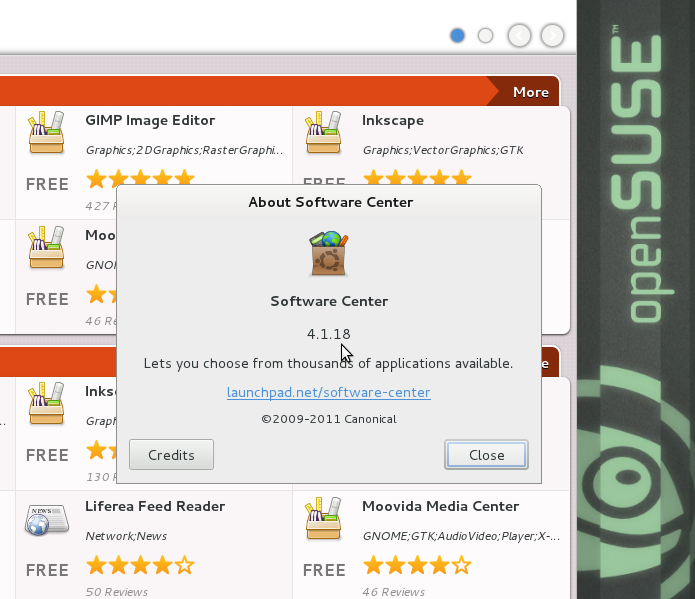
Software Center with PackageKit backend in openSUSE Factory
Today the official coding period of GSoC 2011 ends. It’s been a four months journey, with challenges, failures and achievements, but nevertheless fun  .
.
You may be wondering what is the status of my project; here it goes: current version of Software Center can be tested in openSUSE Factory; it can populate its database with data from an AppStream XML; it shows application information (fetched from the package manager); it installs and removes software, in the same friendly manner the ubuntu does (showing progress, handling dependencies).
Moreover, my patches to gobject-introspection, PackageKit and obviously software-center, are all upstream and released; kudos to the project managers and the community for helping me get them there.
There are still parts that need work; some of then have been intentionally left with lower priority from my initial plan, in order to get a functional version up by the end of the program; others weren’t covered by the planed feature set. These are: performance (current version is rather slow on first load, and also on showing list, due to many resolve calls), transaction history (it can be implemented using the almighty PackageKit), reviews (currently these are fetched from ubuntu servers), screenshots (same as reviews). Software Center itself passes a period of active development and changes, once its fancy Gtk+3 interface stabilizes, more work can be done into polishing the <other-distro> experience.
Although I’m generally happy with the result of the project, since this is a report, I want to outline what differed from my expectations and slowed me down from bringing a full feature set cross-distro Software Center:
- fast development – when I started hacking on software-center’s GUI, it was pygtk Gtk+2 based; a Gtk+3 branch existed, but was far from being usable; under the last few weeks, it was merged, and actively developed into a newly designed interface (which will become software-center 5.0);
- Gio, GLib, GMenu, GObject, usually libs starting with a capital G, which introspection bindings are about to stabilize; having to get them from trunk, and dealing with API breakage;
- waiting for the pygobject release; when it came, it broke my pygtk mixed work (since static vs GI are no longer permitted in the same program – which is the right choice. btw), and left me with no working GUI; luckily, I took the best advices on IRC, and also software-center devs fixed things along, so that the new UI isn’t affected by the underlying changes.
Something worth mentioning in this finale post is that OBS totally rocks.
Overall, I hope this effort won’t stop here, and with a bit of luck, it will be shipped by your favorite distribution 
PS: for more implementation/testing/plan details, I have created this page on openSUSE wiki, please check it out.