
 Member
 FunkyPenguin
Getting The Necessitas To Port To Android
Bug Tracking With The Help Of An Entomologist

PDF Mod Update
I haven't blogged about PDF Mod since Nov, 2009. We've had five releases in the meantime, including 0.9.1 just released today!
We have had tons of improvements and fixes, and one major new feature: bookmark editing!
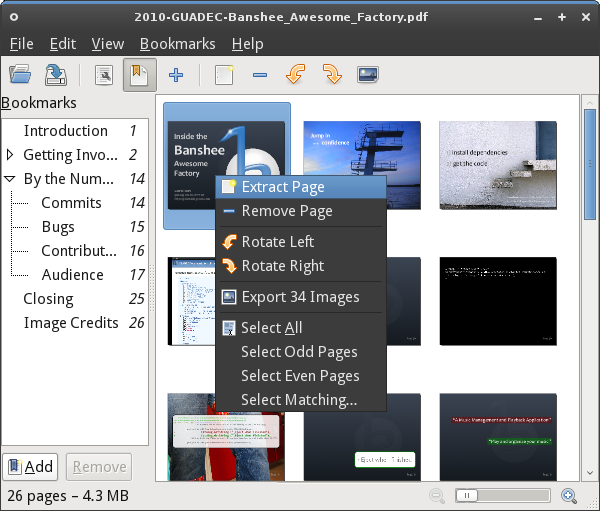
We're up to 26 translations now, including 11 of our user manual!
As a reminder, PDF Mod can:
- pull out (extract) pages from a document into a new PDF
- combine two documents, or parts thereof
- reorder and rotate pages
- extract embedded images
- edit basic metadata (title, author, keywords)
- edit a document's bookmarks (aka outlines)
- and that's it!
tarballs, release notes, git, mailing list, irc, bugzilla, website/wiki

First beta of MonoDevelop 2.6
The first new big feature is support for GIT. This was long time due, especially since Mono and MonoDevelop itself moved to GIT. I already blogged about it a few months ago, but basically we are using NGit, a C# port of JGit, as the core for the GIT add-in. It hasn't been easy to make this port fully operational, but we now have a GIT core that can be easily updated and which is fully portable.


LibreOffice 3.3.1 bugfix release available for openSUSE
I’m happy to announce LibreOffice 3.3.1 bugfix release for openSUSE. The packages are available in the Build Service LibreOffice:Stable project. They fix various crashers, usability and translation problems, see the libreoffice-3.3.1.2 release news for more details. See also some notes about openSUSE LibreOffice build.
The openSUSE LO team hopes that you will be happy with this release. Though, any software contains bugs and we kindly ask you to report bugs. It will help us to fix them in the future releases.
Other information and plans:
This version will be in openSUSE-11.4 out of box. We are going to prepare official maintenance update for openSUSE-11.2 and 11.3.
There are already several fixes for the LO-3.3.2 bugfix release. You might expect 3.3.2-rc1 in the “LibreOffice:Unstable” repositories by the end of the following week.
Most developers are already concentrated on LO-3.4 release. I hope that the first beta packages will be ready in the beginning of April.
gui-thread-check
To make it easier to track down those bugs, I created a simple profiler module for Mono which can detect invocations to GTK# methods from a thread other than the main GUI thread. This module is available here:
https://github.com/slluis/gui-thread-check
To use it, build and install the module, and then run your application with
the command:
mono --profile=gui-thread-check yourapp.exe
If the profiler is properly installed, you'll see an output like this:
*** Running with gui-thread-check ***
*** GUI THREAD INITIALIZED: 2861676352
While the application is running, if the profiler detects a non-gui thread
invoking gtk methods, it will print a warning message together with a
stack trace. For example:
*** GTK CALL NOT IN GUI THREAD: Widget.gtk_widget_get_parent
Widget.get_Parent
SourceEditorWidget.get_TextEditor
SourceEditorWidget.get_Document
SourceEditorWidget.HandleParseInformationUpdaterWorkerThreadDoWork
BackgroundWorker.OnDoWork
BackgroundWorker.ProcessWorker

Forging knives!
I have a spleen for rather - say - exotic weekend activities (remember the R8 tour?). This time, two friends of mine and I went close to the middle of nowhere to the local blacksmith in Hallerstein (his web page is German only), for a two days forging course  . . |
||
The event was fantastic, apart from some major problems with the local power supply (the whole village went dark three times), so we had to setup a mobile power generator in order to power the fan for the smith's hearth. It went well, apart from the starter breaking on the first attempt to start up the generator (it was brand new  ), but we were able to improvise. ), but we were able to improvise. |
||
| After a lot of hammering (also involving a pneumatic hammer we used for pattern welding for our Damascus steel knifes), and hours of grinding and polishing, every one of us was the proud owner of two self-forged knives, one of monosteel and one of Damascus steel. |
It was an amazing experience, but you definitely need the help of an experienced blacksmith like our Axel, in order to get good results even on the first forging attempt. I guess I'll do it again, in the future. Maybe I will come home with a fully sized Katana next time
 .
.
EBay
I forgot to monitor my ebay Auction - and well lets just say congratulations to Andrew Hussak from Summerseat, Bury, Lancashire who picked up a copy of openSUSE Retail for just £0.99p!!!
That will teach me to set a reserve price on the auction however with only a week until 11.4 perhaps I can recommend him to upgrade to a more up to date version very soon.
Next time I will figure a reserve price auction!!
He better leave me a review on Ebay and Qype!!
Welcome to EcoHealth
Flisol 2011
The Flisol (Festival Latinoamericano de Instalación de Software Libre or Free Software Installation Latin American Festival ) is the biggest Free Software diffusion event that is celebrated on 18 countries all over Latin America, from Mexico to Argentina simultaneously in more than 200 Cities.

The Idea of this Festival is spread the knowledge about Open Source in general and Linux in particular by installing it on the participants machines. I has been participating for the las 4 years by helping with talks, openSUSE DVDs, etc.
The FLISOL 2011 will be celebrated the next April 9. If you live in Latin America of will be in some of the countries that celebrates FLISOL, you can check where and at what time will be celebrated in the city that you will be. Always is good to hangout with other people that wants to get to know about openSUSE and the Open Source in General.
This Time I will be participating in Mexico City in about 3 different places with talks and giving away openSUSE DVDs and T-shirts. Sorry but all the links are in Spanish, Google translate is your friend 