
 Member
 DimStar
openSUSE Tumbleweed – Review of the week 2023/14
Dear Tumbleweed users and hackers,
Despite some people celebrating Easter, and a typical tradition is to hide stuff around, we don’t do that to you: we publish the 7 snapshots this week all at the same place – exactly where you know how to find them.
The 7 snapshots were numbered 0330…0405 and contained these changes:
- Mesa-demo 9.0.0
- Ruby 3.2.2
- Coreutils 9.2
- Linux kernel 6.2.9
- Samba 4.18.1
- libnvme 1.4 / nvme-cli 2.4
- Mozilla Firefox 111.0.1
- KDE Plasma 5.27.4
- Qt 6.5.0
- TeXLive 2023
- systemd-rpm-macros: Drop support for -n/-f options in %service_del_postun
- python-setuptools 67.6.0
Despite the long weekend ahead, I’ll try to keep OBS and openQA busy (assuming there are submit requests in the queue). In any case, the following things are already in the queue and are being worked on:
- Poppler 23.04.0
- Libvirt 9.2.0
- systemd 253.3
- LLVM 16.0.1
- Zypper 1.14.60 / libzypp 17.31.9
- openSSL 3.1
- gnutls 3.8.0

Firefox, systemd update in Tumbleweed
Snapshots of openSUSE Tumbleweed are continuously rolling forward.
Several medium sized snapshots this week provided an array of system component updates for rolling release users.
Snapshot 20230404 provided an update of systemd 253.2; this update moved the file system checker logic systemd-fsck items to a udev userspace sub-package. The spec file also added files coredump. Mozilla Firefox squashed 13 Common Vulnerabilities and Exposures. One of those was CVE-2023-28176 that has important severity and was described as a memory safety bug. The Web Service Discovery host daemon updated to version 0.7.1. This wsdd new version fixes regression due to changed Application Programming Interfaces in Python 3.10 and it also makes a point to force the use of this Python version for openSUSE Leap. The hardware identification and configuration data package hwdata updates Peripheral Component Interconnect, USB and vendor identities in its 0.369 version.The yast2-storage-ng 4.6.4 version exports thin Logical Volume Manage volumes when being cloned. A few more YaST packages had updates in the snapshot.
Snapshot 20230403 had just a few packages update. The aaa_base package added back a conditional glibc requirement and made it a fixed requirement. The libcap 2.68 update forced some internal functions to be hidden outside the library. The package also cleaned up and added support for documentation and manpages respectively. A major version update of systemd-rpm-macros 20 deprecated some support options and makes sure to restart services if /etc/sysconfig/service is not present.
The command line interface utility for NVMe storage was updated in snapshot 20230402. The nvme-cli 2.4 version added a smart cloud log plugin, and enabled a few options to include --tls_key and --tls. Another NVMe related package to update in the snapshot was libnvme 1.4, which added define for Direct Media Interface (DMI) sysinfo and filters out invalid UUIDs from DMI. CVE-2023-1393 was fixed with the xwayland 23.1.1 and xorg-x11-server 21.1.8; it could have lead to an escalation of local privileges. Brazilian Portuguese translations were made with the libstorage-ng 4.5.92 andyast2-storage-ng 4.6.3 updates.
The 20230401 snapshot starting off the month updated the Linux Kernel; kernel-source 6.2.9 disabled hibernation mode of Atheros’ 4th generation AR8031. Multiple fixes related to arm architectures were resolved. A few GNOME packages were updated in the snapshot. Both gnome-shell 44.0+42 and gnome-control-center 44.0+20 updated. The latter fixed a Network Time Protocol switch that was out of sync. GNOME’s wayland display server and window manager mutter 44.0+18 cleaned up the spec file and makes use of a more interoperable path for bash. Xen had an update to 4.17.0_06. There were multiple patches for the virtualization package related to GNU Compiler Collection 13 issues. Text editor vim 9.0.1392, xfce4-panel 4.18.3, coreutils 9.2 and several other packages updated in the snapshot.
Both snapshot 20230331 and 20230330 has a smaller amount of packages to update in the snapshot. Some of the key packages to update in it were ImageMagick 7.1.1.5, which eliminated a memory leak when writing the JPS image format, and ruby3.2 3.2.2, which took care of two CVEs. CVE-2023-28755 fixed the URI parser that mishandles invalid URLs and CVE-2023-28756 fixed the time parser that mishandled invalid strings. Graphics library gegl 0.4.44 fixed a crash unmasked by glib 2.75.3 and yast2 4.6.2 replaced modules calls to mkinitrd with dracut.
Learning syslog-ng: a table of contents for my tutorial series
Last year, one of the returning questions I received was how to learn syslog-ng. My answer was that read the first few chapters of the documentation, read my blogs related to your use case, and then read a few relevant parts from the rest of the documentation. Our documentation is praised by users, but it is still a reference documentation. I was asked if a less detailed, more to the point, preferably video tutorial is available.

syslog-ng logo
Your request was heard. In the past couple of months, I published a tutorial series in blog and video format, which brings you from basic logging concepts to using syslog-ng to collect, parse, enrich log messages and store them to Elasticsearch. Of course, these 5-10 minute videos are not enough to learn anything in depth, but they introduce you to all major syslog-ng functionalities.
Even if you are a seasoned syslog-ng user, there is a good chance that you will learn something new from this introductory tutorial series: the “if” statement, in-line configuration elements, the inlist() filter or the JSON template function, just to name a few.
If you have roughly 1.5 hours, then I recommend going through all the videos from the beginning to the end. You can reach the play list on YouTube at: https://www.youtube.com/playlist?list=PLoBNbOHNb0i5Pags2JY6-6wH2noLaSiTb
If you would rather pick only a few topics from the tutorial series, here is a table of contents, with short summaries, pointers to the blog and video versions and the related parts from the documentation. Unfortunately, the documentation for the latest version is not available yet, pointers are included to the web version of the syslog-ng version 3.37 documentation.
Of course, once you read/watched my syslog-ng tutorials, reading the blogs and relevant parts of the documentation is still highly recommended.
Introduction
The introduction gives you an overview of the tutorial series and defines what syslog-ng is.
-
Blog: https://www.syslog-ng.com/community/b/blog/posts/syslog-ng-101-part-1-introduction
-
Video: https://youtu.be/CVxeYE5t9iE
-
Documentation: https://www.syslog-ng.com/technical-documents/doc/syslog-ng-open-source-edition/3.37/administration-guide/3#TOPIC-1828912
Basic concepts
In this part, we cover some of the basic concepts behind syslog-ng. We talk about why central log collection is important, and then discuss the four major roles of syslog-ng: log collection, processing, filtering and finally storage. We conclude this part with a short introduction to various message formats.
-
Blog: https://www.syslog-ng.com/community/b/blog/posts/syslog-ng-101-part-2-basic-concepts
-
Video: https://youtu.be/unXX69XUtnE
-
Documentation: https://www.syslog-ng.com/technical-documents/doc/syslog-ng-open-source-edition/3.37/administration-guide/4#TOPIC-1828914 (this tutorial covers content from many parts of the documentation without going into the details)
Syslog-ng editions, and where to get them from
In this part we cover the various syslog-ng editions (open source, commercial and appliance), and where to get them from. The focus of this tutorial series is the Open Source Edition (OSE), but to avoid confusion, I also briefly introduce the other two.
-
Video: https://youtu.be/_BXp4Y5PNKk
-
The syslog-ng product summary page: https://www.syslog-ng.com/products/
Configuration and testing
This is the first practical part of the tutorial series. It introduces you to the syslog-ng configuration, shows you how to stop and start syslog-ng, and how to send a test message.
-
Blog: https://www.syslog-ng.com/community/b/blog/posts/syslog-ng-101-part-4-configuration-and-testing
-
Video: https://youtu.be/nd4rpeW2e_Y
-
Documentation: https://www.syslog-ng.com/technical-documents/doc/syslog-ng-open-source-edition/3.37/administration-guide/13#TOPIC-1828950 (the documentation goes more into the details than what we cover in this tutorial)
Sources
In this part we learn about syslog-ng source definitions and how to check the syslog-ng version and its enabled features. The tutorial shows you the source syntax and lists some of the more popular source drivers. The documentation lists all the sources and all their parameters.
-
Blog: https://www.syslog-ng.com/community/b/blog/posts/syslog-ng-101-part-5-sources
-
Video: https://youtu.be/6P9PIrKYRKE
-
Documentation: https://www.syslog-ng.com/technical-documents/doc/syslog-ng-open-source-edition/3.37/administration-guide/17#TOPIC-1828967
Destinations and log path
In this part we learn about syslog-ng destinations and the log path. At the end of the session, we will also perform a quick syntax check. As usual, the tutorial shows you the destination and log path syntax and lists some of the more popular destination drivers. The documentation lists all the destinations and all their parameters. The part about the log path also includes many concepts that we only talk about in later parts of the tutorial.
-
Blog: https://www.syslog-ng.com/community/b/blog/posts/syslog-ng-101-part-6-destinations-and-log-path
-
Video: https://youtu.be/mqIQqeSm4W4
-
Documentation: https://www.syslog-ng.com/technical-documents/doc/syslog-ng-open-source-edition/3.37/administration-guide/32#TOPIC-1829027 and https://www.syslog-ng.com/technical-documents/doc/syslog-ng-open-source-edition/3.37/administration-guide/59#TOPIC-1829137
Networking
In this part we learn about syslog-ng network logging, and why relays are important in a logging infrastructure. At the end of the session, we will send test messages to a syslog-ng network source.
-
Blog: https://www.syslog-ng.com/community/b/blog/posts/syslog-ng-101-part-7-networking
-
Video: https://youtu.be/Tp6bnUx7uH4
-
Documentation: https://www.syslog-ng.com/technical-documents/doc/syslog-ng-open-source-edition/3.37/administration-guide/22#TOPIC-1828986
Macros and templates
In this part we learn about syslog-ng macros and templates. At the end of the session, we will know how to do a simple log rotation using macros.
-
Blog: https://www.syslog-ng.com/community/b/blog/posts/syslog-ng-101-part-8-macros-and-templates
-
Video: https://youtu.be/Dfktsh7C5fU
-
Documentation: https://www.syslog-ng.com/technical-documents/doc/syslog-ng-open-source-edition/3.37/administration-guide/74#TOPIC-1829195
Filters
In this part we learn about syslog-ng filters. At the end of the session, we will see a more complex filter using an “if” statement and a template function.
-
Blog: https://www.syslog-ng.com/community/b/blog/posts/syslog-ng-101-part-9-filters
-
Video: https://youtu.be/2JZNuRbZc_8
-
Documentation: https://www.syslog-ng.com/technical-documents/doc/syslog-ng-open-source-edition/3.37/administration-guide/65#TOPIC-1829159
Parsing
In this part we learn about message parsing using syslog-ng. We only scratch the surface, so reading the documentation is recommended, especially if you want to try PatternDB.
-
Blog: https://www.syslog-ng.com/community/b/blog/posts/syslog-ng-101-part-10-parsing
-
Video: https://youtu.be/xZwYqUrvdqw
-
Documentation: https://www.syslog-ng.com/technical-documents/doc/syslog-ng-open-source-edition/3.37/administration-guide/82#TOPIC-1829229
Enriching log messages
In this part we learn about enriching log messages. Enriching in this case means that you can create additional name-value pairs based on message content. There are several ways how you can enrich log messages using syslog-ng.
-
Blog: https://www.syslog-ng.com/community/b/blog/posts/syslog-ng-101-part-11-enriching-log-messages
-
Video: https://youtu.be/tFHyvLgiSyI
-
Documentation: https://www.syslog-ng.com/technical-documents/doc/syslog-ng-open-source-edition/3.37/administration-guide/100#TOPIC-1829301
Elasticsearch (and Opensearch, Zinc, Humio, etc.)
In this part we learn about how to send log messages to Elasticsearch. Note that while I keep referring to the driver as “Elasticsearch destination”, you can use it with several other software utilizing the Elasticsearch API, such as Opensearch, Zinc, Humio and probably more. This part shows you not only how to send log messages to Elasticsearch, but also combines many of the previously learned syslog-ng features into a single configuration.
-
Video: https://youtu.be/44rFCmSdb6M
-
Documentation: https://www.syslog-ng.com/technical-documents/doc/syslog-ng-open-source-edition/3.37/administration-guide/35#TOPIC-1829041
Updating syslog-ng, syslog-ng 4
In this part we learn about updating syslog-ng, and some of the new features of syslog-ng 4.
-
Video: https://youtu.be/205eMGS51XU
-
Documentation for syslog-ng 4 is not yet available. You can find more information about what is new in the release notes at https://github.com/syslog-ng/syslog-ng/releases/tag/syslog-ng-4.0.1 and about Python-related changes at https://github.com/syslog-ng/syslog-ng/tree/master/modules/python-modules

Request Page Redesign - Two More Action Types and Better Comments on Changes

Paradigm shifts in software development
I could have given it the title ‘Old Man’s Ranting,’ but even though it would have been more honest, it wouldn’t be very catchy.
Why I decided to write this up?
 I knew something was in the air when my favorite fishmonger, an incredibly friendly and always super-helpful fellow, asked me what I thought about that Chat.GPT thingy. That doesn’t happen often. Like our neighbor, who was a fantastic craftsman, didn’t stop me in the ’90s to ask me what I thought about object-oriented programming. Neither did the ladies in our university’s canteen ask us how POSIX threads would impact software engineering. Sure, the significance of these examples is arguable. Still, my point is that a massive paradigm shift in our beloved profession rarely breaks through to the general public.
openSUSE Tumbleweed – Review of the week 2023/13
Dear Tumbleweed users and hackers,
This week we are fully back on track with 7 published snapshots. One significant change to mention again is:
RPMs for i586 (intel 32bit systems) are no longer part of the regular Tumbleweed snapshots. This has been moved into a legacyx86 port in OBS and is published separately on download.opensuse.org. See also this announcement on the factory mailing list.
Other than that, the 7 snapshots published (0322, 0324…0329) contained these changes:
- GNOME 44.0 (Snapshot 0324)
- cURL 8.0.1
- Linux kernel 6.2.8
- LibreOffice 7.5.2.1
- Samba 4.18.0
- LLVM 16
- Mesa 23.0.1
- cmake 3.26.0 & 3.26.1
Staging projects keep on being filled, at the moment these changes are being tested:
- systemd-rpm-macros: Drop support for -n/-f options in %service_del_postun
- python-setuptools 67.6.0
- Linux kernel 6.2.9
- openSSL 3.1
- GNU coreutils 9.2
- TeXLive 2023
GNOME, curl, LLVM Update in Tumbleweed
This week in openSUSE Tumbleweed had both enormous and single-package snapshots.
A new GNOME, compiler tools and music player updates arrived this week along with a ton of other packages.
Snapshot 20230329 provided an update of Mesa 23.0.1, which fixed some bugs from its major release. Sandboxing tool for Flatpak and similar projects had an update; bubblewrap 0.8.0 added a --disable-userns option to prevent the sandbox from creating its own nested user namespace. Fixes for recent GLibs warnings were made in the libostree 2023.2 update. A 1.3 release of fwupd-efi had a few fixes for arm devices and fixed a regression.
A few packages arrived in snapshot 20230328. The XFS utilities package xfsprogs was among the updates. The 6.2.0 version now has a command that can now retrieve the UUID of mounted filesystems and has a fix for broken realtime free block unit conversions. A major version of the compiler and toolchain LLVM brought Clang compiler tools. One of those tools is used to detect locally available GPUs by the Clang OpenMP driver. Another standalone tool determines which headers are used by using existing functionality in clangd. File-synchronization tool unison 2.53.2 improves stopping of update propagation, and fuse3 3.14.1, which is the Interface for userspace programs to export a filesystem to the Linux kernel, no longer has flags available that were introduced in 3.14, but will likely be reintroduced in the next release. updated to version. A few other packages were updated in the snapshot.
The snapshot with the single-package update was 20230327. That single package was transactional-update 4.1.5. This package, which provides updates for Linux operating systems in a transactional way, adds support for configuration of file snippets.
The snapshot from the day prior wasn’t much bigger. Snapshot 20230326 updated two packages. One GNOME package received its second update this week; gnome-music updated from its release candidate, which arrived in snapshot 20230324, to version 44. The music application for GNOME users made a small change with the appdata for the 44.0 release. Another of the project’s packages that was updated was gobject-introspection 1.76.1. This package updated documentation and the handle null default values.
A major update of xwayland 23.1.0 took care of some regressions in snapshot 20230325; it also improved rootful mode for using Xwayland as a nested Xserver. An update of php 8.1.17 fixed some incorrect check conditions and a memory leak. The libstorage-ng package had some cleanup and propagated the failure of the snapper installation-helper with the 4.5.87 update. There were a couple time zone packages updated in the snapshot related to changes surrounding daylight savings. Egypt now uses daylight savings again and Morocco will move the clocks forward April 23 rather than April 30. KDE music player amarok fixed a crash and added support for ffmpeg 5.0 with a minor version bump. A 4.18.0 samba update provided Server Message Block performance improvements and a new wbinfo --change-secret-at option. A few other packages updated in the snapshot.
Snapshot 20230324 was enormous in size. GNOME 44 was released in this snapshot and the Kuala Lumpur code-name release didn’t disappoint. A new grid view is available with the use of GTK4. However, some appy may still use the previous version. The Device Security that was introduced in the previous version gains a new status view as either “Checks Failed”, “Checks Passed”, or “Protected”. The accessibility setting had a redesign and the sound setting gained a number of polish improvements. Another new major version in the snapshot was curl 8.0.1. It fixed a crash, added Fortran bindings and took care of more than a few Common Vulnerabilities and Exposures. One of those was CVE-2023-27538 that reuses a previously created connection even when an ssh related option had been changed, which should have prohibited reuse. Several regressions in the handling of GFileInfo attributes were made with the glib2 2.76.1 update. An update of ImageMagick 7.1.1.3 reverted some changes due to file conflicts and the version build aids with AVX2 and enables the hwcaps library for x86-64-v3 so try a zypper inr if you have v3 hardware. LibreOffice reverted some patches and had a harfbuzz text shaping fix. Several other packages updated in the snapshot including GTK3 3.24.37, gvfs 1.50.4, sqlite 3.41.2, webkit2gtk3 2.40.0 and many more.

Linux Saloon | 25 Mar 2023 | Archcraft Linux
Releasing version 0.8
Six weeks ago we announced D-Installer 0.7 and a lot has happened since then. The most important news is that we just released a new prototype with version 0.8, integrating several exciting new features we will go through in this post. But this prototype is not only important because of those features, but also because it will be the last D-Installer release! Fear not, we are not abandoning the project... quite the opposite.
We want to consolidate D-Installer in the following months from the experimental project it currently is into a solid alternative for installing several Linux distributions. And the name was perceived by some people as an obstacle for that. So we will change it to an already decided alternative starting with the next prototype.
Adjusting the scope
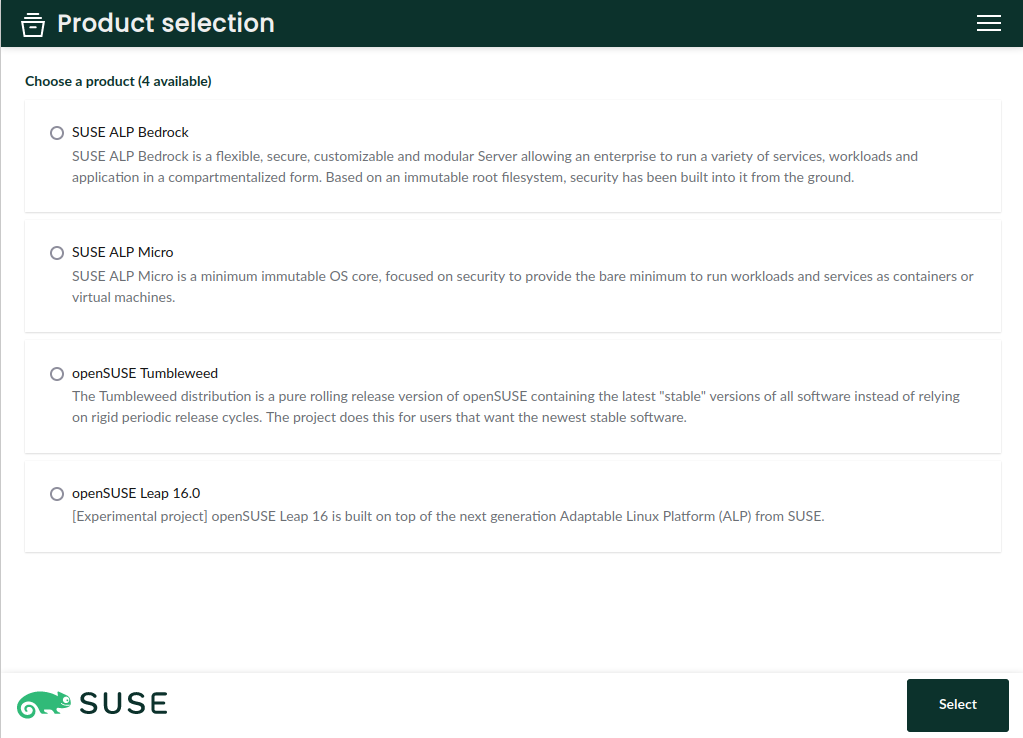
As said, we want D-Installer to become a real alternative to install some of the future and even present (open)SUSE distributions. So the first step was to better define the list of supported distribution, called "products" in D-Installer jargon. If you grab the default flavor of the testing ISO we provide, you will see the following selection.
Take into account the YaST Team is not in charge of those distributions. D-Installer simply grabs the packages and default patterns from the corresponding repositories and installs them into your system. If you detect any inconsistency in the patterns of a distribution or any missing package, please contact the corresponding maintainers so they can fix the issue.
Support for s390x
One of the main highlights of the latest D-Installer prototype is the ability to install the mentioned distributions in s390x mainframes. That includes installing in LPAR mode, on z/VM and as a KVM guest.
That's a bigger achievement that it may look like. Sure having YaST under the hood eased the task of handling of the nuances of installing into such a special platform. But the real challenge here was making it possible to run D-Installer itself on all kind of s390 systems. We usually execute D-Installer using an slightly modified version of a live image in which we pack D-Installer and Firefox. The point is that regular (open)SUSE live images didn't come with full support for s390x out of the box.
Fortunately, SUSE is full of smart people that know a lot about Linux and all kind of hardware architectures. So after knocking on the appropriate doors we got a nice image that can be used to install any of the distributions supported by the D-Installer on any kind of s390x system by just following these instructions.
Advanced storage devices: iSCSI and DASD
Apart from its multi-architecture nature, another key aspect of the (open)SUSE installation process is its broad support for all kind of storage devices. D-Installer aims to simplify the installation experience without sacrificing those historical possibilities, like installing into network disks through iSCSI and FCoE or into disks relying on s390x technologies like DASD, XPRAM or zFCP.
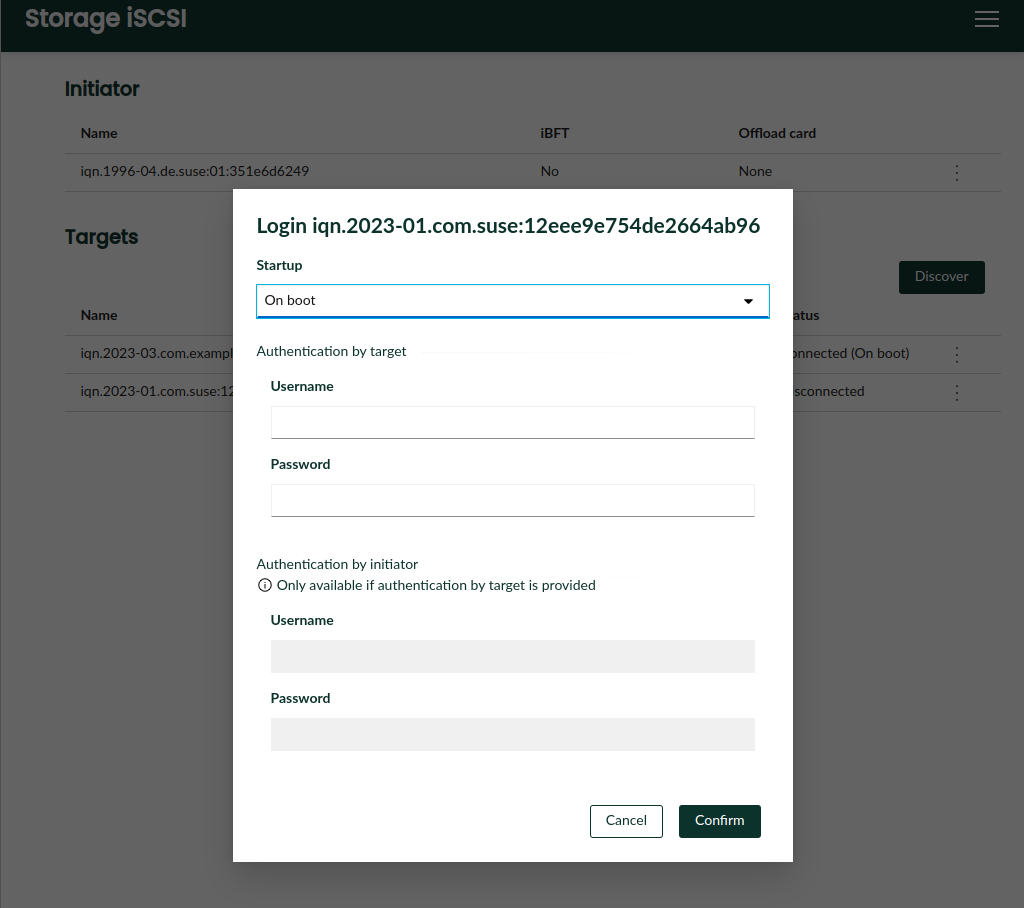
The latest version of D-Installer supports configuring an iSCSI initiator and connecting to iSCSI targets during the installation process, including the configuration of both discovery and login authentication. Of course, the iSCSI configuration is transferred to the target system. If iBFT is used to configure iSCSI via firmware, D-Installer recognizes and displays the corresponding configuration and makes it possible to install the system into the remote iSCSI disk.
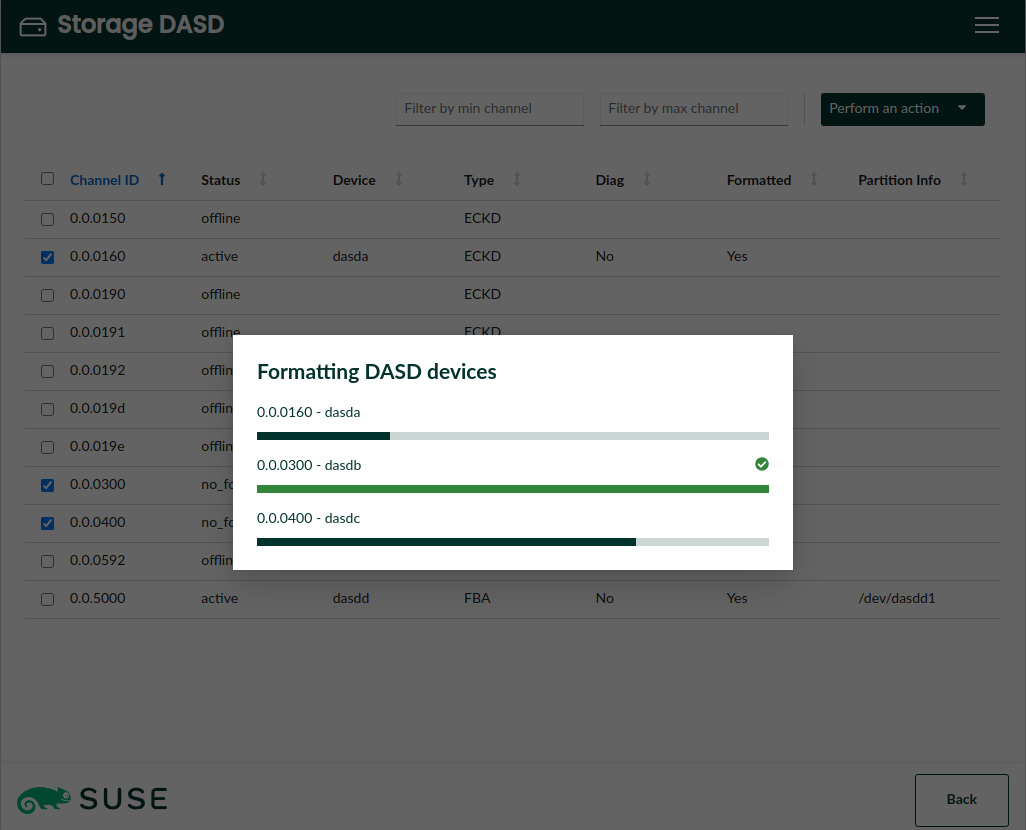
The iSCSI protocol is widely used in data-centers with all kind of hardware architectures. But in the mainframe world, DASD is probably the most common technology to provide storage space. DASDs need some previous configuration before they can accommodate a Linux system and now D-Installer offers the possibility to activate and format DASDs, together with other operations that have been traditionally available in YaST, like deactivation or configuration of the DIAG mode.
Interface polishing and reorganization
In addition to all the advanced features mentioned above, D-Installer 0.8 brings good news also for those geckos not running a full-featured data-center. 😉 First of all, we polished a bit the summary page to offer a more clear overview of the installation settings, moving configuration of authentication and network to new separate pages. See the screenshots at the corresponding pull request.
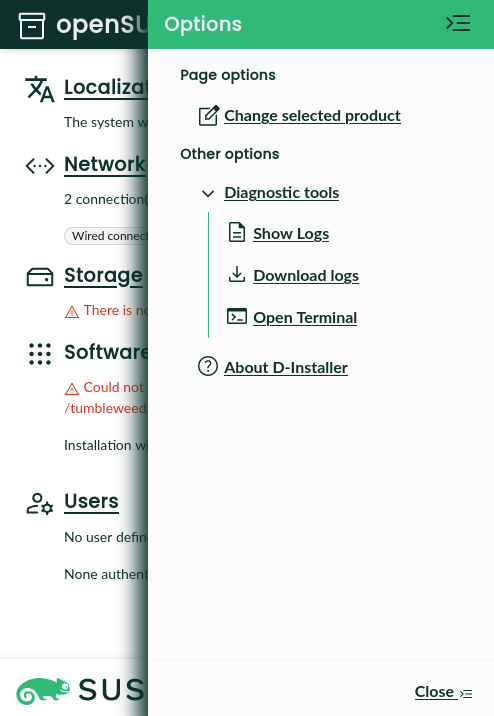
Moreover, we reorganized the sidebar that contains the advanced menu (which we fondly call "the hamburger menu). The actions are now grouped by topics and the menu offers contextual actions related to the current page, like configuration of iSCSI or DASD when the user is visiting the storage section.
Integrated terminal
In the screenshot above, you may have noticed the entry "Open terminal" in the "Diagnosis tools" sub-menu. No surprises there, it does exactly what you would expect. That is, offering a terminal embedded in the web interface that runs a shell on the very same Linux system that is executing D-Installer. Because we know our users can not resist to tweak and inspect all kind of things in the systems they run!
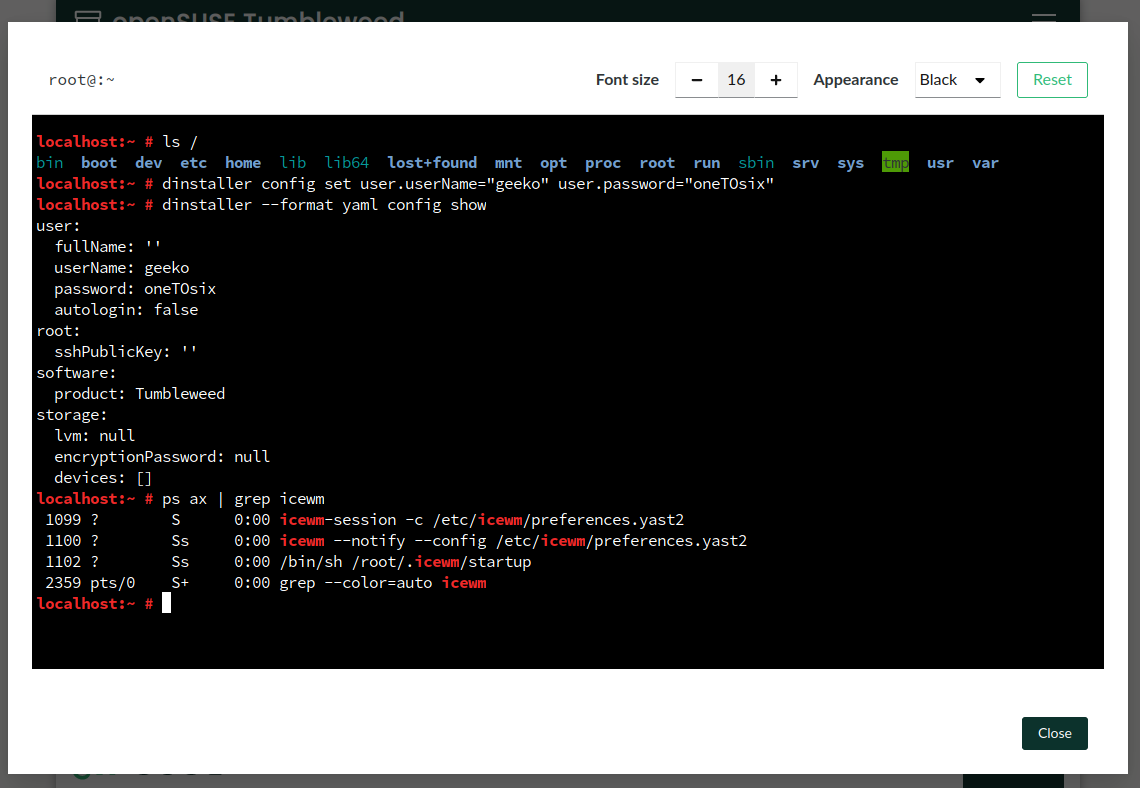
Kudos to the Cockpit project, relying on its infrastructure made this feature quite straightforward to implement.
Re-implemented command-line interface
You surely know D-Installer is way more than just a web front-end for YaST. Its architecture is designed to provide different kinds of interfaces and ways to operate. To make that more more visible than ever, D-Installer 0.8 comes with a new command-line interface rewritten from scratch (using the Rust programming language, if you are interested in those geeky details).
With the command-line interface you can drive the installation with sequences of command like:
dinstaller config set software.product=Tumbleweed
dinstaller config set user.fullName="Jane Doe" user.userName="jane.doe" user.password="12345"
dinstaller install
What is even better, that command-line is a crucial building block for another very relevant feature...
Preliminary support for unattended installation
Many (open)SUSE users rely on AutoYaST to install their systems. D-Installer aims to also be useful in the kind of unattended and mass-deployment scenarios in which AutoYaST shines. But D-Installer will follow a slightly different path. First of all, D-Installer offers two alternative approaches.
On the one hand, the user can provide a file, known as a "profile", with the settings to use during installation. This might sound familiar to AutoYaST users. The format and philosophy of D-Installer profiles is different from the AutoYaST ones, although there are plans to partially support AutoYaST profiles at D-Installer.
On the other hand, D-Installer can accept just a plain shell script, enabling custom installation workflows that rely on the D-Installer infrastructure and, potentially, also on other tools available in the installation media.
A more detailed explanation of both modes can be found at this document that covers several topics like the different ways to trigger an unattended installation, the format of the profile files, the mechanisms to make those profiles dynamic, etc.
Stay in touch
The D-Installer project is heading into interesting times, starting with the rename already pointed at the beginning of this document. We also want to take some time to reflect on internal aspects like memory usage and usability topics like exposing more possibilities to configure the network or the storage layout.
All opinions and feedback are welcome. So do not hesitate to give D-Installer a try and tell us
about your experience and thoughts. You can contact us through the
GitHub project's page or, as usual, in our #yast channel at
Libera.chat or the
YaST Development mailing list.

Announcing D-Installer 0.8
Six weeks ago we announced D-Installer 0.7 and a lot has happened since then. The most important news is that we just released a new prototype with version 0.8, integrating several exciting new features we will go through in this post. But this prototype is not only important because of those features, but also because it will be the last D-Installer release! Fear not, we are not abandoning the project… quite the opposite.
We want to consolidate D-Installer in the following months from the experimental project it currently is into a solid alternative for installing several Linux distributions. And the name was perceived by some people as an obstacle for that. So we will change it to an already decided alternative starting with the next prototype.
Adjusting the Scope
As said, we want D-Installer to become a real alternative to install some of the future and even present (open)SUSE distributions. So the first step was to better define the list of supported distribution, called “products” in D-Installer jargon. If you grab the default flavor of the testing ISO we provide, you will see the following selection.

Take into account the YaST Team is not in charge of those distributions. D-Installer simply grabs the packages and default patterns from the corresponding repositories and installs them into your system. If you detect any inconsistency in the patterns of a distribution or any missing package, please contact the corresponding maintainers so they can fix the issue.
Support for s390x
One of the main highlights of the latest D-Installer prototype is the ability to install the mentioned distributions in s390x mainframes. That includes installing in LPAR mode, on z/VM and as a KVM guest.
That’s a bigger achievement that it may look like. Sure having YaST under the hood eased the task of handling of the nuances of installing into such a special platform. But the real challenge here was making it possible to run D-Installer itself on all kind of s390 systems. We usually execute D-Installer using an slightly modified version of a live image in which we pack D-Installer and Firefox. The point is that regular (open)SUSE live images didn’t come with full support for s390x out of the box.
Fortunately, SUSE is full of smart people that know a lot about Linux and all kind of hardware architectures. So after knocking on the appropriate doors we got a nice image that can be used to install any of the distributions supported by the D-Installer on any kind of s390x system by just following these instructions.
Advanced Storage Devices: iSCSI and DASD
Apart from its multi-architecture nature, another key aspect of the (open)SUSE installation process is its broad support for all kind of storage devices. D-Installer aims to simplify the installation experience without sacrificing those historical possibilities, like installing into network disks through iSCSI and FCoE or into disks relying on s390x technologies like DASD, XPRAM or zFCP.
The latest version of D-Installer supports configuring an iSCSI initiator and connecting to iSCSI targets during the installation process, including the configuration of both discovery and login authentication. Of course, the iSCSI configuration is transferred to the target system. If iBFT is used to configure iSCSI via firmware, D-Installer recognizes and displays the corresponding configuration and makes it possible to install the system into the remote iSCSI disk.

The iSCSI protocol is widely used in data-centers with all kind of hardware architectures. But in the mainframe world, DASD is probably the most common technology to provide storage space. DASDs need some previous configuration before they can accommodate a Linux system and now D-Installer offers the possibility to activate and format DASDs, together with other operations that have been traditionally available in YaST, like deactivation or configuration of the DIAG mode.

Interface Polishing and Reorganization
In addition to all the advanced features mentioned above, D-Installer 0.8 brings good news also for those geckos not running a full-featured data-center. :wink: First of all, we polished a bit the summary page to offer a more clear overview of the installation settings, moving configuration of authentication and network to new separate pages. See the screenshots at the corresponding pull request.
Moreover, we reorganized the sidebar that contains the advanced menu (which we fondly call “the hamburger menu). The actions are now grouped by topics and the menu offers contextual actions related to the current page, like configuration of iSCSI or DASD when the user is visiting the storage section.

Integrated Terminal
In the screenshot above, you may have noticed the entry “Open terminal” in the “Diagnosis tools” sub-menu. No surprises there, it does exactly what you would expect. That is, offering a terminal embedded in the web interface that runs a shell on the very same Linux system that is executing D-Installer. Because we know our users can not resist to tweak and inspect all kind of things in the systems they run!

Kudos to the Cockpit project, relying on its infrastructure made this feature quite straightforward to implement.
Re-implemented Command-line Interface
You surely know D-Installer is way more than just a web front-end for YaST. Its architecture is designed to provide different kinds of interfaces and ways to operate. To make that more more visible than ever, D-Installer 0.8 comes with a new command-line interface rewritten from scratch (using the Rust programming language, if you are interested in those geeky details).
With the command-line interface you can drive the installation with sequences of command like:
dinstaller config set software.product=Tumbleweed
dinstaller config set user.fullName="Jane Doe" user.userName="jane.doe" user.password="12345"
dinstaller install
What is even better, that command-line is a crucial building block for another very relevant feature…
Preliminary Support for Unattended Installation
Many (open)SUSE users rely on AutoYaST to install their systems. D-Installer aims to also be useful in the kind of unattended and mass-deployment scenarios in which AutoYaST shines. But D-Installer will follow a slightly different path. First of all, D-Installer offers two alternative approaches.
On the one hand, the user can provide a file, known as a “profile”, with the settings to use during installation. This might sound familiar to AutoYaST users. The format and philosophy of D-Installer profiles is different from the AutoYaST ones, although there are plans to partially support AutoYaST profiles at D-Installer.
On the other hand, D-Installer can accept just a plain shell script, enabling custom installation workflows that rely on the D-Installer infrastructure and, potentially, also on other tools available in the installation media.
A more detailed explanation of both modes can be found at this document that covers several topics like the different ways to trigger an unattended installation, the format of the profile files, the mechanisms to make those profiles dynamic, etc.
Stay in Touch
The D-Installer project is heading into interesting times, starting with the rename already pointed at the beginning of this document. We also want to take some time to reflect on internal aspects like memory usage and usability topics like exposing more possibilities to configure the network or the storage layout.
All opinions and feedback are welcome. So do not hesitate to give D-Installer a try and tell us
about your experience and thoughts. You can contact us through the GitHub
project’s page or, as usual, in our #yast channel at
Libera.chat or the YaST Development mailing
list.