
 Member
 dragotin
Kraft on Windows
Kraft, which was released as version 1.0 after long time of active development, is targetted to the Linux desktop. My firm conviction is that the Linux desktop is very suitable for the target group of Kraft: In the small office of craftsmen for example, a Linux desktop is a great work horse which is stable, very well adoptable and has a great amount of applications that are stable and maintained.
These are only the most obvious points why Kraft is so far only available for Linux.
But often enough switching to Linux is another hurdle that users have to go, coming from a more mainstream world. So it is great to learn that Kraft, as many UI applications, can be run unter the Windows Subsystem for Linux (WSL) on Windows systems quite flawlessly.
 It was tried with Windows 11 Home and the Kraft AppImage of 1.0.
The steps to run Kraft in WSL:
- Make WSL running on the Windows installation
- Install a X-server on the Windows machine
- Create a Debian or Ubuntu Linux subsystem
- Install a few extra packages into the Linux installation
- Download and run the Kraft AppImage 1.0
A more detailed howto and discussion can be found in the easy cash & tax forum. Thanks Thomas for bringing up the topic and providing the Howto!

A 2022 Christmastime Blathering

openSUSE Tumbleweed – Review of the week 2022/52
Dear Tumbleweed users and hackers,
The last week of the year was tranquil, and I think nobody is surprised by this. The holiday takes time away from computers and redirects it to other important events. Yet, sufficient requests had been submitted to openSUSE Tumbleweed to let the distro roll on with another 7 snapshots published (1223…1229). Granted, there have not been ground-breaking changes happening.
But let’s see what the snapshots DID bring then:
- Mozilla Firefox: build fixes for i586 added, so this is back in shape (ppc64le missing)
- cURL 7.87.0
- util-linux 2.38.1
- bind 9.18.10
- WebKit 2.38.3
- XFCE 4.18
- GStreamer 1.20.5
- Samba 4.17.4
- Spamassassin 4.0.0
- Linux kernel 6.1.1
- Kernel firmware 20221216
Staging projects are mainly carrying the same longer-lasting changes:
- Boost 1.81.0: breaks libetonyek and LibreOffice
- Libzypp 17.31.7: PackageKit needs adjustments
- Ruby 3.2 is being tested to become the default ruby version: YaST is failing
- Switch to openSSL 3: tracked in Staging:N, main failures are nodejs18, nodejs19, OpenSSH, mariadb
- Python pytest 7.2.0
Building a New Retro Styled Computer
Kraft Version 1.0
 It is a pleasure to announce that Kraft Version 1.0 was released last week.
What is Kraft?
Kraft is free software to create office documents like offers and invoices in an efficient way. It runs on the Linux desktop and suits small businesses of all kinds.
After countless releases with version numbers 0.x, Kraft finally goes with version number 1.0 with this release. It is in production at several companies since many years, and with this release it got many more improvements that make it a really mature product.
Highlights
Lets take a look on the highlights of of version 1.0.
AppImage Support
Installing software properly is still a challenge for many users. AppImage comes to the rescue there: Single file, easy to download and start with all dependencies included makes it easy for users. For the creator, it is just one-fits-all, which makes it easy to maintain.
The new Kraft AppImage was carefully reworked and has now really all dependencies included, has a complete own icon set and was tested thoroughly. It is ready for production now.
Giro Code
Kraft now can print the EPC QR Code on invoices easily. Users just have to configure the bank account data to use, and Kraft creates the QR code automatically to be included in the documentation template.
User Manual
The Kraft user manual got great improvements again. It comes with even more and improved text, with much more screenshots and improved translations.
This is a community contributions that is so important for Kraft.
Many other Improvements
There were many other improvements: New functionality such as the new day counter for the number cycle templates (allows to have a counter in the document number that resets to 1 every day) or new modes for the watermark functionality to complete the generated PDF documents plus much more details (See Changelog).
How it continues
Kraft is up and running - and maintained. The plan is to keep the 1.0 as a kind of LTS in a stable branch, that only gets urgent fixes for stability.
For master, I am planning to do a couple of more intrusive changes that will take a bit longer.
See the roadmap discussion here.
Curious?
I hope you got a bit curious now about Kraft. Feel free to check it out using the AppImage.
If you find it an useful addition to the Linux application ecosystem that enables more users for Linux we’d very much appreciate your contribution!
openSUSE Tumbleweed – Review of the week 2022/51
Dear Tumbleweed users and hackers,
The winter holiday period is upon us, and the number of requests submitted to Factory is getting lower (I even managed to have an empty review queue for a couple of minutes yesterday). But small snapshots never stopped Tumbleweed – and it kept on rolling, again with 7 snapshots released during this week (1216…1222)
The most relevant changes included are:
- Pipewire 0.3.63
- sqlite3: CVE-2022-46908: relying on –safe for execution of untrusted CLI scripts
- systems: CVE-2022-4415
- XFCE 4.18 (update in progress, not the entire stack is there yet, please be patient)
- Node.JS 19.3.0
- Mozilla Firefox 108.0.1
- NetworkManager 1.40.8
- Linux kernel 6.1.0
- Bash 5.2.15
As a lot of people are already enjoying some time off, a few resources are missing to fix the fallout in the staging projects, which means the list stays, to a large degree, the same as last week:
- Util-linux 2.38.0 (Snapshot 1223+)
- Boost 1.81.0: breaks libetonyek and LibreOffice
- Ruby 3.2 (currently RC) is being tested to become the default ruby version (switch would happen when ruby 3.2 sees a final release)
- Switch to openSSL 3: tracked in Staging:N, main failures are nodejs18, nodejs19, OpenSSH, mariadb
- Python pytest 7.2.0

Second Prototype Advances ALP
Geekos are rolling out a new Operating System and the second prototype of the next generation OS is quickly advancing.
The first Adaptable Linux Platform (ALP) prototype Les Droites has been supplanted by a new ALP prototype Punta Baretti.
Implementations with the new prototype include more flexibility, security and stability.
The mountainous prototype has the big addition of Full Disk Encryption. ALP extended this Full Disk Encryption to bare metal servers and the use of a Trusted Platform Module will open the doors to leverage unattended booting while keeping systems encrypted and secured. ALP is intended to run on both private and public clouds that require encryption features. The systems need no user interaction on boot nor while ensuring security for workloads. Grub2 will be the bootloader instead of another and it will have a single encrypted volume considering initramfs is already encrypted.
There were some compatibility issues addressed with the new prototype; SELinux is now set to fully enforce access control and firewalld defaults to netfilter deny; these two packages were previously more open for compatibility and testing purposes.
Upgrades since the Les Droites prototype include architecture and network changes. ARM is now supported with aarch64 including for the Raspberry Pi, which will give more innovators opportunity to experiment with the prototype. Network Manager now is completely integrated and has replaced Wicked.
ALP use containerized workloads to isolate different processes at the application layer to include managing the use of K3s for Kubernetes-based workloads and enhance the running, building, sharing and deploying of applications, which is boosted as Podman is now used as the primary container management frontend.
A containerized Cockpit instance will help users deploy and manage systems through a web User Interface. It appears as though Cockpit has become the default 1.1 system management for ALP.
A Zero-Touch method will allow for self-management capabilities. Release manager Lubos Kocman wrote on the factory mailing list about possible next steps for Self-Management and Zero-Touch and was seeing if developers wanted to experiment with auto-tuning solutions.
Another containerized element with the prototype is YaST, which was implemented since ALP’s inception, and it gives options to allow the running and managing of package needs as a workload. There are new ALP workloads available at online repositories with firewalld-container and warewulf-container.
The integration within the D-Installer increases the possibility of different deployments setups and provides building of advanced user interfaces over it.
Feedback from the first prototype provided a lot of active discussions, tests, setups and engineering involvement for the next generation distribution. SUSE’s prototype is expected to lead to one of many family products based on ALP.
For more information about using the ALP prototype, visit The Adaptable Linux Platform Guide.
Explaining difference between download.o.o and mirrorcache.o.o
Explaining difference between download.o.o and mirrorcache.o.o
Introduction
Historically mirrorcache.opensuse.org was set up to evaluate new backend engine, and gradually the new engine became the only used by download.opensuse.org as well.
The main task of both services is to redirect requests to artifacts produced by OBS (Open build Service) to community mirrors using GeoIP information. The both services use the same database and the same backend engine, so behavior should be more or less identical.
In the best case mirrorcache.o.o could be deprecated or be just an alias, but download.o.o has complex legacy setup and also runs other heavy services, which may affect user experience in some cases.
Difference 1 - setup
download.o.o is a powerful box with Apache as forward proxy with quite complex legacy config. The machine also hosts other services, from which the most heavy is rsyncd service. It pushes and provides files to the mirrors and usually it takes more traffic than Apache.
mirrorcache.o.o is relatively small box behind http-proxy, and it is dedicated only to the Web Service.
Difference 2 - file access
mirrorcache.o.o doesn’t have easy access to the files, so it represents information from DB and it may be outdated in some cases (which does not affect normal zypper experience). In contrast, download.o.o renders files availability directly from local disk.
One example is that when folder is deleted in OBS - it is gone from download.o.o almost immediately. And it may take some time until it disappears from mirrorcache.o.o (should be several hours after somebody tries to access it).
Another important example is symbolic links. E.g. openSUSE-Tumbleweed-DVD-x86_64-Current.iso is normally symbolic link to file name with particular Build, e.g. today it is openSUSE-Tumbleweed-DVD-x86_64-Snapshot20221220-Media.iso . download.o.o will notice the change of snapshot immediately, while it may take some time until mirrorcache.o.o reacts to the change.
Conclusion
Use download.o.o for most of operations, especially for manual browsing or if you work with Current.iso.
Use mirrorcache.o.o as fallback if you experience problems with download.o.o, but do not forget to report those issues to openSUSE Heroes.
Download Redirector State - December 2022
Download Redirector State (download.opensuse.org) - December 2022
Introduction
The post describes changes that went live for download.opensuse.org on 22-Dec. No critical changes in functionality are expected, so most of the users can ignore the details below. The functionality was already available on mirrorcache.opensuse.org for weeks, excluding some final visual polishing.
Changes in file listing rendering
Rendering of directory listing previously was done with an Apache module. The new functionality provides three methods for rendering the content of folders:
- Dynamic loading (ajax) of JSON data into an HTML table, available at /browse route, e.g. Leap 15.4 iso on /browse.
- Plain HTML, similar to the old way, available at /download route, e.g. Leap 15.4 iso on /download.
- Raw JSON data - this needs a special URL parameter json or jsontable, e.g. json, jsontable.
Using AJAX with an HTML table allows the filtering of rows using a special box in the top right corner, as well as sorting files by name, size, or time. It also significantly reduces the download size for rendering folders with many files, which also is mentioned in this ticket.
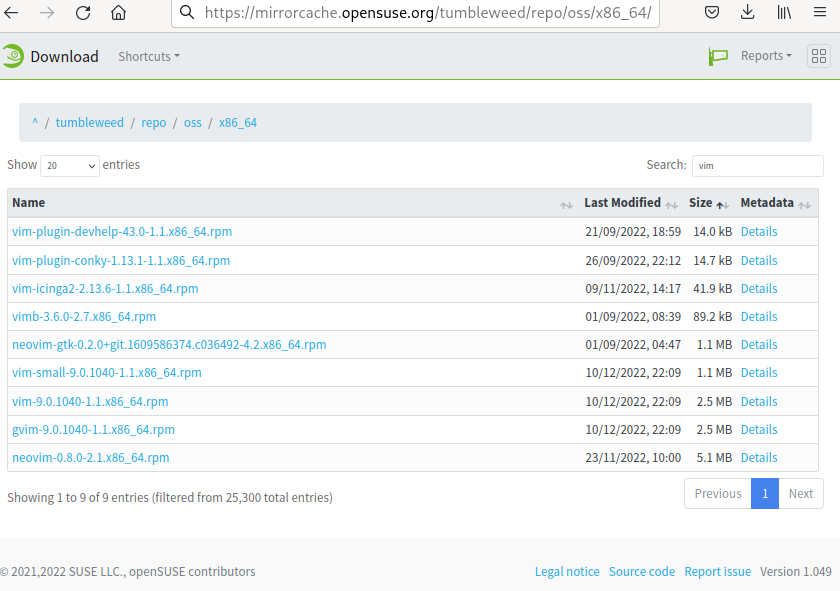
Plain HTML can be used by tools without JavaScript support, e.g. curl and wget.
JSON rendering is used internally by JavaScript and also may be used by eventual tools which need file listings.
If no /download or /browse route is specified, then the method of rendering is chosen dynamically: the first method is used for browsers, and traditional HTML rendering is used otherwise.
Showing mirrors on the map
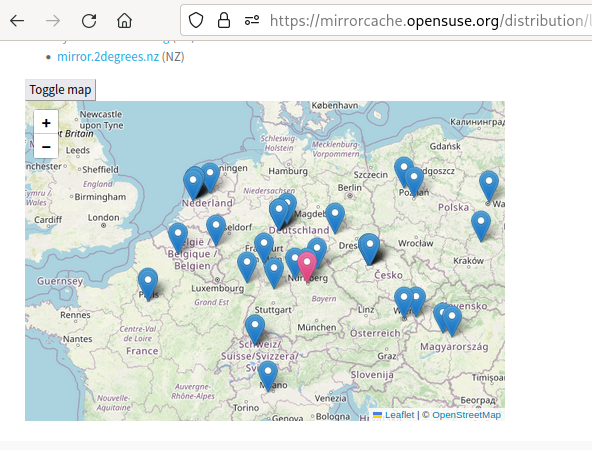
Mirrorlist now can show mirrors on the map, which may be useful for visual representation. (Mirrorlist is shown if you click ‘Details’ link in the file listing or add .mirrorlist to the file URL). The map appears when button ‘Toggle map’ at the bottom of mirrorlist page is pressed.
Download reports
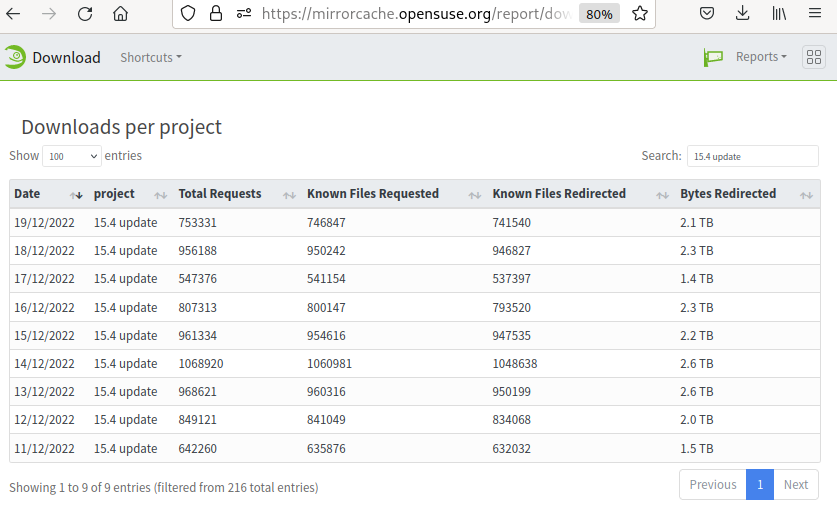
It is possible to see download statistics for several recent days in the ‘Reports’ menu, e.g. Downloads per country with the following limitations:
- The statistics are collected after the day is over, i.e. no statistics for the current day.
- The statistics for geographical regions are available on the corresponding MirrorCache instance (see below).
- Values in column ‘Bytes Redirected’ are currently only valid on the main and US instances.
Current regional instances
- North America - mirrorcache-us.opensuse.org
- South America - mirrorcache-br-2.opensuse.org
- Oceania - mirrorcache-au.opensuse.org
- Japan - mirrorcache-jp.opensuse.org
Feedback
Open a ticket on GitHub or progress.opensuse.org or email admin at opensuse.org.
Bash, GCC13 update in Tumbleweed
Snapshots of openSUSE Tumbleweed are rolling out this week like a postal worker delivering presents.
The snapshots are plenty, but only a few software packages are arriving in each snapshot as developers begin to take some time off during the holiday season.
Snapshot 20221219 delivered just one package. That package was cppcheck 2.9.3, which is a static analysis tool for C/C++ code. This update brought various Graphical User Interface and premium feature handling bugfixes. The package improved the lifetime analysis with this pointers, and added debug intrinsics debug valueflow and debug valuetype to show more detail including source backtraces.
The 20221218 snapshot had just two package updates. An update of bash 5.2.15 added some upstream patches in the rolling release snapshot. The patches addressed several cases where bash is too aggressive when optimizing out forks in subshells, and how bash can leak memory when referencing a non-existent associative array element. The shell and command language package also defers processing additional terminating signals when running the EXIT trap while exiting due to a terminating signal; the patch allows the new terminating signal to kill the shell immediately. The other package to update in the snapshot was XFS filesystem utility xfsdump 3.1.12. The package contains tools to create and restore backups of directory trees, which fixed on-media inventory for media unpacking, stream unpacking, stream packing and unpacking logic.
Snapshot 20221217 had a major version update of VPN client openconnect. The 9.01 version added a webview callback and support for some of Cisco’s AnyConnect sessions and verifications. An update of pipewire 0.3.63 fixed a critical bug that caused some audio distortion in some cases when using Advanced Vector Extensions AVX2. The audio and video package for linux also fixed some crash triggers and a potential starting issue with audacity A few other KDE’s Qt5 packages were updated in the snapshot, along with osinfo-db 20221130, which added some patches for supporting LeapMicro versions.
Functionality improvements for the Linux boot process were made in snapshot 20221216 as dracut had an update to check for the fipscheck validation check in /usr/libexec. VMware’s open-vm-tools package updated to version 12.1.5. The package added a containerInfo plugin and a number of Coverity, which is proprietary static code analysis tool, reported issues were addressed. Password Checking Library cracklib 2.9.8 had some translation updates and forces grep to treat the input as text when formatting word files. Text editor nano 7.1, mpc 1.3.0 and a couple other packages updated in the snapshot.
There were several packages that arrived in snapshot 20221215. The big update in the snapshot was to the GNU Compiler Collection. The gcc13 13.0.0 git + added two new headers and depends on at least LLVM 13 for GCN cross compiler. The compiler rebased a patch and included a new patch to allow for armv7l architecture. Another major version update was the GNOME Unicode character map package; the 15.0.2 update of gucharmap updated translations, unicode 15.0.0 and added screenshots and link them from the metainfo. Other packages to update were shotwell 0.31.7, which improved the handling of images that do not have a GPS altitude, rsyslog 8.2212.0, which made Python http server based tests more reliable, and several more.