
 Member
 DimStar
openSUSE Tumbleweed – Review of the week 2021/04
Dear Tumbleweed users and hackers,
This week felt like I was fighting with OBS and openQA, and packages breaking Tumbleweed. This also shows in the number of released snapshots: ‘only’ 3. But there was a huge gap between 0121 (reviewer last week) and 0126 (first published snapshot this week). But I’m sure you all prefer longer gaps, but working snapshots. The longer the gap, the more packages are in there, so the total net change remains the same. This wee, we released 0126, 0127, and 0128.
The main changes included:
- Automake 1.16.3
- findutils 4.8.0
- Linux kernel 5.10.9
- libvirt 7.0.0
- Sudo 1.9.5p2 (CVE-2021-3156)
Plenty of submissions are being tested in the Staging projects – almost all of them are filled. The main upcoming changes will be:
- Mozilla Firefox 85.0
- Linux kernel 5.10.11
- util-linux 2.36.1
- Rust 1.49.0
- More work on python-rpm-macros, used for multiple python flavors (aka python singlespec)
- This will come together with python 3.8.7
- Postfix: change the default database format to lmdb, migrating away from BerkeleyDB (3rd attempt, previous two were reverted)
- Bison 3.7.5
- Firewalld 0.9.3
- Pulseaudio 14.2
- Bind 9.16.11: changed protection of/against “named” from chroot jail to systemd protection. This obsoletes subpackage named-chrootenv.
- KDE Plasma 5.21: currently 5.20.90 being tested
- openssl 1.1.1i, based on centralized crypto-policies package

Customizing the GRUB menu
Simple customization of the the GRUB 2 menu on openSUSE can be quickly done without any additional software.
GRUB stands for GRand Unified Bootloader. It was developed by Erich Boleyn in 1995 under the GNU Project and released under the GPLv3 license. Its current version is 2, that is why it is often written as GRUB 2.
GRUB is a bootloader which is the piece of software that a computer reads when booting up to know the location of the operating system.

In order to change the boot options and Kernel parameters, open YaST and go to System > Boot Loader.

More advanced customization can be done by editing the /etc/default/grub file. However, one needs to proceed with caution as a broken config can prevent your computer from booting up.
The /etc/default/grub is well documented. I suggest that you follow the in-line comments when modifying values, rather than relying on bits and pieces of info from the internet. The first line in the file reminds the user to execute grub2-mkconfig -o /boot/grub2/grub.cfg after making changes to the file. Always remember to run after making changes.
Now, look at the bottom of the file:
# GRUB_INIT_TUNE="480 440 1"
GRUB_BACKGROUND=
GRUB_THEME=/boot/grub2/themes/openSUSE/theme.txt
SUSE_BTRFS_SNAPSHOT_BOOTING="true"
GRUB_DISABLE_OS_PROBER="false"
GRUB_ENABLE_CRYPTODISK="n"
GRUB_CMDLINE_XEN_DEFAULT="vga=gfx-1024x768x16"
These are pretty much everything you will need to make a fancy GRUB menu. Note that the above configuration is taken from openSUSE Leap 15.2. If you are using another Linux distribution, they may be different.
You can specify a background image for GRUB. The image must be .png, .tga, .jpg, or .jpeg and it will be scaled if necessary. The image should be in a location where GRUB can read. I suggest you put the image in the /boot/grub2/themes/openSUSE folder for now. You could also add the GRUB_DISTRIBUTOR key to provide a custom name to the distribution, like to say openSUSE Leap is rock-solid!. 😉
# GRUB_INIT_TUNE="480 440 1"
GRUB_BACKGROUND=/boot/grub2/themes/openSUSE/blue-background.png
GRUB_DISTRIBUTOR='openSUSE Leap is rock-solid!'
#GRUB_THEME=/boot/grub2/themes/openSUSE/theme.txt
SUSE_BTRFS_SNAPSHOT_BOOTING="true"
GRUB_DISABLE_OS_PROBER="false"
GRUB_ENABLE_CRYPTODISK="n"
GRUB_CMDLINE_XEN_DEFAULT="vga=gfx-1024x768x16"
Notice that I commented the GRUB_THEME key to avoid it overwriting the change. Lastly, we run grub2-mkconfig to re-build the GRUB configuration.
sudo grub2-mkconfig -o /boot/grub2/grub.cfgReboot the machine & we should now see the blue background image that we specified.

You can also edit the openSUSE GRUB theme specified by editing the /boot/grub2/themes/openSUSE/theme.txt file and experiment further with GRUB theming.

The GNU GRUB official manual can help you better understand the theme file format.
Read more on the getting nice background images.
Grab a cool wallpaper for your Linux desktop
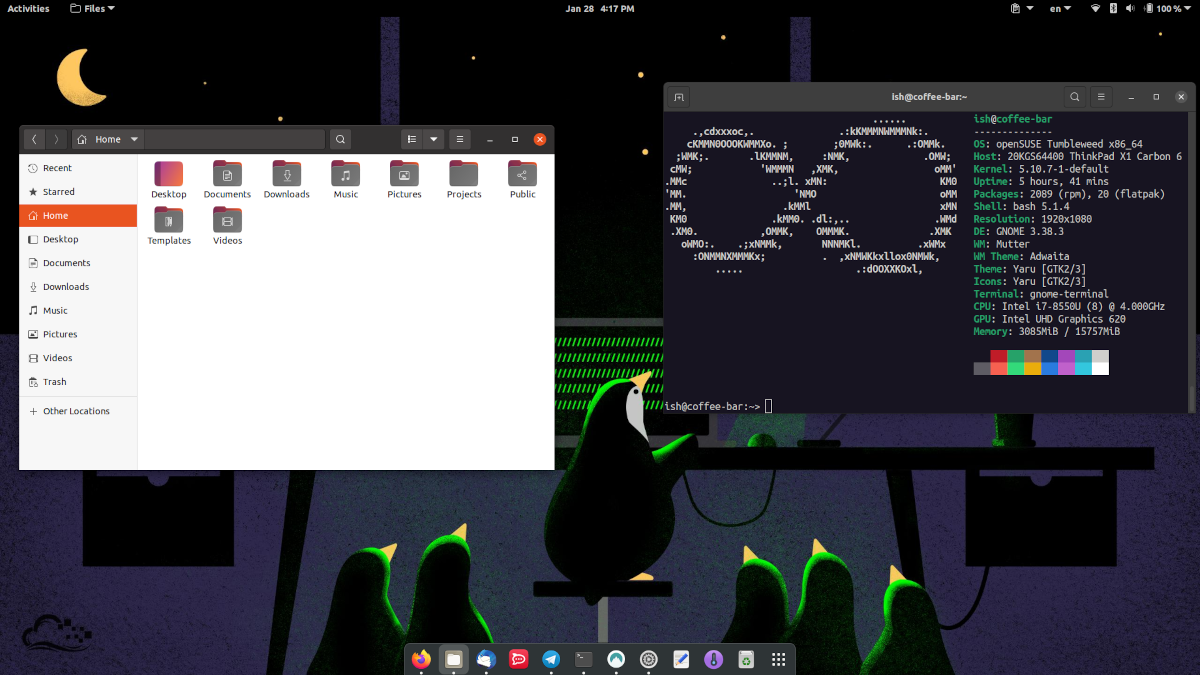
I tweeted about a blog post which I published on opensuse.mu, explaining how I configured the GNOME desktop theme Yaru (by the Ubuntu community) on my openSUSE Tumbleweed machine. The tweet got a lot of reaction, not just for the blog post or cool Yaru theme but also for the nice wallpaper showing penguins using a computer.
Our friends in the #Ubuntu community did a nice job with the Yaru theme for the #GNOME desktop. If you'd like to have the same theme on #openSUSE, then I wrote the instructions at the https://t.co/6SlMP0kbqY blog.https://t.co/NraGym2KZL pic.twitter.com/pRO93SjeTC
— Ish Sookun (@IshSookun) January 28, 2021
I got a question whether the wallpaper was freely available. The answer is yes. The wallpaper was released, among many others, by Digital Ocean in 2016.
We've made a handful wallpapers which you can find by sailing to this link: https://t.co/QerTGG51Ig pic.twitter.com/UUOMM7W9X3
— DigitalOcean (@digitalocean) April 7, 2016
You can head to imgur.com now and grab a cool wallpaper for your Linux desktop.

RubyGems, sudo, libvirt update in Tumbleweed
Three openSUSE Tumbleweed snapshots were released since the last update.
Several RubyGems were updated in the first two snapshots of the week and an update to sudo came in the most recent 20210127 snapshot.
A 10-year-old Common Vulnerabilities and Exposures that allowed root-level access was fixed with the update to sudo 1.9.5p2. Patches for CVE-2021-3156 were also backported in maintenance updates for openSUSE Leap. A minor version update of virtualbox to 6.1.18 fixed some nested virtualization hangs when executing symmetric multiprocessing with nested-guests under certain conditions on Intel hosts. An update was made to jhead, which is a command-line tool for displaying and manipulating exif header data in jpeg images; the 3.04 version removed an unnecessary warning with some types of GPS data and fixed a few bugs, including one bug that did not clear exif information when processing images. Some buttons were disabled in the update of yast2-network 4.3.41, which also added basic support for writing the network configuration to the NetworkManager backend.
New features from the update of libvirt 7.0.0 arrived in snapshot 20210126. The new version allows control of the qcow2 metadata cache for qemu. Another qemu improvement was the reporting of guest disks informations in virDomainGetGuestInfo; libvirt is now able to report disks and filesystems from the guest’s perspective using guest agent 5.3.0 or newer. The Linux Kernel 5.10.9 updated in the snapshot as well. A few updates were made for the i915 graphics drivers including allowing a sysadmin to override security mitigations for digital rights management. Skopeo, which is a command line utility for container images and image repositories, updated the vendor of containers and integrated tests for the syncing of the k8s.gcr.io directory. Other packages to arrive in the snapshot wree ncurses, xen, email client mutt 2.0.5 and text rendering library pango 1.48.1. A few RubyGems arrived in the snapshot; rubygem-parser 3.0.0.0, rubygem-rspec 3.10.0 and rubygem-rubocop 1.8.1 were among the RubyGems packages to arrive in this snapshot.
The majority of the gem packages arrived in snapshot 20210121. The entire snapshot was filled with more than 40 plus RubyGems updates. Notable packages to update were Ruby’s logging layer rubygem-fluentd 1.12.0, major version updates of rubygem-webpacker 5.2.1 and rubygem-liquid 5.0.0, and rubygem-js-routes 1.4.14. Only four other packages were updated. Those updates were xapps 2.0.6, gstreamer-devtools 1.18.3, gstreamer-editing-services 1.18.3 and python-gst 1.18.3.

Upgraded matomo
As usual, we keep our infrastructure up-to-date. While this is easy for the base system ('zypper patch', you know? ;-) most of the applications need special handling. Normally, we package them as well in our OBS repositories. But this often means that we need to maintain them on our own. At least: packaging them allows us to track them easily and integrates them in the normal workflow. All we have to do to keep them updated on the production machines is a 'zypper up' (which updates all packages with higher version and/or release number - while a 'zypper patch' only updates packages, which have an official patchinfo with them).
Upgrading Matomo from version 3.14.1 to 4.1.1 was not that easy: simply replacing the files in the package was not enough. Upstream changed so much in the database structure, that the standard calls in the post installation script (which normally update the database as well during package update) were just not enough. As this is (hopefully) a one-time effort, we run some steps manually from the commandline, which took ~20hours. After that, our DB was updated, cleaned up and ready to go again.
Summary: Being an openSUSE hero includes not only being an infrastructure Guru with automation and scripting skills. Often enough, you need some packaging expertise as well. ...and sometimes even this is not enough!
Web Development Sprints To Start Next Week
The openSUSE Project will begin monthly web development sprints to address feedback provided by attendees of the Jan. 23 meetup regarding the results of the End of the Year Survey.
The sprints will be every first Thursday of the month at 18:30 UTC and will take place online at https://meet.opensuse.org/websprints; the first sprint starts on Feb. 4.
The web sprints are open for people to provide feedback to the community about the various websites openSUSE has for on-boarding people who install openSUSE and people who want to learn more about the distributions, tools and technologies. The sprints will focus on several aspects of web development and enhance the structure of the websites to better direct users toward helpful links, resources and communication tools. The web sprints seek participation from new, current and former users to provide feedback to developers with the desire to better understand how people navigate the openSUSE websites.
Gaining feedback on the best communication channels to help people solve technical issues and better ways to show people how to get involved in the project are desired outcomes from the web development sprints.
The sprints will provide a useful way for people to voice their feedback and gain knowledge about web development and technologies.
Organizers of the sprint are collecting topics and ideas on https://etherpad.opensuse.org/p/websprints, so even people who are interested but unable to attend can help improve the navigation and content of the project’s websites.
Next Meetup for End of Year Survey Results
The next sessions will start at 13:00 UTC on openSUSE’s Jitsi instance on Jan. 30. Topics to be discussed are:
- Tools driving switchers to openSUSE (Where are users coming from)
- Discuss flagship project/s
- Expanding global users
- Increasing diversity
- Increase usage with people under 34
The meetup will take place at https://meet.opensuse.org/EOY2020.
RHEL no-cost* vs openSUSE Leap

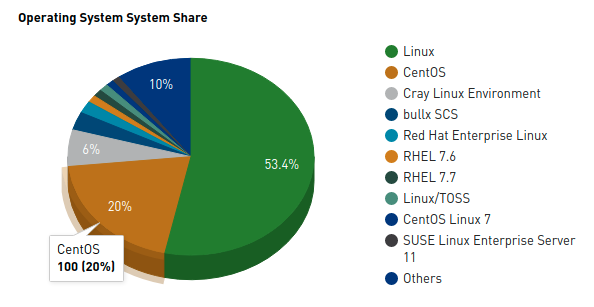
Ever since Red Hat announced that they are changing the development model of CentOS and making it an upstream project rather than downstream, it left many CentOS users frowning. No matter what argument brought forward, CentOS users, especially running production machines, relied on the stability of an enterprise-grade Linux distribution. Compiled from RHEL sources, CentOS offered such stability that it powered many web servers and enjoyed a massive 20% share of the top 500 supercomputers of the world.
Some time back, Red Hat made another annoucement, about new Red Hat Enterprise Linux programs. Under the new program RHEL can be used in production for up to 16 systems (which Red Hat considers a small workload) at zero license costs. Also, Red Hat is making it easier for a customer's development team to join the program and reap the benefits.
What risks lie ahead for an enterprise if Red Hat changes or cancels the program in the future? 🤔
On the other hand, since 2018, SUSE has worked closely with the openSUSE community to bring the Leap distribution closer to SUSE Enterprise Linux (SLE), such that now Leap and SLE are binary compatible.
openSUSE currently offers two distinct distributions, Leap & Tumbleweed.
Tumbleweed is a rolling distribution constantly getting updated software whereas Leap has planned releases that sync with SUSE Linux Enterprise and its Service Packs.
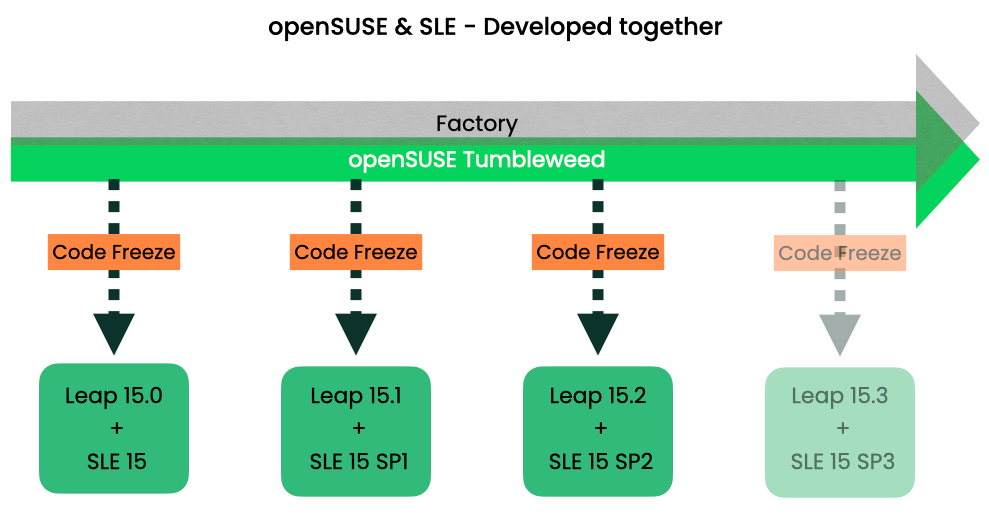
The above image depicts how openSUSE & SUSE Linux Enterprise are developed together. Factory is the rolling development codebase for both openSUSE & SLE. In the pipeline we can see that Leap & SLE are synced and both receive software packages from the same source; that is why they are both binary compatible.
In a series of blog posts explaining how SUSE builds its Enterprise Linux distribution, author Vincent Moutoussamy details the relationship between openSUSE & SLE.
Conclusion
Red Hat allows its clients to use RHEL for free on up to 16 machines. On the other hand, openSUSE Leap boasts binary compatibility with SUSE Linux Enterprise and comes without any restriction on usage.
Cover image source:
Photo by Gratisography from Pexels
Running syslog-ng in Bastille – revisited
Bastille is a container management system for FreeBSD, similar to Docker or Podman on Linux. The historical name of containers on FreeBSD is jail, and they appeared a lot earlier than containers on Linux. Managing jails was not always easy. When I started to use this technology in production in 2001, nothing was automated. Using Bastille, you can easily create, configure, or update jails at scale. It has a template system to install applications in containers and there is a template also for syslog-ng.
From this blog, you can learn how to get started with Bastille and how to create and run a syslog-ng jail using the freshly released 0.8 version of Bastille.
Before you begin
First of all, to use Bastille, you need FreeBSD installed. I used FreeBSD 12.2 on AMD64, but it also works on CURRENT and on any platform supported by FreeBSD, including the Raspberry Pi. Bastille 0.8, the release I’m describing in my blog, was released after the latest quarterly package release. It means, that by the time of writing this blog article, you can install it only using an up-to-date ports snapshot or following the latest PKG builds, instead of the quarterly PKG release.
Installing Bastille
The easiest way to install Bastille is to use the pkg command:
pkg install bastille
And depending on your Internet connection, it will be installed within a few seconds. You can also install it from ports:
cd /usr/ports/sysutils/bastille/
make install clean
There are no extra dependencies when you install Bastille. There is one exception, even if it is not hardcoded into the Makefile in ports: you need to install Git to be able to use the template system.
pkg install git
Configuring Bastille
Bastille supports many different FreeBSD features, like ZFS or VNET. However, these need extra planning, stronger hardware, and more control over the network. So, in this blog, I go with the easiest configuration possible, which works anywhere: on your local network or somewhere in a public cloud as well. For more choices and advanced functionality, check the Bastille documentation at https://bastille.readthedocs.io/en/latest/
The commands below enable Bastille, create and start an internal network interface for jails and also enable the PF firewall. Run each of these commands from a terminal.
sysrc bastille_enable="YES"
sysrc cloned_interfaces+=lo1
sysrc ifconfig_lo1_name="bastille0"
service netif cloneup
sysrc pf_enable="YES"
The next step is to set up the PF firewall. The configuration below should go into /etc/pf.conf and you should replace “em0” on the first line with your actual network interface name. This configuration makes sure that jails can reach the Internet through NAT and Bastille can create rules to access services in jails without editing the firewall configuration manually.
ext_if="em0"

set block-policy return
scrub in on $ext_if all fragment reassemble
set skip on lo

table <jails> persist
nat on $ext_if from <jails> to any -> ($ext_if)

rdr-anchor "rdr/*"

block in all
pass out quick modulate state
antispoof for $ext_if inet
pass in inet proto tcp from any to any port ssh flags S/SA modulate state
You can now restart the pf service for these rules to take effect. Note, that if you work over an SSH connection, you might be kicked off from the system when you hit Enter. In this case, reconnect and continue your work:
service pf restart
Finally, bootstrap the release of your choice (not more recent than what the host is running):
bastille bootstrap 12.2-RELEASE
It downloads and extracts the given release. You are now ready to create your first jail!
Creating your first jail
The first step is to create a jail. “bastille create” expects a few parameters from you. One is a name for the jail. In the example below, we use “alcatraz”, but in real life, you will most likely use names that remind you of the function of the jail, for example: centralsyslog. You also need a FreeBSD release name and finally an IP address. Use a different IP address if your host is on a 10.0.0.0/8 network.
bastille create alcatraz 12.2-RELEASE 10.17.89.50
Unlike previous releases, version 0.8 of Bastille starts the freshly created jail automatically. I prefer this way, but not everyone is happy with this change, so it might change in future releases.
Now, bootstrap the syslog-ng template. It uses Git to download the template from a repository on GitLab.
bastille bootstrap https://gitlab.com/BastilleBSD-Templates/syslog-ng
Apply the template to the jail. As you can see, we refer to the jail by its name, so choose jail names wisely!
bastille template alcatraz BastilleBSD-Templates/syslog-ng
Finally configure the PF firewall with a bastille command, and redirect the external 514 port to the 514 port of the freshly created jail on the internal network:
bastille rdr alcatraz tcp 514 514
And your second jail
The commands below create a second jail with a slightly different name and IP address. You do not have to bootstrap the syslog-ng template again, just apply it to the jail. And as port 514 on the host is already redirected to the first jail, here we redirect the external 515 port to the 514 port of the jail.
bastille create alcatray 12.2-RELEASE 10.17.89.51
bastille template alcatray BastilleBSD-Templates/syslog-ng
bastille rdr alcatray tcp 515 514
Testing
You can check the logs from both jails with the following command:
tail -f /usr/local/bastille/jails/alcatraz/root/var/log/messages /usr/local/bastille/jails/alcatray/root/var/log/messages
You should see two sets of log messages from the two jails. The -f option means that you do not get back the command prompt, but tail follows the files.
Now open another terminal and from another system use telnet to connect to port 514 and 515 of your FreeBSD host. In both cases, enter some test messages.
czanik@czplaptop:~> telnet 172.16.167.138 515
Trying 172.16.167.138...
Connected to 172.16.167.138.
Escape character is '^]'.
this is a test
^]
telnet> quit
Connection closed.
czanik@czplaptop:~> telnet 172.16.167.138 514
Trying 172.16.167.138...
Connected to 172.16.167.138.
Escape character is '^]'.
this is another test
^]
telnet> quit
Connection closed.
On the other terminal, you should see log messages about the connection and the test messages as well:
Jan 22 10:03:13 alcatraz syslog-ng[1120]: syslog-ng starting up; version='3.30.1'
Jan 22 11:52:52 alcatraz syslog-ng[1120]: Syslog connection accepted; fd='23', client='AF_INET(172.16.167.1:50212)', local='AF_INET(0.0.0.0:514)'
Jan 22 11:52:56 172.16.167.1 this is another test
Jan 22 11:53:01 alcatraz syslog-ng[1120]: Syslog connection closed; fd='23', client='AF_INET(172.16.167.1:50212)', local='AF_INET(0.0.0.0:514)'
If you have questions or comments related to syslog-ng, do not hesitate to contact us. You can reach us by email or even chat with us. For a list of possibilities, check our GitHub page under the “Community” section at https://github.com/syslog-ng/syslog-ng. On Twitter, I am available as @Pczanik.

Cron do not send me empty emails
Just in case, if you’ve ever wondered how to stop cron from sending empty emails, a quick look at man mail will give
you the answer you’re looking for (if you know what you’re searching for):
    -E

    If an outgoing message does not contain any text in its first or only message part, do not send it but discard it silently,
    effectively setting the skipemptybody variable at program startup. This is useful for sending messages from scripts started
    by cron(8).
I got this after visiting couple of forums, and some threads at stack exchange, however this one nailed it
So all you need to do is, fire up that crontab -e and make your script run every five minutes, without fear of the noise
*/5 * * * * /usr/local/bin/only-talk-if-there-are-errors-script |& mail -E -r $(hostname)@opensuse.org -s "[CRON][monitoring] foo bar $(date --iso-8601='minutes')" do-not-spam-me@example.com
Et voilà, ma chérie!

YaST Control Center
A few tweets ago, openSUSE Mauritius mentioned using YaST to configure the timezone on a machine with just a few clicks.
If you are more comfortable navigating GUI tools rather than the command-line, then YaST is a just a few clicks away to configure🛠️ the timezone on your #openSUSE machine.
— openSUSE Mauritius (@openSUSE_MU) January 25, 2021
YaST Control Center > System > Date and Time pic.twitter.com/K2wimxyNDQ
YaST is a system setup & configuration tool. It was developed by SuSE in the mid-90s. YaST is an acronym for Yet another Setup Tool. It is a handy tool for administrators to install software, configure hardware, connect to a network, etc.
It is written in Ruby. It has both a GUI and is available as a command-line utility through a text-based user interface using ncurses.


To run the ncurses-based YaST version, run sudo yast2 using the terminal. Then, use the tab & arrow keys to navigate and press the enter button to select an item. Menu items and buttons can be triggered by using the Alt + Hightlighted Letter. For example, to quit the screen as in the above screenshot, one would press Alt + Q.
Software Management
YaST can be used to install software packages. Both the GUI & yast2 command can be used to search for packages and install them. YaST uses the Zypp package management engine which is also used by the zypper command-line tool, to manage software.
YaST Modules
Additional modules can be installed to extend YaST's capabilities. For example, installaling the yast2-docker package provides a module that allows YaST to manage Docker containers. The YaST website provides a list of available modules.
Documentation
SUSE has excellent documentation on YaST. The administration section of the Leap documentation refers to using YaST for various configuration tasks.
Contributing
YaST is developed in the open. Its source code is available on GitHub. The YaST Team has made it easy for volunteers to to find their way to contribute code.