
 hpj
hpjOn the Graying of GNOME
The GNOME project turned 23 this year, and despite equally persistent rumors to the contrary, it's still alive and kicking.
Just how alive, though? All I know is this: Where the topic of GNOME's health goes, accurate data rarely follows. Of course, there is data — lots of it in fact, in public source code repositories. Though flawed in many ways, it allows us to make comparisons to the past — and maybe predictions for the future: Are a few organizations carrying most of the workload, making them critical points of failure? Are new contributors able to pick up the slack from those who leave? Is the project graying (i.e. increasingly dominated by veterans)?
In one of my occasional fits of hubris, I set out to process this data to see if I could shake out anything meaningful. I'm usually fine with just satisfying my own curiosity and leaving it at that, but it's one of those times where the results seem interesting enough for a blog post. So here we are.
I'm going to lead with the nice graphs and follow on with a section on methodology. The latter is long, boring, and mandatory reading.
Active contributors
By generation
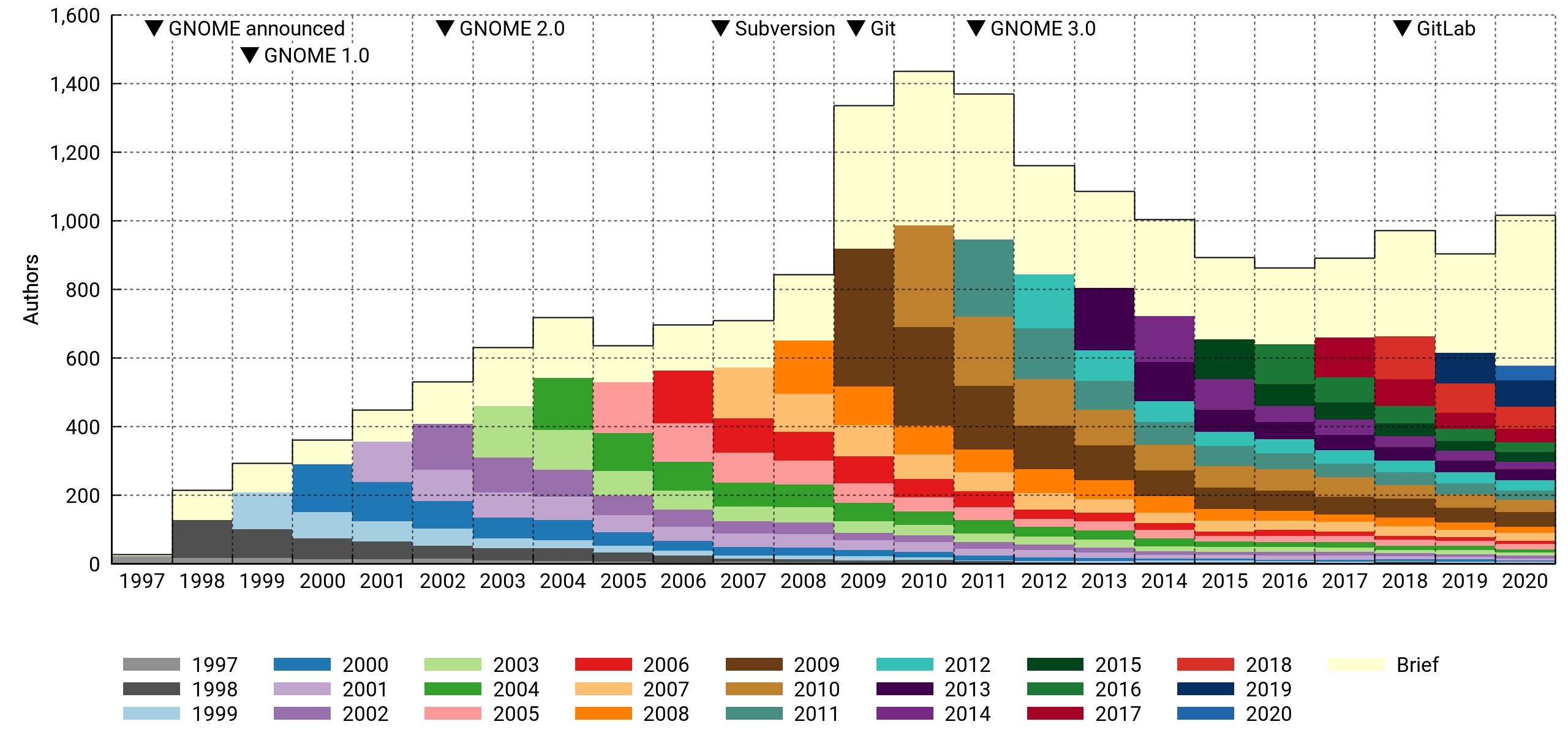
The stacked histogram above shows the number of contributors who touched the project on a yearly basis. Each contributor is assigned to a generational cohort based on the year of their first contribution. The cohorts tend to shrink over time as people leave.
There's a special "drive-by" cohort (in a fetching shade of off-white) for contributors who were only briefly involved, meaning all their activity fits in a three-month window. It's a big group. In a typical year, it numbers 200-400 persons who were not seen before or since. Most of them contribute a single commit.
According to this, GNOME peaked at slightly above 1,400 contributors in 2010 and went into decline with the GNOME 3.0 release the following year. However, 2020 saw the most contributors in a long time, even with preliminary data — there's still two weeks to go. Who knows if it's an anomaly or not. It's been an atypical year across the board.
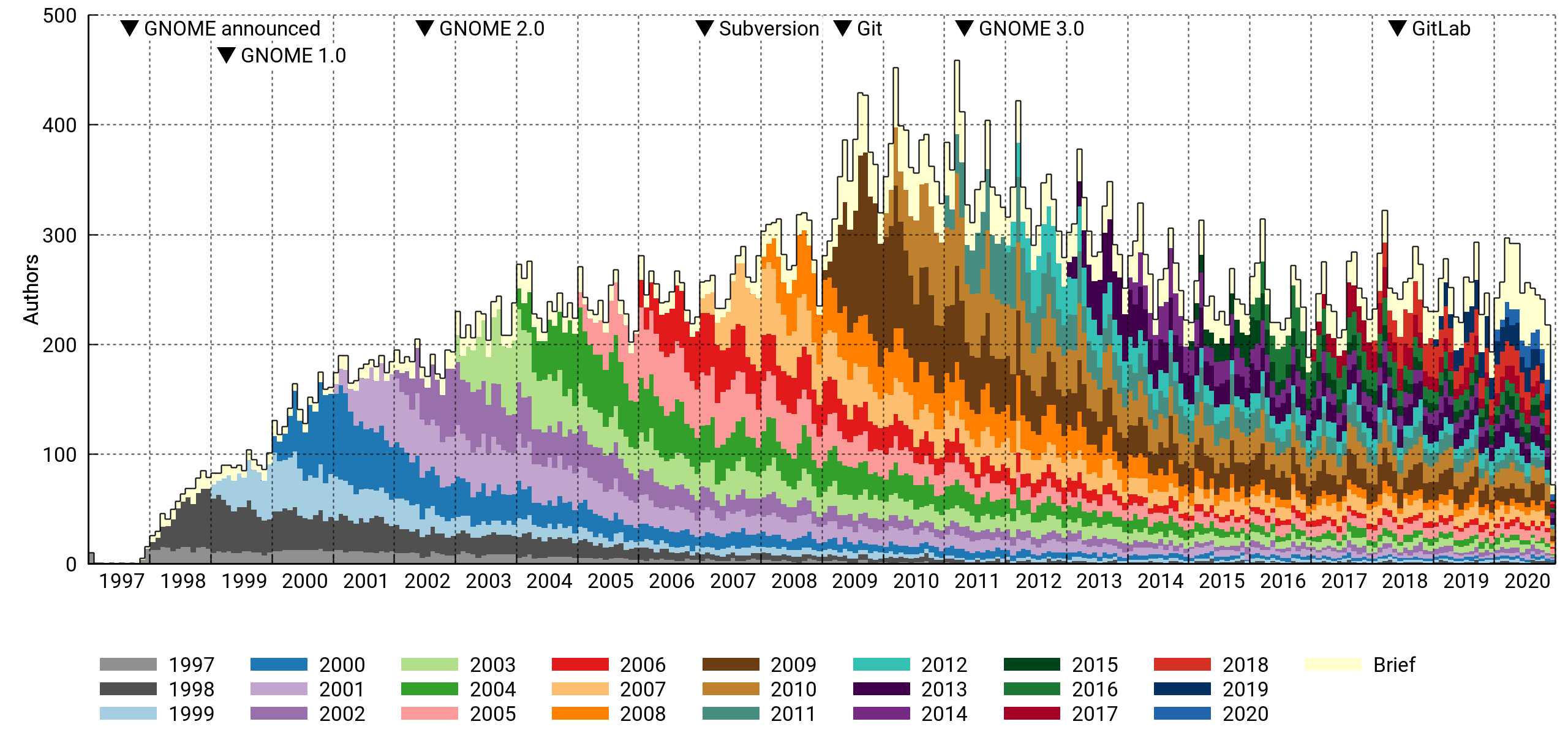
This is the same histogram, but with per-month bins. There's a clear periodicity caused by the semiannual release cycle. The peak month was March 2011, right before the GNOME 3.0 release. About 450 contributors got involved that month.
The drive-by cohort is relatively smaller on a monthly basis. This makes sense, as it has little overlap from month to month, and the per-year bins tend to add them all up.
By affiliation
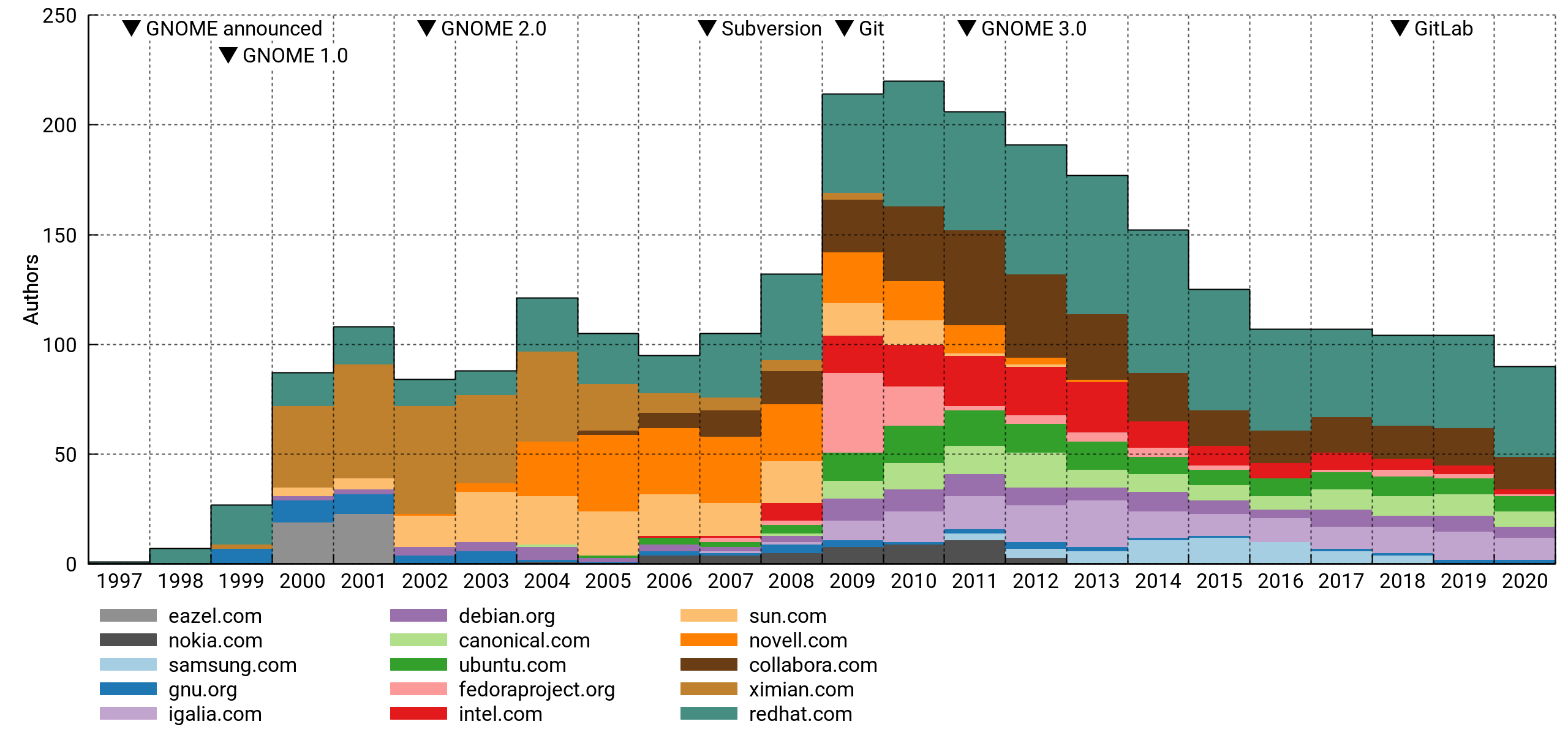
Above, the top 15 affiliations of active contributors. I've excluded personal accounts. This is pretty flawed (details below), but interesting nonetheless. For what it's worth, it mostly lines up with my memory of things.
The pattern tracks well with the total despite only capturing a minority portion of it. I think this means that paid and unpaid contributions are driven by the same underlying trends, or that there's a lot of the former hiding in the latter.
Commit count
By generation
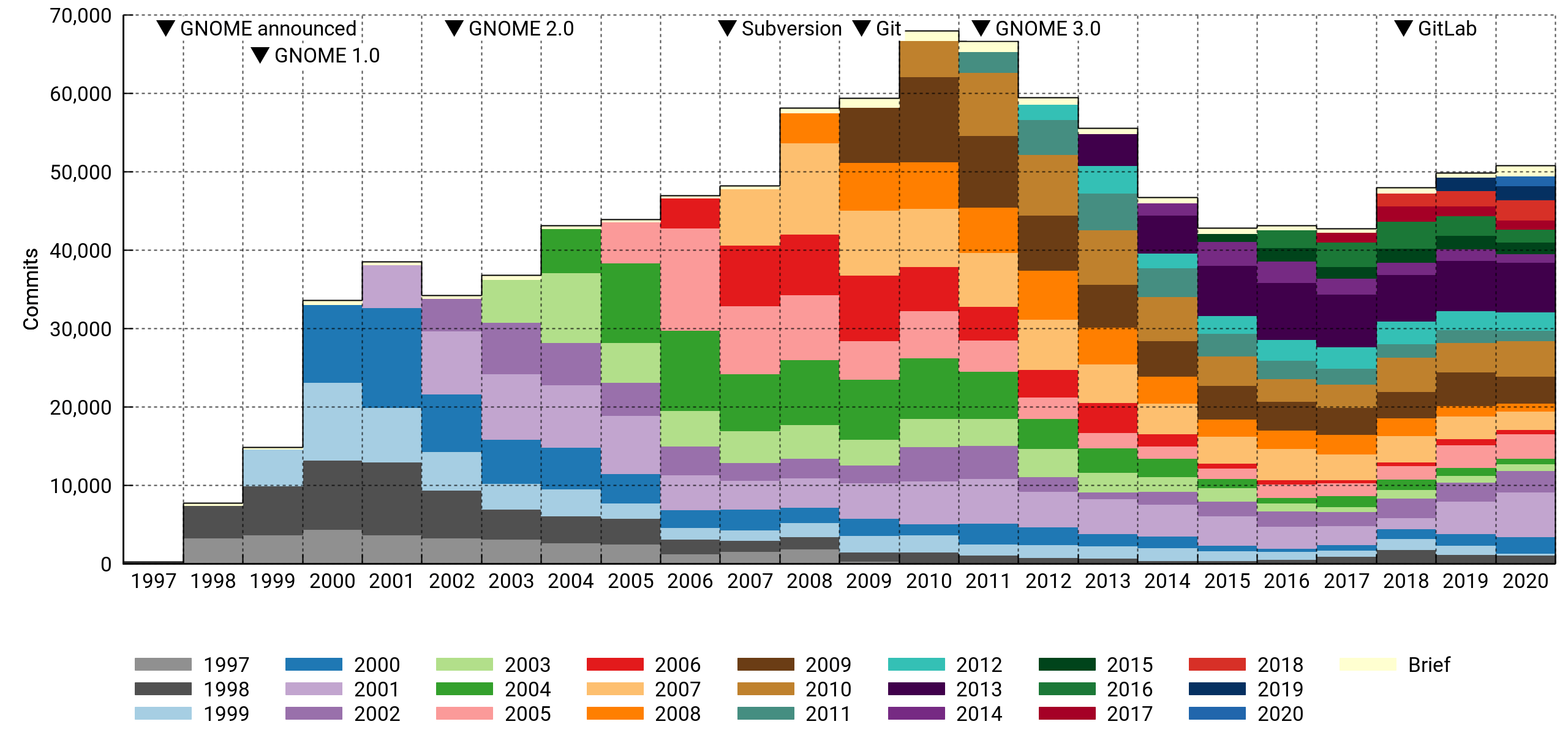
Here I'm counting the number of commits per year in the various cohorts.
At first glance, this looks much less dire. However, note how newcomers are having a smaller impact, especially from 2014 on. And the 2018-2020 bounce is entirely due to a handful of veterans making a comeback.
Half the commits in 2020 were made by contributors who've been with the project for ten years or more. Also noteworthy, drive-by commits are a vanishingly small portion of the total.
By affiliation
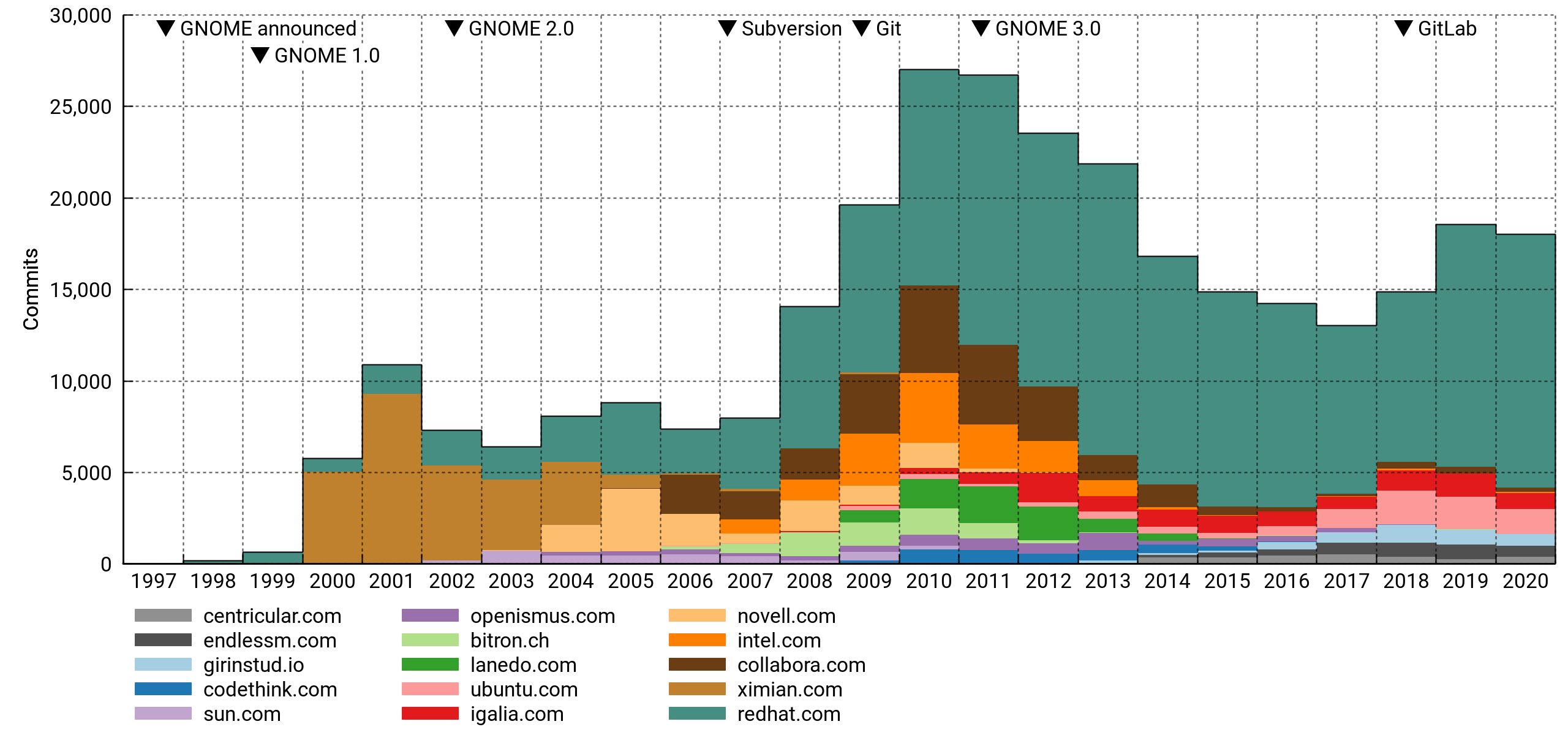
Top 15 affiliations again, but now ordered by commit counts. It's safe to say that GNOME is dependent on paid developers in a big way. Specifically, and to no one's surprise, it leans heavily on Red Hat.
General observations
A few observations can be made with confidence:
- By F/OSS standards, the project is not unhealthy. It has hundreds of experienced and first-time contributors every year. It is well-organized and arguably well-funded compared to its peers. But:
- Every metric has the project peaking around 2010.
- A diminishing number of veterans is doing an increasing share of the work.
- Although recruitment is stable, newcomers don't seem to be hitting their stride in terms of commits.
- Corporate sponsorship is probably necessary to keep the project going, but the field of sponsors has kept thinning.
I think GNOME is addressing the risk factors competently by modernizing infrastructure (GitLab, Discourse). This has obvious value even in the absence of quantifiable results, but it'll be interesting to see if the effect can be measured over the next couple of years.
Diminished enthusiasm may also be due to there being fewer ways for a new contributor to make their mark or assume a role of responsibility. GNOME has become more conservative, certainly much more so than it was a decade ago in the run-up to GNOME 3. The rationale and phrasing in the announcement of the new versioning scheme (e.g. "Radical technological and design changes are too disruptive for maintainers, users, and developers") seems indicative of this trend1.
Notes on methodology
So what's wrong with this analysis? If you're so inclined, you can find the details under the next couple of subheadings and pass harsh, harsh judgement.
I've set the unscientific rigor bar high enough to hopefully yield something useful, but low enough that I could do it in my spare time and not get stuck in the dreaded state commonly known as "90% done".
Module selection
I aggregated data from 189 Git repositories. The vast majority of these are hosted on gnome.org, with a handful from freedesktop.org and github.com. Commits are uniquely identified by their commit hash, meaning trivial duplicates are counted only once.
GNOME has always been a decentralized, big-tent project, so it's not obvious how to delineate it. I've tried to be fair by including most of the repositories from a full meta-gnome-desktop jhbuild, including fairly low-level dependencies like Cairo, Pango, and Pipewire, as well as past, present and would-be flagship applications under the GNOME umbrella. Documentation and infrastructure is represented, as are many archived projects (e.g. ORBit2, Bonobo, Sabayon, GAL).
I was a little uncertain about what to do with X.Org and Wayland. In the end I decided to include the latter, but not the former, since Wayland has close ties to GNOME (it even references GTK+ in its TODO file), while X.Org has its roots in the much older XFree86.
Mono is another project I resisted including; its development was tangential to GNOME proper, diverging completely in the most recent decade. However, I did include GtkSharp and several GNOME-hosted C# applications common on desktops in the 2005-2010 time frame.
Since I haven't established hard criteria for module selection, it's subject to various biases. Older code is probably underrepresented, since providers of important functionality were more loosely attached to the project early on (e.g. GNOME Online Accounts and Telepathy got pulled in, should I have included Gaim or Pidgin too? How about XChat?).
Anyway, the list isn't terrible, but there's room for improvement.
Contributor identities
Similar studies often identify contributors by their e-mail addresses. I used full author names instead, since there's good reason to think they're more stable over a 20-year time span. We're fairly consistent in spelling our own names, and we change them rarely (often never). On the other hand, e-mail addresses come and go with different hosting arrangements, employers, etc.
An added challenge with this approach is that sometimes different people have the exact same name. In practice, I'm not aware of any instances of this happening in GNOME. It seems to be rare enough that I doubt it'd introduce significant error in most projects.
I should add here that the drive-by cohort depends on a fair amount of hindsight (you never know when someone might come back with more contributions, but the likelihood drops off quickly as time passes). This means the cohorts for 2020 are preliminary. They'll be a lot more accurate with another run late next year.
Domain names
I'm using e-mail domain names as a proxy for organizations in some of the graphs. This is a notoriously unreliable approach for at least three reasons:
- Contributors often use personal e-mail addresses for paid work, leading to significant undercounting in general.
- Specific companies may require their employees (or ask them nicely) to use company e-mail for collaboration. Out of the listed companies, I know of at least one that definitely did this. However, there are many that don't, and these will be comparatively less well represented.
- The mapping between DNS and organizations isn't one-to-one. A company may operate under multiple names or TLDs (e.g.
.co.ukand.com).
Despite these weaknesses, it's common to slice the data this way. It's difficult to do better without access to semi-closed data troves, and depending on your views on privacy and ability to handle PII safely, it might not be something you'd want to get into anyway. But I bet you'd be well-positioned for it if you were, say, the corporate owner of both LinkedIn and GitHub.
When grouping by organization, the goal is to get an idea of which outside entities are sponsoring contributions. Therefore, I've filtered out addresses from the biggest mass e-mail providers like @gmail.com and project-centric providers of personal accounts (e.g. @gnome.org, @gtk.org).
I took the liberty of reassigning the personal domains of a few extra prolific authors who would've otherwise showed up as individual organizations. Since there's no way I'm doing it for everyone, this introduces some bias. The full details are in the project's metadata file (see: code).
Version control systems
Changeovers in version control systems divide GNOME's VCS history into three eras with noticeable discontinuities between them.
Before 1998: Dark ages
In the Bad Old Days, Free Software would often use plain RCS or no version control at all. I have basically no data for this era: The GIMP, being the ur-project from which GTK+ spawned, was imported to CVS in November 1997, but by then it had already been in development since at least mid-1995. It may be possible to reconstruct it somewhat by diffing old tarball releases. Linux historians have done this for the kernel.
1998-2009: Centralized
GNOME projects were mostly maintained in CVS from 1998 on, with infrastructure provided by Red Hat. A few companies (e.g. Ximian) maintained projects in their own CVS instances that were later consolidated under GNOME.
CVS had many limitations. For instance, history edits and other complex operations — like, oh, renaming a file — fell under the technical term "surgery" and the auspices of a competent server-side surgeon. The centralization of accounts also fostered a workflow where outside contributions were committed without any formal authorship metadata. This shows up in my plots as undercounting of active contributors.
GNOME moved to Subversion in 2007. While technically superior to CVS, it was still a centralized file-tracking solution and didn't change the workflow very much.
2009-present: Decentralized
Subversion didn't last long; 2009 saw the move to Git. The active contributor count shot up that year, and part of this is due to more accurate authorship metadata. I think there's a case to be made that involvement had been gradually increasing even before Git's introduction, but moving to a proper DVCS certainly didn't hurt.
Since a lot of contributors moved off @gnome.org in this switch, and affiliations are assigned based on e-mail addresses, the discontinuity is most visible in these graphs.
I expected the improved history management (and reduced commit anxiety) in Git's wake would also have produced more numerous commits. The data doesn't really bear this out — the count did increase the following year, but it's hard to distinguish from the general momentum leading up to GNOME 3.
Code
I wrote a small program to automate this somewhat. It's nothing much, but at least it can serve as a humorous example of what can happen when your reach starts to exceed awk's grasp and it occurs to you that hey, I should use Rust for scripting!
CSV files
I've uploaded the report data used in the charts in CSV format. It should be fairly self-explanatory and can be imported directly in LibreOffice (UTF-8, comma-separated).
Disclaimer
According to a quick tally, I've done enough work on GNOME projects for a place in the top 3% of committers2. That's decent enough, but the lion's share of it is, shall we say, not very recent. I don't presume to speak for the project or, in fact, any group at all.
1 Not necessarily a bad thing. There's something to be said for not constantly yanking the rug out from beneath everyone's feet.
2 Humblebrag aside, I'd like to emphasize that since there are so many small contributions ("long tail"), it's easy to end up in a high percentile even with a modest commitment.

Alpha Releases of openSUSE Leap 15.3 are Available for Testing
Alpha images of openSUSE’s next stable fixed release openSUSE Leap 15.3 are now available for testing at software.opensuse.org/distributions/testing.
Release Manager Luboš Kocman announced the availability of the Alpha images yesterday in an email to developers on the openSUSE Factory mailing list.
“I’d like to inform you that you can already find openSUSE Leap 15.3 testing images on software.opensuse.org,” Kocman wrote. “You may notice that Installation images for all arches can be now found in the Installation tabs, and the tab Ports no longer exist. This new structure corresponds with the way how we build images in 15.3.”
openSUSE Leap 15.3 is based on the Jump concept that was developed over the past several months, which makes it and SUSE Linux Enterprise compatible. openSUSE Leap aligns with SLE and its Service Packs (SP), which keeps the system updated, stable and patched. Upon General Availability of this release, there will be a whole new level of harmony between Leap 15.3 and SUSE Linux Enterprise 15 SP3.
The end of CentOS 8 announced last week aligns well for those users who are ready to move away from RedHat’s community enterprise release to a release model with openSUSE Leap, which has a life cycle of about 18 months of maintenance and security updates per minor release.
The point release of Leap 15.3 enters its Alpha build phase. During the Alpha phase, regular Alpha images will be built on a rolling basis until mid-February, when it is scheduled to transition to a Beta build phase. The beta submission deadline is February 12. The Beta phase has a similar model until the General Availability of the release; at GA, the rolling builds stop and Leap transitions into a maintenance and security update phase.
“Any update request to existing packages should be simply submitted against openSUSE:Leap:15.3 and OBS will determine where to redirect the request either to SLE or openSUSE Backports,” the email states. “Please note that new packages need to be currently submitted against openSUSE:Backports:SLE-15-SP3.opensuse-factory@ We know it’s inconvenient and we’ll work with the Autobuild team to make it a default destination place for any new package submission for openSUSE Leap 15.3.”
Distro hoppers, hobbyists, users and tech enthusiasts can download the current builds and help test the releases at software.opensuse.org/distributions/testing.
Users of openSUSE Leap 15.1 have until January of 2021 before it reaches its End of Live and users need to update to Leap 15.2. The Public Availability of Leap 15.3 is scheduled to be released in July, 2021, according to the releases roadmap Users of Leap 15.2 will need to update to the newer version within six months of the release of Leap 15.3.

 Member
My Platform for the 2020 openSUSE Board Election
openSUSE Leap offers Predictability
Users of the community enterprise distributions can be confident in the direction of openSUSE Leap for those who might be hunting for a stable Linux distribution that offers predictability and longevity.
Minor releases like openSUSE Leap 15.2 sometimes get compared to a major release. The minor releases are essentially updates that people can choose rather than have forced updates.
Major versions of Leap receive long periods of maintenance and security updates; the release cycle has additional overlap that is greater than that of alternatives. Major releases are coming roughly every three to four years and minor releases come usually once a year, which leads to a life cycle of about 18 months of maintenance and security updates per minor release. Many of the package’s versions are the same as in previous minor releases.
Leap aligns with SUSE Linux Enterprise and its Service Packs (SP), which keeps the system updated, stable and patched. openSUSE and SUSE have been collaborating to bring openSUSE Leap 15.3 and SUSE Linux Enterprise 15 SP3 even closer together to make them fully compatible.
Users who are willing to switch to Leap are likely to find great benefits in choosing an openSUSE distributions and support ecosystem the project provides.
openSUSE Leap not only offers the sources, but Leap 15.3 will also offer the binaries and tools like the Open Build Service to rebuild the distribution. However, no rebuilding efforts are needed to benefit from the enterprise-grade code base. OBS also offers other capabilities like easy to add container builds and openSUSE’s Devel Project allows for the latest software on a stable platform that is much more refined without impacting the underlying enterprise code base. Testing of migrations are also made with the project’s openQA test suite automatically for older releases.
openSUSE Leap has continually moved closer together with SUSE Linux Enterprise, but the openSUSE Project is independently driven by its community and the path for Leap is foreseeable. openSUSE has a thriving global community with multiple distributions, so users pondering a switch from another distribution can consider openSUSE Leap and it’s community a safe haven for their future.
Board Elections - Meet the Candidates
As the openSUSE Board election is drawing closer, with the ballots opening on December 15 already, we want to invite the openSUSE community to a “meet-and-greet” and QA live session with the candidates.
In the past weeks there have been passionate discussions on the election and candidates, and we felt we had to answer the community’s interest with a proper setting.
In this video call the candidates will introduces themselves, present their openSUSE board election platforms and answer questions. While this might sound a bit formal we really want to keep it very informal and relaxed for everyone. The goal is to give the community a better picture of the candidates so they can decide whom to vote for.
Time and date
Saturday, 2020-12-19 at 13:00 UTC
We tried to accommodate as many time zones as possible. We chose Saturday to give people a chance to take part who are working during the weekdays. Please find your local time accordingly here
Location
We will gather at this Jitsi room: https://meet.opensuse.org/meet-the-candidates-2020
The session will be recorded for anyone not being able to take part. Furthermore we’re trying to make a live stream on Youtube possible as well to cover regions not that well connected to meet-o-o. Please keep that in mind so if you don’t want to be recorded it’s better to leave your webcam turned off.
Moderation
Adrien Glauser and Vinzenz Vietzke will be moderating the whole event together to make sure no questions get lost unanswered.
Collecting Questions
As mentioned there will be lots of time for questions and discussions. We will try to monitor the chat for questions as they pop up. But if you already have questions to one or more candidates in mind please email them in advance: vinzv@opensuse.org That makes planning much easier for us.
If there a general questions on the event feel free to get in touch. We’re looking forward to a productive and healthy session!

openSUSE Tumbleweed – Review of the week 2020/50
Dear Tumbleweed users and hackers,
The weekly review for 2020/50 is a bit late, but technically, it is still week 50, so ‘just in time’. Since my last review, Tumbleweed has managed to publish 5 snapshots (1203, 1205, 1207, 1209 and 1211). The fact that they are 2-day intervals is pure co-incidence and by no means planned. 1204 simply never was published, as 1205 reached QA before all reviews could be completed and the snapshot was discarded. 1206 was not produced, as I skipped the check-ins last Sunday. 1208 was again a ‘too fast build compared to test time; and 1210 was discarded due to packaging / build issues around the kubernetes 1.20 updates.
Anyway, the five snapshots that were published accumulated these changes:
- KDE Plasma 5.20.4
- gdb 10.1: now with debuginfod support
- Pulseaudio 14.0
- Mozilla Thunderbird 78.5.1
- Linux kernel 5.9.12
- SQLite 3.34.0
- Mesa 20.2.4
- NetworkManager 1.28.0
- QEmu 5.2.0
- Wine 6.0 rc1
- Kubernetes 1.20
The staging projects are currently filled with these updates/changes:
- KDE Applications 20.12 (currently RC being tested)
- icu 68.1: breaks a couple of builds (Staging:I)
- brp-check-suse: a bug fix in how it detected dangling symlinks (it detected them, but did not fail as it was supposed to)
- permissions package: prepares for easier listing, while supporting a full /usr merge
- RPM 4.16: still a few packages build failures (Mozilla *, openblas)
- Ruby 3.0: mainly YaST not ready for that switch. We are likely to stay on 2.7 as ‘default ruby’ version, but add rubygem packages for Ruby 3.0 by end of the year
- First experiments with rpmlint 2.0 started in Staging:M
- openssl 3.0: currently alpha 9 in Staging:O

Kubic with Kubernetes 1.20.0 released
Announcement
The Kubic Project is proud to announce that Snapshot 20201211 has been released containing Kubernetes 1.20.0.
Release Notes are avaialble HERE.
Upgrade Steps
All newly deployed Kubic clusters will automatically be Kubernetes 1.20.0 from this point.
For existing clusters, please follow our new documentation our wiki HERE
Thanks and have a lot of fun!
The Kubic Team
Tumbleweed Gets PulseAudio 14, Updates for Plasma, Firewalld
Four openSUSE Tumbleweed snapshots updated hundreds of packages in the rolling release this week.
There were two major versions to arrive this week and one of them, pulseaudio, has an important message for GNOME who plan on using the new major version.
An update of Mesa 20.2.4 and firewalld 0.9.1 arrived in the latest snapshot - 20201209. While no new features were added in Mesa 20.2.4, there was a rendering bugfix for Blender viewport with AMD NAVI 5700 XT GPUs. Firewalld 0.9.1 removed a patch and added a workaround for the Docker bridge. ModemManager 1.14.8 made minor improvements and fixed a daemon crash when a device is being removed during the initialization sequence. NetworkManager 1.28.0 unified some behavior affecting IPv4 and IPv6 connections with the boot configuration generator. A couple new features were added for the DNS server package bind 9.16.8 and a feature change affecting the EDNS buffer size has been changed from 4096 to 1232 bytes; the change log states that measurements were done by multiple parties and that the change should not cause any operational problems as most of the Internet “core” is able to cope with IP message sizes between 1400-1500 bytes. More color printer support was added in the hplip 3.20.9 update. Other packages to update in the snapshot were vim 8.2.2105, mutt 2.0.3, poppler and sudo 1.9.4, which allows the parser to detect when an upper-case reserved word is used when declaring an alias.
The 20201207 snapshot updated three packages. GNU Compiler Collection 10 received a minor update to enable fortran for offload compilers. The 6.2.1 version of gmp fixed a longtime AArch64 bug and gstreamer-devtools 1.18.1 fixed a memory leak and made various stability and reliability improvements.
Text editor nano updated to version 5.4 in Tumbleweed’s 20201205 snapshot. The changes made in nano varied from the cursor skipping over “combined zero-width characters” to “backspacing” to delete just one zero-width character at a time. KDE Plasma 5.20.4 fixed the dragging panel to resize for the top and right panels in the plasma-desktop package and the breeze package made a color scheme change notification. The plasma-workspace package had some fixes including a build fix with the newer Qt. ImageMagick 7.0.10.45 corrected the rotation parameter for an SVG transformation. Mozilla Thunderbird 78.5.1 took care of a stack overflow Common Vulnerabilities and Exposures that was caused by incorrect parsing of the SMTP server response codes. Apparmor 3.0.1 provided its first minor update, which added support for capability checkpoint_restore for the 5.9 and later Linux Kernels. The caching DNS resolver unbound 1.13.0 made a fixed that added unencrypted DNS over HTTPS support. There were incremental improvements in the update of libvirt 6.10.0 and some new Application Programming Interface implementations were added. Version 5.9.12 of the Linux Kernel had some s390 fixes and added bindings for Raspberry Pi firmware based PWM bus. Other packages to update in the snapshot were fwupd 1.5.2, yast2-storage-ng 4.3.27 and sqlite3 3.34.0, which enhanced the recursive common table expressions to support two or more recursive terms as is done by an SQL Server.
The 20201203 snapshot began the week and started to update the Plasma 5.20.4 packages, which were completed in the follow on 20201205 snapshot; the discover package in this snapshot fixed the sidebar size and height as well as fixed the incorrect usage of units on ApplicationDelegate. GNOME Web package epiphany 3.38.2 fixed a crash when a safe browsing database is corrupted. The browser also reduced the size of the storage access API permission request. A new major version of the GNU Project debugger, gdb 10.1, arrived in this snapshot; the package was filled with patches and added new commands like set exec-file-mismatch and tui new-layout. Another major version to arrive in this snapshot was pulseaudio 14. One highlight pointed out in the new major version is the build with --enable-stream-restore-clear-old-devices, which is considered a bit of a destructive option; it will clear the old PA routing once when upgraded prior to 14.0, but it’s required for GNOME; this should be a one-off action that won’t bother too much, but users are encouraged to read the release notes.

Building a openSUSE MicroOS RPi Network Monitor
openSUSE MicroOS is one of openSUSE’s most exciting projects, and for me has replaced openSUSE Leap as my go-to server operating system of choice. I currently have 3 MicroOS installations, all running as podman with openSUSE containers. The machines are as follows:
- A nice fanless Zotac x86-64 NUC running at home as my Nextcloud and ssh-based backup server/NAS
- A VM on Hetzner Cloud running this blog, my saltstack master and a few other public facing services. (Kudos to Hetzner for adding the openSUSE MicroOS ISO to the list of Cloud ISOs so I could do a custom installation)
- A VM on Linode for running a US-based proxy for some of my friends who otherwise might have too-high latency accessing services on the Hetzner host. (Kudos to Linode for consistantly supporting openSUSE Leap releases on the day of release and providing ways of doing custom installs of any OS)
And so, with all these MicroOS boxes in my life, as reliable as they may be, I wanted to have a simple way of keeping an eye on whether or not the machines are up or not, possibly evolving to more interesting checks in the future. I wanted this to be able to monitor my machines even when my main laptop at home is off, and I wanted to not have to worry about updating the monitoring system at all. So an idea formed, why not use MicroOS to monitor MicroOS?
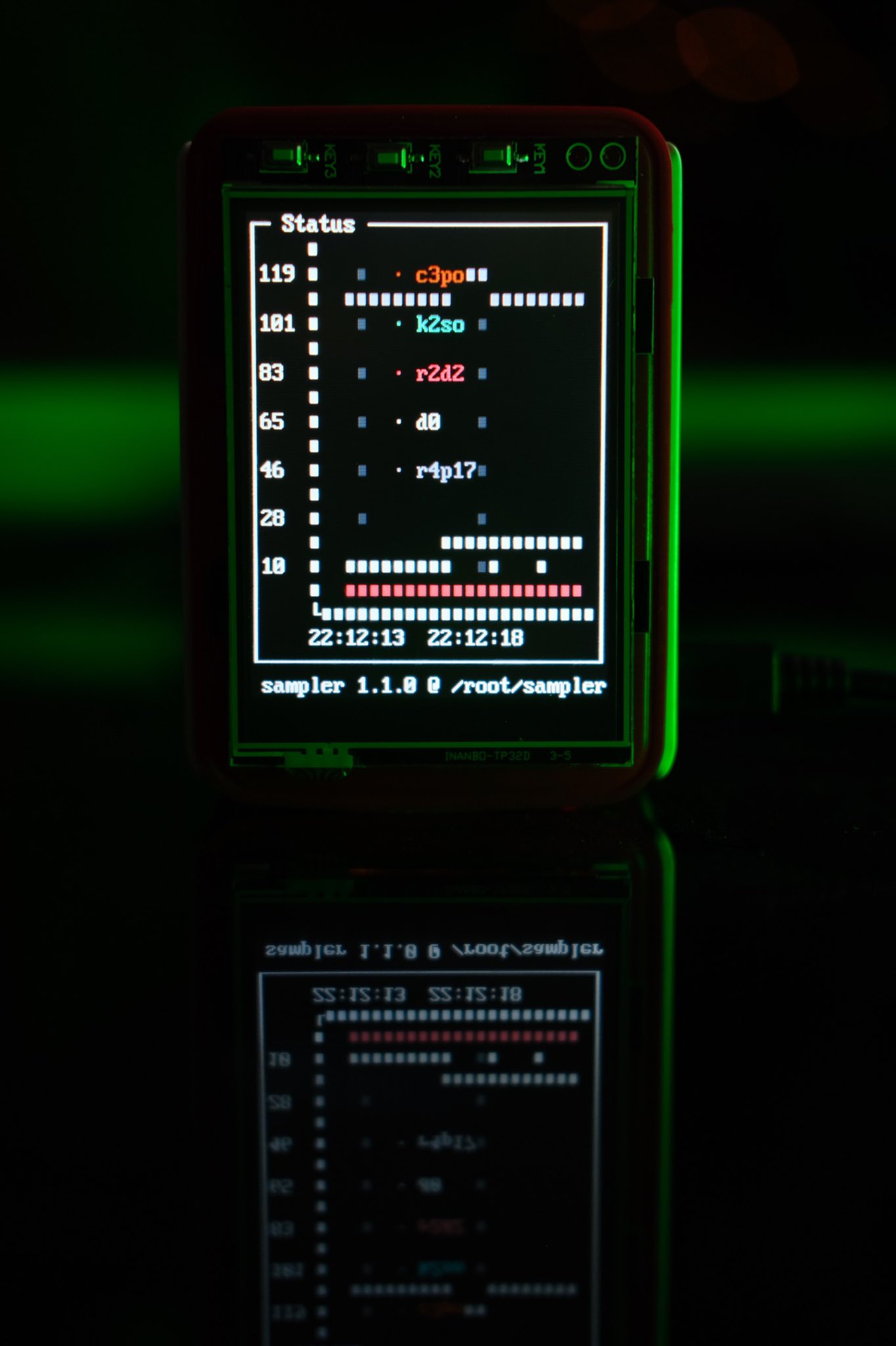
Hardware Used
I cobbled this little project together out of random bits of hardware I had lying around, namely:
- Raspberry Pi 3B+ with the official RPi case
- Joy IT 3.2” TFT display with 3 GPIO buttons
- 32GB micro SDCard
- 8GB random old USB stick
Software Used
I found a very nice command-line visualisation tool called sampler that perfectly fit my needs for this project. It’s nice and small, lets you draw graphs based on numbers it gets from whatever shell commands you run at whatever frequency you tell it to poll. It can also produce alerts if the results do not match expected values. So given the basic monitoring I want is basically just a ping and be alerted if they stopped responding, sampler is absolutely perfect. I packaged it for openSUSE as part of this project so it’s now available for regular Tumbleweed as well as MicroOS.
Installing MicroOS on the SDCard
First I needed to download the latest official openSUSE MicroOS aarch64 image for Rasbperry Pi from the official download page. For this project we’re using a plain old MicroOS image without any pre-installed services, not the Container Host images which come with podman.
wget https://download.opensuse.org/ports/aarch64/tumbleweed/appliances/openSUSE-MicroOS.aarch64-RaspberryPi.raw.xz
Putting in the SDCard into the reader, I simultaniously extracted the image and wrote it direct to the image with the following command. (Substitue sdX with the correct name for your SDCard device)
xzcat openSUSE-MicroOS.aarch64-RaspberryPi.raw.xz | dd bs=4M of=/dev/sdX iflag=fullblock oflag=direct status=progress; sync
And that’s it, the SDCard is ready to go…or is it?
But Wait!
By default, MicroOS images have no root password, no user accounts, and no services installed. I needed to have some way to setup the Pi when it first boots from the SDCard. MicroOS has two tools available for such first boot configuration:
- Ignition, originally from CoreOS which has a lovely structured JSON config but a limited scope of what it can setup.
- Combustion, written specifically for MicroOS and capable of doing anything you can write in a shell script.
As I already had a feeling I’d need to do some quirky things, especially to get the TFT display running, I opted to use combustion. I could have used ignition for the easy stuff and left combustion in combination for the trickier parts but it seemed silly to me to have to learn how to write a new JSON config file when I could just as easily write everything in a shell script.
Preparing a combustion USB stick
On first boot combustion looks for a device with a volume named combustion containing a directory called combustion and a script called script so that’s precisely what I did to my USB stick
mkfs.ext4 /dev/sdY
e2label /dev/sdY combustion
mount /dev/sdY /mnt
mkdir -p /mnt/combustion/
touch /mnt/combustion/script
After a few trial runs and a bit of hacking around the final script now looks like this:
#!/bin/bash
# combustion: network

## Copy config and device tree overlays for Pi TFT & GPIO buttons to /boot/efi
cp extraconfig.txt /boot/efi/
cp joy-IT-Display-Driver-32b-overlay.dtbo /boot/efi/overlays/
cp tft_keys.dtbo /boot/efi/overlays/

## Change boot params so framebuffer console goes to TFT display
sed -i "/^GRUB_CMDLINE_LINUX_DEFAULT=/ s/\"$/ fbcon=map:10\"/" /etc/default/grub
grub2-mkconfig -o /boot/grub2/grub.cfg

## Mount /var and /home so user can be created smoothly
mount /var
mount /home

## Make user
useradd -m ilmehtar

## Add user to sudoers
echo "ilmehtar ALL=(ALL) NOPASSWD: ALL" > /etc/sudoers.d/ilmehtar

## Create ssh folder and populate authorized_keys for remote sshd
mkdir -pm700 /home/ilmehtar/.ssh
chown ilmehtar:users -R /home/ilmehtar/.ssh
cat authorized_keys > /home/ilmehtar/.ssh/authorized_keys

## Setup vconsole so framebuffer console has right font/keyboard layout (Optional)
cp vconsole.conf /etc/vconsole.conf

## Setup Wifi
cp wpa_supplicant.conf /etc/wpa_supplicant/wpa_supplicant.conf
systemctl enable wpa_supplicant@wlan0.service
cp /etc/sysconfig/network/ifcfg-eth0 /etc/sysconfig/network/ifcfg-wlan0

## Disable IPv6 (Optional)
cp 90-disableipv6.conf /etc/sysctl.d/

## Install sampler
zypper --non-interactive install sampler
cp sampler.yaml /home/ilmehtar/sampler.yaml

## Make user login by default
mkdir -p /etc/systemd/system/getty@tty1.service.d
cp autologin.conf /etc/systemd/system/getty@tty1.service.d

## Make sampler run by default
echo "[ \$TERM = 'linux' ] && sleep 30 && sampler -c ~/sampler.yaml" >> /home/ilmehtar/.bashrc

## Reboot after setup
cp firstbootreboot.service /etc/systemd/system/
systemctl enable firstbootreboot.service

## Clear up mounts
umount /var
umount /home
The script references a number of additional files, all of which are placed alongside script in the combustion directory on the USB stick:
File Listing of the combustion directory
90-disableipv6.conf
authorized_keys
autologin.conf
extraconfig.txt
firstbootreboot.service
joy-IT-Display-Driver-32b-overlay.dtbo
sampler.yaml
script
tft_keys.dtbo
tft_keys.dts
vconsole.conf
wpa_supplicant.conf
Joy-IT-Display-Driver-32b-overlay.dtbo is a Device Tree overlay provided by the manufactorer of the TFT hat. tft_keys.dtbo is my own Device Tree overlay compiled from tft_keys.dts. All the other files are text files used to configure various aspects of the system to my liking and are documented at the bottom of this post for anyone wanting to use this idea as a basis for their own projects.
First Boot
And with all that prep work done, the first boot is now surprisingly easy. I inserted the SDCard, added the USB stick and connected the Pi to ethernet (The wifi won’t work until it’s configured by combustion). Powering on the Pi the whole device can be left alone for a few minutes. It boots itself, does all of the configuration, and the end result is a nice working desktop network monitor:
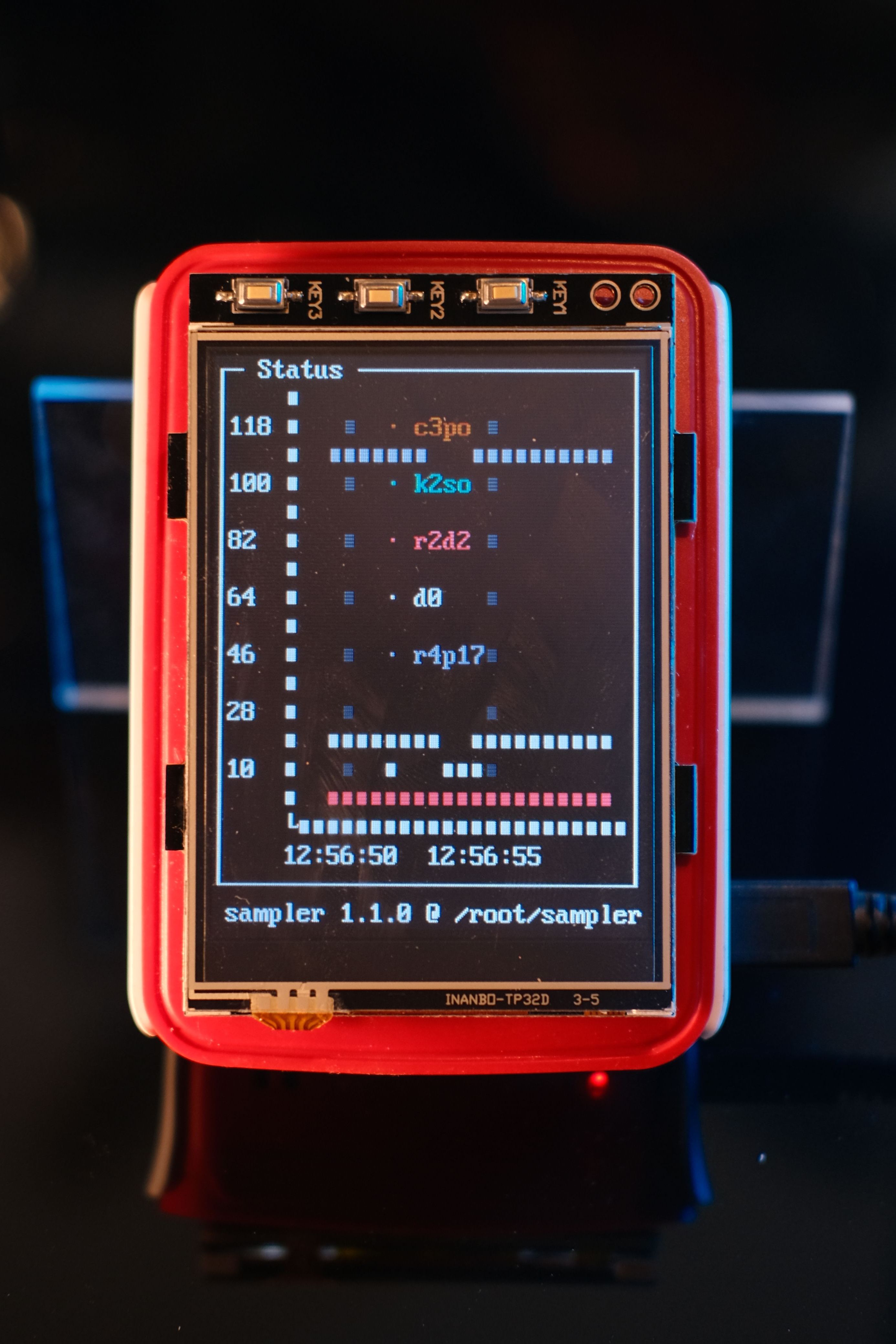
The GPIO switches on the top even work as the P and ESC keys for sampler, allowing me to pause the polling or dismiss any alerts. A little bit of hardware hacking (read: hot glue and acryrlic) finished of the project with a little stand so the whole thing sits on my desk at an angle easy for me to read.
The system doesn’t have any passwords, so can’t be logged in remotely with the exception of ssh using the non-root user using my existing public key. Simple and secure enough.
All this might seem like a little overkill, I realise it probably is, but one great benefit of having everything in this one combustion script is now I know I can wipe that SDCard or use a new Pi and get it back up and running to exactly how I like it directly from the first boot, without any manual intervention at all. Which I guess means I could reuse this Pi for other projects..anyone got any ideas?
Thanks and Have a Lot of Fun
Additional Config Files Used (For Reference)
90-disableipv6.conf
net.ipv6.conf.all.disable_ipv6 = 1
net.ipv6.conf.default.disable_ipv6 = 1
net.ipv6.conf.lo.disable_ipv6 = 1
autologin.conf
[Service]
ExecStart=
ExecStart=-/sbin/agetty -a ilmehtar %I $TERM
extraconfig.txt
dtoverlay=joy-IT-Display-Driver-32b-overlay:rotate=0,swapxy=1
dtoverlay=tft_keys
gpio=18,23,24=pu
dtparam=audio=on
max_usb_current=1
hdmi_force_hotplug=1
config_hdmi_boost=7
hdmi_drive=1
hdmi_ignore_edid=0xa5000080
firstbootreboot.service
[Unit]
Description=First Boot Reboot

[Service]
Type=oneshot
ExecStart=rm /etc/systemd/system/firstbootreboot.service
ExecStart=rm /etc/systemd/system/default.target.wants/firstbootreboot.service
ExecStart=systemctl reboot

[Install]
WantedBy=default.target
sampler.yaml
runcharts:
  - title: Status
    position: [[0, 2], [80, 40]]
    rate-ms: 1000
    triggers:
      - title: Node Down
        condition: '[ $cur = "DOWN" ] && echo 1 || echo 0'
        actions:
            visual: true
    legend:
        enabled: true
        details: false
    scale: 0
    items:
      - label: node1
        sample: ping -qc5 192.168.1.1 2>&1 | awk -F'/' 'END{ print (/^rtt/? $5:"DOWN")
            }'
      - label: node2
        sample: ping -qc5 192.168.1.2 2>&1 | awk -F'/' 'END{ print (/^rtt/? $5:"DOWN")
            }'
      - label: node3
        sample: ping -qc5 192.168.1.3 2>&1 | awk -F'/' 'END{ print (/^rtt/? $5:"DOWN")
            }'
      - label: node4
        sample: ping -qc5 192.168.1.4 2>&1 | awk -F'/' 'END{ print (/^rtt/? $5:"DOWN")
            }'
      - label: node5
        sample: ping -qc5 192.168.1.5 2>&1 | awk -F'/' 'END{ print (/^rtt/? $5:"DOWN")
            }'
tft_keys.dts
/dts-v1/;
/plugin/;
/ {
	compatible = "brcm,bcm2835";

	fragment@0 {
		target-path = "/soc";
		__overlay__ {
			tft_keys{
				compatible = "gpio-keys";
				autorepeat;
				key1 {
					label = "Key 1";
					linux,code = <1>;
					gpios = <&gpio 18 1>;
				};
                                key2 {
                                        label = "Key 2";
                                        linux,code = <25>;
                                        gpios = <&gpio 23 1>;
                                };
                                key3 {
                                        label = "Key 3";
                                        linux,code = <1>;
                                        gpios = <&gpio 24 1>;
                                };
			};
		};
	};
};
vconsole.conf (Because uk layout is best keyboard layout)
KEYMAP=uk
FONT=eurlatgr.psfu
FONT_MAP=
FONT_UNIMAP=
wpa_supplicant.conf
network={
   ssid="My-SSID"
   psk="MyPassword"
}


How to disable ICMP ping replies (linux)
Few weeks ago during server setup phase for one of my project, I notice there is no ICMP or ping replies from server and some port are not able to access.
I told the network engineer to check and seem they blocking the ports and disabling ICMP replies from their firewall configuration.
From that accident I do some google-fu if I can do same thing for personal computer / server. We can setting the kernel variable or use iptable to disable ICMP / ping replies if requested.
Temporarily disable ICMP / ping replies
$ su -
echo "1" >  /proc/sys/net/ipv4/icmp_echo_ignore_all
# This instructs the kernel to simply ignore all ping requests
# 1 = ignore ping requests and 0 = allow ping request
or
$ iptables -A INPUT -p icmp -j DROP
Permanently disable ICMP / ping replies
To disable ping requests permanently, add this line into your /etc/sysctl.conf file:
net.ipv4.icmp_echo_ignore_all = 1
And reload sysctl’s policy by # sysctl -p.
Or save iptables rule by
# for distros with systemd
/usr/libexec/iptables.init save

# for all other distros
service iptables save

# univeral way: edit main config by yourself
vim /etc/sysconfig/iptables