
 Member
 DimStar
openSUSE Tumbleweed – Review of the week 2019/50
Dear Tumbleweed users and hackers,
Another week has passed – and we’re almost at the end of the year. During the last week we have released 4 snapshots for Tumbleweed (1206, 1207, 1210 and 1211) containing those noteworthy changes:
- gpg 2.2.18
- libvirt 5.10.0
- linux-glibc-devel 5.4
- Mozilla Thunderbird 68.3.0
- bluez 5.52
- libxml 2.9.10
- createrepo_c 0.15.4: beware: it is very strict and blocks any snapshot if there is a package with non-UTF8 chars or ASCII < 32 (except 9, 10 and 13) in a changelog. Double check your .changes files before submitting.
- GNOME 3.34.2
- KDE Plasma 5.17.4
Thins that are currently being worked on and will be reaching you sooner or later:
- KDE Applications 19.12.0 (Snapshot 1213+)
- Qt 5.14.0
- Linux kernel 5.4.1
- Python 3.8
- RPM 4.15.0
- Rust 1.39.0: Still breaks the build of Firefox and Thunderbird
This is the last week before a lot of people will disappear on Christmas break all around. A lot of people – but not all! Tumbleweed will keep on rolling also during the next weeks.

openSUSE on reproducible builds summit
As in the past 3 years, I joined the r-b summit where many people interested in reproducible builds met.
There were several participants from companies, including Microsoft, Huawei and Google.
Also some researchers from universities that work on tools like DetTrace, tuf and in-toto.
But the majority still came from various open-source projects – with Fedora/RedHat being notably absent.
We had many good discussion rounds, one of which spawned my writeup on the goal of reproducible builds
Another session was about our wish to design a nice interface, where people can easily find the reproducibility status of a package in various distributions. I might code a Proof-of-Concept of that in the next weeks (when I have time).
I also got some help with java patches in openSUSE and made several nice upstream reproducibility fixes – showing some others how easy that can be.
This whole event also was good team-building, getting to know each other better. This will allow us to better collaborate in the Future.
Later there will be a larger report compiled by others.

Benchmark results on mdds multi_type_vector
In this post, I’m going to share the results of some benchmark testing I have done on multi_type_vector, which is included in the mdds library. The benchmark was done to measure the impact of the change I made recently to improve the performance on block searches, which will affect a major part of its functionality.
Background
One of the data structures included in mdds, called multi_type_vector, stores values of different types in a single logical vector. LibreOffice Calc is one primary user of this. Calc uses this structure as its cell value store, and each instance of this value store represents a single column instance.
Internally, multi_type_vector creates multiple element blocks which are in turn stored in its parent array (primary array) as block structures. This primary array maps a logical position of a value to the actual block structure that stores it. Up to version 1.5.0, this mapping process involved a linear search that always starts from the first block of the primary array. This was because each block structure, though it stores the size of the element block, does not store its logical position. So the only way to find the right element block that intersects the logical position of a value is to scan from the first block and keep accumulating the sizes of the encountered blocks. The following diagram depicts the structure of multi_type_vector’s internal store as of 1.5.0:

The reason for not storing the logical positions of the blocks was to avoid having to update them after shifting the blocks after value insertion, which is quite common when editing spreadsheet documents.
Of course, sometimes one has to perform repeated searches to access a number of element values across a number of element blocks, in which case, always starting the search from the first block, or block 0, in every single search can be prohibitively expensive, especially when the vector is heavily fragmented.
To alleviate this, multi_type_vector provides the concept of position hints, which allows the caller to start the search from block N where N > 0. Most of multi_type_vector’s methods return a position hint which can be used for the next search operation. A position hint object stores the last position of the block that was either accessed or modified by the call. This allows the caller to chain all necessary search operations in such a way to scan the primary array no more than once for the entire sequence of search operations. It was largely inspired by std::map’s insert method which provides a very similar mechanism. The only prerequisite is that access to the elements occur in perfect ascending order. For the most part, this approach worked quite well.
The downside of this is that there are times you need to access multiple element positions and you cannot always arrange your access pattern to take advantage of the position hints. This is the case especially during multi-threaded formula cell execution routine, which Calc introduced some versions ago. This has motivated us to switch to an alternative lookup algorithm, and binary search was the obvious replacement.
Binary search
Binary search is an algorithm well suited to find a target value in an array where the values are stored in sorted order. Compared to linear search, binary search performs much faster except for very small arrays. People often confuse this with binary search tree, but binary search as an algorithm does not limit its applicability to just tree structure; it can be used on arrays as well, as long as the stored values are sorted.
While it’s not very hard to implement binary search manually, the C++ standard library already provides several binary search implementations such as std::lower_bound and std::upper_bound.
Switch from linear search to binary search
The challenge for switching from linear search to binary search was to refactor multi_type_vector’s implementation to store the logical positions of the element blocks and update them real-time, as the vector gets modified. The good news is that, as of this writing, all necessary changes have been done, and the current master branch fully implements binary-search-based block position lookup in all of its operations.
Benchmarks
To get a better idea on how this change will affect the performance profile of multi_type_vector, I ran some benchmarks, using both mdds version 1.5.0 – the latest stable release that still uses linear search, and mdds version 1.5.99 – the current development branch which will eventually become the stable 1.6.0 release. The benchmark tested the following three scenarios:
-
set()that modifies the block layout of the primary array. This test sets a new value to an empty vector at positions that monotonically increase by 2, until it reaches the end of the vector. -
set()that updates the value of the last logical element of the vector. The update happens without modifying the block layout of the primary array. Like the first test, this one also measures the performance of the block position lookup, but since the block count does not change, it is expected that the block position lookup comprises the bulk of its operation. -
insert()that inserts a new element block at the logical mid-point of the vector and shifts all the elements that occur below the point of insertion. The primary array of the vector is made to be already heavily fragmented prior to the insertion. This test involves both block position lookup as well as shifting of the element blocks. Since the new multi_type_vector implementation will update the positions of element blocks whose logical positions have changed, this test is designed to measure the cost of this extra operation that was previously not performed as in 1.5.0.
In each of these scenarios, the code executed the target method N number of times where N was specified to be 10,000, 50,000, or 100,000. Each test was run twice, once with position hints and once without them. Each individual run was then repeated five times and the average duration was computed. In this post, I will only include the results for N = 100,000 in the interest of space.
All binaries used in this benchmark were built with a release configuration i.e. on Linux, gcc with -O3 -DNDEBUG flags was used to build the binaries, and on Windows, MSVC (Visual Studio 2017) with /MD /O2 /Ob2 /DNDEBUG flags was used.
All of the source code used in this benchmark is available in the mdds perf-test repository hosted on GitLab.
The benchmarks were performed on machines running either Linux (Ubuntu LTS 1804) or Windows with a variety of CPU’s with varying number of native threads. The following table summarizes all test environments used in this benchmark:

It is very important to note that, because of the disparity in OS environments, compilers and compiler flags, one should NOT compare the absolute values of the timing data to draw any conclusions about CPU’s relative performance with each other.
Results
Scenario 1: set value at monotonically increasing positions
This scenario tests a set of operations that consists of first seeking the position of a block that intersects with the logical position, then setting a new value to that block which causes that block to split and a new value block inserted at the point of split. The test repeats this process 100,000 times, and in each iteration the block search distance progressively increases as the total number of blocks increases. In Calc’s context, scenarios like this are very common especially during file load.
Without further ado, here are the results:
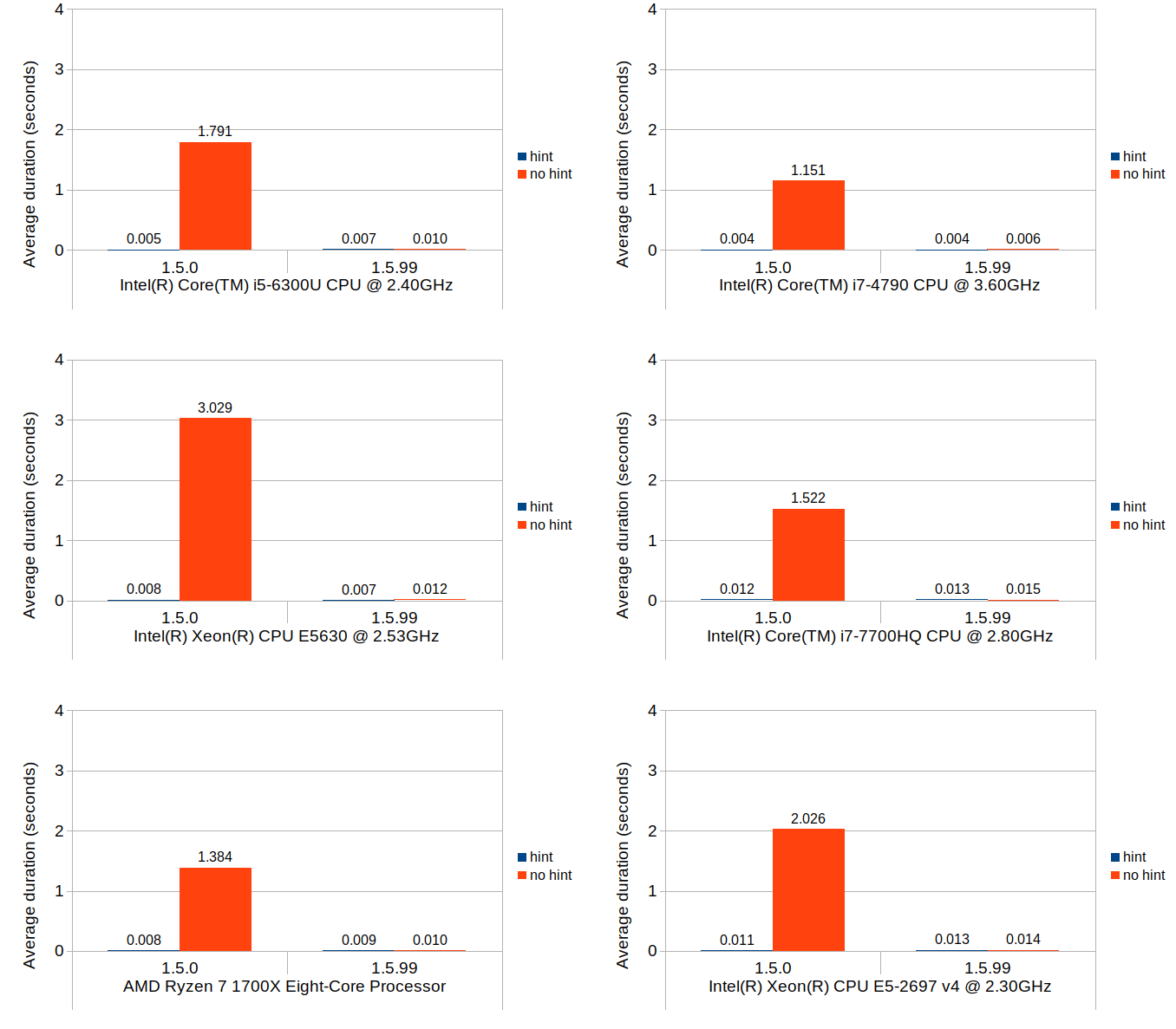
You can easily see that the binary search (1.5.99) achieves nearly the same performance as the linear search with position hints in 1.5.0. Although not very visible in these figures due to the scale of the y-axes, position hints are still beneficial and do provide small but consistent timing reduction in 1.5.99.
Scenario 2: set at last position
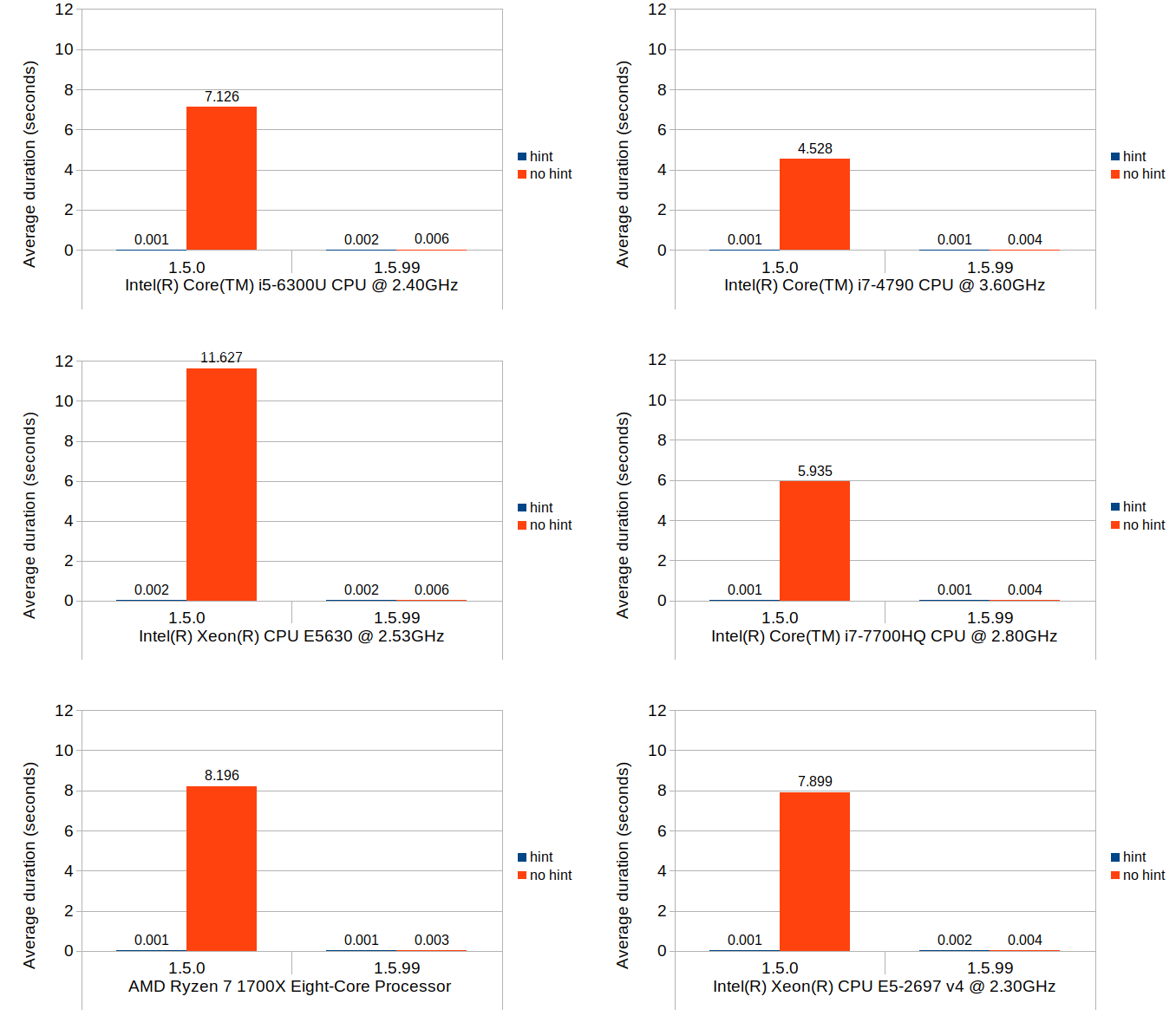
The nature of what this scenario tests is very similar to that of the previous scenario, but the cost of the block position lookup is much more emphasized while the cost of the block creation is eliminated. Although the average durations in 1.5.0 without position hints are consistently higher than their equivalent values from the previous scenario across all environments, the overall trends do remain similar.
Scenario 3: insert and shift
This last scenario was included primarily to test the cost of updating the stored block positions after the blocks get shifted, as well as to quantify how much increase this overhead would cause relative to 1.5.0. In terms of Calc use case, this operation roughly corresponds with inserting new rows and shifting of existing non-empty rows downward after the insertion.
Without further ado, here are the results:
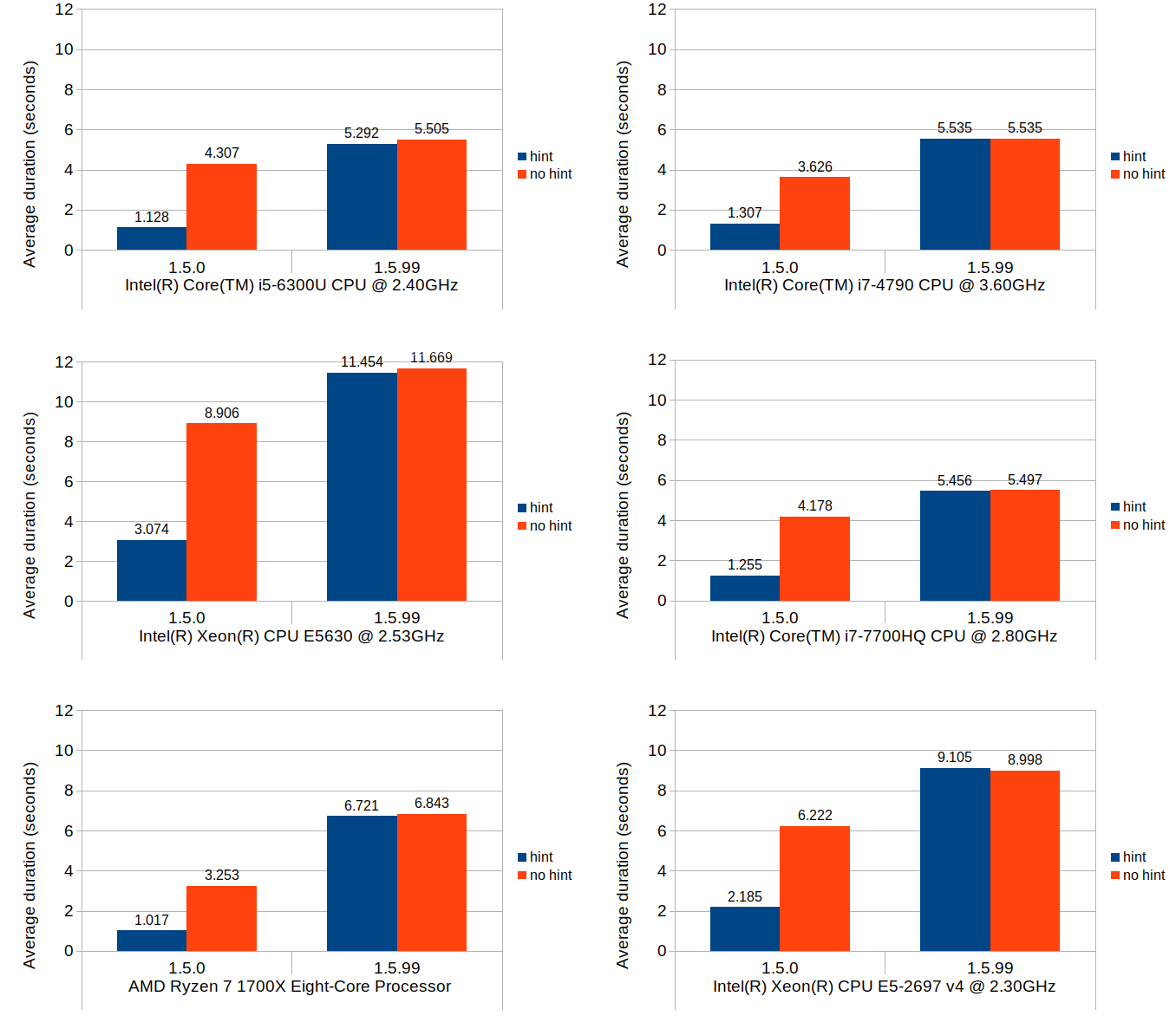
These results do indicate that, when compared to the average performance of 1.5.0 with position hints, the same operation can be 4 to 6 times more expensive in 1.5.99. Without position hints, the new implementation is more expensive to a much lesser degree. Since the scenario tested herein is largely bottlenecked by the block position updates, use of position hints seems to only provide marginal benefit.
Adding parallelism
Faced with this dilemma of increased overhead, I did some research to see if there is a way to reduce the overhead. The suspect code in question is in fact a very simple loop, and all its does is to add a constant value to a known number of blocks:
template
void multi_type_vector<_CellBlockFunc, _EventFunc>::adjust_block_positions(size_type block_index, size_type delta)
{
    size_type n = m_blocks.size();

    if (block_index >= n)
        return;

    for (; block_index < n; ++block_index)
        m_blocks[block_index].m_position += delta;
}
Since the individual block positions can be updated entirely independent of each other, I decided it would be worthwhile to experiment with the following two types of parallelization techniques. One is loop unrolling, the other is OpenMP. I found these two techniques attractive for this particular case, for they both require very minimal code change.
Adding support for OpenMP was rather easy, since all one has to do is to add a #pragma line immediately above the loop you intend to parallelize, and add an appropriate OpenMP flag to the compiler when building the code.
Adding support for loop unrolling took a little fiddling around, but eventually I was able to make the necessary change without breaking any existing unit test cases. After some quick experimentation, I settled with updating 8 elements per iteration.
After these changes were done, the above original code turned into this:
template
void multi_type_vector<_CellBlockFunc, _EventFunc>::adjust_block_positions(int64_t start_block_index, size_type delta)
{
    int64_t n = m_blocks.size();

    if (start_block_index >= n)
        return;

#ifdef MDDS_LOOP_UNROLLING
    // Ensure that the section length is divisible by 8.
    int64_t len = n - start_block_index;
    int64_t rem = len % 8;
    len -= rem;
    len += start_block_index;
    #pragma omp parallel for
    for (int64_t i = start_block_index; i < len; i += 8)
    {
        m_blocks[i].m_position += delta;
        m_blocks[i+1].m_position += delta;
        m_blocks[i+2].m_position += delta;
        m_blocks[i+3].m_position += delta;
        m_blocks[i+4].m_position += delta;
        m_blocks[i+5].m_position += delta;
        m_blocks[i+6].m_position += delta;
        m_blocks[i+7].m_position += delta;
    }

    rem += len;
    for (int64_t i = len; i < rem; ++i)
        m_blocks[i].m_position += delta;
#else
    #pragma omp parallel for
    for (int64_t i = start_block_index; i < n; ++i)
        m_blocks[i].m_position += delta;
#endif
}
I have made the loop-unrolling variant of this method a compile-time option and kept the original method intact to allow on-going comparison. The OpenMP part didn't need any special pre-processing since it can be turned on and off via compiler flag with no impact to the code itself. I needed to switch the loop counter from the original size_type (which is a typedef to size_t) to int64_t so that the code can be built with OpenMP enabled on Windows, using MSVC. Apparently the Microsoft Visual C++ compiler requires the loop counter to be a signed integer for the code to even build with OpenMP enabled.
With these changes in, I wrote a separate test code just to benchmark the insert-and-shift scenario with all permutations of loop-unrolling and OpenMP. The number of threads to use for OpenMP was not specified during the test, which would cause OpenMP to automatically use all available native threads.
With all of this out of the way, let's look at the results:
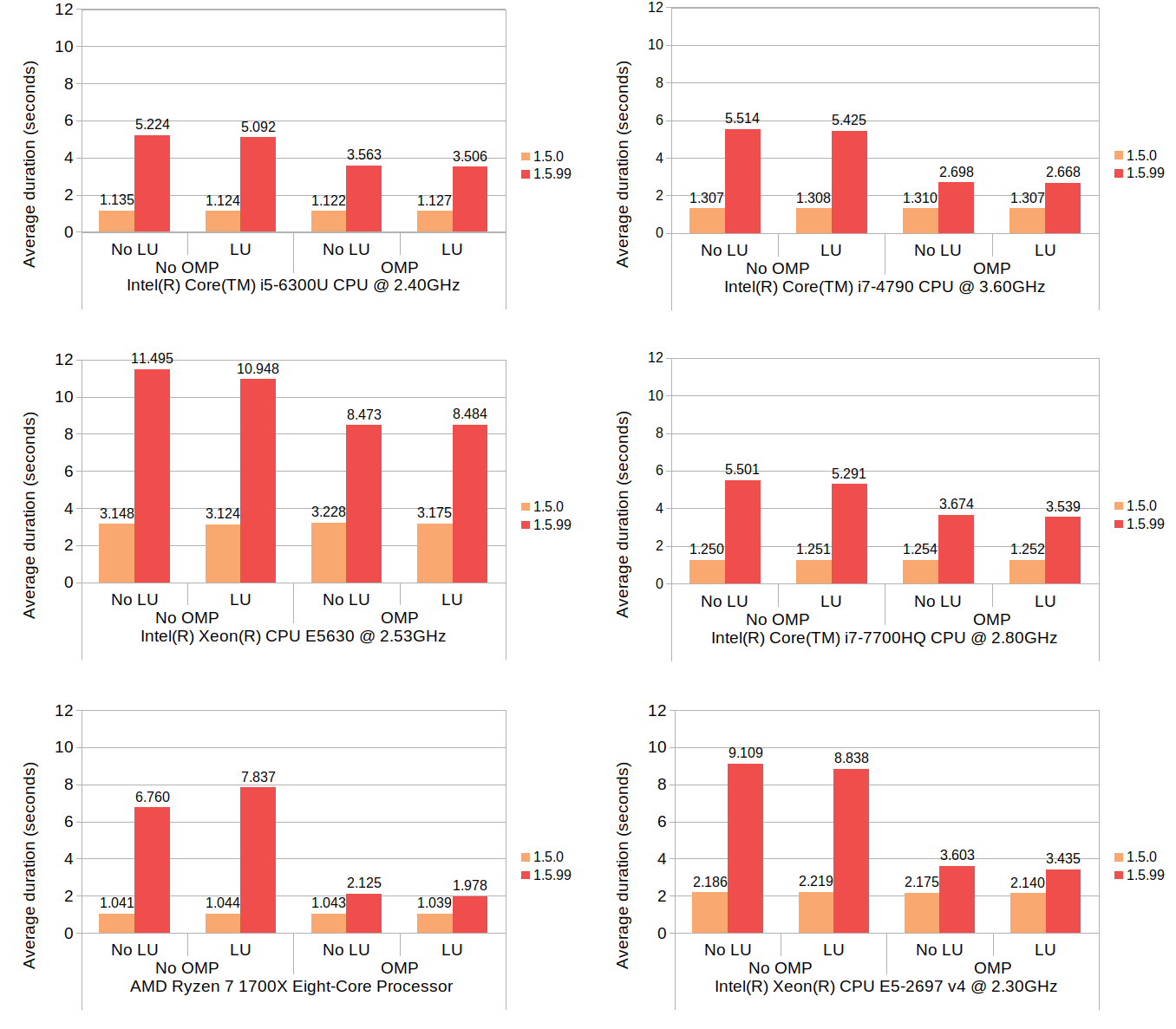
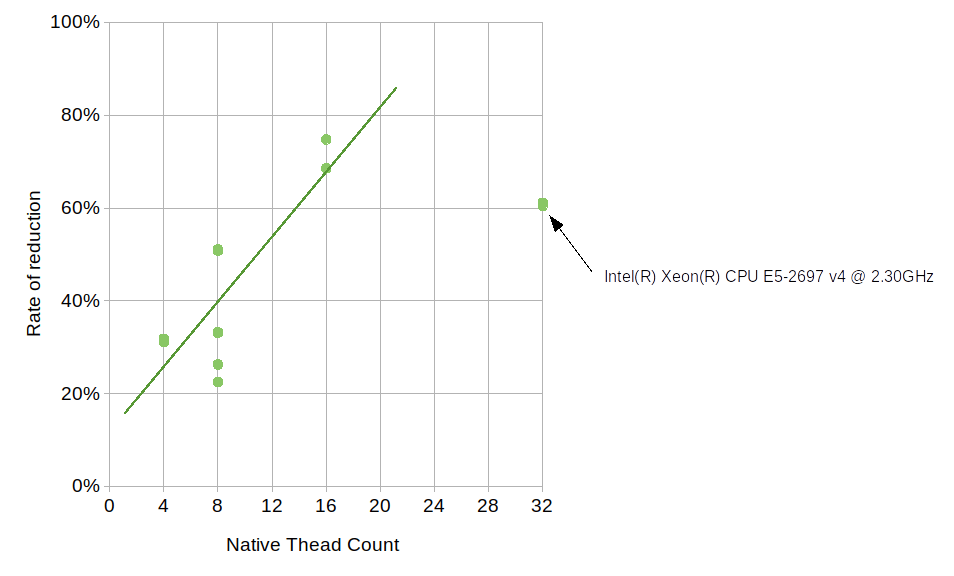
Here, LU and OMP stand for loop unrolling and OpenMP, respectively. The results from each machine consist of four groups each having two timing values, one with 1.5.0 and one with 1.5.99. Since 1.5.0 does not use neither loop unrolling nor OpenMP, its results show no variance between the groups, which is expected. The numbers for 1.5.99 are generally much higher than those of 1.5.0, but the use of OpenMP brings the numbers down considerably. Although how much OpenMP reduced the average duration varies from machine to machine, the number of available native threads likely plays some role. The reduction by OpenMP on Core i5 6300U (which comes with 4 native threads) is approximately 30%, the number on Ryzen 7 1700X (with 16 native threads) is about 70%, and the number on Core i7 4790 (with 8 native threads) is about 50%. The relationship between the native thread count and the rate of reduction somewhat follows a linear trend, though the numbers on Xeon E5-2697 v4, which comes with 32 native threads, deviate from this trend.
The effect of loop unrolling, on the other hand, is visible only to a much lesser degree; in all but two cases it has resulted in a reduction of 1 to 7 percent. The only exceptions are the Ryzen 7 without OpenMP which denoted an increase of nearly 16%, and the Xeon E5630 with OpenMP which denoted a slight increase of 0.1%.
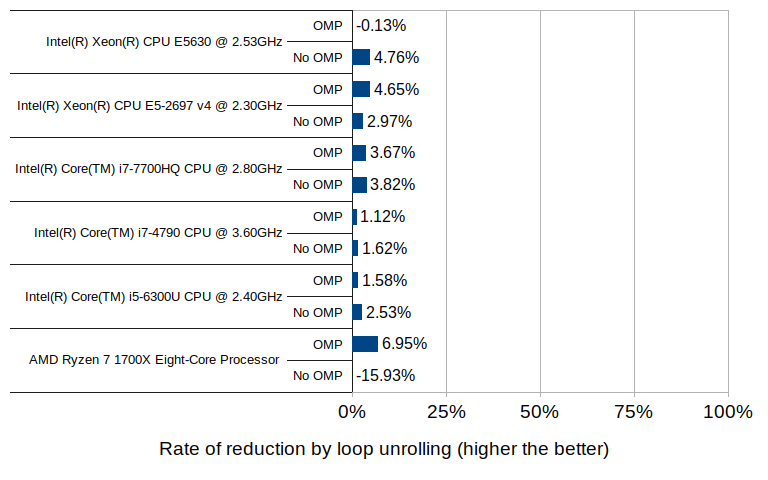
The 16% increase with the Ryzen 7 environment may well be an outlier, since the other test in the same environment (with OpenMP enabled) did result in a reduction of 7% - the highest of all tested groups.
Interpreting the results
Hopefully the results presented in this post are interesting and provide insight into the nature of the change in multi_type_vector in the upcoming 1.6.0 release. But what does this all mean, especially in the context of LibreOffice Calc? These are my personal thoughts.
- From my own observation of having seen numerous bug reports and/or performance issues from various users of Calc, I can confidently say that the vast majority of cases involve reading and updating cell values without shifting of cells, either during file load, or during executions of features that involve massive amounts of cell I/O's. Since those cases are primarily bottlenecked by block position search, the new implementation will bring a massive win especially in places where use of position hints was not practical. That being said, the performance of block search will likely see no noticeable improvements even after switching to the new implementation when the code already uses position hints with the old implementation.
- While the increased overhead in block shifting, which is associated with insertion or deletion of rows in Calc, is a certainly a concern, it may not be a huge issue in day-to-day usage of Calc. It is worth pointing out that that what the benchmark measures is repeated insertions and shifting of highly fragmented blocks, which translates to repeated insertions or deletions of rows in Calc document where the column values consist of uniformly altering types. In normal Calc usage, it is more likely that the user would insert or delete rows as one discrete operation, rather than a series of thousands of repeated row insertions or deletions. I am highly optimistic that Calc can absorb this extra overhead without its users noticing.
- Even if Calc encounters a very unlikely situation where this increased overhead becomes visible at the UI level, enabling OpenMP, assuming that's practical, would help lessen the impact of this overhead. The benefit of OpenMP becomes more elevated as the number of native CPU threads becomes higher.
What's next?
I may invest some time looking into potential use of GPU offloading to see if that would further speed up the block position update operations. The benefit of loop unrolling was not as great as I had hoped, but this may be highly CPU and compiler dependent. I will likely continue to dig deeper into this and keep on experimenting.

Piwik -> Matomo
You might know that Piwik was renamed into Matomo more than a year ago. While everything is still compatible and even the scripts and other (internal) data is still named piwik, the rename is affecting more and more areas. Upstream is working hard to finalize their rename - while trying not to break too much on the other side. But even the file names will be renamed in some future version.
Time - for us - to do some maintenance and start following upstream with the rename. Luckily, our famous distribution already has matomo packages in the main repository (which currently still miss Apparmor profiles, but hey: we can and will help here). So the main thing left (to do) is a database migration and the adjustments of all the small bits and bytes here and there, where we still use the old name.
While the database migration silently happened already, the other, "small" adjustments will take some time - especially as we need to find all the places that need to get adjusted and also need to identify the contact persons, who can do the final change. But we are on it - way before Matomo upstream will do the final switch. :-)

Enhancing search and replace with Vim
openSUSE Tumbleweed – Review of the weeks 2019/48 & 49
Dear Tumbleweed users and hackers,
Once again I’m spanning two weeks; besides the normal work on getting you openSUSE Tumbleweed updated and timely delivered, the release team has been working together with the build service team to implement/stabilize the OBS-internal staging workflow. There is (should) not be any real noticeable difference for the contributors – except the new used URLs. The Factory Staging dashboard can now be found at https://build.opensuse.org/staging_workflows/1
During the last two weeks, we have pushed out 10 Tumbleweed Snapshots (1121, 1122, 1123, 1124, 1126, 1127, 1128, 1202, 1203 and 1204) containing those changes:
- openSSL 1.1.1d
- YaST updates
- Linux kernel 5.3.12
- Mesa 19.2.6
- firewalld 0.7.2
- bind 9.14.8
- alsa 1.2.1
- fprintd 0.9.0
- Perl 5.30.1
- QEmu 4.2.0-rc3
Currently, all stagings are full and a lot of things are happening – and OBS does not like me for this it seems. Stagings seem to progress a bit slower at the moment than they used to. But this could be just a timing issue as all stagings were rebased at the same time after the workflow switch. Hopefully, things will settle soon there. The notable changes being staged at the moment are:
- RPM 4.15.0
- Python 3.8
- Rust 1.39.0: break Firefox and Thunderbird so far
-
libxml 2.9.10 - Linux kernel 5.4.1
-
libvirt 5.10.0 - KDE Frameworks 5.17.4
- KDE Applications 19.12.0 (currently rc2 in testing)
- Qt 5.14.0 (currently release candidate in testing)

Highlights of YaST Development Sprint 90
The Introduction
As usual, during this sprint we have been working on a wide range of topics. The release of the next (open)SUSE versions is approaching and we need to pay attention to important changes like the new installation media or the /usr/etc and /etc split.
Although we have been working on more stuff, we would like to highlight these topics:
- Support for the new SLE installation media.
- Proper handling of shadow suite settings.
- Mount points handling improvements.
- Help others to keep the Live Installation working.
- Proper configuration of console fonts.
- Better calculation of minimum and maximum sizes while resizing ext2/3/4 filesystems.
- Small fixes in the network module.
The New Online and Full SLE Installation Media
The upcoming Service Pack 2 of SUSE Linux Enterprise products will be released on two media types: Online and Full.
On the one hand, the Online medium does not contain any repository at all. They will be added from a registration server (SCC/SMT/RMT) after registering the selected base product. The Online medium is very small and contains only the files needed for booting the system and running the installer. On the other hand, the Full medium includes several repositories containing base products and several add-ons, which can help to save some bandwidth.
Obviously, as the installer is the same for both media types, we need to adapt it to make it work properly in all scenarios. This is an interesting challenge because the code is located in many YaST packages and at different places. Keep also in mind that the same installer needs to also work with the openSUSE Leap 15.2 product. That makes another set of scenarios which we need to support (or at least not to break).
The basic support is already there and we are now fine-tuning the details and corner cases, improving the user experience and so on.
Proper Handling of Shadow Suite Settings
A few weeks ago, we anticipated that (open)SUSE would split system’s configuration between /usr/etc and /etc directories. The former will contain vendor settings and the latter will define host-specific settings.
One of the first packages to be changed was shadow, which stores now
its default configuration in /usr/etc/login.defs. The problem is that
YaST was not adapted in time and it was still trying to read settings
only from /etc/login.defs
During this sprint, we took the opportunity to fix this behavior and,
what is more, to define a strategy to adapt the handling of other files
in the future. In this case, YaST will take into account the settings
from /usr/etc directory and it will write its changes to a dedicated
/etc/login.defs.d/70-yast.conf file.
Missing Console Font Settings
The YaST team got a nice present this year (long before Christmas) thanks to Joaquín, who made an awesome contribution to the YaST project by refactoring the keyboard management module. Thanks a lot, Joaquín!
We owe all of you a blog entry explaining the details but, for the time being, let’s say that now the module plays nicely with systemd.
After merging those changes, our QA team detected that the console font settings were not being applied correctly. Did you ever think about the importance of having the right font in the console? The problem was that the SCR agent responsible for writing the configuration file for the virtual consoles was removed. Fortunately, bringing back the deleted agent was enough to fix the problem, so your console will work fine again.
Helping the Live Installation to Survive
Years ago, the YaST Team stopped supporting installation from the
openSUSE live versions due to maintainability reasons. That has not
stopped others from trying to keep the possibility open. Instead of
fixing the old LiveInstallation mode of the installer, they have been
adapting the live versions of openSUSE to include the regular installer
and to be able to work with it.
Sometimes that reveals hidden bugs in the installer that nobody had
noticed because they do not really affect the supported standard
installation procedures. In this case, YaST was not always marking for
installation in the target system all the packages needed by the storage
stack. For example, the user could have decided to use Btrfs and still
the installer would not automatically select to install the
corresponding btrfsprogs package.
It happened because YaST was checking which packages were already installed and skipping them. That check makes sense when YaST is running in an already installed system and is harmless when performed in the standard installation media. But it was tricky in the live media. Now the check is skipped where it does not make sense and the live installation works reasonably well again.
A More Robust YaST Bootloader
In order to perform any operation, the bootloader module of YaST first
needs to inspect the disk layout of the system to determine which
devices allocate the more relevant mount points like /boot or the root
filesystem. The usage of Btrfs, with all its exclusive features like
subvolumes and snapshots, has expanded the possibilities about how a
Linux system can look in that regard. Sometimes, that meant YaST
Bootloader was not able to clearly identify the root file system and it
just crashed.

Fortunately, those scenarios are reduced now to the very minimum thanks to all the adaptations and fixes introduced during this sprint regarding mount points detection. But there is still a possibility in extreme cases like unfinished rollback procedures or very unusual subvolumes organization.
So, in addition to the mentioned improvements in yast2-storage-ng, we
have also instructed yast2-bootloader to better deal with those
unusual Btrfs scenarios, so it will find its way to the root file
system, even if it’s tricky. That means the “missing ‘/’ mount point”
errors should be gone for good.
But in case we overlooked something and there is still an open door to reach the same situation again in the future, we also have improved YaST to display an explanation and quit instead of crashing. Although we have done our best to ensure this blog entry will be the only chance for our users to see this new error pop-up.

Improving the Detection of Mount Points
As mentioned above, improving the detection of mount points helped to
prevent some problems that were affecting yast2-bootloader. However,
that is not the only module that benefits from such changes.
When you run some clients like the Expert Partitioner, they
automatically use the libstorage-ng library to discover all your
storage devices. During that phase, libstorage-ng tries to find the
mount points for all the file systems by inspecting /etc/fstab and
/proc/mounts files. Normally, a file system is mounted only once,
either at boot time or manually by the user. For the first case, both
files /etc/fstab and /proc/mounts would contain an entry for the
file system, for example:
$ cat /etc/fstab
/dev/sda1  /  ext4  defaults  0  0

$ cat /proc/mounts
/dev/sda1 / ext4 rw,relatime 0 0
In the example above, libstorage-ng associates the / mount point to
the file system which is placed on the partition /dev/sda1. But, what
happens when the user bind-mounts a directory? In such a situation,
/proc/mounts would contain two entries for the same device:
$ mound /tmp/foo /mnt -o bind
$ cat /proc/mounts
/dev/sda1 / ext4 rw,relatime 0 0
/dev/sda1 /mnt ext4 rw,relatime 0 0
In the Expert Partitioner, that file system will appear as mounted at
/mnt instead of /. So it will look like if your system did not have
the root file system after all!
This issue was solved by improving the heuristic for associating mount
points to the devices. Now, the /etc/fstab mount point is assigned to
the device if that mount point also appears in the /proc/mounts file.
That means, if a device is included in the /etc/fstab and the device
is still mounted at that location, the /etc/fstab mount point takes
precedence.
As a bonus, and also related to mount points handling, now the Expert Partitioner is able to detect the situation where, after performing a snapshot-based rollback, the system has not been rebooted. As a result, it will display a nice and informative message to the user.

Improved Calculation of Minimum and Maximum Sizes for ext2/3/4
If you want to resize a filesystem using YaST, it needs to find out the
minimum and maximum sizes for the given filesystem. Until now, the
estimation for ext2/3/4 was based on the statvfs system call and it
did not work well at all.
Recently, we have improved YaST to use the value reported by resize2fs
as the minimum size which is more precise. Additionally, YaST checks now
the block size and whether the 64bit feature is on to calculate the
maximum size.
Polishing the Network Module
As part of our recent network module refactorization, we have improved the workflow of wireless devices configuration, among other UI changes. Usually, these changes are controversial and, as a consequence, we received a few bug reports about some missing steps that are actually not needed anymore. However, checking those bugs allowed us to find some small UI glitches, like a problem with the Authentication Mode widget.
Moreover, we have used this sprint to drop the support for some deprecated device types, like Token Ring or FDDI. Below you can see how bad the device type selection looks now. But fear not! We are aware and we will give it some love during the next sprint.

Conclusions
The last sprint of the year is already in progress. This time, we are still polishing our storage and network stacks, improving the migration procedure, and fixing several miscelaneous issues. We will give you all the details in two weeks through our next sprint report. Until then, have a lot of fun!

Configuration files in /etc and /usr/etc
Intro
As some may have already noticed, openSUSE MicroOS introduced a /usr/etc
directory and some configuration files are already moved to this
directory.
What’s behind this move? For a better understanding, let’s first look how configuration files are handled by RPM today:
RPM and Configuration Files
RPM has limited support for updating configuration files. In the end this consist of two simple choices:
- modified configuration files are moved away during upgrade and the admin has to redo the changes (
.rpmsavefiles). - modfied configuration files are kept and changes done by the distribution are ignored (
.rpmnewfiles). In the end the service may not work or could even be insecure!
Both options are not really user friendly and will most likely lead to a broken or insecure service after an upgrade, which requires manual work by the admin. On desktop systems or a simple server this may be tolerable, but for big clusters this can lead to a huge amount of work.
There are several alternative solutions for this like Three-Way-Diff or doing the update interactively, but the first one does not solve the problem if conflicting changes are done, and the second one is no solution for fully automated updates.
Atomic Updates
For atomic systems another layer of complexity is added, because different states may contain different versions of a configuration file. So how can this happen? An atomic update is a kind of update that:
- Is atomic
- The update is either fully applied or not applied at all
- The update does not influence your running system
- Can be rolled back
- If the update fails or if the update is not compatible, you can quickly restore the situation as it was before the update
The update will be activated by rebooting into the new state, so after an update, before the reboot, the changes done by the update are not visible. If an admin or configuration management software changes the configuration files in the runnung system during this time, this will create conflicts, and needs manual interaction again.
Goal
The goal is to provide a concept working for most packages and their configuration files, which makes automatic updates much easier and robust. For that a new way to store and manage configuration files is needed.
Requirements for a Solution
The new solution should make sure that:
- It’s visible to the admin that something got updated
- It’s visible which changes the admin made
- Package and admin changes should be merged automatically
- There should be only one directory to search for default configuration files
Solutions
As a longterm solution no package should install anything into /etc any
more, this directory should only contain host specific configuration files
created during installation and changes made by the system administrator.
Packages are supposed to install their default configuration files to
another directory instead.
For SUSE/openSUSE the decision was made to use /usr/etc as the directory
for the distribution provided configuration files.
For merging the package and admin configuration files there will have to be different strategies depending on the file type; the files can be categorized as follows:
- Configuration files for applications
- Configuration files for the system (network, hardware, …)
- “Databases” like files (
/etc/rpc,/etc/services,/etc/protocols) - System and user accounts (
/etc/passwd,/etc/group,/etc/shadow)
Application Configuration Files
For application configuration files there is already a good solution used by systemd, which could be adopted for most applications:
-
/usr/etc/app.confis the distribution provided configuration file. - If it exists,
/etc/app.confreplaces/usr/etc/app.conf. -
/etc/app.conf.d/*.confcontains snippets overiding single entries from/usr/etc/app.confor/etc/app.conf.
The workflow for the application to load the configuration file would be:
- Application looks for
/etc/app.conf. - If this file does not exist, load
/usr/etc/app.conf. - Look for overides in
/etc/app.conf.dand merge them.
See https://www.freedesktop.org/software/systemd/man/systemd.unit.html#Examples, “Overriding vendor settings” for more details and examples. A C library which provides a simple interface and implements above loading mechanism transparently for the application is libeconf.
Depending on the configuration file format above patterns may not work for all applications. For those applications a solution following the above guidelines as closely as possible should be found.
System Configuration Files (network, hardware, …)
As these configuration files are system specific and only created during
or after installation and not provided by the distribution, these files
will stay in /etc.
System Databases (rpc, services, protocols)
There are files in /etc which, strictly speaking, are no configuration files,
such as /etc/rpc, /etc/services and /etc/protocols. They are changed
very rarely, but sometimes new system applications or third party software
need to make additions.
These files will be moved to /usr/etc; /etc/nsswitch.conf has to be changed
to search in /etc first and in /usr/etc second. A glibc NSS plugin
usrfiles will be used
for this. /etc will contain only the changes done by the admin and third
party software.
/etc/passwd, /etc/group and /etc/shadow
There is no solution yet for these configuration files which would really solve the problems. Ideas are welcome!
Further Documentation
- The original, full proposal with many more ideas and background information on the reasoning behind the decisions: Atomic Updates and /etc
- The openSUSE wiki page tracking all changes: Packaging /usr/etc

openSUSE Board election 2019-2020 – Call for Nominations, Applications
 Election time is here!
Two seats are open for election on the openSUSE Board. Gertjan Lettink completed his second term. Simon Lees completed his first term and thus he is eligible to run as a Board candidate again should he wish to do so.
The election schedule is as follows:
== Phase 0 ==
5 December 2019
* Announcement of the openSUSE Board election 2019-2020
* Call for Nominations and Applications for Board candidacy
* Membership drive. Become an openSUSE Member. Take the opportunity to apply for an openSUSE Membership during this phase (in order to vote or to run as a candidate).
25 December 2019
* Nominations and Applications for Board candidacy close
== Phase 1 ==
26 December 2019
* Announcement of the final list of candidates
* Campaign begins
* Membership drive continues, opportunity to apply for openSUSE Membership, but members will only be eligible to vote and not run as a candidate.
== Phase 2 ==
16 January 2020
* Ballots open: Please cast your vote during this time
* Campaign continues
31 January 2020
* Ballots close
1 February 2020
* Announcement of the results
The Election Committee is composed of Edwin Zakaria and Ish Sookun.
Only openSUSE members are eligible to run for openSUSE Board openings. Election Committee officials, however, are not eligible to run in order to avoid conflicts of interest. To stand for a position in the openSUSE Board please send an email to:
* opensuse-project@opensuse.org and * election-officials@opensuse.org
If a member would like to nominate somebody else, please inform the Election Committee and the officials will contact the nominee to ask whether s/he would like to run as a Board candidate.
The Election Committee is hereby calling for Nominations and Applications for the openSUSE Board.
status.opensuse.org updated
Our infrastructure status page at https://status.opensue.org/ is using Cachet under the hood. While the latest update brought a couple of bugfixes it also deprecated the RSS and Atom feeds, that could be used to integrate the information easily in other applications.
While we are somehow sad to see such a feature go, we also have to admit that the decision of the developers is not really bad - as the generation of those feeds had some problems (bugs) in the old Cachet versions. Instead of fixing them, the developers decided to move on and focus on other areas. So it's understandable that they cut off something, which is not in their focus, to save resources.
As alternative, you might want to subscribe to status changes and incident updates via Email or use the API that is included in the software for your own notification system. And who knows: maybe someone provides us with a RSS feed generator that utilizes the API?