
Ritchie-CLI for openSUSE
Ritchie is an open source tool developed from ZUP Company that allows you to create, store and share automations securely. It also optimizes repetitive commands so you have more programming autonomy. As a member of the openSUSE community, I am working to add a new package to Factory and all help from the openSUSE community is welcome. The packages are currently in my OBS home project available to all openSUSE users interested in testing.
How does Ritchie work?
In a general context, the common process for executing a project is to create a whole previous infrastructure, defining a language in the system that will be programmed, downloading dependencies and defining the rules that should be used for the project.
With Ritchie, it’s possible to define this configuration using a formula, creating this infrastructure directly by a command line, which in this case will delivered all the structure of the project with all files automatically configured. That helps on avoiding an important time spent on infrastructure and configurations.
Less bureaucracy, more independence : Developers have more autonomy to work on their projects, with less interference from other areas. See an example in the illustration below:
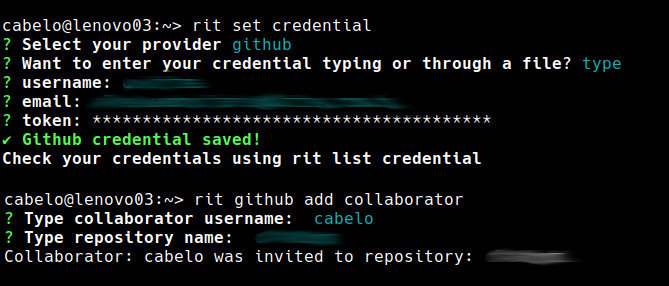
For more information: https://docs.ritchiecli.io/

Stasiek Michalski wins the race for the openSUSE Board
The openSUSE Ad-hoc Board Election is now concluded.
Stasiek Michalski has been elected to join the openSUSE Board. The complete result is as follows:
- Stasiek Michalski — 160 votes
- Pierre Böckmann — 70 votes
234 out of 510 eligible members have cast their vote in this election. We recorded 4 blank votes.
We thank both of them for stepping up and running in this election and we congratulate Stasiek for his win.
Lastly, thanks to Edwin Zakaria and Ariez Vachha for their help in the planning of this election.

 Member
 dmulder
Samba Winbind Group Policy
Samba version 4.14 will ship with Group Policy for Winbind. The Group Policy offerings are made to be similar to what is offered by proprietary tools, such as Vintela’s and Centrify’s Group Policy.

Winbind Group Policy provides the ability to distribute smb.conf settings, Sudo Privileges, Message of the Day and Login Prompt messages, and daily, hourly, monthly, or weekly cron jobs.
To enable Group Policy in Winbind, set the apply group policies global smb.conf option to Yes. You can even deploy this setting from Group Policy smb.conf options, then running the apply command manually the first time with sudo samba-gpupate --force.
In order to use the Samba Administrative Templates in the Group Policy Management Console, you’ll need to install them first, using the command sudo samba-tool gpo admxload -UAdministrator. This will upload the samba.admx template to the joined domains SYSVOL share.
Resultant Set of Policy
To see what policies will apply to a machine before applying them (or to view what policies are already applied), run the command sudo samba-gpupdate --rsop.
linux-h7xz:~ # samba-gpupdate --rsop
Resultant Set of Policy
Computer Policy

GPO: Default Domain Policy
============================================================
  CSE: gp_sec_ext
  ------------------------------
  ------------------------------
  CSE: gp_sec_ext
  ------------------------------
  ------------------------------
  CSE: gp_scripts_ext
  ------------------------------
  ------------------------------
  CSE: gp_sudoers_ext
  ------------------------------
    Policy Type: Sudo Rights
    ------------------------------
    [ tux ALL=(ALL) NOPASSWD: ALL ]
    ------------------------------
  ------------------------------
  CSE: gp_smb_conf_ext
  ------------------------------
    Policy Type: smb.conf
    ------------------------------
    [ apply group policies ] = 1
    [ client max protocol ] = SMB2_02
    ------------------------------
  ------------------------------
  CSE: gp_msgs_ext
  ------------------------------
    Policy Type: /etc/motd
    ------------------------------
This message is distributed by Samba!
    ------------------------------
    Policy Type: /etc/issue
    ------------------------------
Samba Group Policy \s \r \l
    ------------------------------
  ------------------------------
============================================================
smb.conf Policies
smb.conf policies are found in Computer Configuration > Policies > Administrative Templates > Samba > smb.conf. These policies distribute smb.conf global options to the client. This policy is unable to apply idmap policies.
Password and Kerberos Policies
Password and Kerberos policies, found in Computer Configuration > Policies > OS Settings > Security Settings > Account Policy, are only applicable to Samba Domain Controllers.
The following password policies are applicable:
- Minimum password age
- Maximum password age
- Minimum password length
- Password must meet complexity requirements
And Kerberos policies:
- Maximum ticket age (Maximum lifetime for user ticket)
- Maximum service age (Maximum lifetime for service ticket)
- Maximum renew age (Maximum lifetime for user ticket renewal)
Script Policies
Script policies create cron jobs on client machines which execute the specified commands. Script policies are found in Computer Configuration > Policies > Administrative Templates > Samba > Unix Settings > Scripts.
To add a script policy, open the policy, enable it, and click Show. In the dialog that appears, add the command to execute on the client. Click OK, then Apply to save the policy.
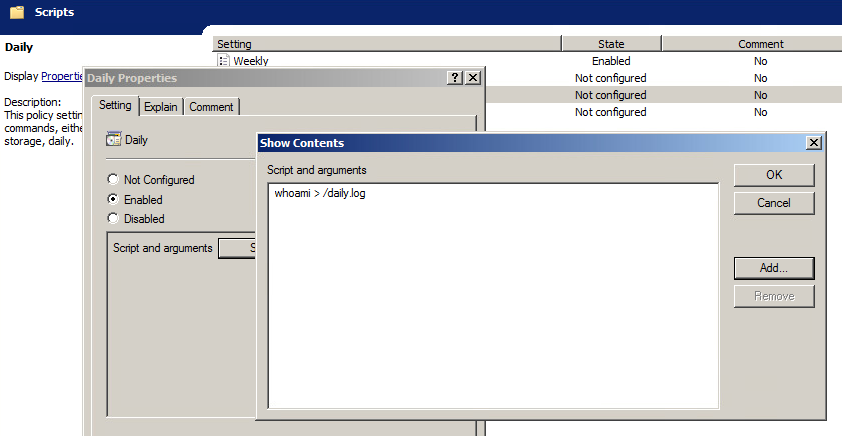
Script policies are applied as cron jobs on the winbind client.
linux-h7xz:~ # /usr/sbin/samba-gpupdate --force
linux-h7xz:~ # cat /etc/cron.daily/tmp6l0m809i
#!/bin/sh
whoami > /daily.log
Sudoers Policies
Sudoers policies add sudo rules to client machines. Sudoers policies are found in Computer Configuration > Policies > Administrative Templates > Samba > Unix Settings > Sudo Rights.
To add a sudo policy, open the policy, enable it, and click Show. In the dialog that appears, add the sudo rules to the list. Click OK, then Apply to save the policy.
linux-h7xz:~ # /usr/sbin/samba-gpupdate --force
linux-h7xz:~ # cat /etc/sudoers.d/gp_eockoryg

### autogenerated by samba
#
# This file is generated by the gp_sudoers_ext Group Policy
# Client Side Extension. To modify the contents of this file,
# modify the appropriate Group Policy objects which apply
# to this machine. DO NOT MODIFY THIS FILE DIRECTLY.
#

tux ALL=(ALL) NOPASSWD: ALL
Message Policies
Message policies set the contents of the /etc/motd and /etc/issue files on client machines. Message policies are found in Computer Configuration > Policies > Administrative Templates > Samba > Unix Settings > Messages.
To add a message of the day policy, for example, open the policy and enable it. In the text box provided, enter the message you’d like displayed after a successful login.
linux-h7xz:~ # samba-gpupdate
linux-h7xz:~ # cat /etc/motd
This message is distributed by Samba!
To add a login prompt policy, open the ‘Logon Prompt Message’ policy and enable it. In the text box provided, enter the message you’d like displayed before the login prompt. You can use escape sequences supported by the client /etc/issue file.
linux-h7xz:~ # samba-gpupdate
linux-h7xz:~ # cat /etc/issue
Samba Group Policy \s \r \l
For more information about Winbind Group Policy, see the Samba wiki.

openSUSE Tumbleweed – Review of the week 2020/35
Dear Tumbleweed users and hackers,
This week we have published a few snapshots less than normal. To ‘compensate’, the next one will be huge to download though. On August 25, I merged the change for libexecdir == /usr/libexec and since then I’m fighting to QA after effects to get you a snapshot out that won’t break in all corners. There will likely be some rough patches here and there though.
Anyway, let’s see what DID happen in week 35: three snapshots have been published (0821, 0823 and 0824) containing these changes:
- cURL 7.72.0
- NetworkManager 1.26.2
- fdupes 2.1.2 (upgraded from 1.61)
- systemd 245.7: NOTE: an issue with a dangling symlink in /etc/systemd/system/tmp.mount was identified. A fix for this is in the TW-Update channel
As mentioned earlier, the next snapshot to come out (currently testing 0826, but this could still be discarded too) will be ‘large’ with respect to download size, as literally all 15000 packages in Tumbleweed have been rebuilt. There were multiple reasons to trigger a full rebuild (and I intentionally collected them to have this done in one go)
- RPM: %{_libexecdir} changed to /usr/libexec. As this affects a lot of packages, and can change build results based on dependent packages file locations, a full rebuild was needed to be consistent in the end
- RPM: The compression payload of our packages has been changed to zstd compression. This generally should result in faster decompression (read: installation) of RPMs. Downside: These packages can only be read with Leap 15.2 (and future versions) and Tumbleweed (newer than 20190713).
- build: the build package was changed to also copy pkgconfig .pc files into the -devel-32bit package, if this is defined to be built in baselibs.conf.
- brp-check-suse: The symlinks pointing to /etc/alternatives are no longer converted to be relative symlinks, as update-alternatives did not really like that and kept on complaining to the users.
And besides all what has happened, the Stagings are still filled up with:
- Linux kernel 5.8.4
- Mozilla Firefox 80
- Chromium 85
- Boost 1.74.0
- Kubernetes 1.19
- systemd package drops the dependency on sysvinit-tools
- glibc 2.32
- binutils 2.35
- gettext 0.21
- bison 3.7.1

Kraft Version 0.95
The authors are happy to announce the new release 0.95 of Kraft. Kraft is free desktop software for managing office documents like quotes and invoices in the small enterprise for the Linux desktop.

Kraft Version 0.95
With version 0.95 we do a big step forward in the way of generating documents: Until now (more than fifteen years!) Kraft uses the ReportLab python library to create high quality PDF documents.
While this has served us well, it has always been cumbersome to adopt the template for users needs. ReportLab uses a XML format as the template which has a bit of a steep learning curve and is not really easy with syntax.
This changes now: From version 0.95, Kraft supports the cool project WeasyPrint. The principle remains the same: The document is built of a text based template which defines the look of the output document. That gets filled with the document data and gets converted to a PDF document. But unlike ReportLab, Weasyprint is HTML based. Many people know a bit of HTML and thus will have an way easier time to adopt the template to personal needs.
Apart from the ease of use, it is much more simple to do modern report design with Weasyprint, as it supports the wide range of CSS styling.
That is a great improvement, as adopting Krafts output to personal needs is much more intuitive now. For now, Kraft supports both rendering engines, but ReportLab based reports are deprecated now and support will end in future releases of Kraft.
Along with integration of Weasyprint the text templating library Grantlee was added, as it is the standard in the KDE/Qt world, well maintained and widely available. The ctemplate library which was used for that so far will also be deprecated.
The other great improvement in this release is that Kraft now has a user manual embedded which will give new users a guiding help. It will open in the browser once the user clicks on the menu entry in the help menu, also without internet connection. It was started by a community member and it will grow and improve over time.
As usual this new version also ships an amount of bug fixes and small improvements which can be found in the Changelog.
We wish all users big fun with this remarkable new version of Kraft.
Alpha Prototype Jump is Available, Tumbleweed gets systemd, curl Updates
The prototype project openSUSE Jump is now available for Alpha phase testing. Jump is an interim name given to the experimental distribution in the Open Build Service as developers have been trying to synchronize SUSE Linux Enterprise binaries for openSUSE Leap. The efforts are trying to bring the codes of Leap and SLE closer together, which was previously mentioned in an article titled New Prototype Builds Bringing Leap, SLE Closer Will be Available Soon.
The past week produced three openSUSE Tumbleweed snapshots.
The snapshots brought some interesting packages including one used by NASA and one package fixed a ancient bug. A full rebuild of Tumbleweed was done with Build20200825, but the build doesn’t appear good enough to be released in a snapshot.
Snapshot 20200824 provided an update of the intel-vaapi-driver 2.4.1 package, which fixed some compiler errors with GNU Compiler Collection 10. A few RubyGem packages were updated, but didn’t provide much info in the changelog. However, the rubygem-bootsnap 1.4.8 changelog points to a force-pushed fix in the package that was contributed for Shopify. The snapshot is trending moderately stable at a rating of 72, according to the Tumbleweed snapshot reviewer.
An update to the 245.7 version of systemd arrived in snapshot 20200823. The snapshot also had an update of NetworkManager 1.26.2, which provided a fix for Dynamic Host Configuration Protocol version 4 and added an update for the export and handling of the DHCPv6 FQDN option. A major version update made it into the snapshot with fdupes updated from version 1.61 to the newest 2.1.2 version; FDUPES is a program for identifying or deleting duplicate files residing within specified directories and the updated version increases speed by reducing the number of call to stats. Pipewire 0.3.9, which is a server and user space API to deal with multimedia pipelines, fixed bad audio in Chromium and added support for the video crop in the GStreamer elements. The python-kiwi 9.21.7 package had multiple fixes including one for Google Compute Engine integration test builds. Other packages update in the snapshot were the pixel encoding and color space conversion engine babl 0.1.80, bash-completion 2.11 and giflib 5.2.1. The snapshot is trending moderately stable at a rating of 69, according to the Tumbleweed snapshot reviewer.
The command line tool for transferring data curl 7.72.0 arrived in snapshot 20200821. The bugfix release also added zstd decoding support. The open-source lexer generator for C, C++ and Go, re2c has a new Go code generation backend that can be used with a –lang go re2c option, or as a standalone re2go binary in the new major 2.0.2 version; the version also offers backward incompatible changes. Generic spell checking library enchant 2.2.8 added a provider back-end for Nuspell, which is a new spell-checker whose development has been supported by the Mozilla foundation. It is backwards-compatible with Hunspell and Myspell dictionaries and supports a wider range of language peculiarities, improved suggestions, and easier maintainability of the code-base. GNOME’s note editor bijiben 3.36.3 updated translations and fixed an issue in the main view that prevented showing more than 48 notes. Other packages updated in the snapshot were the C and Fortran library used by NASA cfitsio 3.490. The machine checks daemon mcelog 170 was updated and popt 1.18 fixed “an ugly and ancient” security issue that failed to drop privileges on alias exec from a Set User ID/Set Group ID program. The snapshot recorded a moderately stable rating of 73.
Linux newbies shouldn’t dual boot
If you lurk around many Linux support forums, you are bound to see the regular post that looks something like this:
Hi, I’m new to Linux. I tried to dual boot Windows and Ubuntu, now I can’t use my computer at all because it has errors. Help!!!
Troubleshooting Grub errors is difficult enough. Troubleshooting Grub errors when you know very little about how any of it works or when getting help from strangers on the internet is even more difficult to nearly impossible.
I offer 3 suggestions for newbs who want to learn Linux other than dual booting.
- Use a virtual machine. Download Virtualbox on any platform, and install Linux there. It is a little slower than a real computer, but it is safe. If something breaks, nothing is lost. Just start again.
- Use bootable live installations. OpenSUSE, Ubuntu, and others allow you to use their Linux distribution from a USB key without ever installing it. This is faster that a VM and when rebooted, it’s like it was never there.
- Get a dedicated Linux machine. I’m not talking about spending a ton of money on something new. A raspberry pi will do nicely. So would an old machine from Craigslist. Something that would be used only for Linux and that’s all.
All of these are safe alternatives. I suggest the first option though because it costs nothing except time and your data will be safe.
Running for the openSUSE board - ad-hoc board elections 2020
In case you follow the mailing lists or openSUSE groups in social media you might have come to know that the openSUSE community holds ad-hoc board elections to refill an open spot in the openSUSE board.
If you did not know or even if you knew, you might not know that I was honored by being suggested as a candidate for that elections by Gerald and that I accepted the nomindation.
So, ultimately, I am running for the openSUSE board!
Ballot is open
Since 17th August 2020 the ballots are op...
openSUSE Tumbleweed – Review of the week 2020/34
Dear Tumbleweed users and hackers,
Another week has passed and there was probably something of interesting to everybody. So, we have released 6 snapshots since my last review (0814, 0815, 0816, 0817, 0818 and 0819).
The most relevant updates were:
- gdb 9.2
- qemu 5.1.0
- GNOME 3.36.5
- KDE Applications 20.08.0
- sqlite3 3.33.0
- LibreOffice 7.0.1 RC1
The list of major upgrades being brewed did no get much shorter, those are still:
- Linux kernel 5.8.2
- glibc 2.32
- binutils 2.35
- gettext 0.21
- bison 3.7.1
- RPM changes: %{_libexecdir} is being changed to /usr/libexec. Basically all build failures are addressed by now, openQA is starting to look good.
- openSSL 3.0
