
 Member
Introduction to OpenPGP for secure communication during COVID19 Pandemic
Introduction to OpenPGP for secure communication during COVID19 Pandemic
In this article, I will talk a bit about OpenPGP, and how to use it for secure document exchange during the COVID19-Pandemic.
What is PGP?
PGP (“Pretty Good Privacy”) is an encryption program. It has the abilitie to sign, encrypt and decrypt files. Unlike other encryption protocols, it uses asymmetric key algorithms, instead of symmetric ones. In a nutshell, this means the following: Instead of using the same password (or key) for encrypting and decrypting files, PGP uses two different ones. One Key is called the private key, This key should stay in your hands, as it says, it’s private. It is used for decrypting stuff for you, and for signing documents. People who want to encrypt a file for you or verify a signature use your public key. You can send your public key to everyone, for example you could upload it to a keyserver.
How we could use this at school
During the actual events, I am required to do home schooling. I sign every document I send of, so my teachers could verify it was me who send it. I uploaded my public key to IServ, it is loacted in the group folder gym/OpenPGP-keys.
Getting started
First install a PGP Programm. For Linux, I prefer KDE Kleopatra, although you could also use gpg’s command line interface. On Microsoft Windows, we are going to use GPG4Win.
Microsoft Windows
- Visit this site.
- Hit the download button
- Select “$0” and click “Download”
- Save the file somewhere on your hard disk.
- Execute the downloaded file.
- Select “Yes” when Windows asks whether it should execute the file.
- Hit “OK” and “Next”.
- Leave the defaults and click “Next” once again, then click “Install”.
- The needed tools will be installed.
- Hit “Next” and “Finish”.
- If Kleopatra doesn’t launch, start it from the start menu.
- Congrats! Kleopatra is now installed and configured correctly.
GNU/Linux
On Linux, installation is pretty easy. Just install Kleopatra with you package manager and you should be good to go.
Generating your very own PGP Key
Now, it’s time to generate our PGP Key pair.
- Start Kleopatra
- Select “New Keypair”
- Enter your name and your E-Mail Address (most likely IServ).
- Leave the default settings and continue.
- Enter a password for your private PGP key. It will be use for signing and decrypting your documents, so keep it secret!
Importing a PGP Key
So you received a public key. What’s next? You are required to import it in order to use it.
- Download my public key from IServ.
- Open Kleopatra
- Go to File -> import (Ctrl + I)
- Select the downloaded key file
- If it asks you to verify the key, hit “Yes”, then “Verify”.
- Unlock your secret PGP key by entering your password.
- That’s it! The key is imported.
Verifying a signature on a document
Alright, so you received a document which is signed. First of all, let’s talk about signed Open Office documents.
Signed .odx files
If you use OpenOffice or LibreOffice, verification of documents is super easy. Just open a signed document and you will see a little blue bar on top of it, saying “This document is digitally signed and the signature is valid.”. You can click on “Show Signatures”, and it will display more detailled information about the signature. A list view will appear, telling you who signed the document at what exact time.
Verifying a file with a .sig or .gpg file
Normally, you will receive a .sig (or .gpg) file and another file, for example, you recieve KW17-History-Task.pdf and KW17-History-Task.pdf.sig If you do so, follow these steps:
- Download both files (e.g. the .pdf and the .pdf.sig)
- Now use your file manager, right-click the .sig file and select “Decrypt/Verify file” on windows or Actions -> “Decrypt/Verify file” on Linux using KDE Dolphin.
- You should see something like this:

- If you see something else, the signature may be invalid.

Note: Everything that works with a .sig file also works with a .gpg file
Further reading
- Kleopatra Application Page
- The Kleopatra Handbook
- The GNU Privacy Guard
- Pretty Good Privacy on Wikipedia
Sources
- Title Picture: The KDE Community - kde.org

Highlights of YaST Development Sprint 98
It’s time for another report from the YaST trenches. This time, apart from this blog post, we have several other reads for you in case you are interested on YaST development or on Linux technical details in general.
Today topics include:
- Some considerations about the usage of YaST
- A sneak peek at the future of AutoYaST, including a separate full blog post
- Some kind of UI design contest for the YaST Partitioner
- Better compatibility with LVM cache
- Interesting researchs about combining disks and about Unicode support for VFAT in Linux
- An impressive speedup of the partitioning proposal for SUSE Manager
- A summary of the enhancements for YaST and related projects in Leap 15.2
And what is even better, many of those topics include a call to action for our loyal users and contributors.
Looking towards the future
Let’s start with a technical but rather significant detail. During our latest
sprint we created a new SLE-15-SP2 branch in the YaST Git repositories,
meaning that now the master branch is open again for more innovative
features.

This is an important milestone from the development point of view, since it marks the point in which the team acknowledges 15.2 to be basically done and manifests the intention to focus in the mid and long term future. All the previous blog posts have been focused on describing features and fixes that will be present in the upcoming SUSE Enterprise Linux 15 SP2 and openSUSE Leap 15.2. From now on, you will read more about changes that go into openSUSE Tumbleweed and Leap 15.3 (also SLE-15-SP3, of course).
Getting some insights about the usage of YaST
In order to take decisions for the future, we would like to know how often the YaST modules are used and which ones are the most important for the users. But that is not easy because YaST does not collect any data, the only feedback we get are bug reports and feature requests.
During this sprint we tried to gather some data by collecting the bug and feature numbers from the change logs. We have not yet analyzed that data but it seems the more features we implement the more bug reports we get. :smiley: See this gist for the details and feel free to suggest any other system we could use to analyze the relevance of the different YaST modules and components.
Modernizing AutoYaST
Something we know for sure is that AutoYaST is critical for many users of SUSE Linux Enterprise and openSUSE. And, to be honest, our venerable unattended installer is showing its age. That’s why AutoYaST has a priority place in the mid-term goals of the YaST Team. The plan is to have an improved AutoYaST for SLE 15 SP3 and openSUSE Leap 15.3, although some fixes could be backported to SP2 and 15.2 if they are important enough.
During this sprint, we started gathering some feedback from our users and colleagues at SUSE. Additionally, we did some research about the current status of AutoYaST in order to identify those areas that are in need of more love. We have put all the conclusions together as a separate blog post. Check it if you are interested in what the future will bring for AutoYaST.
Now that we have started a new development sprint, there is an ongoing discussion that might be interesting for you about AutoYaST tooling. Please, check yast-devel, opensuse-autoinstall, or the opensuse-factory mailing lists and do not hesitate to participate. We would love to hear from you.
Expert Partioner: Leap 15.3 and Beyond
If you are not an AutoYaST user, don’t worry. There is still other area in which your input will be greatly appreciated by the YaST team. The interface of the YaST Partitioner has reached a point in which is really hard to deal with it and we need to find a way to move forward.

As a first step, we have created this document that explains the problem and we hope it can be used as a base to discuss the future of the Partitioner interface.
This is a very important topic for the future of YaST. All ideas are
welcome. Feel free to join the mail
thread, to create
pull requests for the document, to discuss the topic at the #yast IRC channel
at Freenode… whatever works for you.
Recognizing LVM Cache
We also decided this was the right time to introduce some relatively big changes in libstorage-ng (the library used by YaST to manage storage devices) aimed to improve the compatibility of YaST with some advanced LVM features.
For more than a year YaST has supported to setup and use bcache to speed up rotating disks by using a SSD as a cache. But that is not the only technology that can be used for that purpose. Some users prefer to use LVM cache instead of bcache since it has been around for a longer period of time and it offers some different features.
YaST cannot be used to setup an LVM cache system and we don’t plan to make that possible. Moreover, booting from LVM cache does not work in SLE or openSUSE as of this writing. But giving the user the freedom of choice has always been important for (open)SUSE and YaST.
To help customers using LVM cache, YaST can now recognize such setup and display it properly in the Expert Partitioner and many other parts of YaST. The following warning will not be longer displayed for LVM cache volumes in openSUSE Tumbleweed.

Instead, it will be possible to use those logical volumes normally for operations like mounting, formatting, etc. The ability to modify them will still be very restricted and it will not be possible to create new LVM cache volumes.
We plan to offer a similar limited level of support for other kind of advanced LVM volumes. Stay tuned for more news on this.
VFAT filesystem and Unicode
And talking about storage technologies, we also introduced a small change in the
management of VFAT file systems for future releases of SLE and Leap (after
15.2). For some time we have wanted to stop using iocharset=utf8 in favor of
utf8 when mounting a VFAT filesystem, as this is the recommendation in the
kernel documentation.
There was also this bug
that led to avoiding iocharset=utf8 for EFI system partitions (because
iocharset=utf8implies that filenames are case-sensitive).
We took the opportunity to do some experiments and even look at the source code
of the Linux kernel to find out what’s really going on. Why is utf8 so special
and what can go wrong?
If you ever wondered what these VFAT charset related options mean and whether VFAT filenames are really case-insensitive in Linux as they are in Windows, have a look at this document we have created.
Although SLE-15-SP2 and openSUSE Leap 15.2 will still use the traditional mount
options, the new approach (utf8 for all VFAT file systems) will land in
Tumbleweed in a matter of days, as usual.
And, since we were already in research mode regarding storage technologies, why to stop there?
Mixing block sizes in multi-device devices
As a result of a recent bug in libstorage-ng which was tracked down to a RAID device block size issue the YaST team spent some time researching the topic in general.
If you’ve ever wondered what happens when you combine disks with different block sizes into a RAID, LVM, BCACHE, or BTRFS, have a look at our document.
In most cases, YaST and libstorage-ng already manage the situation well enough. But we found that in some cases we will need special handling of some situations, specially to guide our users so they don’t slip through the pitfalls. But that’s another story… for upcoming development sprints.
Faster Partitioning Proposal for SUSE Manager
Not all changes and improvements done during this sprint are targeting the mid and long term. We also had time to introduce some improvements in the upcoming SLE 15 SP2. To be precise, in the corresponding version of SUSE Manager, the SUSE’s purpose-specific distribution to manage software-defined infrastructures.
Quite some time ago, we wrote this separate blog post to introduce some special features of the partitioning Guided Setup we have developed to allow SUSE Manager (and other products) to offer the users an experience tailored to their needs.

But we knew some of those features in our partitioning proposal had serious performance problems that affected the initial proposal, that is, the one the installer creates before the user has had any chance of to influence the result or to select the disks to use.
The SUSE Manager version for SLE 15 SP2 will finally introduce two system roles that use the new proposal (both indentified by the “multiple disk” label), so it was finally time to address those performance problems.
And we really improved the situation! If you want to know more, this pull request contains many details and the result of some benchmarks. Let’s simply say here that in some worst-case scenarios we managed to reduced the time needed to calculate the initial proposal… from several hours to half a second!
Summarizing what Leap 15.2 will bring
As our usual readers have had many opportunities to attest, the life of a YaST developer goes much further than simply coding. And with every openSUSE Leap release it’s time for us to take a look back to several months of work and, with our salesman hat on, summarize all the cool additions to YaST and its related projects.
In that regard, we have been helping the openSUSE marketing team to shape the release announcement for openSUSE Leap 15.2. You will have to wait to read such document in all its glory, but meanwhile you can check what we have added to the “Snapper”, “YaST” and “AutoYaST” sections of the Leap 15.2 Features Page. It’s a wiki, so feel free to add any important point we could have missed.
To Infinity and Beyond
A lot of interesting topics open up in front of the YaST Team. So it’s time for us to go back to the daily work. Meanwhile, enjoy all the reads and don’t hesitate to get involved taking part in the converstions, improving the wiki pages or in any other way.
Have a lot of fun!

 mfleming
Reducing jitter on Linux with task isolation
Last week I gave a talk at the first virtual adhoc.community meetup on the history of task isolation on Linux (slides, video). It was a quick 15-minute presentation, and I think it went well, but I really wanted to include some details of how you actually configure a modern Linux machine to run a workload without interruption. That’s kinda difficult to do in 15 minutes.
So that’s what this post is about.
I’m not going to cover how to use the latest task isolation mode patches because they’re still under discussion on the linux-kernel mailing list. Instead, I’m just going to talk about how to reduce OS jitter by isolating tasks using Linux v4.17+.
First, as the below chart shows, you really do need a recent Linux kernel if you’re going to run an isolated workload because years of work have gone into making the kernel leave your tasks alone when you ask.
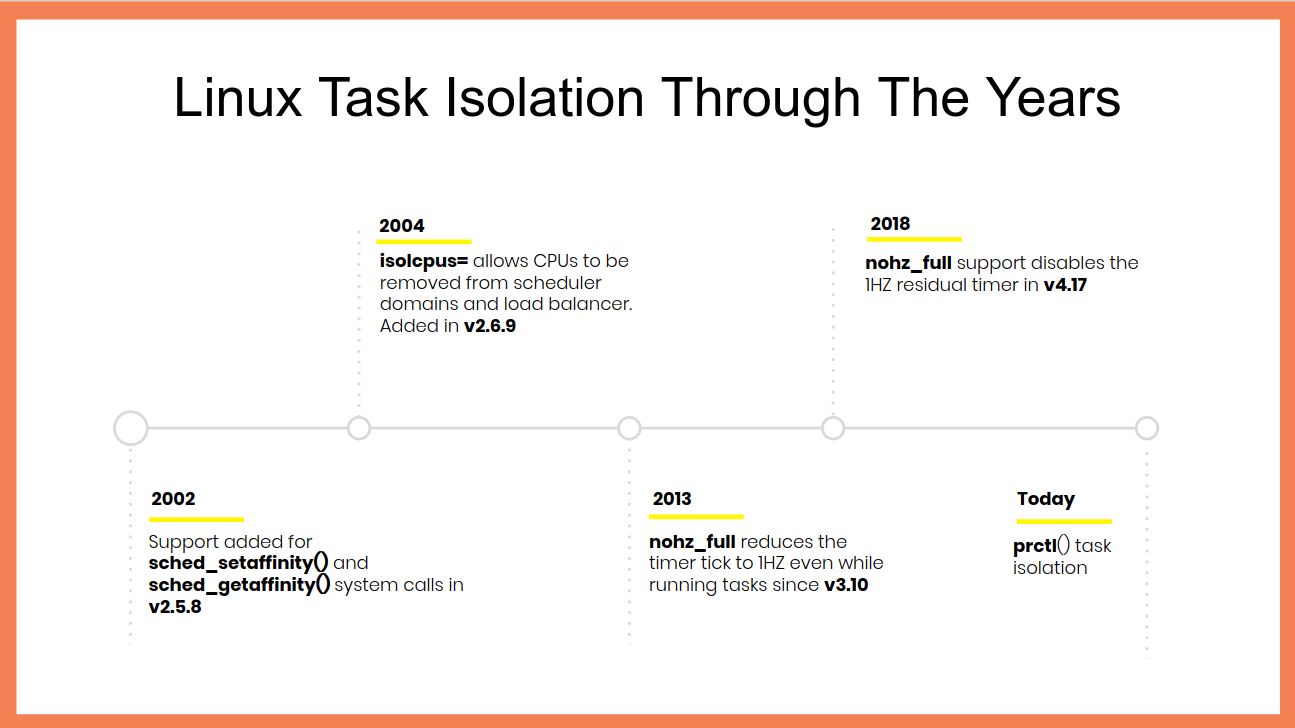 Linux task isolation features throughout the years
Each of these features is incremental and builds on top of the previous ones to quiesce a different part of the kernel. You need to use all of them.
Modern Linux does a pretty good job out of the box of allowing userspace tasks to run continuously once you pull the right options. Here’s my kernel command-line for isolating CPU 47:
isolcpus=nohz,domain,47 nohz_full=47 tsc=reliable mce=off
The first option, isolcpus, removes every CPU in
the list from the scheduler’s domains, meaning that the kernel will not
to do things like run the load balancer for them, and it also disables
the scheduler tick (that’s what the nohz flag is for). nohz_full=
disables the tick (yes, there’s some overlap of the in-kernel flags
which means you need both of these options) as well as offloading RCU
callbacks and other miscellaneous items.
On my machine, I needed the last two options to disable some additional timers and prevent them from firing while my task was running.
Once you’ve booted with these parameters (substitue your desired CPU
list for 47) you’ll need to setup a cpuset cgroup to run your task in
and make sure that no other tasks accidentally run on your dedicated
CPUs. cset is definitely my favourite
tool for doing this because it makes it so easy:
$ cset shield --kthread=on --cpu 47
cset: --> activating shielding:
cset: moving 34 tasks from root into system cpuset...
[==================================================]%
cset: kthread shield activated, moving 79 tasks into system cpuset...
[==================================================]%
cset: **> 56 tasks are not movable, impossible to move
cset: "system" cpuset of CPUSPEC(0-46) with 57 tasks running
cset: "user" cpuset of CPUSPEC(47) with 0 tasks running
Now all you need to do is add the PID of your task to the new user
cpuset and you’re good to go.
Verifying your workload is isolated
Of course, it’s all well and good me saying that these options isolate your tasks, but how can you know for sure? Fortunately, Linux’s tracing facilities make this super simple to verify and you can use ftrace to calculate when your workload is running in userspace by watching for when it’s not inside the kernel – in other words, by watching for when your workload returns from a system call, page fault, exception, or interrupt.
Say we want to run the following super-sophisticated workload without it entering the kernel:
while :; do :; doneHere’s a sequence of steps – assuming you’ve already setup the user
cpuset using cset – that enables ftrace, runs the workload for 30
seconds, and then dumps the kernel trace to a trace.txt
# Stop irqbalanced and remove CPU from IRQ affinity masks
systemctl stop irqbalance.service
for i in /proc/irq/*/smp_affinity; do
        bits=$(cat $i | sed -e 's/,//')
        not_bits=$(echo $((((16#$bits) & ~(1<<47)))) | \
		xargs printf %0.2x'\n' | \
		sed ':a;s/\B[0-9a-f]\{8\}\>/,&/;ta')
        echo $not_bits > $i
done

export tracing_dir="/sys/kernel/debug/tracing"

# Remove -rt task runtime limit
echo -1 > /proc/sys/kernel/sched_rt_runtime_us

# increase buffer size to 100MB to avoid dropped events
echo 100000 > ${tracing_dir}/per_cpu/cpu${cpu}/buffer_size_kb

# Set tracing cpumask to trace just CPU 47
echo 8000,00000000 > ${tracing_dir}/tracing_cpumask

echo function > ${tracing_dir}/current_tracer

echo 1 > ${tracing_dir}/tracing_on
timeout 30 cset shield --exec -- chrt -f 99 bash -c 'while :; do :; done'
echo 0 > ${tracing_dir}/tracing_on

cat ${tracing_dir}/per_cpu/cpu${cpu}/trace > trace.txt
# clear trace buffer
echo > ${tracing_dir}/trace
The contents of your trace.txt file should look something like this:
# tracer: function
#
# entries-in-buffer/entries-written: 102440/102440   #P:48
#
#                              _-----=> irqs-off
#                             / _----=> need-resched
#                            | / _---=> hardirq/softirq
#                            || / _--=> preempt-depth
#                            ||| /     delay
#           TASK-PID   CPU#  ||||    TIMESTAMP  FUNCTION
#              | |       |   ||||       |         |
          <idle>-0     [047] dN..   177.931485: sched_idle_set_state <-cpuidle_enter_state
          <idle>-0     [047] .N..   177.931487: cpuidle_reflect <-do_idle
          <idle>-0     [047] .N..   177.931487: menu_reflect <-do_idle
          <idle>-0     [047] .N..   177.931488: tick_nohz_idle_got_tick <-menu_reflect
          <idle>-0     [047] .N..   177.931488: rcu_idle_exit <-do_idle
          <idle>-0     [047] dN..   177.931488: rcu_eqs_exit.constprop.71 <-rcu_idle_exit
          <idle>-0     [047] dN..   177.931489: rcu_dynticks_eqs_exit <-rcu_eqs_exit.constprop.71
You want to make sure that the you didn’t lose any events by checking
that the entries-in-buffer/entries-written fields have the same
values. If they’re not the same you can further increase the buffer size
by writing to tracing/per_cpu/<cpu>/buffer_size_kb.
The key part of the trace file is the finish_task_switch tracepoint
which tells you when a context switch completed. You can use this
tracepoint to find when your bash process starts running and when it
finishes – hopefully after 30 seconds has elapsed – with a bit of awk
magic:
$ awk '/: finish_task_switch / {
        # Do not start counting until we see the bash task for the first time
        comm = substr($1, 0, index($1, "-")-1)
        if (comm == "bash") {
                counting = 1;
        }
}

{
        if (counting) {
                usecs = $4
                gsub(/\./,"",usecs)
                gsub(/\:/,"",usecs)
                msecs = usecs / 1000

                delta = msecs - last
                if (last && (delta > runtime)) {
                        runtime = delta
                }
                last = msecs
        }
}


BEGIN { runtime = -1 }

END { printf "Max uninterrupted exec: %.2fms\n", runtime }' < trace.txt
Max uninterrupted exec: 29877.67ms
I’ve successfully used this technique to verify that I can run a bash busy-loop for an hour without entering the kernel.

MicroOS - The OS that does "just one job"
The openSUSE Summit 2020 kicked off yesterday. Like many others this summit was a virtual one too. It ran on a platform managed by openSUSE fan and user P. Fitzgerald.
I was busy with work stuff and couldn't watch the presentations live. I hopped on and off on the platform. I didn't want to miss Richard's presentation about MicroOS yet I missed it. Luckily he was quick to record his session and upload it on YouTube. I got a chance to watch it afterwards. Surely, all other presentations will be available on openSUSE TV soon and I'll be able to catch-up.
If you didn't rush to watch Richard's presentation on YouTube right-away, here are a few hints that may encourage you to do so.
openSUSE container registry
I'm not going to tell you what MicroOS is, you got to watch the video to learn about that, but did you know that the openSUSE project had a containers registry available publicly at https://registry.opensuse.org ? You can add it to the /etc/containers/registries.conf file and Podman can now search & pull containers from it.
Tiny openSUSE containers
When deploying your application in a container you always look for the fattest container, right? Of course, no!
ish@coffee-bar:~$ podman pull registry.opensuse.org/opensuse/busybox
Trying to pull registry.opensuse.org/opensuse/busybox...
Getting image source signatures
Checking if image destination supports signatures
Copying blob b6fc9a391c78 [====>---------------------------------] 515.9KiB / 3.8MiB
ish@coffee-bar:~$ podman images
REPOSITORY TAG IMAGE ID CREATED SIZE
registry.opensuse.org/opensuse/busybox latest c19f82628d9f 44 hours ago 9.4 MBopenSUSE offers a small (Tumbleweed) busybox container that is just under 10 MB. Mini but mighty! 💪
How to keep a system patched & running?
If it's running you don't want to touch it, but, systems need security updates. Someone has to do the dirty-job. Who? Can a system update itself without breaking the applications that are running?

Health checks during boot-up
Have you ever had a system that fails to boot after an update? I had. MicroOS checks for errors during the boot phase and if a snapshot is faulty the system then boots up with the last known working snapshot. MicroOS does so without any manual intervention, so, automatic reboots are safe. 😀 🎉 🎊
Debugging your MicroOS container host
MicroOS is a lightweight system that doesn't come bundle with debugging tools (for obvious reasons). Once in a while though you need to troubleshoot things like network issues. There you go, you can spin a toolbox container and inspect the network interface on the host. 🛠️
I hope these are enough to convince you to watch the presentation and that openSUSE MicroOS becomes part of your servers infrastructure. 🐧

Under the hood of zypper-upgraderepo gem
openSUSE Tumbleweed – Review of the week 2020/18
Dear Tumbleweed users and hackers,
This week, we released a few snapshots less. But we released GNOME 3.36.1 which also contained a minor font change for cantarell. And as openQA compares reference screen shots, a font change results in a lot of mismatches, that need to be confirmed. This takes easily a bit of time. This resulted in three snapshots being published (0425, 0427 and 0428), bringing those changes:
- GNOME 3.36.1
- KDE Applications 20.04
- Linux kernel 5.6.6
- Mesa 20.0.5
- openSSL 1.1.1g
The list looks short, but GNOME and KDE Applications both consist of numerous applications. So all in all the snapshots were actually rather large.
And as usual, that’s not the end: things currently being worked on in Staging projects:
- Switch from Ruby 2.6 to 2.7 (some preparations/fixes are coming by regularly)
- Linux kernel 5.6.8
- RPM change: %{_libexecdir} is being changed to /usr/libexec. This exposes quite a lot of packages that abuse %{_libexecdir} and fail to build
- Qt 5.15.0 (currently beta4 is staged)
- TeXLive 2020
- Guile 3.0.2: breaks gnutls’ test suite on i586
- GCC 10 as the default compiler
Announcement
From news.groups.newgroups:
This is an official communication from the Big-8 Management Board. Please note that followups are set to news.groups.
After a careful review of the Big 8 Management Board’s activity and process, all remaining members of the Big 8 Management Board opted not to consider re-election and instead have voted to install two new volunteers as the new members of the Big 8 Management Board. These two volunteers are:
Tristan Miller Jason Evans
We believe these volunteers have the technical and social skills necessary to maintain the Big-8. Please give them your support while they develop their vision for the future mission and goals of the Big 8 Board.
Kathy Morgan, Chairperson Emeritus Bill Horne, former Chairperson
Modernizing AutoYaST
Introduction
YaST2 is a venerable project that has been around for more than 20 years now. It keeps evolving and, with every SUSE and openSUSE release, it takes several new features (and a couple of new bugs). Needlessly to say that, to some extent, YaST2 is showing its age. We are aware of it, and we have been working to tackle this problem. The successful rewrite of the storage layer, which brought many features, is an example we can feel proud of.
Now that the development of SLE 15 SP2 and openSUSE Leap 15.2 features is mostly done, we have started to look to AutoYaST. The purpose of this article is to present our initiative to modernize AutoYaST.
First of all, let’s make it clear: we do not plan to rewrite AutoYaST. What we want to do is:
- Fix several bugs and remove some known limitations.
- Improve the tooling around AutoYaST.
- Introduce a few features that can help our users.
- Work hard to improve code quality.
Although nothing is set in stone yet, this document tries to present some ideas we are considering. But they are just that, ideas. We have identified the main areas that we want to improve, and now we are trying to come up with a more concrete (and realistic) plan.
Creating a profile does not need to be hard
Perhaps one of the main complaints about using AutoYaST is that writing a profile can be tricky. The easiest way is to perform a manual installation and generate the profile from the command line or using the AutoYaST UI.
If you decide to go for the command line approach, yast2 clone_system generates an XML file
containing all the details from the underlying system. The generated profile is quite long, and
usually you want to make it shorter by removing unimportant sections. For instance, you do not need
the full list of users (the corresponding packages creates them) or services.
The alternative is to use the AutoYaST UI, which is a tool that allows you to create and edit profiles, although it has several bugs that we need to fix.
As part of this modernizing AutoYaST initiative, we would like to make things easier when it comes to deal with profiles. We are considering a few options:
- Improve AutoYaST UI quality.
- Provide a set of templates you can base on:
minimal,hardening, etc. - Optionally, do not export the default options, making the profile shorter.
- Implement a wizard that can guide you through the process of creating a profile from scratch (selecting the product, the list of add-ons, the filesystem type, etc.). It could also offer a CLI:
$ yast2 autoyast_profile --product SLES-15.2 \
  --addons sle-module-basesystem,sle-module-development-tools \
  --regcode XXXX \
  --filesystem btrfs
Integrated profile validation
One of the advantages of using XML is that we can rely on the existing tools to validate the
profile. The AutoYaST Guide
documents
the usage of xmllint and jing for that. As part of this initiative, we would like to integrate
the validation within the installation process. So one of the first things that AutoYaST would do
is checking whether the profile is valid or not.
However, this kind of validation does not detect logical problems. Some of them are easy to find by just analyzing the profile, and we could consider adding some additional checks. But there is another whole category of problems that you cannot anticipate. For instance, consider that you want to reuse a partition that does not exist. And that brings us to the next topic: error reporting.
Better error reporting
If something unexpected happens during the installation, AutoYaST reports the issue. The user can decide whether a problem should stop the installation or not depending on its severity. Obviously, in some cases, the installation is simply not possible and AutoYaST aborts the process.
Error reporting infrastructure can be improved. For instance, it would be nice to group related messages and show them at once, instead of stopping the installation several times. Fortunately, during the storage layer rewrite, we introduced a mechanism that enables us to do that. Now it is a matter of extending its API and using it in more places.
Another nice feature could be to allow filtering the messages not only by its severity but by its module as well (e.g., partitioning warnings only), offering more control on error reporting. And the new code would enable us to do that.
Getting rid of the 2nd stage
Depending on the content of the profile, the installation would be finished after the first
reboot. In the past, SUSE and openSUSE installation took place in two phases known as stages,
but that it is not true anymore for the manual installation. However, AutoYaST still requires that
in some cases. For instance, if you use the <files> section, AutoYaST copies the files after
rebooting.
We plan to move everything we can to the 1st stage, skipping the 2nd stage entirely. We will keep the 2nd stage, though, because third party modules could use it as an extension point. But YaST2 core modules should avoid it.
To be honest, it sounds easier than it is (there are some corner cases to consider), and we are still checking whether it is technically possible.
Introducing dynamic profiles
In some situations, it is desirable to modify a profile at runtime. For instance, let’s consider that you want to install several machines with different software selections. The profiles would be almost identical, so it does not make sense to keep one for each machine.
AutoYaST already offers two mechanisms for that: rules and classes and pre-install scripts.
The first one is a feature that, for some reason, remains relatively unknown. It allows to combine several XML files depending on a set of rules which are applied at runtime. Although it is quite powerful, their specification is really verbose and the merging process can be rather confusing in some cases.
Alternatively, pre-install scripts are widely used. You can then rely on the classical Linux tools (sed, awk, etc.), or Python, or Perl, or Ruby… well, you cannot use Ruby, but that is something we will fix. :sweat_smile:
However, we have been thinking about making things even easier by allowing to embed Ruby (ERB) in AutoYaST profiles:
<?xml version="1.0" encoding="utf-8"?>
<partitioning config:type="list">
  <drive>
    <!-- vda, sda, ... -->
    <device><%= script("find_root_device.sh") -%></device>
    <use>all</use>
  </drive>
</partitioning>

<%= include_file("https://example.net/profiles/software-#{node["mac"]}.xml") %>

<% if arch?("s390x") -%>
<dasd>
  <!-- dasd configuration -->
</dasd>
<% end -%>
Please, bear in mind that it is just an example, and we do not even know whether this feature makes sense to you. Does it?
Conclusions
After reading this document, there is a chance that you have comments or new ideas to discuss. And we would love to hear from you! So you can reach the YaST team through the yast-devel or opensuse-autoinstall mailing lists or, if you prefer, we are usually at #yast channel at Freenode.
Finally, we would like to thank everyone that got involved in the discussions (e.g., The (near) future of AutoYaST and AutoYaST tools: feedback wanted) and our colleagues at SUSE for providing feedback and ideas.

Discuss, Define and be Transparent with the openSUSE-Community
Hi,
The SUSE Linux Enterprise Team is acknowledging the openSUSE community needs for a better and transparent collaboration with SUSE. We have now a momentum to think and be different.
The symbiosis between SUSE Linux Enterprise and openSUSE is real, we share so much more than just code, we use the same tools like Open Build Service, openQA, similar maintenance processes, people (Release Managers, contributors, etc) and more.
We might have been a bit quiet in the past but that doesn’t mean we didn’t evolve; over the years, we have created more bonds like Package Hub, foster our contribution with SLE Factory First Policy for SUSE employees and our Technology Partners, be more accessible during our development phase with the SLE Public Beta Program, just to name a few examples.
But now we have a momentum to accelerate, especially with regard to being more transparent with our defects and feature requests for the benefit of the openSUSE distribution and community. So we heard you, and today we want to clarify and improve processes, for all of us, and give some inputs on SUSE internal discussions about kicking out the so called “closed doors”.
So without further ado, here is our action items:
- Refresh and create openSUSE wiki pages for processes clarification
- Luboš Kocman has already started with documenting the process in place for retrieving SLE Feature Requests and his plan is to present a real and better feature process for external contributors by October or sooner.
- We will also review and improve “how to contribute , openSUSE Leap development phase” to clarify and formalize information that existed for years, but was not documented.
- Create new page about our “SLE Factory First Policy”, and potential maintenance and quality assurance topics.
- Talk more openly about openSUSE and SLE relationship,
- “Current and Future strategy for openSUSE Leap” and “Jump! Current state and upcoming changes” during openSUSE virtual summit.
- Upcoming topic in the “How SUSE Builds its Enterprise Linux Distribution” blog post.
- A talk about “relationship in between SLE and openSUSE” at the Virtual SUSECon.
- Find the proper way to open our bugzilla.suse.com
- SUSE is fully committed to protect our customers and partners private data hosted in our tool like Bugzilla. They trust us with their highly sensitive data, so we approach this topic very seriously. However thanks to the full handover of the Bugzilla instances from MicroFocus to SUSE, we now have full control over Bugzilla thus we can now discuss how to change our processes internally to combine data privacy and openness.
- A group has been formed (Vincent Untz, Anna Maresova and Vincent Moutoussamy) to drive this project internally and will be in charge of discussing the proposal with all stakeholders including the openSUSE community of course.
- Special attention to openSUSE 15.2 (and future) Leap bug reports
- Last but not least, Luboš Kocman, openSUSE Leap Release Manager, is committed to review, triage openSUSE Leap 15.2 bugs and feature requests (create a bug for openSUSE Leap 15.2), and escalate to SLE Product and Release Manager.
We believe this is an exciting and ambitious plan, and we hope to share more concrete information as soon as possible.
In the mean time, do not hesitate to engage with the presenters of “openSUSE and SLE” talks, Luboš obviously, and feel free to comment or send us your feedback here in this thread.
Stay tuned, stay home, stay safe and stay green.
The SUSE Linux Enterprise Team

Bringing my Emacs from the past
I started using Emacs in 1995, and since then I have been carrying a .emacs
that by now has a lot of accumulated crap. It is such an old configuration that
it didn't even use the modern convention of ~/.emacs.d/init.el (and it looks
like a newer Emacs version will allow .config/emacs as per the XDG
standard... at last).
I have wanted to change my Emacs configuration for some time, and give it all the pretty and modern toys.
The things that matter the most to me:
- Not have a random dumpster in
~/.emacsif possible. - Pretty colors.
- Magit.
- Rust-mode or whatever the new thing is for rust-analyzer and the Language Server.
After looking at several examples of configurations that mention use-package
as a unified way of loading packages and configuring them, I found this
configuration which is extremely well
documented. The author does literate programming with org-mode and elisp —
something which I'm casually interested in, but not just now — but that way
everything ends up very well explained and easy to read.
I extracted bits of that configuration and ended up with the following.
Everything in ~/.emacs/init.el and with use-package
;; Initialize package system

(require 'package)

(setq package-archives
      '(("org"     .       "https://orgmode.org/elpa/")
        ("gnu"     .       "https://elpa.gnu.org/packages/")
        ("melpa"   .       "https://melpa.org/packages/")))

(package-initialize)
;(package-refresh-contents)

;; Use-package for civilized configuration

(unless (package-installed-p 'use-package)
  (package-install 'use-package))
(require 'use-package)

(setq use-package-always-ensure t)
~/.emacs.d/custom.el for M-x customize stuff
;; Set customization data in a specific file, without littering
;; my init files.

(setq custom-file "~/.emacs.d/custom.el")
(load custom-file)
Which-key to get hints when typing command prefixes
;; Make it easier to discover key shortcuts

(use-package which-key
  :diminish
  :config
  (which-key-mode)
  (which-key-setup-side-window-bottom)
  (setq which-key-idle-delay 0.1))
Don't pollute the modeline with common modes
;; Do not show some common modes in the modeline, to save space

(use-package diminish
  :defer 5
  :config
  (diminish 'org-indent-mode))
Magit to use git in a civilized fashion
;; Magit

(use-package magit
  :config
  (global-set-key (kbd "C-x g") 'magit-status))
Move between windows with Shift-arrows
;; Let me switch windows with shift-arrows instead of "C-x o" all the time
(windmove-default-keybindings)
Pretty colors
I was using solarized-dark but I like this one even better:
;; Pretty colors

(use-package flatland-theme
  :config
  (custom-theme-set-faces 'flatland
   '(show-paren-match ((t (:background "dark gray" :foreground "black" :weight bold))))
   '(show-paren-mismatch ((t (:background "firebrick" :foreground "orange" :weight bold))))))
Nyan cat instead of scrollbars
;; Nyan cat instead of scrollbar
;; scroll-bar-mode is turned off in custom.el

(use-package nyan-mode
  :config
  (nyan-mode 1))
Move buffers to adjacent windows
;; Move buffers between windows

(use-package buffer-move
  :config
  (global-set-key (kbd "<C-S-up>")     'buf-move-up)
  (global-set-key (kbd "<C-S-down>")   'buf-move-down)
  (global-set-key (kbd "<C-S-left>")   'buf-move-left)
  (global-set-key (kbd "<C-S-right>")  'buf-move-right))
Change buffer names for files with the same name
;; Note that ‘uniquify’ is builtin.
(require 'uniquify)
(setq uniquify-separator "/"               ;; The separator in buffer names.
      uniquify-buffer-name-style 'forward) ;; names/in/this/style
Helm to auto-complete in grand style
(use-package helm
 :diminish
 :init (helm-mode t)
 :bind (("M-x"     . helm-M-x)
        ("C-x C-f" . helm-find-files)
        ("C-x b"   . helm-mini)     ;; See buffers & recent files; more useful.
        ("C-x r b" . helm-filtered-bookmarks)
        ("C-x C-r" . helm-recentf)  ;; Search for recently edited files
        ("C-c i"   . helm-imenu)
        ("C-h a"   . helm-apropos)
        ;; Look at what was cut recently & paste it in.
        ("M-y" . helm-show-kill-ring)

        :map helm-map
        ;; We can list ‘actions’ on the currently selected item by C-z.
        ("C-z" . helm-select-action)
        ;; Let's keep tab-completetion anyhow.
        ("TAB"   . helm-execute-persistent-action)
        ("<tab>" . helm-execute-persistent-action)))
Ripgrep to search in grand style
;; Ripgrep

(use-package rg
  :config
  (global-set-key (kbd "M-s g") 'rg)
  (global-set-key (kbd "M-s d") 'rg-dwim))

(use-package helm-rg)
Rust mode and Language Server
Now that RLS is in the process of being deprecated, it's getting substituted with rust-analyzer. Also, rust-mode goes away in favor of rustic.
;; Rustic, LSP

(use-package flycheck)

(use-package rustic)

(use-package lsp-ui)

(use-package helm-lsp
  :config
  (define-key lsp-mode-map [remap xref-find-apropos] #'helm-lsp-workspace-symbol))
Performatively not get distracted
;;; Show a notification when compilation finishes

(setq compilation-finish-functions
      (append compilation-finish-functions
          '(fmq-compilation-finish)))

(defun fmq-compilation-finish (buffer status)
  (when (not (member mode-name '("Grep" "rg")))
    (call-process "notify-send" nil nil nil
          "-t" "0"
          "-i" "emacs"
          "Compilation finished in Emacs"
          status)))
Stuff from custom.el
The interesting bits here are making LSP work; everything else is preferences.
(custom-set-variables
 ;; custom-set-variables was added by Custom.
 ;; If you edit it by hand, you could mess it up, so be careful.
 ;; Your init file should contain only one such instance.
 ;; If there is more than one, they won't work right.
 '(column-number-mode t)
 '(custom-safe-themes
   (quote
    ("2540689fd0bc5d74c4682764ff6c94057ba8061a98be5dd21116bf7bf301acfb" "bffa9739ce0752a37d9b1eee78fc00ba159748f50dc328af4be661484848e476" "0fffa9669425ff140ff2ae8568c7719705ef33b7a927a0ba7c5e2ffcfac09b75" "2809bcb77ad21312897b541134981282dc455ccd7c14d74cc333b6e549b824f3" default)))
 '(delete-selection-mode nil)
 '(lsp-rust-analyzer-display-chaining-hints t)
 '(lsp-rust-analyzer-display-parameter-hints nil)
 '(lsp-rust-analyzer-macro-expansion-method (quote rustic-analyzer-macro-expand))
 '(lsp-rust-analyzer-server-command (quote ("/home/federico/.cargo/bin/rust-analyzer")))
 '(lsp-rust-analyzer-server-display-inlay-hints nil)
 '(lsp-rust-full-docs t)
 '(lsp-rust-server (quote rust-analyzer))
 '(lsp-ui-doc-alignment (quote window))
 '(lsp-ui-doc-position (quote top))
 '(lsp-ui-sideline-enable nil)
 '(menu-bar-mode nil)
 '(package-selected-packages
   (quote
    (helm-lsp lsp-ui lsp-mode flycheck rustic rg helm-rg ripgrep helm-projectile helm buffer-move nyan-mode flatland-black-theme flatland-theme afternoon-theme spacemacs-theme solarized-theme magit diminish which-key use-package)))
 '(rustic-lsp-server (quote rust-analyzer))
 '(scroll-bar-mode nil)
 '(scroll-step 0)
 '(tool-bar-mode nil))
(custom-set-faces
 ;; custom-set-faces was added by Custom.
 ;; If you edit it by hand, you could mess it up, so be careful.
 ;; Your init file should contain only one such instance.
 ;; If there is more than one, they won't work right.
 )
Results
I am very happy with rustic / rust-analyzer and the Language Server. Having
documentation on each thing when one moves the cursor around code is something
that I never thought would work well in Emacs. I haven't decided if I love M-x
lsp-rust-analyzer-inlay-hints-mode or if it drives me nuts; it shows you the
names of function arguments and inferred types among the code. I suppose I'll
turn it off and on as needed.
Some days ago, before using helm, I had projectile-mode to work with git checkouts and I was quite liking it. I haven't found how to configure helm-projectile to work; I'll have to keep experimenting.