
 Member
 llunak
Skipping functions from entire directories while debugging (e.g. skip all functions from system headers)
skip -gfi /usr/include/*
skip -gfi /usr/include/*/*
skip -gfi /usr/include/*/*/*
skip -gfi /usr/include/*/*/*/*
I feel so stu^H^H^Hproud for catching up only 3 years late.
Fun with grub2-install "not a directory"
The images were SLES15-SP1, they had not been touched for quite some time, rebuilds were only triggered due to new packages in the update channel.
The error was grub2-install failing with the error message "not a directory".
Looking at the recent changes in the update repo showed no obvious reason (some python packages that had nothing to do with grub2-install), so I started to investigate...
... 3 days later, after following some detours, I finally found the issue.
grub2-install scans the installation device for filesystems, and probes all known (to grub2) fs types. The probe of "minix_be" fails fatally. Sometimes.
After building my own grub2 package with lots of debug-printf's, I finally found out, that the minix fs detection of grub2 is a little "fragile". It does the following (pseudo code):
- grub_mount_minix(device) || return "not minix fs"
- grub_minix_find_file("/") || fatal_error()
struct grub_minix_sblock         |struct grub_ext2_sblock
{                                |{
  grub_uint16_t inode_cnt;       |  grub_uint32_t total_inodes;
  grub_uint16_t zone_cnt;        |
  grub_uint16_t inode_bmap_size; |  grub_uint32_t total_blocks;
  grub_uint16_t zone_bmap_size;  |
  grub_uint16_t first_data_zone; |  grub_uint32_t reserved_blocks;
  grub_uint16_t log2_zone_size;  |
  grub_uint32_t max_file_size;   |  grub_uint32_t free_blocks;
  grub_uint16_t magic;           |  grub_uint32_t free_inodes;
};
This already hints at the issue: at the same disk location where ext2 stores the free inodes number, minix stores its magic number, which is used by grub to detect if it is a minix file system.
Now if you happen to have an ext3 file system with a free_inodes number whose lower 16 bits resemble one of the GRUB_MINIX_MAGIC numbers, chances are grub_mount_minix() will succeed, but then the attempt to acces the root directory will fail with a fatal error.
This is a plain grub2 bug, which I will probably report upstream and try to get fixed.
However, I need a fix to have my images build again, and the chances of getting a fix into SLES15-SP1 are ... low (and it is a daunting task, even if you are reporting this bug as a big SLES customer), so I built a workaround in my (locally built, lucky me...) python-kiwi package.
It basically does the following, before calling the "chroot
- statvfs(
) to get the free_inodes number - check if the lower 16 bits resemble one of the MINIX_MAGIC numbers
- if it does, touch a temporary file in
- unmount and mount
again to update the superblock (I missed this at first and wondered why it did not work) - unlink the temporary file
- continue as before

Configuring a Cisco switch from a Linux Terminal with Minicom

Streaming audio from Plasma to a Chromecast

This morning, while browsing the web, I wanted to listen to a Podcast from my laptop, and thought “Hey, can I stream this to our stereo?”. As it turns out, that’s rather easy to achieve, so I thought I’d share it here.
The media devices in our home are connected using Chromecasts, which are small dongles that allow playing media on them, meaning you can play for example a video from your phone on the projector in the living room: very convenient.
I didn’t know if that was easily achievable with audio from my Plasma/Linux laptop and a quick search turned up “pulseaudio-dlna” which adds Chromecast devices on the local networks as output devices.
On my KDE Neon laptop, it’s as easy as installing pulseaudio-dlna from the standard repositories and then starting “pulseaudio-dlna” from the commandline. Then, I can pick an output device from the panel popup and the audio stream changed to my stereo.
$ sudo apt install pulseaudio-dlna
[...]
$ sudo pulseaudio-dlna
[...]
Added the device "Stereo (Chromecast)".
[...]openSUSE Tumbleweed – Review of the week 2020/03
Dear Tumbleweed users and hackers,
This has been a busy week when looking at the snapshots. Tumbleweed has received 6 fully tested snapshots that were published (0110, 0111, 0112, 0113, 0114 and 0115).
The most noteworthy updates there were:
- RPM 4.15.1
- Mozilla Firefox 72.0.1
- Mozilla Thunderbird 68.4.1
- KDE Applications 19.12.1
- KDE Plasma 5.17.5
- KDE Frameworks 5.66.0
- Linux kernel 5.4.10
- Kubernetes 1.17.0
That was quite a bunch of what was on the todo list of last week, but definitively not all of it and a few new things are already incoming again. Things currently being worked on or being shipped in the near future
- systemd 244 (Snapshot 0116+)
- Mesa 19..3.2 (also snapshot 0116+)
- Qt 5.14: we are awaiting some legal reviews. Tests by openQA have all passed
- Python 3.8: Salt seems to be the main blocker here, as it still relies on Tornado 4.x
- Removal of python 2
Thoughts on LBRY
At the behest of people like Bryan Lunduke and DTLive on YouTube, I have started using LBRY more and last night I even uploaded a few test videos of my own. I would eventually like to put up some of my own tutorial videos.
With that said, LBRY has some serious issues. So, let’s be frank. LBRY has no rules against hardcore porn or if they do, they are not enforced. That’s fine, and I don’t care. It’s not hard to find porn on YouTube also. However if a porn channel doesn’t flag their own content as mature, then it will be in your search results and there’s no way right now to flag it yourself. The suggestions that I got in the help forum (aka the discord server) was to report it to the #report-spam room which I did. Will that result in these channels being told to reflag their content? Who knows. It seems a little iffy.
I realize that this is a startup and there is only so much time and energy to put into such things for a small team. I am rooting for them to make LBRY a great alternative to YouTube.
Windscribe VPN on openSUSE


Comparing uptime performance monitoring tools: StatusCake vs Freshping vs UptimeRobot
When you host your own website on a Virtual Private Server or on a DigitalOcean droplet, you want to know if your website is down (and receive a warning when that happens). Plus it’s fun to see the uptime graphs and the performance metrics. Did you know these services are available for free?
I will compare 3 SaaS vendors who offer uptime performance monitoring tools. Of course, you don’t get the full functionality for free. There are always limitations as these vendors like you to upgrade to a premium (paid) account. But for an enthousiast website, having access to these free basic options is already a big win!
I also need to address the elephant in the room: Pingdom. This is the golden standard of uptime performance monitoring tools. However, you will pay at least €440 per year for the privilege. That is a viable option for a small business. Not for an enthousiast like myself.
The chosen free alternatives are StatusCake, Freshping and UptimeRobot. There are many other options, but these ones are mentioned in multiple lists of ‘the best monitoring tools’. They also have user friendly dashboards. So let’s run with it.
StatusCake
The first option that I have tried is StatusCake. This tool not only offers the uptime monitoring, but also offers a free SpeedTest. Of course you can use the free speedtests of Google and Pingdom. But this won’t allow you to see the day-to-day differences.
The images below show the default dashboard for uptime monitoring, the detailed uptime graph for one URL and the webform for creating a new uptime test.


The next images show the default dashboard for speed tests, the detailed speed graph results and the webform for creating a new speed test.


The basic plan is free and this gets you 10 uptime tests and 1 page speed test. A paid superior plan will set you back €200 per year, which is way to much for an enthousiast like myself.

Freshping
Freshping is the second alternative that I tried. This is a Freshworks tool, so that means that it works together with other Freshworks tools such as Freshdesk, Freshsales, Freshmarketeer, Freshchat and Freshstatus. And all of these tools have a free tier. Wow, that is a lot of value for a start-up business. Of course they will like you to upgrade later on and stay with their company.

However, we are now focussing on Freshping. The below images show the default dashboard, the detailed uptime graph for one URL and the webform for creating a new uptime test.


It looks nice, but it gives you much less information than StatusCake. However they do provide value. The sprout plan is free and this gets you 50 uptime tests. A paid blossom account will set you back €119 per year. That looks cheap, but it won’t get you SSL monitoring (which is included in the paid StatusCake plan). So you will need to pay €389 per year to get this functionality. And that is too close to Pingdom, if you are only interested in uptime performance monitoring.

UptimeRobot
The last alternative that I tried is UptimeRobot. The big advantage of this tool is that the paid plan is very cheap. So let’s get to that first. The basic plan is free and this gets you 50 uptime tests. So it does offer value. A paid pro plan costs €49 per year, which is a surmountable ammount for an enthousiast like myself. This will include SSL monitoring.

So what do you get? The images below show the default dashboard for uptime monitoring, the detailed uptime graph for one URL and the webform for creating a new uptime test.


The user interface of UptimeRobot is fairly minimalistic. And you need to like the gray/green color combination (I am looking at you openSUSE and Linux Mint users). But the interface is easy enough to use. I find the graphs lacking in detail.
Conclusion
When comparing the free plans of StatusCake, Freshping and UptimeRobot the winner is StatusCake by a sizable margin. It not only offers uptime monitoring, but also 1 speed test. It provides detailed information on the graphs and you also see the information in tables that can be easily sorted.
When comparing the paid plans from the viewpoint of an enthousiast website owner, the winner is UptimeRobot. They offer both uptime testing and SSL monitoring for €49 per year. Which is a surmountable price.
Looking at these altenatives from the perspective of a startup business, Freshping starts to look more interesting. But a startup business would be better off by using the other Freshworks products and either pay less for UptimeRobot or pay a little bit more for a Pingdom standard plan.
Published on: 17 January 2020
Q&A for openSUSE Board elections
Our openSUSE Chairman has some questions for the candidates for the openSUSE Board. My answers are here:
1. What do you see as three, four strengths of openSUSE that we should cultivate and build upon?
1) Fantastic coherence in the community
2) Great products with collaboration all over the world
3) Quality
2. What are the top three risks you see for openSUSE? (And maybe ideas how to tackle them?)
1) Dependency on SUSE (humans and financials)
Background: I was asked really often at open source events how another company can sponsor openSUSE. We had to say that it would not possible because all of our money is going via a SUSE credit card and the money would be lost (same with the GSoC money, which has to be transferred to other organizations because of this issue). No company wants to pay Open Source Developers with such a background of an open-source project. Therefore, most openSUSE Contributors are working for SUSE or SUSE Business Partners. This topic popped up more than 3 times during my last Board Membership (really created by SUSE employees each time!).
Solution: Creation of the foundation! I had to suggest this solution more than 3 times before that was accepted by SUSE employees in the Board. I told about all the benefits how we can manage our own money then, receive new sponsors, SUSE can use more money for their own, SUSE can sponsor us continuously and we would be able to receive more Contributors.
2) openSUSE infrastructure in Provo
Background: I am one of the Founders of the openSUSE Heroes Team and was allowed to coordinate our first wiki project between Germany and Provo. The openSUSE infrastructure is in Microfocus hands and they need very long to respond on issues and we are not allowed to receive access as a community. Additionally, SUSE is not part of Microfocus any more which makes it more difficult to receive good support in the future.
Solution 1: Migration of all openSUSE systems from Provo to Nuremberg / Prague (perhaps missing space?)
Solution 2: Migration of all openSUSE systems from Provo to any German hosting data centre with access for openSUSE Heroes
3) Bad reputation of openSUSE Leap & openSUSE Tumbleweed
Background: We are the openSUSE project with many different sub-projects. We don’t offer only Linux distributions, but we are well known for that and most people are associating us with that. I had given many presentations about openSUSE during my last Board Membership and represented us at different open source events. The existing openSUSE Board does not do that very much. They have another focus at the moment.
Solution: We need more openSUSE Contributors representing openSUSE and I can do that as an openSUSE Board Member again. After that, we can be one of the top Linux distributions again. 
3. What should the board do differently / more of?
The existing openSUSE Board is working mostly on the topic with the foundation. That is good. Thank you! But the role of a Board Member contains the representation of the community, too. We would have one less risk with that.
4. If you had a blank voucher from the SUSE CEO for one wish, what would that be?
I wish the start financing of the foundation for openSUSE. Both sides will profit from that. 
5. What is your take on the Foundation? What do you consider a realistic outcome of that endeavour? (And if different, what outcome would you like to see?)
The Foundation is a benefit for SUSE and openSUSE (see risk 1). SUSE can support and contribute to us continuously. The difference is that we are open for other sponsoring companies then. Google Summer of Code money can be used for Travel Support. We can say how much money can be used for every openSUSE event/ Summit (without any eye on the situation of SUSE). We can manage that all for our own. If we can accept more companies as sponsors, SUSE can invest the saved money into the own company or in other open-source projects. We become more open and that is a reason for companies to invest money into jobs as Open Source Developers for us. So the community can grow with more companies as sponsoring partners.
The post Q&A for openSUSE Board elections first appeared on Sarah Julia Kriesch.
Comparing perf.data files with perf-diff
Being a performance engineer (or an engineer who’s mainly concerned with software performance) is a lot like being any other kind of software engineer, both in terms of skill set and the methods you use to do your work.
However, there’s one area that I think is sufficiently different to trip up a lot of good engineers that haven’t spent much time investigating performance problems: analysing performance data.
The way most people get this wrong is by analysing numbers manually instead of using statistical methods to compare them. I’ve written before about how humans are bad at objectively comparing numbers because they see patterns in data where none exist.
I watched two talks recently (thanks for the recommendation Franklin!) that riffed on this theme of “don’t compare results by hand”. Emery Berger spends a good chunk of his talk, “Performance matters” explaining why it’s bad idea to use “eyeball statistics” (note eyeball statistics is not actually a thing) to analyse numbers, and Alex Kehlenbeck’s talk “Performance is a shape, not a number” really goes into detail on how you should be using statistical methods to compare latencies in your app. Here’s my favourite quote from his talk (around the 19:21 mark):
The ops person that’s responding to a page at two in the morning really has no idea how to compare these things. You’ve gotta let a machine do it.
And here’s the accompanying slide that shows some methods you can use.

"Did behavior change?" slide from Alex Kehlenbeck's talk
Yet despite knowing these things I stil have a bad habit of eyeballing
perf.data files when comparing profiles from multiple runs. And as we’ve
established now, that’s extremely dumb and error prone. What I really should be
doing is using perf-diff.
Here’s a gist for random-syscall.c,
a small program that runs for some duration in seconds and randomly calls
nanosleep(2) or spins in userspace for 3 milliseconds. To generate some
profile data, I ran it 5 times and recorded a profile with perf-record like
this:
$ gcc -Wall random-syscall.c -o random-syscall
$ for i in $(seq 1 5); do sudo perf record -o perf.data.$i -g ./random-syscall 10; done
Executing for 10 secs
Loop count: 253404
[ perf record: Woken up 14 times to write data ]
[ perf record: Captured and wrote 3.577 MB perf.data.1 (31446 samples) ]
Executing for 10 secs
Loop count: 248593
[ perf record: Woken up 12 times to write data ]
[ perf record: Captured and wrote 3.185 MB perf.data.2 (28252 samples) ]
Executing for 10 secs
Loop count: 271920
[ perf record: Woken up 12 times to write data ]
[ perf record: Captured and wrote 3.573 MB perf.data.3 (31587 samples) ]
Executing for 10 secs
Loop count: 263291
[ perf record: Woken up 13 times to write data ]
[ perf record: Captured and wrote 3.641 MB perf.data.4 (32152 samples) ]
Executing for 10 secs
Loop count: 259927
[ perf record: Woken up 13 times to write data ]
[ perf record: Captured and wrote 3.507 MB perf.data.5 (30898 samples) ]
$ perf diff perf.data.[1-5]
The output of $ perf-diff perf.data.[1-5] looks like this:
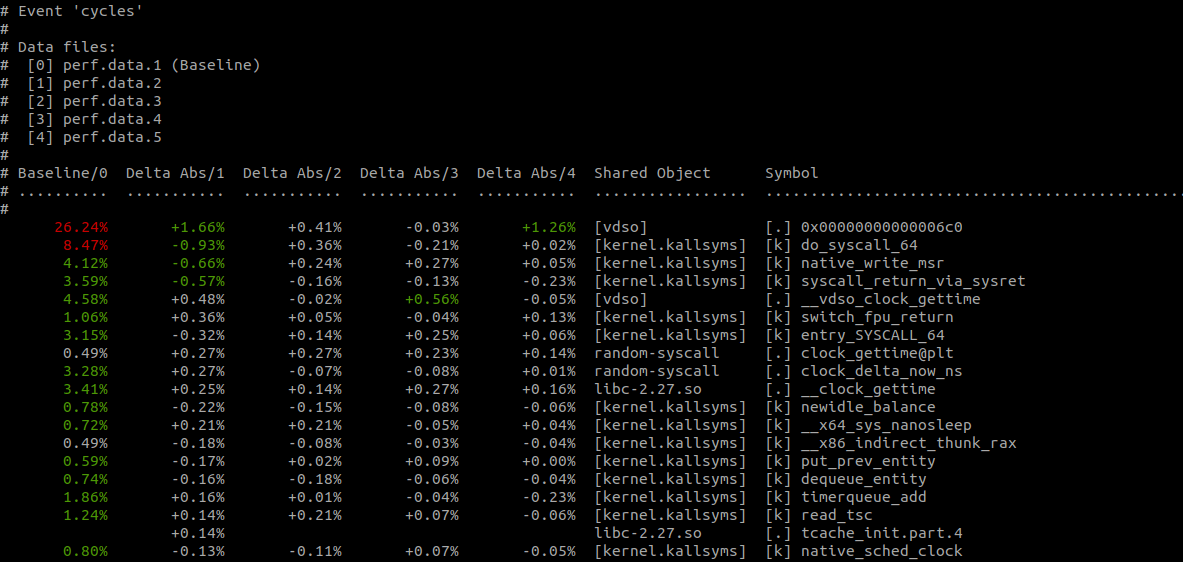
$ perf diff perf.data.[1-5]
Much better! No more eyeball statistics. As you’d expect, perf-diff
comes with the usual assortment of command-line options including
--comms (narrow the displayed results to specific programs), --sort
(order the displayed results by a given key), and --symbols (only
display provided symbols).