
 Member
 dragotin
Kraft Version 0.90
This blog is to inform that Kraft, the Qt and KDE based desktop software to manage documents like invoices and quotes in your small company was released in version 0.90 recently.
Followup Documents
A great new feature is the completely reworked handling of so called follow-up documents. Kraft has this feature to help dealing with docs that follow on a certain kind of predecessor doc in the business flow, such as an invoice follows on an offer once the work has been finished.
 To achieve that and to have all the items of the offer again referenced in the invoice, the Kraft user justs clicks on the menu item “Create Followup Document” on the selected offer, and the new doc is created with all the items of the offer prepared. It is ready to be adjusted to the final invoice details.
Now with version 0.90 this has even improved. Often, the flow is a bit different because a partial invoice is sent while the job is still in progress, for example to cover cost for material. A partial invoice usually has only one item, which is the progress payment the customer should pay.
Kraft users can handle that now very easy: The new UI does not only allow to choose from which predecessor document the final invoice should copy the items (which usually is the offer in the beginning) but it also realises that a partial invoice was sent before, so this amount of payment has to be substracted from the final invoice. Kraft adds an item to the final doc automatically here.
This helps to create high quality documents for your customers even faster, which is exactly the mission of Kraft.
Other Improvements
In addition to that, as usual a lot of other visible and invisible changes have gone into this release. For example, the UI has been simplified again by a clean up of the menu for example. The About Kraft dialog was removed and integrated into the Kraft information page.
Under the hood, we finally added unit tests, which is just a start so far, and ntroduced a new, XML based system to manage the available document types which makes igrations way easier. Last but not least the python based pdf conversion script was ported to python 3 to be ready for the end of python 2.
Community
Last but not least, Kraft got new contributions from the community: A new document type was initiated by a community member, which is a offer like document without showing the price information. Also, the complete app was translated to Dutch by a volunteer, and the translation is now shipped with Kraft by default. Also, other smaller bugfixes went in.
Thank you all for your help to improve Kraft.

Restoring my Nexus 6P To Working Order

openSUSE Board election 2019-2020
This year's openSUSE Election Committee is composed of Ariez Vachha, Edwin Zakaria and myself. Ariez joined the committee for the first time, while Edwin and I have worked together on the previous Board election. Weeks ago, after consulting the election rules and brainstorming a bit, we came up with an election schedule that spans over several weeks, starting in December 2019 until January 2020.

Candidates
As the call for nominations and applications ended on 25 December, we had a list of four candidates for the two seats on the openSUSE Board. The candidates are:
The election campaign now begins. Members are encouraged to ping the candidates and ask them questions about their views and ideas that they'd like to bring on the the openSUSE Board.

openSUSE Tumbleweed – Review of the week 2019/52
Dear Tumbleweed users and hackers,
The year 2019 is coming to an end and this is the final week of the year. As you are surely aware, in many regions people tend to stay away from computers during this period of the year and it is thus not surprising, that Tumbleweed has been rolling a bit slower. But actually: has it? During the last week, 2 snapshots (1221 and 1225) have been published to the users. But there were also snapshots tested and discarded (e.g. 1223 and 1224). Just because we have a snapshot does not mean we distribute it (in this case the issues were around libmozjs60 switching to be an i686 base library, but polkit being an i586 application linking this library). But anyway: let’s talk about the success of this week and what updates those two published snapshots brought the users in the end:
- KDE Frameworks 5.65.0
- QEmu 4.2.0
- PHP 7.4.1
- zsh 5.8 (pre2)
The staging areas are still all filled up with the following updates:
- Python 3.8
- Rust 1.39.0 (Thunderbird failing to build)
- Mozilla Firefox 71.0 (currently staged together with rust, which I’d hope to get ready soon)
- systemd 244 (Need a fix for python-prompt_toolkit1)
- Qt 5.14 (looks like being ready soonish)
- Kubernetes 5.17 (one failing openQA test identified)
- RPM 4.15
- Linux kernel 5.4.x (kexec identified issues around the used signing infrastructure)
- SQLite 3.30.1 (breaks python-Django)
Another Christmastime Blathering | Linux Powered Lighting
KDE vs XFCE vs Gnome
Chris Titus recently vlogged about an article showing that KDE 5.17 is now smaller than XFCE 4.14 in memory usage. The article says that in their tests, XFCE actually uses more RAM than KDE. I was very interested in this, but I couldn’t quite believe it and so I ran my own tests.
First of all, we need to compare apples to apples. I created an OpenSUSE VM using Vagrant with KVM/libvirt. It had 4 cores and 4192MB of RAM. This VM has no graphical interface at all. As soon as I got it up, I took the first “No X” measurement. After patching using zypper dup, I took the second “No X” reading. Every reading in this blog post was using the free -m command. I then shut down the VM and cloned it 3 times so each copy should be completely the same.
I installed the desktop environments into their respective VMs using the following commands:
zypper in -t pattern kde


zypper in -t pattern xfce


zypper in -t pattern gnome
After desktop environment was done, I then installed the lightdm display manager. This wasn’t actually necessary with Gnome because it installs gdm as a dependency.
After that, I started the display manager with:
systemctl set-default graphical && systemctl isolate graphical
Once I logging into the graphical environment, I ran xterm and then free -m for the first reading. I then rebooted each machine, and logged in for the second reading. I then installed and started libreoffice-writer. I created a new spreadsheet. That is the “Libreoffice” reading. Finally, I closed LibreOffice and took the third reading.
The results are a little surprising. The averages speak for themselves. KDE does use more than XFCE but not to a shocking amount. In fact, according to the average, only about 68MB. What’s really surprising is how much more Gnome uses than the either two — nearly 200MB more that KDE!
Finally, I also did a df -kh after installing libreoffice-writer on each. KDE is in fact that disk hog by a wide margin and that’s even comparing it to Gnome + gdm + lightdm.
| Desktop | Test No | RAM (MB) | Disk (GB) | Version |
| No X | 1 | 54 | ||
| No X | 2 | 58 | ||
| Average | 56 | |||
| Gnome | 1 | 471 | 3.34.2 | |
| Gnome | 2 | 501 | ||
| Gnome | 3 | 508 | ||
| Gnome | Libreoffice | 547 | 1.9 | |
| Average | 507 | |||
| KDE | 1 | 327 | 5.17.4 | |
| KDE | 2 | 284 | ||
| KDE | 3 | 291 | ||
| KDE | Libreoffice | 330 | 2.3 | |
| Average | 308 | |||
| XFCE | 1 | 216 | 4.14 | |
| XFCE | 2 | 230 | ||
| XFCE | 3 | 241 | ||
| XFCE | Libreoffice | 272 | 1.8 | |
| Average | 240 |
openSUSE Tumbleweed – Review of the week 2019/51
Dear Tumbleweed users and hackers,
The year 2019 is slowly coming to the end, yet Tumbleweed keeps on rolling (so far). During that week we could publish three snapshots (1213, 1214 and 1216).
The changes contained therein were:
- KDE Applications 19.12.0
- PHP 7.4
One complete snapshot was built (but not released) using kernel 5.4. Unfortunately, we had to revert this update again, as kexec functionality was non-functional with our signed kernel. The issue is being analyzed and fixes are being looked for. Unfortunately, with the holiday season, I can’t predict when this will happen.
Other than that, we still have a few things piling up in stagings, like:
- Python 3.8
- Rust 1.39
- systemd 244
- Qt 5.14
- Kubernetes 1.17
Unfortunately, there is also an openQA/Networking issue present at the moment. Our openQA workers are unable to connect to multiple sites (all *.opensuse.org) and thus fail to test any of the snapshots/staging areas. We are busy trying to find resources that can fix this up, but this proves not so easy over this period. I hope we can soon resume testing activity with working network setup and restart rolling Tumbleweed
Linux kernel preemption and the latency-throughput tradeoff
What is preemption?
Preemption, otherwise known as preemptive scheduling, is an operating system concept that allows running tasks to be forcibly interrupted by the kernel so that other tasks can run. Preemption is essential for fairly scheduling tasks and guaranteeing that progress is made because it prevents tasks from hogging the CPU either unwittingly or intentionally. And because it’s handled by the kernel, it means that tasks don’t have to worry about voluntarily giving up the CPU.
It can be useful to think of preemption as a way to reduce scheduler latency. But reducing latency usually also affects throughput, so there’s a balance that needs to be maintained between getting a lot of work done (high throughput) and scheduling tasks as soon as they’re ready to run (low latency).
The Linux kernel supports multiple preemption models so that you can tune the preemption behaviour for your workload.
The three Linux kernel preemption models
Originally there were only two preemption options for the kernel:
running with preemption on or off. That setting was controlled by the
kernel config option, CONFIG_PREEMPT. If you were running Linux on a
desktop you were supposed to enable preemption to improve interactivity
so that when you moved your mouse the cursor on the screen would respond
almost immediately. If you were running Linux on a server you ran with
CONFIG_PREEMPT=n to maximise throughput.
Then in 2005, Ingo Molnar introduced a third option named
CONFIG_PREEMPT_VOLUNTARY that was designed to offer a middle point on
the latency-throughput spectrum – more responsive than disabling
preemption and offering better throughput than running with full
preemption enabled. Nowadays, CONFIG_PREEMPT_VOLUNTARY is the default
setting for pretty much all Linux distributions since openSUSE
switched at the
beginning of this year.
Unfortunately, choosing the best Linux kernel preemption model is not straightforward. Like with most performance topics, the best way to pick the right option is to run some tests and use cold hard numbers to make your decision.
What are the differences in practice?
To get an idea of how much the three config options lived up to their intended goals, I decided to try each of them out by running the cyclictest and sockperf benchmarks with a Linux 5.4 kernel.
If you’re interested in reproducing the tests on your own hardware, here’s how to do it.
$ git clone https://github.com/gormanm/mmtests.git
$ cd mmtests
$ ./run-mmtests.sh --config configs/config-workload-cyclictest-hackbench `uname -r`
$ mv work work.cyclictest && cd work.cyclictest/log && ../../compare-kernels.sh | less
$ cd ..
$ ./run-mmtests.sh --config configs/config-network-sockperf-pinned `uname -r`
$ mv work work.sockperf && cd work.sockperf/log && ../../compare-kernels.sh | less
cyclictest records the maximum latency between when a timer expires and the thread that set the timer runs. It’s a fair indication of worst-case scheduler latency.
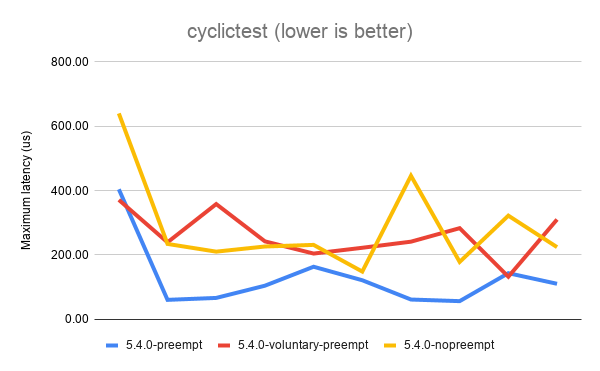
The above results show that the best (lowest) latency is achieved when
running with CONFIG_PREEMPT. It’s not a universal win, as you can see
from the first data point. But overall, CONFIG_PREEMPT does a decent job
of keeping those latencies down. CONFIG_PREEMPT_VOLUNTARY is a good
middle ground and exhibits slightly worse latency while
CONFIG_PREEMPT_NONE shows the the worst (highest) latencies of all.
Based on the descriptions of the kernel config options given in the
preemption models section, I’m sure we can all agree these are roughly
the results we expected to see.
Next, let’s look at sockperf’s TCP throughput results. sockperf is a network benchmark that measures throughput and latency over TCP and UDP. For this experiment, we’re only interested in the throughput scores.
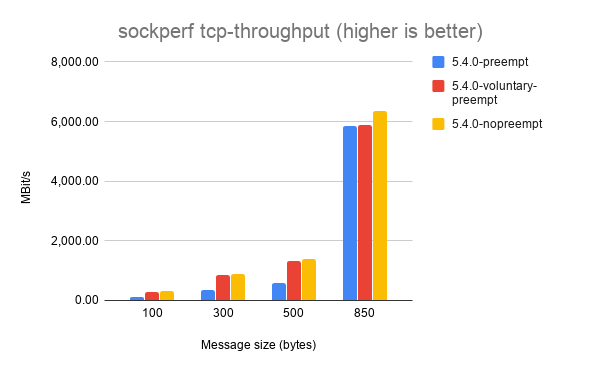
It’s a little hard to make out some of the results, but each of the
different message sizes shows that CONFIG_PREEMPT_NONE achieves the
best throughput, followed by CONFIG_PREEMPT_VOLUNTARY and with
CONFIG_PREEMPT coming last. Again, this is the expected result.
Things get a little weirder with sockperf’s UDP throughput results.
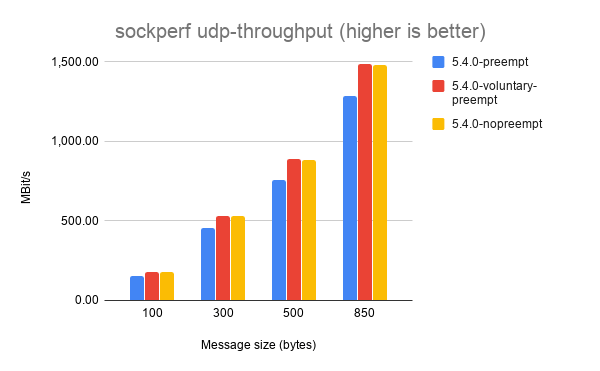
Here, CONFIG_PREEMPT_VOLUNTARY consistently achieves the highest
throughput. I haven’t dug into exactly why this might be the case, but
my best guess is that preemption doesn’t matter as much for UDP
workloads because it’s stateless and doesn’t exchange multiple messages
between sender and receiver like TCP does.
If you’ve got any ideas to explain the UDP throughput results please leave them in the comments!
2001 Ford F-350 Radiator Replacement