
Making Rails packaging easier - Part1
One step at a time. Today: Requires
You might have seen that we package rails apps for a while now. We have discourse, gitlab-ce, errbit and our own open build service. I probably forgot an app or 2 here. Anyway if you look at all the spec files e.g. this one. You notice we have to specify the Requires manually.
BuildRequires:  %{rubygem rails:5 >= 5.1}
Requires:       %{rubygem rails:5 >= 5.1}
This comes with a few problems actually.

 sebas
sebasKDE’s Goal: Privacy

A world in which everyone has control over their digital life and enjoys freedom and privacy.
This presents a very high-level vision, so a logical follow-up question has been how this influences KDE’s activities and actions in practice. KDE, being a fairly loose community with many separate sub-communities and products, is not an easy target to align to a common goal. A common goal may have very different on each of KDE’s products, for an email and groupware client, that may be very straight-forward (e.g. support high-end crypto, work very well with privacy-respecting and/or self-hosted services), for others, it may be mostly irrelevant (a natural painting app such as Krita simply doesn’t have a lot of privacy exposure), yet for a product such as Plasma, the implications may be fundamental and varied.
 So in the pursuit of the common ground and a common goal, we had to concentrate on what unites us. There’s of course Software Freedom, but that is somewhat vague as well, and also it’s already entrenched in KDE’s DNA. It’s not a very useful goal since it doesn’t give us something to strive for, but something we maintain anyway. A “good goal” has to be more specific, yet it should have a clear connection to Free Software, since that is probably the single most important thing that unites us. Almost two years ago, I posed that privacy is Free Software’s new milestone, trying to set a new goal post for us to head for. Now the point where these streams join has come, and KDE has chosen privacy as one of its primary goals for the next 3 to 4 years. The full proposal can be read here.
“In 5 years, KDE software enables and promotes privacy”
Privacy, being a vague concept, especially given the diversity in the KDE community needs some explanation, some operationalization to make it specific and to know how we can create software that enables privacy. There are three general focus areas we will concentrate on: Security, privacy-respecting defaults and offering the right tools in the first place.
Security
Improving security means improving our processes to make it easier to spot and fix security problems and avoiding single points of failure in both software and development processes. This entails code review, quick turnaround times for security fixes.
Privacy-respecting defaults
Defaulting to encrypted connections where possible and storing sensible data in a secure way. The user should be able to expect the KDE software Does The Right Thing and protect his or her data in the best possible way. Surprises should be avoided as much as possible, and reasonable expectations should be met with best effort.
Offering the right tools
KDE prides itself for providing a very wide range of useful software. From a privacy point of view, some functions are more important than others, of course. We want to offer the tools that most users need in a way that allows them to lead their life privately, so the toolset needs to be comprehensive and cover as many needs as possible. The tools itself should make it easy and straight-forward to achieve privacy. Some examples:
- An email client allowing encrypted communication
- Chat and instant messenging with state-of-the art protocol security
- Support for online services that can be operated as private instance, not depending on a 3rd party provider
- …
Of course, this is only a small part, and the needs of our userbase varies wildly.
Onwards from here…
In the past, KDE software has come a long way in providing privacy tools, but the tool-set is neither comprehensive, nor is privacy its implications widely seen as critical to our success in this area. Setting privacy as a central goal for KDE means that we will put more focus on this topic and lead to improved tools that allow users to increase their level of privacy. Moreover, it will set an example for others to follow and hopefully increase standards across the whole software ecosystem. There is much work to do, and we’re excited to put our shoulder under it and work on it.

 Member
Group Policy Management Console for Linux
I’m working on a YaST module that imitates the behavior of the Group Policy Management Console in linux.
You can install it on openSUSE Tumbleweed via:
sudo zypper in yast2-python-bindings
sudo zypper ar https://download.opensuse.org/repositories/network:/samba:/STABLE/openSUSE_Tumbleweed/ samba
sudo zypper ref && sudo zypper in yast-gpmc
Then run it with:
yast2 gpmc
It requires yast2-python-bindings version 4.0+, which is only available in openSUSE Tumbleweed at the moment (although it’ll be in the next version of SLE).


YaST and Python, the new bindings
YaST has had python bindings for about 10 years, but there has been no maintainer for the last 4 years, and they’ve slowly gone kaput.
That has changed. Python+YaST is back. The syntax is (or should be) backwards compatible with <= 3.x of the yast-python-bindings, but you can now write python yast via code very similar to the ruby code.
There are also lots of examples now (thanks to noelp and his hackweek project).
We’re working on a couple of yast modules via the yast-python-bindings:
https://github.com/dmulder/yast-gpmc
https://github.com/noelpower/yast-aduc/tree/wip-aduc
IKEA Trådfri first impressions

Most recently, I’ve gotten myself a few items from IKEA new product range of smartlight. It’s called trådfri (Swedish for wireless). These lights can be remote-controlled using a smartphone app or other kinds of switches. These products are still fairly young, so I thought I’d give them a try. Overall. the system seems well thought-through and feels fairly high-end. I didn’t notice any major annoyances.
First Impressions

My first impressions are actually pretty good. Initially, I bought a hub which is used to control the lights centrally. This hub is required to be able to use the smartphone app or update the firmware of any component (more on that later!). If you just want to use one of the switches or dimmers that come separately, you won’t need the hub.
Setting everything up is straight-forward, the documentation is fine and no special skills are needed to install these smartlights. Unpacking unfortunately means the usual fight with blister packaging (will it ever stop?), but after that, a few handy surprises awaited me. What I liked:
- The light is nice and warm. The GU10 bulbs i got give 400 lumens and are dimmable. For my taste, they could be a bit darker at the lower end of the scale, but overall, the light feels comfy warm and not too cold, but not too yellow either. The GU10 bulbs I got are spec’ed at 2700 Kelvin. No visible flickering either.
- Trådfri components are relatively inexpensive. A hub, dimmer and 4 warm-white GU10 bulbs set me back about 75€. It is way cheaper than comparable smartlights, for example Philips Hue. As needs are fairly individual exact prices are best looked up on IKEA’s website by yourself.
- The hub has a handy cable storage function, you can roll up excessive cable inside the hub — a godsend if you want to have the slightest chance of preventing a spaghetti situation.
- The hub is USB-powered, 1A power supply suffices, so you may be able to plug it into the USB port of some other device, or share a power supply.
- The dimmer can be removed from the cradle. The cradle can be stuck on any flat surface, it doesn’t need additional cabling, and you can easily take out the dimmer and carry it around.
- The wireless technology used is ZigBee, which is a standard thing and also used by other smarthome technologies, most notably, Philips Hue. I already own (and love) some Philips Hue lights, so in theory I should be able to pair up the Trådfri lights with my already existing Hue lights. (This is a big thing for me, I don’t want to have different lighting networks around in my house, but rather concert the whole lighting centrally.)
Pairing IKEA Trådfri with Philips Hue
Let’s call this “work in progress”, meaning, I haven’t yet been able to pair a Trådfri bulb with my Hue system. I’ll dig some more into it, and I’m pretty sure I’ll make it work at some point. If you’re interested in combining Hue and Trådfri bulbs, I’ll suffice with a couple of pointers:
- https://www.smarthomegeeks.co.uk/how-to/add-ikea-tradfri-philips-hue/
- https://developers.meethue.com/content/philips-hue-and-ikea-tr%C3%A5dfri
If you want to try this yourself, make sure you get the most recent lights from the store (the clerk was helpful to me and knowledgable, good advice there!). You’ll also likely need a hub at least for updating the firmware. If you’re just planning to use the bulbs together with a Hue system, you won’t need the hub later on, so that may seem like 30€ down the drain. Bit of a bummer, but depending on how many lights you’ll be buying, given the difference in price between IKEA and Philips, it may well be worth it.
\edit: After a few more tries, the bulb is now paired to the Philips Hue system. More testing will ensue, and I’ll either update this post, or write a new one.
Pool Dive

Decentralized HA

I've been playing with different ideas until I came across namecoin, a decentralized DNS based on bitcoin technology.
Then, I had this idea about combining it with DNS Round Robin for High Availability, and so have Decentralized DNS Round Robin for High Availability, or in short, Decentralized HA.
Thus, I downloaded the namecoin daemon and namecoin clients from namecoin.org and started syncronizing the blockchain network... which was terrible slow, 48h!
In the middle of that I got impatient and I just bought the "namecoin domain" jordia65.bit from peername.com, which will add such domain into the blockchain for you (kind of a service proxy if you can't wait for the whole blockchain to be downloaded).
Note you can not use any domain but a special zone domain, which is .bit. More at https://bit.namecoin.org/
Anyway, after buying the domain, they also gave me good support, as my request was a bit special. I didn't want just jordia65.bit to map into an IP address, but to map to 2 IP adresses, to mimic what I would do with a classic DNS Round Robin setup, which would be to have at least 2 A records.
This is the domain in the namecoin blockchain:
https://namecha.in/name/d/jordia65
The 2 IP addresses are real servers running in a cloud. Actually they are floating ip addresses, but that is another story.
Until here, all good. Then the fun started :) . The trick is to use a DNS daemon which queries the namecoin daemon. namecoin already provides that, which is called nmcontrol *
However, that daemon was not expecting 2 IP addresses per domain, and here is where I did my contribution: https://github.com/namecoin/nmcontrol/pull/121/
With that, I was able to put down one of the servers and firefox redirected me to the other one automatically. And the whole beauty of this, is that this does not require a central server for storing neither the domain name nor the list of IP addresses to balance, and this list can also be updated on a decentralized way.
Since setting up all this can be a bit difficult for a "regular user", I also did some tests on setting up an http proxy, with apache2, so that the proxy will be the one trying to resolve the jordia65.bit domain ... and it worked :) ! Also the HA part.
Thus, you could set up your firefox to use that proxy and you would be able to browse .bit domains with high availability.
However, as you may have guessed, adding a proxy has a drawback, which is that it introduces a "single point of failure". If the proxy is taken down, you would not be able to reach any internet at all.
All this is "experimental" and so it will need some more testing and engineering, but all in all, I am very proud of the results and I had a lot of fun with this project :)
(*) Actually it seems nmcontrol has been deprecated in favor of https://github.com/namecoin/ncdns , but nmcontrol was easier to hack.

Code Hospitality
Recently on the Greater than Code podcast there was an episode called "Code Hospitality", by Nadia Odunayo.
Nadia talks about thinking of how to make people comfortable in your code and in your team/organization/etc., and does it in terms of thinking about host/guest relationships. Have you ever stayed in an AirBnB where the host carefully prepares some "welcome instructions" for you, or puts little notes in their apartment to orient/guide you, or gives you basic guidance around their city's transportation system? We can think in similar ways of how to make people comfortable with code bases.
This of course hit me on so many levels, because in the past I've written about analogies between software and urbanism/architecture. Software that has the Quality Without A Name talks about Christopher Alexander's architecture/urbanism patterns in the context of software, based on Richard Gabriel's ideas, and Nikos Salingaros's formalization of the design process. Legacy Systems as Old Cities talks about how GNOME evolved parts of its user-visible software, and makes an analogy with cities that evolve over time instead of being torn down and rebuilt, based on urbanism ideas by Jane Jacobs, and architecture/construction ideas by Stewart Brand.
I definitely intend to do some thinking on Nadia's ideas for Code Hospitality and try to connect them with this.
In the meantime, I've just rewritten the README in gnome-class to make it suitable as an introduction to hacking there.
Encrypted installation media
Hackweek project: create encrypted installation media
- You’re still carrying around your precious autoyast config files on an unencrypted usb stick?
- You have a customized installation disk that could reveal lots of personal details?
- You use ad blockers, private browser tabs, or even
torbut still carry around your install or rescue disk unencrypted for everyone to see? - You have your personal files and an openSUSE installation tree on the same partition just because you are lazy and can’t be bothered to tidy things up?
- A simple Linux install stick is just not geekish enough for you?
Not any longer!
mksusecd can now (well, once this pull request has been merged) create fully encrypted installation media (both UEFI and legacy BIOS bootable).
Everything (but the plain grub) is on a LUKS-encrypted partition. If you’re creating a customized boot image and add sensitive data via --boot or add an add-on repo or autoyast config or some secret driver update – this is all safe now!
You can get the latest mksusecd-1.54 already here to try it out! (Or visit software.opensuse.org and look for (at least) version 1.54 under ‘Show other versions’.
It’s as easy as
mksusecd --create crypto.img --crypto --password=xxx some_tumbleweed.iso
And then dd the image to your usb stick.
But if your Tumbleweed or SLE/Leap 15 install media are a bit old (well, as of now they are) check the ‘Crypto notes’ in mksusecd --help first! – You will need to add two extra options.
This is how the first screen looks then

Hackweek0x10: Fun in the Sun
We recently had a 5.94KW solar PV system installed – twenty-two 270W panels (14 on the northish side of the house, 8 on the eastish side), with an ABB PVI-6000TL-OUTD inverter. Naturally I want to be able to monitor the system, but this model inverter doesn’t have an inbuilt web server (which, given the state of IoT devices, I’m actually kind of happy about); rather, it has an RS-485 serial interface. ABB sell addon data logger cards for several hundred dollars, but Rick from Affordable Solar Tasmania mentioned he had another client who was doing monitoring with a little Linux box and an RS-485 to USB adapter. As I had a Raspberry Pi 3 handy, I decided to do the same.
Step one: Obtain an RS-485 to USB adapter. I got one of these from Jaycar. Yeah, I know I could have got one off eBay for a tenth the price, but Jaycar was only a fifteen minute drive away, so I could start immediately (I later discovered various RS-485 shields and adapters exist specifically for the Raspberry Pi – in retrospect one of these may have been more elegant, but by then I already had the USB adapter working).
Step two: Make sure the adapter works. It can do RS-485 and RS-422, so it’s got five screw terminals: T/R-, T/R+, RXD-, RXD+ and GND. The RXD lines can be ignored (they’re for RS-422). The other three connect to matching terminals on the inverter, although what the adapter labels GND, the inverter labels RTN. I plugged the adapter into my laptop, compiled Curt Blank’s aurora program, then asked the inverter to tell me something about itself:
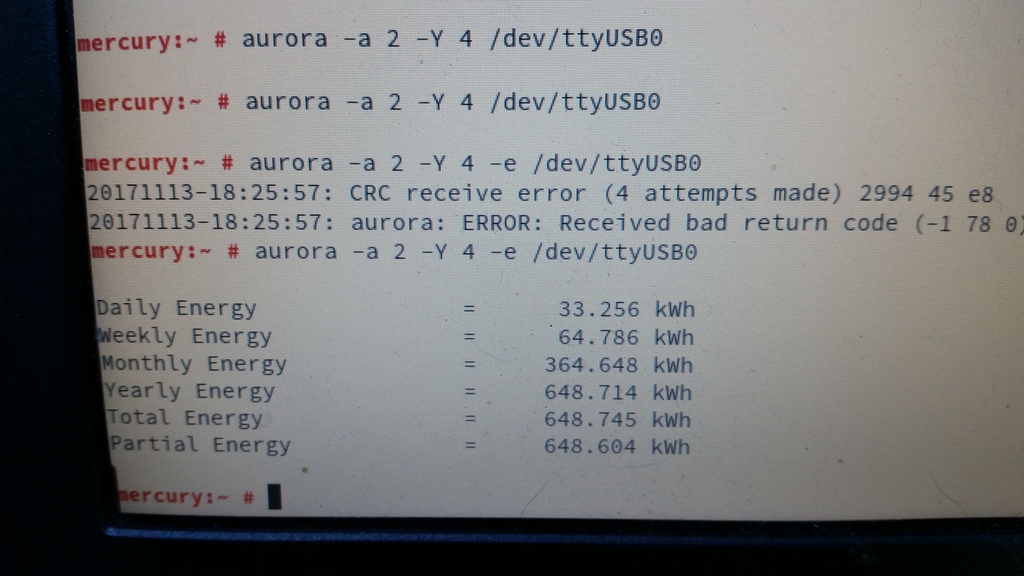 Interestingly, the comms seem slightly glitchy. Just running
 aurora -a 2 -e /dev/ttyUSB0 always results in either “No response after 1 attempts” or “CRC receive error (1 attempts made)”. Adding “-Y 4” makes it retry four times, which is generally rather more successful. Ten retries is even more reliable, although still not perfect. Clearly there’s some tweaking/debugging to do here somewhere, but at least I’d confirmed that this was going to work.
So, on to the Raspberry Pi. I grabbed the openSUSE Leap 42.3 JeOS image and dd’d that onto a 16GB SD card. Booted the Pi, waited a couple of minutes with a blank screen while it did its firstboot filesystem expansion thing, logged in, fiddled with network and hostname configuration, rebooted, and then got stuck at GRUB saying “error: attempt to read or write outside of partition”:
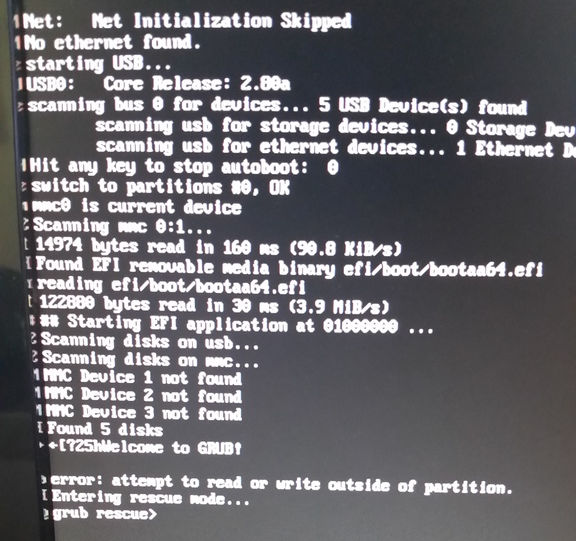
Apparently that’s happened to at least one other person previously with a Tumbleweed JeOS image. I fixed it by manually editing the partition table.
Next I needed an RPM of the aurora CLI, so I built one on OBS, installed it on the Pi, plugged the Pi into the USB adapter, and politely asked the inverter to tell me a bit more about itself:
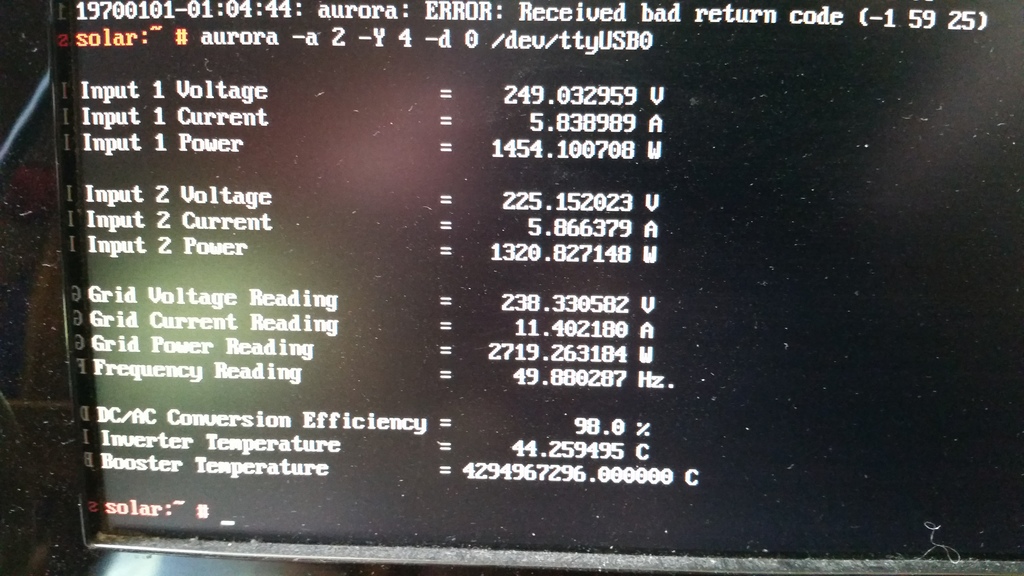
Everything looked good, except that the booster temperature was reported as being 4294967296°C, which seemed a little high. Given that translates to 0x100000000, and that the south wall of my house wasn’t on fire, I rather suspected another comms glitch. Running aurora -a 2 -Y 4 -d 0 /dev/ttyUSB0 a few more times showed that this was an intermittent problem, so it was time to make a case for the Pi that I could mount under the house on the other side of the wall from the inverter.
I picked up a wall mount snap fit black plastic box, some 15mm x 3mm screws, matching nuts, and 9mm spacers. The Pi I would mount inside the box part, rather than on the back, meaning I can just snap the box-and-Pi off the mount if I need to bring it back inside to fiddle with it.
Then I had to measure up and cut holes in the box for the ethernet and USB ports. The walls of the box are 2.5mm thick, plus 9mm for the spacers meant the bottom of the Pi had to be 11.5mm from the bottom of the box. I measured up then used a Dremel tool to make the holes then cleaned them up with a file. The hole for the power connector I did by eye later after the board was in about the right place.
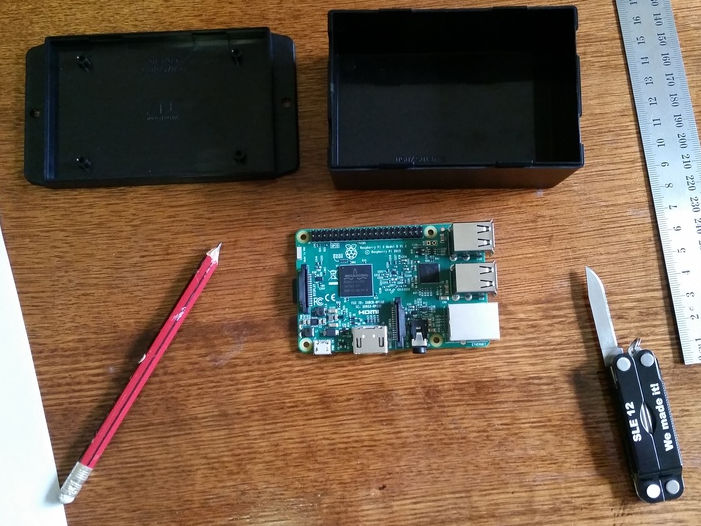
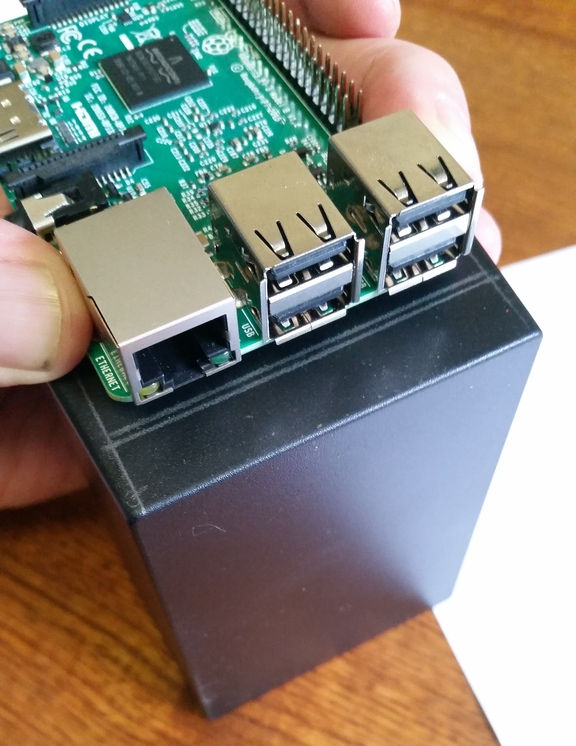
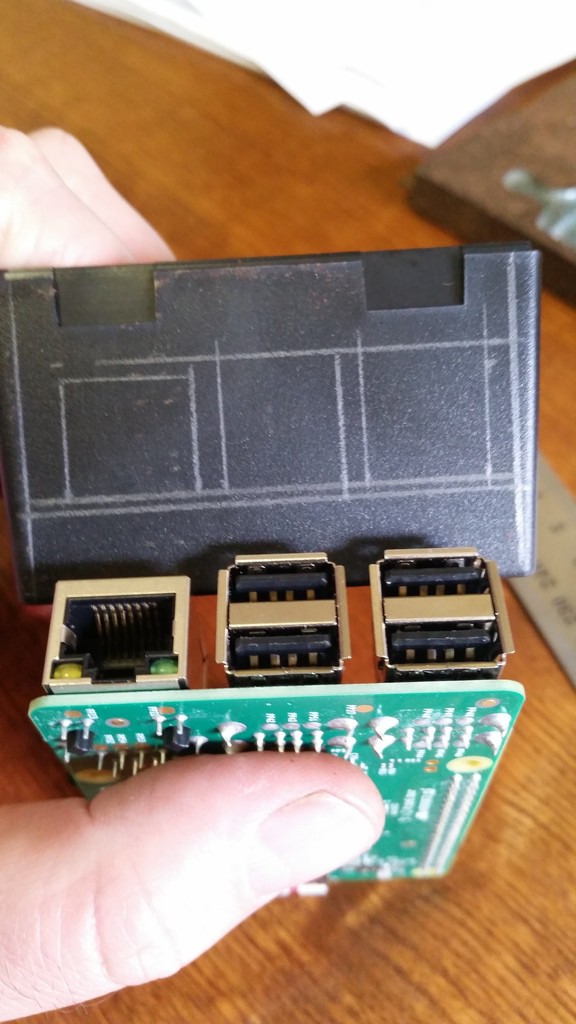
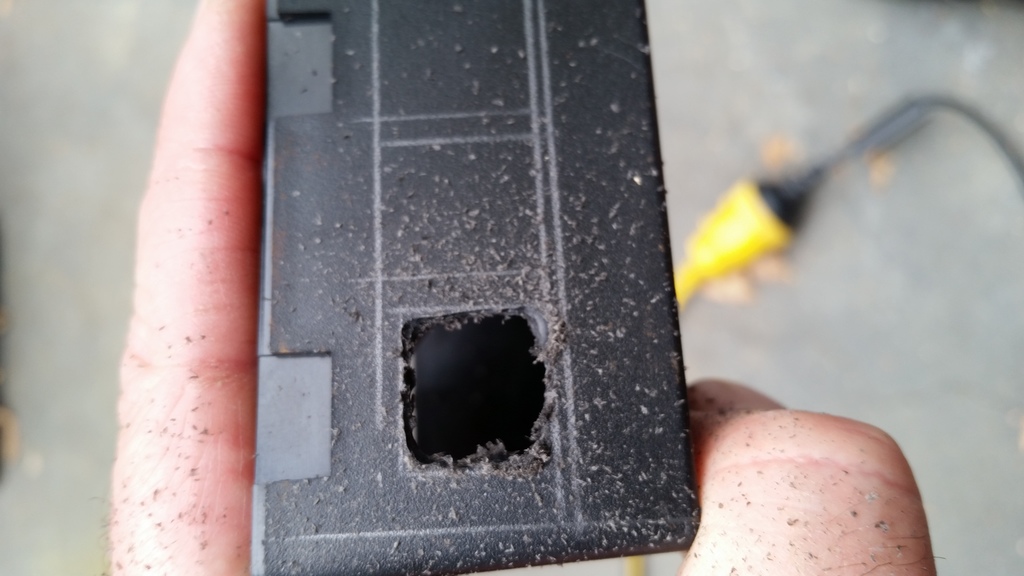
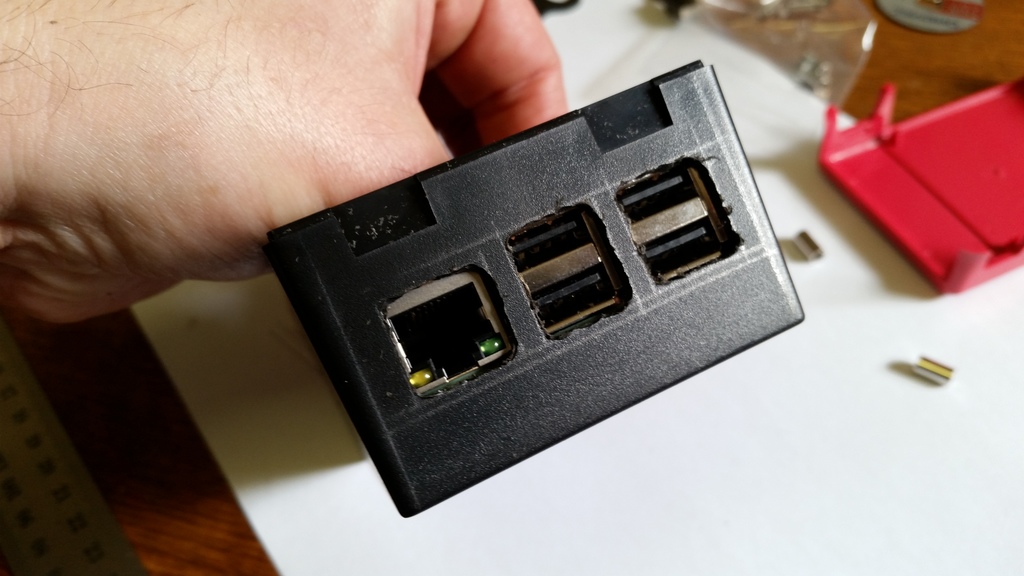
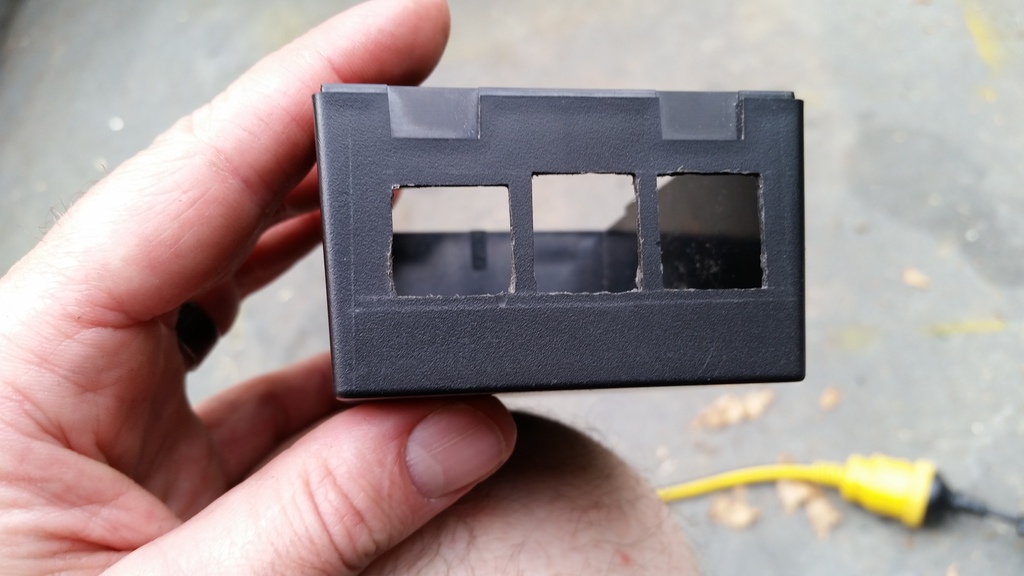
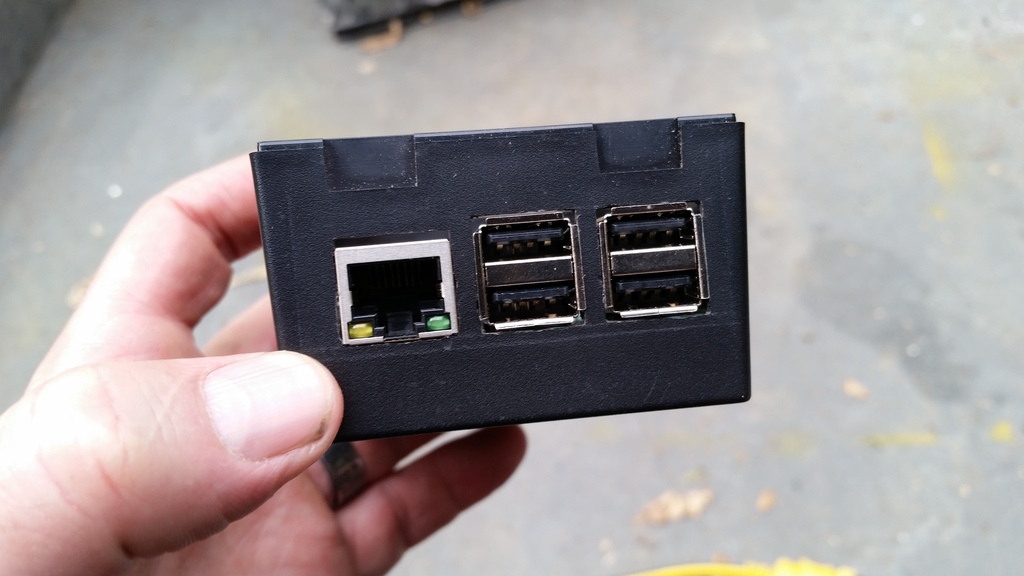
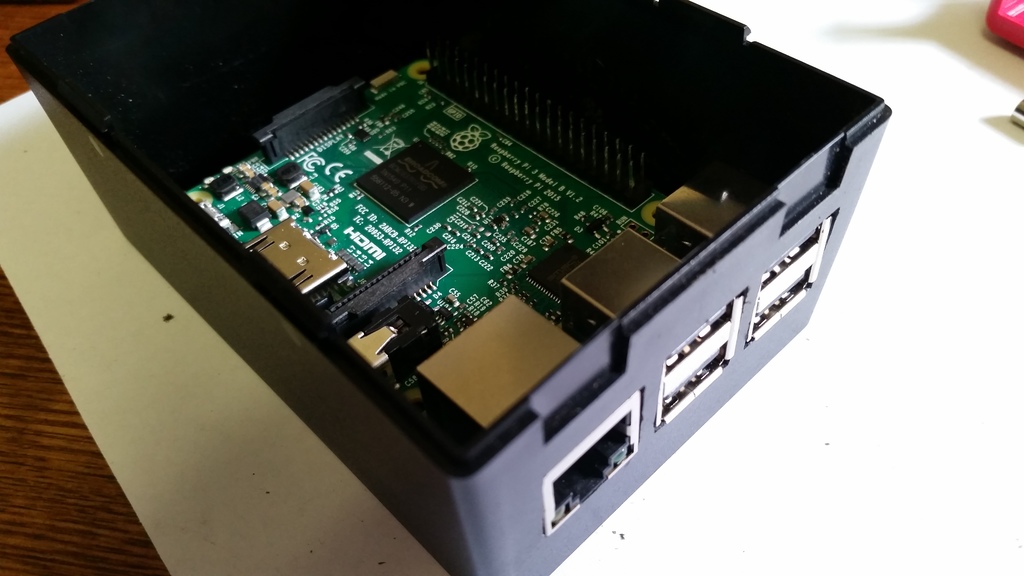
I didn’t measure for the screw holes at all, I simply drilled through the holes in the board while it was balanced in there, hanging from the edge with the ports. I initially put the screws in from the bottom of the box, dropped the spacers on top, slid the Pi in place, then discovered a problem: if the nuts were on top of the board, they’d rub up against a couple of components:
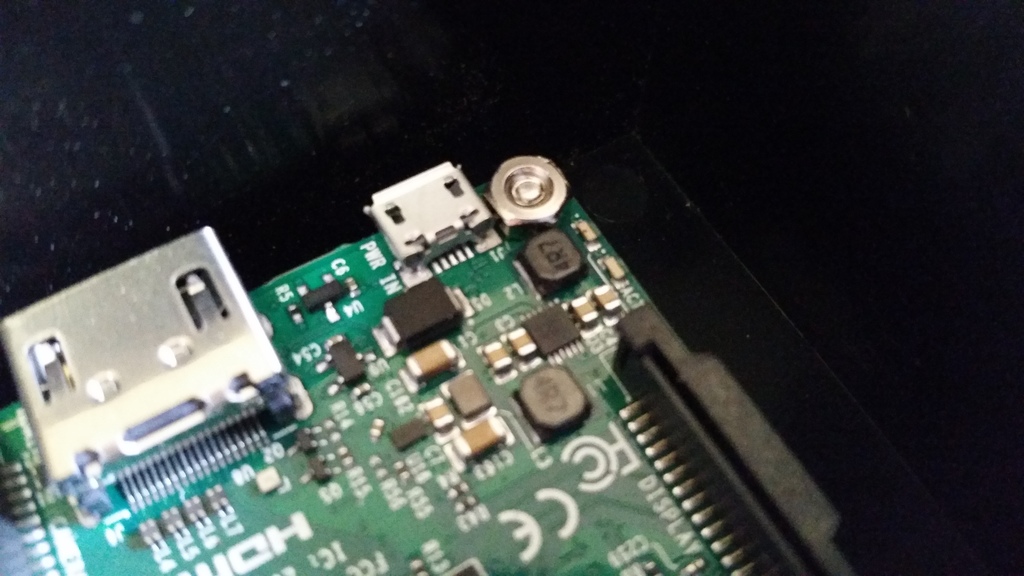
So I had to put the screws through the board, stick them there with Blu Tack, turn the Pi upside down, drop the spacers on top, and slide it upwards into the box, getting the screws as close as possible to the screw holes, flip the box the right way up, remove the Blu Tack and jiggle the screws into place before securing the nuts. More fiddly than I’d have liked, but it worked fine.
One other kink with this design is that it’s probably impossible to remove the SD card from the Pi without removing the Pi from the box, unless your fingers are incredibly thin and dexterous. I could have made another hole to provide access, but decided against it as I’m quite happy with the sleek look, this thing is going to be living under my house indefinitely, and I have no plans to replace the SD card any time soon.
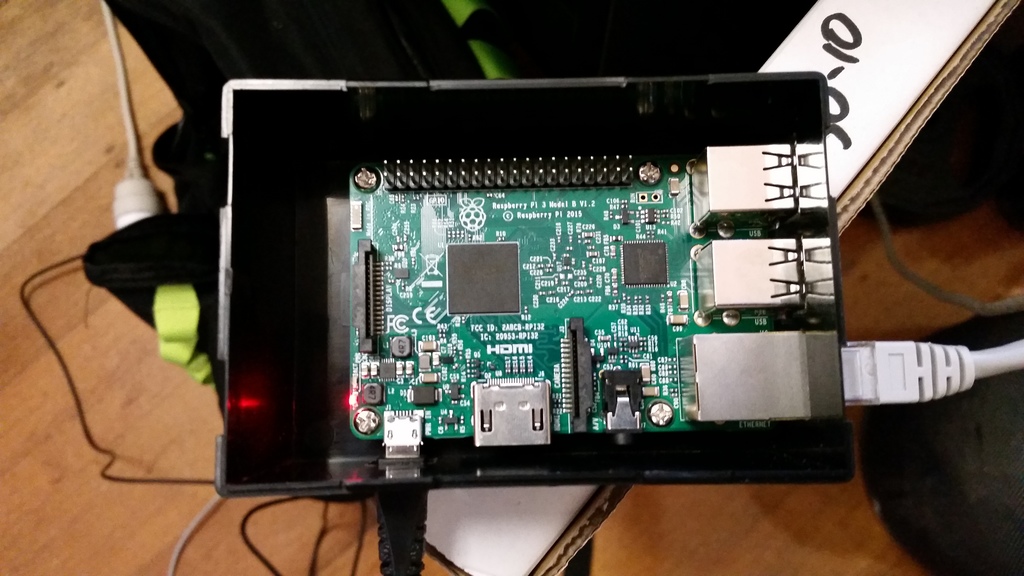
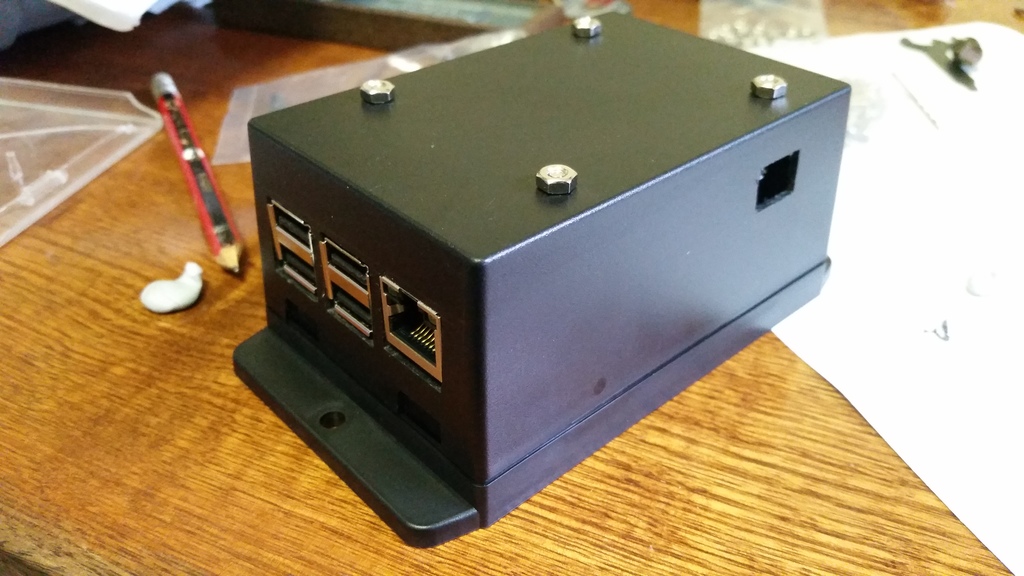
All that remained was to mount it under the house. Here’s the finished install:
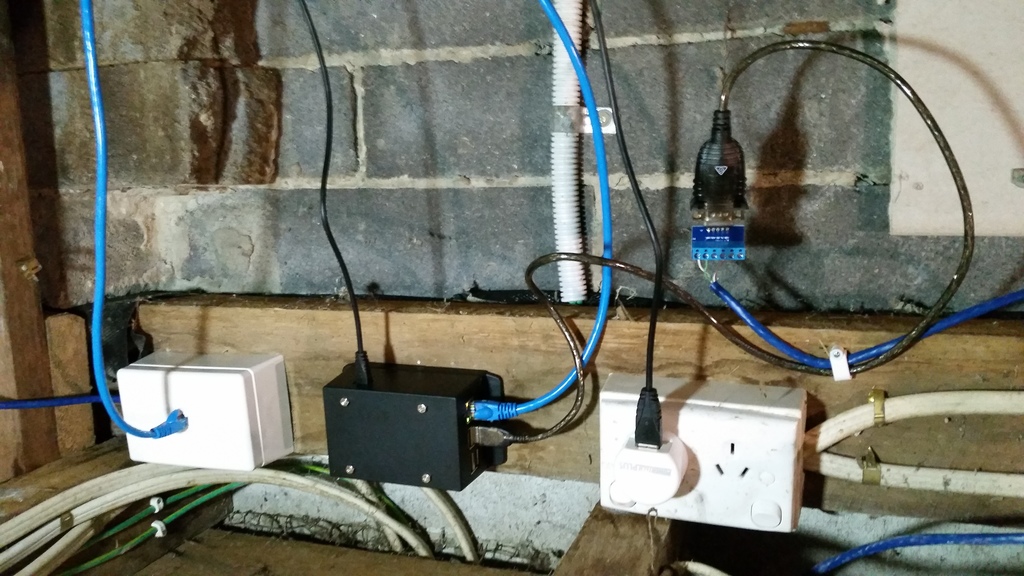
After that, I set up a cron job to scrape data from the inverter every five minutes and dump it to a log file. So far I’ve discovered that there’s enough sunlight by about 05:30 to wake the inverter up. This morning we’d generated 1KW by 08:35, 2KW by 09:10, 8KW by midday, and as I’m writing this at 18:25, a total of 27.134KW so far today.
Next steps:
- Figure out WTF is up with the comms glitches
- Graph everything and/or feed the raw data to pvoutput.org