
 dannyK
CEPHALOCON 2017 - CANCELLED
The Ceph community has always been based on the principles of openness, inclusion, and a level playing field for all participants. We have worked hard to ensure that no matter what time zone you’re in, who you are, or how technically knowledgeable you are there is always a way for you to participate and contribute to the Ceph community.
It is our sincere hope that the people of the United States will course-correct their leadership to conform to the principles that the country was founded on, and has served so well throughout history. In the meantime, we wont be hosting any events that require members of our community to travel to the U.S. and potentially suffer harassment, digital privacy violations, or rejection at the border.
Though these are `SAD` news for the community, I fully support the decision and the statement. I'm looking forward for a new date for a Cephalocon, propably in Canada, Mexico or around the next OpenStack Summit in Sydney end of this year. It would be really good if the full Ceph community - including the developers - could get together at least once in a while.
Tracing IDispatch::Invoke calls in COM applications
In practice, it is use of the services that Microsoft Office offers to third-party applications that we want to trace and dump symbolically.
Binaries are available at https://people.collabora.com/~tml/injectdll/injectdll.zip (for 32-bit applications) and https://people.collabora.com/~tml/injectdll/injectdll64.zip (64-bit). The zip archive contains an executable, injectdll.exe (injectdll64.exe in the 64-bit case) and a DLL.
Unpack the zip archive somewhere. Then go there in Command Prompt, and in case the program you want to trace the IDispatch::Invoke use of is something you know how to start from the command line, you can enter this command:
injectdll.exe x:\path\to\program.exe “program arg1 arg2 …”
where program.exe is the executable you want to run, and arg1 arg2 … are command-line parameters it takes, if any.
If program.exe is a 64-bit program, instead download injectdll64.zip, and run injectdll64.exe, otherwise similar.
if you can’t start the program you want to investigate from the command line, but you need to inspect it after it has already started, just pass only the process id of the program to injectdll.exe instead. (Or injectdll64.exe) This is somewhat less likely to succeed, depending on how the program uses IDispatch.
In any case, the output (symbolic trace) will go to the standard output of the program being traced, which typically is nowhere at all, and not useful. It will not go to the standard output of the injectdll.exe program.
In order to redirect the output to a file, set an environment variable DEVIARE_LOGFILE that contains the full pathname to the log file to produce. This environment variable must be visible in the program that is being traced; it is not enough to set it in the Command Prompt window where you run injectdll.exe.
Obviously all this is a work in progress, and as needed will be hacked on further. For instance, the name "injectdll" is just the name of the original sample program in upstream Deviare-InProc; we should really rename it to something specific for this use case.
HAProxy - Speeding up SSL
I have been a haproxy user for quite a few years now. Even using snapshots in production for a very long time. Especially after support was added to terminate SSL connections directly in haproxy. Getting rid of stunnel was so nice.
For a very long time i was doing really well with this setup. But over time more and more services were put behind haproxy and the connections/s and the total amount of connections went up. We started to see some performance issues. Which at first sounds weird … if you look at the benchmarks on the haproxy website they can do thousands if not hundred thousands of connections per seconds.
Fun things to do with driver updates
Today: And what if I want to remove some files?
It’s easy and obvious to add new files with a driver update (DUD). But what if you need to remove some files? Or, related: can you replace some read-only file by a writable copy?
Let’s for this article assume you want to modify the Xorg configuration. Say,
/usr/share/X11/xorg.conf.d/10-evdev.conf troubles you.
The direct way would be to write an update.pre script than removes the file and include this into a DUD.
update.pre is run right after the DUD has updated the files in the installation system.
For example:
echo \
  rm /usr/share/X11/xorg.conf.d/10-evdev.conf \
  > update.pre
mkdud --create test1.dud --dist tw --name "remove 10-evdev.conf" update.pre
But when we try test1.dud we run into this:
Driver Update: remove 10-evdev.conf
Driver Updates added:
  remove 10-evdev.conf
[...]
rm: cannot remove '/usr/share/X11/xorg.conf.d/10-evdev.conf': Read-only file system
So, we see the catch: much of the installation system resides on a read-only file system! You can’t just go and modify things.
But how does the driver update process manage to add new files to the installation system then? It does so by restructuring the file system using symlinks. In the process all directories that need to be modified are replaced by writable copies.
In other words: if you include the file you want to remove in the DUD – you will be able to remove it. It’s actually sufficient to include the directory the file resides in to make this work.
So, let’s try this:
mkdir -p /tmp/dud/usr/share/X11/xorg.conf.d
echo \
  "rm /usr/share/X11/xorg.conf.d/10-evdev.conf" \
  > update.pre
mkdud --create test2.dud --dist tw --name "remove 10-evdev.conf" update.pre /tmp/dud
Now we don’t get any error applying test2.dud and when we login to the installation system, we see:
console:vm9732:/ # ls -l /usr/share/X11/xorg.conf.d
total 0
console:vm9732:/ #
Tip
For easy testing a DUD, boot the machine with
startshell=1 sshd=1 password=*** dud=<URL>
startshell=1wi ll stop the installation workflow after the installation system has been fully prepared just beforeYaSTwill be started.sshd=1will start an SSH daemon and you’ll be able to connect to the machine and look around.
A similar trick can be used to make files writable (watch out for correct shell quoting):
mkdir -p /tmp/dud/usr/share/X11/xorg.conf.d
echo \
  cp --remove-destination '$(readlink -f /usr/share/X11/xorg.conf.d/10-evdev.conf)' \
  /usr/share/X11/xorg.conf.d/10-evdev.conf \
  > update.pre
mkdud --create test3.dud --dist tw --name "make 10-evdev.conf writable" update.pre /tmp/dud
We can verify the result:
console:vm9732:/ # ls -l /usr/share/X11/xorg.conf.d
total 4
-rw-r--r-- 1 root root 1099 Apr 24 13:06 10-evdev.conf
console:vm9732:/ #
The file is now writable.
Time-stamping Output and Profiling
Time-stamping
Sometimes you need to get the time stamps for each line printed by a programm.
How to do it? Fortuntely there is a tool called ts (like Time Stamp).
In openSUSE it is not installed by default, but is available in the standard repositories in the moreutils package:
sudo zypper in moreutils
When using time-stamping it is a good idea to get rid of buffering which might prevent from getting the correct time. So the usual usage pattern should be something like this:
unbuffer <command> | ts
See man ts for more details, it has few but very usefull options. It can display
absolute or relative time, define the precision, etc…
Profiling
If you can get exact time stamps for each output line then it is easy to find the line which took too long time.
In this example I was writing a new test for the s390 YaST module. I noticed that one test
took much more time than the others. So I used ts to get the real numbers,
the full command in this case was unbuffer rake test:unit | ts -i %.s:
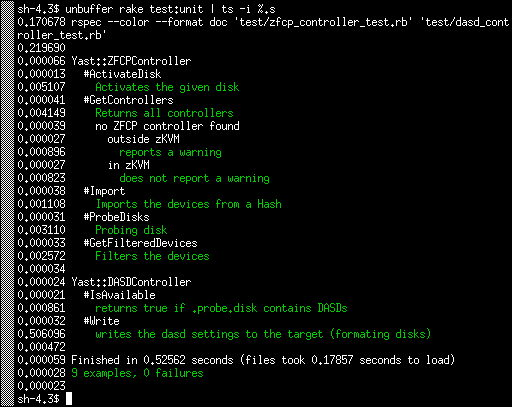
As you can see the tests usually take just few miliseconds, 5 ms at most. Except the Write test which takes more than 500ms. I was wondering why.
Debugging
So how to find the place where the test took most of the time? You could use the Ruby profiler:
ruby -rprofile -S rspec <test_file>
But I found the output too detailed without finding any relevant information, probably because it measures the CPU time, not the real time…
The alternative approach is simply to add the puts call somewhere in the tested
code. So you can measure how long it takes to reach this specific point.
Using the usual bisect approach you can find the problematic place quite quickly.
In this case the problematic place was surprisingly calling the sleep(500)
function here
which obviously adds 500ms to the test time. The fix was easy, simply
mock the sleep call in the test and return immediately.
The result is that the Write test now also takes few miliseconds just like the others:
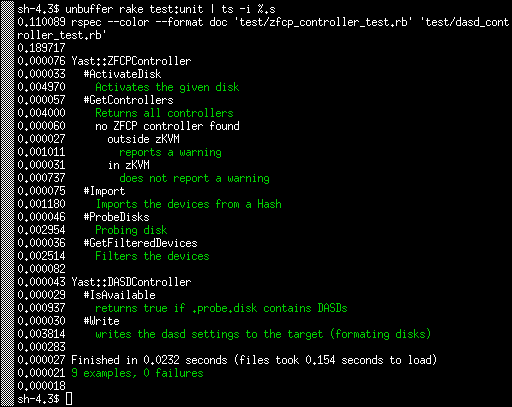
The test as a whole is now more than 20x faster. :wink:
Conclusion
In this case the real improvement was small, saving half a second is not a game changing feature.
But I used this approach in the past in the YaST registration module where the problem was caused by running a SLP network discovery without mocking it. That took much more time and scanning the local network in tests is at least not nice.
 Member
SUSE Hack Week 15
The first project remained unfinished. I wanted to fill out Tim Urban's Life Calendar (you might have seen that on his excellent blog "Wait But Why"), but realized that it's not trivial to map dates to weeks in your life. So I wrote a small tool to calculate that, stopped after I had a failing test and had a rough feeling for how to put the dots on the life calendar.
The second project was something I always wanted to do, implement Conway's Game of Life. I had once started an implementation in 68000 assembler on the Amiga many years ago, but never finished it. Technology has advanced, so I decided to do at as ASCII pixel art. Who needs high resolution? The result turned out to be a bit more generic, as a command line tool to manipulate pixel matrices stored in text files, the Pixelist. While I was at it, I also implemented Langton's Ant and a simulation of diffusion limited aggregation.
GivenFilesystem is a Ruby gem I maintain for writing unit tests dealing with files on disk. It's quite convenient, if you test code, which writes files on disk and you want to have a well-defined environment without side effects for testing this code. There were some open pull requests. I reviewed and merged them and released given_filesystem 0.2.0.
I already wrote about Inqlude, where I used Hack Week to finally publish the new Inqlude web site, which is based on the work Nanduni did during last year's Google Summer of Code. It's a great improvement. I also did some cleanup work, including reviewing the open issues. So we have a nice roadmap now. There is some interesting work to do. People who want to help with that are always welcome.
Trollolo is another side project I work on from time to time. We use it for supporting our Scrum work flows at SUSE in Trello, such as generating burndown charts. I didn't get around to write code, but I consolidated some of the ideas floating around and put them into issues. This also is a nice opportunity, if you want to have some fun with writing a bit of Ruby code for a small project. Issues are up for takers.
Finally I worked a bit on the next iteration of my attempt to make git support multiple authors. This would make life with git in a pair programming situation much nicer. Based on the feedback I got on my first iteration and at the Git Merge conference, I started to work on a version which puts the data into the trailers of the commit messages. This is less intrusive and with a bit of tooling it achieves similar results as the version which worked directly on the commit headers. I have something working, but it needs a rework of the trailer handling code. I'll continue to work on that when I find some more time to do that.
pam-python is avaliable for openSUSE
Last week I came across pam_python, a PAM module that lets you write PAM modules in Python. It seems interesting to play in this direction, but I had to install it manually. It seems that there was no official packages for openSUSE until now…
Yesterday I built version 1.0.6 for Tumbleweed. Please test it. It’s in our security repo. Feel free to send submit requests.
After installing it we will get /lib64/security/pam_python.so PAM modul. It’s just an interface between PAM and your own plugin (that you have to implement). To test it, you will need to add PATH of your plugin to the /etc/pam.d/login file (in case of getty-access test, for example), like described here.
This code can be used as an example. It will close access for all getty.
> cat /lib64/security/access.py

def pam_sm_authenticate(pamh, flags, argv):
  if str(pamh.service) == "login":
    return pamh.PAM_AUTH_ERR
You will also need to add this line to the /etc/pam.d/login file:
auth required pam_python.so access.py
This is just an example with login service or getty. Pam-python supports also, for example, ssh- and kdm-services. It supports many other interesting things. For more info look at documentation page.


vSphere Client on openSUSE 42.2
I needed vSphere client on linux, but vmware only builds a Windows version. Here is my work-around:
First, install vSphere Client via wine. I personally used vSphere Client (and server) 5.1.
WINEARCH=win32 WINEPREFIX=$HOME/.vmware-client ./winetricks msxml3 dotnet35sp1 vcrun2005 vcrun2008 vcrun2010
WINEARCH=win32 WINEPREFIX=$HOME/.vmware-client wine VMware-viclient-all-5.1.0-2306356.exe
When you get the hcmon install failure, copy the entire contents of your wine bottle to a tmp directory, complete the installation (says it failed), then mv the contents back.
cp $HOME/.vmware-client $HOME/.vmware-client2rm -rf $HOME/.vmware-client
mv $HOME/.vmware-client2 $HOME/.vmware-clientNow you can run the vSphere Client with:
WINEARCH=win32 WINEPREFIX=$HOME/.vmware-client wine ~/.vmware-client/drive_c/Program Files/VMware/Infrastructure/Virtual Infrastructure Client/Launcher/VpxClient.exe
The biggest drawback is that the console doesn’t work, so install VMware Remote Console.
The remote console can connect to a vSphere server and provide the console functionality that’s broken in the client. Just provide it the host url, username, etc on the command line:
> /usr/bin/vmrc –help
Usage:
vmrc [OPTION…]Help Options:
-h, –help Show help optionsApplication Options:
-v, –version Display the program version
-X, –fullscreen Start in fullscreen mode
-M, –moid=moid A managed object id indicating the VM to connect to
-U, –user=username Username used to authenticate to the remote host
-P, –password=password Password used to authenticate to the remote host
-D, –datacenter=datacenter Datacenter containing the VM to open
-H, –host=host:port Remote host containing VMs you wish to access


GMime 2.99.0 released
After a long hiatus, I am pleased to announce the release of GMime 2.99.0!
See below for a list of new features and bug fixes.
About GMime
GMime is a C library which may be used for the creation and parsing of messages using the Multipurpose Internet Mail Extension (MIME), as defined by numerous IETF specifications.
GMime features an extremely robust high-performance parser designed to be able to preserve byte-for-byte information allowing developers to re-seralize the parsed messages back to a stream exactly as the parser found them. It also features integrated GnuPG and S/MIME v3.2 support.
Built on top of GObject (the object system used by the GNOME desktop), many developers should find its API design and memory management very familiar.
Noteworthy changes in version 2.99.0
- Overhauled the GnuPG support to use GPGME under the hood rather than a custom wrapper.
- Added S/MIME support, also thanks to GPGME.
- Added International Domain Name support via GNU's libidn.
- Improved the GMimeMessage APIs for accessing the common address headers. They now all return an InternetAddressList.
- g_mime_init() no longer takes any flag arguments and the g_mime_set_user_charsets() API has also been dropped. Instead, GMimeParserOptions and GMimeFormatOptions have taken the place of these APIs to allow customization of various parser and formatting options in a much cleaner way. To facilitate this, many parsing functions and formatting functions have changed to now take these options arguments.
- InternetAddress now has a 'charset' property that can be set to override GMime's auto-detection of the best charset to use when encoding names.
- GMimeHeaderIter has been dropped in favor of a much simpler index-based API on GMimeHeaderList.
- GMimeHeaderList no longer caches the raw message/mime headers in a stream. Instead, each GMimeHeader now has its own cache. This means that changing the GMimeHeaderList or any of its GMimeHeaders no longer invalidates the entire cache.
- GMimeParser has been fixed to preserve (munged or otherwise) From-lines that sometimes appear at the start of the content of message/rfc822 parts.
- GMimeParser now also scans for encapsulated PGP blocks within MIME parts as it is parsing them and sets a flag on each GMimePart that contains one of these blocks.
- GMimePart now has APIs for dealing with said encapsulated PGP blocks.
Developers interested in migrating to the upcoming GMime 3.0 API (of which GMime 2.99.0 is a preview) should take a look at the PORTING document included with the source code as it contains a fairly comprehensive list of the API changes that they will need to be aware of.
Getting the Source Code
You can download official public release tarballs of GMime at https://download.gnome.org/sources/gmime/ or ftp://ftp.gnome.org/pub/GNOME/sources/gmime/.
If you would like to contribute to the GMime project, it is recommended that you grab the source code from the official GitHub repository at https://github.com/jstedfast/gmime. Cloning this repository can be done using the following command:
git clone https://github.com/jstedfast/gmime.git
Documentation
API reference documentation can be found at https://developer.gnome.org/gmime/2.99/.
Documentation for getting started can be found in the README.md.