
 Member
 psankar
Conversations with self while "Learning Reactjs"
> Go with react. That is what all the cool kids are using. Also, something to do with: Angular 2 continues to put “JS” into HTML. React puts “HTML” into JS. sounds geeky and logical.
Okay. Let me start with this react. Where do I even begin ? Seems very complex.
> Alright. There is this create-react-app which is introduced by Facebook to make it easy to begin, so that you do not have to break your head about gulp, grunt, node, etc. and their magical version incompatibilities
I started with this create-react-app and went a little further. I can create various components and render them, but how do I get various views/components to interact, to form a workflow (say such as sharing a session string or so) ?
> This is where state management comes in. You need to maintain state in a nice way centrally. You need to use the Flux architecture, introduced by Facebook.
Cool. So I just use the flux library from Facebook and things will all fall in place ?
> Actually flux is a standard, but everyone uses Redux which is an implementation of this standard. Oh, btw there are lot of other implementations such as alt. The creator of the redux seem to be an active guy and helps in the community often, writes long stackoverflow posts, etc. How can someone who write long posts be wrong ?
Hm. Okay. Let me start with this redux. What should I understand ?
> It is simple. If you understand: Global store, Reducers, Actions, Dispatch, Containers, you have understood redux. Just follow these egghead tutorials.
Okay. I tried following these. They are really beginner unfriendly. Actually this series on youtube is better, though a bit out-dated and non-standard. I have now done a simple redux toy app.
> Try a complex app, with multiple pages and talk to that API that you implemented.
Good idea. I will start with it. Oh, wait. My component has a lot of buttons, text boxes, etc. I need a way to get something rudimentary, like: getting the value from the username and password input boxes, when a "Login" button is clicked. Do I need to make a mess of global states and private-component-specific states ? That is like so contrary to what we learnt so far.
> Think again. Is there any alternative for this ?
May be I can have Actions, ActionCreators and State variables for each field in each component, centrally maintained in the global store ? That will be a looooot of boilerplate.
> Ahem. May be you should start using redux-form library. It will minimize your workload and optimizes the boilerplate.
Is it well maintained ? It has plenty of github stars but what if the bus factor is high and the primary author loses interest when he gets a dayjob somewhere else ? Also, it is already in version 6. Isn't react itself announced just three years ago ? Why is there so 6 major versions of this library already ? Will this change again if I depend on it ?
> Hrm. How long has it been since you began the exercise ?
It has been about a month or so, learning only during the latenights (after the dayjob and getting kid to sleep etc.) and occasionally weekends. Already I am tired. May be this javascript-fatigue is real.
> Now that you have learnt React and Redux, and experienced first-hand how much it takes time to identify the quintessential combination of libraries, you should not attempt to build anything in your free time, you should be careful in choosing these technologies, for a proper dayjob.
If all these javascript fatigue posts are to be believed, the alternatives are equally bad if not worse. Angular 2 broke APIs in RC stage, does not offer guarantee to not break APIs even after release it seems. Anyways, I started this project to learn about react and I can say, I know my way around react. It is a different question if I want to choose UI programming as a full time profession at all. The current flux (not to be confused with the architecture) of things makes it extremely painful. I think people choose mobile first development, not because of product requirements but because of javascript fatigue.
PS: A lot of things where I had to take a detour and wasted a lot of time is trimmed from the post, as they are anyway not directly related to ReactJS

How To Install VirtualBox Latest Version on openSUSE Leap
This tutorial will show you about how to install VirtualBox on openSUSE Leap or another version and another .rpm distro. Because i’m using openSUSE Leap as my operating system.
VirtualBox is one of powerfull virtualization software. For developer you can use VirtualBox to create or manage your project without disrupt your main device, those are isolated. I’m using virtualbox for trying an another linux distro without destroy my Laptop.
VirtualBox can be combine with Vagrant. Wait for the next tutorial! 
Check this out:
Requirements
- openSUSE Leap
- Internet Connection
- VirtualBox, you can download it here.
Installation
- Install dependencies for VirtualBox, it requires gcc, kernel-devel, dkms and make.
zypper in gcc make kernel-devel dkms
- Download and install public key for signed,
wget -c https://www.virtualbox.org/download/oracle_vbox.asc
rpm --import oracle_vbox.asc
- Navigate to your download folder of VirtualBox, and run this command:
zypper in VirtualBox-xxxx.rpm
- As root, open YaST | go to Security and Users | User and group management. Select your username from the list, then click Edit. Go to the tab named Details, then tick the group
vboxusersin order to add your username to that group.

- Okay, VirtualBox is ready to use. If you using KDE you can find in by search or go to Application Menu | System | Oracle VM Virtualbox.
Hope this helpful 
The post How To Install VirtualBox Latest Version on openSUSE Leap appeared first on dhenandi.com.
Ruby Meetup Prague @SUSE

Among others, our YaST team has got a great chance to have three presentations there:
- Ladislav Slezak - Ruby Debugger in SUSE Installer
- Josef Reidinger - Continuous Deployment of a Big Project (GitHub, Rake, Build Service, Jenkins, ...)
- Martin Vidner - Static Code Analysis - The Failure with Ruby-lint
How To Install VMware Workstation 12 on openSUSE Leap 42.1
Now, i will show you how i did install VMware Workstation on my openSUSE Leap 42.1. Maybe this tutorial can be reference by another Linux Distro.
I want to tell you a little about my workplace, my workplace related with this tutorial because i got VMware Workstation License in my workplace haha :-D. My Workplace is a VMware Partner, and they are got a NFS (Not For Sale) License. So i use it.
Okay, Check this out!
Requirement
- Linux openSUSE Leap 42.1
- VMware Workstation 12, you can download at here. (with .bundle format)
- VMware Workstation 12 License
Installation
- Install dependencies for VMware Workstation, VMware Workstation need gcc and kernel-devel
zypper in gcc kernel-devel
- Go to your download folder and give execute permission
chmod +x VMware-Workstation-xxxxxxx.bundle
./VMware-Workstation-xxxxxxx.bundle
- Follow the wizard, and voilaaa. VMware Workstation Ready for use
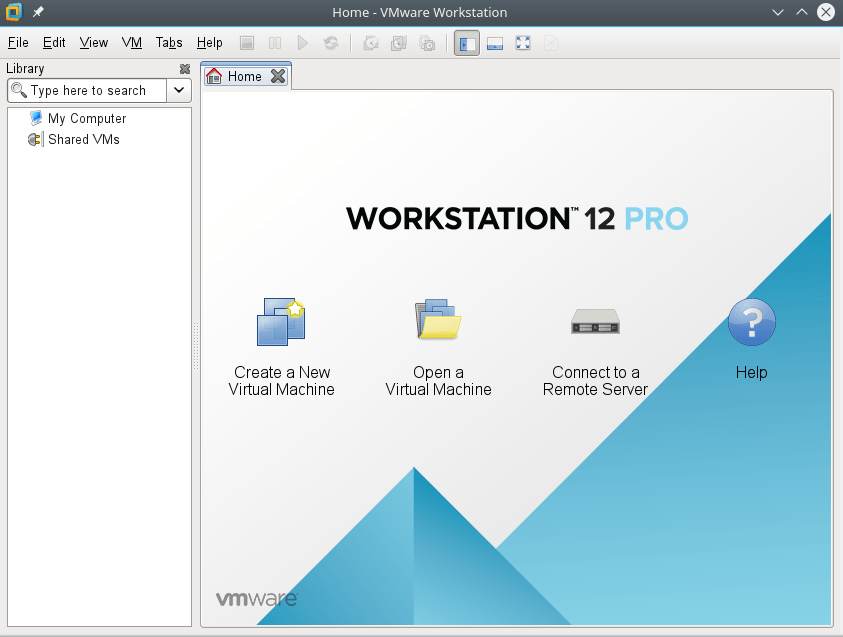
The post How To Install VMware Workstation 12 on openSUSE Leap 42.1 appeared first on dhenandi.com.

GNOME and Rust
I’ve been keeping an eye on Rust for a while now, so when I read Alberto’s statement of support for more Rust use in GNOME, I couldn’t resist piling on…
From the perspective of someone who’s quite used to C, it does indeed seem to tick all the boxes. High performance, suitability for low-level tasks and C ABI compatibility tend to be sticking points with new languages — and Rust kills it in those departments. Anyone who needs further convincing should read up on Raph Levien’s font renderer. The usual caveat about details vis-a-vis the Devil applies, but the general idea looks exactly right. Rust’s expressiveness and lack of baggage means it could even outperform C for non-trivial code, on top of all the other advantages.
There are risks too, of course. I’d worry about adoption, growth and the availability of bindings/libraries/other features, like a good optional GC for high-level apps (there is at least one in the works, but it doesn’t seem to be quite ready for prime-time yet). Rust is on an upwards trajectory, and there doesn’t seem to be many tasks where it’s eminently unsuitable, so in theory, it could have a wide reach: operating systems, platform libraries, both client- and server-side applications, games and so on. However, it doesn’t appear to be the de facto language in many contexts yet. Consider the statement “If I learn language X, I will then be able to work on Y.” Substitute for X: Java, Javascript, Python, ObjC, C, C++, C# or even Visual Basic — and Y becomes obvious. How does Rust fare?
That is, of course, a very conservative argument, while in my mind the GNOME project represents, for better or worse, and C use notwithstanding, a more radical F/OSS philosophy. Its founding was essentially formulated as a revolt against the Qt license (and a limited choice of programming languages!), it was an early adopter of Git for version control, and it’s a driver for Wayland and Flatpak now. For what it’s worth, speaking as mostly a downstream integrator, I wouldn’t mind it if GNOME embraced its DNA yet again and fully opened the door to Rust.
The heroes we deserve
You may be aware that openSUSE Leap 42.2 is now in the release candidate stage, and there’s a lot of activity aimed at squashing those pesky bugs before they hit the final release. One particular bug proved to be quite tough to fix, and it was only solved thanks to the “heroes” mentioned in the title. This is the history of the bug.
The report
October 6th, 2016 - A bug iss reported against Plasma reporting a hard freeze of Plasma when using the Noveau driver, but not with the closed NVIDIA blob. Although the effect is deleterious to Plasma and not other desktop environments, there is evidence that the issue is in the driver itself, but there’s only partial indications, and no conclusive proof.
The problem is that no one of the current KDE team members has access to a NVIDIA card so it’s hard to determine what is actually going on. After thinking over it for a while, I decided it was time to call in the pros. And in KDE, Martin Graesslin of KWin fame is the best bet when graphics and KWin interactions are involved. He suggested to get a backtrace of the freezes and crashes to ensure what exactly is happening. At the same time, Antonio Larrosa from the KDE team tried to get hold of a test system to investigate the cause.
Antonio eventually managed to reproduce the problem with a specific NVIDIA card and Noveau, and his initial results pointed at issues in interactions between the Noveau driver and KWin itself. Martin, being a nice person, also subscribed to the report, and once the bactraces came in he was able to find a solution to the riddle: when using OpenGL, Mesa waited for a buffer and in turn blocked KWin. The net result was an apparent freeze of the workspace when logging in.
Patches had been proposed to fix the issue, but according to upstream Noveau developers, they just made matters worse (instability).
As an aside, Noveau, despite the heroic efforts from its developers, has still several issues when using apparently “normal” workflows: for example any application using QWebEngine will crash on Noveau because while the driver does work well with multi-threaded rendering, the Blink engine uses different threads even when Qt is using single-threaded rendering.
Once the problem was found, the 5 eurocent question was: what can we do to fix the situation?
The hunt for a solution
One major problem with this issue was that not all NVIDIA cards were affected. Only specific models exhibited the problem, which meant blanket-disabling OpenGL for KWin when using Noveau was too restrictive. But at the same time, the only environment affected was Plasma. The situation was extremely dire for the default desktop in openSUSE.
But two of our today’s heroes did not give up. Martin and Antonio sat around a virtual table and tried to work out a solution. Martin suggested to use the same mechanism that KWin used normally to determine if the use of OpenGL is “unsafe” when starting up, disabling it if any problems arose. It didn’t work in the specific case only because the freeze occurred when rendering started, that is past this checkpoint.
The discussion was fruitful. Across the several hypotheses mentioned, Fabian Vogt, also from the openSUSE KDE team, thought about a “dead man’s switch”: KWin would get killed and restarted if a freeze occurred, but disabling OpenGL after the restart. That was enough for Antonio and Martin to come up with a strategy: checking with a timer if KWin was frozen during rendering. If the timer went off, KWin would get killed and restarted automatically, but disabling OpenGL (more technically, activating the “OpenGL unsafe protection”), and now would be able to continue without freezes. Antonio posted his patch for review and that is where we meet another hero of the day, David “d_ed” Edmundson. During the patch review, he asked Antonio what kind of card exhibited the issue, and promptly acted to get one to run tests himself.
Patches went back and forth for a number of days, scrapping one solution after the other, until Martin was finally able to accept the final revision, which was merged by Antonio in the Plasma/5.8 branch of kwin (meaning, everyone will benefit from it). Fabian then proceeded to submit these patches to openSUSE Leap and to openSUSE Tumbleweed.
As final icing on the cake, Antonio was able to come up with a patch to QWebEngine to disable the GPU if Noveau was detected, preventing crashes at the price of reduced performance (and adding two environment variables to force or disable the behavior, respectively).
The bottom line
What could I say: upstream-downstream collaboration is truly awesome, and even more so when such a difficult bug is tackled and fixed. The way my fellow KDE team members acted is truly commendable, and so the behavior of upstream KDE (despite the false “they don’t listen” mantra) that helped and offered assistance in getting a proper solution out.
So if you ever meet Antonio, David, Fabian, and Martin, please offer them a beverage of their choice. They’re the heroes Free Software deserves.
Bottom note
Other noteworthy people need to be mentioned here due to their involvement:
- Dominique Leuenberger and Ludwig Nussel, namely the Tumbleweed and Leap release managers, for keeping up at their jobs (that is, ensuring that awesome software is released timely and properly);
- The SUSE X11 developers, for their assistance on the Mesa side of things;
- The openSUSE community for bug reporting and testing, or this bug would’ve never been discovered.
OpenStack Summit Barcelona Presentation

Launch of the new crowbyte.org websites
I am proud to announce the launch of the new crowbyte.org websites.
Over half a year passed by since my last post on the crowbyte.org blog and I am happy to give some sign of life of crowbyte.org and myself alike.
A lot has happened in such a long period of time.
So lets sum up the most important cornerstones since the last activities here:
- I moved from Berlin to Schleswig Holstein due to a new job in Hamburg
- crowbyte.org is now reached over a secured https connection with certificate...
OpenStack Summit Barcelona

Looking forward to my talk later today: Vanilla or Distributions: How Do They Differentiate? and a interesting summit the next days.

Proprietary AMD/ATI Catalyst fglrx 15.12 rpms released for LEAP 42.2
Warnings
There’s no warranties the drivers will work, for you!
If you are satisfied with the open-source radeon drivers, don’t risk to break your computer !
Still there will NEVER be a fglrx driver for recent kernel and xorg. So if one of those component change in Leap fglrx will be broken.
Actual situation
Since last december, AMD doesn’t published any update about fglrx so the version is still the 15.12.302 published. A few days ago our beloved Leap release manager Ludwig ask me by email, if there will be an available drivers for Leap 42.2.
Today, after hacking a bit the last Sebastian Siebert’s script I’ve been able to build the drivers for Leap 42.2 RC1, and the driver install fine, and xorg start on my HD5750 (but that’s all what I can tell).
I will rebuild the driver once Leap 42.2 will hit its final stage.
Repository
zypper ar -cfg -n FGLRX http://geeko.ioda.net/mirror/amd-fglrx/openSUSE_Leap_42.2/ FLGRX

zypper -v refresh -f FGLRX

zypper -v install fglrx64_amdcccle_SUSE422 fglrx64_core_SUSE422 fglrx64_graphics_SUSE422  fglrx64_opencl_SUSE422 fglrx64_xpic_SUSE422
Future
AMD has stopped any development for FGLRX, so it is already considered obsolete. But on the other side they make a lot of effort to bring radeon and amdgpu (the free and open source driver) to a decent performance level.
I don’t have that much usage anymore of my AMD gpu powered computer, and my HD5750 is now 8 years old already, so I can’t promise to be able to follow up with changes.
Cleanup
I removed all the obsoletes packages letting only the last one for each openSUSE version still available. Also the server has no more copy of openSUSE github artwork. If this missing to someone, don’t hesitate to ask.
Have fun