
 Member
 jospoortvliet
Akonadi/KMail issues on Tumbleweed?
The solution is in this email from Christian Boltz:
I created a repo with the previous version of libxapian, and akonadi-*  and baloo linkpac'd from Factory (so rebuilt against the old libxapian):     https://build.opensuse.org/project/show/home:cboltz:branches:openSUSE:Factory


Packages at     http://download.opensuse.org/repositories/home:/cboltz:/branches:/openSUSE:/Factory/standard/


Since I installed these packages (using zypper dup --from), I didn't  see any akonadi crashes.


If someone wants to use the fixed packages _now_: I'll keep the repo  as long as it's useful for me ;-)   -> this is clearly caused by the libxapian update (libxapian22 ->  libxapian30)
In other words, you fix it this way:
zypper ar http://download.opensuse.org/repositories/home:/cboltz:/branches:/openSUSE:/Factory/standard akonadi-fix

zypper ref

zypper lr
zypper dup --from 4(where 4 is the number of the repo in my case).
Then OK the result and done, the mail client which, despite all its issues, continues to be the only one I can stand working with is smooth sailing again ;-)
Oh, to fix the mess Xapian made of the database, you probably should stop akonadi and remove the search DB, it will get re-indexed:
akonadictl stop

rm -rf ~/.local/share/akonadi/search_db

rm ~/.config/.baloorc

akonadictl start
Greetings from #Akademy2016 by the way!
Kickstarting conversations with lightning talks.

Last year I wrote a longer article about that on opensource.com, but this is the gist of it: it is a conversation kickstarter! Our event is very hands-on (bring your laptop, we say!) and the program is mostly there to facilitate the natural flow of ideas and code.
So we have three kinds of sessions:
- Keynote = inspiration. Everyone joints to listen to a fascinating story! Our keynote speakers are Karen and Jane.
- Lightning talks = sharing. Everyone in one room listens to what others are thinking about, working on or inspired by. Then, after, you look each other up and start talking and doing! Think 'unconference'.
- Workshops = learning and collaborating. They're coding, interactive, either teaching/learning or more "let's work on X for an hour together".
The event starts in two weeks at the TU Berlin: September 16-23 so it is time to book your trip. If you care about open source, privacy-protecting cloud services it is a great place to find like-minded folks!

What's coming?
Besides the keynotes by Karen Sandler (Managing DIrector at SFC) and Jane Silber (CEO of Canonical) We have some 30 sessions already submitted, just a selection:
- Nextcloud Security by Lukas Reschke
- Enterprise grade two factor authentication with Nextcloud by Cornelius Kölbel
- Upcoming features of Android Nextcloud by Tobias Kaminsky
- Nextcloud Scalability with a concept design for 10.000 users by Dennis Pennings (Friday program!)
- Installing NextCloud with SSL/TLS in less than 5 minutes on UBOS by Johannes Ernst
- MySQL Database Scalability by Oli Sennhauser (Friday program!)
- Next generation of federation by Björn Schießle (Friday program!)
- Theming your Nextcloud by Julius Haertl
- Collabora Online by Michael Meeks
- Performance Testing at Nextcloud by Morris Jobke
More still coming, I know Cornelius Schumacher wanted to talk about the importance of privacy-protecting cloud services (if his family can miss him for the weekend...) and I still have some other talks to approve in the queue.
The gist of it is that we'll have a lot of technical people, the folks who wrote Nextcloud as well as many others who contributed and have been using it, from home users to enterprise and educational or government agencies - all together to discuss and work on where our technology is going.
Oh, and we have a surprise on Friday afternoon. ;-)
Check it out and see you there!

Looking for a True Linux Hero

What does our team do? We install and configure your openSUSE and SUSE Linux Enterprise - and we really enjoy it! All our code is open-source and you can find it at GitHub. We also have a wonderful developer's documentation. You can reach us at irc.freenode.net, channel #yast and have a chat about THE JOB we offer. You might be also interested in other jobs at SUSE.
Let's meet Stefan Kunze, another Linux Hero. He grew in Borna, a small town in Germany close to Leipzig. He joined SUSE and moved to Prague in 2008 after doing an openSUSE support for two years in another company. Stefan now helps our customers at the Front-line Support (you see? front-line - a hero!). He enjoys playing computer games (he's the best at Civilization), reading and a good food.
We don't work for SUSE, we are SUSE.

Revisiting context and http.Handler for Go 1.7
Go 1.7 was released earlier this
month, and the thing I’m most excited
about is the incorporation of the context
package into the Go standard
library. Previously it lived in the golang.org/x/net/context
package.
With the move, other packages within the standard library can now use
it. The net package’s
Dialer and os/exec
package’s Command can
now utilize contexts for easy cancelation. More on this can be found
in the Go 1.7 release notes.
Go 1.7 also brings contexts to the net/http package’s Request
type for both HTTP
clients and servers. Last year I wrote a
post about using context.Context
with http.Handler when it lived outside the standard library, but Go
1.7 makes things much simpler and thankfully renders all of the
approaches from that post obsolete.
A quick recap
I suggest reading my original post
for more background, but one of the main uses of context.Context is
to pass around request-scoped data. Things like request IDs,
authenticated user information, and other data useful for handlers and
middleware to examine in the scope of a single HTTP request.
In that post I examined three different approaches for incorporating
context into requests. Since contexts are now attached to
http.Request values, this is no longer necessary. As long as you’re
willing to require at least Go 1.7, it’s now possible to use the
standard http.Handler interface and common middleware patterns with
context.Context!
The new approach
Recall that the http.Handler interface is defined as:
type Handler interface {
        ServeHTTP(ResponseWriter, *Request)
}
Go 1.7 adds new context-related methods on the *http.Request type.
func (r *Request) Context() context.Context
func (r *Request) WithContext(ctx context.Context) *Request
The Context
method returns the
current context associated with the request. The WithContext
method creates
a new Request value with the provided context.
Suppose we want each request to have an associated ID, pulling it from
the X-Request-ID HTTP header if present, and generating it if not.
We might implement the context functions like this:
type key int
const requestIDKey key = 0

func newContextWithRequestID(ctx context.Context, req *http.Request) context.Context {
    reqID := req.Header.Get("X-Request-ID")
    if reqID == "" {
        reqID = generateRandomID()
    }

    return context.WithValue(ctx, requestIDKey, reqID)
}

func requestIDFromContext(ctx context.Context) string {
    return ctx.Value(requestIDKey).(string)
}
We can implement middleware that derives a new context with a request ID, create a new Request value from it, and pass it onto the next handler in the chain.
func middleware(next http.Handler) http.Handler {
    return http.HandlerFunc(func(rw http.ResponseWriter, req *http.Request) {
        ctx := newContextWithRequestID(req.Context(), req)
        next.ServeHTTP(rw, req.WithContext(ctx))
    })
}
The final handler and any middleware lower in the chain have access to all the previously request-scoped data set in middleware above it.
func handler(rw http.ResponseWriter, req *http.Request) {
    reqID := requestIDFromContext(req.Context())
    fmt.Fprintf(rw, "Hello request ID %v\n", reqID)
}
And that’s it! It’s no longer necessary to implement custom context
handlers, adapters to standard http.Handler implementations, or
hackily wrap http.ResponseWriter. Everything you need is in the
standard library, and right there on the *http.Request type.
Latest attacks on privacy...
Privacy
It is the usual story: we should disallow companies from using perfect end to end encryption and force them to insert backdoors against terrorists.Not that it would help - that's been discussed extensively already but in short:
- If you have nothing to hide, you'll use a backdoored app and you're vulnerable to foreign (and your own) governments, terrorists (!), criminals and others who can abuse your data in more ways than you can imagine.
- If you have something to hide, you can use 1000 different tools to do so and there is nothing government can do about that so you won't use a backdoored app.
- And note that government has failed to even use fully unencrypted information to stop terrorist attacks so perhaps we should first see if they can actually get their act together there.
Nor will you catch corrupt politicians or big companies doing nasty stuff, though I am quite certain the laws will be written in such a way that you can use them to go after people who actually try to expose such politicians or companies.
And I'm also quite certain companies will use this as an excuse to not implement proper protection in their products so you can continue to stop pacemakers remotely or disable the brakes in cars over the internet.
Generally, laws targeting encryption and terrorism do more to harm whistleblowing than terrorism and are thus promoting corruption and bad, unsecure products.
These laws will literally cost lives. Not save any.
And it is exactly why Frank started ownCloud and why we continue to develop that vision at Nextcloud. And keep developing new features, like the File Access Control app which can provide an extra protective layer around your data. I for one certainly can use that app and exactly in the way described in that blog! So much for 'enterprise only features'.

Get it and migrate today. You and your data deserve it!

GSoC comes to an end :(
GSoC comes to an end, so it is time to write a last post about it.
The project
Let’s summarize what I did. You can also see it on Github: https://github.com/openSUSE/osem/commits?author=Ana06
I explained in my last post about the project that I had already changed completely the public schedule of OSEM. Since then I have mainly focused on the admin schedule, the place where the schedule is created. Now it is also possible to have several schedules in the backend before deciding which of them to use. So there is a list of schedules and a switch in every schedule to set that schedule as the selected one. I’ve also changed the appearance and functionality of the admin schedule. This is how it used to look like:
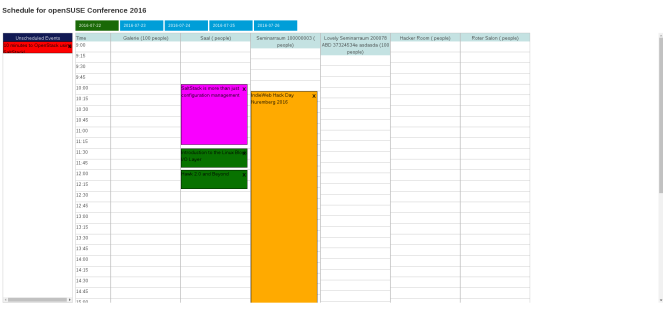
And this is how it looks like now:

As you can see I have integrated it in the admin interface. I’ve used bootstrap while doing so and I have also changed the way events are loaded and scheduled.
I’ve also introduced a Save button, as previously the schedule was saved instantly when dropping and event in a new cell. After clicking Save the page is reload and it is rendered a message to inform that the schedule was correctly saved or the reasons why it was not correctly saved. Another problem I’ve solved is that it was possible to schedule an event at the same time than other event, so things like that could happen:

I’ve also made the schedule times changeable. Previously the schedule started at 9:00 and ended at 20:00 and it was impossible to schedule an event outside this hours range.
Apart from the admin schedule I also add the feature to allow users to have their own schedule by having favourite events:


Nishanth GSoC project interfered few times with mine. It was something great as he pointed out some bugs in my project and I also helped him with the tags in the schedule:


There are some of the things I mentioned that hadn’t been merged yet as they are still being reviewed.
Challenges
I found a little bit tiresome understanding the javascript code previously used for the admin schedule and then changing it almost completely several times. But every time I changed that code I liked it more so it was worthwhile.
Displaying the tags in the schedule properly was not as easy as it seemed at the beginning: osem#1082 and osem#1125. Founding a way to make links inside other link work and to do it with ctrl+click was another little challenge as you can see here: osem#1132 and osem#1134.
Overall experience
Working in an Open Source Project has been much better than I expected (and I had very high expectations  ). During the last three months I’ve learnt many things, had really fun and made friends. I would like to thank this amazing summer to all mentors (specially my mentors Christian and Henne) and to the openSUSE community. I also want to thank the TSP program for giving me the chance to attend openSUSE Conference, which was an incredible experience.
I will continue working on Open Source projects and of course I will continue working on OSEM. I also encourage all students reading to apply to GSoC next year and to do it at openSUSE. 
GSoC Welcome Package
It is a little bit late to post pictures of the GSoC welcome package, but I have just found the pictures I took when I received it 3 months ago and I thought that maybe someone likes to see them.


FrOSCon and the future of private clouds

Frank won't make it, sadly, as he's in Denmark speaking at another event. Or somewhere else, his travel is a bit crazy lately ;-)
Future of private clouds
Frank blogged last week about a vision for Nextcloud and we've been thinking and discussing this at our hackweek with about 30 community members as well. It was quite amazing to bring so many people together and discuss these things!Afterwards we've brought most of the topics to our forums or github, including our ambitious Nextcloud 11 roadmap. I'll certainly talk about some of those things this weekend at FrOSCon:
- Communication integration
- New app store
- New updater
- Federation
If you like to get involved in the 'future', join us at our conference!

Live USB improvements
Tools to create multi distribution bootable USB stick got couple of new improvements and features.
live-usb-gui now offers choice of scripts to use, depending in your need you can either use live-fat-stick with vfat partitioned stick or live-grub-stick script which works with any partition format supported by grub2 including vfat, must be used if you have iso bigger than 4G.
live-grub-stick can now create bootable USB from openSUSE installation media isos (standard DVD or NET), difference from --isohybrid option is that the data already on the stick is not touched, the whole iso is available on the stick so you can use the stick to copy it around apart from being able to install from it.
Two new options --suse-persistent(for openSUSE live ISOs) and --ubuntu-persistent(for Ubuntu and clones) are now available, using these options allows live sessions to be persistent over multiple boots, even when used on vfat partition. Again the way it is used does not need change in partition format of the stick, existing data on the stick remains untouched.
Feel free to fork https://github.com/cyberorg/live-fat-stick if you want some more enhancements.

Traffic shaping with virtual pfsense and SLES 12 KVM Host

I built my own pfsense from a Dell OptiPlex 990 SFF PC with an Intel Core i5-2400 3.1GHz. I have installed an Intel PRO/1000 VT Quad Port Server Adapter LP PCI-E for more networks and vlans on my network. Traffic shaping was a breeze with pfsense. I of course run pfsense virtualized as the OS itself doesn't work on the hardware physically. BSD seems to have a limited hardware support than Linux these days. It was really the fact that BSD kernel didn't have the right support for this chip and kept hard locking with a kernel error that made no sense. So I have installed SUSE Linux Enterprise Server 12 SP1 as the HOST OS which is humming along with no kernel errors and pfsense is running as a KVM virtual machine. I have bridged all the network interfaces for the virtual machine and it works great. Its been running for 3 months now with no troubles.
Now to try out Sophos UTM. Looks like a fun alternative to pfsense and its Linux based. :-)