
 Member
 dragotin
Kraft Version 0.54 veröffentlicht
Heute wurde die neue Kraft Version 0.54 veröffentlicht!
Diese Version hat eine interessante Liste an neuen Features. Als wichtigstes sei herausgestellt, dass Kraft jetzt das Erstellen von Lieferscheinen unterstützt. Lieferscheine tragen keine Preisangaben, sondern listen nur gelieferte Artikel. Kraft kommt nun mit passenden Vorlagen, so dass diese Dokumente problemlos erstellt werden können.
Aus Lieferscheinen können dann Rechnungen als Folgedokumenten generiert werden.
Weiterhin wurde die Integration mit dem KDE Adressbuch deutlich verbessert. In der Vergangenheit gab es immer wieder Probleme mit der Abfrage der Adressdaten aus dem KDE Adressbuch, wenn z.B. keine Indizierung mit Nepomuk eingeschaltet war. Das ist nun anders realisiert, so dass mit KDE neuer als KDE 4.12 eine einfachere, schnellere und vor allem robustere Adressbuchintegration verwendet wird.
Ausserdem wurde dem Kraft Paket ein Kommandozeilentool mit dem Namen findcontact hinzugefügt, dass die Abfrage von Adressdaten anhand der Adress-UID, die von Kraft zur Adressatenverwaltung verwendet wird, ermöglicht. Damit können einfacher integrierte Lösungen rund um Kraft gebaut werden.
Eine große Menge an Fehlerfixes und kleineren Verbesserungen wurde ebenfalls in diese Version aufgenommen, so dass allen Benutzerinnen und Benutzern ein Update angeraten ist.
Wie immer ist eine Reaktion auf das Release willkommen, sei es als Kommentar in Forum oder auf der Mailingliste, oder als Bugreport.
Die neue Software ist über die Projektseite verfügbar.

Coffee: my personal history
Why, would you ask ? Mostly because with my not-so-new-anymore position at SUSE (Enterprise Desktop Release Manager), I'm mostly working behind the scene (discovery the joy of OBS to create ISO images and lot of crazy similar stuff) which might not be that sexy to describe but still need to be done ;)
So, instead of closing this blog for new posts, I'm trying something new to me: writing about things which aren't Free Software but might still interest people:
My new thing these days (asks my wife ;) is coffee.

I've always been fond of coffee (and tea, they aren't mutually exclusive, fortunately), probably because when I was a child, my parents loved good coffee and I was happy to be the one taking care of both electric grinder and Expresso machine we had. And I remember how difficult it was to find good coffee, even more when you were living in a very rural area of France and when the only online services were accessible with a Minitel and were definitively not selling coffee ;)

And then started my love story with Nespresso, which has not ended (yet), with its ups (being part of a customer panel once, including UI designers, very interesting) and downs. I often skipped coffee in cafés and restaurants because I knew it wouldn't be good!

And it has happened these days, somehow unexpectedly: for a few years, I was reading about strange devices (Aeropress being cited often) and tasty filter coffee (which, for me, as always been synonym of bad coffee) and I also heared some radio shows on coffee which make me think: let's try.
I ordered an Aeropress and tried it (with some fair trade coffee from my supermarket since I don't have any grinded coffee at home and opening caps wasn't really a good idea). Result: not bad, compared to the consistency of Nespresso but not that great. I knew I wasn't using great coffee.
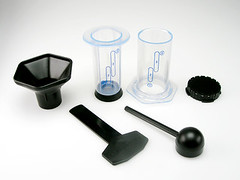

So, I'm now with this exact same coffee at home, waiting for delivery of a freshly ordered manual grinder to try to duplicate this coffee experience, because I try other coffee and other Paris roasters.
Let's see if I succeed :)

Is Canonical planning to take out Microsoft Office with OEM Kingsoft Office?
Lately I've been seeing more and more buzz surrounding Kingsoft Office for Linux. KSO has been gaining a rather devoted following despite it's Linux port still being in alpha and not near to release. My first familiarity with Kingsoft Office was reading about their Android offering which has had rave reviews and a devoted following. Across all platforms, people praise it for its interface and its exceptional compatibility with Microsoft Office formatted documents. So with all the buzz, rumors, and conflicting information I wanted some clear answers for myself and to share with you. On May 5th I had the opportunity to interview Jin who serves as the Chief Software Architect for +Kingsoft Office .

Before I dive right into the things we addressed in the course of our interview, I wanted to give you a brief background for Kingsoft and their office software. For brevity I'll pull from Wikipedia.
Kingsoft was founded in 1988 by the JinShan company located in Hong Kong. JinShan is a manufacturer of IBM PCs and was founded in 1973. In the late 1980s and early 1990s, Kingsoft researched and developed word processors and other office applications, such as its flagship product, Word Processing System 1.0, which launched in 1989. Today, the latest version of Kingsoft Office 2013 is a freeware office suite which includes Kingsoft Writer, Kingsoft Presentation and Kingsoft Spreadsheet. Kingsoft has established collaborative relationships with Dell, Intel and IBM.
Jin mentioned that Kingsoft has attempted Linux ports in the past (2003, 2007, 2009), which did not succeed. Kingsoft Office (the Chinese market version is called WPS) has over 10 million lines of code, making this porting effort very significant. Complicating the porting effort further is the matter that over 600 dialogs are written in Delphi which needs to be rewritten, including the chart feature which many users have bemoaned the lack of.
So why though is Kingsoft making such a powerful effort to port their flagship office suite to Linux? The reasons Jin gives are interesting. "Firstly, *Nix is a large family of operating systems. Making our product for Windows only is not a good strategy. We once depended on Delphi, and have paid a price for this. So now we say to not put all of our eggs in one basket." Once bitten twice shy, they have come to be reticent of relying on proprietary technologies. I asked about +OpenOffice.org and +LibreOffice, "These are very powerful suites, but fall short in two major areas; the interface, and compatibility with Microsoft document formats." Elaborating on their emphasis of compatibility, he stated they had four dedicated teams working on compatibility with Microsoft formats exclusively. In response to the reports I've read saying that previous versions of Kingsoft Office were based on OpenOffice, "er... It's a rumour, KSO was never based on OpenOffice."
Though these are all philosophically sound reasons, I doubted it was so simple. Certainly we could use a better office suite (I used to work in zoning and entitlements, and wasted a lot of time trying to generate complex documents in LibreOffice) and I certainly can understand being wary of vendor lock in. Jin mentioned, "Linux deals" and I pried a bit further. "Last year, we have a deal from Canonical. They want to make a business version." Canonical whom makes the +Ubuntu distribution has purchased 5 million OEM licenses in order to do this. "They need an office similar to MS Office."
I think the implications for a KSO business version from Canonical could be huge. Clearly this means Kingsoft and Canonical are gunning for the big daddy of the office, Microsoft Office. But this could also mean Canonical is looking to move into the business and enterprise desktop market putting them in direct and formidable competition with the likes of +SUSE whom has been in this arena for a long time. Also, it may imply there could be a version for the Ubuntu Phone OS which could bring their devices into a realm of mobile business that has been largely the domain of +BlackBerry. Whatever the case is, I think it's good news for +Linux users everywhere and helps bring people who weren't able to transition to Linux due to the lack of Microsoft Office in a much better position to join us.
There has been a good amount of rumor saying that Kingsoft will release the code as open source for KSO. Considering how Kingsoft has learned to shy away from proprietary lock in, it might even seem plausible. However, when asked Jin stated "Free to use and distribute. Kingsoft Office is the only profitable product for us. Open source is a very dangerous choice for us. We will however release some source of our product such as emf support, we know the Linux community needs it also." With this in mind I asked what would happen to KSO for Linux when it's ready for official release and out of testing. "KSO for Linux is based on our Pro version, having the full set of functions. We will not change it, but the name will change to Community Version." So thankfully the Linux community will still be getting Kingsoft Office Pro without any feature regressions, and still offered as free to use and distribute.
They plan to bring important features such as charting, mail merge, and the ability to embed formulas in Writer documents. However, the challenges are significant. Besides the transition from Delphi, much of KSO relies on Microsoft APIs. "And too many thing out of our control, for example; we can't input formula in Kingsoft Writer. Why? Because we buy a formula editor on Windows Version. But they can not offer a Linux version. Mail merge is similar. We can not find a good data source on Linux."
Finally I asked how we in the Linux community can help, and if there is any message they would like to convey. "We need quality assurance." "We want to thank the Linux community for their support and enthusiasm. We are not the best yet, but we are working hard on it."
P.S. To install in +openSUSE is very simple. Simply download the RPM from their site and install as you would any RPM. In my test, everything works correctly. KSO checks for updates on launch, and will prompt you to download the newest available alpha version.

Echoes from oSC’14: state of Factory and openQA

There has a been a lot of work going on regarding the stabilization of Factory. It is still ongoing process. We have a lot of submissions, Factory is moving really fast and was hard to keep stable. Over the time, there were more and more checks added to the process to make Factory more stable and usable in everyday life. Last of them being added right now are rings and openQA. You can learn more about that in the talk by our release manager coolo. It will also allow you a quick peek behind the curtain on what future will bring.
In that future, one of the core roles in making Factory stable will be played by openQA. As such it got quite some attention during openSUSE Conference 2014 in Dubrovnik. Stable Factory will not happen by itself, it need quite some work. Currently openQA is under heavy development to match the new needs. You can help improving it! The work is being coordinated in a progress.o.o project, the sources are available in a Github’s organization and there is even a talk to introduce you to the world of openQA development 
At some point, when openQA gets integrated well enough, users will be able to enjoy “almost” bug free Factory as a rolling distro. How bugfree it will be will depend on our test coverage of the distribution. What is the current state? We have basics pretty well covered, but still sometimes existing tests break and sometimes we miss more tests. If you want to help with making Factory better tested, you can get openQA running locally and start writing tests for stuff that matters to you! During a nice workshop in openSUSE Conference, Ludwig Nussel trained some geekos on how to get a local openQA running and start writing tests. Luckily, workshop was recorded so even if you missed the conference, you can watch it and start writing tests. New tests are welcome, although due to performance reasons (we want openQA to finish at some point, right?), not everything might get run every time. Even though, you can always run your own openQA instance for testing stuff that you care about and reporting to bugzilla!
Looks like there is a bright future in front of us with stable well tested Factory continually rolling forward. There is plenty of work to be done to achieve this, but progress made so far is starting to show results and we will approach the final goal faster as we get more people involved.

The Week that was oSC14

Building docker images with KIWI
I’m pleased to announce Marcus Schäfer has just made possible to build docker images with KIWI.
For those who never heard about it, KIWI is a tool which creates Linux systems for both physical and virtual machines. It can create openSUSE, SUSE and other types of Linux distributions.
Update: I changed the required version of kiwi and the openSUSE 13.1 template. Kiwi just received some improvements which do no longer force the image to include the lxc package.
Why is this important?
As you might know Docker has already its build system which provides a really easy way to create new images. However these images must be based on existing ones, which leads to the problem of creating the 1st parent image. That’s where KIWI comes to the rescue.
Indeed Kiwi can be used to build the openSUSE/SUSE/whatever docker images that are going to act as the foundation blocks of other ones.
Requirements
Docker support has been added to KIWI 5.06.87. You can find this package inside of the Virtualization:Appliances project on OBS.
Install the kiwi and the kiwi-doc packages on your system. Then go to the
/usr/share/doc/packages/kiwi/examples/ directory where you will find a simple
openSUSE 13.1 template.
Building the system
Just copy the whole /usr/share/doc/packages/kiwi/examples/suse-13.1/suse-docker-container
directory to another location and make your changes.
The heart of the whole image is the config.xml file:
<?xml version="1.0" encoding="utf-8"?>

<image schemaversion="6.1" name="suse-13.1-docker-guest">
  <description type="system">
    <author>Flavio Castelli</author>
    <contact>fcastelli@suse.com</contact>
    <specification>openSUSE 13.1 docker image</specification>
  </description>
  <preferences>
    <type image="docker" container="os131">
      <machine>
        <vmdisk/>
        <vmnic interface="eth0" mode="veth"/>
      </machine>
    </type>
    <version>1.0.0</version>
    <packagemanager>zypper</packagemanager>
    <rpm-check-signatures>false</rpm-check-signatures>
    <rpm-force>true</rpm-force>
    <locale>en_US</locale>
    <keytable>us.map.gz</keytable>
    <hwclock>utc</hwclock>
    <timezone>US/Eastern</timezone>
  </preferences>
  <users group="root">
    <user password="$1$wYJUgpM5$RXMMeASDc035eX.NbYWFl0" home="/root" name="root"/>
  </users>
  <repository type="yast2">
    <source path="opensuse://13.1/repo/oss/"/>
  </repository>
  <packages type="image">
    <package name="coreutils"/>
    <package name="iputils"/>
  </packages>
  <packages type="bootstrap">
    <package name="filesystem"/>
    <package name="glibc-locale"/>
    <package name="module-init-tools"/>
  </packages>
</image>
This is a really minimal image which contains just a bunch of packages.
The first step is the creation of the image’s root system:
kiwi -p /usr/share/doc/packages/kiwi/examples/suse-13.1/suse-docker-container \
     --root /tmp/myimage
The next step compresses the file system of the image into a single tarball:
kiwi --create /tmp/myimage --type docker -d /tmp/myimage-result
The tarball can be found under /tmp/myimage-result. This can be imported
into docker using the following command:
docker import - myImage < /path/to/myimage.tbz
The image named myImage is now ready to be used.
What’s next
In the next days I’ll make another blog post explaining how to build docker images using KIWI and the Open Build Service. This is a powerful combination which allows to achieve continuous delivery.
Stay tuned and have fun!

GSoC 2013 with Gnome
In summer 2013, Tomasz Maczynski worked on Banshee as a GSoC student, and he did great work! He developed a SongKick extension, and a FanArt.tv one. Both were worked on in the banshee-community-extensions repository. They work very well but there are a few downsides about this work, which we didn't have time to fix:
- The FanArt.TV extension depended on some Banshee API that hasn't been added yet to mainline. The patch to add it lived in bugzilla for a while, in a bug about a feature request to have images in the artist list. The reason for not committing the patch even if I had already reviewed it was because I was wary about it, since it allowed FanArt.TV to hook its ArtistList widget, but wouldn't be really extension friendly. What I mean is that if there was other extension that wanted to also attach a different ArtistList, it would conflict with FanArt extension when enabled at the same time. The ideal thing would be to expose this functionality as an extension point, so that if more than one extension attached a new kind of ArtistList widget, the user could switch between the two from the UI when both extensions were enabled. When I mentioned this in the bug, awesome Banshee-extension developer Frank Ziegler jumped in and created the extension interface necessary for this. I've been reviewing the patches in the last days (couldn't do it before because I really wanted to release 2.9.1 and 2.6.2 versions before landing this work) and I'll likely commit them this week.
- The FanART.TV extension uses Hyena's ListView widget to show images. This is the main widget that Banshee uses for showing the tracks in the main view. It's a great custom widget because it allows very fast rendering of data coming from an SQLite database, but it wasn't optimized for rendering images. The main disadvantage of it is in the case that images have different heights, because the ListView will just allocate a height for each row equal to the tallest of the images used. This means that the widget shown could be a bit ugly if you have many artists in your library and some of them have very differently sized images. Tomasz worked on this a bit, but couldn't finish it because of lack of time (we have a WIP patch). But fortunately this will be fixed this summer!
- Both SongKick and FanArt.TV don't implement caching yet. This is not only important to save bandwidth from the point of view of the client, but also from the point of view of the server! (We could even violate their ToS if we didn't implement this, IIRC.) Fortunately this will be fixed this summer!
- SongKick extension provides several ways to discover gigs: searching by city, by artist, etc. It even suggests you artists extracted from your library that composed songs which you marked with a high rating! But IMO this is not enough, SongKick extension should even be smarter and query ahead of time looking for your favorite artists *and* near your area (doing the latter via GeoLocation). Fortunately this will be fixed this summer! (and we will use Gnome infrastructure for it)
That is all folks! Stay tuned for the next blog post, which will explain the plan for GSoC 2014 (this year I get to mentor three students!).
Belated Gnome .NET Hackfest post
- I got my house refurbished in the last months, which has been such a long planning endeavour, and a real stressful PITA while it was being done.
- Before the above started, and after it was finished, I had to move, so that's 2 moves! (I hate moving)
- I've been kind of busy in regards to Gnome-related contributions: we released Banshee 2.6.2, GStreamer-Sharp 0.99.0, Banshee 2.9.1, and a big etcetera (including pre-mentoring for GSoC! more about that in a subsequent post).
- Hylke Bons, sparkleshare creator, Red Hat designer.
- Mirco Bauer, smuxi creator and debian developer (mono packager).
- Jo Shields, debian developer (mono packager), Collabora sysadmin.
- Robert Nordan, Pinta contributor.
- Jared Jennings, Tomboy contributor.
- Stephen Shaw, ex-Novell coworker (build developer), and currently at Xamarin. (Yes, I was Stephen's team-mate when at Novell, but had never met him in person!)
- Stefan Hammer, Tomboy contributor and hackfest local-host.
- Timo Dörr, Tomboy and Banshee contributor, GSoC student.
- Stephan Sundermann, GSoC student for GStreamerSharp and Bindinator.
(BTW I didn't include the awesome Bertrand Lorentz, fellow Banshee co-maintainer and GtkSharp gatekeeper, in the list, because I had already met him before, it wasn't my first time!).
And it was with the latter Stephan (not Stefan) the one I ended up spending more time with, because we decided to work on the new GStreamerSharp bindings since the 2nd day of the hackfest (the 1st day I mainly worked with Bertrand to release Banshee 2.9.0, our first Gtk3 compatible release, which he already blogged about).
So what was special about this work?
- GStreamerSharp 0.10.x releases were not compatible with GStreamer 1.x releases, so this had to be fixed soon. However, much of the architecture of this old version of the bindings used many manually crafted binding code.
- Stephan, by using the new Bindinator (a GObjectIntrospection metadata parser that outputs GAPI metadata, that allows generating .NET bindings, created by Andreia Gaita) in his GSoC, created a better foundation for the new bindings.
- He targetted GI metadata from GStreamer 1.0 and 1.2 versions (the jump from 0.10 to 1.0 was a big and not easy leap, since lots of APIs were modified and deprecated).
- We needed to polish them enough to make Banshee be able to consume them without glitches.
Main kudos should go to him though. I mainly added Banshee expertise, gtk-sharp contributing expertise, and lots of motivation (or at least I thought).
We had a big success: a Banshee playing audio with GStreamerSharp. Unfortunately video playback was freezing. But some months later after the hackfest we fixed it, and we released first GStreamerSharp 1.0 preview, which we called "0.99.0", and we released the first Banshee release that depends on this work: 2.9.1.
And it was my first time in Austria (and in Vienna). Overall a great experience, and I need to mention our awesome sponsors:





GNOME 3.12 arrives to openSUSE Tumbleweed, and it is fabulous
Elegance

Shell Function

Online Accounts
- Google has not changed much, though it does seem to have gained support for Google Cloud Print. You can still access your Drive documents in the GNOME Documents application.
- Windows Live has seen massive improvements. You can now access your OneDrive documents through the GNOME Documents application, and it will also set up your email account (outlook.com for example) with Evolution mail. Most impressive though is that it actually works reliably and consistently.
- Pocket formerly known as Read it Later has also been added, though it currently does very little. So far only 'Videos' makes use of Pocket as a plugin to play your Pocket saved videos. Developers say they will add integration to Epiphany or 'Web' in a future release of the browser.
- Flickr is included and is used by the 'Photos' application. I read somewhere that it can be used in some special way for desktop wallpapers.
- IMAP and SMTP accounts can be set up directly from here for use with Evolution mail.
- I believe the above are the only truly new notables to 3.12, I encourage you to take a look and see if you discover something new. I can revise this later.
Software
- gnome-software is the app-store style interface (PackageKit frontend) in upstream GNOME. This is not installed by default in openSUSE. Besides installing software, the new user defined application folders in the shell are set up by this program. It can be installed in openSUSE, but appears to be broken as it repeatedly asks for authentication for setting a network proxy. However, I have no need of application folders since I merely search for whatever I want and find it's package management capability massively redundant in light of YaST and our own Software Search portal.
-
Gedit is the default GNOME text editor since time immemorial. In 3.12 it has received a massive interface overhaul following the minimalist UI philosophy of GNOME 3. Despite the minimalistic new design overhaul, it appears that none of its familiar functionality has been removed. I like it.
- Nautilus or 'Files' as it's labeled appears to have changed little, excepting that you may now connect to servers straight from the app menu on the activities bar. For me, this is a very welcome change since the last time I needed this functionality it had been entirely removed into a separate module that needed to be invoked from the CLI.
- gnome-photos is not installed by default in openSUSE as the default photo manager, that distinction goes to the revered Shotwell. Photos however is a simple and elegant photo manager, now with Facebook integration through the GNOME Online Accounts. Likewise it also supports Flickr via the same mechanism.
- Totem or 'Videos' as it is now labeled has seen a massive cosmetic makeover. Under the hood though, it sees a new plugin architecture for online video services. Notably, Online Accounts has support for Pocket and any saved videos there will be accessible in Videos.
- Epiphany or 'Web' as it is labeled now has seen major changes both under the hood and cosmetically. The minimalistic UI gets out of your way enabling your content. Each tab now has it's own process, and so when one page crashes the rest of the browser will not be affected. In my testing of it, I've found it to be swift and reliable like no other non-mainstream browser before. I can for once see people actually using this browser. It also enables with a quick menu option the ability to save a page as a Web App that will then be added to your applications, launchable immediately from the shell. Support for Pocket should be added in a later version. When Epiphany is installed, it enables the ability to perform internet searches directly from the shell.
- Polari is an early 'preview' application. Polari is the new GNOME upstream default IRC client. XChat for GNOME is shipped by default in openSUSE. Polari however is a beautiful and easy to use client, which immediately became my new favorite. Polari has excellent integration with the GNOME Shell, using Online Accounts and the notification and chat frameworks allowing you to see pending private messages in the lock screen, and responding to them directly from the shell notifications.
- gnome-logs is a new system log viewer for GNOME. It is not shipped by default in openSUSE and is redundant since we have a YaST module for this purpose. It also appears that it does not yet work under openSUSE, likely due to wrong permissions. Though 'Logs' may not be an important application for us in openSUSE, it represents a significant step forward for less experienced users in any GNOME distribution since it makes it much easier to fulfill the request, "Ok, in order to help you I'm going to need a couple system logs."