
 Member
 cornelius
184 Qt Libraries

Inqlude is based on a collection of manifests. If you like to add or update a library, simply submit a pull request there. The inqlude tool is used to manage the manifests, it generates the web site, but you can also use it to validate manifests, or download libraries. There also is inqlude-client, which is a C++ client for retrieving sources of libraries via the data on the Inqlude web site. It's pretty handy, if you want to integrate some library into your project.
If you want to get a brief introduction into Inqlude, you might want to watch my award winning lightning talk from Qt Dev Days 2013: "News from Inqlude, the Qt library archive". It still provides a pretty accurate explanation of what Inqlude is about and how it works.
A big part of the libraries which are collected on Inqlude are coming from KDE as part of KDE Frameworks. We just released KDE Frameworks 5.14. It's 60 Qt addon libraries which represent the state of the art of Linux desktop development and more.
Inqlude as well as KDE Frameworks are a community effort. Incidentally they both started at a developer sprint at Randa. Getting community people together for intense hacking and discussions is a tremendously powerful catalyst in the free software world. Randa exemplifies how this is done. The initial ideas for Inqlude were created there and last year it enabled me to release the first alpha version of Inqlude. These events are important for the free software world. You can help to make them happen by donating. Do this now. It's very much appreciated.

One more recent change was the addition of a manifest for all libraries part of the Inqlude archive. This is a JSON file aggregating all latest individual manifests. It makes it very easy for tools who don't need to deal with the history of releases to get everything in one go. The inqlude client uses it, and it's a straight-forward choice for integration with other tools which would like to benefit from the data available through Inqlude.
At the last Qt contributors summit we had some very good discussions about more integration. Integration with the Qt installer would allow to get third party library the same way you get Qt itself, or integration with Qt Creator would allow to find and use third party libraries for specific purposes natively in the environment you use to develop your application. One topic which came up was a classification of libraries to provide some information about stability, active development, and support. We will need to look into that, if there are some automatic indications we can offer for activity, or what else we can do to help people to find suitable libraries for their projects.
It's quite intriguing to follow what is going on in the Qt world. As an application developer there is a lot of good stuff to choose from. Inqlude intends to help with that. The web site is there and will continue to be updated and there also are a number of ideas and plans how to improve Inqlude to serve this purpose. Stay tuned. Or get involved. You are very welcome.

Deploying Limba packages: Ideas & current status
 The Limba project does not only have the goal to allow developers to deploy their applications directly on multiple Linux distributions while reducing duplication of shared resources, it should also make it easy for developers to build software for Limba.
Limba is worth nothing without good tooling to make it fun to use. That’s why I am working on that too, and I want to share some ideas of how things could work in future and which services I would like to have running. I will also show what is working today already (and that’s quite something!). This time I look at things from a developer’s perspective (since the last posts on Limba were more end-user centric). If you read on, you will also find a nice video of the developer workflow 
1. Creating metadata and building the software
To make building Limba packages as simple as possible, Limba reuses already existing metadata, like AppStream metadata to find information about the software you want to create your package for.
To ensure upstreams can build their software in a clean environment, Limba makes using one as simple as possible: The limba-build CLI tool creates a clean chroot environment quickly by using an environment created by debootstrap (or a comparable tool suitable for the Linux distribution), and then using OverlayFS to have all changes to the environment done during the build process land in a separate directory.
To define build instructions, limba-build uses the same YAML format TravisCI uses as well for continuous integration. So there is a chance this data is already present as well (if not, it’s trivial to write).
In case upstream projects don’t want to use these tools, e.g. because they have well-working CI already, then all commands needed to build a Limba package can be called individually as well (ideally, building a Limba package is just one call to lipkgen).
I am currently planning “DeveloperIPK” packages containing resources needed to develop against another Limba package. With that in place and integrated with the automatic build-environment creation, upstream developers can be sure the application they just built is built against the right libraries as present in the package they depend on. The build tool could even fetch the build-dependencies automatically from a central repository.
2. Uploading the software to a repository
While everyone can set up their own Limba repository, and the limba-build repo command will help with that, there are lots of benefits in having a central place where upstream developers can upload their software to.
I am currently developing a service like that, called “LimbaHub”. LimbaHub will contain different repositories distributors can make available to their users by default, e.g. there will be one with only free software, and one for proprietary software. It will also later allow upstreams to create private repositories, e.g. for beta-releases.
3. Security in LimbaHub
Every Limba package is signed with they key of its creator anyway, so in order to get a package into LimbaHub, one needs to get their OpenPGP key accepted by the service first.
Additionally, the Hub service works with a per-package permission system. This means I can e.g. allow the Mozilla release team members to upload a package with the component-ID “org.mozilla.firefox.desktop” or even allow those user(s) to “own” the whole org.mozilla.* namespace.
This should prevent people hijacking other people’s uploads accidentally or on purpose.
4. QA with LimbaHub
LimbaHub should also act as guardian over ABI stability and general quality of the software. We could for example warn upstreams that they broke ABI without declaring that in the package information, or even reject the package then. We could validate .desktop files and AppStream metadata, or even check if a package was built using hardening flags.
This should help both developers to improve their software as well as users who benefit from that effort. In case something really bad gets submitted to LimbaHub, we always have the ability to remove the package from the repositories as a last resort (which might trigger Limba to issue a warning for the user that he won’t receive updates anymore).
What works
Limba, LimbaHub and the tools around it are developing nicely, so far no big issues have been encountered yet.
That’s why I made a video showing how Limba and LimbaHub work together at time:
Still, there is a lot of room for improvement – Limba has not yet received enough testing, and LimbaHub is merely a proof-of-concept at time. Also, lots of high-priority features are not yet implemented.
LimbaHub and Limba need help!
At time I am developing LimbaHub and Limba alone with only occasional contributions from others (which are amazing and highly welcomed!). So, if you like Python and Flask, and want to help developing LimbaHub, please contact me – the LimbaHub software could benefit from a more experienced Python web developer than I am (and maybe having a designer look over the frontend later makes sense as well). If you are not afraid of C and GLib, and like to chase bugs or play with building Limba packages, consider helping Limba development 
Team Efficiency is Irrelevant
The most common reaction I hear when I tell people about mob programming (or even paired programing) is “How can that possibly be efficient?”, sometimes phrased as “How can you justify that to management?” or “How productive are you?”
I think that efficiency in terms of “How much stuff can we get done in a week” is the wrong thing to be focussing on in teams. It can often be helpful to be less efficient.
“All the brilliant people working at the same time, in the same space, on the same thing, at the same computer.” — Woody Zuill
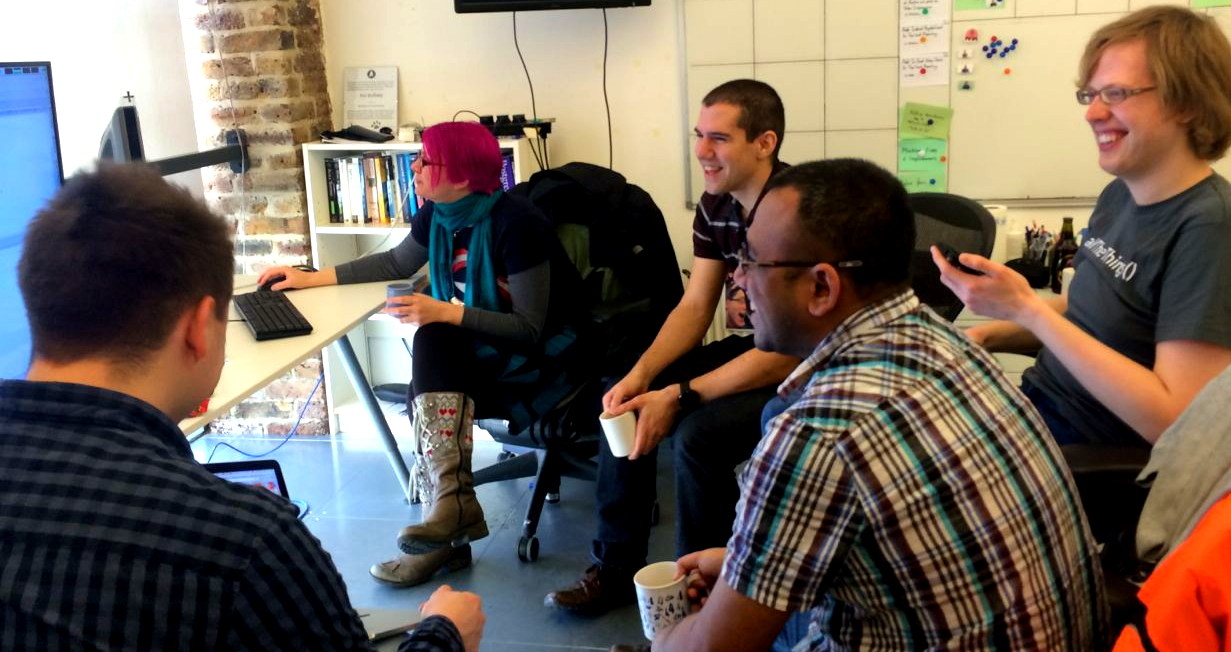
At Unruly we’ve been Mob Programming regularly over the last year.
At first glance it’s hard to see why it could be worth working this way. Five or more people working on a single task seems inefficient compared to working on five tasks simultaneously. As developers we’re used to thinking about parallelising work so that we can scale out.
Build Less!
If your team builds twice as much stuff as another team, are you more effective?
What if 80% of the software your team builds is never used, and everything another team builds is heavily used?
What if all the features you build are worth less than a single feature the other team has built?
We’re better off slowing down if it means that what we do build is more valuable
Value Disparity
There’s often a huge disparity between the relative value of different things we can be working on. We can easily get distracted building Feature A that might make us $10,000 this year, when we could be building Feature B which will make us $10,000,000 this year.
It’s often not evident up front which of these will be more valuable. However, if we can order our development to start with testing hypotheses about features A and B we often learn that one is much less valuable than we thought, for some reason it won’t work for us — meanwhile, new opportunities often open up that makes the other option much more interesting.
Focus on Goal
When working alone it’s very easy to get sidetracked into working on things you notice along the way that are important but unrelated to the current goal of the team. When working together there are more people to hold one another accountable and bring the focus of the team back to the primary goal, avoiding time consuming diversions.
When working together we also help hold each other accountable for following working agreements like fixing non-deterministic tests immediately, or refactoring a piece of code the next time we’re in the area.
If you’re going to build it, build it right
It’s easy to plan a feature, implement what you planned to do, and have it technically working, but generating no value. Here is a case where “technically correct” is not the best kind of correct.

If we release a feature and it’s not being used, or not making any money, we need to learn, iterate and improve. This may involve ordering the development to prioritise trying things out early, even if we’re not entirely happy with the finished product.
Unstoppable Team
It’s often more interesting how quickly we can achieve a team goal, than how much our team can get done in a set time period. In programmer parlance Low latency is more valuable than high throughput.
Therefore it can be worth trading off “efficiency” if it means you get to your goal slightly quicker.
In Extreme Programming circles there’s a concept of ideal time — if everything went exactly according to plan, and you had no interruptions, how long would a task take.
Ideal Days
Working together as team in a mob is the closest I’ve experienced to real “Ideal Days”.
When working alone, or even when pairing, there are often interruptions. You have to go off to a meeting, so work stops. Somebody asks you a question, and work stops. You get stuck on a distracting problem, so work stops. You take a bathroom break, and work stops.
This tends to lead to individual or pair developer days being less than ideal. Rather, you get a few periods of productivity interspersed with interruptions where you lose your “flow” and train of thought.
This is quite different with a mob of a few people.
Can’t stop the mob

If you need to go off to a meeting, you go off to your meeting. The mob keeps on rolling.
If someone comes over with a question, someone peels off the mob to help them. The mob keeps on rolling.
You encounter a puzzling problem, no-one has any idea how to approach it, someone peels off to go and spike a couple of approaches. The mob keeps on rolling.
You’re feeling like a break, you can just take one whenever you like. The mob keeps on rolling. In this regard mob programming is actually less tiring than pair programming. There’s no amount of guilt from losing concentration or taking a break. You know the team will continue.
So while a mob requires more people, it lets us achieve a specific goal more quickly than if we were working on individual tasks.
Team Investment
It’s also worth bearing in mind that the value of your team practices can’t be measured purely by the amount of stuff you deliver, or even in the amount of money generated by the features you build.
If your work is investing in the team’s ability to support the software in production in the future, or in their ability to move and learn faster in the future, then that’s adding value, albeit sometimes hard to measure.
So…
Don’t aim to be an efficient team, aim to be an effective team.
Instead of optimising the amount of stuff you deliver, optimise the amount of value you add to your organisation.
Mob-programming and pair-programming are techniques that can help teams be more effective. They may or may not affect productivity, but it doesn’t matter.
Living on Tumbleweed
Since we have staging for Factory/Tumbleweed, it became surprisingly stable. Major breakages at least for core packages are really rare now. But even for leaf packages it is not a common sight.
One thing was still annoying: for upgrading you should use zypper dist-upgrade or short zypper dup normally. zypper dup will upgrade all the packages to the latest version it finds but also downgrade/uninstall packages, if required. Something a zypper up will not do. This is all fine when you only use the core distribution repositories. If you start using e.g. packman or any other repository from the build service, zypper did switch around the package to the distribution package and a few days later back to the OBS based repository. Depending on what was newer. It is allowed to do that because zypper dup allows also vendor changes.
Octave 4 and Octave Forge packages
Structure of Octave packages in openSUSE was changed. Octave 4.0 brings stabilization of official graphical user interface. Upstream uses it by default, so octave package provides GUI. For users, who want to install only traditional command line interface, all non-gui stuff was moved to octave-cli package.
And finally we have most part of Octave Forge packages in main openSUSE repository for Tumbleweed and Leap 42.1. Science repository traditionally contains latest versions of Octave Forge packages for all supported openSUSE releases.

openSUSE.Asia Summit – Call for Papers
openSUSE.Asia Summit – Call for Papers

- Lightning Talk (10 mins)
- Short Talk (30 mins)
- Long Talk (60 mins)
- Workshop (3 hours)
This my code take it! Contributing to Open Source project
You want to be an Open Source developer? Want to hack up some nasty code. Make everyone obey your order and take over the world. I was young back when I entered these shallow waters and how green I was back then.. oh boy!
My first app
I been coding long time maybe too long. First I was using Pascal but it was too high level for me and not cool at all. When I started using Linux KDE 1 was Koolest desktop environment on earth and CDE was de-facto environment on for the big boys. Soon after KDE 2 was released I started using KDE PIM suite because KMail is still neat application and Korganizer was way better than Evolution. I realized I like to format my happenings in list which wasn’t supported the way I liked. I thought, ‘Hey what If I write console application for that. I know how to code C and Java so C++ can’t that hard?’.
It was possible. QT2 was really great GUI library for writing applications. That time QT licensing was insane but today it’s much easier to understand. Writing applications with KDE libraries wasn’t all that hard. Application was all main-function and soon as I got it working I mailed to KDE mailing list. I don’t have that mail any more and can’t find it from the net but it was something like: ‘Hello, I’m the best QT-coder ever and I have this app called KonsoleKalendar‘. I got very friendly feedback and it got included into CVS. I though now I’m greatest coder ever lived!
Actually I maintained KonsoleKalendar only short time and as I said I wasn’t happy about licensing of QT2 (It didn’t help that it was badly written application like ever). Most wonderful and bizarre thing is that KonsoleKalendar this exists in KDE5 and it’s in much better shape than when I left it. Afterwards this was the main learning point about collaboration in Open Source project for me. In start of 2000 there weren’t Git nor there where any fancy GUIs for sending patches. People mailed each other and tried to cope with CVS/Subversion and KDE still is very friendly community if you compare it to many others.
Getting along the communities
If you ever are going to cope the Open Source world try to get along with community. There is as many communities as there is project and they can be friendly, neutral, unknown or hostile. There are several nearly or really hostile projects where bug reports and patches are rejected with making fun of you body organs or mom. Hostile projects seems to have same pattern. There one master of universe mega alpha coder that dictators everything and then people who needs that project or are somehow contributed something that coder number one things that they can exists. If you cross this kind of project you should have very nice shielding or some precious code gems to take as bounty. Remember many very successful project also have that mega dictator which have some urge to make things happen. problem is that most of these dictators only understand code and can’t speak anything else.
Unknown projects are strangest ones. Common thing is that plenty of people use them and commit actively bug reports. Only few people commit changes to version control but they don’t pay any attention to bug reports or mailing-lists. libSDL is this kind of project. People share their patches on bug database but it’s nearly impossible to get them to code base or I just don’t understand how SDL development goes.
Neutral communities are nice. They have good management and clean orders how to contribute. You can get you patch or bug report in if it’s good enough. Neutral communities are somehow uneasy to enter but if you prove to make good contribution they let you make your thing. So what is difference with neutral and friendly. In friendly community you can ask stupid questions and someone answers you nicely not just blank silence or some kind RTFM answers.
How to contribute?
I tried to open situation little bit above but I give you example from Mixxx community which I’m most active these days. Most of people pop in mailing list and they have the best idea ever but they haven’t looked Mixxx code so they don’t know if it’s possible or not. If their ideas are reasonable and that human being is ready to do work it’s mostly greeted with some advises and notes how it should be made. After hiatus that developer commits Pull Request or not.
If Pull request been made then rough ride starts. Reviewing code is not a bad thing and people who are making these code reviews in Mixxx knows application well and only wants best code in. For green contributor it can be very frustrating. Basicly you have to have good code quality to get into Mixxx code base and you have to sign contributor paper.
How fast this happens? It really depends size of you contribution and how badly it’s done. People are doing code review in their spare time so it can be slow. If you just get out of blue with Pull request in Github you most probably won’t get nothing in. In Mixxx everything gets in with Pull Request (if it’s trivial then it’s just LGTM and merge style stuff).
If you didn’t read anything else this is what I wanted to say
What I have learned are in these three things: Know community you are going to work with (it takes time and motivation), Know how to contribute (what are rules) and try to cope with some level of frustration (They can be very hard on you if you ask stupid questions because most of them are stupid in Open Source world). If you just stop development because project things your code is pile of sh*t and you have to work on it more. Understand it’s pile of sh*t until they are happy and you have to make it to their standard. Every community it is always Dystopia of commiters. They decide what goes in and what doesn’t. If it’s your project you can choose but if you are not in enough you just have to cope with it. You can Fork code and start new project but believe most time it’s more progressive to stay in same project and try to change that. If it’s not possible then just Fork it but you can end up like FFmpeg and AVConv situation.
Working in Open Source project is about communication. So talk in mailing list, work on bug reports, write documentation and review code. If you are silent then you don’t exist and remember if you can’t code but you like to something there is always plenty to do. If you like to contribute learn: Git (Gitbub), Mercurial (Bitbucket), Subversion, Bug reporting (Mantis, Bugzilla), code structure of project and debugging/reading others code or if you are sysadmin, web designer or something else there always something to do. Remember if you think you are correct and everyone else if incorrect you are the one who have to prove them incorrect. Flaming and trolling is nice and fun but not going to get project forward.
I end here and remember these are my own notes.
Optionally typechecked StateMachines
Many things can be modelled as finite state machines. Particularly things where you’d naturally use “state” in the name e.g. the current state of an order, or delivery status. We often model these as enums.
enum OrderStatus {
    Pending,
    CheckingOut,
    Purchased,
    Shipped,
    Cancelled,
    Delivered,
    Failed,
    Refunded
}
Enums are great for restricting our order status to only valid states. However, usually there are only certain transitions that are valid. We can’t go from Delivered to Failed. Nor would we go straight from Pending to Delivered. Maybe we can transition from Purchased to either Shipped or Cancelled.
Using enum values we cannot restrict to the transitions to only those that we desire. It would be nice to also let the compiler help us out by not letting us choose invalid transitions in our code.
We can, however, achieve this if we use a class hierarchy to represent our states instead, and it can still be fairly concise. There are other reasons for using regular classes, they allow us to store and even capture state from the surrounding context.
Here’s a way we could model the above enum as a class heirarchy with the valid transitions.
interface OrderStatus extends State {}
static class Pending     implements OrderStatus, BiTransitionTo {}
static class CheckingOut implements OrderStatus, BiTransitionTo {}
static class Purchased   implements OrderStatus, BiTransitionTo {}
static class Shipped     implements OrderStatus, BiTransitionTo {}
static class Delivered   implements OrderStatus, TransitionTo {}
static class Cancelled   implements OrderStatus {}
static class Failed      implements OrderStatus {}
static class Refunded    implements OrderStatus {}
We’ve declared an OrderStatus interface and then created implementations of OrderStatus for each valid state. We’ve then encoded the valid transitions as other interface implementations. There’s a TransitionTo<State> and BiTransitionTo<State1,State2>, or TriTransitionTo<State1,State2,State3> depending on the number of valid transitions from that state. We need differently named interfaces for different numbers of transitions because Java doesn’t support variance on the number of generic type parameters.
Compile-time checking valid transitions
Now we can create the TransitionTo/BiTransitionTo interfaces, which can give us the functionality to transition to a new state (but only if it is valid)
We might imagine an api like this where we can choose which state to transition to
new Pending()
    .transitionTo(CheckingOut.class)
    .transitionTo(Purchased.class)
    .transitionTo(Refunded.class) // <-- can we make this line fail to compile?
This turns out to be a little tricky, but not impossible, due to type erasure.
Let's try to implement BiTransitionTo interface with the two valid transition.
public interface BiTransitionTo {
    default T transitionTo(Class type) { ... }
    default U transitionTo(Class type) { ... }
}
Both of these transitionTo methods have the same erasure. So we can't do it quite like this. However, if we can encourage the consumer of our API to pass a lambda, there is a way to work around this same erasure problem.
So how about this API, where instead of passing class literals we pass constructor references. It looks similarly clean, but constructor references are basically lambdas so we can avoid type erasure.
new Pending()
    .transition(CheckingOut::new)
    .transition(Purchased::new)
    .transition(Refunded::new) // <-- Now we can make this fail to compile

In order to make this work the trick is to create a new interface type for each valid transition within our BiTransitionTo interface
public interface BiTransitionTo {
    interface OneTransition extends Supplier { }
    default T transition(OneTransition constructor) { ... }
    interface TwoTransition extends Supplier { }
    default U transition(TwoTransition constructor) { ... }
}
Supplier<T> is a functional interface in the java.util.function that is equivalent to a no-args constructor reference. By creating two interfaces that extend this we can overload the transition() method twice, allowing both methods to be passed a constructor reference without the two methods having the same erasure.
Runtime checking
Sometimes we might not be able to know at compile-time what state our statemachine is in. Perhaps a Customer has a field of type OrderStatus that we serialize to a database. We would need to be able to try a transition at runtime, and fail in some manner if the transition is not valid.
This is also possible using the TransitionTo<NewState> approach outlined above. Since supertype parameters are available at runtime, we can implement a tryTransition() method that uses reflection to check which transitions are permitted.
First we'll need a way of finding the valid transition types. We'll add it to our State base interface.
default List> validTransitionTypes() {
    return asList(getClass().getGenericInterfaces())
        .stream()
        .filter(type -> type instanceof ParameterizedType)
        .map(type -> (ParameterizedType) type)
        .filter(TransitionTo::isTransition)
        .flatMap(type -> asList(type.getActualTypeArguments()).stream())
        .map(type -> (Class>) type)
        .collect(toList());
}
Note the isTransition filter. Since we have multiple transition interfaces - TransitionTo<T>, BiTransitionTo<T,U>, TriTransitionTo<T,U,V> etc, we need a way of marking them as all specifying transitions. I've used an annotation
@Retention(RUNTIME)
@Target(ElementType.TYPE)
public @interface Transition {

}
static boolean isTransition(ParameterizedType type) {
     Class> cls = (Class>)type.getRawType();
     return cls.getAnnotationsByType(Transition.class).length > 0;
}

@Transition
public interface TriTransitionTo...
Once we have validTransitionTypes() we can find which transitions are valid at runtime.
static class Pending implements OrderStatus, BiTransitionTo {}
@Test
public void finding_valid_transitions_at_runtime() {
    Pending pending = new Pending();
    assertEquals(
        asList(CheckingOut.class, Cancelled.class),
        pending.validTransitionTypes()
    );
}
Now that we have the valid types, tryTransition() needs to check whether the requested transition is to one of those types.
This is a little tricky, but since we're passing a lambda we make it a lambda-type-token and use reflection to find the type parameter of the lambda.
Our implementation then looks something like
interface NextState extends Supplier, MethodFinder {
    default Class type() {
        return (Class) getContainingClass();
    }
}
default  T tryTransition(NextState desired) {
    if (validTransitionTypes.contains(desired.type())) {
        return desired.get();
    }

    throw new IllegalStateTransitionException();
}
We can make it a bit nicer by allowing the caller to specify the exception to throw on error, like an Optional's orElseThrow. We can also allow the caller to ignore failed transitions.
@Test
public void runtime_checked_transition() {
    OrderStatus state = new Pending();
    assertTrue(state instanceof Pending);
    state = state
        .tryTransition(CheckingOut::new)
        .unchecked();
    assertTrue(state instanceof CheckingOut);
}
Since we've transitioned into a known state (or thrown an exception) with tryTransition we could then chain compile-time checked transitions on the end.
@Test
public void runtime_checked_transition() {
    OrderStatus state = new Pending();
    assertTrue(state instanceof Pending);
    state = state
        .tryTransition(CheckingOut::new)
        .unchecked()
        .transition(Purchased::new); // This will be permitted if the tryTransition succeeds.
    assertTrue(state instanceof CheckingOut);
}
We can even let people ignore transition failures if they wish, just by catching the exception and returning the original value.
@Test
public void runtime_checked_transition_ignoring_failure() {
    OrderStatus state = new Pending();
    assertTrue(state instanceof Pending);
    state = state
        .tryTransition(Refunded::new)
        .ignoreIfInvalid();
    assertFalse(state instanceof Refunded);
    assertTrue(state instanceof Pending);
}
Adding Behaviour
Since our states are classes, we can add behaviour to them.
For instance we could add a notifyProgress() method to our OrderStatus, with different implementations in each state.
interface OrderStatus extends State {
    default void notifyProgress(Customer customer, EmailSender sender) {}
}
static class Purchased implements OrderStatus, BiTransitionTo {
    public void notifyProgress(Customer customer, EmailSender emailSender) {
        emailSender.sendEmail("fulfillment@mycompany.com", "Customer order pending");
        emailSender.sendEmail(customer.email(), "Your order is on its way");
    }
}
...
OrderStatus status = new Pending();
status.notifyProgress(customer, sender); // Does nothing
status = status
    .tryTransition(CheckingOut::new)
    .unchecked()
    .transition(Purchased::new);
status.notifyProgress(customer, sender) ; // sends emails
Then we can call notifyProgress on any OrderStatus instance and it will notify differently depending on which implementation is active.
Internal Transitions
One of the ways to make most use of the typechecked transitions is to have the transitions internally within the state. e.g. in a state machine for the Regex "A+B" the A state can transition either
- Back to A
- To B
- To a match failure state
If we do this we can make them typechecked even though we don't know what the string we're matching in advance is.
static class A implements APlusB, TriTransitionTo {
    public APlusB match(String s) {
        if (s.length() < 1) return transition(NoMatch::new);
        if (s.charAt(0) == 'A') return transition(A::new).match(s.substring(1));
        if (s.charAt(0) == 'B') return transition(B::new).match(s.substring(1));
        return transition(NoMatch::new);
    }
}
Capturing State
If we use non-static classes we could also capture state from the enclosing class. Supposing these OrderStatuses are contained within an Order class that already has an EmailSender available, we'd no longer need to pass in the emailSender and the customer to the notifyProgress() method.
class Order {
    EmailSender emailSender;
    Customer customer;
    class Purchased implements OrderStatus, BiTransitionTo {
        public void notifyProgress() {
            emailSender.sendEmail("fulfillment@mycompany.com", "Customer order pending");
            emailSender.sendEmail(customer.email(), "Your order is on its way");
        }
    }
}
Guards
Another feature we might want is the ability to execute some code before transitioning into a new state or after transitioning into a new state. This is something we can add to our base State interface. Let's add two methods beforeTransition() and afterTransition()
interface State {
    default void afterTransition(T from) {}
    default void beforeTransition(T to) {}
}
We can then update our transition implementation to invoke these guard methods before and after a transition occurs.
We could use this to log all transitions into the Failure state.
class Failed implements OrderStatus {
    @Override
    public void afterTransition(OrderStatus from) {
        failureLog.warning("Oh bother! failed from " + from.getClass().getSimpleName());
    }
}
We could also combine state capturing and guard methods to build a stateful-state machine that updates its state on transition instead of just returning the new state. Here's an example where we use a guard method to mutate the state of lightSwitch after each transition.
class LightExample {
    Switch lightSwitch = new Off();

    public class Switch implements State {
        @Override
        public void afterTransition(Switch from) {
            LightExample.this.lightSwitch = Switch.this;
        }
    }
    public class On extends Switch implements TransitionTo {}
    public class Off extends Switch implements TransitionTo {}

    @Test
    public void stateful_switch() {
        assertTrue(lightSwitch instanceof Off);
        lightSwitch.tryTransition(On::new).ignoreIfInvalid();
        assertTrue(lightSwitch instanceof On);
        lightSwitch.tryTransition(Off::new).ignoreIfInvalid();
        assertTrue(lightSwitch instanceof Off);
    }
}
Show me the code
The code is on github if you'd like to play with it/see full executable examples
HTML in Java
Another use of lambda parameter reflection could be to write html inline in Java. It allows us to create builders like this, in Java, where we’d previously have to use a language like Kotlin and a library like Kara.
String doc =
    html(
        head(
            meta(charset -> "utf-8"),
            link(rel->stylesheet, type->css, href->"/my.css"),
            script(type->javascript, src -> "/some.js")
        ),
        body(
            h1("Hello World", style->"font-size:200%;"),
            article(
                p("Here is an interesting paragraph"),
                p(
                    "And another",
                    small("small")
                ),
                ul(
                    li("An"),
                    li("unordered"),
                    li("list")
                )
            )
        )
    ).asString();
Which generates html like
    Hello World

    Here is an interesting paragraph

    And anothersmall
- An
- unordered
- list
Code Generation
Why would you do this? Well we could do code generation. e.g. we can programmatically generate paragraphs.
body(
    asList("one","two","three")
        .stream()
        .map(number -> "Paragraph " + number)
        .map(content -> p(content))
)
Help from the Type System
We can also use the Java type system to help us write valid code.
It will be a compile time error to specify an invalid attribute for link rel.

It’s a compile time error to omit a mandatory tag

It’s also a compile time error to have a body tag inside a p tag, because body is not phrasing content.

We can also ensure that image sizes are in pixels

Safety
We can also help reduce injection attacks when inserting content from users into our markup, by having the DSL html-encoding any content passed in.
e.g.
assertEquals(
"<script src="attack.js"></script>
",
p("").asString()
);
How does it work?
See this previous blogpost that shows how to get lambda parameter names with reflection. This allows us to specify the key value pairs for html attributes quite cleanly.
I’ve created an Attribute
public interface Attribute extends NamedValue {
    default String asString() {
        return name() + "=\"" + value()+"\"";
    }
}
For the tags themselves we declare an interface per tag, with a heirarchy to allow certain tags in certain contexts. For example Small is PhrasingContent and can be inside a P tag.
public interface Small extends PhrasingContent {
    default Small small(String content) {
        return () -> tag("small", content);
    }
}
To make it easy to have all the tag names available in the context without having to static import lots of things, we can create a “mixin” interface that combines all the tags.
public interface HtmlDsl extends
        Html,
        Head,
        Body,
        Link,
        Meta,
        P,
        Script,
        H1,
        Li,
        Ul,
        Article,
        Small,
        Img
        ...
Then where we want to write html we just make our class implement HtmlDsl (Or we could staticly import the methods instead.
We can place restrictions on which tags are valid using overloaded methods for the tag names. e.g. HTML
public interface Html extends NoAttributes {
    default Html html(Head head, Body body) {
    ...
and restrict the types of attributes using enums or other wrapper types. Here Img tag can only have measurements in pixels
public interface Img extends NoChildren {
    default Img img(Attribute src, Attribute dim1, Attribute dim2) {
    ...
All the code is available on github to play with. Have a look at this test for executable examples. n.b. it’s just a proof of concept at this point. Only sufficient code exists to illustrate the examples in this blog post.
What other creative uses can you find for parameter reflection?
Oh hell! It’s open source project
This was supposed to be survival guide to open source and free software world but I realized I’m not that good citizen of open source world that I can give any advises to others. What I’m giving are hint’s what I have learn along the years. So why I’m not very good open source citizen? I read several projects mail lists but only topics that I like and make contributions but not with rage but when I feel like it. I answer few mails that I receive about open source in limited time frame that I have (which sometimes can be too long) and use many projects with out giving anything back. I prefer license to steal and freedom as value not as in beer.
What is license for?
Wear your tin-hats and make securing spells because here we go. In modern world everything is for sale and everything you can image will be stolen and in-incorporated in nuclear bomb or used in mass destruction of human beings. This ain’t new feature in human society. For example fire have been probably one man thing for long time (and I can just imagine how many jokes you can make about that poor fellow and that even poorer soul that first roasted something) after a while it widespread all over the world and same goes with wheel. They were invented somewhere and someone took them in use without giving a dime to the inventor. Is it fair? No it’s not. Bit harsh and unfair to this original guy but again this is how ball is played.
What this is related to licensing and what is the big deal of open source and free software anyway if this the Status Quo? What are the licenses for? Believe or not they are important agreements! It’s not secret that most of the Github repositories are still without proper license. That is why they launch: http://choosealicense.com/. Take time and study a bit or if you don’t have a time I’ll tell how I see things.
Free software
There is Free Software movement which is constructed around GNU project and FSF (Free Software Foundation). Most significant person in Free software is Richard Stallman (Yes that hansom guy with a beard) . If you want more history please read it from FSF site they know it more better than me. Main principals in Free software are Freedom, Freedom to share and make sure that everyone else have that freedom also.
Free Software licenses are commonly known as Copyleft licenses and most know is Gnu Public license (Actually version 3.0 ain’t that popular). All these licenses share a same thing. You will always have 4 freedoms:
- Freedom 0 – the freedom to use the work
- Freedom 1 – the freedom to study the work
- Freedom 2 – the freedom to copy and share the work with others
- Freedom 3 – the freedom to modify the work, and the freedom to distribute modified and therefore derivative works.
What this means (and I’m not a lawyer so don’t blame me if you get sued) is that you can make your changes to code, used it in nuclear bomb but if you release your bomb to big public (or make it available only in machine readable form) you must release also the code changes you have made to original code. There is eternal fight do these changes have to be delivered to upstream project and do they have to be suitable to attach into original code base.
This why every distribution is releasing their source packages (which ain’t bad thing at all) because GPL demands it. Copyleft tries to make sure you will get source code of binary if you demand it but it can be made available only for those who demand it and even in printed out form as A4 papers.
Copyleft there different opinions how these license articles really apply and there is plenty of violations like Allwinner. Still most of them a settled out of the court. One of the biggest GPL (which wasn’t about GPL license at all) that get in the court was (or is it still?) Linux kernel vs SCO. It was only possible because code was freely available and everyone could study it.
Because you didn’t read the anything above. Remember one thing Copyleft is VERY restrictive license. If you are using some library which is using Copyleft license of any form and you doing in-house development make sure you apply license demands before releasing your work or it could get real nasty. Main thing is: you have the right to use the source but same time you have to provide everyone else the same rights and no this doesn’t mean you have to have version control or bug tracker.
Puppy projects: Linux, Libreoffice, Blender and GIMP
Open source
Open Source licenses are widespread and there is plenty more of them than there is Copyleft licenses. How they compare Copyleft? Open Soure licenses tend to give you all rights so they are more liberal. Most popular licenses are MIT, Apache License 2.0 and BSD license. Why they are popular? It’s because they are simple and all these three gives you right to do what ever you want with these files and choose you want to contribute back. If you choose some not popular license you have to make sure you are compatible with GPL without that there is no game.
Why even have license then if you don’t care what people do with your stuff? Choosing liberate Open Source license is not letting everyone ‘steal’ your work it’s about making sure that they know what they can do with it and you are the owner of the rights. Project without any license or release as Public domain is most dangerous ever because you don’t know is this some kind of bomb project that author is waiting to spread and then he or she is making demand on court with statement ‘hey I have this code on Internet and this my new EULA! GIVE ME YOU €€€ (or $$$ sometimes £££) YOU FEALTY ROBBERS!’. These licenses most cases tell what kind of warranty you have and every time it’s next to nothing.
Why then choose Open Source license and not the Free Software? It’s about the attitude: Freedom makes freedom happen. With Free Software you are forced to be free and with Open Source you can choose what is your freedom level and of course you need something to fight about.
Puppy projects: Docker, FreeBSD, Apache HTTP server
What about something else that is not code
Back in days creative works was a weak spot of licensing. Free Software and Open Source license are very fitting to code but they are not very well fitting to creative work. This is why Creative Commons (commonly known as CC) was created. There is suitable licenses for sharing you images, writings or what ever. They have Copyleft style licenses and then more liberal ones. Take you time and find what fits to your project.
Lengthy post but nothing much to said
I think I’ll rest my case here. Next time I think I’ll post about contributing code and remember these are my OWN observations. If they are incorrect please let me know or if you hate me because I like Systemd and liberal licenses you can tell that too. Remember it’s your project and you can choose any license in the world you like.