
 ximion
Limba Project: Another progress report
And once again, it’s time for another Limba blogpost 

Limba is a solution to install 3rd-party software on Linux, without interfering with the distribution’s native package manager. It can be useful to try out different software versions, use newer software on a stable OS release or simply to obtain software which does not yet exist for your distribution.
Limba works distribution-independent, so software authors only need to publish their software once for all Linux distributions.
I recently released version 0.4, with which all most important features you would expect from a software manager are complete. This includes installing & removing packages, GPG-signing of packages, package repositories, package updates etc. Using Limba is still a bit rough, but most things work pretty well already.
So, it’s time for another progress report. Since a FAQ-like list is easier to digest. compared to a long blogpost, I go with this again. So, let’s address one important general question first:
How does Limba relate to the GNOME Sandboxing approach?
(If you don’t know about GNOMEs sandboxes, take a look at the GNOME Wiki – Alexander Larsson also blogged about it recently)
First of all: There is no rivalry here and no NIH syndrome involved. Limba and GNOMEs Sandboxes (XdgApp) are different concepts, which both have their place.
The main difference between both projects is the handling of runtimes. A runtime is the shared libraries and other shared ressources applications use. This includes libraries like GTK+/Qt5/SDL/libpulse etc. XdgApp applications have one big runtime they can use, built with OSTree. This runtime is static and will not change, it will only receive critical security updates. A runtime in XdgApp is provided by a vendor like GNOME as a compilation of multiple single libraries.
Limba, on the other hand, generates runtimes on the target system on-the-fly out of several subcomponents with dependency-relations between them. Each component can be updated independently, as long as the dependencies are satisfied. The individual components are intended to be provided by the respective upstream projects.
Both projects have their individual up and downsides: While the static runtime of XdgApp projects makes testing simple, it is also harder to extend and more difficult to update. If something you need is not provided by the mega-runtime, you will have to provide it by yourself (e.g. we will have some applications ship smaller shared libraries with their binaries, as they are not part of the big runtime).
Limba does not have this issue, but instead, with its dynamic runtimes, relies on upstreams behaving nice and not breaking ABIs in security updates, so existing applications continue to be working even with newer software components.
Obviously, I like the Limba approach more, since it is incredibly flexible, and even allows to mimic the behaviour of GNOMEs XdgApp by using absolute dependencies on components.
Do you have an example of a Limba-distributed application?
Yes! I recently created a set of package for Neverball – Alexander Larsson also created a XdgApp bundle for it, and due to the low amount of stuff Neverball depends on, it was a perfect test subject.
One of the main things I want to achieve with Limba is to integrate it well with continuous integration systems, so you can automatically get a Limba package built for your application and have it tested with the current set of dependencies. Also, building packages should be very easy, and as failsafe as possible.
You can find the current Neverball test in the Limba-Neverball repository on Github. All you need (after installing Limba and the build dependencies of all components) is to run the make_all.sh script.
Later, I also want to provide helper tools to automatically build the software in a chroot environment, and to allow building against the exact version depended on in the Limba package.
Creating a Limba package is trivial, it boils down to creating a simple “control” file describing the dependencies of the package, and to write an AppStream metadata file. If you feel adventurous, you can also add automatic build instructions as a YAML file (which uses a subset of the Travis build config schema)
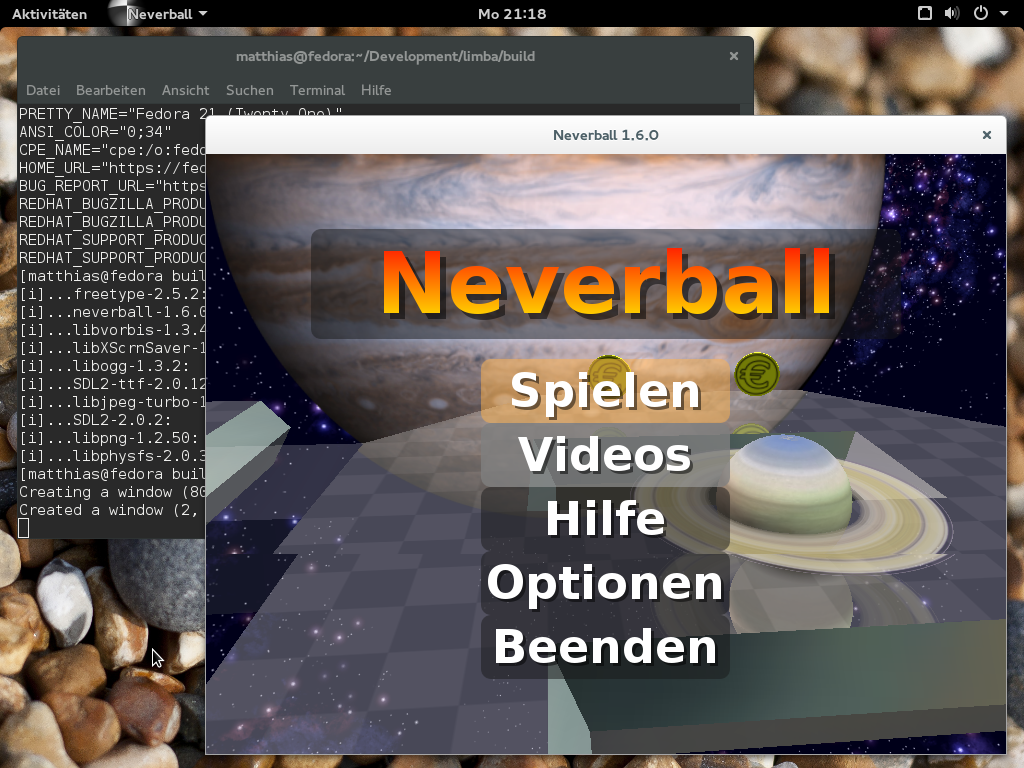
This is the Neverball Limba package, built on Tanglu 3, run on Fedora 21:
Which kernel do I need to run Limba?
The Limba build tools run on any Linux version, but to run applications installed with Limba, you need at least Linux 3.18 (for Limba 0.4.2). I plan to bump the minimum version requirement to Linux 4.0+ very soon, since this release contains some improvements in OverlayFS and a few other kernel features I am thinking about making use of.
Linux 3.18 is included in most Linux distributions released in 2015 (and of course any rolling release distribution and Fedora have it).
Building all these little Limba packages and keeping them up-to-date is annoying…
Yes indeed. I expect that we will see some “bigger” Limba packages bundling a few dependencies, but in general this is a pretty annoying property of Limba currently, since there are so few packages available you can reuse. But I plan to address this. Behind the scenes, I am working on a webservice, which will allow developers to upload Limba packages.
This central ressource can then be used by other developers to obtain dependencies. We can also perform some QA on the received packages, map the available software with CVE databases to see if a component is vulnerable and publish that information, etc.
All of this is currently planned, and I can’t say a lot more yet. Stay tuned! (As always: If you want to help, please contact me)
Are the Limba interfaces stable? Can I use it already?
The Limba package format should be stable by now – since Limba is still Alpha software, I will however, make breaking changes in case there is a huge flaw which makes it reasonable to break the IPK package format. I don’t think that this will happen though, as the Limba packages are designed to be easily backward- and forward compatible.
For the Limba repository format, I might make some more changes though (less invasive, but you might need to rebuilt the repository).
tl;dr: Yes! Plase use Limba and report bugs, but keep in mind that Limba is still in an early stage of development, and we need bug reports!
Will there be integration into GNOME-Software and Muon?
From the GNOME-Software side, there were positive signals about that, but some technical obstancles need to be resolved first. I did not yet get in contact with the Muon crew – they are just implementing AppStream, which is a prerequisite for having any support for Limba[1].
Since PackageKit dropped the support for plugins, every software manager needs to implement support for Limba.
So, thanks for reading this (again too long) blogpost There are some more exciting things coming soon, especially regarding AppStream on Debian/Ubuntu!
[1]: And I should actually help with the AppStream support, but currently I can not allocate enough time to take that additional project as well – this might change in a few weeks. Also, Muon does pretty well already!
 Member
High Contrast Refresh

One of the major visual updates of the 3.16 release is the high contrast accessible theme. Both the shell and the toolkit have received attention in the HC department. One noteworthy aspect of the theme is the icons. To guarantee some decent amount of contrast of an icon against any background, back in GNOME 2 days, we solved it by "double stroking" every shape. The term double stroke comes from a special case, when a shape that was open, having only an outline, would get an additional inverted color outline. Most of the time it was a white outline of a black silhouette though.

In the new world, we actually treat icons the same way we treat text. We can adjust the best contrast by controlling the color at runtime. We do this the same way we've done it for symbolic icons, using an embedded CSS stylesheet inside SVG icons. And in fact we are using the very same symbolic icons for the HC variant. You would be right arguing that there are specific needs for high contrast, but in reality majority of the double stroked icons in HC have already been direct conversions of their symbolic counterparts.

While centralized theme that overrides all application never seemed like a good idea, as the application icon is part of its identity and should be distributed and maintained alongside the actual app, the process to create a high contrast variant of an icon was extremely cumbersome and required quite a bit of effort. With the changes in place for both the toolkit and the shell, it's far more reasonable to mandate applications to include a symbolic/high contrast variant of its app icon now. I'll be spending my time transforming the existing double stroke assets into symbolic, but if you are an application author, please look into providing a scalable stencil variant of your app icon as well. Thank you!

Code Review: Microsoft's System.Net.Mail Implementation
MailAddress and MailAddressCollection
address         =       mailbox / group
mailbox         =       name-addr / addr-spec
name-addr       =       [display-name] angle-addr
angle-addr      =       [CFWS] "<" addr-spec ">" [CFWS] / obs-angle-addr
group           =       display-name ":" [mailbox-list / CFWS] ";"
                        [CFWS]
display-name    =       phrase
word            =       atom / quoted-string
phrase          =       1*word / obs-phrase
addr-spec       =       local-part "@" domain
local-part      =       dot-atom / quoted-string / obs-local-part
domain          =       dot-atom / domain-literal / obs-domain
obs-local-part  =       word *("." word)
Now consider the following email address: "Joe Example" <joe@example.com>
The first token you read will be "Joe Example" and you might think that that token indicates that it is the display name, but it doesn't. All you know is that you've got a 'quoted-string' token. A 'quoted-string' can be part of a 'phrase' or it can be (a part of) the 'local-part' of the address itself. You must read at least 1 more token before you'll be able to figure out what it actually is ('obs-local-part' makes things slightly more difficult). In this case, you'll get a '<' which indicates the start of an 'angle-addr', allowing you to assume that the 'quoted-string' you just got is indeed the 'display-name'.
If, however, you parse the address in reverse, things become a little simpler because you know immediately what to expect the next token to be a part of.
That's pretty cool. Kudos to the Microsoft engineers for thinking up this strategy.
Unfortunately, the parser does not handle the 'group' address type. I'll let this slide, however, partly because I'm still impressed by the approach the address parser took and also because I realize that System.Net.Mail is meant for creating and sending new messages, not parsing existing messages from the wild.
Okay, so how well does it serialize MailAddress?
Ugh. You know that face you make when you just see a guy get kicked in the nuts? Yea, that's the face I made when I saw line #227:
encodedAddress = String.Format(CultureInfo.InvariantCulture, "\"{0}\"", this.displayName);
The problem with the above code (and I'll soon be submitting a bug report about this) is that the displayName string might have embedded double quotes in it. You can't just surround it with quotes and expect it to work. This is the same mistake all those programmers make that allow SQL-injection attacks.
For an example of how this should be done, see MimeKit's MimeUtils.Quote() method.
I had such high hopes... at least this is a fairly simple bug to fix. I'll probably just offer them a patch.
ContentType and ContentDisposition
Their parser is decent but it doesn't handle rfc2231 encoded parameter values, so I'm not overly impressed. It'll get the job done for simple name="value" parameter syntax, though, and it will decode the values encoded with the rfc2047 encoding scheme (which is not the right way to encode values, but it is common enough that any serious parser should handle it). The code is also pretty clean and uses a tokenizer approach, so that's a plus. I guess since this isn't really meant as a full-blown MIME parser, they can get away with this and not have it be a big deal. Fair enough.
Serialization, unsurprisingly, leaves a lot to be desired. Parameter values are, as I expected, encoded using rfc2047 syntax rather than the IETF standard rfc2231 syntax. I suppose that you could argue that this is for compatibility, but really it's just perpetuating bad practices. It also means that it can't properly fold long parameter values because the encoded value just becomes one big long encoded-word token. Yuck.
Base64
Amusingly, Microsoft does not use their Convert.FromBase64() decoder to decode base64 in their System.Net.Mail implementation. I point this out mostly because it is the single most common problem users have with every one of the Open Source .NET mail libraries out there (other than MimeKit, of course) because Convert.FromBase64() relies on the data not having any line breaks, white space, etc in the input stream.
This should serve as a big hint to you guys writing your own .NET email libraries not to use Convert.FromBase64() ;-)
They use unsafe pointers, just like I do in MimeKit, but I'm not sure how their performance compares to MimeKit's yet. They do use a state machine, though, so rock on.
I approve this base64 encoder/decoder implementation.
SmtpClient
One thing they do which is pretty cool is connection pooling. This is probably a pretty decent win for the types of things developers usually use System.Net.Mail's SmtpClient for (spam, anyone?).
The SASL AUTH mechanisms that they seem to support are NTLM, GSSAPI, LOGIN and WDIGEST (which apparently is some sort of IIS-specific authentication mechanism that I had never heard of until now). For those that were curious which SASL mechanisms SmtpClient supported, well, now you know.
The code is a bit hard to follow for someone not familiar with the codebase (not nearly as easy reading as the address or content-type parsers, I'm afraid), but it seems fairly well designed.
It does not appear to support PIPELINING or BINARYMIME like MailKit does, though. So, yay! Win for MailKit ;-)
They do support SMTPUTF8, so that's good.
It seems that if you set client.EnableSsl to true, it will also try STARTTLS if it isn't able to connect on the SSL port. I wasn't sure if it did that or not before, so this was something I was personally interested in knowing.
Hopefully my SmtpClient implementation review isn't too disappointing. I just don't know what to say about it, really. It's a pretty straight-forward send-command-wait-for-reply implementation and SMTP is pretty dead simple.
Conclusion
Overall the bits I was interested in were better than I expected they'd be. The parsers were pretty good (although incomplete) and the serializers were "good enough" for normal use.
Of course, it's not as good as MimeKit, but let's be honest, MimeKit sets the bar pretty high ;-)

How do you upgrade your distro? A tale of two workarounds
Every classic Linuxer would know why it's very handy to dedicate a separate partition for the /home folder of your tree: you could in theory share it between multiple OSs that you installed in your box (which you choose to run when you start your computer).
Now, I'm guessing that many people reading and nodding to the above, will also know that sharing /home/ is one thing, sharing $HOME (/home/yourUserName) is a completely different beast.
For example: you have a stable distro installed in your box; you decide to install a new version of that distro along the old one, in the same box. You run the new distro with a new account tied to the old /home/yourUserName folder: KABOOM!!! Weird things start happening. Among these:
- The newer versions of your desktop or desktop programs don't run properly with the settings saved in your .dotDirectories (they are to blame because they didn't probably have a settings-conversion feature).
- The newer versions of your desktop or desktop programs have a buggy settings-conversion feature; because your program does not run properly, or as well as it would have run if it had been ran for the first time with no settings saved at all.
- The newer versions of your non-buggy desktop or desktop programs convert your settings to a new format. Then when you go back and run your old distro again, your old-versioned programs stop working because they see settings in a new format which they don't understand. (This is impossible to fix, or very hard.) It's very important that this scenario works, because the migration to the new version of your distro may not be immediate, it may take you some days to figure everything out, and until that happens, you want to still be able to run the stable version of your desktop and desktop programs
- Etc.
To workaround these problems, I have a strategy: I use a different /home/ sub-directory for each distro installed in my system. For example, for distro X version A.B I use /home/knocteXAB/, for distro Y version C.D I use /home/knocteYCD/. The advantage about this is that you can migrate your settings manually and at your own pace. But then, you may be asking, how to really take advantage of sharing the /home folder when using this technique?
Easy: I keep non-settings data (mainly the non-dotfiles) in a different /home/ folder with no associated account in any of the distros. For example: /home/knocte/ (no version suffix). Then, from each of the suffixed /home/ subfolders, I setup symlinks to this other folder, setting the appropriate permissions. For instance:
- /home/knocteXAB/Music -> /home/knocte/Music
- /home/knocteXAB/Documents -> /home/knocte/Documents
- /home/knocteYCD/Music -> /home/knocte/Music
- /home/knocteYCD/Documents -> /home/knocte/Documents
- Etc.
- Debugger not stopping on breakpoints.
- Builds breaking with obscure error messages.
- Debugger opening file in the IDE which was already open, duplicating two tabs for the same file.
- Etc.
So I had to use a workaround for my workaround: clone all my projects in $HOME instead of /home/knocte/Documents/Code/OpenSource/ (yah, I'm this organized ;) ).
I've been trying to fix these problems for a while, without much time on my hands.
But the last weeks a magical thing happened: I decided to finally sit down and try to fix the last two remaining, and my patches were all accepted and merged last week! (at least all the ones fixing symlink-related problems), woo!!!
So the lessons to learn here are:
- Even the slickest workarounds have problems. Try to fix or report settings-conversion bugs!!
- Don't ever quit trying to fix a problem. Some day you'll have the solution and you will realize it was simpler than you thought.
- realpath is your friend.
- MonoDevelop (master branch) is now less buggy and as amazing as (or more than) ever (</PUBLIC_SERVICE_ANNOUNCEMENT>).

ownCloud Client 1.8.0 Released
Today, we’re happy to release the best ownCloud Desktop Client ever to our community and users! It is ownCloud Client 1.8.0 and it will push syncing with ownCloud to a new level of performance, stability and convenience.
[caption id=“attachment_586” align=“alignleft” width=“300”] The Share Dialog[/caption]This release brings a new integration into the operating system file manager. With 1.8.0, there is a new context menu that opens a dialog to allow the user to create a public link on a synced file. This link can be forwarded to other users who get access to the file via ownCloud.
Also the clients behavior when syncing files that are opened by other applications on Windows has greatly been improved. The problems with file locking some users saw for example with MS office apps were fixed.
Another area of improvements is again performance. With latest ownCloud servers, the client uses even more parallized requests, now for all kind of operations. Depending on the synced data structure, this can make a huge difference.
All the other changes, improvements and bug-fixes are too hard to count. Finally, this release received around 700 git commits compared to the previous release.
All this is only possible with the powerful and awesome community of ownClouders. We received a lot of very good contributions through the GitHub tracker, which helped us to nail down a lot of issues and improved the client tremendously.
But this time we’d like to specifically point out the code contributions of Alfie “Azelphur” Day and Roeland Jago Douma who contributed significant code bits to the sharing dialog on the client and also some server code.
A great thanks goes out to all of you who helped with this release. It was a great experience again and it is big fun working with you!
We hope you enjoy 1.8.0! Get it from https://owncloud.org/install/#desktop
FITRIM/discard with qemu/kvm for thin provisioning
<disk type='block' device='disk'>After:
<driver name='qemu' type='raw'/>
<source dev='/dev/main/factory'/>
<target dev='vda' bus='virtio'/>
<address type='pci' domain='0x0000' bus='0x00' slot='0x07' function='0x0'/
</disk>
<disk type='block' device='disk'>
<driver name='qemu' type='raw'/>
<source dev='/dev/main/factory'/>
<target dev='sda' bus='scsi'/>
<address type='drive' controller='0' bus='0' target='0' unit='0'/>
</disk>
<controller type='scsi' index='0' model='virtio-scsi'/>
<driver name='qemu' type='raw' discard='unmap'/>Restart the VM, and...
factory-vm:~ # fstrim -v /
/: 8,7 GiB (9374568448 bytes) trimmed
factory-vm:~ #
susi:/local/libvirt-images # ls -lh factory.raw
-rw-r----- 1 qemu qemu 20G Mar 15 14:05 factory.raw
susi:/local/libvirt-images # du -sh factory.raw
12G factory.raw
factory-vm:~ # du -sh /home/seife/linux-2.6/
3.9G /home/seife/linux-2.6/
factory-vm:~ # rm -rf /home/seife/linux-2.6/
factory-vm:~ # fstrim -v /
/: 12.7 GiB (13579157504 bytes) trimmed
susi:/local/libvirt-images # ls -lh factory.raw
-rw-r----- 1 qemu qemu 20G Mar 15 14:08 factory.raw
susi:/local/libvirt-images # du -sh factory.raw
6.4G factory.raw
ownCloud ETags and FileIDs
Often questions come up about the meaning of FileIDs and ETags. Both values are metadata that the ownCloud Server stores for each of the files and directories in the server database. These values are fundamentally important for the integrity of data in the overall system. Here are some thoughts about what they are why these are so important.This is mainly from a clients point of view, but there are other use cases as well.
ETags
ETags are strings that describe exactly one specific version of a file (example: 71a89a94b0846d53c17905a940b1581e).
 Whenever the file changes, the ownCloud server will make sure that the ETag of the specific file changes as well. It is not important in which way the ETag changes, it also does not have to be strictly unique, it’s just important that it changes reliably if the file changes for whatever reason. However, ETags should not change if the file was not changed, otherwise the client will download that file again.
In addition to that, The ETags of the parent directories of the file have to change as well, up to the root directory. That way client systems can detect changes that happen somewhere in the file tree. This is in contrast to normal computer file systems where only the modification time of the direct parent of a file is changing.
File IDs
FileIDs are also strings that are created once at the creation time of the file (example: 00003867ocobzus5kn6s).
 But contrary to the ETags, the file IDs should never ever change over the files lifetime. Not on an edit of the file, and also not if the file is renamed or moved. One of the important usages of the FileID is to detect renames and moves of a file on the server.
The FileID is used as an unique key to identify a file. FileIDs need to be unique within one ownCloud, and in inter-owncloud connections, they must be compared together with the ownCloud server instance id.
Also, the FileIDs must never be recycled or reused.
Checksums?
Often ETags and FileIDs are confused with checksums such as MD5 or SHA1 sums over the file content.
Neither ETags nor FileIDs are, even if there are similarities: Especially the ETag can be seen as a checksum over the file content. However, file checksums are way more costly to compute than just a value that only needs to change somehow.
What happens if…?
Let’s make a thought experiment and consider what it would mean especially for sync clients if either fileID or ETag gets lost from the servers database.
If ETags are lost, clients loose the ability to decide if files have changed since the last time that was checked by the clients. So what happens is that the client will download the files again, byte-wise compare them to the local file and use the server file if the files differ. A conflict file will be created. Because the ETag was lost, the server will create new ETags on download. This could be improved by the server creating more predictable ETags based on the storage backends capabilities.
If the ETags are changed without reason, for example because a backup was played back on the server, the clients will consider the ones with changed ETags as changed and redownload them. Conflict handling will happen as described if there was a local change as well.
For the user, this means a lot of unnecessary downloads as well as potential conflicts. However, there will not be data loss.
If FileIDs got lost or changed, the problem is that renames or moves on server side can no longer be detected. That would result in a new download of files in the good case. If a fileID however changes to something that was used before, that can result in a rename that overwrites an unrelated file. That is because clients might still have the FileID associated with another file.
Hopefully this little post explains the importance of the additional metadata that we maintain in ownCloud.

Simple Browser Project
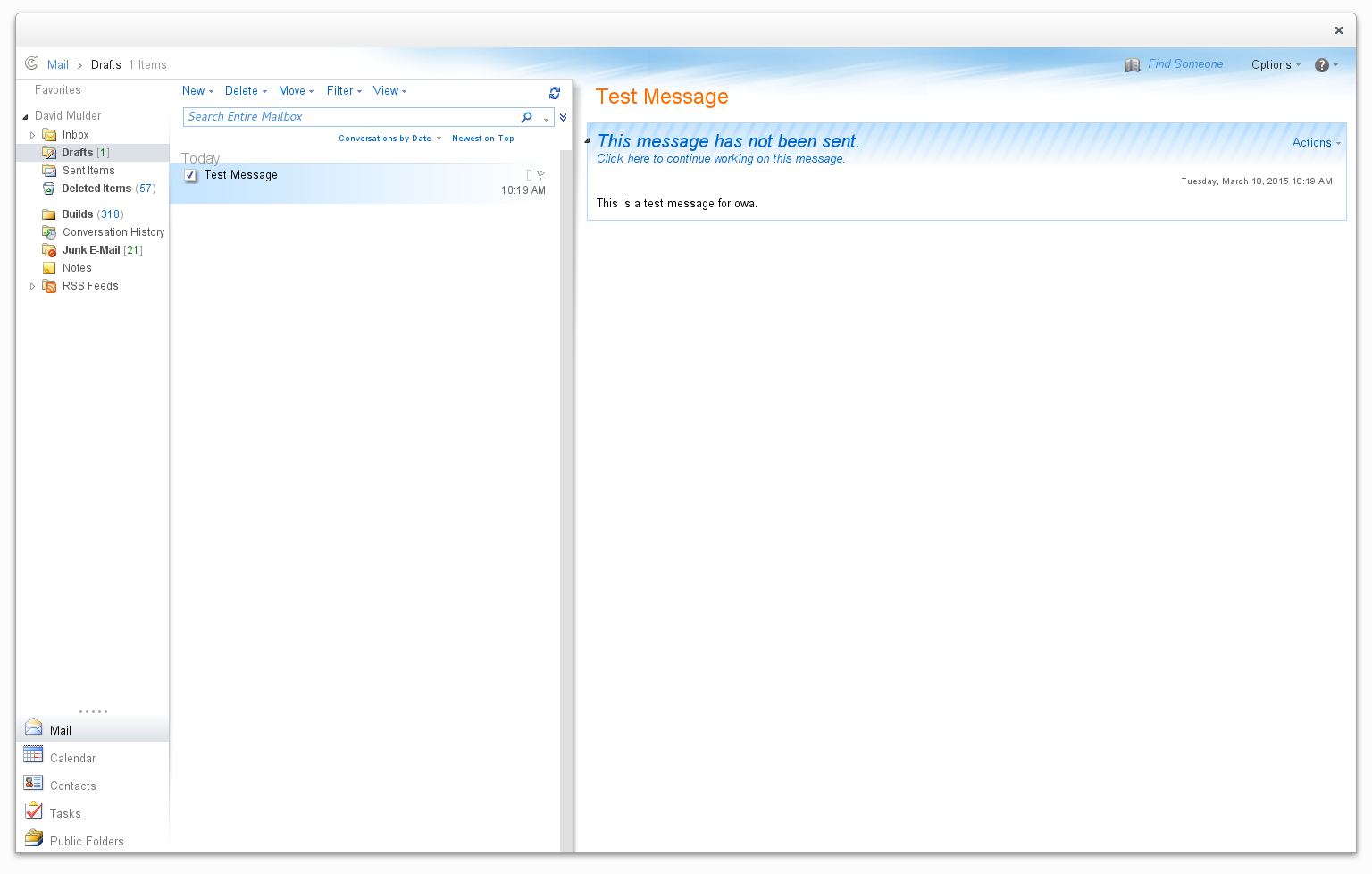
I’ve been looking for a good way to access my corporate email on my linux (opensuse) laptop. Evolution is pretty good, but the evolution-ews plugin is REALLY buggy. The connection was dropping every few minutes for me. The user interface also feels too cluttered for what I’m trying to do. So, I decided to try a different approach.
I wrote a simple python based webkit browser to modify the look and feel of owa to make it more like a desktop app.
You can access the source code here:
http://github.com/DavidMulder/simple_browse
Or you can install the opensuse package here:
http://software.opensuse.org/package/simple_browse?search_term=simple_browse
I also plan to use it to play Netflix on my mythtv box. It seems like I should be able to modify the css styling to make the summaries bigger on the page, etc.
Portable Float Map with 16-bit Half
Recently we saw some lively discussions about support of Half within the Tiff image format on the OpenEXR mailing list. That made me aware of the according oyHALF code paths inside Oyranos. In order to test easily, Oyranos uses the KISS format PPM. That comes with a three ascii lines header and then the uncompressed pixel data. I wanted to create some RGB images containing 16-bit floating point half channels, but that PFM format variant is not yet defined. So here comes a RFC.
A portable float map (PFM) starts with the first line identifier “Pf” or “PF” and contains 32-bit IEEE floating point data. The 16-bit IEEE/Nvidia/OpenEXR floating point data variant starts with a first line “Ph” or “PH” magic similar to PFM. “Ph” stands for grayscale with one sample. The “PH” identifier is used for RGB with three samples.
That’s it. Oyranos supports the format in git and maybe in the next 0.9.6 release.

Online Programming Competitions are Overrated
I believe that the assessment for a senior/architect level programmer, should be done by finding how co-operative [s]he is with others to create interesting products and their history than by assessing how competitive [s]he is in a contest.
Algorithms
On my lone programming competition experience (on hackerrank), the focus of the challenges were on Algorithms (discrete math, combinatorics etc.).Usage of standard, simple algorithms, instead of fancy, non-standard algorithms is a better idea in real life, where the products have to last for a long time, oblivious to changing programmers. Fancy algorithms are usually untested, harder to understand for a maintenance programmer.
Often, it is efficient to use the APIs provided by the standard library or ubiquitously popular libraries (say jquery). Unless you are working on specific areas (say compilers, memory management etc.) an in-depth of knowledge of a wide-range of algorithms may not be very beneficial (imo) in day-to-day work, elaborated in the next section.
Runtime Costs
There are various factors that decide the runtime performance, such as: Disk accesses, Caches, Scalable designs, Pluggable architectures, Points of Failures, etc.Algorithms optimize mostly one aspect, CPU cycles. There are other aspects (say choice of Data structures, databases, frameworks, memory maps, indexes, How much to cache etc.) which have a bigger impact on the overall performance. CPU cycles are comparatively cheap and we can afford to waste them, instead of doing bad I/O or a non-scalable design.
Most of the times, if you choose proper datastructures and get your API design correct, we can plug the most efficient algorithm, without affecting the other parts of the system, iff your algorithm proves to be really a bottleneck. A good example is the Evolution of filesystems, schedulers in the Linux Kernel. Remember that Intelligent Design school of software development is a myth.
In my decade of experience, I have seen more performance problems due to poor choice of datastructures or unnecessary I/O, than due to poor selection of algorithms. Remember, Ken Thompson said: When in doubt, Use Brute Force. It is not important to get the right algorithm on the first try. Getting the skeleton right is more important. The individual algorithms can be changed, after profiling.
At the same time, this should not be misconstrued as an argument to use bubblesort.
The 10,000 hour rule
Hardware
AHA Algorithms
Conclusion:
Having said all these, these online programming contests are a nice way to improve one's skills and to think faster. I will be participating in a few more to make myself fitter. There may be other programming challenges which are better and test all aspects of an engineer. I should write about my view after an year or so.