
Using Icecream to speed up the LibreOffice Android build
The LibreOffice FOSDEM HackFest is no exception; Markus even brought a MacMini with a Linux VM to provide even more building power.
The problem was that I decided to hack on Android-related stuff; and the setup for Icecream was something that I had on my TODO, never achieved, and now it became really paiful. There was a small problem that was confusing me for a while, but finally I have a how-to!
- Make sure you have a recent enough repo that contains this fix
- Create cross-compile package for your environment like this (adapt the paths of course):
/usr/lib/icecc/icecc-create-env --gcc /local/libreoffice/android-ndk-r10d/toolchains/arm-linux-androideabi-4.9/prebuilt/linux-x86_64/bin/arm-linux-androideabi-gcc /local/libreoffice/android-ndk-r10d/toolchains/arm-linux-androideabi-4.9/prebuilt/linux-x86_64/bin/arm-linux-androideabi-g++ - icecc-create-env will create a tarball with a hash instead of a readable name, rename it to something sensible, let's say
/local/libreoffice/android/arm-linux-androideabi-4.9.tar.gz - Find out how exactly is the compiler called. Just do ./autogen.sh > .log 2>& .log, and search for arm-linux-androideabi-gcc and arm-linux-androideabi-g++. You will need it with all the options that are there, it is quite a long command line!
- Modify your autogen.input to start like (we'll:
CC=icecc [the_command_line_with_options_for_arm-linux-androideabi-gcc]
CXX=icecc [the_command_line_with_options_for_arm-linux-androideabi-g++]
--with-parallelism=10
--enable-icecream
export ICECC_VERSION=/local/libreoffice/android/arm-linux-androideabi-4.9.tar.gz
start the build:
./autogen.sh
make
and enjoy the lightning fast compilation for Android! :-)
Update: Since this commit, it is not necessary to set the ICECC_VERSION in every env any more, the one from the ./autogen.sh time is preserved - it has to be in sync with CC/CXX setting anyway. In other words, you can just add ICECC_VERSION to autogen.input the same way you have added CC/CXX there:
CC=icecc [the_command_line_with_options_for_arm-linux-androideabi-gcc]
CXX=icecc [the_command_line_with_options_for_arm-linux-androideabi-g++]
ICECC_VERSION=/path/to/the/tarball
--with-parallelism=10
--enable-icecream
...your other options...

 Member
 FunkyPenguin
Sorry for being 50 Shades of Wrong
LibreOffice Design Team
I think it this was the first year when this devroom took place - but it was really well organized. Thanks so much for accepting my talk, was a pleasure to present there!
 |
| Click the slide to see the presentation. |
LibreOffice Design: Easy Hacks
 |
| Click the slide to see the presentation. |
Plasma 5.2 for openSUSE? You bet!
The ever-amazing Plasma team from KDEjust put out a new release of Plasma. I won’t spend much describing how big of an improvement it is - the release announcement at KDE has all the details needed to whet your appetite.
And of course, now it’s the turn of distributions to get out packages for the users at large.
This is also the case for openSUSE. The KDE:Frameworks5 repository hosts the new 5.2 goodness for released distributions (13.1 and 13.2) and Tumbleweed. Packages have also been submitted to Tumbleweed proper (pending legal review, so it will take some time).
Don’t forget the rule of thumb, in case you find problems: bugs in the packages should be directed towards the openSUSE bugzilla, while issues in the actual software should be reported to KDE. You can also discuss your experience on the KDE Community Forums.
Linux audio library smackdown part2: Pulseaudio
Oh yes.. those were great times! Open Sound System was rocking my Linux based sound system and I was having a time of my life. Like we all know good doesn’t last long. Soon after happiness I find out that OSS couldn’t do recording and playing (full duplex) same time. Fiery same time this was working on Windows 98 very well. I was shocked how the heck my Linux box is so borked? Luckily times were changing and this time they formed only better. ALSA was about to take over OSS in Kernel version 2.6. Why I’m talking about ALSA and OSS when I should talk about Pulseaudio? Read further to find out why or go examples for Pulseaudio here: https://github.com/illuusio/linux-audio-example/tree/master/pulseaudio
Open Sound System
First let’s talk about Open Sound System first before going to ALSA. After that we talk about todays topic: Pulseaudio. I recall correct OSS was the first sound system that provided support for audio in Linux kernel. Even today it’s emulated by ALSA and you can use it as output with Pulseaudio. Real OSS still lives as Proprietary library and it’s implemented in several OS like FreeBSD.
If you look OSS as API point of view it’s very blocking because it uses heavily IOCTL-calls and because they are direct memory calls you have to wait. Only reason I can imagine why someone wants to support OSS in new application is trying to support whole UNIX family. If it’s not must then trust me you don’t want OSS. Event lack of duplex audio wasn’t biggest problem at late ’90. I had Gravis Ultrasound and OSS support sucked a lot. ALSA wasn’t even pre-alpha and without thinking I jumped that rapidly moving wagon.
ALSA
Advanced Linux Sound Architecture is current Linux Audio API. You should use it for new applications and it has impressive set of supported audio chips. I haven’t find a single audio hardware that doesn’t work. Only problem with ALSA is that is so stable that it’s getting little bit too mature. times have change from ’90 and ALSA is starting look not fantastic like I thought about it first but just OK.
Getting your hardware working is not the complicated case with ALSA. Hard part comes whne you want set up more complicated patterns like USB audio, Bluetooth or send audio to another machine for playing.
Nowadays Every other platforms than Linux desktop had neat audio servers. There have been several attempts for Linux also ESD, KDE audio server and several others that never reached much attention. There is also JACK but it’s again little bit too hard to use and not for old morons like me. Believe I have use it for high-end stuff and I cannot recommend it more but when you just want your audio come from the speaker without routing it half an hour then Pulseaudio is just better, sorry you can hate me being old senile fart.
Pulseaudio
Supported outputs: Alsa, Oss, Jack, Mac OS X, Windows
License: GNU Lesser General Public License 2.1
So why we talked ALSA and OSS? Because Pulseaudio doesn’t handle sound cards. It expects that someone else have knowledge about what cards are in system and how to use them. Pulseaudio just provides common way to use them. But let’s start from beginning shall we? Lennart Poettering is who created Pulseaudio. His new beast Systemd is just like Pulseaudio hated from the start and dividing Linux community but making huge impact in Linux. Pulseaudio was meant to be replacement for Gnome ESD and there is compatibility layer for ESD available. Pulseaudio works for KDE, XFCE and others. Prove me wrong but I don’t know anyone how misses ESD! I miss KDE 2.0 Audio server Arts in sentimental moments but in my point of view ESD was horrible piece of crap. My opinion is only Android Audioflinger is more popular audio server in Linux world. Sometimes I wonder why Pulseaudio doesn’t provide Audioflinger compatibility layer? How does Pulseaudio sit top of the Linux audio stack. I try to make nice picture of it.
| Sound card or chip |
| ↑↓ |
| ALSA kernel drv |
| ↑↓ |
| ALSA C-library API |
| ↑↓ |
| Pulseaudio ALSA drv |
| ↑↓ |
| Pulseaudio C-library API |
| ↑↓ |
| Application |
If you want to talk to sound card you make connection to Pulseaudio server with Pulseaudio C-library and talk to the Pulseaudio. Not direct to ALSA not direct to sound card. Pulseaudio is built upon sockets so you can access Pulseaudio from another machine or from network if you have bandwidth and play your tunes from or to other machine. Pulseaudio takes care about find out what sound cards you may have and connecting to them for example Bluetooth audio device. What is so wrong with Pulseaudio if it’s working so well? Basicly, it adds latency between application and audio coming out of speakers. Not me or not you not your mother are going to spot it but those nerdy super HIFI audio humans (Homo HIFIcus) can spot it. If you have some very bad audio chip there you notice but 99% times you are happier with Pulseaudio than without it.
Stop praising Pulseaudio and get to API
As beautiful as Pulseaudio API is it’s horrible same time! Modern slick callback based monster that just does something and at the you get audio or you can play it so feed me with bytes. I think they noticed this and made blocking Simple API. Which is very simple and easy to use. If you don’t want to use Pulseaudio Simple API then oh boy!
There is two main mode which you can use if we count Simple API out. There is normal mainloop and threaded mainloop. So if you want to control everything you choose mainloop mode. You iterate your mainloop and get events to your callbacks or you can let Pulseaudio do it with pa_mainloop_run() command. In threaded version it just runs and gives you callback as you go. Difference is that threaded loop stays away of you sight and normal blocks your application.
What kind of callbacks there is?
In Pulseaudio question is more like what doesn’t have callback. Stream is ready, check, buffer underrrun, check, something weird just happen, check. You just choose what to implement and then they appear as they happen. Then you choose do something or not.
Is there something wrong with this. No there isn’t, it works as expected. Actually it worked better than I was expecting. Learning curve for Pulseaudio is bit high because fully understanding how Pulseaudio works takes time and patience.
Summary: Little bit weird pure C API but when correctly implemented very powerful. Widely spread in Linux world such all major distributions use it. Even it support Mac OS X and Windows it’s not really as easily portable at it sounds. It’s little bit Linux specific although BSD family is beginning to use it. But if you need to support Linux and want to have higher level API than ALSA then this is for you but most frameworks support it so you can also leave it to them and not shovel into API.

Capturing rainwater
In our house we have a very simple system to capture rainwater into a tank. We use it to water our vegetable garden during the dry season.
Parts

We use a 1100 liter water tank. I would have liked something bigger, but there just wasn't enough space for it.
1 is the exit from the roof; water from various roofs in the house gets directed here.
2 is a T connector. On the horizontal side it goes to 3, where it enters the water tank. On the vertical exit side it goes down a relatively long pipe, all the way down to 6, which is a valve or faucet. That long pipe is the "dirty water collection pipe". When it starts raining, the first charge charge of water can be quite dirty from all the dirt on the roof. This dirty water fills the long pipe. The dirt accumulates in the bottom of the pipe, and finally cleaner water will have a chance of filling the tank when the water level in the pipe reaches the T connector.
4 is the overflow pipe. When the tank gets full, any overflowing water will exit through here.
5 is the water tank's exit pipe.
6 is the valve controlling the output from the dirty water collection pipe, as mentioned above.
7 is a normal faucet coming from the water tank. This is where you would plug a garden hose.
The trick is to adjust 6, the valve of faucet at the bottom of the dirty water collection pipe, so that water and dirt can trickle out of it. That is, don't leave it fully closed. The pipe will fill up shortly after it starts raining, allowing the rest of the rain to reach the tank; finally the pipe will empty itself for the next rain.

Does it work!
It works very well! We use the stored rainwater for plants in the vegetable garden. We used that water for construction of the garden's planting beds, to make mortar for bricks. Although we have managed to empty the tank a couple of times during very heavy use, normally it rains often enough that the tank stays almost full.
Note that the tank is basically one storey above ground level. This gives barely enough water pressure for a slow-running garden hose.
2022 Update: Since the installation of the original system in 2015, we have added a flow-activated pressurizer pump so we can irrigate comforatbly.
References
T.H. Thomas and D.B. Martinson, Roofwater Harvesting: A Handbook for Practitioners (PDF)
Linux audio library smackdown part1: Portaudio
Common disinformation people tends to believe in is that Linux Audio is in bad shape. Actually it’s not. They are right ALSA is getting bit rusty and it’s not top of the notch but list of supported sound cards is long. There have been speak about next generation audio API for Linux but nothing is really happening (I’m happy if you prove me wrong!). Last year I had task to evaluate different Linux audio libraries for playing audio and recording. So these articles try to make some light to my journey and what did I found. inpatient can go to Github https://github.com/illuusio/linux-audio-example/tree/master/portaudio. There is other library examples also but only Portaudio is currently updated to my last version. I wrote same very simple application to test every audio library. I’ll upgrade rest of the examples and add also Xiph libao and GStreamer.
Application
Like I said example applications are very simple. With Every library I tried to write playback and record example. If you can use blocking API interface there is blocking example also. In these Examples I use sndfile because API is super easy to use and I could test with WAV. So no troubles big bobbles approach.
Code
I won’t be posting code here it can be found on Github repository. I tried to be super clear as they are examples and added comments as needed but if you don’t get glue fault is all mine.
Portaudio
Supported outputs: Alsa, Oss, Jack, Mac OS X CoreAudio and Many Windows Audio API’s
Why do want to use something else than ALSA? If you need to support other platforms than Linux you get idea of cross platform API for audio. Portaudio is hidden gem of Linux audio libraries. It’s stable as can get. Portaudio has blocking and callback support. It has Float 32-bit Int 32-, 16- and 8-bit input/output. I tries to be very high end in every corner. Also licensing is very liberal. For a while It’s has seen slowing development because main developers have something else to do in life.
For me biggest no-no for me was lack of Pulseaudio support (I go so upset that I wrote Pulseaudio hostApi for Portaudio but that is worth of another blog post). Portaudio supports Windows, Linux and Mac OS X so it’s good choice if you need same quality audio in every platform.
Biggest minus in Portaudio is there ain’t much applications using it. There is some highlights like Mixxx and Audacity. Rest of the list can be found here. Why it’s not more popular I can’t say because it’s easy to use.
Summary: Simple but powerful API for I/O which I can recommend. So go and see examples if it’s for you and documentation from official pages. Next time we get on Pulseaudio.

Naming Policy - Deactivated Quora Account
Tamils do not have a last name due to various political reasons. Avoiding the lastname is considered to be good for ending caste discrimination as well. (Ironically a quora link)
Companies like Google had the sense to relax their real name policy after their initial debacle with G+
Sadly, Quora does not want to learn from their's or others' mistakes. I wonder if they will even ban names in non-English letters later. So if they cannot be inclusive, I feel that they deserve to lose business.
Testing Android in openQA
The other day Richard described in his blog how how he used openQA to test drive Fedora. Around the same time I read about Android x86 and saw that they offer iso images for download. So I wondered how hard it would be to get that one tested in openQA.
To find out I installed a current Tumbleweed snapshot in qemu. Installing openQA in the VM is straight forward with the provided packages, following the instrucutions at GitHub.
Keep in mind that nested virtualization needs to be turned on to be able to run the openQA worker inside qemu (pass nested=1 to kvm_intel resp kvm_amd). To conveniently access the web interface, vnc and ssh I added “-net” “user,hostfwd=tcp::8888-:80,hostfwd=tcp::5091-:5091,hostfwd=tcp::2222-:22” to the qemu command line.
As soon as openQA is up and running the remaining steps are easy:
- add the sample Android test cases I created:
# cd /var/lib/openqa/tests
# git clone -b android-4.4 git://github.com/lnussel/os-autoinst-distri-android.git android-4.4
# chown geekotest android-4.4/needles
- import the job templates so openQA learns what to do with Android iso images
# android-4.4/templates
- Download android-x86-4.4-r2.iso and store it in /var/lib/openQA/factory/iso
- register the iso image with openQA:
# /usr/share/openqa/script/client isos post \
    ISO=android-x86-4.4-r2.iso \
    DISTRI=android VERSION=4.4 ARCH=i586 \
    FLAVOR=live BUILD=0002
Voilà! If everything went right openQA should now have created a job and the worker should start processing it.
Here are some screenshots and a video of my test run:
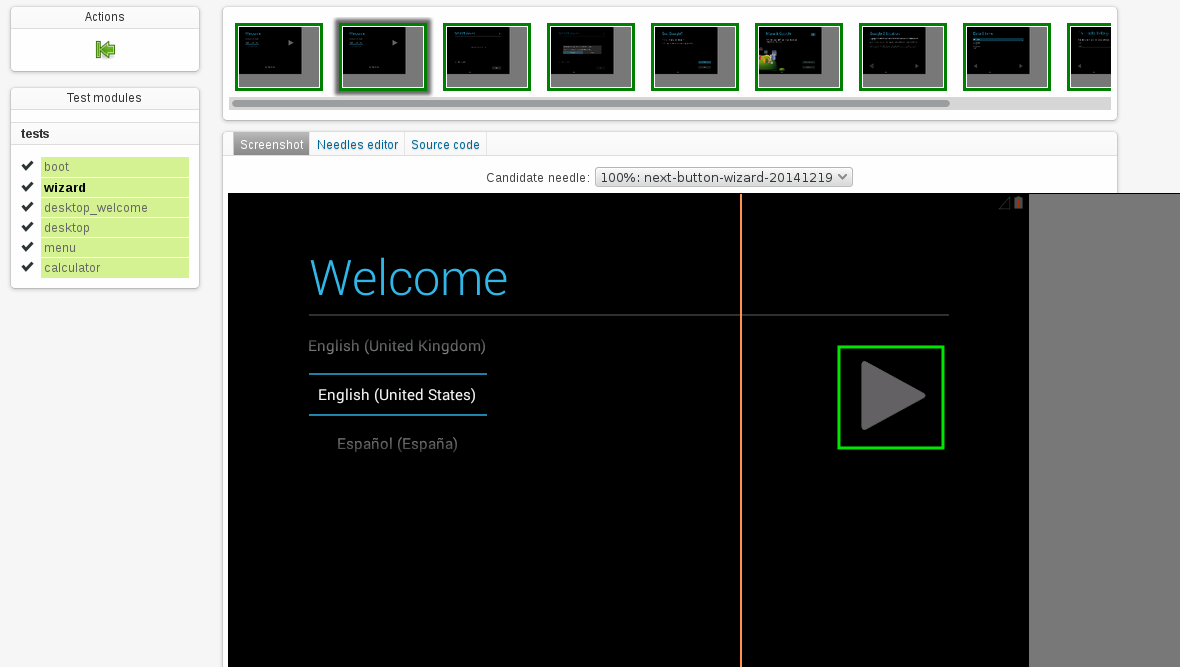
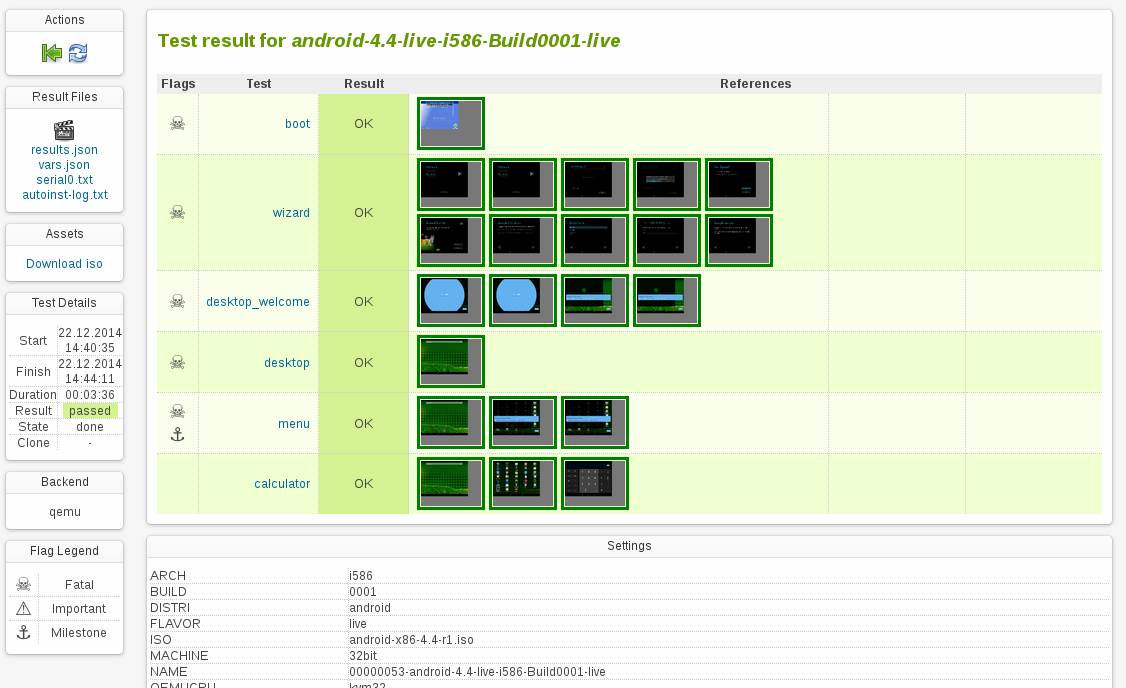
Looks like the emulator in the Android SDK is also qemu based. So theoretically it shouldn’t be hard to integrate that one into openQA in order to actually test on emulated phones as well.